Terraform-provider-google: google_bigquery_data_transfer_config.query_config example is not working
Community Note
- Please vote on this issue by adding a 👍 reaction to the original issue to help the community and maintainers prioritize this request
- Please do not leave "+1" or "me too" comments, they generate extra noise for issue followers and do not help prioritize the request
- If you are interested in working on this issue or have submitted a pull request, please leave a comment
- If an issue is assigned to the "modular-magician" user, it is either in the process of being autogenerated, or is planned to be autogenerated soon. If an issue is assigned to a user, that user is claiming responsibility for the issue. If an issue is assigned to "hashibot", a community member has claimed the issue already.
Terraform Version
Terraform v0.12.8
- provider.google v2.14.0
- provider.google-beta v2.14.0
Affected Resource(s)
- google_bigquery_data_transfer_config.query_config
Terraform Configuration Files
resource "google_project_iam_member" "permissions" {
  project = google_project.project.project_id
  role    = "roles/iam.serviceAccountShortTermTokenMinter"
  member  = "serviceAccount:service-${google_project.project.number}@gcp-sa-bigquerydatatransfer.iam.gserviceaccount.com"
}

resource "google_bigquery_dataset" "my_dataset" {
  depends_on    = [google_project_iam_member.permissions]
  dataset_id    = "my_dataset"
  friendly_name = "foo"
  description   = "bar"
  project       = google_project.project.project_id
  location = "EU"
}

resource "google_bigquery_data_transfer_config" "query_config" {
  project       = google_project.project.project_id
  depends_on = [google_project_iam_member.permissions]
  display_name = "my-query"
  location = "EU"
  data_source_id = "scheduled_query"
  schedule = "every day at 01:00"
  destination_dataset_id = google_bigquery_dataset.my_dataset.dataset_id

  params = {
    destination_table_name_template = "my-table"
    write_disposition = "WRITE_APPEND"
    query = "SELECT * FROM xxxx.LandingZoneDev.xxxx limit 10"
  }
}
Debug Output
Panic Output
Expected Behavior
The scheduled query is created.
Actual Behavior
An error is raised.
Steps to Reproduce
terraform apply
Important Factoids
References
- #0000
 nysthee
All 45 comments
Hi @nysthee, when you say an error is raised, can you be more specific? What does the error say? Debug logs (as requested in the issue template) would also be a big help here. Thanks!
 danawillow
on 13 Sep 2019
danawillow
on 13 Sep 2019
Hi
Apparently I forgot to paste the gist.
Here it is: https://gist.github.com/nysthee/bd6d86f206c41e29919f10f22840d861.
Thomas
Op 13 september 2019 om 18:19:06, Dana Hoffman ([email protected](mailto:[email protected])) schreef:
Hi @nysthee(https://github.com/nysthee), when you say an error is raised, can you be more specific? What does the error say? Debug logs (as requested in the issue template) would also be a big help here. Thanks!
—
You are receiving this because you were mentioned.
Reply to this email directly, view it on GitHub(https://github.com/terraform-providers/terraform-provider-google/issues/4449?email_source=notifications&email_token=ACYIREFK4QDV7272WMOZP7DQJO4PVA5CNFSM4IWQJ3MKYY3PNVWWK3TUL52HS4DFVREXG43VMVBW63LNMVXHJKTDN5WW2ZLOORPWSZGOD6VQIEA#issuecomment-531301392), or mute the thread(https://github.com/notifications/unsubscribe-auth/ACYIREBF4VCBVSQS4Q3KCPDQJO4PVANCNFSM4IWQJ3MA).
nysthee
on 13 Sep 2019
Do you have debug logs (https://www.terraform.io/docs/internals/debugging.html)? I'm curious why the error message says the account is missing the permission, given that it should have been added in the IAM resource.
danawillow
on 13 Sep 2019
In this you can find more verbose logs: https://gist.github.com/nysthee/6bd32b41b354e1059fba698642ccbf1f
nysthee
on 16 Sep 2019
Out of curiosity, can you try setting the create timeout to 10m and see if that fixes it? (either way, can you also post the debug logs for a run with a 10m timeout?)
danawillow
on 16 Sep 2019
Hi these are the logs with 10m timeout.
https://gist.github.com/nysthee/c082c1ed57b2bfe32095adee1d7dabdc
nysthee
on 17 Sep 2019
Thanks! I'll see what I can find out internally.
danawillow
on 17 Sep 2019
Oh actually I was looking for one that also has the API call for adding the IAM member, but this is interesting too. When you look in the IAM section of the cloud console, do you see the permissions you expect for that service account?
danawillow
on 17 Sep 2019
Hi
I guess it’s not visible since this is a re aplly of the same plan. I can confirm IAM role is configured and visible in the console.
Thomas
Op 17 september 2019 om 20:34:01, Dana Hoffman ([email protected](mailto:[email protected])) schreef:
Oh actually I was looking for one that also has the API call for adding the IAM member, but this is interesting too. When you look in the IAM section of the cloud console, do you see the permissions you expect for that service account?
—
You are receiving this because you were mentioned.
Reply to this email directly, view it on GitHub(https://github.com/terraform-providers/terraform-provider-google/issues/4449?email_source=notifications&email_token=ACYIREHSGNLZMYQWCYZRKETQKEPJTA5CNFSM4IWQJ3MKYY3PNVWWK3TUL52HS4DFVREXG43VMVBW63LNMVXHJKTDN5WW2ZLOORPWSZGOD65PMSY#issuecomment-532346443), or mute the thread(https://github.com/notifications/unsubscribe-auth/ACYIREFH3NQSNNBDUFGL5E3QKEPJTANCNFSM4IWQJ3MA).
nysthee
on 17 Sep 2019
Hi @danawillow
Do you have any update on this issue?
nysthee
on 2 Oct 2019
No, I tried to find someone to ask internally but no luck. Just pinged the thread again; I'll let you know if I hear anything back.
danawillow
on 14 Oct 2019
It appears that at the moment BigQuery Data Transfer Configs are tied to the creator of the scheduled query and can't be configured with a service account. The method of adding a role of roles/iam.serviceAccountShortTermTokenMinter apparently worked at one time but no longer does.
I can create a transfer with User application credentials using gcloud auth application-default login but running as a service account will always give an error of P4 service account needs iam.serviceAccounts.getAccessToken permission. ...
In my estimate the terraform documentation should change to remove the configuration for and dependencies on the iam.serviceAccountShortTermTokenMinter permission. Hopefully Google can fix this limitation on their end soon.
References:
 jeffFranklin
on 11 Nov 2019
jeffFranklin
on 11 Nov 2019
I'm not yet familiar with this release, can this be solved?
https://cloud.google.com/bigquery/docs/release-notes#November_21_2019
https://cloud.google.com/bigquery/docs/scheduling-queries?hl=en#using_a_service_account
 OTA2000
on 25 Nov 2019
OTA2000
on 25 Nov 2019
As per @OTA2000, I believe this should work now.
I'm going to close this out, but if it's still not working let me know and I'll reopen + raise with the team internally again.
danawillow
on 4 Dec 2019
Hi @danawillow,
I could still reproduce the exact same error today with:
Terraform v0.12.8
provider.google v2.20.0
provider.google-beta v2.20.0
 dpfeif
on 12 Dec 2019
dpfeif
on 12 Dec 2019
@dpfeif, can you post the config you're using and debug logs from a failed run?
danawillow
on 12 Dec 2019
Hi @danawillow, sorry for the delay.
As I was trying to reproduce the issue with debug logs, it actually passed this time :)
I'm copying the relevant configuration, in case it can help someone else.
Thank you very much for the support.
provider "google" {
  version = "2.19.0"
}

resource "google_project" "project" {
}

resource "google_project_iam_member" "scheduled-query-permissions" {
  role   = "roles/iam.serviceAccountShortTermTokenMinter"
  member = "serviceAccount:service-${google_project.project.number}@gcp-sa-bigquerydatatransfer.iam.gserviceaccount.com"
}

resource "google_bigquery_data_transfer_config" "test" {
  data_refresh_window_days = 0
  data_source_id                   = "scheduled_query"
  destination_dataset_id       = google_bigquery_dataset.XXX.dataset_id
  disabled                              = false
  project                                = google_project.project.project_id
  location                               = "EU"
  schedule                             = "every day 01:00"
  display_name                      = "test-scheduled-query"
  params = {
    "destination_table_name_template" = "XXX"
    "write_disposition"                           = "WRITE_TRUNCATE"
    "query"                                             = <<EOT
SELECT  XXX
FROM YYY
WHERE ZZZ;
EOT
  }
  depends_on = [google_project_iam_member.scheduled-query-permissions]
}
Glad it's working now! I'm going to go ahead and close this out, but if anyone else encounters it again, feel free to post debug logs for a failed run and I can reopen and keep investigating.
danawillow
on 17 Jan 2020
@dpfeif using your example I cannot for the life of me get it to work, it fail with
Error: Error creating Config: googleapi: Error 400: Failed to find a valid credential. The request to create a transfer config is supposed to contain an authorization code.

  on test.tf line 14, in resource "google_bigquery_data_transfer_config" "query_config":
  14: resource "google_bigquery_data_transfer_config" "query_config" {
I took your example and made it even smaller
provider "google" {
  project = "<project_id>"
}

data "google_project" "project" {

}

resource "google_project_iam_member" "permissions" {
  role   = "roles/iam.serviceAccountShortTermTokenMinter"
  member = "serviceAccount:service-${data.google_project.project.number}@gcp-sa-bigquerydatatransfer.iam.gserviceaccount.com"
}

resource "google_bigquery_data_transfer_config" "query_config" {
  depends_on = [google_project_iam_member.permissions]

  display_name           = "my-query"
  data_source_id         = "scheduled_query"
  schedule               = "first sunday of quarter 00:00"
  destination_dataset_id = google_bigquery_dataset.my_dataset.dataset_id
  params = {
    destination_table_name_template = "my-table"
    write_disposition               = "WRITE_APPEND"
    query                           = "SELECT 1"
  }
}

resource "google_bigquery_dataset" "my_dataset" {
  depends_on = [google_project_iam_member.permissions]

  dataset_id    = "my_dataset"
}
It looks like somehow the service account is not getting the correct roles or is not even used? Can I have missed some other step?
Maybe it could be worth extending google_bigquery_data_transfer_config to support the usage of real servicea accounts https://cloud.google.com/bigquery/docs/scheduling-queries?hl=en#using_a_service_account ?
These are the last logs from the terraform apply using Terraform v0.12.20 + provider.google v3.8.0
---[ REQUEST ]---------------------------------------
POST /v1/projects/<project_id>/locations/US/transferConfigs?alt=json HTTP/1.1
Host: bigquerydatatransfer.googleapis.com
User-Agent: HashiCorp Terraform/0.12.20 (+https://www.terraform.io) Terraform Plugin SDK/1.4.0 terraform-provider-google/3.8.0
Content-Length: 249
Content-Type: application/json
Accept-Encoding: gzip
{
 "dataSourceId": "scheduled_query",
 "destinationDatasetId": "my_dataset",
 "displayName": "my-query",
 "params": {
  "destination_table_name_template": "my-table",
  "query": "SELECT 1",
  "write_disposition": "WRITE_APPEND"
 },
 "schedule": "first sunday of quarter 00:00"
}
-----------------------------------------------------
2020/02/12 08:32:09 [DEBUG] Google API Response Details:
---[ RESPONSE ]--------------------------------------
HTTP/2.0 400 Bad Request
Alt-Svc: quic=":443"; ma=2592000; v="46,43",h3-Q050=":443"; ma=2592000,h3-Q049=":443"; ma=2592000,h3-Q048=":443"; ma=2592000,h3-Q046=":443"; ma=2592000,h3-Q043=":443"; ma=2592000
Cache-Control: private
Content-Type: application/json; charset=UTF-8
Date: Wed, 12 Feb 2020 07:32:09 GMT
Server: ESF
Vary: Origin
Vary: X-Origin
Vary: Referer
X-Content-Type-Options: nosniff
X-Frame-Options: SAMEORIGIN
X-Xss-Protection: 0
{
  "error": {
    "code": 400,
    "message": "Failed to find a valid credential. The request to create a transfer config is supposed to contain an authorization code.",
    "status": "INVALID_ARGUMENT"
  }
}
-----------------------------------------------------
 brodin
on 12 Feb 2020
brodin
on 12 Feb 2020
The example still does not work. I found a workaround by setting the role roles/iam.serviceAccountTokenCreator to the bigquerydatatransfer service account for the service account used to deploy (and create) the scheduled queries:
module "bq_scheduled_queries_service_account" {
  source     = "terraform-google-modules/service-accounts/google"
  version    = "~> 2.0"
  project_id = local.project
  names      = ["DUMB_NAME"]
  project_roles = [
    "${local.project}=>roles/bigquery.admin"
  ]
  generate_keys = true
}

resource "google_service_account_iam_member" "bq_scheduled_queries_service_account_iam" {
  service_account_id = module.bq_scheduled_queries_service_account.service_account.id
  role               = "roles/iam.serviceAccountTokenCreator"
  member             = "serviceAccount:service-${local.project_id}@gcp-sa-bigquerydatatransfer.iam.gserviceaccount.com"
}
It seems the issue comes from the role "roles/iam.serviceAccountShortTermTokenMinter" which seems not to be enough.
 gwendal-lecren
on 25 Feb 2020
gwendal-lecren
on 25 Feb 2020
The example still does not work. I found a workaround by setting the role
roles/iam.serviceAccountTokenCreatorto the bigquerydatatransfer service account for the service account used to deploy (and create) the scheduled queries:module "bq_scheduled_queries_service_account" { source = "terraform-google-modules/service-accounts/google" version = "~> 2.0" project_id = local.project names = ["DUMB_NAME"] project_roles = [ "${local.project}=>roles/bigquery.admin" ] generate_keys = true } resource "google_service_account_iam_member" "bq_scheduled_queries_service_account_iam" { service_account_id = module.bq_scheduled_queries_service_account.service_account.id role = "roles/iam.serviceAccountTokenCreator" member = "serviceAccount:service-${local.project_id}@gcp-sa-bigquerydatatransfer.iam.gserviceaccount.com" }It seems the issue comes from the role "roles/iam.serviceAccountShortTermTokenMinter" which seems not to be enough.
Interesting solution @Gwen56850! If I understand this correctly this changes the service account used for all scheduled queries for the entire project? If so it feels as you say, more of a workaround/hack than a sustainable pattern. Is it possible to get this issue re-opened @danawillow since it seams to be unsolved?
brodin
on 26 Feb 2020
It won't change the service account for all the scheduled queries but for the ones you deploy through terraform. In other words, it deploys the scheduled queries using a service account which is then used to execute them (credentials need to be set in the provider configuration). This way service-P4 service account needs iam.serviceAccounts.getAccessToken permission. Hope this helps!
gwendal-lecren
on 26 Feb 2020
I'm going to lock this issue because it has been closed for _30 days_ ⏳. This helps our maintainers find and focus on the active issues.
If you feel this issue should be reopened, we encourage creating a new issue linking back to this one for added context. If you feel I made an error 🤖 🙉 , please reach out to my human friends 👉 [email protected]. Thanks!
![hashibot[bot] picture](https://avatars2.githubusercontent.com/in/8332?v=4&s=40) hashibot[bot]
on 26 Feb 2020
hashibot[bot]
on 26 Feb 2020
Reopened, thanks all for the extra information! I'm hoping as @Gwen56850 suggested that this might just be that our example is out-of-date and that the feature actually works. I'm not going to be able to get to this immediately, but hopefully within the next few weeks. In the meantime, feel free to continue the conversation here.
danawillow
on 26 Feb 2020
I tried to repro this again today, and again, it works fine for me 😐
I have a hypothesis- for those of you that were unable to get this working, was the service account that you were running Terraform with in the same project or a different project as the transfer config that you were trying to create?
danawillow
on 17 Mar 2020
I recently tried to create a biquery_data_transfer_config and got
Error: Error creating Config: googleapi: Error 400: P4 service account needs iam.serviceAccounts.getAccessToken permission. Running the following command may resolve this error: gcloud projects add-iam-policy-binding <PROJECT_ID> --member='serviceAccount:service-<PROJECT_NUMBER>@gcp-sa-bigquerydatatransfer.iam.gserviceaccount.com' --role='roles/iam.serviceAccountShortTermTokenMinter'
I tried the workaround described by @Gwen56850 to no avail. Got this error
Error: Error creating Config: googleapi: Error 400: Failed to find a valid credential. The request to create a transfer config is supposed to contain an authorization code.
Then I tried to go the other route, create one manually and terraform import.
After filling out all relevant fields and hitting the create button, a window popped up
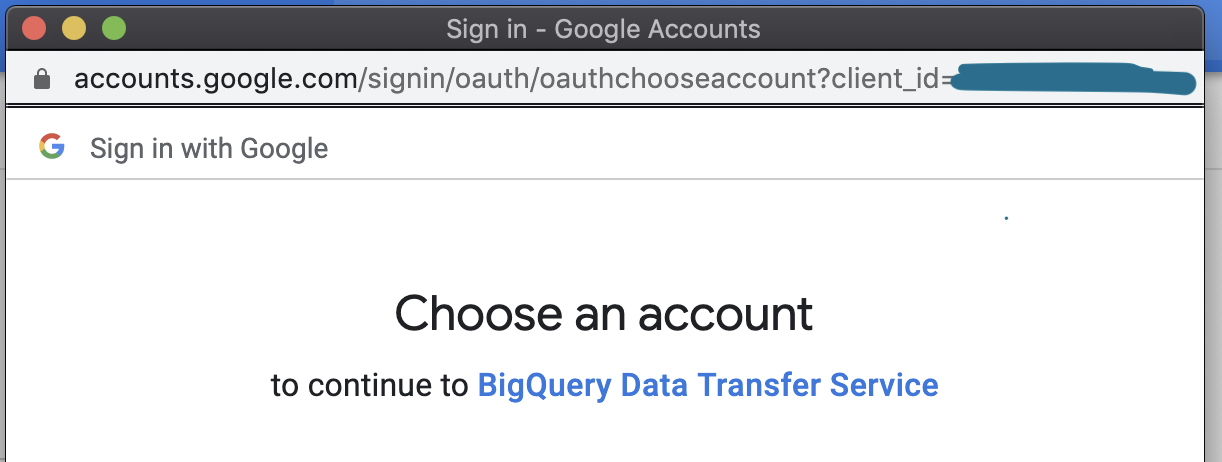
Clicked Allow, and a second window popped up
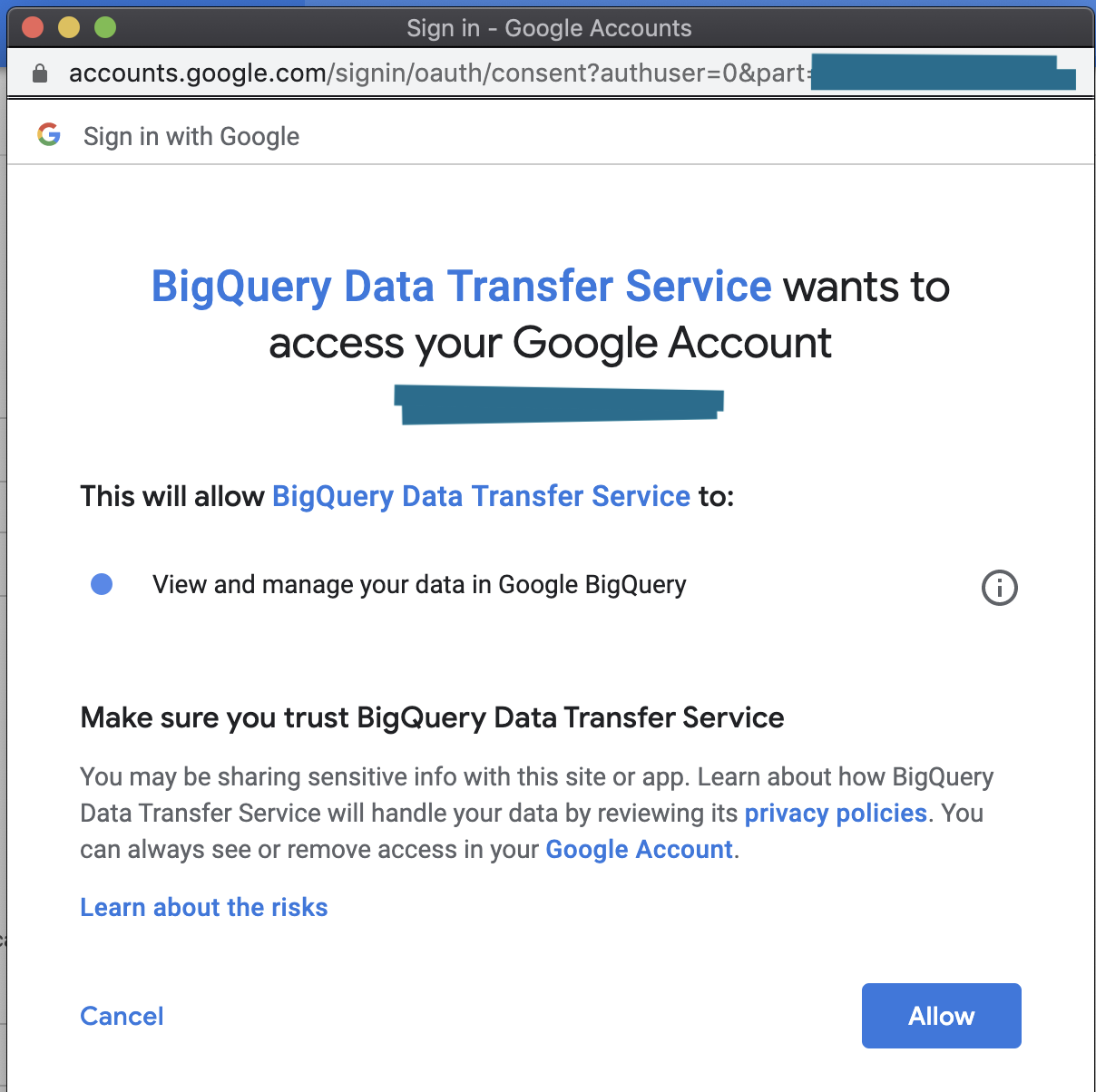
Clicked Allow again, and was able to create the data transfer manually.
Then I did a terraform import locally and succeeded.
Followed by a terraform plan and apply.
Now here's where it gets interesting:
I had coded out two google_bigquery_data_transfer_config resources.
But I had only imported one of them.
The terraform plan was as expected: Plan: 1 to add, 0 to change, 0 to destroy.
But when I went to do the apply, to see the failure again, I got a success.
The second, not imported transfer config was created via terraform.
I tested the results again, by removing the data transfer from state, deleting them manually via the console, and then recreating them with terraform apply. Both succeeded on the first apply.
In conclusion: I think this has something to do with Oauth. Also was able to verify this behavior by authing as a service account (instead of my local user credentials) and tried to apply these same changes, and got similar errors from above, even after giving the account the above described permission (tokenMinter).
TLDR:
This has to do with Oauth on initial creation of any data_transfer_config.
Workaround:
Manually make a Bigguery Data Transfer via the console UI.
This will generate a pop-up where you'll authenticate your account. Click through.
Delete this manually created BQ data transfer, you won't need it.
Do a terraform apply on your code.
It will succeed now.
Things to consider, and why this is still a bug:
If you're running terraform with atlantis or something similar, this workaround will be useless to you unless you auth as the service account locally and click through the UI.
This is inconvenient for obvious reasons, and you'll also eventually need to re-auth after some expiration date has passed.
 cynful
on 25 Mar 2020
cynful
on 25 Mar 2020
I tried to repro this again today, and again, it works fine for me 😐
I have a hypothesis- for those of you that were unable to get this working, was the service account that you were running Terraform with in the same project or a different project as the transfer config that you were trying to create?
The service account used in terraform to create the service account which deploys the transfer config is not in the same project. The service account used in terraform to deploy the transfer config itself is in the same project.
gwendal-lecren
on 1 Apr 2020
I recently tried to create a biquery_data_transfer_config and got
Error: Error creating Config: googleapi: Error 400: P4 service account needs iam.serviceAccounts.getAccessToken permission. Running the following command may resolve this error: gcloud projects add-iam-policy-binding <PROJECT_ID> --member='serviceAccount:service-<PROJECT_NUMBER>@gcp-sa-bigquerydatatransfer.iam.gserviceaccount.com' --role='roles/iam.serviceAccountShortTermTokenMinter'I tried the workaround described by @Gwen56850 to no avail. Got this error
Error: Error creating Config: googleapi: Error 400: Failed to find a valid credential. The request to create a transfer config is supposed to contain an authorization code.Then I tried to go the other route, create one manually and terraform import.
After filling out all relevant fields and hitting the create button, a window popped up
Clicked Allow, and a second window popped up
Clicked Allow again, and was able to create the data transfer manually.
Then I did aterraform importlocally and succeeded.
Followed by a terraform plan and apply.Now here's where it gets interesting:
I had coded out two google_bigquery_data_transfer_config resources.
But I had only imported one of them.
The terraform plan was as expected:Plan: 1 to add, 0 to change, 0 to destroy.
But when I went to do the apply, to see the failure again, I got a success.
The second, not imported transfer config was created via terraform.
I tested the results again, by removing the data transfer from state, deleting them manually via the console, and then recreating them with terraform apply. Both succeeded on the first apply.In conclusion: I think this has something to do with Oauth. Also was able to verify this behavior by authing as a service account (instead of my local user credentials) and tried to apply these same changes, and got similar errors from above, even after giving the account the above described permission (tokenMinter).
TLDR:
This has to do with Oauth on initial creation of any data_transfer_config.
Workaround:
Manually make a Bigguery Data Transfer via the console UI.
This will generate a pop-up where you'll authenticate your account. Click through.
Delete this manually created BQ data transfer, you won't need it.
Do aterraform applyon your code.
It will succeed now.Things to consider, and why this is still a bug:
If you're runningterraformwithatlantisor something similar, this workaround will be useless to you unless you auth as the service account locally and click through the UI.
This is inconvenient for obvious reasons, and you'll also eventually need to re-auth after some expiration date has passed.
That makes sense. In your case, it seems you were trying to deploy the transfer config with your own identity. In this case, the workaround is to authorize the bigquerydatatransfer service account through the console first (to allow him to execute the data transfer with your own identity). In my case, the transfer config needed to be executed as a service account (DUMB_NAME in my example). In that case, I had to authorize bigquerydatatransfer to impersonificate (generate access token) for this service account (DUMB_NAME), hence the serviceAccountTokenCreator role workaround.
In other words, the transfer configs get executed as the user or service account which deploys it (the service account bigquerydatatransfer impersonificates them during execution). Prior to deploy it, this user or service account needs then to authorize it to impersonificate them. Hope this helps :)
gwendal-lecren
on 1 Apr 2020
As per https://issuetracker.google.com/issues/118921817 this was resolved in December by allowing users to specify a service account to run the scheduled query as.
https://cloud.google.com/sdk/docs/release-notes#27400_2019-12-17 suggests there's a cli flag for this feature (service_account_name) but there's no reference to this in the api docs, so it's not even clear if the module magician could use this yet :|
 hcliff
on 5 Apr 2020
hcliff
on 5 Apr 2020
@hcliff that's the bq CLI, which uses different APIs than gcloud/terraform. For the REST API, the service account that's used to deploy the resource is the one that the scheduled query will be set up with. There's a lot of information in this issue already, so I recommend reading it through.
danawillow
on 7 Apr 2020
the service account that's used to deploy the resource is the one that the scheduled query will be set up with
ok that's good to know, thanks! does that mean I just need to grant the right set of perms _on_ that service account? if so any pointers would be much appreciated.
when trying to repo this, using my gcloud personal access token (owner permissions, previously walked through the oauth flow for a bigquerytransferconfig) worked, switching over to my terraform service account was no beauno.
hcliff
on 7 Apr 2020
What happened when you switched to your terraform service account, and what does your terraform config look like?
danawillow
on 7 Apr 2020
@danawillow i was using the same sample as from the docs,
resource "google_project_iam_member" "permissions" {
  project = google_project.project.project_id
  role    = "roles/iam.serviceAccountShortTermTokenMinter"
  member  = "serviceAccount:service-${google_project.project.number}@gcp-sa-bigquerydatatransfer.iam.gserviceaccount.com"
}
in the meantime https://github.com/GoogleCloudPlatform/magic-modules/pull/3347 was opened which would suggest maybe terraform doesn't already set the service_account_name (unless the connector was hand written? 🤷)
hcliff
on 8 Apr 2020
Oh gosh, that's so frustrating- the parameter _does_ exist, it's just not documented anywhere. I raised that internally just now, so hopefully it'll make it into the documentation soon.
In the meantime, it does look like that PR will fix this issue, so I'll go ahead and link the two. Once it's merged and released, you'll have the opportunity to explicitly set the field yourself.
danawillow
on 8 Apr 2020
awesome, thanks :)
hcliff
on 8 Apr 2020
i'm using
resource "google_bigquery_data_transfer_config" "query_config" {
  provider               = "google-beta"
  project                = var.project
  display_name           = var.display_name
  location               = var.location
  data_source_id         = "scheduled_query"
  schedule               = var.schedule
  service_account_name   = var.service_account_name
and I get this error when using terraform version: 0.12.13
  12:   service_account_name   = var.service_account_name
An argument named "service_account_name" is not expected here.
is this fix available in the terraform releases yet?
 sreechok
on 5 Jun 2020
sreechok
on 5 Jun 2020
That version you mentioned is your terraform tool version. You want to make sure you're on at least version 3.23.0 of the google provider. When you run terraform version it should tell you both versions.
danawillow
on 5 Jun 2020
Also, thanks for bringing this up. Closing this issue since I think the addition of that parameter should resolve it.
danawillow
on 5 Jun 2020
@danawillow : thank you for the update. when I run terraform version, it returns just the terraform version but does not return anything else. are you saying that it should also return the google provider version? If not, is there a command to get google provider version that I'm using?
sreechok
on 8 Jun 2020
When you run terraform init, it should tell you what version it's downloading. I'd also recommend pinning at least to a major version series (https://www.terraform.io/docs/configuration/providers.html#provider-versions) so you don't get caught unaware.
danawillow
on 8 Jun 2020
@danawillow can you please tell me can I transfer BQ scheduled queries from one project to another is it possible with the same terraform config available on the tf docs if yes then in the params block we will need some kind of variable like source_project but it is not anywhere in tf docs please help to provide some clarity
 yashsaini77
on 20 Jun 2020
yashsaini77
on 20 Jun 2020
Hi @yashsaini77, that sounds like a different question than what this specific issue is for. To answer your question though, most GCP resources can't be transferred between projects. Do you see anything in the GCP docs at https://cloud.google.com/bigquery/docs/scheduling-queries that says it's possible? If so, I'd recommend opening a new FR here, but I'm doubtful that it is. As a reminder, the params block is just a key-value map, and the provider will send anything in that map to the API. There's nothing we need to do provider-side to get a supported key available in the provider.
danawillow
on 22 Jun 2020
Thanks, much @danawillow I checked we can't transfer the bq scheduled queries from one project to another.
Another concern is about the service_account_name parameter that we are talking here about. Does that parameter's value will be the email of the service account and is it officially used now ?
yashsaini77
on 22 Jun 2020
Yup, here's the docs: https://www.terraform.io/docs/providers/google/r/bigquery_data_transfer_config.html#service_account_name.
I don't think we have an example in the docs but we do have a test you can look at: https://github.com/terraform-providers/terraform-provider-google/blob/f661c5ba9dc57107082926bd28b8b39a478c27ff/google/resource_bigquery_data_transfer_config_test.go#L184-L220
danawillow
on 22 Jun 2020
I'm going to lock this issue because it has been closed for _30 days_ ⏳. This helps our maintainers find and focus on the active issues.
If you feel this issue should be reopened, we encourage creating a new issue linking back to this one for added context. If you feel I made an error 🤖 🙉 , please reach out to my human friends 👉 [email protected]. Thanks!
hashibot[bot]
on 6 Jul 2020
Related issues
 gilberthdez
·
3Comments
gilberthdez
·
3Comments
 Zhann
·
3Comments
Zhann
·
3Comments
 kaifresh
·
4Comments
kaifresh
·
4Comments
 matti
·
3Comments
matti
·
3Comments
 jamielennox
·
4Comments
jamielennox
·
4Comments
Most helpful comment
I recently tried to create a biquery_data_transfer_config and got
I tried the workaround described by @Gwen56850 to no avail. Got this error
Then I tried to go the other route, create one manually and terraform import.


After filling out all relevant fields and hitting the create button, a window popped up
Clicked Allow, and a second window popped up
Clicked Allow again, and was able to create the data transfer manually.
Then I did a
terraform importlocally and succeeded.Followed by a terraform plan and apply.
Now here's where it gets interesting:
I had coded out two google_bigquery_data_transfer_config resources.
But I had only imported one of them.
The terraform plan was as expected:
Plan: 1 to add, 0 to change, 0 to destroy.But when I went to do the apply, to see the failure again, I got a success.
The second, not imported transfer config was created via terraform.
I tested the results again, by removing the data transfer from state, deleting them manually via the console, and then recreating them with terraform apply. Both succeeded on the first apply.
In conclusion: I think this has something to do with Oauth. Also was able to verify this behavior by authing as a service account (instead of my local user credentials) and tried to apply these same changes, and got similar errors from above, even after giving the account the above described permission (tokenMinter).
TLDR:
This has to do with Oauth on initial creation of any data_transfer_config.
Workaround:
Manually make a Bigguery Data Transfer via the console UI.
This will generate a pop-up where you'll authenticate your account. Click through.
Delete this manually created BQ data transfer, you won't need it.
Do a
terraform applyon your code.It will succeed now.
Things to consider, and why this is still a bug:
If you're running
terraformwithatlantisor something similar, this workaround will be useless to you unless you auth as the service account locally and click through the UI.This is inconvenient for obvious reasons, and you'll also eventually need to re-auth after some expiration date has passed.