Terraform-provider-google: Data Source google_compute_instance can't be created
Community Note
- Please vote on this issue by adding a 👍 reaction to the original issue to help the community and maintainers prioritize this request
- Please do not leave "+1" or "me too" comments, they generate extra noise for issue followers and do not help prioritize the request
- If you are interested in working on this issue or have submitted a pull request, please leave a comment
- If an issue is assigned to the "modular-magician" user, it is either in the process of being autogenerated, or is planned to be autogenerated soon. If an issue is assigned to a user, that user is claiming responsibility for the issue. If an issue is assigned to "hashibot", a community member has claimed the issue already.
Terraform Version
Terraform v0.11.11
- provider.google v1.20.0
Affected Resource(s)
Data Source google_compute_instance
Expected Behavior
I can create Data Source google_compute_instance to retrieve specific information about created instances (e.g. from resource "google_compute_instance")
https://www.terraform.io/docs/providers/google/d/datasource_compute_instance.html
Actual Behavior
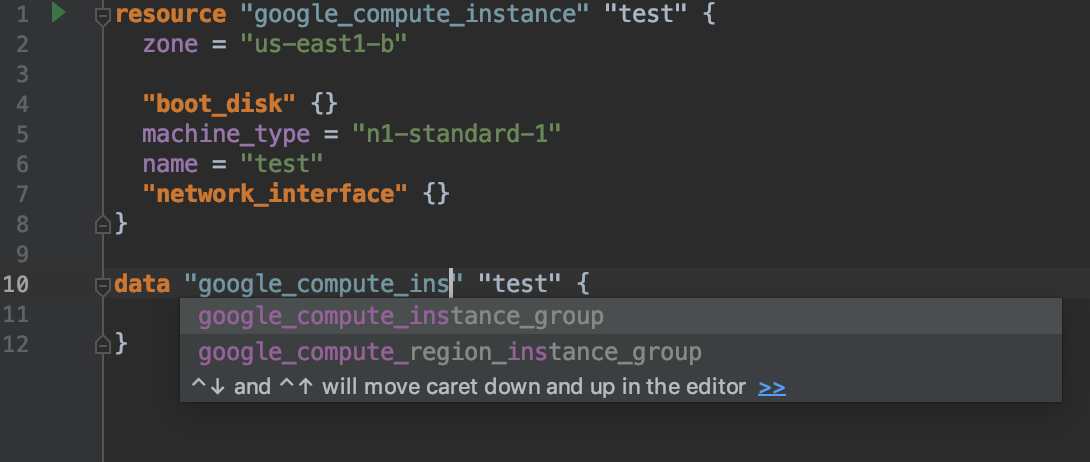
I can't create this Data Source. It is absent in autofill menu.
 MastaPA
All 11 comments
Auto... what menu?..
What exactly are you doing, what do you expect and what goes wrong? There're no telepathists, sorry.
 Chupaka
on 2 Jan 2019
Chupaka
on 2 Jan 2019
I meant auto complite in IDE.
- I created resource "google_compute_instance" or resource "google_dataproc_cluster"
- I want to create data "google_compute_instance" to get more information about VMs that was create d, but I can't do it. This data source is not in autocomplete list.
MastaPA
on 2 Jan 2019
If it's not in autocomplete - don't be so lazy and type it by yourself. Or contact your IDE's developers for comments.
Do you use some IDE plugin? You also may contact plugin's developer :)
Chupaka
on 3 Jan 2019
Also, Data Sources are used for the resources you don't manage via Terraform. For information about instances created via Terraform, use resource, not data.
Like someparameter = "${google_compute_instance.test.network_interface.0.access_config.0.nat_ip}"
Chupaka
on 3 Jan 2019
I'm not lazy, be sure. What I was trying to do and found this issue.
I created resource "google_dataproc_cluster". From this resource I couldn't get external and internal IPs of every VM of cluster. But I can get names of instances and using data source "google_compute_instance" get all needed information.
Next. IDE (IntelliJ IDEA with HCL plugin). I created this data source by hand.
Here is code.
provider "google" {
  credentials = "${file("./cred/deploy-sa.json")}"
  region = "us-east1"
  zone = "us-east1-b"
  project = "${var.project}"
}

resource "google_dataproc_cluster" "dataproc_cluster" {
  name = "${var.name}"
  region = "us-east1"

  cluster_config {

    master_config {
      num_instances = 1
      machine_type = "n1-standard-1"
      disk_config {
        boot_disk_size_gb = 15
        num_local_ssds = 0
      }
    }

    worker_config {
      num_instances = 2
      machine_type = "n1-standard-1"
      disk_config {
        boot_disk_size_gb = 15
        num_local_ssds = 1
      }
    }

    preemptible_worker_config {
      num_instances = 0
    }

    gce_cluster_config {
      service_account = "${var.service_account}"
      service_account_scopes = ["useraccounts-ro", "storage-rw", "logging-write"]
    }

    software_config {
      image_version = "1.3"
      override_properties {
        "hdfs:dfs.permissions.enabled" = "false"
        "hdfs:fs.trash.interval" =  "0"
        "hdfs:fs.hdfs.impl.disable.cache" = "true"
      }
    }
  }
}

data "google_compute_instance" "master_node" {
  name = "${google_dataproc_cluster.dataproc_cluster.cluster_config.0.master_config.0.instance_names}"
}

output "master_node_ip" {
  value = "${data.google_compute_instance.master_node.id }"
}
After applying this config terraform crashed.
Here is great possibility I'm doing wrong, but similar approach worked with AWS provider. Resource manages resources and datasource give possibility to retrieve additional information about resource.
What I'm doing wrong? Or any suggestion to do it in other way.
MastaPA
on 3 Jan 2019
First, as @Chupaka suggests, the autocomplete suggestions are created and maintained by whoever maintains the plugin associated with the IDE. In this case I think the correct place to file the bug for autocomplete suggestions in Intellij is https://github.com/VladRassokhin/intellij-hcl/issues
Secondly, if terraform is crashing (do you mean panic'ing?) then that could be an issue with the plugin code that we maintain. Can you add a gist with the crash.log that was created as part of the crash?
My guess right now is that you're trying to create a _single_ compute_instance datasource but passing a _list_ of compute instances when referencing the instance_names field.
 chrisst
on 3 Jan 2019
chrisst
on 3 Jan 2019
Also, about name = "${google_dataproc_cluster.dataproc_cluster.cluster_config.0.master_config.0.instance_names}" - docs https://www.terraform.io/docs/providers/google/r/dataproc_cluster.html mention it should be cluster_config.master_config.instance_names - are you sure those zeroes are necessary? Or maybe try name = "${google_dataproc_cluster.dataproc_cluster.cluster_config.master_config.instance_names[0]}"?
Chupaka
on 4 Jan 2019
@Chupaka those zeroes are necessary. Without them I couldn't get any name. Actually that was a suggestion from @rileykarson.
@chrisst you are right.
name = "${google_dataproc_cluster.dataproc_cluster.cluster_config.0.master_config.0.instance_names}"
returns list.
I changed it to
name = "${element(google_dataproc_cluster.dataproc_cluster.cluster_config.0.master_config.0.instance_names, 0)}" and now this is string value.
Now my configuration file has:
data "google_compute_instance" "master_node" {
  name = "${element(google_dataproc_cluster.dataproc_cluster.cluster_config.0.master_config.0.instance_names, 0)}"
}


output "master_node_ip" {
  value = "${data.google_compute_instance.master_node.network_interface.0.access_config.0.nat_ip}"
}
No crash, but error message:
* output.master_node_ip: Resource 'data.google_compute_instance.master_node' not found for variable 'data.google_compute_instance.master_node.network_interface.0.access_config.0.nat_ip'
MastaPA
on 4 Jan 2019
I'm not able to repro the issue you are seeing. Here is my configuration that is working correctly:
resource "google_dataproc_cluster" "dataproc_cluster" {
  name   = "issue-2776"
  region = "us-west1"

  cluster_config {
    master_config {
      num_instances = 1
      machine_type  = "n1-standard-1"

      disk_config {
        boot_disk_size_gb = 15
        num_local_ssds    = 0
      }
    }

    worker_config {
      num_instances = 2
      machine_type  = "n1-standard-1"

      disk_config {
        boot_disk_size_gb = 15
        num_local_ssds    = 1
      }
    }

    preemptible_worker_config {
      num_instances = 0
    }

    # gce_cluster_config {
    #   service_account        = "${var.service_account}"
    #   service_account_scopes = ["useraccounts-ro", "storage-rw", "logging-write"]
    # }

    software_config {
      image_version = "1.3.19-deb9"

      override_properties {
        "hdfs:dfs.permissions.enabled"    = "false"
        "hdfs:fs.trash.interval"          = "0"
        "hdfs:fs.hdfs.impl.disable.cache" = "true"
      }
    }
  }
}

data "google_compute_instance" "master_node" {
  name = "${element(google_dataproc_cluster.dataproc_cluster.cluster_config.0.master_config.0.instance_names, 0)}"
}

output "master_node_ip" {
  value = "${data.google_compute_instance.master_node.network_interface.0.access_config.0.nat_ip}"
}

output "compute-name" {
  value = "${element(google_dataproc_cluster.dataproc_cluster.cluster_config.0.master_config.0.instance_names, 0)}"
}
with outputs:
Apply complete! Resources: 0 added, 0 changed, 0 destroyed.
2019/01/04 14:09:46 [DEBUG] plugin: waiting for all plugin processes to complete...

Outputs:

compute-name = issue-2776-m
master_node_ip = *.*.92.108
The problem was in cluster name! It's ridicules.
My cluster had name "v-cluster", after renaming to "cluster" everything was fine, no errors. Output showed external IP.
But "v-cluster" is valid name.
Thank you guys for help.
MastaPA
on 8 Jan 2019
I'm going to lock this issue because it has been closed for _30 days_ ⏳. This helps our maintainers find and focus on the active issues.
If you feel this issue should be reopened, we encourage creating a new issue linking back to this one for added context. If you feel I made an error 🤖 🙉 , please reach out to my human friends 👉 [email protected]. Thanks!
![hashibot[bot] picture](https://avatars2.githubusercontent.com/in/8332?v=4&s=40) hashibot[bot]
on 8 Feb 2019
hashibot[bot]
on 8 Feb 2019
Related issues
 nthypes
·
4Comments
nthypes
·
4Comments
 firstVersion
·
4Comments
firstVersion
·
4Comments
 matti
·
3Comments
matti
·
3Comments
 wmuizelaar
·
4Comments
wmuizelaar
·
4Comments
 mumblez
·
4Comments
mumblez
·
4Comments