Terraform-provider-azuredevops: Issue with Hosted Ubuntu 16.04 default value for agent_pool_name for build definition
Im running into an issue trying to provision build definitions with terraform.
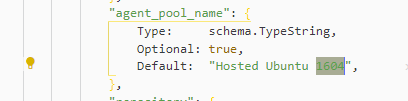
It looks like the default provider defaults to Hosted Ubuntu 16.04 for agent_pool_name. This was working a few months ago but all of a sudden stopped working with the error:
Error: error creating resource Build Definition: Agent pool Hosted Ubuntu 1604 was not found.
Did some more digging into this and found this on the MS Docs site: https://docs.microsoft.com/en-us/azure/devops/release-notes/2019/sprint-155-update#single-hosted-pool
The above mentions how they are switching to a single host pool called "Azure Pipelines" instead of the designated pools for Ubuntu, Windows, and Mac hosted agents.
I also notice that Hosted Ubuntu 16.04 isn't listed under the available agent pools for my organization. However when I set agent_pool_name to use Azure Pipelines, it still fails, although there is a pool clearly listed within my org called Azure Pipelines.
 davoodharun
All 12 comments
I should mention that when I run my commands locally, the terraform project completes successfully, but when running the commands inside an azure devops agent, it will fail claming it cannot find the default agent pool Hosted Ubuntu 16.04
davoodharun
on 23 Jul 2021
Hi @davoodharun According the signle-hosted-pool that all other hosted pools will be replaced by Azure Pipelines. Since this is not a required parameter but ADO provider set Hosted Ubuntu 1604 as the default agent pool name, you can update your TF script and set the agent pool name to Azure Pipelines. (Notice: The vmImage must be specified in the YAML file when using this Microsoft-hosted pool)
 xuzhang3
on 23 Jul 2021
xuzhang3
on 23 Jul 2021
@xuzhang3 I think we've to update the code in azuredevops/internal/service/build/resource_build_definition.go to more reliable default value, that will not get obsolete over time.
I favor ubuntu-latest.

 tmeckel
on 26 Jul 2021
tmeckel
on 26 Jul 2021
I have tried to set the agent_pool_name explicitly to Azure Pipelines and it is still failing.
resource "azuredevops_build_definition" "build" {
  count = length(var.environment_names)
  project_id = data.azuredevops_project.project.id
  name       = var.environment_names[count.index]
  agent_pool_name = "Azure Pipelines"
  path       = format("\\Deployment Standards\\Terraform IAC Model\\release\\%s\\%s", var.type, split(".", var.environment_names[count.index])[0])

  ci_trigger {
    use_yaml = true
  }

  repository {
    repo_type   = "TfsGit"
    repo_id     = data.azuredevops_git_repository.repository.id
    branch_name = data.azuredevops_git_repository.repository.default_branch
    yml_path    = format("%s/.eudevops/config/pipelines/%s/%s.release.yaml", var.type, split(".", var.environment_names[count.index])[0], var.environment_names[count.index])
  }

}
@davoodharun can you provide a log? Perhaps with TF_LOG=debug.
Please sanitize (anonymize) the log file before you post the data here, because a TF log can contain secret values and private data.
tmeckel
on 26 Jul 2021
davoodharun
on 27 Jul 2021
@davoodharun you can use the following REST API to get a list of available agent pools in your organization. Please verify that you only use names of pools for the agent_pool_name property that are listed in the return of the REST API.
https://dev.azure.com/{organization}/_apis/distributedtask/pools?api-version=6.1-preview.1
When you use a name from the list of returned agents pools, will the error still occur?
tmeckel
on 27 Jul 2021
Yep, so the "Azure Pipelines" pool is returned when I make that REST call:
{
            "createdOn": "2019-07-09T18:55:09.377Z",
            "autoProvision": true,
            "autoUpdate": true,
            "autoSize": true,
            "targetSize": 1,
            "agentCloudId": 1,
            "createdBy": {

            },
            "owner": {

            },
            "id": 80,
            "scope": "25ff78d6-995d-462e-a548-c4e4c5296714",
            "name": "Azure Pipelines",
            "isHosted": true,
            "poolType": "automation",
            "size": 60,
            "isLegacy": false,
            "options": "none"
        },
Let me ensure I am using the same access token
davoodharun
on 27 Jul 2021
AH, so I fixed this issue .
It turns out that the pre-defined azure pipelines variable $(System.AccessToken) does not have the ability to read the Azure Pipelines agent pool. I switched to a person access token and the issue was resolved.
I'll ask around on the Microsoft side as to why the Azure Pipeline pool is not found when using $(System.AccessToken) for AZDO_PERSONAL_ACCESS_TOKEN vs a personal access token
davoodharun
on 27 Jul 2021
@davoodharun great you could fix the problem. @xuzhang3 please close the issue
tmeckel
on 27 Jul 2021
Close this issue, feel free to open another issue if you have questions.
xuzhang3
on 2 Aug 2021
Related issues
 FernandoMiguel
·
7Comments
FernandoMiguel
·
7Comments
 flmmartins
·
6Comments
flmmartins
·
6Comments
 josh-barker
·
4Comments
josh-barker
·
4Comments
 oscarmorasu
·
8Comments
oscarmorasu
·
8Comments
 rusticshiv86
·
5Comments
rusticshiv86
·
5Comments