Terraform-provider-aws: InvalidParameterCombinationException: AWS Database Migration Service (DMS) tries to create DMS instance but incorrectly assumes RDS postgres is in wrong vpc
Community Note
- Please vote on this issue by adding a 👍 reaction to the original issue to help the community and maintainers prioritize this request
- Please do not leave "+1" or "me too" comments, they generate extra noise for issue followers and do not help prioritize the request
- If you are interested in working on this issue or have submitted a pull request, please leave a comment
Terraform Version
terraform --version
Terraform v0.11.11
+ provider.aws v1.22.0
+ provider.template v2.0.0
Affected Resource(s)
aws_dms_replication_instance
Terraform Configuration Files
resource "aws_dms_replication_instance" "dms-classic-prod-instance" {
  allocated_storage          = 50
  apply_immediately          = false
  auto_minor_version_upgrade = true
  engine_version             = "3.1.2"
  kms_key_arn                = "${lookup(var.kms_keys, "prod-db")}"
  multi_az                   = true
  replication_instance_class = "dms.t2.small"
  replication_instance_id    = "dms-classic-prod-one"

  tags {
    Name        = "terraform dms replication instance classic-prod-one"
    stack_name  = "data-eng-petalcard.com"
    environment = "production"
    created_by  = "terraform"
  }

  vpc_security_group_ids = ["sg-0ab1e6b1e6c4d27c7"]
}
Debug Output
* aws_dms_replication_instance.dms-classic-prod-instance: InvalidParameterCombinationException: Database is in vpc-f129a896, but Ec2 Security Group sg-0ab1e6b1e6c4d27c7 is in vpc-8347e2fa
The RDS postgres db is ACTUALLY in vpc-8347e2fa NOT vpc-f129a896.
The ec2 security group sg-0ab1e6b1e6c4d27c7 is in fact in vpc-8347e2fa.
Expected Behavior
- Terraform should be creating a DMS instance in vpc-8347e2fa and should recognize that the RDS postgres is also in that same vpc.
Actual Behavior
- Terraform believes that RDS postgres is in vpc-f129a896, not vpc-8347e2fa. This is factually incorrect.
Notes
For context, I have a postgres rds created in vpc-8347e2fa. Since this RDS was not created through terraform and I want to use this as a source, I manually created the source endpoint through the console.
And since I wanted my DMS to be replicating to S3 (yes, it's not typical but it's because I want to capture changelog or WAL data) and due to https://github.com/terraform-providers/terraform-provider-aws/issues/4643#issuecomment-443399489
I also created the target endpoint through the console.
After grabbing the ARNs for both endpoints, I wrote a terraform module to create a task here:
resource "aws_dms_replication_task" "dms_task" {
  migration_type           = "${var.migration_type}"
  replication_task_id      = "${var.dms_task_id}"
  table_mappings           = "${data.template_file.table_mappings.rendered}"
  replication_instance_arn = "${var.replication_instance_arn}"
  source_endpoint_arn      = "${var.source_endpoint_arn}"
  target_endpoint_arn      = "${var.target_endpoint_arn}"

   replication_task_settings = "${trimspace(file("${path.module}/settings.json"))}"

   lifecycle = {
    #https://github.com/terraform-providers/terraform-provider-aws/issues/1513
    ignore_changes  = ["replication_task_settings"]
    prevent_destroy = true
  }

   tags {
    Name        = "${var.dms_task_id}"
    environment = "production"
    created_by  = "terraform"
  }
}

 # Reference the DMS table mappings
data "template_file" "table_mappings" {
  template = "${file("${var.module_path}/${var.table_mapping_file}")}"
}
The config for the DMS instance is above.
After running apply, I got the error message stated above. Very bizarre that terraform thinks the database in vpc-f129a896.
Something that I've also seen missing with the aws_dms_replication_instance in https://www.terraform.io/docs/providers/aws/r/dms_replication_instance.html is that there is NO PARAMETER FOR VPC even though in the console there is clearly one here:
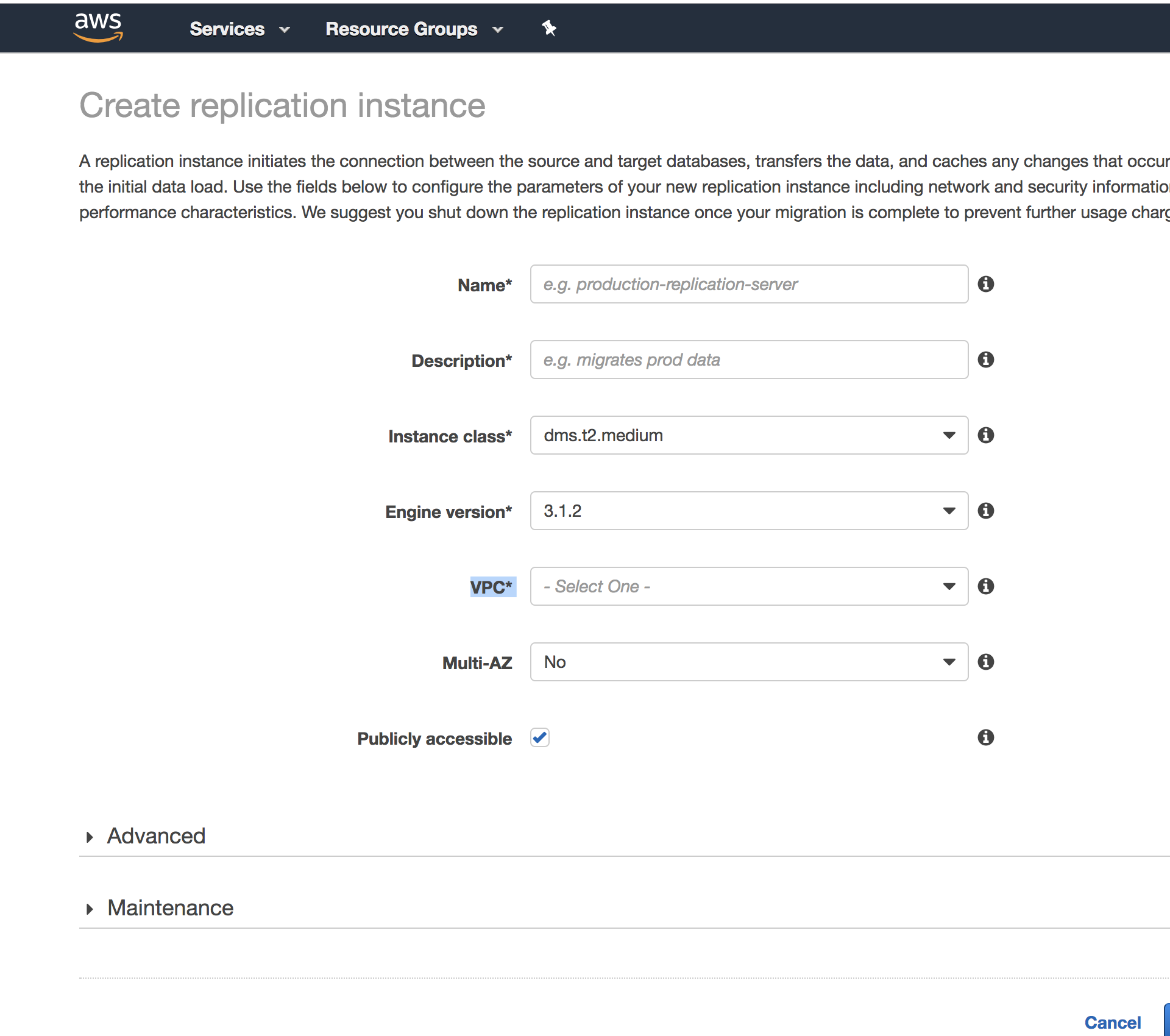
Not sure why creators of this terraform plugin wouldn't include the VPC parameter for aws_dms_replication_instance, unless it's supposed to be implied with the included terraform parameter vpc_security_group_ids. If that's the case, this seems like a bug.
 david19han
All 5 comments
👍
 nalinguptalinux
on 11 Apr 2019
nalinguptalinux
on 11 Apr 2019
Yes, I agree with David. I'm having similar issue as well.
It would make more sense we have feature to input the VPC we want the replication instance to be created in.
 hari-ganagavaram
on 15 Apr 2019
hari-ganagavaram
on 15 Apr 2019
Did any one figure this ?
 gitgoose
on 19 Apr 2019
gitgoose
on 19 Apr 2019
When it came to my situation, my organization found that our AWS infrastructure had a "default VPC" which was the weird vpc-f129a896 I discuss earlier above. We believe that Terraform would erroneously take this "default VPC" into account when organizing resources and syncing with AWS.
The solution for our project was to migrate all existing AWS resources in this default VPC to a different VPC in order to ultimately remove this default VPC. After the default vpc was removed, things finally started moving in the right direction.
david19han
on 19 Apr 2019
Quick Explanation
So it looks like if you have a replication_subnet_group_id that is configured for the desired VPC then terraform will place it in the correct VPC.
More detail
I've been experiencing the same problem. See below error (replaced the sg-* and vpc-* values with dummy data). Similar to OP I had a default VPC, which was interfering with where terraform was trying to create the aws_dms_replication_instance resource.
Error: error creating DMS Replication Instance: InvalidParameterCombinationException: Database is in vpc-default, but Ec2 Security Group sg-foo is in vpc-some-other-one
If I added the replication_subnet_group_id parameter then it created the instance in the correct place. If I omit that parameter then it will create the resource in the default VPC defined in your account. So this appears to be what handled the VPC parameter shown in the AWS console.
 EliasRanz
on 16 Dec 2019
EliasRanz
on 16 Dec 2019
Related issues
 hashibot
·
3Comments
hashibot
·
3Comments
 gothrek22
·
3Comments
hashibot
·
3Comments
gothrek22
·
3Comments
hashibot
·
3Comments
 reedloden
·
3Comments
reedloden
·
3Comments
 carmas
·
3Comments
carmas
·
3Comments
Most helpful comment
Yes, I agree with David. I'm having similar issue as well.
It would make more sense we have feature to input the VPC we want the replication instance to be created in.