Terraform-aws-eks: not all worker nodes join the cluster
I have a question
I'm submitting a...
- [ ] bug report
- [ ] feature request
- [√] support request
- [ ] kudos, thank you, warm fuzzy
What is the current behavior?
I'm creating a cluster with the following config:
module "eks" {
  source                = "terraform-aws-modules/eks/aws"
  version               = "1.6.0"
  cluster_name          = "eks-dev-cluster"
  subnets               = ["subnet-PUBLIC", "subnet-PRIVATE"]
  tags                  = "${map("Environment", "Dev")}"
  vpc_id                = "vpc-VPC-ID"
  worker_groups         = [{
                            "asg_desired_capacity" = "3",
                            "asg_max_size" = "4",
                            "asg_min_size" = "1"
                          }]
}
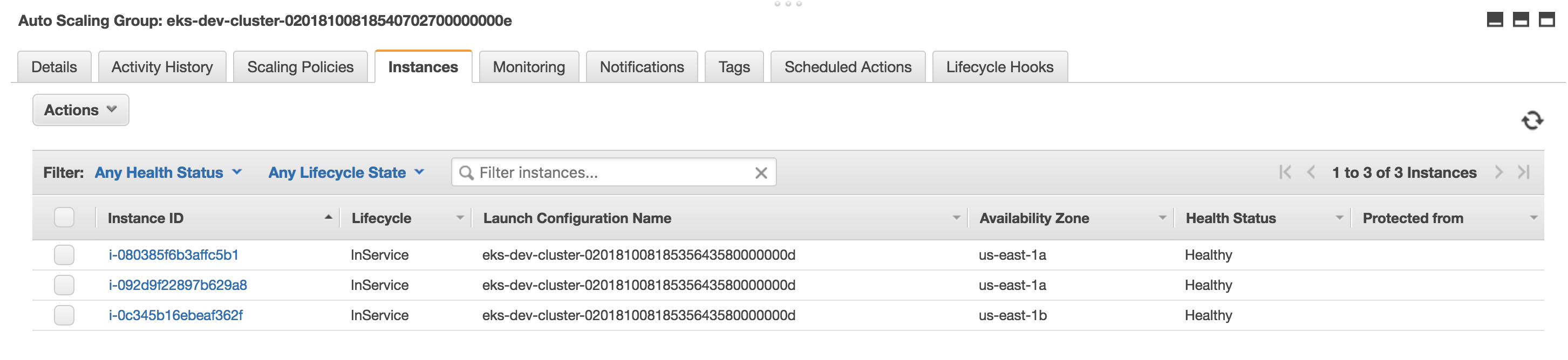
When I look at the ASG in AWS I see the exact sizes I specified: I see 3 instances with a min of 1 and max of 4.
However only TWO instances joined the cluster.
Regardless of how many instances I specify as the desired capacity, only two join the cluster.
kubectl --kubeconfig=./kubeconfig_eks-dev-cluster get nodes
NAME                            STATUS   ROLES    AGE   VERSION
ip-172-31-32-101.ec2.internal   Ready    <none>   19m   v1.10.3
ip-172-31-43-177.ec2.internal   Ready    <none>   19m   v1.10.3
If this is a bug, how to reproduce? Please include a code sample if relevant.
What's the expected behavior?
In the above example, I should see 3 instances in the cluster.
Are you able to fix this problem and submit a PR? Link here if you have already.
Have not yet been able to figure this out, although I have been able to get more than 2 nodes to join the cluster when following the Getting Started EKS guide and using the CloudFormation template approach.
Environment details
- Affected module version: 1.6.0
- OS: Max OS 10.13.6
- Terraform version: 0.11.8
Any other relevant info
 nkrendel
All 9 comments
You didn't mention how many instances actually exist in EC2 console? Is there more than 2? Perhaps you have a limit? Or some other reason the ASG can't create the 3rd instance?
 max-rocket-internet
on 9 Oct 2018
max-rocket-internet
on 9 Oct 2018
There are currently 106 EC2 instances in the console for this region. And actually the number of instances I specify in the ASG -do- get created. In the example above, I see 3 instances in the EC2 console, but only 2 actually join the k8s cluster.
nkrendel
on 9 Oct 2018
Just a thought, what subnets were the successfully joined nodes created in?
subnets = ["subnet-PUBLIC", "subnet-PRIVATE"] passes down to the worker group defaults, so they could be created in either the public or private subnets, and then something about your specific VPC setup could be impacting communication _if_ they get created in an unexpected location?
You can limit the worker node subnets by using the override:
workers_group_defaults = {
    subnets               =  ["subnet-PRIVATE"]
}
Also, can you confirmed they are all properly tagged?
 mmcaya
on 9 Oct 2018
mmcaya
on 9 Oct 2018
I ran another test, destroyed the previous cluster and created another one while adding two more subnets: subnet-PUBLIC2 and subnet-PRIVATE2. I also specified asg_desired_capacity=7 and asg_max_size=10. In EC2 console I see 7 instances created, but only 4 joined the cluster. Two of these nodes were in subnet-PUBLIC and two were in subnet-PUBLIC2. The 3 instances that were not joined into the cluster were created in the two PRIVATE subnets.
The tags on the subnets and the instances are all identical and seem ok.
I will run another test with only the original subnets but the same desired_capacity and see what happens...
nkrendel
on 9 Oct 2018
Do you have a NAT gateway for the private subnets?
mmcaya
on 9 Oct 2018
There is a Gateway associated with the private subnets but it's not a NAT gateway (it's just an endpoint?!). Sorry I'm not an AWS expert.
nkrendel
on 9 Oct 2018
That is the issue. Here is the AWS VPC tutorial up on the topic for EKS:
https://docs.aws.amazon.com/eks/latest/userguide/network_reqs.html
https://docs.aws.amazon.com/eks/latest/userguide/create-public-private-vpc.html
Unless you see a route table entry in the subnet like this: 0.0.0.0/0 | nat-XXXX, they won't be able to communicate with the EKS control plane, and you'll only be able to use public subnets for worker nodes.
mmcaya
on 9 Oct 2018
You were right! When I removed the private subnets from the config, all my instances were created in the public subnets, and they all registered with k8s! Thanks for your help!
nkrendel
on 9 Oct 2018
@nkrendel just FYI having your nodes in a public subnet can be a security risk, and why the recommendations were using private subnets and nat gateways. just need to get the nat gateways up correctly.
I want to add I was stuck on a way simpler issue in case anyone looks. Node tags need to have cluster name match. makes obvious sense but I overlooked this. Nodes will only join the cluster it is 'owned' by
( terraform obviously )
tag {
key = "kubernetes.io/cluster/${var.eks_cluster_name}-${terraform.workspace}"
value = "owned"
propagate_at_launch = true
}
 elliottb303
on 1 Apr 2019
elliottb303
on 1 Apr 2019
Related issues
 cabrinha
·
5Comments
cabrinha
·
5Comments
 tokiwong
·
4Comments
tokiwong
·
4Comments
 mattlawnz
·
3Comments
mattlawnz
·
3Comments
 discordianfish
·
3Comments
discordianfish
·
3Comments
 tnimni
·
3Comments
tnimni
·
3Comments
Most helpful comment
That is the issue. Here is the AWS VPC tutorial up on the topic for EKS:
https://docs.aws.amazon.com/eks/latest/userguide/network_reqs.html
https://docs.aws.amazon.com/eks/latest/userguide/create-public-private-vpc.html
Unless you see a route table entry in the subnet like this:
0.0.0.0/0 | nat-XXXX, they won't be able to communicate with the EKS control plane, and you'll only be able to use public subnets for worker nodes.