Termux-packages: Running X11 apps in Termux
@fornwall , @Grimler91 , @xeffyr , @its-pointless . I think it would be interesting for all of you.
Hi there! I have some thoughts about running X11 apps in Termux. Here we have Xorg server package. We can use it with Sparkle driver. For now I have sources that use Ashmem for buffers (original sparkle uses SysV SHM) and JNI calls for MotionEvents + libandroidjni. My xserver inside activity segfaults for some reason and I think it is because I am not so cool to handle it in the right way.
Details:
Sparkle needs it's own activity to work. Activity communicates with Xorg via Unix socket. It can be placed inside Termux filesystem.
libandroidjni and JNI MotionEvent wrappers are needed to use both NativeActivity and custom views in one normal activity.
Everything we need is :
- Another one activity inside Termux.
- A way to update libsparkle.so (which is supposed to be builtin to APK, but looks like I know the way to come it over).
- Xorg package enabled.
- GUI to manage the running server (calling keyboard, sparkle setttings, etc).
As I said before I have APK that works, but I think it is unusable without comfortable user interface like XFCE/LXDE. Or we can just use lxpanel + main menu plugin for graphical menu.
Thank you for patience.
 twaik
twaik
All 73 comments

twaik
on 18 Mar 2019
wow
 its-pointless
on 18 Mar 2019
its-pointless
on 18 Mar 2019
Fantastic! How can I install this on _my_ mobile?
 RalfWerner
on 18 Mar 2019
RalfWerner
on 18 Mar 2019
amazing! It may works, but most software has no graphics hardware acceleration on android ( opengl vs opengles ). I hope wayland could be a direction.
I am a noob but I very bump up this project.
 kenneth-Q
on 18 Mar 2019
kenneth-Q
on 18 Mar 2019
Fantastic! How can I install this on _my_ mobile?
It does not work well. I did not write KeyEvent JNI wrapper and Xorg segfaults for some reason. I think it segfaults because I am no good with my hands.
amazing! It may works, but most software has no graphics hardware acceleration on android ( opengl vs opengles ). I hope wayland could be a direction.
I am a noob but I very bump up this project.
It does not use graphical acceleration. It is not a Wayland port to Android. It is Xorg with modified xf86-video-dummy driver. It sends image's Ashmem region handle to the NativeActivity and outputs it to the screen using GLESv2 shader. Xorg and it's clients do not have hardware acceleration support.
twaik
on 18 Mar 2019
If I interpret your screenshot above correctly, you have an Xserver running inside the Termux app, with a _HOME_ window and two widgets below. If that is _not a collage_, then does it work. Maybe not well but the first time - that I see!
What should/could I do for it on my smartphone?
RalfWerner
on 18 Mar 2019
running inside the Termux app
It works outside Termux application. It is a standalone Sparkle application with some improvements and custom layout support. NatieActivity does not support custom layout so I added it using libandroidjni.
with a HOME window
Openbox an Pcmanfm are running inside chroot and connecting to the Xorg using sockets.
two widgets below
Keyboard and settings buttons? That is my attempt to add custom layout to the NativeActivity.
If that is not a collage, then does it work
It does not work well.
What do not work for now (or not implemented):
- Touchpad input does not work well (or pcmanfm just plays with my mind).
- Keyboard input.
- Xorg autostart.
- "Clients are not connected" notification.
- Notification in the status bar which is supposed to hold Xorg in memory.
- MIT-SHM (implemented in x11-packages).
- Touchpad input mode and mode switching.
- Zoom.
- Resolution switching.
- Help or FAQ.
- Wakelock.
- Android clipboard.
What should/could I do for it on my smartphone?
As I said before it is unusable. For now I cloned termux-app and x11-packages. I think that using Termux build system I will fix segfaults and some other mistakes/errors/etc.
twaik
on 18 Mar 2019
Ok then I misinterpreted that. The _spakle app_, I found neither in _GooglePlay_ nor in _F-Droid_ and the operation of X11 packages would then be comparable to XSDL or Xvnc - right?
Have you already made such a comparison?
RalfWerner
on 18 Mar 2019
I did not. But.
- Xvnc compresses image.
- XSDL updates screen on every change. Graphical operations in XSDL or Android UI take some time and block the server until screen is updated.
Sparkle does not compress image because we do not use network and do not block server while uploading an image to the screen.
twaik
on 18 Mar 2019
I'm still trying to understand what you did?
In my words: Your screenshot above came from your _Sparkle-App_, which you got with git clone https://gitlab.com/mogryph/sparkle.git and _merge it_ with the xorg-server sources from the package in https://github.com/termux/x11-packages/tree/master/disabled-packages from xeffyr (your links above) to your local APP and start it. So you have running a Xserver (with a PID) on the phone. As far as right?
Then you have launched a Xclient (your file manager) from the _Termux app_ (with a PID), which then communicates via the Xprotocol with the Xserver of your _Sparkle-App_ to show the _Display_ (as in your screenshot). So far still right?
If so, I would have the question of Xprotocol exchange between the two PIDs (XOpenDisplay 1st step)? (you call it X11)
As a rule (not in Termux), the _startx_ script is executed on Linux boot, after that there _is_ a Xserver (builtin PID). In XSDL and Xvnc or on a remote computer (sshd), this is done via env DISPLAY. How is this in your solution?
RalfWerner
on 18 Mar 2019
In my words: Your screenshot above came from your Sparkle-App, which you got with git clone https://gitlab.com/mogryph/sparkle.git and merge it with the xorg-server sources from the package in https://github.com/termux/x11-packages/tree/master/disabled-packages from xeffyr (your links above) to your local APP and start it.
https://github.com/twaik/android_external_xorg_server
Then you have launched a Xclient (your file manager) from the Termux app (with a PID), which then communicates via the Xprotocol with the Xserver of your Sparkle-App to show the Display (as in your screenshot). So far still right?
Xprotocol = X11. Yes.
If so, I would have the question of Xprotocol exchange between the two PIDs (XOpenDisplay 1st step)?
No. My app behaves just like XSDL or Xvnc (via export DISPLAY=:0).
twaik
on 18 Mar 2019
Looks like it works with Termux's xorg-server (x11-packages/disabled-packages for now).

@fornwall Image output needs one NativeActivity inside termux-app and one native library inside apk. And the way to start it (i.e. button in the drawer).
twaik
on 18 Mar 2019
(i.e. button in the drawer).
Or context menu.
 xeffyr
on 18 Mar 2019
xeffyr
on 18 Mar 2019
@twaik To "it works outside" above:
In the following picture are the APPs (widgets on my phone), which are currently necessary for an X11 client process mpv-x with _Xsdl_.I have started a stand-alone Termux app (black with .bashrc) and then manually changed the name in _Navigator_.

First, then the _"6-second-XSDL-APP" (green)_ must be started (here _portrait_ and outside). Then I started with Xsdl.sh and Xvnc.sh in _Termux-Widget_ (are automatically entered in the_Navigator_ but without .bashrc). To display the mpv-x video, I select the _XServer-APP_ from the APP list manually.
If the phone is rotated to _landscape_, the output will be distorted. The DISPLAY=:0 would be possible here, but the correct is value displayed in the _XSDL start_.
In the Xvnc.sh a _Xvnc-PID_ (start vcnserver) is assumed. Again, portrait/landscape rotation _not_ is possible (but not distorted). Between Xvnc and the RealVNC-APP (outside blue) there is an _other_ client/server dialog, which means that only part of the XEvents arrive in Termux and DISPLAY=:1 (5901 in the (outside APP) is required (recommended @xeffyr).
Furher issues to the same topic: https://github.com/termux/termux-app/issues/978 and https://github.com/termux/termux-api-package/issues/44
@fornwall A really big step would be the solution _without_ outside APP by using the display of Xorg.sh directly from Termux. This would eliminate the tedious and frequent manual selection from the APP list.
Is _your_ solution _Xspakle-APP_ (outside) and _Xorg-PID_ in the same way or comparable?
RalfWerner
on 22 Mar 2019
Sparkle works a bit different way.
- Xorg server starts and loads sparkle_drv.so, sparklei_drv.so. Driver sets default resolution (i.e. 800x600).
- Sparkle activity starts. It connects to the Unix socket created by Xorg with sparkle_drv.so.
- Activity reports screen resolution to the Xorg, sparkle_drv changes screen resoolution to the reported one.
- While activity is running it reports about touch/mouse/keys events to the server, the server reports about screen updates to the activity.
- When screen orientation is changed activity reports to the server, the server changes resolution to the reported one. Xorg itself does not need to set screen orientation because Activity handles it.
If the server's Unix socket will be in Termux's folder it will be accessible for Termux's programs and we won't need TCP sockets for the apps. It will improve perfomance. May be a bit but it will.
twaik
on 22 Mar 2019
Sorry @twaik - I'm a bit stupid.
In my picture above are several APP's on the start screen of my smartphone. The two blacks use the same APP (Termux with _navigation drawer_ to switch between up to 8 shells)
The other three widgets are used to install (F-Droid) additional APPs and launch the two outside XServers.
There's probably another _Sparcle APP_ widget on your startup screen, right?. If so, is the _reported screen_ then part of this _Sparcle-APP_ or Termux?
RalfWerner
on 22 Mar 2019
@RalfWerner Sorry, English is not my first or event second language so probably there is some misunderstaning.
Sparkle is not XSDL or Xvnc or something. Sparkle is consists of 4 parts:
- xf86-video-sparkle.
- xf86-input-sparklei.
- Sparkle Activity (NativeApplication based).
- libsparkle which contains functions common for 3 first parts.
Xorg can be glibc- or bionic- built. It is no difference. Sparkle's author has written it to be used with glibc container inside Linux Deploy app to not build Xorg with application with bionic. I've ported Xorg to bionic for using it inside apk (app built this way does not require external Xorg and manual driver building inside glibc container). It is much faster than Xvnc because it does not compress image or send image fragments via sockets to output image to the screen. And it does not require SDL to output image. It uses only Android and Xserver elements without any other dependencies.
The only two things needed to output image are place to put socket that is accessible to both Activity and Xorg and NativeActivity. I can modify Sparkle to use SurfaceView if it really needed so it can be used to provide GUI to every terminal tab (with it's own Xorg launched). But for now Xorg segfaults for some reason when it tries allocate memory. That is why Sparkle is unusable for now. @fornwall can add activity (1, 2) without launcher icon and native library to make Termux using Sparkle. Using activity with native library I wrote allows us update Sparkle or Xorg code without updating termux-app code. Activity can be launched with command or by libX11 on XOpenDisplay call.
twaik
on 22 Mar 2019
@twaik Misunderstandings can be clarified by queries - so thank you so far.
I have understood your explanation so far: Xorg runs inside Termux (like Xvnc demon) and your two _*drv.so_ files stored in u/lib (for me isln -s .. / usr u in .bashrc) and Xorg are in u/bin and SparkleActivity is used by @fornwall as part of an approved Termux APP . As far as right?
I could check this only when this action is completed right? On my mobile phone I have Termux:API and Termux:Widget installed (above). Then comes _Termux:Sparkle_ or how did you test it?
Ps.: My mother tongue is either not English. In a chat with Leonid last year you specified Одеса as your home but in your profile is ירושלים
RalfWerner
on 22 Mar 2019
As far as right?
Yes.
I could check this only when this action is completed right?
You can try to build it on your own.
https://github.com/twaik/x11-packages
https://github.com/twaik/termux-app
But it segfaults for some reason. @xeffyr tries to handle it.
with Leonid last year you specified Одеса as your home but in your profile is ירושלים
PS: I moved to Jerusalem this year.
twaik
on 22 Mar 2019
@twaik Living in a holy city - nice.
To: _"But it segfaults*) for some reason. @Xeffyr tries to handle it."_
I know! That's why he moved xorg-server to disabled-packages in December (before I could download it with pkg install) and marked my requests aswontfix. But he is really very busy and I can understand that he has to prioritize.
Unfortunately, I have little experience with _github repos / docker / travis-CI / build / bintray etc_ and never install APPs outside of GoolglePlay or F-Droid.
Based on the information in this issue - How much time would you need to create a _Termux-APP_ with Xorg and SparkleActivity (e.g. with start of aterm) on your phone?
*) _segfaults_ call for _solutions_ and take time and _patience_. I am a pensioner and have both.
RalfWerner
on 22 Mar 2019
Some hours with building xorg-server package.
twaik
on 22 Mar 2019
Okay - more than I expected.
If you hope, I could help you with the _segfaults_ solution contact me privately, otherwise I'll wait until @fornwall has integrated your updates above.
RalfWerner
on 22 Mar 2019
more than I expected
For some reason I was building all the packages, building xorg-server and sparkle from scratch will take something about 30-45 minutes. You can post message here if you found something.
@xeffyr told me that it can be compiler bug. Or it is something wrong with xf86-video-sparklei driver.
twaik
on 22 Mar 2019
30 to 45 minutes are better. First, I suspect I have to download the necessary sources to my phone (with git clone) and start the build / make processes. Above I found three twaik/* repos (you see I miss some basics). I will try this tomorrow.
RalfWerner
on 22 Mar 2019
You need only the repos I mentioned. x11-package will download sparkle sources.
twaik
on 22 Mar 2019
@twaik The git clone download was successful with129Mb (8.1Mb: termux-app, 32Mb: x11-packages and 90Mb: android_external_xorg_server) the timestamp will not be applied.
https://github.com/termux/termux-app is the same repo as _yours_ with the exception of _your_ updates (above). So with the source a _Termux app_ with your extensions could be generated - but how?
My Termux app has 800Mb and should not overwrite, so I have the _classic_ Installation made via GooglePlay on another phone. The app is then 620Kb and 10.6Mb after first opening.
The README of the repos contains no information how to do it with _this source_ (instead of GooglePlay) or I've not found. Could you give me a hint?
You have https://gitter.im/termux/dev ask to help with segfault-debuging. I hope you get it! Before I can contribute something I have to increase my knowledge and in the coming days I have little time.
RalfWerner
on 23 Mar 2019
and 90Mb: android_external_xorg_server
As I said before everything you need are x11-packages and termux-app. android_external_xorg_server is my attempt to build Xorg with AOSP.
Classic installation will not help you, you need to build my source with Android SDK.
Build instructions are available in termux/termux-app repo, but you need to clone repo recursively and copy x11-packages/packages to x11-packages/termux-packages/packages, then
cd x11-packages/termux-packages
./build-package.sh xorg-server
./build-package.sh sparkle
Then you will need to create local apt repo with termux-apt-repo and add this repo to $PREFIX/etc/apt/sources.list. Then xorg-server and sparkle packages will be available to install via Termux's apt.
twaik
on 23 Mar 2019
Posting here prebuilt app, xorg-server and sparkle packages,
Application: app-debug.apk.gz
AArch64 Xorg/Sparkle: xorg-sparkle-aarch64.tar.gz
ARM Xorg/Sparkle: xorg-sparkle-arm.tar.gz
P.S. It more like demo. Any other implementations of X server have more usability.
Regarding segfault, I wasn't able to reproduce it on AArch64 version, but it always happens on ARM if you many times click on window's header.
xeffyr
on 24 Mar 2019
Thanks both of you
I have tested the versions uname -m of my available devices. This is: X86-64 (_debian_ PC), i686 (_moba_ PC), aarch64 (_huawei_ - here I like to test Xorg) and armv81 (_samsung_ of my wife - there I'd, installed Termux yesterday - above).
Probably my questions seem very stupid, because they are your _"daily bread"_ - unfortunately not for me, specifically for Android I know only the _user perspective_.
The files you specified above (except *arm.tar) have been saved on my _huawei_, analyzed with mc and _clone_ the packages repo_ (90 Mb).
Then I tried the _cp / built* proposal_ of @twaik above - execute with:
[~/sd/x/x11-packages/termux-packages]$ bash build-package.sh xorg-server
ERROR: On-device builds are not supported - see README.md
and have _"read me"_. This ERROR is understandable because of uname -o = Andriod. in scripts/build/termux_error_exit.sh. What does that mean for xorg generation on my phone?
What I've to do with the two files (demo is good) from @xeffyr (mv ..., tar -x...) to _use_ them (aterm/fluxbox on display) on my phone?
RalfWerner
on 24 Mar 2019
Using termux build system on-device is not supported. Termux is not selfhosting and likely never be.
Isn't statement
ERROR: On-device builds are not supported - see README.md
clear enough ? It applies to all repositories that use termux-packages build system.
xeffyr
on 24 Mar 2019
What I've to do with the two files (demo is good) from @xeffyr
Dowload https://github.com/termux/termux-packages/files/2999878/app-debug.apk.gz, extract it with
gzip -dorgunzipand install. It is APK (android package) file.Download https://github.com/termux/termux-packages/files/2999879/xorg-sparkle-aarch64.tar.gz (only aarch64 devices) file and extract it with
tar -zxf. Enter folder "aarch64" and install *.deb files withdpkg -i. You may need to runapt -f installto install missing dependencies.
How to use
Open Termux and type command
XorgorXorg -verbose 10.export DISPLAY=:0and start your X11 programs.Click on button "back" (!!! not home) several times to exit termux.
Type on icon with label "Sparkle" which will appear if you installed modified termux application.
xeffyr
on 24 Mar 2019
Sorry still unclear _where_ the action takes place!
Clear is README.md (not selfhosting) so I've obviously misunderstood a question / answer (is phone sufficient) from you last month. The two Downloads I've already done above (_The files you specified above (except *arm.tar) have been saved on my huawei_) but on the wrong place?
So I need two devices (PC _and_ mobile phone). All of the actions described above are _"Linux"_ (I know it well and I understand it). With exchange between the devices I've also no problems. Only _which_ files on _which_ device has to store (excanged) _where_ to have the modified Termux application?
RalfWerner
on 24 Mar 2019
Instructions from my post above (https://github.com/termux/termux-packages/issues/3535#issuecomment-475966623) is for Termux only.
APK can be installed with file manager, just make sure that it is gunzipped (i.e. no *.gz compression anymore) then click on it. If you see warning about unknown sources, go to Android settings/security and tap "allow unknown sources".
*.deb files installable with dpkg. Example dpkg -i /sdcard/mydebpackage.deb.
So I need two devices (PC and mobile phone)
As I wrote above, all tasks with download and installiation should be done in Termux. But you can use PC to download necessary files and send them to device, but again installation should be done within Termux.
xeffyr
on 24 Mar 2019
Forget to mention that before installing modified Termux application you will have to uninstall previous. Just different signature.
xeffyr
on 24 Mar 2019
Am I to assume the Sparkle/Termux apk is limited to Arm/Arm64? It would not install on my x86_64 android 7.1 device?
System information:
Linux localhost 4.19.27-primeos #1 SMP PREEMPT Tue Mar 12 12:21:56 IST 2019 x86_64 Android
Termux-packages arch:
x86_64
Android version:
7.1.2
Device manufacturer:
Dell Inc.
Device model:
Inspiron 15-3552
Very interested in Sparkle.. Been working with Xpra to output X as html5 to work around full screen only XSDL.. Do you know if Sparkle will be able to work with Android Application Window managers commonly found in Android-x86.org builds for PC? See my Desktop Screenshot.

 MrJinx123
on 24 Mar 2019
MrJinx123
on 24 Mar 2019
Do you know if Sparkle will be able to work with Android Application Window managers.
No. Sparkle used to display video output from Xorg. Assume that it is similar to XSDL.
xeffyr
on 24 Mar 2019
Thanks, It's a shame none of the x-server solutions other than Xrdp or Xrpa can run in a window. All others are full screen only. I would really like to know what the author of AndrOpenOffice used as well as Wine for android used for their port. I'm trying to get Android Studio for linux to behave better on Android PC platforms..
MrJinx123
on 25 Mar 2019
@MrJinx123 I think that AndrOpenOffice uses https://github.com/eugals/GTKAndroid . Wine for Android uses its own window system and output implementation. Exagear Desktop uses its own X11 server, but the do not want to open sources.
twaik
on 25 Mar 2019
Hi Twaik, Leonid,
The description for installing _app-debug-apk_ was good, but did not work on my phone (1). Here are some screenshots to clarify what I tried: from left to right:

(1: left) is what my file manager looks like with my german mobile phone. Besides that of my mother (2: _Motorola_ arm71) and my daughter (3: _Huawei_ aarch64). I already mentioned that to my wife above and it behaves like (2) with the same arm architecture. In all cases, the _safety_ checks had to be switched _off_. Except for (3) the installation was nevertheless refused. Apparently the architecture is not suitable?
In the penultimate column you can see the two icons of _Sparkle_ (not executable) and _Termux_ (3:send by WhatsApp and tap on appendix - but is not my phone), below the dialogs are nevertheless ("allow unknown sources") at the end _not installed_. End of column are my _API_ and _Widget_ extensions .
@xeffyr recommended above to uninstalled Termux (with the 800Mb of the last 6 months) - done without effect. Then I've uninstalled _extensions_ too, reboot (_now - Termux-free phone?_), and tried again to install your app - unfortunately still without success - why or where can I found log to the _broken_ install?
The last column (right - see also above is similar to my phone as Termux was still on it. The restore process with _F-Droit_ and tar took 30 minutes.
RalfWerner
on 27 Mar 2019
Except for (3) the installation was nevertheless refused.
If plugins installed - delete them too. Termux uses _shared user id_ and all Termux applications (plugins) should be signed by same key. Modified Termux app obviously signed by different key.
xeffyr
on 27 Mar 2019
I thought with deinstall of Termux and all extensions all plugins are removed (Termux-free above) how can I determine that perhaps _hidden keys_ are still on the phone?
RalfWerner
on 27 Mar 2019
I thought with deinstall of Termux and all extensions all plugins
All Termux plugins are separate applications.
xeffyr
on 27 Mar 2019
Yes but I've uninstall all (above)! Checked in APP list of setup and Startscreen and reboot, before reinstall your debug app!
RalfWerner
on 27 Mar 2019
Yes but I've uninstall all (above)
Then I have no idea why it is not getting installed.
I was able to install it on all my devices, regardless of architecture it was installed successfully.
Checked in APP list of setup and Startscreen and reboot
btw, Termux:API is not shown on "Startscreen". Everything (termux-related) should be uninstalled from Android Settings or Google Play.
xeffyr
on 27 Mar 2019
As I've understand Termux packages should use the same source _Google Play_ or always _F-Droit_ - as I used. your source seems to be _Google Play_ related (do you've a _F-Droit-version_ too?) and yes only _Widget_ is on Startscreen, when it's placed (there was a _hole_ after remove of Termux on my phone).
You say:_"I was able to install it on all my devices, regardless of architecture it was installed successfully."_
So I've again tried to install your on the arm81 phone and :) today it works! So I try to install a part of my 800Mb on this device for _sparkle_ check - need more than 30 minutes
Thanks so far!
RalfWerner
on 27 Mar 2019
FYI i found this on xda that also uses sparkle but with wayland: https://forum.xda-developers.com/android/software/wayland-server-android-t3902720 they did not post source tough :(
 mariogrip
on 30 Mar 2019
mariogrip
on 30 Mar 2019
Solution posted here is not original sparkle.
xeffyr
on 30 Mar 2019
@mariogrip I think we can port Weston and libwailand, but I did not find anything about changing screen resolution in Weston runtime. Mogryph's wayland server uses Android Overlays. We will need to do something with panels and Task switcher if we do port Weston.
twaik
on 31 Mar 2019
@xeffyr It's hard to install your _app-debug.apk_ on (1) my phone. Another installation attempt on my son's phone was simply and successful but the devices of my family (with Android phones) are limited available to me for testing, maybe in between you have an idea what could I try?

The screenshot sequence above shows the state of my app list before and after uninstalling, trying to install your app and at the end the F-Droid search for "termu". For termux and both removed plugins, are "Droid" icons displayed, but _not_ for unused plugins. Is this possibly an indication that the _fdroid-key_ was not removed? At the end of many de/reinstallations and restarts and with restrictions, I've even installed your app on (1).
Condition for success is: Step 1: Install _and_ Uninstall App + plugins from _Play Store_. Step 2: Install your app. The Plugins can not be installed either before or after step 2 from _Play Store_ or _F-Droit_. Restoring the 840Mb-Termux with sd/t.tgz, I've learned to reduced to 2 minutes. The above described way is not loger possible by this *.apk.
Could you send me please an alternative _app-debug.apk_ with _fdroid-key_ like above , that I could extend by plugins - so I can test it?
In the meantime, according to your instruction, I have produced u/bin/Xorg for aarch64 (1) and arm (2) (right in picture above). With Xorg & and DISPLAY =: 0; xterm you can either start _by this_ or use _shortcut/widget_ Xorg.sh.
I 've successfully follow the 3rd and 4th steps of your "How to use" above*). It's not optimal yet. With the _QuickSupport_ app the mobile phone can be _mirrored_ and _controlled_ on the PC display and the _Hackers Keyboard_ App contains all necessary keys (I use in _Xsdl_L and _Termux_). But I would prefer for control the _Navigation Drawer_ (see #978)- is that possibly possible via an am ... activity in a sparkle.sh?

To the 5 shots above: Full-Setup from a _virgin_ Termux (1st) with script s on sdcard finished (2nd) in 11 minutes (several confirms needed). Close Termux and tab Sparkle (3rd) - than is control with _volume-down_ and _finger_ possible. Rotate phone and tab (4th)- than control with two mices (USB and TV) and Keyboard (TV) is available. The last one is from https://gitter.im/termux/dev. Maybe you remember - I'm still waiting for an update of mpv-x! A check with t :0 m sd/ip/*4 is comparable to _Xsdl_.
On the sdcard the folder ip (2.5 Mb) with _install_ sources is expected. For a setup _without_ sdcard (symlink d=sd), ip would be expected in /storage/emulated/0/ (symlink d).
Just not includet (comment in s) is _Xvnc, Termux-api_ but _sshd_ to control phone from PC.
The current _script_ s (116 loc) includes updates of all necessary packages, will used as bashrc, manage backups (_tgz_) and replace (includes) the _script_ ~/t in #44. All 3 xservers can checked with it.
Without _Xvnc_ the processes: Xorg, fluxbox and xterm will initialized at first time (or when not exist/killed). Below I have checked the Termux-space needed by some packages:
app->0.65Mb, open->18Mb, xorg/ssh->87Mb, xterm/fluxbox->100Mb, mpv/magicks-x->160Mb
_make_ ->316Mb and _gfortran_ ->410Mb are required to install _local_sources_*).
Differences to other Xserver: first of all the process _com.termux_ noticed, which does not exist in the _normal_ app - what does that?. A _sshd_ process I start _.bashrc_ to process X11 on my PC _"too"_. The _Xorg_ process is also started from _.bashrc_ as described above. How can I use Xorg from a PC-X11-client on my phone? In my network it opens with s 48 x in _Xsdl_ a xterm and local on phone with t :0 x (2nd parameter indicates DISPLAY depend on Xserver) but _:0_ on PC is _this_ itself.
) Detailed test results later, when I can use my smart phone _better_. Without _extern_ mouse + KB it does not going on at present. Besides the two programs check (fullscreen control - without WM = window manager - my goal of _smart _ control) and touch (pointer/finger/device control) I also have a modified feh3.1.3 * Version tested and examined the sources of _Xrdp_ (@twaik has requested the packet from you). In which is _multitouch_ is used, helpful for **_smart_ control and _Xorg_ knows this unlike _Xsdl_ also (XI2: 2.3) and also all events _logged_ in contrast to _Xvnc_. Furthermore, the mobile phone rotation is supported (differend width/hight) in contrast to both alternatives. I'm hopeful! Do you've in between progress on _On-Screen-KB_ and _conf_?
References to my dropbox: ip goal of non X11 mc X11 with Xsdl
RalfWerner
on 3 Apr 2019
@twaik can you specify _sometimes_ and _we can not fix_ (condition)? I've found in sparkle so far _no segfalls_ (except missing KB). Do you have a termux.apk version with _Xfake_ that I could test?
RalfWerner
on 17 Apr 2019
There is segfault on AArch64. It is tricky to reproduce it but it exist. Though on ARM it is not reproducible.
xeffyr
on 17 Apr 2019
aarch64 is my mobile (1)! Which tricks I have to do, to repeat _segfault_?
RalfWerner
on 17 Apr 2019
@RalfWerner See https://transfer.sh/SUa2k/VID_20190417_123941_321.mp4
You need openbox + pcmanfm
xeffyr
on 17 Apr 2019
I installed _openbox_ and _pcmanfm_ (+110Mb) and tried _unsuccessfully_ to produce a _segfault_ for an hour. You've succeeded in 11 seconds (17-28). What tricks besides _mouse/finger_ movement have you done yet? I could not produce a _Message_ like _yours_ (in Cyrillic). Pictures for my checks:
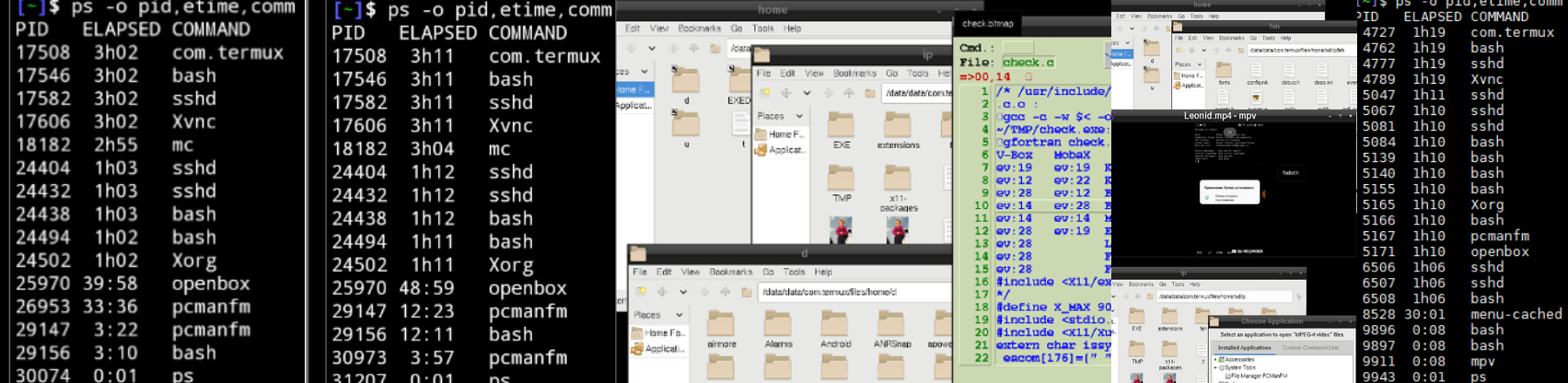
The first two shots show the process status after 40 and 49 minutes. The _pcmanfm_ process is started twice (from a ssh/PC and the phone itself). I had killed 26953 after I only got a blackscreen but no segfault. After lunch I started another attempt (script s above). Again from two devices and 3 times _pcmanfm_. Now _three_ windows were opened but only one _pcmanfm_ (5167) and 8528 (last shot). I have not yet discovered the secret of the program, but could analyse all pictures and show _your_ video (mpv+ without stop-buttom).
Control with mouse and KB is still difficult. I bought a blutooth KB today, which I can use for all devices but is too big to put in my pocket with mobile phone. Window editing is hardly possible without a mouse (USB) and MB3 always ends the sparkle session.
I will continue to test and inform you, if I still get a _segfault_.
Your version allows to switch to sparkle via navigation drawer - nice -can I get it too (I had described above my wish)?
RalfWerner
on 17 Apr 2019
I wrote above that it is not easy to produce.
There 2 variants:
- Click many times on window label.
- Open pcmanfm and select some files, then move cursor to find positions where selection will start flicker and continue until it freezes or crash. This variant is shown on video.
Your version allows to switch to sparkle via navigation drawer - nice -can I get it too (I had described above my wish)?
Your and my versions different and this is why you can't reproduce segfault, though it exist in all these apks.
I can build sparkle and app of this version and post here
xeffyr
on 17 Apr 2019
_Yes_, thank you - a new version here would be very nice. Although with plugins-possibility (F-droid) would be even better.
Is possibly the _aarch_ (1) version unstable compared to _arm_ (2)? A _termux runtime_ of 7/24 (a whole week) I've never reached. At (2) I am currently at 5/1. On (1) termux is often ended unfounded, even if I do _not use it_ - e.g. with multiple parallel TV use (regardless of Xorg or sparkle). I have not yet assigned the behavior to the _Termux app_ but to my device.
In your video, you started Xorg in [1] (I had done that via the widget plugin as well as it was still possible). In [2] then openbox &; pcmanfm with their std log's. After segfault termux was restarted and the log's from [2] are lost.
Experiments with fluxbox &; pcmanfm failed (start ok). the change between Termux and Sparkle is only possible with the _start screen_ and I can not generate a _mouse/finger-cursor_ (as in your video below - only big USB mouse) I can repeat _"flicker"_ until my fingers get lame and _"freeze"_ sometimes for a while. My touch.c test program uses XCreateFontCursor, which works otherwise, but here in sparkle not - what did you do?
Addendum to segfault:
In addition to _Xorg_, I also tested _Xvnc, XSDL_ (your recommendation) and _Mattkwan (uninteresting - only on-screen KB well and xterm work)_. It's easier to create segfault with these _Xservers_ than with _Xorg/Sparkle_. The last two do not need a PID in termux.
In the s-script all three can be used in parallel. In your example, can also openbox - startup pcmanfm used with c=o; printf '%s\n' "t :0 $c&" "t $c&" "t 00 $c &"> a; chmod + x a; a& two PIDs are generated on each of the three _Xservers_ (shot 1). I have extended my tests with t 15 o on the Xorg server of my PC (without WM - is already there - shot 2 - start from mobax/ssh on phone). Action: - resize window - select sd/ip - open (doubleclick) check.jpg - resize (ctrl+MB1) - rotate (ctrl+MB2) - move windows - screenshot.
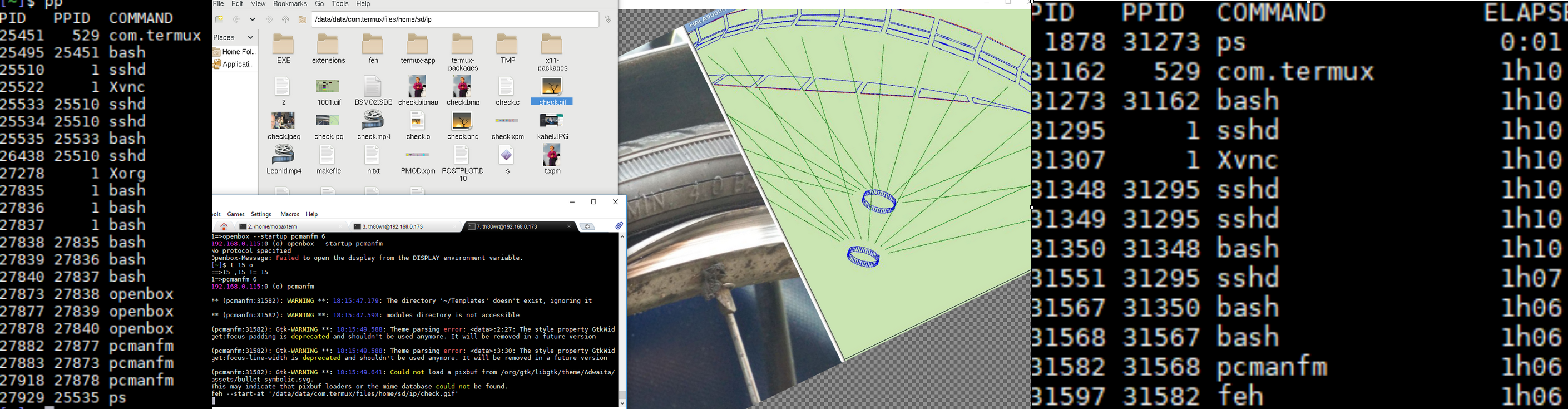
No problems with PC (shot 3 stop test after 1 hour). _Xvnc_ 1st segfault in the first attempt to open VNC (restart termux) then 2nd segfault after 30 seconds (MB-actions not possible) at the "window move" action.
_XSDL_ after 40 seconds segfault in "select sd/ip". The windows are very small (despite glasses) USB and finger mouse do not work together. A detailed _Xorg_ test I do when I have your new version.
My new Bluetooth KB in termux works well, when I set in android the on-screen-KB's to "german" (not needed for itself) and different in the 4_Xservers._
Without mouse-cursor, the finger position becomes the cursor, and hidden by itself, which corresponds to the typical smart _phone_ operation. In order to use actions with text display and selection menus, these must be left standing or remain after the _finger movement_.
The application here (check.c) is designed to support PC _and_ phone devices. It creates an editor-like table with the program source, some _mouse/finger_ functions, icons and up to 4 graphics.
Typical for _phones_ is the _"Window Manager (WM) free"_ usage (without fluxbox/openbox) and the _"portrait/landscape fulls creen mode"_ as standard. This eliminates the tedious task of moving and resizing windows. Instead, the windows are faded in or out or hierarchically managed by gestures.
RalfWerner
on 18 Apr 2019
xeffyr
on 19 Apr 2019
Thanks for the three files! Unfortunately I was not able to install termux-debug.apk on my mobile.
All workarounds described above have worked with your current *.apk (April 764 Kb) only once (onetermux shortcut) and never again after uninstall.
Your last termux-debug.apk (March 647 Kb) generated 2 shortcuts termux + sparke. Then there are the (fdroid 643 Kb) and the (gplay 651 Kb) versions _now_ with 2 shortcuts termux + termux (failsafe) produced. The restoration of all old versions (800 / 640Mb) and also the api/widget _fdroid_ plugins was no problem.
Is possibly the yesterday in your team discussed: _"TermuxActivity does not have label"_ responsible for my failure?
RalfWerner
on 22 Apr 2019
Is possibly the yesterday in your team discussed: "TermuxActivity does not have label" responsible for my failure?
It affected only F-Droid's web page. Application is fine, it should have 2 icons.
xeffyr
on 22 Apr 2019
I have again uninstalled all termux.apk from my (1) and my wife's (2) (Termux free) and tried to reinstall your * .apk. No problem on (2=arm) - it generates _one_ shortcut/icon and I can trace your _*.mp4_ up to 16th second (tab SPARKLE). Then the message appears (translated): Termux stopped / reopen?. However, I've used sparkle_0.1a_arm.deb from above, which (Mar 24) may not work.
No chance on (1=arch). There is like above always the message: _App not installed_ and a DONE _button_. Can I find a logfile and where? Plugins still can not be installed right now?
RalfWerner
on 22 Apr 2019
Plugins still can not be installed right now?
No, they probably signed with different key.
xeffyr
on 22 Apr 2019
Ok - too many questions in one comment. No logfile if install failed?!
The arm-Termux abort (fluxbox/xterm processes ok) is done _"before/in"_ the sparkle switch!?
Speaking of key - I have issue 52 reopened because E404 - not your resposibility?!
RalfWerner
on 22 Apr 2019
No logfile if install failed?!
Android doesn't store logfiles if install failed. But you can view error message if installing with ADB, for example you can get something like:
adb: failed to install com.termux.window_11.apk: Failure [INSTALL_FAILED_SHARED_USER_INCOMPATIBLE: Package couldn't be installed in /data/app/com.termux.window-ou7XcZyhKdW1h7txIAtgLQ==: Package com.termux.window has no signatures that match those in shared user com.termux; ignoring!]
- message shown above means that signatures between main app and addon incompatible.
I have issue 52 reopened because E404 - not your resposibility?!
No, https://github.com/its-pointless/gcc_termux is managed by @its-pointless.
xeffyr
on 22 Apr 2019
Thanks, with ./adb install -r .\app-debug.apk I get Performing Streamed Install Success on (1), for whatever reason?! I sent my sons the *.apk via WhatsApp: Success on Samsung/Android: 8.0.0/ aarch64 and impossible on Android: 6.1 (too old ?!) - anyway. I've reinstalled my last backup (645Mb from 180Mb as t.tgz) and updated your *.deb files:
[~/sd/ip/x]$ ll
-rwxrwx--- 1 root everybody 764475 Apr 20 13:02 app-debug.apk
-rwxrwx--- 1 root everybody  90540 Apr 20 13:02 sparkle-aarch64.deb
-rwxrwx--- 1 root everybody 699746 Apr 20 13:02 xorg-server_1.20.4_aarch64.deb
[~/sd/ip/x]$ dpkg -i *.deb
(Reading database ... 16837 files and directories currently installed.)
Preparing to unpack sparkle-aarch64.deb ...
Unpacking sparkle (0.1b) over (0.1b) ...
Preparing to unpack xorg-server_1.20.4_aarch64.deb ...
Unpacking xorg-server (1.20.4) over (1.20.4) ...
Setting up xorg-server (1.20.4) ...
[~]$ ll ~/u/bin/Xorg
-rwx------ 1 u0_a152 u0_a152 67320 Mar 23 23:40 /data/data/com.termux/files/home/u/bin/Xorg
what will be new now? _Xorg_ is still from March! I've checked again your example as above described and compare with your *.mp4:

Shot1 your data unzipped in Android, Shot2 start pcmanfm in openbox, Shot3 drawer to select Xorg/SPARKLE, Shot4 Xorg-view with 5 buttons below (new KEYBORD and LEAVE) Shot5 On-Screen-KB (Hackers) all in portrait and fullscreen. Than I've rotate the phone:

to landscape Shot6 small mouse-cursor (under finger and syncs with USB mouse) is visible and Shot7 with On-Screen-KB (swift) usable.
So far you have done a _fantastic job_ (more than in your _*.mp4_) and most (no plugins possible) of my wishes (above) implemented. Many Thanks.
A segfault (with msg - like in your _.mp4_) I could not produce so far (I keep on testing) but often I get a "black screen" (bm) e.g. when I switch by LEAVE in Termux and then try to switch back to Xorg. The processes, however, all remain *last shot. KEYBOARD button is lost after _first use!?_ Do you have the same behavior?
continue _bm_ test
Once the _blackscreen mode_ (bm) is reached, I can not finish it without killing Termux itself! - you?
Meanwhile, I have found: _com.termux_ is the _"termux process itself"_ and can be terminated with _kill_ ps -o pid, comm|grep com|cut -dc -f1 (alias k in s). Unfortunately, the bm occurs very often (not only while toggling)! t l executes: s=TMP/T.log; logcat -d>$s; grep 'E' $s (in s script) and produces following output (partially selected by me):
[~]$ t l
--------- beginning of crash
04-24 10:36:30.999 11830 11922 F libc    : Fatal signal 11 (SIGSEGV), code 1, fault addr 0x0 in tid 11922 (Thread-5)
04-24 10:36:31.296 11954 11954 F DEBUG   : ABI: 'arm64'
04-24 10:36:31.296 11954 11954 F DEBUG   : pid: 11830, tid: 11922, name: Thread-5  >>> com.termux <<<
04-24 12:36:02.263 16346 16383 E vndksupport: Could not load vendor/lib64/egl/libGLES_mali.so from sphal namespace: dlopen failed: library "vendor/lib64/egl/libGLES_mali.so" not found.
In total, TMP/T.log (above in ip contains 560 lines of which 64 with 'F DEBUG' and 4 with 'F libc'. Do you get that too and what solution could be there?
RalfWerner
on 23 Apr 2019
Dear specialists,
Thank you for yours programmers complex work on Xserver full implementation with Termux. Do you think, that it will support External Bluetooth keyboard? Or unfortunately for now, only touch keyboard will work?
And does yours implementation support as many Xprotocol features as possible? Try to test it with Firefox or with Seamonkey. It would be interesting.
 JanuszChmiel
on 24 Apr 2019
JanuszChmiel
on 24 Apr 2019
@JanuszChmiel Firefox is my favorite browser, and the Bluetooth keyboard has no limits. My enthusiasm for KB in Xorg referred to the _option of displaying_ an "On-screen KB". The implementation in X-protocol does not work, just like all other external KB do not produce XEvents.
My main problem at the moment is the blackscreen, which can only be fixed by completely terminating Termux and the traceback (logcat).
Specialists are @xeffyr and @twaik and maybe you? I know a lot about X11. But much of the Android / repo / package / architecture management is still alien to me and I can do it only limited self.
I have understood that currently the architectures _arm_ and _aarch_ are used and problems should only in _aarch_ (my phone) occur. In the log (above) is an ABI: arm64 msg? At the moment I can not test the _arm_ version because I miss the corresponding * .deb.
RalfWerner
on 25 Apr 2019
I have also testet stable dummi driver. In this case, all Xprotocol
functions are supported but keyboard and other input can not be used.
Orca screen reader have started but it did not have keyboard feetback.
Xserver XSDL works, but switching between windows from Termux or other
window to Xserver makes it unstable.
JanuszChmiel
on 25 Apr 2019
My research of XInput in the recommended Xserver has been described above, e.g. here and in Addendum to segfault. I do not know what is "stable dummi driver" and "Orca" does not seem to be a contributor to "X11 on phones".
But I tested (check.c) again under the _Bluetooth KB-aspect_ the Xserver: _Xorg(PC), XSDL_ and _Xvnc_. In all cases, all XInputs of the KB will be correctly interpreted on the mobile/PC, if the corresponding pairing is used. Then the _"on-screen KB"_ disappears and appears again after "decoupling".

1.Shot photo of PC monitor and Bluetooth-KB (pairing: white-key-1), 2.Shot _XSDL_ with Swift-On-Screen-KB (bug on top), 3.Shot _Xvnc_ with Hackers-On-Screen-KB,and 4.Shot with pairing: white-key-2.
Since it works here on the phone, so it should not be a _fundamental problem_ to realize that in Sparkle. In Termux itself I tested the KB without problems in the bash and with mc - with the same behavior.
In mc even better, because there, the On-screen-KB can be turned on without _"App-change"_.
@xeffyr As next step I would like to test on a _arm_ device (2) with *arm64.deb.gz whether the _blackscreen modus_ there _not_ occurs and possibly get I files and a brief comment from you Leonid, to my questions above and the next.
The log is subdivided with _beginning of_: crash, system and main. Where could I _traceback_ segfaults at best and do you have understand all of log above?
RalfWerner
on 25 Apr 2019
@RalfWerner Resigned termux-app and termux-api:
termux-api.apk.gz
termux-sparkle.apk.gz
xeffyr
on 5 May 2019
@twaik @xeffyr - You had announced _soon_ a Termux version _with_ lorie _Xserver_ will ready for test.
Is it this repo and APK from last _month_? Is it ready/finished and usable (how) or _"in progress"_?
Could you please prepare a lorie *.apk.gz, as in previous comment, that I can test? I described my unsuccessful attempt in liblorie.
RalfWerner
on 14 May 2019
I'm new to Termux and I recently got X11 to work. While X forwarding is working, it's kinda slow. Has anyone tried compiling Xpra to work in Termux? Just curious if this is even possible.
 brianwoo
on 8 Aug 2019
xeffyr
on 22 Sep 2019
brianwoo
on 8 Aug 2019
xeffyr
on 22 Sep 2019
Wouldn't a split screen work on mobile?
I'm still learning
 canofworm
on 15 Oct 2019
canofworm
on 15 Oct 2019
Related issues
 newmania
·
3Comments
newmania
·
3Comments
 Wetitpig
·
3Comments
Wetitpig
·
3Comments
 roalyr
·
3Comments
roalyr
·
3Comments
 bkdwt
·
3Comments
bkdwt
·
3Comments
 adit
·
3Comments
adit
·
3Comments