Termux-packages: create-react-app error: cb() never called!
Problem description
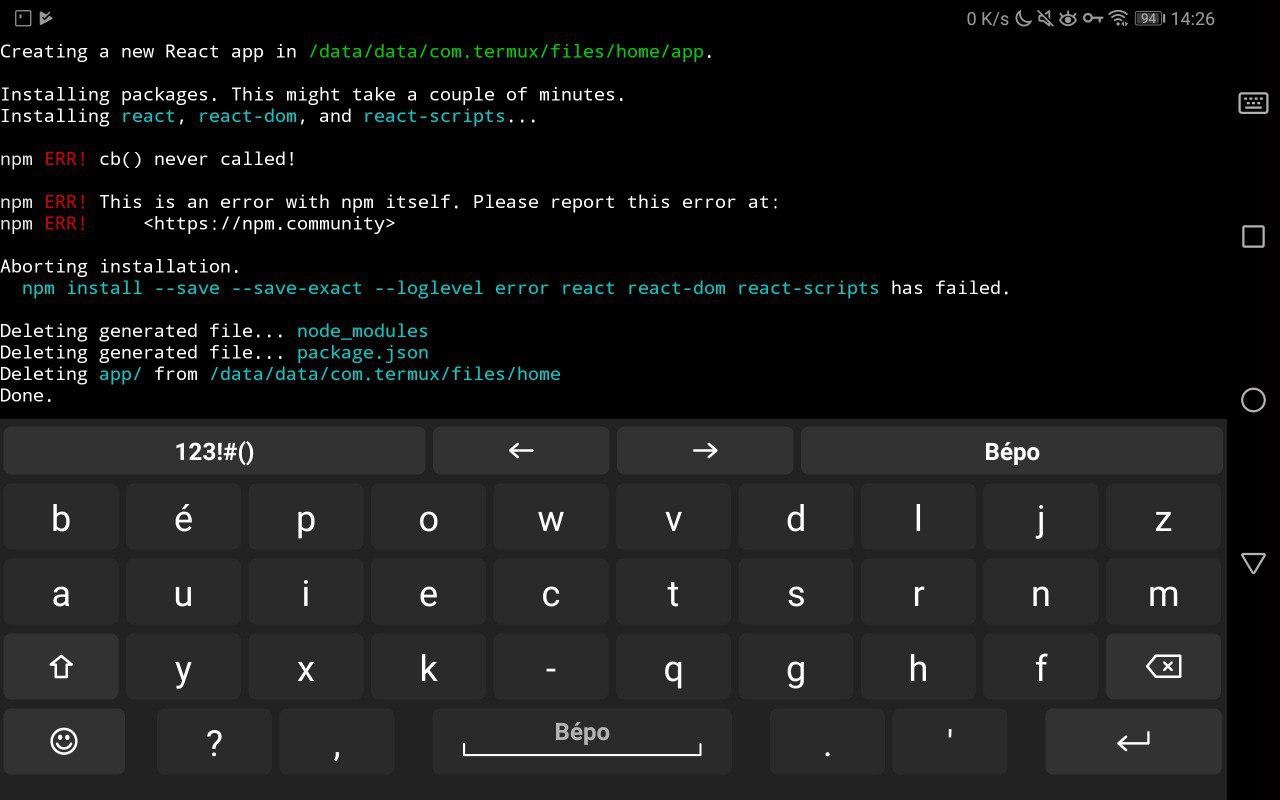
Using create-react-app after having installed with npm i -g create-react-app results in a fatal error.
I saw several people on the Internet recommending to erase the cache, but this workaround did not work.
Steps to reproduce
pkg i nodejsnpm i -g create-react-appcreate-react-app app
Expected behavior
I would have expected a bootstrapped React app
Additional information
$ termux-info
Updatable packages:
All packages up to date
System information:
Linux localhost 4.4.23+ #1 SMP PREEMPT Tue Dec 4 09:52:16 CST 2018 aarch64 Android
Termux-packages arch:
aarch64
Android version:
8.0.0
Device manufacturer:
HUAWEI
Device model:
SHT-W09

 tchoutri
All 2 comments
Attempted to reproduce, didn't get any errors from npm. Only got an error from create-react-app due to it attepting to hardlink.
$ pkg i nodejs
Hit:2 https://termux.net stable InRelease
Ign:3 https://dl.bintray.com/xeffyr/unstable-packages unstable InRelease
Ign:4 https://dl.bintray.com/xeffyr/x11-packages x11 InRelease
Get:5 https://its-pointless.github.io/files termux/extras aarch64 Packages [18.5 kB]
Get:6 https://dl.bintray.com/xeffyr/unstable-packages unstable Release [6065 B]
Hit:6 https://dl.bintray.com/xeffyr/unstable-packages unstable Release
Get:7 https://dl.bintray.com/xeffyr/x11-packages x11 Release [6055 B]
Hit:7 https://dl.bintray.com/xeffyr/x11-packages x11 Release
Fetched 18.5 kB in 3s (4874 B/s)
Reading package lists... Done
Building dependency tree
Reading state information... Done
All packages are up to date.
Reading package lists... Done
Building dependency tree
Reading state information... Done
nodejs is already the newest version (11.9.0).
nodejs set to manually installed.
0 upgraded, 0 newly installed, 0 to remove and 0 not upgraded.

$ npm i -g create-react-app
/data/data/com.termux/files/usr/bin/create-react-app -> /data/data/com.termux/files/usr/lib/node_modules/create-react-app/index.js
+ [email protected]
added 63 packages from 20 contributors in 11.52s

$ create-react-app app
Creating a new React app in /data/data/com.termux/files/home/app.

Installing packages. This might take a couple of minutes.
Installing react, react-dom, and react-scripts...

+ [email protected]
+ [email protected]
+ [email protected]
added 1847 packages from 719 contributors and audited 36343 packages in 178.284s
found 0 vulnerabilities

/data/data/com.termux/files/home/app/node_modules/react-scripts/scripts/init.js:153
      throw err;
      ^

Error: EACCES: permission denied, link '/data/data/com.termux/files/home/app/gitignore' -> '/data/data/com.termux/files/home/app/.gitignore'
    at Object.linkSync (fs.js:955:3)
    at tryRenameSync (/data/data/com.termux/files/home/app/node_modules/fs-extra/lib/move-sync/index.js:40:12)
    at Object.moveSync (/data/data/com.termux/files/home/app/node_modules/fs-extra/lib/move-sync/index.js:22:3)
    at module.exports (/data/data/com.termux/files/home/app/node_modules/react-scripts/scripts/init.js:141:8)
    at [eval]:3:14
    at Script.runInThisContext (vm.js:123:20)
    at Object.runInThisContext (vm.js:312:38)
    at Object.<anonymous> ([eval]-wrapper:6:22)
    at Module._compile (internal/modules/cjs/loader.js:734:30)
    at evalScript (internal/process/execution.js:56:25)

Aborting installation.
  node  has failed.

Deleting generated file... node_modules
Deleting generated file... package.json
Done.
Perhaps use yarn? npm i -g yarn.
$ npm i -g yarn
/data/data/com.termux/files/usr/bin/yarn -> /data/data/com.termux/files/usr/lib/node_modules/yarn/bin/yarn.js
/data/data/com.termux/files/usr/bin/yarnpkg -> /data/data/com.termux/files/usr/lib/node_modules/yarn/bin/yarn.js
+ [email protected]
added 1 package in 2.37s

$ create-react-app app

Creating a new React app in /data/data/com.termux/files/home/app.

Installing packages. This might take a couple of minutes.
Installing react, react-dom, and react-scripts...

yarn add v1.13.0
[1/4] Resolving packages...
[2/4] Fetching packages...
info [email protected]: The platform "android" is incompatible with this module.
info "[email protected]" is an optional dependency and failed compatibility check. Excluding it from installation.
info [email protected]: The platform "android" is incompatible with this module.
info "[email protected]" is an optional dependency and failed compatibility check. Excluding it from installation.
[3/4] Linking dependencies...
warning "react-scripts > pnp-webpack-plugin > [email protected]" has unmet peer dependency "typescript@*".
[4/4] Building fresh packages...
success Saved lockfile.
success Saved 4 new dependencies.
info Direct dependencies
├─ [email protected]
├─ [email protected]
└─ [email protected]
info All dependencies
├─ [email protected]
├─ [email protected]
├─ [email protected]
└─ [email protected]
Done in 68.01s.
/data/data/com.termux/files/home/app/node_modules/react-scripts/scripts/init.js:153
      throw err;
      ^

Error: EACCES: permission denied, link '/data/data/com.termux/files/home/app/gitignore' -> '/data/data/com.termux/files/home/app/.gitignore'
    at Object.linkSync (fs.js:955:3)
    at tryRenameSync (/data/data/com.termux/files/home/app/node_modules/fs-extra/lib/move-sync/index.js:40:12)
    at Object.moveSync (/data/data/com.termux/files/home/app/node_modules/fs-extra/lib/move-sync/index.js:22:3)
    at module.exports (/data/data/com.termux/files/home/app/node_modules/react-scripts/scripts/init.js:141:8)
    at [eval]:3:14
    at Script.runInThisContext (vm.js:123:20)
    at Object.runInThisContext (vm.js:312:38)
    at Object.<anonymous> ([eval]-wrapper:6:22)
    at Module._compile (internal/modules/cjs/loader.js:734:30)
    at evalScript (internal/process/execution.js:56:25)

Aborting installation.
  node  has failed.

Deleting generated file... node_modules
Deleting generated file... package.json
Deleting generated file... yarn.lock
Done.
To create an app without the linkSync error, create the app directory with a gitignore before running create-react-app.
$ mkdir app
$ touch app/.gitignore
$ create-react-app app

Creating a new React app in /data/data/com.termux/files/home/app.

Installing packages. This might take a couple of minutes.
Installing react, react-dom, and react-scripts...

yarn add v1.13.0
[1/4] Resolving packages...
[2/4] Fetching packages...
info [email protected]: The platform "android" is incompatible with this module.
info "[email protected]" is an optional dependency and failed compatibility check. Excluding it from installation.
info [email protected]: The platform "android" is incompatible with this module.
info "[email protected]" is an optional dependency and failed compatibility check. Excluding it from installation.
[3/4] Linking dependencies...
warning "react-scripts > pnp-webpack-plugin > [email protected]" has unmet peer dependency "typescript@*".
[4/4] Building fresh packages...
success Saved lockfile.
success Saved 4 new dependencies.
info Direct dependencies
├─ [email protected]
├─ [email protected]
└─ [email protected]
info All dependencies
├─ [email protected]
├─ [email protected]
├─ [email protected]
└─ [email protected]
Done in 19.29s.

Success! Created app at /data/data/com.termux/files/home/app
Inside that directory, you can run several commands:

  yarn start
    Starts the development server.

  yarn build
    Bundles the app into static files for production.

  yarn test
    Starts the test runner.

  yarn eject
    Removes this tool and copies build dependencies, configuration files
    and scripts into the app directory. If you do this, you can’t go back!

We suggest that you begin by typing:

  cd app
  yarn start

Happy hacking!
 ghost
on 12 Feb 2019
ghost
on 12 Feb 2019
👍3
Had a similar issue, I just restart my mac it started working all fine
 ReemaGowda
on 29 May 2019
ReemaGowda
on 29 May 2019
❤1
Was this page helpful?
0 / 5 - 0 ratings
Related issues
 tigran123
·
3Comments
tigran123
·
3Comments
 StephanBeer
·
3Comments
StephanBeer
·
3Comments
 bbtdev
·
3Comments
bbtdev
·
3Comments
 Zuccace
·
3Comments
Zuccace
·
3Comments
 loveablefellow007
·
3Comments
loveablefellow007
·
3Comments
Most helpful comment
Attempted to reproduce, didn't get any errors from npm. Only got an error from
create-react-appdue to it attepting to hardlink.Perhaps use yarn?
npm i -g yarn.To create an app without the
linkSyncerror, create the app directory with a gitignore before runningcreate-react-app.