Termux-packages: ecj: version 4.7.2 incompatible with android 5 and 6
ecj suddenly failed after not using it for a few days. The identical error occurs for simple test code:
$ cat Hello.java
public class Hello {
  public static void main(String[] args) {
    System.out.println("hello world");
  }
}
$ ecj Hello.java
java.lang.NoClassDefFoundError: org.eclipse.jdt.internal.compiler.batch.-$$Lambda$ClasspathLocation$GQimjP-835AJ59yLyUnQopLF5GE
    at org.eclipse.jdt.internal.compiler.batch.ClasspathLocation.getModuleNames(ClasspathLocation.java:129)
    at org.eclipse.jdt.internal.compiler.batch.FileSystem.initializeModuleLocations(FileSystem.java:222)
    at org.eclipse.jdt.internal.compiler.batch.FileSystem.<init>(FileSystem.java:212)
    at org.eclipse.jdt.internal.compiler.batch.Main.getLibraryAccess(Main.java:3447)
    at org.eclipse.jdt.internal.compiler.batch.Main.performCompilation(Main.java:4631)
    at org.eclipse.jdt.internal.compiler.batch.Main.compile(Main.java:1771)
    at org.eclipse.jdt.internal.compiler.batch.Main.main(Main.java:1479)
$ ecj -version
Eclipse Compiler for Java(TM) v20171123-1049, 3.13.100, Copyright IBM Corp 2000, 2015. All rights reserved.
It stumped me. I tried rebooting the phone; also, reinstalling ecj (it was already the latest version, 3.13.100).
The only thing I can think of is that I played around with proot a fair bit last night (changing directories with -b; I couldn't get -r to work). However, all those shells would have exited.
I haven't noticed problems with other code (eg py, clang, dx, apt).
BTW I am on Lollipop 5.1; and the latest version of termux (0.65)
Any ideas what this could be or how to fix it?
 hyperpallium
All 44 comments
Could you share the simple test code?
 Grimler91
on 9 Aug 2018
Grimler91
on 9 Aug 2018
@Grimler91 thanks; edited into question
hyperpallium
on 9 Aug 2018
Compiles fine for me on aarch64 8.0 and arm 7.1, (after changing public class Hello to class Hello), so might be something that only happens on android 5
Grimler91
on 9 Aug 2018
@Grimler91 Thanks for checking. I've compiled a lot of java with ecj on my setup with no problems - until today.
I can't think what's changed, except maybe something due to proot?
I don't think ecj has changed either - I hadn't upgraded it specifically, and I don't think I've done a general apt upgrade recently (though not sure). I don't think there's a way to check for the date of a package with apt, but I don't think there's even been a new version out recently.
EDIT There was a pretty big new version of ecj 14 days ago, ecj: Update from 4.6.2 to 4.7.2, and I did have this version before reinstalling. And the last time I compiled code was Aug 29... so it's possible this is the reason.
I see that Eclipse is "embracing" Java 8, which doesn't work on Lollipop 5.1. And since you're on Oreo 8.0 which is the first to support Java 8, that would explain it.
Is there some way to downgrade to a previous version of ecj, to check that this is the cause?
EDIT I found the log for apt ~/../usr/var/log/apt/history.log, and in fact I did do a general upgrade on 2018-08-03 (after the last time ecj workes), and it did upgrade ecj (ecj:arm (4.6.2-3, 4.7.2)). So it's looking a very plausible candidate for the cause.
hyperpallium
on 9 Aug 2018
I don't see how proot would be related, but who knows.
There's a newer version of ecj available, could you try if it works?
https://grimler.se/dists/testing/misc/binary-all/ecj_4.7.3a_all.deb
Grimler91
on 9 Aug 2018
@Grimler91 Thanks very much for preparing that. Unfortunately it gives the same error.
java.lang.NoClassDefFoundError: org.eclipse.jdt.internal.compiler.batch.-$$Lambda$ClasspathLocation$GQimjP-835AJ59yLyUnQopLF5GE
    at org.eclipse.jdt.internal.compiler.batch.ClasspathLocation.getModuleNames(ClasspathLocation.java:129)
    at org.eclipse.jdt.internal.compiler.batch.FileSystem.initializeModuleLocations(FileSystem.java:222)
    at org.eclipse.jdt.internal.compiler.batch.FileSystem.<init>(FileSystem.java:212)
    at org.eclipse.jdt.internal.compiler.batch.Main.getLibraryAccess(Main.java:3463)
    at org.eclipse.jdt.internal.compiler.batch.Main.performCompilation(Main.java:4647)
    at org.eclipse.jdt.internal.compiler.batch.Main.compile(Main.java:1773)
    at org.eclipse.jdt.internal.compiler.batch.Main.main(Main.java:1479)
It's looking like a Java 8 problem. I'll try to confirm in which version Eclipse adopted Java 8 for ecj.
PS I edited my previous comment (the problem happened after upgrading to the new ecj, after all)
hyperpallium
on 9 Aug 2018
Alright.
We don't have older debs available. I guess we should downgrade ecj, at least while we support android 5 (we've talked about dropping android 5 support).
Grimler91
on 9 Aug 2018
Confirming that this was the problem: I built the older version (4.6.2) in termux, and everything works now.
In case anyone needs this before the repository is changed, here's what I did:
Downloaded ecj-4.6.2.jar from http://archive.eclipse.org/eclipse/downloads/drops4/R-4.6.2-201611241400/
Built it using the termux-packages build.sh for ecj as a guide: https://github.com/termux/termux-packages/blob/bc52f5e1f59b7fc99bb198811bb86e64d82c3b29/packages/ecj/build.sh
That is, created another ecj.jar, containing classes.dex (obtained by dexing the downloaded jar), and various *.properties and *.rsc (taken directly from the downloaded jar).
Then install it at ~/../usr/share/dex/ecj.jar. [The other files needed, android.jar, android-21.jar, ecj, ecj-21 are the same - so just left the ones already there]
Because ths termux repository does not have jar, I had to modify the build.sh to use unzip and zip. Also, dx ran out of ram, so doubled it to -Xmx512m at /data/data/com.termux/files/usr/bin/dx, which was fine.
hyperpallium
on 9 Aug 2018
@Grimler91 I'm just a humble user, but... I think it's important for termux to support Android 5. For previous versions, there's Terminal IDE. But there's nothing else like either to fill the gap if termux abandoned it.
EDIT The other issue is what are the advantages of the version bump?
BTW if such a great step were to be made, might it make sense to make other dramatic changes at the same time, like a proot based approach, instead of modifying paths in the source?
hyperpallium
on 9 Aug 2018
Humble user input is good :) we should create a information/discussion/tracking thread for the upgrade but haven't got around to doing that yet.
We'll perhaps/hopefully end up with a new android-5 repo for people which doesn't receive updates (or is maintained by someone else).
EDIT The other issue is what are the advantages of the version bump?
Version bump of supported android version?
Android 6, and android 7, have more functionality which makes porting packages easier. Some packages also simply won't work on earlier android versions (as noticed for ecj for example).
Proot based approach most likely won't happen, you have solutions like termuxarch, termux-ubuntu for that. We (potentially) save time by not having to filter all executed commands.
Grimler91
on 9 Aug 2018
@Grimler91
Version bump of supported android version?
Sorry, I meant version bump of ecj. 4.7 didn't add very much to the compiler https://www.eclipse.org/eclipse/news/4.7/jdt.php#JavaCompiler (the Eclipse project is much bigger than just ecj; there were greater changes elsewhere). I'm not sure how to compare details of specific point releases like 4.6.2 vs. 4.7.2, apart from going through all the release notes.
Because ecj is pure java (I'm sure because I just built it), and AFAIA the only compatibiliy change to android's "JVM" came with Oreo 8, ecj 4.7.2 won't work on android 5, 6 and 7. [Unconfirmed hypothesis at this point.]
we should create a information/discussion/tracking thread for the upgrade but haven't got around to doing that yet.
That suggests it's not very serious, thank goodness!
A general argument for maintaining the original version of android (Lollipop) is that termux is more than what it is in itself: it turns affordable phones into full computers.
This plays a role in the broad historical process, of computers becoming smaller, cheaper, more power efficient, more convenient.
This isn't relevant to the latest flagship phones. But it is of practical importance to many people - particularly those in the developing world.
Termux is more than what it is.
hyperpallium
on 10 Aug 2018
I am not sure about the idea of just reverting to the older version of ecj. Perhaps we can provide both with separate packages though.
But seriously even Google has declared EOL to Lollipop (AFAIK). You can't really cling onto old systems and say "please provide support to us" forever...
 tomty89
on 10 Aug 2018
tomty89
on 10 Aug 2018
@tomty89 What benefit do you get from the new version of ecj?
Not changing the software so it stops working isn't exactly the same as "please provide support to us" forever. It's more like "please don't break it."
Google might not be a good role model, since they have an has an interest in pushing new versions, as each one integrates google more closely, with privacy issues etc. There's also bloat and inefficiency. They couldn't get away with that in early versions, because it would harm adoption. But now they are so well established that they can.
hyperpallium
on 10 Aug 2018
What benefit do you get from the new version of ecj?
I don't really see a point in asking or getting a concrete/specfic answer for this question, as if one asks it for one package, he/she can go on asking that for every package even for a minor update. And @Grimler91 has already given you a general-speaking one.
I can ask the counter question (which is equivalently pointless) as well. What benefits do I get by clinging onto the old ecj when I am not going to using a device with Lollipop on it? And till when?
Note that Termux is a downstream. If you think the eclipse team breaks ecj backward compatibility without a good reason, they are the one you want to reason with.
tomty89
on 10 Aug 2018
theaapt begun!
Configurations:
 (default)
 ldpi-v4
 mdpi-v4
 hdpi-v4
 xhdpi-v4
 xxhdpi-v4

Files:
  drawable/ic_launcher.png
    Src: (ldpi-v4) ./res/drawable-ldpi/ic_launcher.png
    Src: (mdpi-v4) ./res/drawable-mdpi/ic_launcher.png
    Src: (hdpi-v4) ./res/drawable-hdpi/ic_launcher.png
    Src: (xhdpi-v4) ./res/drawable-xhdpi/ic_launcher.png
    Src: (xxhdpi-v4) ./res/drawable-xxhdpi/ic_launcher.png
  drawable/moon.png
    Src: () ./res/drawable/moon.png
  layout/activity_fullscreen.xml
    Src: () ./res/layout/activity_fullscreen.xml
  values/strings.xml                                                                                                        Src: () ./res/values/strings.xml
  AndroidManifest.xml
    Src: () ./AndroidManifest.xml

Resource Dirs:
  Type drawable
    drawable/ic_launcher.png
      Src: (ldpi-v4) ./res/drawable-ldpi/ic_launcher.png
      Src: (mdpi-v4) ./res/drawable-mdpi/ic_launcher.png
      Src: (hdpi-v4) ./res/drawable-hdpi/ic_launcher.png
      Src: (xhdpi-v4) ./res/drawable-xhdpi/ic_launcher.png
      Src: (xxhdpi-v4) ./res/drawable-xxhdpi/ic_launcher.png
    drawable/moon.png
      Src: () ./res/drawable/moon.png
  Type layout
    layout/activity_fullscreen.xml
      Src: () ./res/layout/activity_fullscreen.xml
  Type values
    values/strings.xml
      Src: () ./res/values/strings.xml
Including resources from package: /data/data/com.termux/files/usr/share/aapt/android.jar
applyFileOverlay for drawable
applyFileOverlay for layout
applyFileOverlay for anim
applyFileOverlay for animator
applyFileOverlay for interpolator
applyFileOverlay for transition
applyFileOverlay for xml
applyFileOverlay for raw
applyFileOverlay for color
applyFileOverlay for menu
applyFileOverlay for mipmap
    (new resource id ic_launcher from ./res/drawable-ldpi/ic_launcher.png)
    (new resource id ic_launcher from ./res/drawable-mdpi/ic_launcher.png)
    (new resource id ic_launcher from ./res/drawable-hdpi/ic_launcher.png)
    (new resource id ic_launcher from ./res/drawable-xhdpi/ic_launcher.png)
    (new resource id ic_launcher from ./res/drawable-xxhdpi/ic_launcher.png)
    (new resource id moon from ./res/drawable/moon.png)
    (new resource id activity_fullscreen from ./res/layout/activity_fullscreen.xml)
  Writing symbols for class R.
ecj begun!
Segmentation fault
$
 SDRausty
on 10 Aug 2018
SDRausty
on 10 Aug 2018
Doesn't anyone check if it works before it's pushed?
*
- comment by sdrausty
I have checked it (but after it was pushed) and it works for me. But I'm on Oreo/8.0.
 xeffyr
on 10 Aug 2018
xeffyr
on 10 Aug 2018
Doesn't anyone check if it works before it's pushed?
It works fine on at least android 7 and 8. Can't speak for all other developers by I test my PR on at least one of my devices. Couldn't have discovered this though since I don't own an android 5/android 6 device.
It takes maybe 5 (five) minutes to check if it works
Testing on all arches and all android versions we support would probably take more that 5 minutes.
Grimler91
on 10 Aug 2018
Test harnesses for this and similar issues are at https://sdrausty.github.io/buildAPKs/setup.
SDRausty
on 11 Aug 2018
@tomty89 The point is balancing improvements in a java compiler against depriving others of this key tool for Android altogether.
Obviously, having both is ideal. Though multiple versions seem uncommon in the termux repository.
EDIT there are two versions for ecj now (4.7.2 and 4.7.3a). Neither work on Lollipop.
hyperpallium
on 11 Aug 2018
There's no such thing as balance in that matter.
We can't just hold the updating/upgrading of a package and call it balance when upstream has broken the compatibility intentionally (i.e., not a bug; and especially if it also stopped maintaining the older version), coz it will always be subjective then when it comes to "when should we stop holding". (Particularly, we are not going to bump our API level to the minimum that ecj 4.7 can work on soon, AFAIK.)
The best thing (and only sane thing) we can do is to have it in a separate package and let it rot till it cannot even be built anymore (or till we have no reason to provide it anymore, i.e. API level bump).
tomty89
on 11 Aug 2018
@Grimler91 Thanks for checking android 7 too. [Has anyone got android 6 to check it there?]
That rules out the big changes in android 8 being the cause. I didn't think there were any compatibility changes to android's "JVM" before 8... so I wonder what it is...
This might be relevant to termux for porting java code to the android platform.
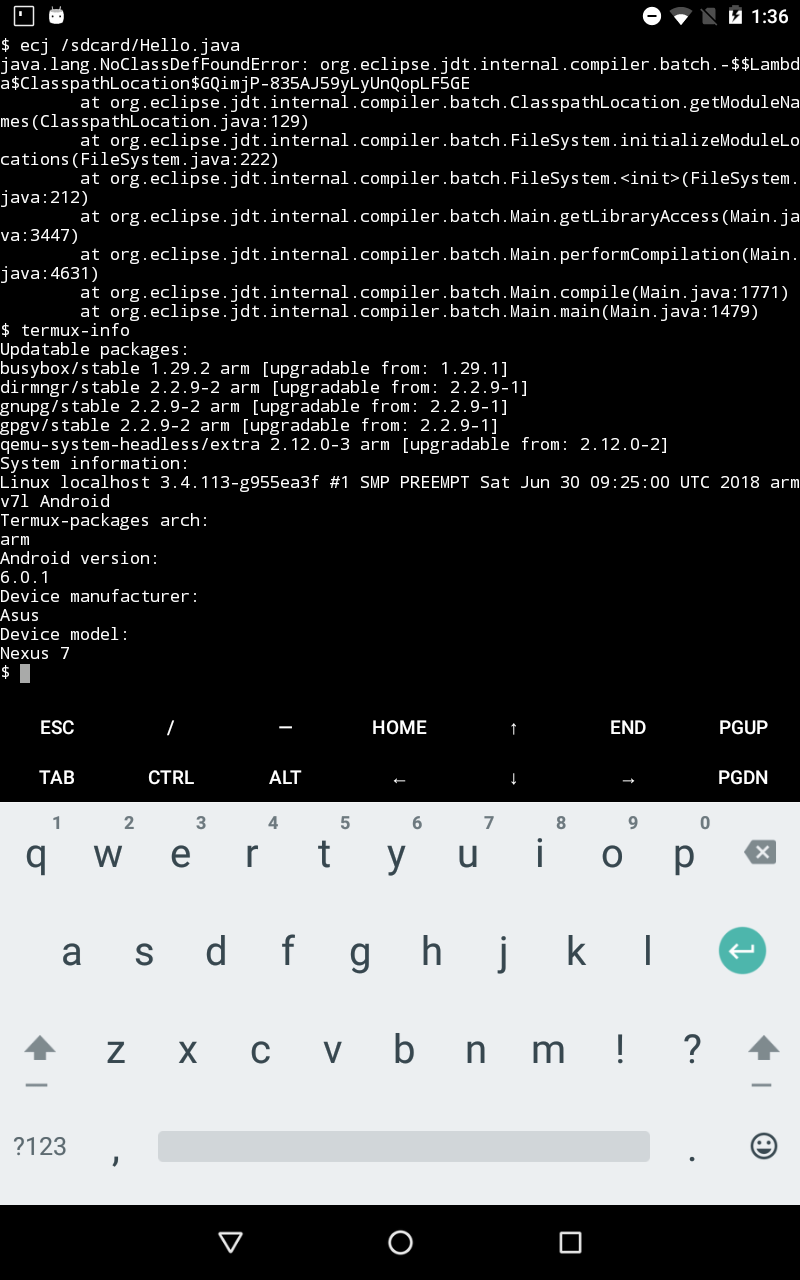
The error here seems to be named as a lambda: -$$Lambda$ClasspathLocation$GQimjP-835AJ59yLyUnQopLF5GE. These were introduced in Java 8... but it shouldn't work in android 7 because (AFAIK) android 7 doesn't support Java 8...
NoClassDefFoundError is often caused by inflating objects whose static initializers throw an exception - such as a class not found.
It also might use modules (getModuleNames, initializeModuleLocations), which also weren't present until java 8.
hyperpallium
on 11 Aug 2018
@hyperpallium Android does not support complete set of Java APIs. But partial support of Java 8 was introduced in Android 7.
xeffyr
on 11 Aug 2018
@xeffyr Thanks - that suggestsecj 4.7.2 also won't work on android 6.
hyperpallium
on 11 Aug 2018
Yes, it won't work on Android 6. Just did a test:
xeffyr
on 11 Aug 2018
@hyperpallium, please could you share your build script for 4.6.2? Thanks in advance.
 HenriDellal
on 11 Aug 2018
HenriDellal
on 11 Aug 2018
@HenriDellal You can just roll back git history of termux-packages to get previous version of scripts.
Here is for 4.6.2:
TERMUX_PKG_HOMEPAGE=http://www.eclipse.org/jdt/core/
TERMUX_PKG_DESCRIPTION="Eclipse Compiler for Java"
TERMUX_PKG_VERSION=4.6.2
_date=201611241400
TERMUX_PKG_REVISION=3
TERMUX_PKG_SRCURL=http://eclipse.mirror.wearetriple.com/eclipse/downloads/drops${TERMUX_PKG_VERSION:0:1}/R-${TERMUX_PKG_VERSION}-${_date}/ecj-${TERMUX_PKG_VERSION}.jar
TERMUX_PKG_SHA256=9953dc2be829732e1b939106a71de018f660891220dbca559a5c7bff84883e51
TERMUX_PKG_PLATFORM_INDEPENDENT=true

termux_step_extract_package () {
    mkdir $TERMUX_PKG_SRCDIR
}

termux_step_make () {
    RAW_JAR=$TERMUX_PKG_CACHEDIR/ecj-${TERMUX_PKG_VERSION}.jar
    if [ ! -f $RAW_JAR ]; then
        termux_download $TERMUX_PKG_SRCURL $RAW_JAR \
            $TERMUX_PKG_SHA256
    fi

        mkdir -p $TERMUX_PREFIX/share/{dex,java}
    $TERMUX_DX \
        --dex \
        --output=$TERMUX_PREFIX/share/dex/ecj.jar \
        $RAW_JAR

    cd $TERMUX_PKG_TMPDIR
    rm -rf android-jar
    mkdir android-jar
    cd android-jar

        # We need the android classes for JDT to compile against.
    cp $ANDROID_HOME/platforms/android-27/android.jar .
    unzip -q android.jar
    rm -Rf android.jar resources.arsc res assets
    jar cfM android.jar .

    cp $TERMUX_PKG_TMPDIR/android-jar/android.jar $TERMUX_PREFIX/share/java/android.jar

    # Bundle in an android.jar from an older API also, for those who want to
    # build apps that run on older Android versions.
    rm -Rf ./*
    cp $ANDROID_HOME/platforms/android-21/android.jar android.jar
    unzip -q android.jar
    rm -Rf android.jar resources.arsc res assets
    jar cfM android-21.jar .
    cp $TERMUX_PKG_TMPDIR/android-jar/android-21.jar $TERMUX_PREFIX/share/java/

    rm -Rf $TERMUX_PREFIX/bin/javac
    install $TERMUX_PKG_BUILDER_DIR/ecj $TERMUX_PREFIX/bin/ecj
    perl -p -i -e "s%\@TERMUX_PREFIX\@%${TERMUX_PREFIX}%g" $TERMUX_PREFIX/bin/ecj
    install $TERMUX_PKG_BUILDER_DIR/ecj-21 $TERMUX_PREFIX/bin/ecj-21
    perl -p -i -e "s%\@TERMUX_PREFIX\@%${TERMUX_PREFIX}%g" $TERMUX_PREFIX/bin/ecj-21
}
Download:
build.sh.txt
xeffyr
on 11 Aug 2018
I posting a compiled v4.6.2 if someone need it:
ecj_4.6.2-3_all.deb.gz
Just gunzip downloaded file and then dpkg -i ecj_4.6.2-3_all.deb.
xeffyr
on 11 Aug 2018
Thank you. I was trying to roll back with pkg install ecj=4.6.2*. Sadly didn't backup packages information, so now that's my lesson.
HenriDellal
on 12 Aug 2018
@HenriDellal looks like @xeffyr got you, anyway:
curl -LO http://archive.eclipse.org/eclipse/downloads/drops4/R-4.6.2-201611241400/download.php?dropFile=ecj-4.6.2.jar

dx --dex --output=ecj-4.6.2.dex ecj-4.6.2.jar
# use unzip/zip, not jar
# result is in: ecj.jar
#   classes.dex
#   properties, rsc  [resources]
# we extract the latter from the original jar, and add it to ecj.jar
set -o errexit

# my setup
cp ecj-4.6.2.dex classes.dex
RAW_JAR=ecj-4.6.2.jar
rm ecj.jar
rm org -r

  # Package classes.dex into jar:
  zip ecj.jar classes.dex

  # Add needed properties file to jar file:
  unzip $RAW_JAR org/eclipse/jdt/internal/compiler/batch/messages.properties
  zip ecj.jar  org/eclipse/jdt/internal/compiler/batch/messages.properties
  unzip $RAW_JAR org/eclipse/jdt/internal/compiler/problem/messages.properties
  zip ecj.jar  org/eclipse/jdt/internal/compiler/problem/messages.properties
  unzip $RAW_JAR org/eclipse/jdt/internal/compiler/messages.properties
  zip ecj.jar  org/eclipse/jdt/internal/compiler/messages.properties
  unzip $RAW_JAR org/eclipse/jdt/internal/compiler/parser/readableNames.props
  zip ecj.jar  org/eclipse/jdt/internal/compiler/parser/readableNames.props
  for i in `seq 1 24`; do
    unzip $RAW_JAR org/eclipse/jdt/internal/compiler/parser/parser$i.rsc
    zip ecj.jar  org/eclipse/jdt/internal/compiler/parser/parser$i.rsc
  done
  # Move into place:
  #mv ecj.jar $TERMUX_PREFIX/share/dex/ecj.jar
I commented out the last installation line. I used ~/../usr/share/dex/ecj.jar
PS I edited the dx line in. I did it partly manually, and only did the tricky modification by editing termux's build.sh
hyperpallium
on 12 Aug 2018
@xeffyr Thanks for checking android 6. To summarize:
android 5 - fail
android 6 - fail
android 7 - "hello world" works
android 8 - "hello world" works
There's a possibility of retrofitting some Java 8 support by patching the java source - which termux does for many c programs already. I don't think it's worth it in this specific case, but might be worthwhile to develop as a technique available for other java programs.
However, it's only possible for some Java 8 features. Specifically, invokedymamic needs "JVM" support.
EDIT ecj 4.7.2 seems to target Java 8, but because android 7 doesn't fully implement Java 8, there's no guarantee that it will fully work on android 7. The minimal "hello world" test code hardly exercises the codebase; there could be other problems (although it might be OK).
According to the Java version,ecj 4.7.2 only matches android 8.
EDIT according to the eclipse release notes, Java 8 started being required in 4.6, although I've had no trouble with it. Of course, ecj is just one of the whole Eclipse project.
As of Eclipse Platform 4.6, and the Neon release, a Java 8 (or later) JRE or JDK is required to run Eclipse.
hyperpallium
on 12 Aug 2018
@hyperpallium since this issue is NOT related to PRoot, can you update the title of this issue as:
ecj: weird error (after playing with proot?)
Might discourage future Termux users and is misleading; "ecj: error" is not.
SDRausty
on 14 Aug 2018
Old ecj debs have just been published here https://github.com/sdrausty/ecj2717 to assist Termux users that encounter errors with the current version while using https://github.com/buildapks and similar…
SDRausty
on 14 Aug 2018
@sdrausty
misleading; "ecj: error" is not.
I agree, and previously tried to edit it (to ecj: weird error in android 5, 6), but github only allowed edit to text - perhaps a collaborator can edit the title?
EDIT thanks @Grimler91
hyperpallium
on 14 Aug 2018
Thank you for changing the title. This should encourage future Termux users to join us; Much appreciated.
SDRausty
on 15 Aug 2018
@hyperpallium might be related to JavaScript and Termux; What do you think?
previously tried to edit it (to
I have had weirder things than cannot edit happen…
SDRausty
on 16 Aug 2018
@sdrausty I'm using a browser; termux isn't involved.
Turns out there are different buttons to edit the issue-title versus editing the issue-body. You must scroll right to see the title edit button (and be in github's desktop mode).
I (wrongly) assumed the problem was a lack of access-rights.
hyperpallium
on 16 Aug 2018
@hyperpallium thank you for your information; the reason I asked is because I have found long ago that scripting is important…
SDRausty
on 16 Aug 2018
@Grimler91 @fornwall It's not really a "bug report", but an incompatibility with android 5 and 6, since they don't support java 8, which ecj 4.7.2 needs.
Unless termux is abandoning both Lollipop and Marshmallow, isn't it appropriate to provide a version compatible with those platforms? i.e. retain ecj 4.6.2
This matters, because a java compiler is a key part of the android tool chain, and ecj is now the only one in the repository.
It's been a week now - what's the process for resolving incompatible packages?
hyperpallium
on 18 Aug 2018
It's not really a "bug report"
It is sort of a bug in this repository, since a package doesn't work as intended. Not a bug in ecj though.
I opened #2747 to add ecj4.6.
Grimler91
on 18 Aug 2018
@Grimler91 cool, thanks. That's a neat way of moving it along - I honestly didn't think of it.
hyperpallium
on 19 Aug 2018
I'm not sure how the termux repository gets rebuilt and updated, or how often, but shouldn't the new package ecj4.6 have showed up on apt by now?
$ apt update
Hit:1 https://termux.net stable InRelease
Reading package lists... Done
Building dependency tree
Reading state information... Done
13 packages can be upgraded. Run 'apt list --upgradable' to see them.
$ apt search ecj
Sorting... Done
Full Text Search... Done
ecj/now 4.7.3a all [installed,local]
  Eclipse Compiler for Java
That's a general search for ecj; I also tried the specific apt show ecj4.6.
I note there's only one repository https://termux.net checked above... IIRC there's usually 2 or 3?
hyperpallium
on 22 Aug 2018
(new resource id moon from ./res/drawable/moon.png)
    (new resource id activity_fullscreen from ./res/layout/activity_fullscreen.xml)
  Writing symbols for class R.
ecj begun!
java.lang.NoClassDefFoundError: org.eclipse.jdt.internal.compiler.batch.-$$Lambda$ClasspathLocation$GQimjP-835AJ59yLyUnQopLF5GE
        at org.eclipse.jdt.internal.compiler.batch.ClasspathLocation.getModuleNames(ClasspathLocation.java:129)
        at org.eclipse.jdt.internal.compiler.batch.FileSystem.initializeModuleLocations(FileSystem.java:222)
        at org.eclipse.jdt.internal.compiler.batch.FileSystem.<init>(FileSystem.java:212)
        at org.eclipse.jdt.internal.compiler.batch.Main.getLibraryAccess(Main.java:3447)
        at org.eclipse.jdt.internal.compiler.batch.Main.performCompilation(Main.java:4631)
        at org.eclipse.jdt.internal.compiler.batch.Main.compile(Main.java:1771)
        at org.eclipse.jdt.internal.compiler.batch.Main.main(Main.java:1479)
[14:41 buildAPKs ]$ ecj -v
Eclipse Compiler for Java(TM) v20171123-1049, 3.13.100, Copyright IBM Corp 2000, 2015. All rights reserved.
[14:41 buildAPKs ]$ uname -m
armv7l
[14:42 buildAPKs ]$ pkg list-installed|grep ecj

WARNING: apt does not have a stable CLI interface. Use with caution in scripts.

ecj/stable,now 4.7.2-1 all [installed]
[14:43 buildAPKs ]$
@sdrausty It's live now, and I've confirmed it's the correct version. You have the old version. You need to install a different package, ecj4.6 (and remove the old one):
apt remove ecj
apt install ecj4.6
The command line name ecj remains the same. If you have both packages installed, I'm not sure which will run!
Using a different package name means you can apt upgrade and it will leave your ecj alone. But there's an argument that the plain name ecj should refer to the old version, so it doesn't break compatibility. But it's also logical that the one that's frozen should have a specific version in its name. I think that latter makes more sense, but I'm concerned that android 5 and 6 users have no way of knowing this, and will just assume it's broken. Most of the million+ termux downloaders probably don't visit the issues here.
It might be nice to have a note on the plain ecj, telling people about the other version ecj4.6. I could edit the package and submit a PR. Should I do that, @Grimler91 ?
hyperpallium
on 23 Aug 2018
@hyperpallium thanks for pointing out this little detail. Works with ecj4.6, not with ecj; Out of these getprops:
[ro.build.version.release]: [7.1.1]
[ro.product.first_api_level]: [24]
[ro.build.version.sdk]: [25]
Which one would be best to use to automate version detection? What is the cutoff between the ecj versions? Is there a ro.build.version.release on Amazon Fire and Chromebook?
SDRausty
on 24 Aug 2018
Related issues
 am11
·
3Comments
am11
·
3Comments
 jackbrycesmith
·
3Comments
jackbrycesmith
·
3Comments
 Cyb3rD3m0n
·
3Comments
Cyb3rD3m0n
·
3Comments
 newmania
·
3Comments
newmania
·
3Comments
 loveablefellow007
·
3Comments
loveablefellow007
·
3Comments
Most helpful comment
I posting a compiled v4.6.2 if someone need it:
ecj_4.6.2-3_all.deb.gz
Just gunzip downloaded file and then
dpkg -i ecj_4.6.2-3_all.deb.