Termux-packages: segfault after upgrade (aarch64)
help, i got segfault after upgrading packages. with error exit code 100.
here my steps :
$ apt update
Get:1 https://termux.net stable InRelease [1687 B]
Get:2 https://termux.net stable/main aarch64 Packages [60.6 kB]
Get:3 https://termux.net stable/main all Packages [4504 B]
Fetched 66.8 kB in 1s (42.8 kB/s)
Reading package lists... Done
Building dependency tree... Done
7 packages can be upgraded. Run 'apt list --upgradable' to see them.
$ apt upgrade
Reading package lists... Done
Building dependency tree Reading state information... Done
Calculating upgrade... Done
The following NEW packages will be installed:
termux-exec
The following packages will be upgraded:
apt ca-certificates command-not-found libcurl libnghttp2 readline termux-tools
7 upgraded, 1 newly installed, 0 to remove and 0 not upgraded.
Need to get 1076 kB of archives.
After this operation, 45.1 kB of additional disk space will be used.
Do you want to continue? [Y/n] y
Get:1 https://termux.net stable/main aarch64 termux-exec aarch64 0.3 [2324 B]
Get:2 https://termux.net stable/main aarch64 libnghttp2 aarch64 1.29.0 [40.3 kB]
Get:3 https://termux.net stable/main aarch64 libcurl aarch64 7.58.0 [156 kB]
Get:4 https://termux.net stable/main aarch64 apt aarch64 1.4.8-1 [656 kB]
Get:5 https://termux.net stable/main all ca-certificates all 20180117 [122 kB]
Get:6 https://termux.net stable/main aarch64 command-not-found aarch64 1.29 [18.3 kB]
Get:7 https://termux.net stable/main aarch64 readline aarch64 7.0.3-2 [77.6 kB]
Get:8 https://termux.net stable/main all termux-tools all 0.50 [4112 B]
Fetched 1076 kB in 1s (587 kB/s)
Selecting previously unselected package termux-exec.
(Reading database ... 445 files and directories currently installed.)
Preparing to unpack .../termux-exec_0.3_aarch64.deb ...
Unpacking termux-exec (0.3) ...
Setting up termux-exec (0.3) ...
(Reading database ... 446 files and directories currently installed.)
Preparing to unpack .../libnghttp2_1.29.0_aarch64.deb ...
Unpacking libnghttp2 (1.29.0) over (1.28.0) ...
Setting up libnghttp2 (1.29.0) ...
(Reading database ... 446 files and directories currently installed.)
Preparing to unpack .../libcurl_7.58.0_aarch64.deb ...
Unpacking libcurl (7.58.0) over (7.57.0) ...
Setting up libcurl (7.58.0) ...
(Reading database ... 446 files and directories currently installed.)
Preparing to unpack .../apt_1.4.8-1_aarch64.deb ...
Unpacking apt (1.4.8-1) over (1.4.8) ...
Setting up apt (1.4.8-1) ...
(Reading database ... 446 files and directories currently installed.)
Preparing to unpack .../ca-certificates_20180117_all.deb ...
Unpacking ca-certificates (20180117) over (20170920) ...
Setting up ca-certificates (20180117) ...
(Reading database ... 446 files and directories currently installed.)
Preparing to unpack .../command-not-found_1.29_aarch64.deb ...
Unpacking command-not-found (1.29) over (1.28) ...
Preparing to unpack .../readline_7.0.3-2_aarch64.deb ...
Unpacking readline (7.0.3-2) over (7.0.3-1) ...
Preparing to unpack .../termux-tools_0.50_all.deb ...
Unpacking termux-tools (0.50) over (0.49) ...
Setting up command-not-found (1.29) ...
Setting up readline (7.0.3-2) ...
Setting up termux-tools (0.50) ...
$ exit
logout
[Process completed - press Enter]
start termux again.
$ apt install gdb
Reading package lists... Done
Building dependency tree
Reading state information... Done
The following additional packages will be installed:
libexpat
E: Method https has died unexpectedly!
E: Sub-process https received a segmentation fault.
E: Method /data/data/com.termux/files/usr/lib/apt/methods/https did not start correctly
$ exit
[Process completed (code 100) - press Enter]
and also i'm trying download and install a .deb package from termux.net ,
$ apt install ./gdb_8.0.1-1_aarch64.deb
Reading package lists... Error!
E: Sub-process Popen received a segmentation fault.
E: Encountered a section with no Package: header
E: Problem with MergeList /data/data/com.termux/files/home/gdb_8.0.1-1_aarch64.deb
E: The package lists or status file could not be parsed or opened.
 kuburan
All 63 comments
install result with termux.

kuburan
on 26 Jan 2018
weird,, but it's work with termux float.
install result with termux float.

kuburan
on 26 Jan 2018
@xeffyr
 DEVviL1
on 27 Jan 2018
DEVviL1
on 27 Jan 2018
@kuburan, I can't reproduce this error on AArch64 or ARM.
 xeffyr
on 27 Jan 2018
xeffyr
on 27 Jan 2018
this is probably because of an unknown termux-exec and your specific rom bug.
Which version of android are you using? 5 6 7 8?
 its-pointless
on 27 Jan 2018
its-pointless
on 27 Jan 2018
I have also met this problem.
I tried on my RedMi Note4(x20,Miui9 based on 6.0).
I clear the data of termux. Apt still works, but after I upgrade apt, and restart termux, it returns the same errors as you.
 YadominJinta
on 28 Jan 2018
YadominJinta
on 28 Jan 2018
@its-pointless
$ termux-info
Updatable packages:
All packages up to date
System information:
Linux localhost 3.18.19 #1 SMP PREEMPT Fri Dec 23 10:26:27 CST 2016 aarch64 Android
Termux-packages arch:
aarch64
Android version:
6.0
Device manufacturer:
ADVAN
Device model:
i7
maybe related:
https://unix.stackexchange.com/questions/263801/apt-get-fails-the-method-driver-usr-lib-apt-methods-https-could-not-be-found
conflict package apt-transport-https
$ apt show apt
Package: apt
Version: 1.4.8-1
Essential: yes
Maintainer: Fredrik Fornwall @fornwall
Installed-Size: 2814 kB
Depends: libcurl, liblzma, dpkg, gpgv, libc++, termux-exec
Conflicts: apt-transport-https
Replaces: apt-transport-https
Homepage: https://packages.debian.org/apt
Download-Size: 656 kB
APT-Manual-Installed: yes
APT-Sources: https://termux.net stable/main aarch64 Packages
Description: Front-end for the dpkg package manager
kuburan
on 28 Jan 2018
but when i use termux-float app everything work correctly (no segfault)
kuburan
on 28 Jan 2018
impact of apt segfault is very huge.
example :
$ pip2 install pysocks
Traceback (most recent call last):
File "/data/data/com.termux/files/usr/bin/pip2", line 11, in
sys.exit(main())
File "/data/data/com.termux/files/usr/lib/python2.7/site-packages/pip/__init__.py", line 233, in main
return command.main(cmd_args)
File "/data/data/com.termux/files/usr/lib/python2.7/site-packages/pip/basecommand.py", line 251, in main
timeout=min(5, options.timeout)) as session:
File "/data/data/com.termux/files/usr/lib/python2.7/site-packages/pip/basecommand.py", line 72, in _build_session
insecure_hosts=options.trusted_hosts,
File "/data/data/com.termux/files/usr/lib/python2.7/site-packages/pip/download.py", line 329, in __init__
self.headers["User-Agent"] = user_agent()
File "/data/data/com.termux/files/usr/lib/python2.7/site-packages/pip/download.py", line 93, in user_agent
from pip._vendor import distro
File "/data/data/com.termux/files/usr/lib/python2.7/site-packages/pip/_vendor/distro.py", line 1050, in
_distro = LinuxDistribution()
File "/data/data/com.termux/files/usr/lib/python2.7/site-packages/pip/_vendor/distro.py", line 594, in __init__
if include_lsb else {}
File "/data/data/com.termux/files/usr/lib/python2.7/site-packages/pip/_vendor/distro.py", line 933, in _get_lsb_release_info
raise subprocess.CalledProcessError(code, cmd, stdout)
subprocess.CalledProcessError: Command 'lsb_release -a' returned non-zero exit status -11
$ pip2 freeze
result same as error above.
$ tar -xvf file.tar.gz
tar: Child died with signal 11
tar: Error is not recoverable: exiting now
$ tar -cJf file.tar.xz directory
tar: Child died with signal 11
tar: Error is not recoverable: exiting now
$ dpkg-deb -x ./file_version_aarch64.deb ./test
dpkg-deb: error: tar subprocess was killed by signal (Segmentation fault)
dpkg-deb (subprocess): decompressing archive member: lzma write error: Broken pipe
trying to launch metasploit.
./msfconsole -r file.rc
Segmentation fault
./msfvenom --help
Segmentation fault
kuburan
on 30 Jan 2018
@kuburan, try to do unset LD_PRELOAD, and then try to use apt or something else that segfaults
xeffyr
on 30 Jan 2018
thanks @xeffyr it's fix, segfault is gone.
kuburan
on 30 Jan 2018
It seems that on some devices termux-exec does not work good.
xeffyr
on 30 Jan 2018
Thank you @xeffyr, unset LD_PRELOAD fixed my issue too on termux.
 veduket
on 30 Jan 2018
veduket
on 30 Jan 2018
Thank you @xeffyr
 RaslSam
on 30 Jan 2018
RaslSam
on 30 Jan 2018
@xeffry i open new pull request. correct me if i'm wrong #2075
kuburan
on 31 Jan 2018
Opening this again until it can be properly closed.
 Grimler91
on 3 Feb 2018
Grimler91
on 3 Feb 2018
i could perhaps debug this if i had some strace or gdb output...
its-pointless
on 3 Feb 2018
Also as a guess it might be openssl conflicting with termux-exec + rom. I could get a working 1.5 version of apt see if apt is no longer broken. Since it would use gnutls instead.
its-pointless
on 3 Feb 2018
if anyone with this issue wants to test you could download apt
first though use the command "apt download apt" so you can always go back to old one
apt install libgnutls
then download this https://github.com/its-pointless/its-pointless.github.io/blob/master/files/apt_1.6%7Ealpha7_aarch64.deb
dpkg -i apt_1.6\~alpha7_x86_64.deb
and try it again.
if it works the issue is openssl and apt and termux-exec are doing something weird.
its-pointless
on 4 Feb 2018
what i think is happening is when using termux-exec apt will execute https method but will lose LD_LIBRARY_PATH variable and link with system libssl since https is linked against libcurl.
its-pointless
on 4 Feb 2018
I tried unset LD_PRELOAD but it did not work. before I had no problems with the update.
 shadow443
on 4 Feb 2018
shadow443
on 4 Feb 2018
Could you try alpha7 version of apt?
its-pointless
on 4 Feb 2018
@its-pointless What do I do after running dpkg -i apt_1.6_alpha7_x86_64.deb? When opening a new session does not work apt, ls, pkg. only those that are in the help list
shadow443
on 4 Feb 2018
if everything is broken
https://wiki.termux.com/wiki/Recover_a_broken_environment
and also
should be dpkg -i apt_1.6_alpha7_aarch64.deb in the instructions and only for your correct arch if you aren't using aarch64 don't install aarch64....
hmm
what exactly is the situation?
its-pointless
on 4 Feb 2018
after using dpkg -i apt_1.6_alpha7_aarch64.deb I try to use apt but it says CAN NOT LINK EXECUTABLE: library "libutil.so" not foud page record for 0x7f8826d050 was not found (block_size = 64). My problem is that when using apt update && apt upgrade, then commands ls, uname, etc. do not work
shadow443
on 4 Feb 2018
i uninstall bash which was one of the packages that was inside the updates and now I do not have the problem of segmentation fault. What is bash?

shadow443
on 4 Feb 2018
bash is the default shell for most linux distributions.
its-pointless
on 4 Feb 2018
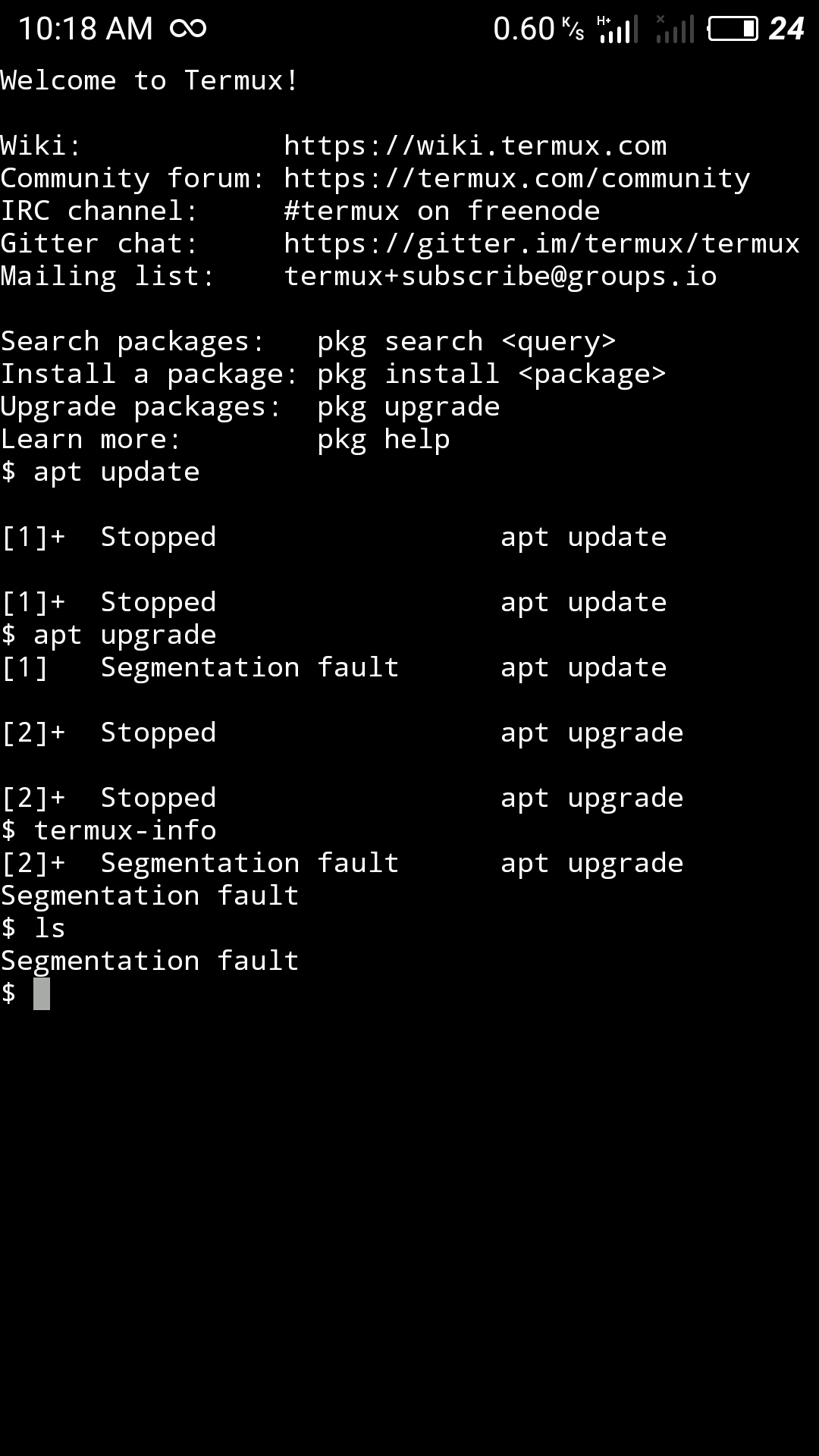
Termux is always show this error whatever I am typing any command. Please help me.
 PhyoWanna
on 9 Feb 2018
PhyoWanna
on 9 Feb 2018
I have a friend meet the same problem as you @PhyoWanna
His phone is Funtouch OS based on android 6.0 , CPU MT 6750,F-droid 0.6 version.
What's yours? @PhyoWanna
I hope this will help you to debug. @its-pointless
YadominJinta
on 9 Feb 2018
If someone with this issue execute command unset LD_PRELOAD and if it starts working could they send me output of
strace -o output -E LD_PRELOAD=/data/data/com.termux/files/usr/lib/libtermux-exec.so COMMANDTHATFAILS
its-pointless
on 9 Feb 2018
@its-pointless But the problem is that unset LD_PRELOAD returns segfalut too
YadominJinta
on 9 Feb 2018
some are sone aren't i need info to debug and i cann't do it with nothing because i can't reproduce the error. Which is why i specifed "if it starts working".
its-pointless
on 9 Feb 2018
I have a phone which can't run apt like the first problem in this issues, and "unset LD_PRELOAD" can work on it. Need I help you?@its-pointless
YadominJinta
on 9 Feb 2018
Yes. Strace output of the failure would be good
its-pointless
on 9 Feb 2018
I will do that after my mother come back.(It's her phone)
YadominJinta
on 9 Feb 2018
@its-pointless
command 1
strace -o output -E LD_PRELOAD=/data/data/com.termux/files/usr/lib/libtermux-exec.so tar -xvJf file.tar.xz
output : https://github.com/kuburan/kuburan.github.io/blob/master/output
command 2
strace -o output_2 -E LD_PRELOAD=/data/data/com.termux/files/usr/lib/libtermux-exec.so apt install zsh
output : https://github.com/kuburan/kuburan.github.io/blob/master/output_2
kuburan
on 9 Feb 2018
for those people who get segfault on any command could you try deleting the file libtermux-exec.so in $PREFIX/lib when in the failsafe mode as described here https://wiki.termux.com/wiki/Recover_a_broken_environment and restart termux see if it fixes?
im thinking for some people it might cause issues because its loaded with bash at start up. i want to remove that possibility.
its-pointless
on 10 Feb 2018
I had to reinstall due to issues related to dpkg not working. Now getting segmentation fault on any command.:-
ing list: [email protected]
Search packages: pkg search
Install a package: pkg install
Upgrade packages: pkg upgrade
Learn more: pkg help
$ p
Segmentation fault
$ clear
Segmentation fault
$
$
$ uname -a
Segmentation fault
$ ls
[1]+ Stopped ls
[1]+ Stopped ls
$
[1]+ Segmentation fault ls
$
 macerg
on 10 Feb 2018
macerg
on 10 Feb 2018
I have started a failsafe session.
ls - al shows no dotfiles apart from
ls -al
-rw------- u0_a131 u0_a131 33 2018-02-10 06:57 .bash_history
macerg
on 10 Feb 2018
Did
rm -rf /data/data/com.termux/files/usr
Got "Installing" message.
Only .bash_history file exists, no other dotfiles are being created.
macerg
on 10 Feb 2018
Can't find the libtermux-exec.so file.
macerg
on 10 Feb 2018
Use rm /data/data/com.termux/files/usr/lib/libtermux-exec.so @macerg
YadominJinta
on 10 Feb 2018
It works ! @its-pointless
YadominJinta
on 10 Feb 2018
It worked!!!!
macerg
on 10 Feb 2018
so the people with apt only issues and segfault on start issues its likely the same issue just manifesting differently.
I have a few theories
1 libtermux-exec.so + on child processes writing to disk or something causing segfault. for apt its when it calls https to write to disk but fails and for bash its write to history file and for tar its write to disk for that person with it.
2 .with termux-float not having the issue its possible a weird text bug due to the libtermux-exec.so rewrites execve ... could be in libc.so for some devices etc not dealing with strings properly in some way.
im going to have to think about making some test cases to eliminate possible causes.
its-pointless
on 10 Feb 2018
It worked!!!!
macerg
on 10 Feb 2018
thanks @YadominJinta !
 a5hpexia
on 10 Feb 2018
a5hpexia
on 10 Feb 2018
Anyone have this issue on android version besides marshmellow aka android 6?
its-pointless
on 11 Feb 2018
okay i might be able to reproduce the error.
export LD_PREOLOAD=/data/data/com.termux/files/usr/lib/libtermux-exec.so:/system/lib64/libdl.so
will produce the same errors...
or LD_PRELOAD=/system/lib64/libdl.so:/data/data/com.termux/files/usr/lib/libtermux-exec.so
will give me full on segfaults like other people with same error.
its-pointless
on 12 Feb 2018
"LD_PRELOAD=/system/lib64/libdl.so:/data/data/com.termux/files/usr/lib/libtermux-exec.so" .
not give output in strace.
when i open system directory.
"$ cd //system/lib64" , there was "libdl.so" over there.
should i set
"$ export LD_PRELOAD=//system/lib64/libdl.so:/data/data/com.termux/files/usr/lib/libtermux-exec.so"
and then strace it ?
kuburan
on 12 Feb 2018
Nah its fine for now don't do need anything.
its-pointless
on 12 Feb 2018
I found that almost every version of android will meet this when using proot
~~~
proot error: execve("/usr/bin/env"): No such file or directory
proot info: possible causes:
- the program is a script but its interpreter (eg. /bin/sh) was not found;
- the program is an ELF but its interpreter (eg. ld-linux.so) was not found;
- the program is a foreign binary but qemu was not specified;
- qemu does not work correctly (if specified);
- the loader was not found or doesn't work.
fatal error: seeproot --help.
proot error: can't chmod '/data/data/com.termux/files/usr/tmp//proot-31860-8sDNj7': No such file or directory
~~~
unset LD_PRELOAD will fix it
@its-pointless
YadominJinta
on 13 Feb 2018
Hello.
When I try to use Hydra I am getting Segmentation Fault. Just this text and nothing more. I am using Redmi note 4 Android version6.0 MIUI version Global9.2|Stable9.2.2.0
 benothsbd
on 14 Feb 2018
benothsbd
on 14 Feb 2018
i don't think there is a proper fix because its likely rom issue. Only way around i can think of revolves around recompiling everything...
its-pointless
on 14 Feb 2018
how do you remove libtermux-exec.so when the rm command itself segfaults?
 Eskender-B
on 14 Feb 2018
Eskender-B
on 14 Feb 2018
@its-pointless Have we confirmed that this happens on only some ROMs?
Could anyone running android 6 on aarch64 not experiencing this confirm?
Grimler91
on 14 Feb 2018
My phone is
- aarch64 and runs android 6.
- RedmeNote 4x with MIUI Global 9.2 ROM
If that could be any info to you. - I was using termux for the past month and found out that it first works fine with no problem
- Then when I cleared all apps in my phone and restarted termux, some programs fail. clang and pkg for example fail.
- So I reinstalled termux and never closed it. Kept it running for two weeks with no problem until i accidentally closed all apps.
- I then reinstalled the same apk and the problem got worse. (segfaulting pretty much on every command)
- But now removing libtermux-exec.so solved everything.
Eskender-B
on 14 Feb 2018
Yes it only happens on some roms. Miui mainly it seems. if its working on float but not in normal it could be due to device drivers or something low level. It reminds me of another weird bug from ages ago. what i think is occuring is that it preloads 2 different execve at once so execve symbol location becomes null since it doesn't prioritise one over the other.
its-pointless
on 15 Feb 2018
This is a serious issue, so it's unfortunate I'm unable to reproduce it so far!
Could anyone who is affected by the bug and know how to use gdb try to debug the crash under gdb?
 fornwall
on 15 Feb 2018
fornwall
on 15 Feb 2018
@fornwall best solution for now would be testing for this bug on start up hefore preloading on aarch64 devices.
It could be a fairly easily done in the script.
its-pointless
on 17 Feb 2018
i trying cleanly uninstall termux. and downgrade to V0.52
i found termux V0.52 here https://www.apk4fun.com/apk/148288/
absolutely i got segfault on every command.
and im switching to use termux float app,
"$ cd $PREFIX/bin"
"$ rm -f login"
"$ apt install wget"
"$ wget https://raw.githubusercontent.com/termux/termux-packages/1ec6c042a899524b04ccd68f970843cacdee1cda/packages/termux-tools/login"
"$ chmod 755 login"
"$ exit"
and finally open normal termux again, every command work correctly (no segfault) without removing "libtermux-exec.so" ,
kuburan
on 21 Feb 2018
$ apt update
Hit:1 https://termux.net stable InRelease
Ign:2 https://hax4us.github.io/termux-tools termux InRelease
Hit:3 https://hax4us.github.io/termux-tools termux Release
Ign:4 https://hax4us.github.io/termux-tools termux Release.gpg
Err:1 https://termux.net stable InRelease
The following signatures couldn't be verified because the public key is not available: NO_PUBKEY 6700B77E6D8D0AE7
Reading package lists... Done
Building dependency tree
Reading state information... Done
All packages are up to date.
W: An error occurred during the signature verification. The repository is not updated and the previous index files will be used. GPG error: https://termux.net stable InRelease: The following signatures couldn't be verified because the public key is not available: NO_PUBKEY 6700B77E6D8D0AE7
W: Failed to fetch https://termux.net/dists/stable/InRelease The following signatures couldn't be verified because the public key is not available: NO_PUBKEY 6700B77E6D8D0AE7
W: Some index files failed to download. They have been ignored, or old ones used instead.
Please help iam used apt as sudo onetime then...in normal it seems like this help ..
 b1nslashsh
on 26 Mar 2018
b1nslashsh
on 26 Mar 2018
Closing since issue was fixed in https://github.com/termux/termux-packages/pull/2163.
xeffyr
on 18 Jan 2019
Related issues
 newmania
·
3Comments
newmania
·
3Comments
 zejji
·
4Comments
zejji
·
4Comments
 adit
·
3Comments
adit
·
3Comments
 loveablefellow007
·
3Comments
loveablefellow007
·
3Comments
 am11
·
3Comments
am11
·
3Comments