Termux-packages: etc is in wrong place
etc is in /data/data/com.termux/files/usr/etc instead of /data/data/com.termux/files/etc
its confusing.
Is there a reason for this?
 shawnl
All 45 comments
@shawnl Thank you for your time and consideration. Can you motivate your issue more? I also had an aversion to having everything in $PREFIX, ie. /usr. It seems like this is not only necessary, but recommended. There might be a want for $PREFIX_USR and $PREFIX_FILES thanks to your thoughtfulness. If we can tell the difference between the advantages of your proposal and the status quo, you may have your issue resolved in our favor. There is a reason for having these directories in /usr. Type $PREFIX and watch the prompt return. Also use ls -al $PREFIX:
 SDRausty
on 26 Nov 2017
SDRausty
on 26 Nov 2017
@shawnl which of these should also be moved to files, if any?
[01:52 ~ ]$ ls $PREFIX
bin      etc      lib      libexec  share    tmp      var
Your further opinion is welcome.
SDRausty
on 26 Nov 2017
tmp var and etc
Everything that can't be read-only
Symlinks will probably be needed to keep stuff working.
shawnl
on 26 Nov 2017
@shawnl there might be a better place to move /tmp to than files https://github.com/termux/termux-packages/issues/1772 Does directory files have a prefix? I would like to move it to external microSD.
SDRausty
on 26 Nov 2017
@sdrausty never put /tmp to sdcard. This can break some tools (such as tmux) which need to create sockets or other special files.
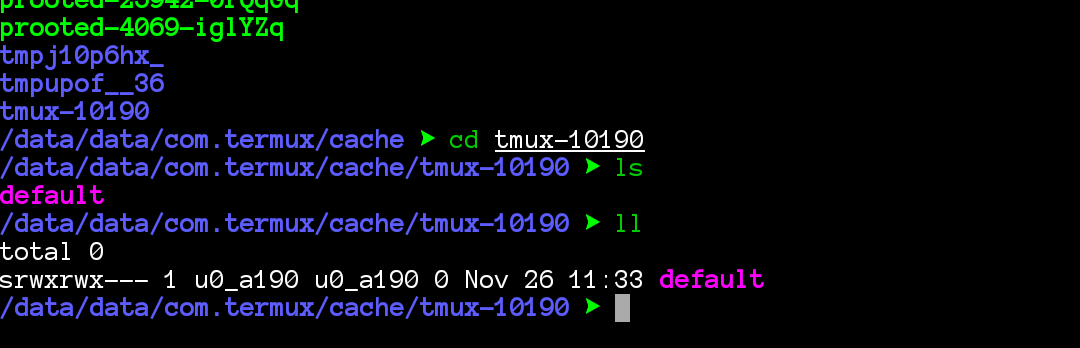
 xeffyr
on 26 Nov 2017
xeffyr
on 26 Nov 2017
@xeffyr I suspected it would. It did. So at present it is back where it came from. What about formatting a file on the external microSD and mounting it as /tmp? This would resolve what breaks it on external storage at present.
Feature Request: mount loopback device
Opened by sdrausty 4 months ago
https://github.com/termux/termux-app/issues/376
Is it possible to grant permission for Termux to use loop devices?
Opened by sdrausty 4 months ago
https://github.com/termux/termux-app/issues/375
Does Anyone Want to Have More Native Space on Device?
Opened by sdrausty 4 months ago
discussion enhancement
https://github.com/termux/termux-packages/issues/1176
SDRausty
on 26 Nov 2017
@sdrausty, mounting loopback device as /tmp is possible, but requires root. There is not possible (at my opinion) to grant a mount permission for regular android application.
xeffyr
on 26 Nov 2017
@xeffyr Debian Noroot mounts an image in its' userspace.
SDRausty
on 26 Nov 2017
@xeffyr GNUroot Debian mount and have modules to simulate root over them!
 JamesFinn
on 26 Nov 2017
JamesFinn
on 26 Nov 2017
Ok, I will check if it can mount EXT4 or FAT32 images in userspace.
xeffyr
on 26 Nov 2017
Debian noroot cannot mount filesystem images:
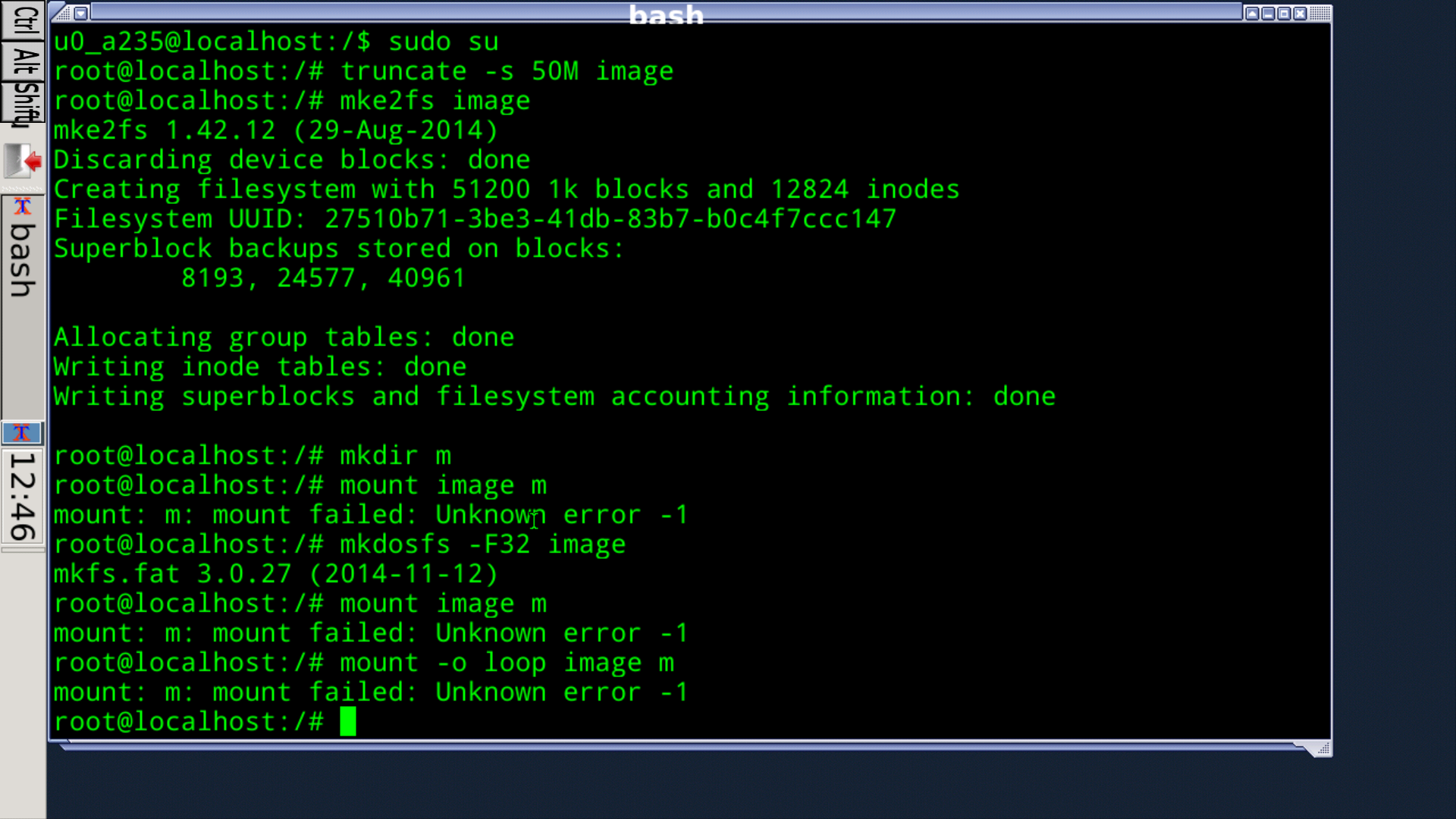
If you can mount image in Debian noroot, then post screenshots or other info how you do that.
xeffyr
on 26 Nov 2017
The system image itself is mounted in the app by the app afaik. @xeffyr how does Debian noroot mount its' system image?
SDRausty
on 26 Nov 2017
It's not a real image, view scripts https://github.com/pelya/debian-noroot/tree/master/img, https://github.com/pelya/debian-noroot/tree/master/dist
xeffyr
on 26 Nov 2017
To mount filesystem image, it's needed to port entire kernel subsystem to userspace, or use FUSE (for which root is needed in android)
xeffyr
on 26 Nov 2017
@xeffyr do you think fakeroot can mount using loop device https://duckduckgo.com/?q=fakeroot+github+mount&t=h_&ia=web ? Or https://github.com/termux/proot ?
SDRausty
on 26 Nov 2017
@sdrausty no fakeroot cannot mount any image like .dat .img etc you need real root for this purpose
JamesFinn
on 26 Nov 2017
@xeffyr do you think fakeroot can mount?
Post here
JamesFinn
on 26 Nov 2017
@JamesFinn no, it cannot, because it's needed to port entire kernel subsystem to userspace, or use FUSE (for which root is needed in android) is needed to simulate mount. Bind mount as proot already do is more simple.
xeffyr
on 26 Nov 2017
And no one will port kernel drivers to the userspace for using under proot. Also this will make proot very slow.
Fakeroot is a tool that simulates root UID, and no more.
xeffyr
on 26 Nov 2017
I already suggested moving tmp in another issue. I was just saying it shouldn't be under usr. My bad for the confusion
shawnl
on 26 Nov 2017
@shawnl I have already opened PRs for /tmp
- Shell script version - https://github.com/termux/termux-packages/pull/1788
- On app side - https://github.com/termux/termux-app/pull/478
Both for me working good. But we need a comment from @fornwall.
xeffyr
on 26 Nov 2017
@xeffyr So what you are saying is; It is possible, but it hasn't been ported to PRoot yet. Any links you can share regarding this kernel subsystem are welcome. Building this on device should be fun. Pushing it to https://github.com/termux/proot moreso.
Some smartphone users are luck btw. There is some kind backdoor to root through JRE Engineering in Android. Another option is to root from inside Termux (no third party app), is this possible? termux-make-root
SDRausty
on 26 Nov 2017
@sdrausty why not just a use shell script that will setup everything when Termux session start (for those who have root).
xeffyr
on 26 Nov 2017
4G $TMP on microSD #or should$TMP be 8G
16~32G $PREFIX on microSD
?G $VAR ditto
$HOME ditto
All as separate mounted loop device partitions.
Optional
$LOCAL
$OPT
SDRausty
on 26 Nov 2017
Script! Great idea @xeffyr for those who have root, but how to make root in Termux?
SDRausty
on 26 Nov 2017
@sdrausty to make root you need to crack android 😆 .
xeffyr
on 26 Nov 2017
No playing with partitions no problem! Mount this:
[09:45 ~ ]$ l storage/shared/file
-rw-rw----    1 root     everybod 97874579456 Nov 14 05:57 storage/shared/file
@xeffyr are there any known open source app for rooting? No source, no go. A better option is building and flashing.
SDRausty
on 26 Nov 2017
@sdrausty no, I don't know open source apps for rooting, but maybe on github you can find some exploits that can be compiled and used, but on old Android versions may be.
Why not to use a regular root method that appropriate for your device, on xda-developers you can find a many of them.
xeffyr
on 26 Nov 2017
@shawnl in the end, isn't it better to lock /etc as read only too? Just like locking down /usr is through chmod 550 and similar in a frozen OS (no upgrades, etc).
SDRausty
on 26 Nov 2017
@xeffyr I'm also agree with /tmp.
But why it's not get an look from Fronwall is there any problem?
JamesFinn
on 26 Nov 2017
@shawnl can't everything just go to files like in a normal Linux? That would be ideal, wouldn't it? Well almost everything, some folders are duplicated.
/files/bin
/files/etc
/files/home
/files/lib
/files/tmp
/files/var
/files/usr/bin
/files/usr/lib
/files/usr/libexec
/files/usr/share
What is your opinion about this proposal?
SDRausty
on 26 Nov 2017
https://www.freedesktop.org/wiki/Software/systemd/TheCaseForTheUsrMerge/
On Nov 26, 2017 07:20, "S D Rausty" notifications@github.com wrote:
@shawnl https://github.com/shawnl can't everything just go to files
like in a normal Linux? That would be ideal, wouldn't it? Well almost
everything, some folders are duplicated./files/bin
/files/etc
/files/home
/files/lib
/files/tmp
/files/var
/files/usr/lib
/files/usr/libexec
/files/usr/bin
/files/usr/shareWhat is your opinion about this proposal?
—
You are receiving this because you were mentioned.
Reply to this email directly, view it on GitHub
https://github.com/termux/termux-packages/issues/1836#issuecomment-347015654,
or mute the thread
https://github.com/notifications/unsubscribe-auth/AAfLcuniXgfohlVGqn7hNQRUjiDgFIDkks5s6YG3gaJpZM4QqqzS
.
shawnl
on 26 Nov 2017
If /usr contained a r/o tree, it could be moved to the SDcard? Updates could be a problem, though, at least in some cases of updating /usr/share...
 Quasic
on 26 Nov 2017
Quasic
on 26 Nov 2017
@Quasic, did you think about file permissions ? Android /sdcard and external SD (which is a FAT or EXFAT) does not support file permissions.
But you could try, if you still want:
mv $PREFIX/share /sdcard/
ln -s /sdcard/share $PREFIX/share
If it was up to me, /var and /etc are the only ones I would consider splitting here, as there is another issue for /tmp. Since this could be implemented on my side with symlinks, I might try this, actually, as I am trying the /tmp split.
Quasic
on 26 Nov 2017
@xeffyr I tried with only /usr/share/java a while ago, to merge the jars with the ones in my project folder on the SD, and it failed to set the timestamp, causing an abort on update. I expect other issues would occur with other files, as well, though most could probably be fixable, if desired...
Quasic
on 26 Nov 2017
@Quasic I have the same failed to set the timestamp when extracting tar archives but it is not fatal. This is due to limitation of Android's virtual filesystem on /sdcard.
There is probably only one fix - patch programs to hide such errors, but this is a bad way and shouldn't be used.
xeffyr
on 26 Nov 2017
This shows there is no /etc at all: https://termux.com/linux.html
 ShalokShalom
on 23 Dec 2017
ShalokShalom
on 23 Dec 2017
there is no /etc at all
etc is exist, but it is prefixed as everything else. Path to etc is /data/data/com.termux/files/usr/etc. And it can't be moved to the real rootfs (which is /).
xeffyr
on 23 Dec 2017
Well, its confusing.
ShalokShalom
on 23 Dec 2017
@ShalokShalom, this topic about moving 'etc' from $PREFIX/etc to /data/data/com.termux/files. IMO, this will be more confusing as other package data will be in $PREFIX.
Current place of 'etc' shouldn't be confusing if you assume that $PREFIX is a 'real' rootfs.
xeffyr
on 23 Dec 2017
I mean the documentation.
ShalokShalom
on 23 Dec 2017
This issue has not created good discussion and is unlikely to be fixed. It is also mostly a style thing. Thus closing.
shawnl
on 3 Jan 2018
🙄
ShalokShalom
on 3 Jan 2018
Related issues
 reggi
·
4Comments
reggi
·
4Comments
 zejji
·
4Comments
zejji
·
4Comments
 Cyb3rD3m0n
·
3Comments
Cyb3rD3m0n
·
3Comments
 adit
·
3Comments
adit
·
3Comments
 Zuccace
·
3Comments
Zuccace
·
3Comments
Most helpful comment
https://www.freedesktop.org/wiki/Software/systemd/TheCaseForTheUsrMerge/
On Nov 26, 2017 07:20, "S D Rausty" notifications@github.com wrote: