Termux-packages: How to install Debian 9.2 chroot termux?
As on listed in debians Official site that the Debian 9.2 is released with a lots of customization which package I have to choose to install Debian chroot in termux?
@Fronwall
Please tell me
 stainslav
All 33 comments
First pkg install debootstrap proot,
example usage debootstrap --arch=armel stretch stretch http://ftp.debian.org/debian/.
Then setup proot to mount the container. A sample proot start.sh includes:
#!/data/data/com.termux/files/usr/bin/sh
proot -0 -r ~/stretch -b /dev/ -b /sys/ -b /proc/ -b /data/data/com.termux/files/home /bin/env -i HOME=/root TERM="xterm-256color" PS1='[root@stretch \W]$ ' PATH=/bin:/usr/bin:/sbin:/usr/sbin:/bin /bin/bash --login
chmod 700 start.sh
./start.sh +enter/return
Enjoy 🎼
 SDRausty
on 9 Oct 2017
SDRausty
on 9 Oct 2017
@sdrausty
Bro I want to install Debian v9.2 please how I can do this, I mean which file work for termux please send me and please choose aarch64 Debian 9.2 as my phone is aarch64 or arm64
stainslav
on 10 Oct 2017
Simply follow the instructions @stainslaw
SDRausty
on 10 Oct 2017
@sdrausty
Bro can you send me the link to Debian 9.2 termux version with command "xxxx" please
stainslav
on 10 Oct 2017
@stainslav https://wiki.termux.com/wiki/Debian
More at https://wiki.termux.com/wiki/Proot
SDRausty
on 10 Oct 2017
@sdrausty How to fix this Error ?
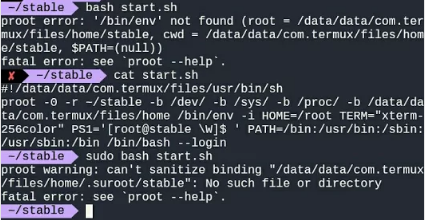
My android arch armv7l Android
installed everything through the wiki.
 Demigoddd
on 12 Oct 2017
Demigoddd
on 12 Oct 2017
@Deathlive try armhf. What version of Android do you have? Also you can always ask at #debian IRC and https://lists.debian.org/debian-boot/ Good luck.
SDRausty
on 12 Oct 2017
@Deathlive actually changing /bin/env to /usr/bin/env in start.sh solves your question. Thanks for taking interest.
SDRausty
on 13 Oct 2017
@sdrausty
Sorry, but no matter how I tried it, it's still a mistake
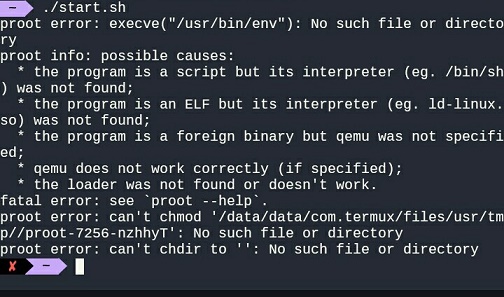
Demigoddd
on 13 Oct 2017
though no errors are reported while executing
debootstrap --arch=armel stable stable http://ftp.debian.org/debian/
the new rootfs is not sane.
A short look at /data/data/com.termux/files/home/stable
(after debootstrap finishes) shows
there is some partly uncompressed files and other crap (mostly
with .l2s.* in the name) around. e.g.
stable/bin:
total 4168
drwxr-xr-x 2 u0_a88 u0_a88 4096 Oct 13 13:16 .
drwxr-xr-x 17 u0_a88 u0_a88 4096 Jan 29 2017 ..
lrwxrwxrwx 1 u0_a88 u0_a88 64 Oct 13 13:15 .l2s.gunzip0001 -> /data/data/com.termux/files/home/stable/bin/.l2s.gunzip0001.0002
-rwxr-xr-x 1 u0_a88 u0_a88 2301 Mar 14 2016 .l2s.gunzip0001.0002
-rwxr-xr-x 1 u0_a88 u0_a88 1021372 May 15 21:45 bash
[...]
stable/usr/bin:
total 9092
drwxr-xr-x 2 u0_a88 u0_a88 4096 Oct 13 13:16 .
drwxr-xr-x 9 u0_a88 u0_a88 4096 Jan 29 2017 ..
lrwxrwxrwx 1 u0_a88 u0_a88 66 Oct 13 13:15 .l2s.perl0001 -> /data/data/com.termux/files/home/stable/usr/bin/.l2s.perl0001.0002
-rwxr-xr-x 1 u0_a88 u0_a88 1816756 Sep 12 18:37 .l2s.perl0001.0002
-rwxr-xr-x 1 u0_a88 u0_a88 47040 Feb 22 2017 [
-rwxr-xr-x 1 u0_a88 u0_a88 18152 Mar 22 2017 addpart
[...]
md5-ff78c9787934a5823812f31d36d30071
/data/data/com.termux/files/home/stable/bin/sh -> dash
which simply isn't there. So I think at least in debootstrap there still
are some problems. Maybe there is some interference with the termux-exec
package (which is also installed here). I didn't dig deeper into this yet.
 sp4rkie
on 13 Oct 2017
sp4rkie
on 13 Oct 2017
there is another problem when using the --foreign flag of debootstrap. I used this flag because (to ease the debugging) it allows to split the whole process into an 'initial unpack phase' and a 'completion phase'. Only the 'completion phase' executes in the guest system.
But that does not work because debootstrap is patched with the shebang fix which fails (and. is not required anyway) in the guest system.
sp4rkie
on 13 Oct 2017
sorry, the currently proposed https://wiki.termux.com/wiki/Debian howto and https://wiki.termux.com/wiki/Debootstrap termux-debootstrap-package does not work for me to setup any debian system.
Based on the original Debian debootstrap script I just setup a new repo with a now (hopefully) working fully automated Debian 9 (stretch) install.
https://github.com/sp4rkie/debian-on-termux
I tested it in on freshly installed termux environment (just reinstalled the termux-app from scratch).
Another test went well on my productive termux machine (LG K3 LTE). No problems seen so far.
Architecture is:
#  uname -a
Linux localhost 3.18.19+ #1 SMP PREEMPT Wed Nov 9 10:33:30 IST 2016 armv7l Android
Possibly fix your architecture near the top lines. The script takes a while to complete. Enjoy:-)
sp4rkie
on 18 Oct 2017
@sp4rkie Thanks It works.
Demigoddd
on 21 Oct 2017
thanks! Issue can be closed I think (but I'm not allowed to do that)
sp4rkie
on 21 Oct 2017
@Deathlive
this is out of scope here. Please open a new issue. Though I just tried on the quick. You must run nmap as normal user not as root. It appears to work if you remove -0 from enter_deb in this case. Otherwise nmap erroneously thinks it's running as root using root features which cause the problems.
sp4rkie
on 22 Oct 2017
added some options to enter_deb:
Usage: enter_deb [options]
enter_deb: enter the installed debian guest system

  -0 - mimic root (default)
  -n - prefer regular termux uid (termux-uid)
  -p - mount proc (requires a patched proot package)
entries according to the current termux-uid now are created in /etc/passwd, /etc/shadow, /etc/group on the Debian guest system.
sp4rkie
on 23 Oct 2017
@sp4rkie
Can i use enter_deb -n -p and how to install patched proot package ?
Demigoddd
on 23 Oct 2017
you can either edit /etc/passwd, /etc/shadow, /etc/group and extract the new enter_deb from debian_on_termux.sh manually
or
simply reinstall from scratch with debian_on_termux.sh
I uploaded a patched proot package here:
https://github.com/termux/termux-packages/issues/1679#issuecomment-338595627
sp4rkie
on 23 Oct 2017
404 not found
tar invalid magic
tar short read
 sinclaircornacchia
on 1 Apr 2018
sinclaircornacchia
on 1 Apr 2018
W: Failure trying to run: proot -w /home -b /dev -b /proc --link2symlink -0 -r /data/data/com.termux/files/home/stable /bin/true
W: See /data/data/com.termux/files/home/stable/debootstrap/debootstrap.log for details
...
http://ftp.debian.org/debian/dists/stable/InRelease:
2018-05-12 05:53:41 ERROR 404: Not Found.
2018-05-12 05:53:42 URL:http://ftp.debian.org/debian/dists/stable/Release [117943/117943] -> "/data/data/com.termux/files/home/stable/var/lib/apt/lists/partial/debootstrap.invalid_dists_stable_Release" [1]
2018-05-12 05:53:46 URL:http://ftp.debian.org/debian/dists/stable/main/binary-arm64/Packages.xz [6963100/6963100] -> "/data/data/com.termux/files/home/stable/var/lib/apt/lists/partial/debootstrap.invalid_dists_stable_main_binary-arm64_Packages.xz" [1]
...
2018-05-12 05:58:20 URL:http://ftp.debian.org/debian/pool/main/x/xz-utils/liblzma5_5.2.2-1.2+b1_arm64.deb [224282/224282] -> "/data/data/com.termux/files/home/stable//var/cache/apt/archives/partial/liblzma5_5.2.2-1.2+b1_arm64.deb" [1]
2018-05-12 05:58:20 URL:http://ftp.debian.org/debian/pool/main/z/zlib/zlib1g_1.2.8.dfsg-5_arm64.deb [82216/82216] -> "/data/data/com.termux/files/home/stable//var/cache/apt/archives/partial/zlib1g_1%3a1.2.8.dfsg-5_arm64.deb" [1]
/data/data/com.termux/files/usr/bin/debootstrap: 1: eval: proot: Permission denied
/data/data/com.termux/files/usr/bin/debootstrap: 1023: /data/data/com.termux/files/usr/bin/debootstrap: sed: Permission denied
/data/data/com.termux/files/usr/bin/debootstrap: 1023: /data/data/com.termux/files/usr/bin/debootstrap: cut: Permission denied
/data/data/com.termux/files/usr/bin/debootstrap: 1023: /data/data/com.termux/files/usr/bin/debootstrap: head: Permission denied
/data/data/com.termux/files/usr/bin/debootstrap: 1023: /data/data/com.termux/files/usr/bin/debootstrap: grep: Permission denied
 Dmole
on 12 May 2018
Dmole
on 12 May 2018
It works, thanks a lot!
 sunshinertoo
on 28 Feb 2019
sunshinertoo
on 28 Feb 2019
Pulseaudio not working in prooted debian termux
 ashuhar455
on 20 Mar 2019
ashuhar455
on 20 Mar 2019
I'm getting a dpkg error when trying to install any package or run the dpkg configure option to fix.
root@localhost:/data/data/com.termux/files/home/stretch/root# apt install dirmngr
E: dpkg was interrupted, you must manually run 'dpkg --configure -a' to correct the problem.
root@localhost:/data/data/com.termux/files/home/stretch/root# dpkg --configure -a
dpkg: error: error creating new backup file '/var/lib/dpkg/status-old': Permission denied
It seems to be complaining about not being able to create a backup status file. I'm running termux on Android 10 with the Pixel 1. Any ideas?
 fireguy123
on 20 Dec 2019
fireguy123
on 20 Dec 2019
I have very positive experience with debian script which have been created by sp4rkie
Debootstrap preconfigures system so also Dbus run in many sitautions. If no, run needed apps by typing dbus-launch app name&
Pulseaudio from Debian can be used to stream sound bz loading simple protocol protocol. Simple protocol plazer gives good responsiveness. But The best reliable scenario is to use Unix socket and Pulseaudio for Termux.
To use graphical apps based on X11 use tigervnc or XVFB in combination with X11vnc.
Then zou can use various VNC client apps. Such as simple remote which have been created bz MR Jordanov.
Zou can use Openbox even on Android 8 and newer with no need to use workaround presented inside Archlinux script from MR Raustz. Workaround allow to switch between apps, it emulate /proc/stat
because Android 8 and newer estrict access to this file.
Marco need to access this file. And without this work around, it will crash.
Openbox do not need this file while using it and even switching between windows is supported.
LXDE will work by The best way. Some LXDE integrated app want to use shared memory.
In some cases, integrated LXDE apps will work in some cases no, you have to try it.
 JanuszChmiel
on 11 Feb 2020
JanuszChmiel
on 11 Feb 2020
请问这个错误怎么回事root@localhost:/data/data/com.termux/files/home# sh debian_on_termux.sh debian_on_termux.sh: 17: debian_on_termux.sh: getprop: not found
termux-info:
debian_on_termux.sh: 1: debian_on_termux.sh: termux-info: not found
root@localhost:/data/data/com.termux/files/home#
 yeyushisi
on 6 Apr 2020
yeyushisi
on 6 Apr 2020
@yeyushisi report bugs here; https://github.com/sp4rkie/debian-on-termux also
apt-get install termux-tools
Dmole
on 6 Apr 2020
谢谢了,大意给落下啦
yeyushisi
on 6 Apr 2020
when I install the termux-app from scratch 'termux-tools' (Basic system tools for termux) package is always included by default.
so why is 'termux-tools' missing here at all?
sp4rkie
on 6 Apr 2020
是啊怎么回事呢 @sp4rkie 我还想问你呢
yeyushisi
on 6 Apr 2020
$ sh debian_on_termux.sh
======== DO_FIRST_STAGE ========
到这里怎么不动了,该怎么办
yeyushisi
on 6 Apr 2020
root@localhost:/data/data/com.termux/files/home# apt install wget
Reading package lists... Done Building dependency tree
Reading state information... Done
wget is already the newest version (1.20.1-1.1).0 upgraded, 0 newly installed, 0 to remove and 0 not upgraded.
root@localhost:/data/data/com.termux/files/home# apt install termux-tools
Reading package lists... Done
Building dependency tree Reading state information... Done E: Unable to locate package termux-tools
root@localhost:/data/data/com.termux/files/home#
debian环境下安装不上 termux-tools
求解决
yeyushisi
on 6 Apr 2020
$这个美元符号下就能安装
yeyushisi
on 6 Apr 2020
@stainslav https://wiki.termux.com/wiki/Debian
有关更多信息,请访问https://wiki.termux.com/wiki/Proot
请问安装之后怎么卸载呢
 yth939
on 1 Aug 2020
yth939
on 1 Aug 2020
Related issues
 divyakutty
·
3Comments
divyakutty
·
3Comments
 ILadis
·
3Comments
ILadis
·
3Comments
 thurask
·
3Comments
thurask
·
3Comments
 Zuccace
·
3Comments
Zuccace
·
3Comments
 Wetitpig
·
3Comments
Wetitpig
·
3Comments
Most helpful comment
sorry, the currently proposed https://wiki.termux.com/wiki/Debian howto and https://wiki.termux.com/wiki/Debootstrap termux-debootstrap-package does not work for me to setup any debian system.
Based on the original Debian debootstrap script I just setup a new repo with a now (hopefully) working fully automated Debian 9 (stretch) install.
https://github.com/sp4rkie/debian-on-termux
I tested it in on freshly installed termux environment (just reinstalled the termux-app from scratch).
Another test went well on my productive termux machine (LG K3 LTE). No problems seen so far.
Architecture is:
Possibly fix your architecture near the top lines. The script takes a while to complete. Enjoy:-)