Termux-packages: 'pip install greenlet' fails on aarch64
Running pip install greenlet fails with the below error message on aarch64. This prevents pip install neovim from working, as the neovim python client depends on greenlet.
Collecting greenlet
  Using cached greenlet-0.4.10.zip
Installing collected packages: greenlet
  Running setup.py install for greenlet ... error
    Complete output from command /data/data/com.termux/files/usr/bin/python -u -c "import setuptools, tokenize;__file__='/data/data/com.termux/files/usr/tmp/pip-build-_p0b67fo/greenlet/setup.py';exec(compile(getattr(tokenize, 'open', open)(__file__).read().replace('\r\n', '\n'), __file__, 'exec'))" install --record /data/data/com.termux/files/usr/tmp/pip-b1ull4oi-record/install-record.txt --single-version-externally-managed --compile:
    running install
    running build
    running build_ext
    building 'greenlet' extension
    creating build
    creating build/temp.linux-aarch64-3.5
    gcc -Wno-unused-result -Wsign-compare -DNDEBUG -g -fwrapv -O3 -Wall -Wstrict-prototypes -Os -fPIC -I/data/data/com.termux/files/usr/include/python3.5m -c greenlet.c -o build/temp.linux-aarch64-3.5/greenlet.o
    In file included from greenlet.c:328:
    In file included from ./slp_platformselect.h:47:
    ./platform/switch_aarch64_gcc.h:29:36: error: unknown register name 'r19' in asm
            __asm__ volatile ("" : : : REGS_TO_SAVE);
                                       ^
    ./platform/switch_aarch64_gcc.h:18:22: note: expanded from macro 'REGS_TO_SAVE'
    #define REGS_TO_SAVE "r19", "r20", "r21", "r22", "r23", "r24", "r25", "r26", \
                         ^
    ./platform/switch_aarch64_gcc.h:61:51: warning: value size does not match register size specified by the constraint and modifier [-Wasm-operand-widths]
               __asm__ volatile ("mov %0, #0" : "=r" (err));
                                                      ^
    ./platform/switch_aarch64_gcc.h:61:35: note: use constraint modifier "w"
               __asm__ volatile ("mov %0, #0" : "=r" (err));
                                      ^~
                                      %w0
    ./platform/switch_aarch64_gcc.h:64:36: error: unknown register name 'r19' in asm
            __asm__ volatile ("" : : : REGS_TO_SAVE);
                                       ^
    ./platform/switch_aarch64_gcc.h:18:22: note: expanded from macro 'REGS_TO_SAVE'
    #define REGS_TO_SAVE "r19", "r20", "r21", "r22", "r23", "r24", "r25", "r26", \
                         ^
    1 warning and 2 errors generated.
    error: command 'gcc' failed with exit status 1
bug report
 fornwall
All 8 comments
I created a PR against greenlet, for now one can use a patched version of greenlet with:
pip install https://github.com/fornwall/greenlet/archive/master.zip
The PR has been merged, so greenlet will work out of the box on aarch on the release after 0.4.10.
For now the above workaround can be used.
fornwall
on 12 Sep 2016
👍1
It faild on Pixel 2 XL with android P DP3:
Collecting greenlet
  Using cached https://files.pythonhosted.org/packages/13/de/ba92335e9e76040ca7274224942282a80d54f85e342a5e33c5277c7f87eb/greenlet-0.4.13.tar.gz
Installing collected packages: greenlet
  Running setup.py install for greenlet ... error
    Complete output from command /data/data/com.termux/files/usr/bin/python -u -c "import setuptools, tokenize;__file__='/data/data/com.termux/files/usr/tmp/pip-install-nlnffjzf/greenlet/setup.py';f=getattr(tokenize, 'open', open)(__file__);code=f.read().replace('\r\n', '\n');f.close();exec(compile(code, __file__, 'exec'))" install --record /data/data/com.termux/files/usr/tmp/pip-record-7r96ow6n/install-record.txt --single-version-externally-managed --compile:
    running install
    running build
    running build_ext
    building 'greenlet' extension
    creating build
    creating build/temp.linux-aarch64-3.6
    aarch64-linux-android-clang -Wno-unused-result -Wsign-compare -Wunreachable-code -DNDEBUG -g -fwrapv -O3 -Wall -Wstrict-prototypes -Oz -Oz -fPIC -I/data/data/com.termux/files/usr/include/python3.6m -c greenlet.c -o build/temp.linux-aarch64-3.6/greenlet.o
    unable to execute 'aarch64-linux-android-clang': No such file or directory
    error: command 'aarch64-linux-android-clang' failed with exit status 1

    ----------------------------------------
Command "/data/data/com.termux/files/usr/bin/python -u -c "import setuptools, tokenize;__file__='/data/data/com.termux/files/usr/tmp/pip-install-nlnffjzf/greenlet/setup.py';f=getattr(tokenize, 'open', open)(__file__);code=f.read().replace('\r\n', '\n');f.close();exec(compile(code, __file__, 'exec'))" install --record /data/data/com.termux/files/usr/tmp/pip-record-7r96ow6n/install-record.txt --single-version-externally-managed --compile" failed with error code 1 in /data/data/com.termux/files/usr/tmp/pip-install-nlnffjzf/greenlet/
 livelazily
on 21 Jun 2018
livelazily
on 21 Jun 2018
@livelazily Do you have clang installed?
 Grimler91
on 21 Jun 2018
Grimler91
on 21 Jun 2018
@Grimler91 No, installed package list here:
apt/stable,now 1.4.8-2 aarch64 [installed]
bash/stable,now 4.4.23 aarch64 [installed]
busybox/stable,now 1.28.4-2 aarch64 [installed]
c-ares/stable,now 1.14.0 aarch64 [installed,automatic]
ca-certificates/stable,now 20180620 all [installed]
command-not-found/stable,now 1.30 aarch64 [installed]
curl/stable,now 7.60.0-1 aarch64 [installed]
dash/stable,now 0.5.10.2 aarch64 [installed]
dpkg/stable,now 1.19.0.4 aarch64 [installed]
gdbm/stable,now 1.15 aarch64 [installed,automatic]
git/stable,now 2.17.1 aarch64 [installed]
gpgv/stable,now 1.4.23 aarch64 [installed]
htop/stable,now 2.2.0-1 aarch64 [installed]
ldns/stable,now 1.7.0-4 aarch64 [installed,automatic]
less/stable,now 530-1 aarch64 [installed,automatic]
libandroid-glob/stable,now 0.4 aarch64 [installed,automatic]
libandroid-support/stable,now 22 aarch64 [installed]
libbz2/stable,now 1.0.6-1 aarch64 [installed,automatic]
libc++/stable,now 16 aarch64 [installed]
libcrypt/stable,now 0.2 aarch64 [installed,automatic]
libcurl/stable,now 7.60.0-1 aarch64 [installed]
libedit/stable,now 20180525-3.1-0 aarch64 [installed,automatic]
libevent/stable,now 2.1.8-1 aarch64 [installed,automatic]
libffi/stable,now 3.2.1-2 aarch64 [installed,automatic]
liblua/stable,now 5.3.4-3 aarch64 [installed,automatic]
liblzma/stable,now 5.2.4 aarch64 [installed]
libmsgpack/stable,now 3.0.1 aarch64 [installed,automatic]
libnghttp2/stable,now 1.32.0 aarch64 [installed]
libprotobuf/stable,now 3.5.2 aarch64 [installed,automatic]
libsqlite/stable,now 3.24.0-1 aarch64 [installed,automatic]
libtermkey/stable,now 0.20-1 aarch64 [installed,automatic]
libunibilium/stable,now 2.0.0 aarch64 [installed,automatic]
libunistring/stable,now 0.9.10 aarch64 [installed,automatic]
libutil/stable,now 0.3 aarch64 [installed,automatic]
libuuid/stable,now 1.0.3-2 aarch64 [installed,automatic]
libuv/stable,now 1.20.3 aarch64 [installed,automatic]
libvterm/stable,now 18.02.20 aarch64 [installed,automatic]
mosh/stable,now 1.3.2-3 aarch64 [installed]
ncurses/stable,now 6.1.20180512 aarch64 [installed]
ncurses-ui-libs/stable,now 6.1.20180512 aarch64 [installed,automatic]
neovim/stable,now 0.3.0 aarch64 [installed]
nodejs/stable,now 8.11.3 aarch64 [installed]
openssh/stable,now 7.7p1-2 aarch64 [installed]
openssl/stable,now 1.0.2o-2 aarch64 [installed]
pcre/stable,now 8.42 aarch64 [installed,automatic]
pcre2/stable,now 10.31 aarch64 [installed,automatic]
python/stable,now 3.6.5-4 aarch64 [installed]
readline/stable,now 7.0.5 aarch64 [installed]
silversearcher-ag/stable,now 2.1.0 aarch64 [installed]
termux-am/stable,now 0.2 all [installed]
termux-exec/stable,now 0.3 aarch64 [installed]
termux-tools/stable,now 0.55 all [installed]
tmux/stable,now 2.7 aarch64 [installed]
vim-python/stable,now 8.1.0050-1 aarch64 [installed]
vim-runtime/stable,now 8.1.0050-1 all [installed,automatic]
wget/stable,now 1.19.5 aarch64 [installed]
zsh/stable,now 5.5.1 aarch64 [installed]
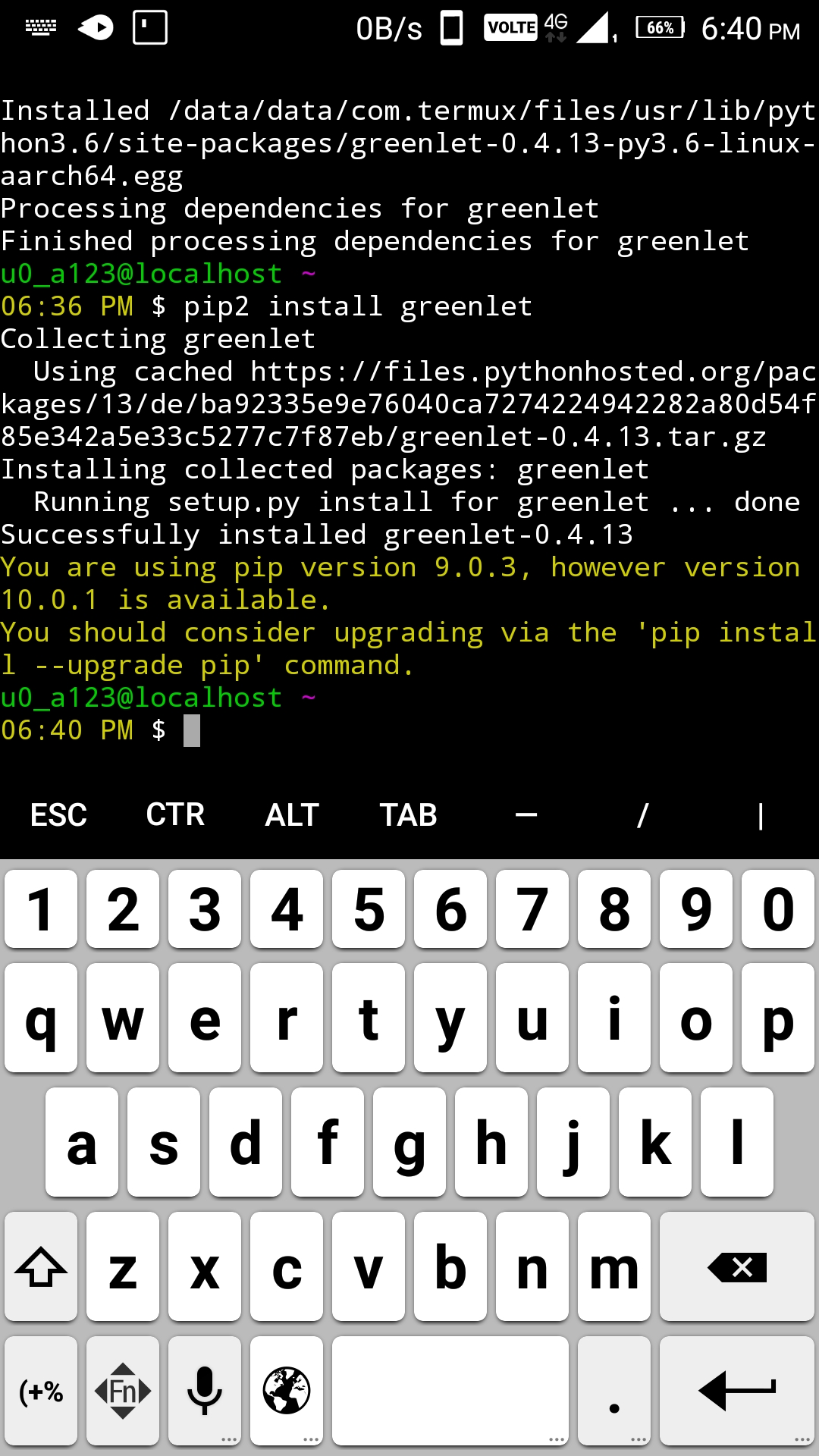
apt install libcrypt-dev python2-dev clang python2 -y
pip2 install greenlet
 remo7777
on 21 Jun 2018
remo7777
on 21 Jun 2018
👍1
remo7777
on 21 Jun 2018
It works for me, I install greenlet for py3:
apt install libcrypt-dev python-dev clang python -y
👍4
😄1
Was this page helpful?
0 / 5 - 0 ratings
Related issues
 Zuccace
·
3Comments
Zuccace
·
3Comments
 newmania
·
3Comments
newmania
·
3Comments
 jackbrycesmith
·
3Comments
jackbrycesmith
·
3Comments
 thurask
·
3Comments
thurask
·
3Comments
 bbtdev
·
3Comments
bbtdev
·
3Comments
Most helpful comment
It works for me, I install greenlet for py3: