Termux-app: Storage access not working on Android 11 beta (Pixel 3)
Problem description
Access to phone storage isn't working on Android 11 (RPB1.200504.020) on Pixel 3.
Steps to reproduce
- Start Termux
- Run
termux-setup-storage
(Nothing happens) - Run
ln -s /storage/emulated/0 ~/storage
(The first time it worked, and I had access to storage, but now I getcd: permission denied: storagewhen attempting to access the directory)
Expected behavior
Access to device storage. In permissions for Termux, it says it has full access to storage.
Additional information
- Termux application version: 0.95
- Android OS version: 11 (RPB1.200504.020)
- Device model: Google Pixel 3
 solarfl4re
All 56 comments
See https://github.com/termux/termux-packages/wiki/Termux-and-Android-10#additional-android-10-issues. I can't reproduce the issue on Android 11 virtual device (SDK-provided), but there is a chance that Termux will lose the full storage access after Android 10(11)+.
This happens due to scoped storage being enforced which works on API level rather than file system. Unfortunately, we can't patch command line utilities (bash, ls, mkdir, etc...) to use the Android storage API over JNI.
 xeffyr
on 28 Jun 2020
xeffyr
on 28 Jun 2020
Run termux-setup-storage (Nothing happens)
Behaviour where termux-setup-storage was no-op was fixed in https://github.com/termux/termux-app/commit/8d302aa9fe03ebb61fa729cc03336fd49fb0db68 (will be released in v0.96).
But situation with storage permission denial when it is granted belongs to https://github.com/termux/termux-packages/wiki/Termux-and-Android-10#additional-android-10-issues.
xeffyr
on 28 Jun 2020
Got it, thanks; I'll wipe my install and test again.28 черв. 2020 р. 13:31 Leonid Pliushch notifications@github.com пише:
See https://github.com/termux/termux-packages/wiki/Termux-and-Android-10#additional-android-10-issues. I can't reproduce the issue on Android 11 virtual device (SDK-provided), but there is a chance that Termux will lose the full storage access after Android 10(11)+.
This happens due to scoped storage being enforced which works on API level rather than file system. Unfortunately, we can't patch command line utilities (bash, ls, mkdir, etc...) to use the Android storage API over JNI.
—You are receiving this because you authored the thread.Reply to this email directly, view it on GitHub, or unsubscribe.
solarfl4re
on 28 Jun 2020
meanwhile, how should we expect to access termux files from other apps? shared internal storage?
and is this the only way for termux to access files from outside?
all this sounds very weird and that link doesn't really address this. (or does it?) 😁
 cauerego
on 17 Jul 2020
cauerego
on 17 Jul 2020
My solution:
- Start up FTP server in Termux (I didn't run the
sv enablecommand, as I don't want it running automatically - I just runsv up ftpdwhen I need to copy something) - Connect to the FTP server with the invaluable MiXplorer. My settings are below.

I set the remote to my home directory - /data/data/com.termux/files/, and the port to 8021.
To copy files to Termux, I connect to MiXplorer's built-in FTP server. I wanted to use SFTP, but I think it's broken on Termux's end, as I get "EOF While reading packet" when I try to connect from MiXplorer (other SFTP connections work fine).
solarfl4re
on 17 Jul 2020
Oops, I accidentally closed the issue (fat fingers).
solarfl4re
on 17 Jul 2020
how should we expect to access termux files from other apps?
In same way as Termux works with files on external/removable sd-card, i.e. through private directory located in "Android" folder.
In case with shared storage, it is located here:
/storage/emulated/0/Android/data/com.termux/files
This directory doesn't require any permissions as owned by Termux user id. However third-party applications should implement SAF support (e.g. stock file manager) to access files here.
xeffyr
on 17 Jul 2020
You should be able to access Termux home directory too, with stock or any other SAF-based file manager.
xeffyr
on 17 Jul 2020
isn't working on Android 11 (RPB1.200504.020) on Pixel 3.
@solarfl4re i'm just wondering are the navigation buttons missing on Android 11 too? I bought an Android 10 yesterday, and the navigation buttons (simple tap navigation icons) are missing.
EDIT: After studying screenshot, Alphabet Android Google took Android 11 navigation icons away from you too! (Can they be builtAPK installed?)
 SDRausty
on 17 Jul 2020
SDRausty
on 17 Jul 2020
are the navigation buttons missing on Android 11 too?
if you mean the system navigation, i believe gesture navigation is enabled by default. i very much prefer it, except it doesn't work with back log history on chrome and chromium.
cauerego
on 18 Jul 2020
You should be able to access Termux home directory too, with stock or any other SAF-based file manager.
I tried with MiXplorer and Google's Files app - in the first, I can only see com.mixplorer, while Files doesn't show anything in /storage/emulated/0/Android/data/. Is there a particular file manager I should use?
solarfl4re
on 18 Jul 2020
It should be created by termux-setup-storage or manually.
xeffyr
on 18 Jul 2020
i see... sadly, looks like cx file explorer, which is a great app, doesn't seem to be saf based and i never noticed there was such a difference in features for what in the system a file manager can access!
thanks for the hints, @xeffyr. much better than setting up an FTP for localhost! 😁
are you sure, however, termux setup storage is needed for this? since i can't unsetup, i can't be readily and easily sure, but i would guess it's not!
cauerego
on 19 Jul 2020
Behaviour where
termux-setup-storage... will be released in v0.96.
With termux-setup-storage (am wrapper script) _access_ is granted (dialog) and symlinks and paths are created. This is different for Android 9, 10 and 11 and depends on the versions _termux build-target_ *28.apk or *29.apk and the emulator. In Andoid 11, am is possible in advance with the *29.apk version. example:
[~]$ s=storage; sd=/$s/emulated/0; a=Android/data/com.termux/files; c=com.termux.app.reload_style
[~]$ ls -l /$s /$sd /$s/C0EE-1706
ls: cannot open directory '/storage': Permission denied
/storage/C0EE-1706:
total 756864
drwxrwx--- 2 root everybody     32768 Jul 19 21:34 Alarms
drwxrwx--- 3 root everybody     32768 Jul  6 19:34 Android
drwxrwx--- 2 root everybody     32768 Jul 19 21:34 DCIM
drwxrwx--- 2 root everybody     32768 Jul 19 21:34 Download
...
drwxrwx--- 2 root everybody     32768 Jul  7 10:08 lp
-rwxrwx--- 1 root everybody       178 Jul  6 15:35 st
-rwxrwx--- 1 root everybody 328111635 Jul  6 06:19 tu.tgz
-rwxrwx--- 1 root everybody      9945 Jul  8 07:43 uu.sh
-rwxrwx--- 1 root everybody 446411895 Jul  7 17:05 uu.tgz

/storage/emulated/0:
total 80
drwxrwx--- 2 root everybody 4096 Jul 19 13:38 Alarms
drwxrwx--x 5 root sdcard_rw 4096 Jul 19 13:38 Android
...
drwxrwx--- 2 root everybody 4096 Jul 19 13:38 Ringtones
[~]$ [ ! -w $sd ]&& am broadcast --es $c $s -a $c com.termux
[~]$ nl=`ls -l u/bin/bash`;nl=${nl##*>};nl=${nl%/*}; ln -s$nl nl;l n -s ../usr u
The test ! -w $sd works differently in *29.apk than in *28.apk (here am is done and then /$s is accessable). In addition to the u0_*,_ root groups also everybody and sdcard_rw are managed, but *29.apk can only work limited on the groups (_writeable test_ is _true_ and _permission_ is _false_).
All emulators >9 have in common that _termux_ data can be edited completely via the _file-app_ and in all _termux_ installations that $sd/$a _is also deleted_ with _termux remove_.
So far I have _not been able to determine a constant behavior_ after every (or the 3rd) restart, reboot or reinstall there is a surprising constellation regarding the existence and content of internal storage and sdcard as well as access to it and often rebooting for unknown reasons
SAF and proot-exec in *29.apk sometimes have serious losses with no understandable profit. Example: with ln -s . file or ln -s .. file in _termux,_ is the folder termux > file in the _file-app_ and can be transferred with copy to to Download - surprise result (when an end is reached)!
~/u ($PREFIX) and ~/nl ($nl) Data in _termux=29_
~/u (../usr) is the symlink to _termux_ and without this path _bootstap_ is done. These versions contain $nl with 1120 files (also in *.apk) to which the symlink ~/nl refers and which in turn are in ~/u/* as symlinks. 59 of these are ELF (binary executable) files and 12 in u/bin with bash, proot .... The two *.tgz above contain _backups_ for subsequent restoration (tu.tgz) after a _bootstap_.
Alternatively, $nl can also be nl=/data/data/com.termux/lib and in a=$nl/../../base.apk is the installation file. The function pm path com.termux in _old termux_ versions, to determine $a and $nl failed here also the new am based pkg function does currently not work and apt, aapt are missing . So these versions cannot be extended without _backup._
_Is there a further development to *29.apk?_
 RalfWerner
on 21 Jul 2020
RalfWerner
on 21 Jul 2020
I recently upgraded my Pixel 2 to Android 11, and now get Permission Denied when accessing ~/storage/. I tried running termux-setup-storage again, but no luck.
drwx------ 2 u0_a0 u0_a0 4.0K Sep 12 22:23 storage/
lrwxrwxrwx 1 u0_a0 u0_a0 34 Sep 12 22:23 dcim -> /storage/emulated/0/DCIM/
lrwxrwxrwx 1 u0_a0 u0_a0 34 Sep 12 22:23 downloads -> /storage/emulated/0/Download/
lrwxrwxrwx 1 u0_a0 u0_a0 34 Sep 12 22:23 movies -> /storage/emulated/0/Movies/
lrwxrwxrwx 1 u0_a0 u0_a0 34 Sep 12 22:23 music -> /storage/emulated/0/Music/
lrwxrwxrwx 1 u0_a0 u0_a0 34 Sep 12 22:23 pictures -> /storage/emulated/0/Pictures/
lrwxrwxrwx 1 u0_a0 u0_a0 34 Sep 12 22:23 shared -> /storage/emulated/0/


md5-74407872b465e981e6a1cf6971e722d8


13:32:56 u0_a0@localhost 0 ✓ (35.8ms) ~ $ cd storage/
13:33:01 u0_a0@localhost 0 ✓ (21.0ms) ~/storage $ ls
dcim  downloads  movies  music  pictures  shared
13:33:03 u0_a0@localhost 0 ✓ (41.8ms) ~/storage $ cd dcim
bash: cd: dcim: Permission denied
13:33:10 u0_a0@localhost 1 ✗ (37.1ms) ~/storage $ cd /storage
13:33:15 u0_a0@localhost 0 ✓ (21.2ms) /storage $ ls
ls: cannot open directory '.': Permission denied
 dwrz
on 13 Sep 2020
dwrz
on 13 Sep 2020
Fixing may require MANAGE_EXTERNAL_STORAGE permission - not tested currently.
However using such permission will require to submit a special form to Google for explicit approval. That's needed for Google Play builds only. F-Droid is more liberal for such things.
If MANAGE_EXTERNAL_STORAGE will not work as required by Termux (assigning special group for filesystem-level access), then issue is not solvable.
xeffyr
on 13 Sep 2020
@dwrz Questions: did you have a _real pixel 2 device_ and created/used termux with targetSdk=29/30 (10/11)? If so, can you access ~/nl with the _file app_ after ln -s ../../lib nl? Can you possibly also put a _real sdcard_ (~/storage/ext*) into your device?
RalfWerner
on 14 Sep 2020
@RalfWerner
I'm not a termux developer, so not sure about the underlying SDK. I am using a real device, with no updates available for either Termux or Termux API in the Play store.
In the Files app, I'm unable to find any directory for Termux. Termux is available in Other Storage in that app, but when I click on it, I'm taken to the app. That is a change -- I used to be able to access Termux data via the file browser.
Hope this is helpful. Happy to provide more info.
dwrz
on 14 Sep 2020
Even on Android 10, Termux's files don't seem to be visible by file browsers in Android/data/com.termux
This is true of both files browsers included with Android 10, "File" and "Google Files" (this one is more a weird mashup of several apps, including a file browser).
The "File" browser can see Termux's files as sort of a separate file system at the top level, but "Google Files" does not seem to include this functionality.
Unfortunately, in Android 11 Google for some reason removed the more functional "File" file browser, and only included "Google Files" which cannot see Termux files.
 snogglethorpe
on 14 Sep 2020
snogglethorpe
on 14 Sep 2020
@dwrz Thanks for the information! I use Pixel 2 Emulator (and others) to check Android-10/11 (Q/R) and had there the problems with /$s and nl/ above detected but _not_ with termux and targetSdk=28 (Android-9/P). The targetSdk version is used in the apk creation/build of termux and defines the restrictions of exec and storage access.
The play store termux version is currently _not yet_ build with _29_ (from Nov), which is why it should be unlimited even for devices with _10/11!_ On the other hand, _29/30_-apk should have no problems on devices with Android-9 (minSdk=24 with termux)
To find out the version of the apk on your device, you need pkg in aapt. Then you should get the info how termux was created with: aapt d badging nl/../../base.apk|head -n 4 .
If I use the file app in the emulation, it looks like this (shot1 _termux_ and others _file app_ in all emulator I've checked):

I have described my experiences with a real _29_ device here
RalfWerner
on 14 Sep 2020
@dwrz Could you repeat my action on top of your _real_ pixel2 and what was the result?
I took three more shots of my _emulated_ pixel2. Does that look similar for you?

1st (startscreen) before 2nd above and here in english. 3rd after select _nl_ and sorted by size.
RalfWerner
on 18 Sep 2020
Unfortunately, in Android 11 Google for some reason removed the more functional "File" file browser, and only included "Google Files" which cannot see Termux files.
Any third-party file manager implementing SAF should be able to see Termux files.
Is "Google Files" being used as file picker? On some ROMs like stock from Samsung SAF-based file manager is not available but file picker application (which look like "Files" or AOSP "DocumentsUI") still can access the Termux directory.
I took three more shots of my emulated pixel2. Does that look similar for you?
Android on emulated "Pixel 2" doesn't have to match variant installed on real Pixel 2 device. All virtual devices use same generic images regardless of selected skin.
xeffyr
on 18 Sep 2020
As @snogglethorpe said, there's two Files apps, and only the non-Google one can access Termux files. That app is not removed from Android 11 though (at least not for me on Pixel 3), it's just not listed in the app drawer anymore. It is stil available as a file picker, so to open it, go to Settings -> Storage -> Files -> Open with Files. Here I can access the files in Termux' internal storage, like before.
Is "Google Files" being used as file picker? On some ROMs like stock from Samsung SAF-based file manager is not available but file picker application (which look like "Files" or AOSP "DocumentsUI") still can access the Termux directory.
Yes, but the old Files is also available as a file picker, so I can choose between the two. Sounds like what you're describing on Samsung ROMs is basically how it is on Pixel with Android 11.
Fixing may require MANAGE_EXTERNAL_STORAGE permission - not tested currently.
Not sure if I have to do anything more, but I tried adding this to the manifest, and ran termux-setup-storage again, but I still get permission denied for ~/storage/shared.
@dwrz Questions: did you have a real pixel 2 device and created/used termux with targetSdk=29/30 (10/11)? If so, can you access ~/nl with the file app after ln -s ../../lib nl?
I tried this on my Pixel 3 with the android-10 branch (target sdk 29). ../../lib doesn't exist, but I ran ln -s ../../shared_prefs nl, and I can access files inside that directory in the Files app.
Can you possibly also put a real sdcard (~/storage/ext*) into your device?
Pixels don't have SD card slots, so that's not possible.
 trygveaa
on 18 Sep 2020
trygveaa
on 18 Sep 2020
Ugh, after going back to master from the android-10 branch it says
CANNOT LINK EXECUTABLE "-zsh": library "libandroid-support.so" not found: needed by main executable
I guess it will be fixed by a reinstall, but since I don't have access to external storage in Termux, I can't backup/restore the home directory there, and Files doesn't show hidden files/directories even if I check "Show hidden files". Does anyone know how/if I can fix the environment without wiping the home directory?
Edit: I fixed it by creating a tar file of my home directory, moved that out of Termux with Files, reinstalled Termux, moved it back and extracted it.
trygveaa
on 18 Sep 2020
@trygveaa Builds from master and android-10 are incompatible with each other. They have different structure of prefix.
xeffyr
on 18 Sep 2020
@xeffyr: Sure, but I was just asking for a way to keep my files in the home directory. Anyways, I found one.
trygveaa
on 18 Sep 2020
@trygveaa do you have a _real pixel 3_ or an _emulation_ (mksdcard -l ldcard 2048M ldcard.img file app manage both here)?
RalfWerner
on 18 Sep 2020
thanks for usefull information
On Fri, 18 Sep 2020 at 19:28, RalfWerner notifications@github.com wrote:
>
>
@trygveaa https://github.com/trygveaa do you have a real pixel 3 or
an emulation (mksdcard -l ldcard 2048M ldcard.img file app manage both
here)?—
You are receiving this because you are subscribed to this thread.
Reply to this email directly, view it on GitHub
https://github.com/termux/termux-app/issues/1617#issuecomment-694813775,
or unsubscribe
https://github.com/notifications/unsubscribe-auth/APTSHKZ2WFDXUFGU5W7FYFTSGM75LANCNFSM4OKOVNWQ
.
 BamLucifer
on 18 Sep 2020
BamLucifer
on 18 Sep 2020
@RalfWerner: A real Pixel 3.
trygveaa
on 18 Sep 2020
I tried this on my Pixel 3 with the android-10 branch (target sdk 29)
ln -s ../../lib nl
@trygveaa I checked several emulations with Android>9 and _one real Samsung pad_. All emulators contain the blue file app above with the described access to all data (including termux). This can also be installed from the play store, works the same way and also on my _pad_ (the three pre-installed apps do not). However, */lib is _missing_, which is _not_ comparable with */shared_prefs (one file) or _can you find 299.so there?_
Here are a few more shots (same for targetSdk=28) on the subject:
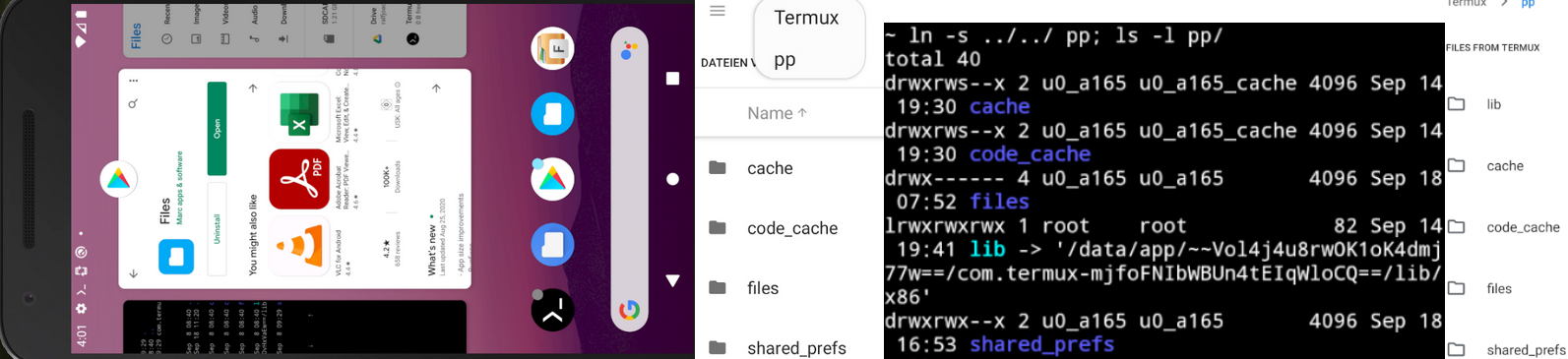
_Shot1:_ Files-App installed from playstore, _Shot2:_ symlink pp done on _pad_ and view with Files-App,
_Shot3:_ symlink pp on _Pixel_ with termux and _Shot4:_ view with Files-App there.
RalfWerner
on 18 Sep 2020
However, */lib is missing, which is not comparable with */shared_prefs (one file) or can you find 299.so there?
It is NOT necessary to have /data/data/{package.name}/lib to be present. It now lives in /data/app/{package.name}-{base64value}/lib.
I never had it since update to Android 7/8/9/10.
xeffyr
on 18 Sep 2020
I never had it since update to Android 7/8/9/10
@xeffyr I didn't say either, only that lib is missing on _Samsung pad_ and _real pixel_ from @trygveaa!
In the example above is _package.name=_/~~Vol4j4u8rwOK1oK4dmj77w==/com.termux and _base64value=_mjfoFNIbWBUn4tEIqWloCQ==, How can I get these values (without pm and ls -l u/bin/bash) _in Termux?_ You wrote in dev:
These utilities (
pm, */nl) are for debugging ... and shouldn't be accessible
I say: symlink u/nl/ is essential for _target=29_ and ←bug workaround impossible without it.
With apk=u/nl/../../base.apk . the Termux version and targetSdk can be determined (aapt) and added in 299.so. This also applies to a99 if ../base.apk exists and u/nl is _not_ a symlink - better with!.
Return to _this_ issue: The storage solution here done by the complete copy of _all data_ in the Termux app, which is completely lost with the termux deinstallation if they are not previously saved with the _Files app_. The data managed with setup-storage in termux are _"random products"_ and often not processable, as it is. Revers in the _Files app_: shows files that add up to hundreds of Gb (only 40G free on _pad_) with "fantasy names".
My other real devices have a maximum of 5Gb free, of which OTS-Termux needs 3.5G. So far (_target=28_) this has not been a problem, as everything except ELF files could be saved on the _sdcard also termux backups and cost of 64G is only around 10-15 euros.
RalfWerner
on 18 Sep 2020
@trygveaa I checked several emulations with Android>9 and _one real Samsung pad_. All emulators contain the blue file app above with the described access to all data (including termux). This can also be installed from the play store, works the same way and also on my _pad_ (the three pre-installed apps do not).
Yes, as I said I do have that Files app, and can access Termux from it. It's just that the app drawer has a different Files app (Files by Google, but it's only called Files in the app drawer), so I have to launch it from Settings. I see that the play store app your talking about is a third party shortcut to this app from the app drawer (I don't have it installed, but that doesn't really matter since I can launch it from Settings).
However,
*/libis _missing_, which is _not_ comparable with*/shared_prefs(one file) or _can you find299.sothere?_
No, shared_prefs is obviously something different from lib and doesn't have any .so files. I just thought you were asking if Files could open symlinks to out of the home directory, so I tested that with another directory since I don't have lib. I don't have the context for what you are trying to do, so not sure what you want with the .so files.
trygveaa
on 19 Sep 2020
They have different structure of prefix said @xeffyr above
The bootstrap sources of prefix (about 18M per arch) of the two versions differ little in terms of content, stored with b99 in nl/[1-9]*.so with reference table files.so and in a99 transferred unchanged from apk (direct or in two steps).
They are a _zip_ from $PREFIX with _SYMLINK_-split/txt, are downloaded as a URL in _build_ or managed locally, identified by _vers, android and arch_ and checked by sha256sum.
If you @trygveaa use the current Android-10 Arifakt (b99) and do ls -l u/bin/bash, you will find the value of nl (lib), behind 133.so you find coreutils and with grep 299.so nl/files.so you find the _Welcome_ text of termux. This does not work with the build on Windows. I have described a workaround and an alternative for nl in b99 build TermuxPackageInstaller.java would be:
String nl=TermuxService.PREFIX_PATH+"/nl",nlr=info.nativeLibraryDir;
TermuxInstaller.ensureDirectoryExists(new File(nl).getParentFile()); new File(nl).delete(); Os.symlink(nlr,nl);
The _classical 28_ version a99 also contains _var_ (131 files), 208 of 2395 more and 8 files fewer (proot) than that of b99 The ELF check/split results in 251 (files.so) of 2439 (merged with aapt) files.
After that, a/b only differs by pkg and *apt, proot are retained. Boot/reset then only needs _one_ source (apk) per device and the _unzip_ version needs about 60M. Plus _apk_ termux installation is less 100M
After a year checks _my favorite_ would be a99 with ELF-split in u/nl. _apt/pkg_ and _proot-exec_ works well!
RalfWerner
on 19 Sep 2020
On Android 11 (Pixel 4a), apparently I can write to but not read from storage from Termux. Is this expected?
$ echo asdf > ~/storage/shared/foobar
$ cat ~/storage/shared/foobar
cat: /data/data/com.termux/files/home/storage/shared/foobar: Permission denied
(I can see from other Android apps that the file has indeed been written with "asdf".)
 JohnGlassmyer
on 7 Nov 2020
JohnGlassmyer
on 7 Nov 2020
@JohnGlassmyer Seems like WRITE_EXTERNAL_STORAGE doesn't provide also read permission like was before.
Right now we have only
<uses-permission android:name="android.permission.WRITE_EXTERNAL_STORAGE" />
I guess if we append
<uses-permission android:name="android.permission.READ_EXTERNAL_STORAGE" />
this issue may get fixed.
However that's case is strange (allowed to write but not read). Android SDK documentation states this on read permission:
public static final String READ_EXTERNAL_STORAGE
Allows an application to read from external storage.

Any app that declares the WRITE_EXTERNAL_STORAGE permission is implicitly granted this permission.
...
which is reasonable.
xeffyr
on 7 Nov 2020
Well, still on my Pixel 4a, I tried, as someone suggested online somewhere, revoking the permission in App Info, then running termux-setup-storage and granting it again, and voila, I can read shared storage from Termux now.
I subsequently tried quitting Termux and restarting the device, and those did not cause Termux to lose the ability to read storage.
If I remember correctly, Termux on this device was able to read storage for a while before it started throwing the Permission denied messages. Perhaps it was caused by the System Update that got applied. (My memory is a little unclear; I bought this phone only a few days ago; I'm moving from an Android 6 phone where I used Termux a lot.)
I guess, if it starts throwing errors again, I'll try resetting the permission again.
JohnGlassmyer
on 7 Nov 2020
I can confirm the above worked with my Pixel 2.
dwrz
on 8 Nov 2020
also working on my pixel 3 with android 11 and nokia 7.2 with android 10! both of which weren't working a few months ago, when i had tried the same procedure!!
so weird.
thanks again, @JohnGlassmyer 😘 (and a @danyael 😁)
cauerego
on 14 Nov 2020
Tested on Pixel 5 (Android 11) - storage access is working right after termux-setup-storage. If someone have issues, try workaround with permission reset as in https://github.com/termux/termux-app/issues/1617#issuecomment-723504941.
Closing.
xeffyr
on 15 Jan 2021
Tested on Pixel 5 (Android 11)
Real device or emulator, target 28 or 29, with or without PiP?
The workaround is _only_ possible with 28 (Android 9)! I saw this issue as a problem of 29 (Android 10+). There is still _no access_ to any external data. _Did you check this?_
RalfWerner
on 17 Jan 2021
@RalfWerner Real device and build v0.104 from F-Droid, of course. However I should say that when we change to API 29, things may go very bad (total loss of access to shared storage).
xeffyr
on 17 Jan 2021
Tested on Pixel 5 (Android 11) ... with or without _PiP?_
I found this article on the subject. By _PiP_ I mean _pop-up view_, which is only possible to a very limited (Samsung's feature works with any application) extent on your Pixel 5. The question does not belong in this issue either :)
... when we change to API 29, things may go very bad (total loss of access to shared storage).
@xeffyr Do you think there will be a _solution for this problem some time?_
If so, only the _ELF problem_ is to solve, for build with _29_. We did a lot of checks last year. Because of the proot-exec function there are only 12 - probably fewer _ELF files_ to be saved in lib/cpp. Everything else can be supplemented with _classical_ pkg and/or tar (backup).
I checked _termux clones_ of versions 104 and 106 with _gradlew_ and _Studio_. The termux source (106.zip = 265k) consists of _109 files_ also after checkout android-package-apks (for build with target 29) and the bootstrap-* sources (four $arch.zip) are added. You wrote there:
I'm strongly against multi-format packaging where DEBs and APKs coexist. I rather will use "monoapk" (all necessary packages within one Termux apk file) solution than this mess ...
_Do you still think so_ or can you imagine now a _bootstrap loop_ 1), since recently _you invested a lot in pkg/apt?_
Without proot-exec function all _ELF files_ has to store in ../../lib by using one $arch.zip and store in next *.apk
1) After pkg in/up a new *.apk can be created/installed. u/nl (symlink to _ELF only_ path) with _29_ installation unpacked in the ../../lib source -details here. If libtermux-bootstrap.so (includes ../usr as .rodata with SYMLINKS.txt split) instead of symlinks.so and files.so in _29_ in the *.apk , termux-reset is no longer necessary and it can be used _standalone_ on any device with the same $arch.
RalfWerner
on 20 Jan 2021
@RalfWerner Android goes towards separation of user data from application data.
Since Android 11, access to directory Android like (/sdcard/Android, /storage/XXXX-XXXX/Android/data/ for devices with external storage support) is restricted for all target APIs. Applications may access files created only themselves. That affects UX for users relying on external storage as they will not be able to move files from "shared" Termux private directory.
I have not tested permission MANAGE_EXTERNAL_STORAGE. However if it works only within the scope of Storage Access Framework, that will mean Termux will lose ability to access files on any storage except internal (aka $HOME). Of course that will happen on target SDK 29+ only.
xeffyr
on 20 Jan 2021
I have not tested permission MANAGE_EXTERNAL_STORAGE
SAF also works without adjustments from the _file app_ to all termux paths, including ../../lib/../... The internal storage is too small for most of my _real_ applications on most of my devices, so copying is not a good option, would disappear with termux and external backups with termux tar would not work.
So a test would show the answer - _could you do that sometime?_
RalfWerner
on 20 Jan 2021
SAF also works without adjustments from the file app
Yes, it is still possible to access Termux by this way. Everything exposed over SAF should work - restrictions here are not expected.
However SAF is not a something that can be used by shell.
xeffyr
on 20 Jan 2021
all this technical talk makes no sense to me.
there will still be file managers in every android version, which will manage files in the shared storage, right?
termux might not be a specialized file manager, but it does have at least the same functions as one.
so, worst case scenario, the only real issue should be with the play store. but termux isn't even officially supporting it anymore.
so, what's the real issue here?
cauerego
on 21 Jan 2021
there will still be file managers in every android version, which will manage files in the shared storage, right?
Termux has one major difference from file managers and in general any normal (!) Android application - it is mainly a wrapper around Linux userland. Bash, coreutils, etc can't use APIs for file managers like storage access framework. If we patch them to run through JNI, there would be a lot issues (there's to say that SAF doesn't support symlinks, chmod, etc Unix features).
so, what's the real issue here?
For now the only issue is a restricted access to "Android" folder on Android 11. Applications can access only their directories, e.g. Termux can access only /storage/*/Android/data/com.termux. File manager (e.g. a stock one), is not able to access it since it is another application.
In future when Termux will switch to target API 30 (the latest one currently) to be published on Play Store again, there would be a problems with storage. The only thing for full file access we can rely on is MANAGE_EXTERNAL_STORAGE permission, however, as I wrote previonsly, I have not tested it to check whether it actually works for Termux application. If it doesn't work (i.e. applicable only to SAF, say Java/Kotlin "file managers"), then Termux would have a complete loss of ability to work with shared storage.
P.S. Potential issues of future Termux versions are off-topic here. No one knows when switching to a newer APIs would be done. But once we'll be ready, an announcement would be posted with all upcoming feature changes.
xeffyr
on 21 Jan 2021
all this technical talk makes no sense to me ... so, what's the real issue here?
@cauerego the title: "access on _API 30_" is correct and the technical solution is the goal!
@xeffyr has closed here because a _workaround solution_ was found with target 28. Should also mean 29+ it could be opened again and possibly the _workarround_ solved (find storage 11 times).
RalfWerner
on 21 Jan 2021
oof, that's still a lot more of technical things...
i think this is the key i was missing:
if we patch them to run through JNI, there would be a lot issues (there's to say that SAF doesn't support symlinks, chmod, etc Unix features).
currently, chmod, symlinks and few other linux features are already limited.
so this patch could be a good thing to do. and make it more evident somehow how different the storage folder must be, due to all those android limitations.
from what i could grasp, you're trying to prevent going that route because it would be a lot of new code and still no guarantees it would even be necessary, given access using api28 was finally fixed within termux.
@xeffyr also said
that will mean Termux will lose ability to access files on any storage except internal (aka $HOME).
and what i mean is that this doesn't need to be true. termux can still access shared storage files with all the reasoning i'm trying to bring in. and there's no way this could ever be fully blocked by android, because there's zero interest in android from banning file explorers.
what's more...
even if saf ever becomes the standard way (looks like there's still some devs fighting against this) offering only saf access to termux files might also not be ideal. because then the opposite happens, and the full fledged *nix files are now exposed to apps that can screw with their attributes.
i think this is the case in which maintaing both file access or focusing on the shared storage rather than saf makes more sense...
if i could make any sense to you guys! 😁😔🤔😇
cauerego
on 21 Jan 2021
@cauerego do you have your own experience with SAF (file app exchange with termux) and _termux_ with target 29+?
RalfWerner
on 21 Jan 2021
sorry @ralf, not at all. nothing related at all. except some 20 years coding in other things, in the past.
i will definitely love to help getting my hands into code in the future if i can improve the ux (as i mentioned in a few places...).
cauerego
on 21 Jan 2021
so this patch could be a good thing to do. and make it more evident somehow how different the storage folder must be, due to all those android limitations.
What I here mean:
- No file access modes/permissions. At all.
ls -ldoesn't work (or will work if we'll fake ownership and modes in return values),chmod +xdoesn't work, etc. - No symbolic links. At all.
- No standard Unix file systems: no
/proc, no/dev, no/sys.
That's at least, since SAF works only within its virtual file system addressed through URIs.
Patching - that's another question. It is possible to redefine standard I/O C functions through a separate library to make them using SAF, I even seen the attempts for doing that on Github. It is not that hard, but main problem is that terminal would be mostly useless. Execution overhead will also apply as each call to open(), fopen() and similar functions will be hooked by Termux app.
xeffyr
on 21 Jan 2021
yes, but all that would be only in the storage/shared folder.
so it'd be much more limited than it is now, but that shouldn't be a big deal. it could be treated like a custom file system or whatever.
cauerego
on 21 Jan 2021
@xeffyr again: reopen here or open a new issue for: _sd=manage external storage at target 29+_ or deal the _sd_ topic here?
RalfWerner
on 23 Jan 2021
@RalfWerner Issues are being opened only for existing application variants. Since SDK 29/30 build is not released - I even don't know if it would be available at all, there no point of opening new thread about issue on future APIs.
As I wrote previously, I have not tested MANAGE_EXTERNAL_STORAGE permission. So storage issue is not only about future versions but also unproven. If I do test and see that issue really exist, then ok, I will create a new one.
xeffyr
on 23 Jan 2021
Related issues
 joakim-noah
·
5Comments
joakim-noah
·
5Comments
 nedz14
·
4Comments
nedz14
·
4Comments
 flipflop97
·
3Comments
flipflop97
·
3Comments
 baconicsynergy
·
5Comments
baconicsynergy
·
5Comments
 bitnetwork
·
3Comments
bitnetwork
·
3Comments
Most helpful comment
Well, still on my Pixel 4a, I tried, as someone suggested online somewhere, revoking the permission in App Info, then running
termux-setup-storageand granting it again, and voila, I can read shared storage from Termux now.I subsequently tried quitting Termux and restarting the device, and those did not cause Termux to lose the ability to read storage.
If I remember correctly, Termux on this device was able to read storage for a while before it started throwing the
Permission deniedmessages. Perhaps it was caused by the System Update that got applied. (My memory is a little unclear; I bought this phone only a few days ago; I'm moving from an Android 6 phone where I used Termux a lot.)I guess, if it starts throwing errors again, I'll try resetting the permission again.