Termux-app: restore previous shortcut layout
Hi, first of all thank you for this app, it's really amazing ! :)
Since the last update, the icon shortcuts changed. There is no more the left and right arrows which is really annoying since I can't move forward and backward :( (yes with Ctrl+b/w but that's incredibly tedious and inconvenient)
Could you add the left and right arrows ?
Thanks
 daufinsyd
All 5 comments
I think you are talking about the extra-keys row.
You can specify which keys you want to have by putting it in ~/.termux/termux.properties. See https://wiki.termux.com/wiki/Touch_Keyboard#Extra_Keys_Row for an example and some more information.
 Grimler91
on 13 Feb 2019
Grimler91
on 13 Feb 2019
Yes, Thank you !
daufinsyd
on 13 Feb 2019
The extra-keys array of arrays in ~/.termux/termux.properties is a very nice thing which I gladly adopt :)
However, since I did, all the keys I requested dispatched in 3 rows appear but the "textual keys" like CTRL, PGUP and such appear weirdly, only the two first letters of each appear atop each other.
All the buttons are crammed to the left of the screen except the last on of the last row which is in the middle ...
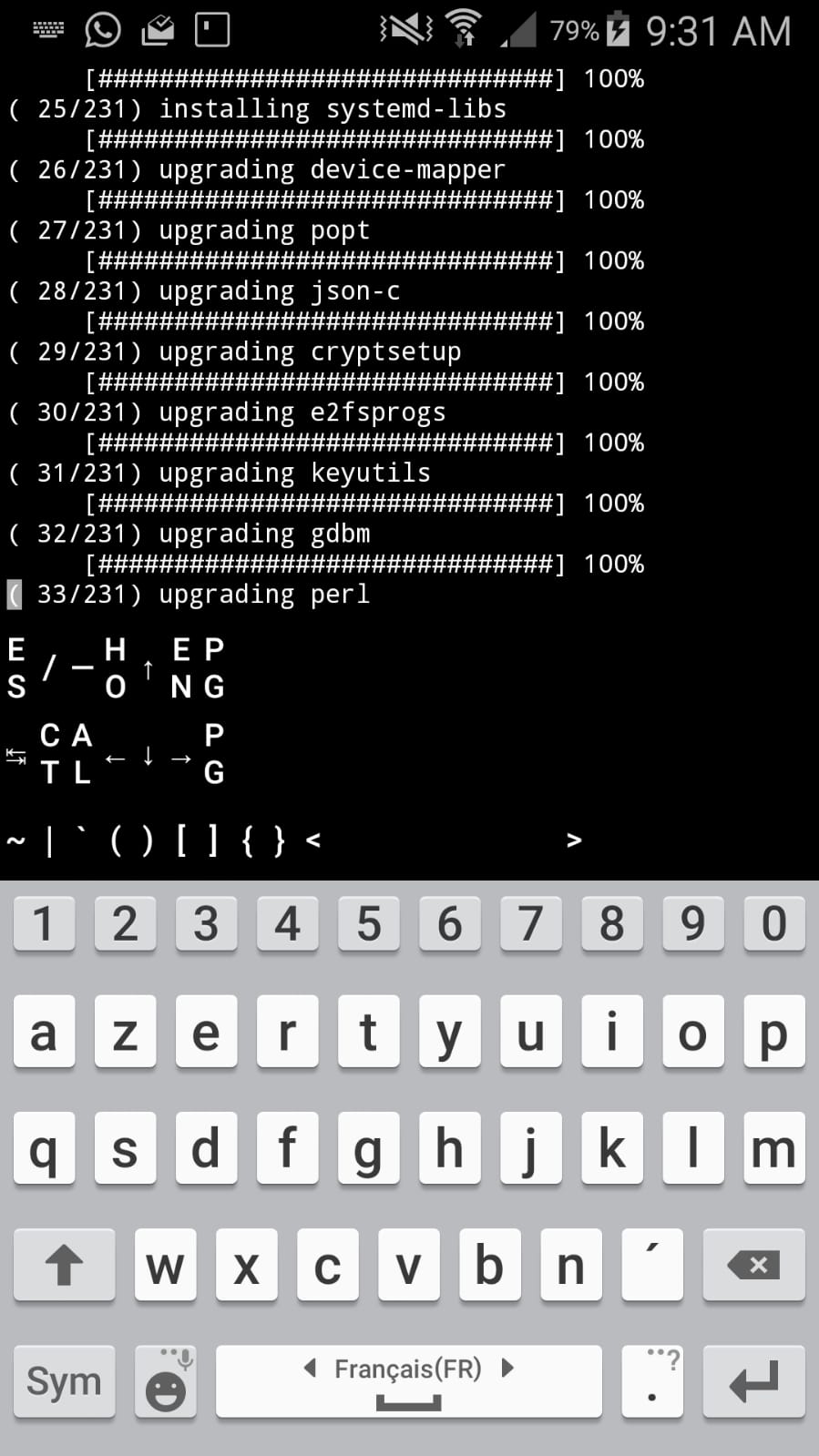
My config is :
extra-keys = [['ESC','/','-','HOME','UP','END','PGUP'],['TAB','CTRL','ALT','LEFT','DOWN','RIGHT','PGDN'],['~', '|','`','(',')','[',']','{','}','<','>']]
in ~/.termux/termux.properties
 gulhe
on 11 Mar 2019
gulhe
on 11 Mar 2019
@gulhe you should open a new issue
1 issue = 1 specific problem :)
daufinsyd
on 13 Mar 2019
thought it was close enough but I guess you are right
gulhe
on 14 Mar 2019
Related issues
 nomxs
·
4Comments
nomxs
·
4Comments
 rjsteinert
·
4Comments
rjsteinert
·
4Comments
 AlainKnaff
·
4Comments
AlainKnaff
·
4Comments
 gerroon
·
5Comments
gerroon
·
5Comments
 nedz14
·
4Comments
nedz14
·
4Comments
Most helpful comment
I think you are talking about the extra-keys row.
You can specify which keys you want to have by putting it in
~/.termux/termux.properties. See https://wiki.termux.com/wiki/Touch_Keyboard#Extra_Keys_Row for an example and some more information.