I use Termux since 6 months and I think it would be nice if someone adds a tutorial like the one from Termius (iOS ssh app), that explain what does "Aquire Wakelock" means, where's the drawer, where are the files, what are the termux-only commands (getprop, ...), how does Termux's pkg works, Termux's wiki url, how does Termux:API work...
It could be very useful for new users (and actual too ;) ).
Why not use "termux-tutorial" to launch it another time.
(I found nothing about this here, but, probably a repost)
 jusdepatate
All 7 comments
Yeah that would be nice
Termux-help or termux-tutorial or something
@canklot What kind of tutorial is needed ? How to use bash/zsh/fish ? How to write a program ? Or what ? You just don't know what you need ?
Termux is just an interface to the shell (e.g. bash). On the Internet you can find plenty information about it. Manpages also available as well as most command line utilities have embedded help information (use flags -h or --help).
Termux's wiki url
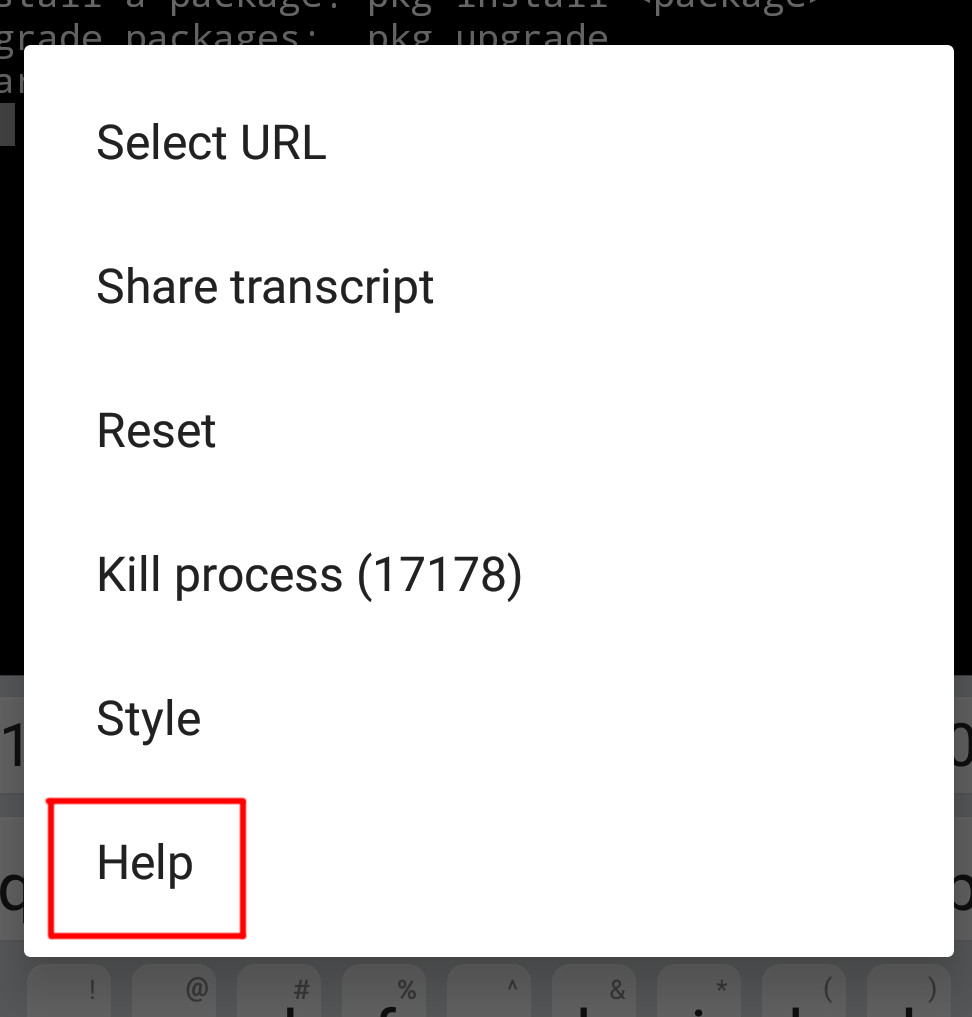
@jusdepatate Wiki's url is well hidden, isn't it ?

Button to open wiki is available too:
that explain what does "Aquire Wakelock" means, where's the drawer, where are the files, what are the termux-only commands (getprop, ...), how does Termux's pkg works, Termux's wiki url, how does Termux:API work...
All (or nearly all) answers on Wiki.
- where's the drawer: https://wiki.termux.com/wiki/User_Interface
The navigation drawer is revealed by swiping inwards from the left part of the screen. It has three elements:
A list of sessions. Clicking on a session shows it in the terminal while long pressing allows you to specify a session title.
A button to toggle visibility of the touch keyboard.
A button to create new terminal sessions (long press for creating a named session or a fail-safe one).
where are the files: https://wiki.termux.com/wiki/Differences_from_Linux
what are the termux-only commands (getprop, ...) - it's android-only commands. Most people don't need them, others know what they doing. Android does not provide description for /system/bin commands. Also, we can't be sure that these commands will have same behaviour on all Android versions.
how does Termux:API work: https://wiki.termux.com/wiki/Termux:API
This addon exposes device functionality as API to command line programs in Termux.
- perfect short explanation of what Termux:API does. Why explanation should be longer ?
 xeffyr
on 2 Dec 2018
xeffyr
on 2 Dec 2018
Termux-help or termux-tutorial or something
Or termux-wiki command that launches a browser to open a Termux Wiki URL.
Add this to bashrc:
termux-wiki() {
    termux-open-url https://wiki.termux.com
}
and restart session.
Termux Wiki is written by Termux users. If you found something missing - you can fix that =). Wiki is easiest way to contribute and have all information that you or someone else need.
xeffyr
on 2 Dec 2018
Yeah, there are tons of good info on the wiki, I definitely recommend reading that in its entirety for any user new to Termux. That said, I can see why new users would be confused about where to find help. It's not obvious at first glance when downloading the app from the play store that there is a help menu when long-pressing. I think a better position for the link would be in the side swipe pane.
 verboze
on 19 Dec 2018
verboze
on 19 Dec 2018
It's not obvious at first glance when downloading the app from the play store that there is a help menu
I think a better position for the link would be in the side swipe pane.
This "side swipe pane" is not obvious too for some user. As I remember, either on Gitter, Google+ or Github was a question related to it.
Some people even can't find a link to wiki that shown on session. I guess I shouldn't point where wiki's link exactly located in the motd:
xeffyr
on 19 Dec 2018
Fair enough. I only mention the side panel because a lot of apps use that panel to expose things like settings, help, etc; so it might be more familiar to new users, I think. That said, you are absolutely right, it's right there in every session, it's kind of hard to miss 😅
verboze
on 19 Dec 2018
@xeffyr, IMHO it would be useful to have one or two lines added to the initial message suggesting the user to "swipe left to right" and/or to "long press" to open the context menu. Currently 2/3 of the info is about the package manager, and not about the app/terminal itself.
Furthermore, I'd suggest to replace all the initial message with:
Welcome to Termux!

Long press anywhere in the terminal to access help and further options.

Report issues at https://termux.com/issues
Then, 'Help' in 'More' would open a window with the current content, plus a reference to the drawer. Personally, I did read the wiki, I read the FAQ, I installed GCC through @its-pointless's repo, and still I installed screen because I didn't find out about the drawer until I read some blog post later. Hence, I do think it might be easy for users to skip obvious info about usability when reading all the details in the wiki.
 eine
on 17 Feb 2020
eine
on 17 Feb 2020
Since termux-tools v0.95 man page termux is provided. Run pkg upgrade to ensure that latest version of termux-tools is installed.
Offline help will be supplied only as standard man page. Embedding help pages in HTML format inside the application will not happen. Termux Wiki remains to be the main source of up-to-date information about Termux.
xeffyr
on 2 Oct 2020
Related issues
 nomxs
·
4Comments
nomxs
·
4Comments
 QGB
·
3Comments
QGB
·
3Comments
 uyu717
·
4Comments
uyu717
·
4Comments
 msh2050
·
4Comments
msh2050
·
4Comments
 AlainKnaff
·
4Comments
AlainKnaff
·
4Comments
Most helpful comment
Or
termux-wikicommand that launches a browser to open a Termux Wiki URL.Add this to bashrc:
and restart session.
Termux Wiki is written by Termux users. If you found something missing - you can fix that =). Wiki is easiest way to contribute and have all information that you or someone else need.