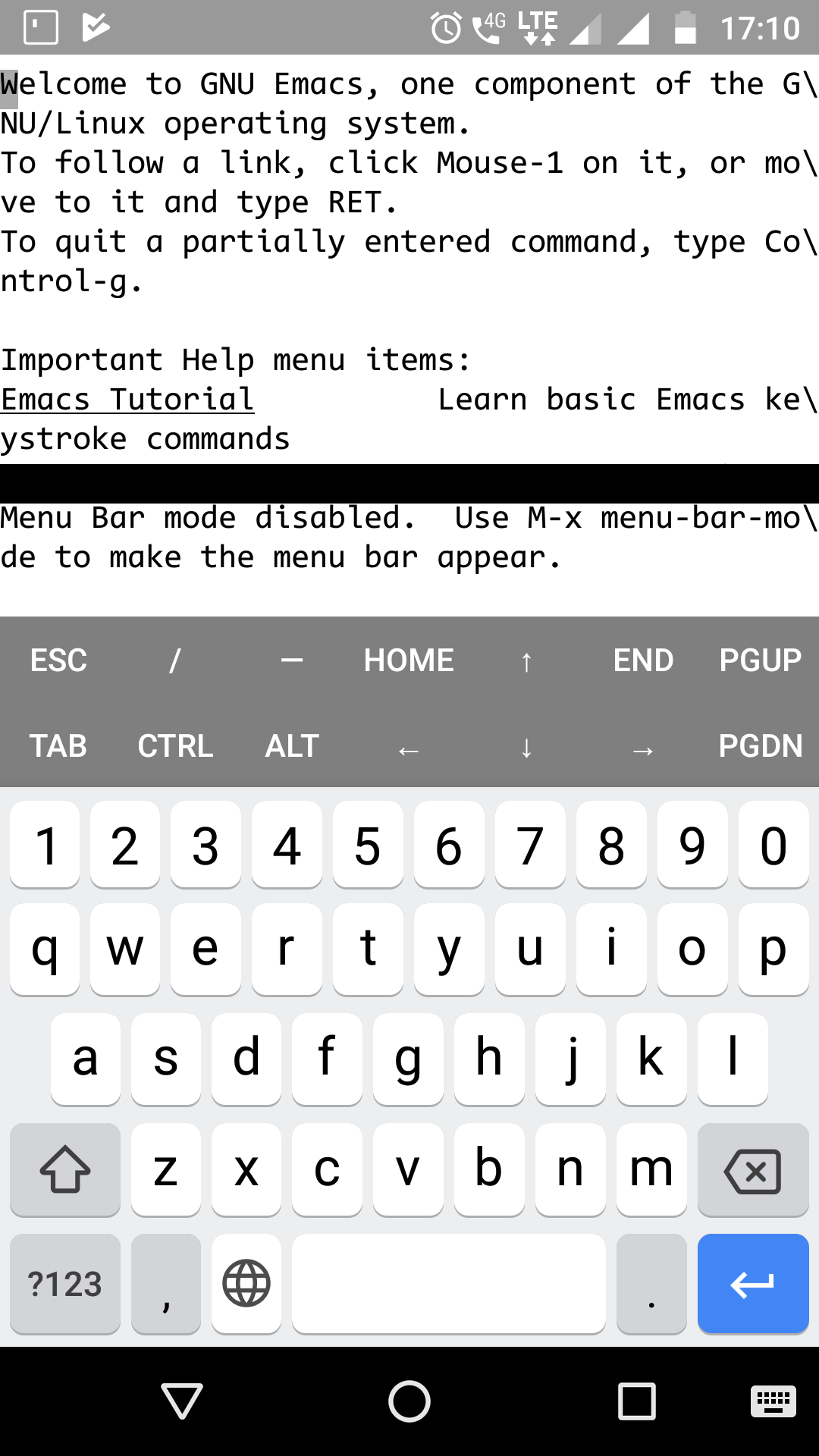
It is much less functional and needlessly big. Could you give the old one back or give an option to switch to it?
 Chaformbintrano
All 11 comments
I also agree, some of the buttons like Home, End, PageUp, PageDown are not essentially required as they have Ctrl+.. bindings, keybar with keyboard on occupies almost half of the screen.
I'd also like an option to swich between no extra keys - > old extra keys - > extended extra keys
maybe use VolmUp+q to cycle between them
 Auxilus
on 1 Jul 2018
Auxilus
on 1 Jul 2018
The 2 rows of extra keys is indeed a hindrance. Not a lot of phones have a huge display to compensate for the resulting loss of the screen estate.
In my own case, I cant enable the rows because the full keyboard eats most of my screen estate. But disabling the rows robs me of one-handed use of ctrl and alt keys.
An ideal, but admittedly more effortful way out could be to eschew the idea of multiple rows in favour of a config where the user could specify the keys and their order of display in a single row. That should cover the needs of the most.
 jayesh-bhoot
on 2 Jul 2018
jayesh-bhoot
on 2 Jul 2018
Please revert this change. It seems almost careless that this design was implemented, considering there's no real purpose or practicality backing it. Theres also a few insanely obvious and more preferable ways that this change could have been approached.
 kosovo0275
on 2 Jul 2018
kosovo0275
on 2 Jul 2018
When using Hacker Keyboard, the extra keys are useless, it should be the user's choice "no extra keys -> old extra keys -> extended extra keys", I already had my environment very well configured, but this change made me lose everything, Now I have to do a downgrade at 0.61.
 daemondev
on 8 Jul 2018
daemondev
on 8 Jul 2018
I think this should be configurable because I really like the new arrow keys but don't necessarily need the other keys besides TAB, CTRL and ALT.
Or the extra keys view can be changed to a horizontally scrollable list like how QuickEdit implements extra keys.
 mmkiir
on 8 Jul 2018
mmkiir
on 8 Jul 2018
can be changed to a horizontally scrollable list like how QuickEdit
Can't be changed. Scrolling left activates alternative text field which allows text autocorrection/prediction and swype input.
I think this should be configurable
There is a pull request but it seems that it's author forgot about it: https://github.com/termux/termux-app/pull/650.
 xeffyr
on 8 Jul 2018
xeffyr
on 8 Jul 2018
We can shift the text input field to the left side, so swiping right shows the text field and scrolling left scrolls the extra keys. After that, scrolling right would go to the back in the extra keys list till we reach the first element and then swiping right would show the text input field.
mmkiir
on 8 Jul 2018
Hey guys, the first version of the configurable extra keys is almost done in #788, new ideas or critics for configuration are welcome!
 robertvandeneynde
on 2 Aug 2018
robertvandeneynde
on 2 Aug 2018
Please bring the two rows solution back again.
For me it was the best solution until now. I used all the keys. Especially the "left and right -arrow keys"
Can we have it configurable?
 neo-expert
on 23 Jan 2019
neo-expert
on 23 Jan 2019
Yes it's configurable (create .termux/termux.properties and add the line extra-keys = [["ESC", "/", "-", "HOME", "UP", "END", "PGUP"], ["TAB", "CTRL", "ALT", "LEFT", "DOWN", "RIGHT", "PGDN"]] in the order you want.
and I also think the two row solution is a best default, I changed the default and that was not a good idea.
That's easily changeable in the source code as seen here : https://github.com/termux/termux-app/commit/3693e3c1b6da04398cbd73a28b44a764abc9bc3e
robertvandeneynde
on 23 Jan 2019
It is configurable now, so this issue can be closed. Seems like it isn't documented yet though.
You can configure it by setting extra-keys in ~/.termux/termux.properties. For the old keys, set this:
extra-keys = [["ESC", "/", "-", "HOME", "UP", "END", "PGUP"], ["TAB", "CTRL", "ALT", "LEFT", "DOWN", "RIGHT", "PGDN"]]
 trygveaa
on 23 Jan 2019
trygveaa
on 23 Jan 2019
Related issues
 christianrondeau
·
4Comments
christianrondeau
·
4Comments
 baconicsynergy
·
5Comments
baconicsynergy
·
5Comments
 darth-cequella
·
3Comments
darth-cequella
·
3Comments
 nedz14
·
4Comments
nedz14
·
4Comments
 uyu717
·
4Comments
uyu717
·
4Comments
Most helpful comment
It is configurable now, so this issue can be closed. Seems like it isn't documented yet though.
You can configure it by setting
extra-keysin~/.termux/termux.properties. For the old keys, set this: