Termux-app: Termux ftp not working properly ( App-Private directory is chosen).
I've tried making an ftp using Termux and using the Termux App-Private folder as ftp home directory but it's not working as I expected. Does anyone knows?
 oscl
oscl
All 15 comments
My crystal ball is foggy today so what did you run and which error are you getting?
 Grimler91
on 30 May 2018
Grimler91
on 30 May 2018
You are so funny!
ok here's the thing:
$ tcpsvd -vE 0.0.0.0 1024 ftpd TestLab
tcpsvd: listening on 0.0.0.0:1024, starting
: start 20286 127.0.0.1:1024-127.0.0.1:41904
tcpsvd: status 1/30
tcpsvd: start 20286 127.0.0.1:1024-127.0.0.1:35735
tcpsvd: status 2/30
tcpsvd -vE 0.0.0.0 1024 ftpd TestLab
should have made the ftp server where Termux App-Private folder will be the ftp's home directory right ?
But it is not working as expected. The ftp is starting with the root(/) as home directory. when I tried opening /data/ the entire folder is empty (It should have because there's no root access).
Please help!!!
oscl
on 30 May 2018
@Grimler91 Hey, use your crystal ball and help me bro...!
oscl
on 30 May 2018
@AJ-Creations For me everything worked.
In Termux I did:

On PC:
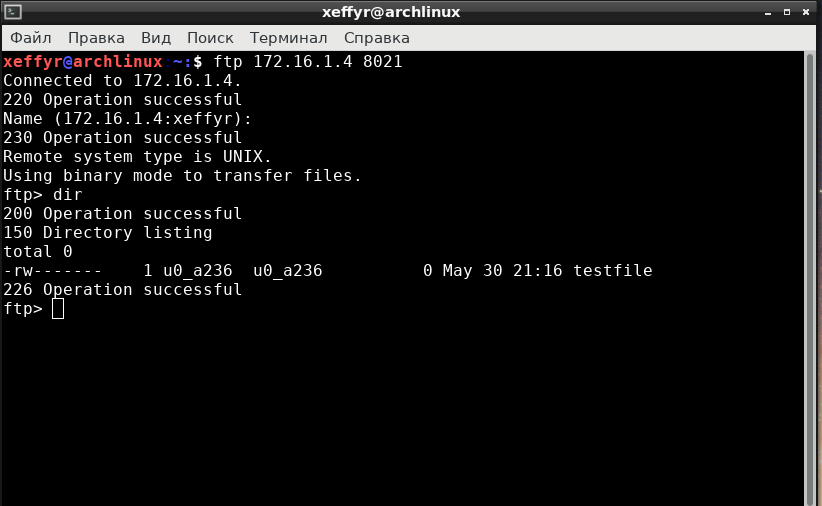
Did you expect a behaviour like this ? Or you need a chroot into home directory ?
I think that with busybox's ftpd this is not possible.
 xeffyr
on 30 May 2018
xeffyr
on 30 May 2018
@xeffyr
Please tell me how you turned on these buttons?
 Demigoddd
on 31 May 2018
Demigoddd
on 31 May 2018
Tried your same commands
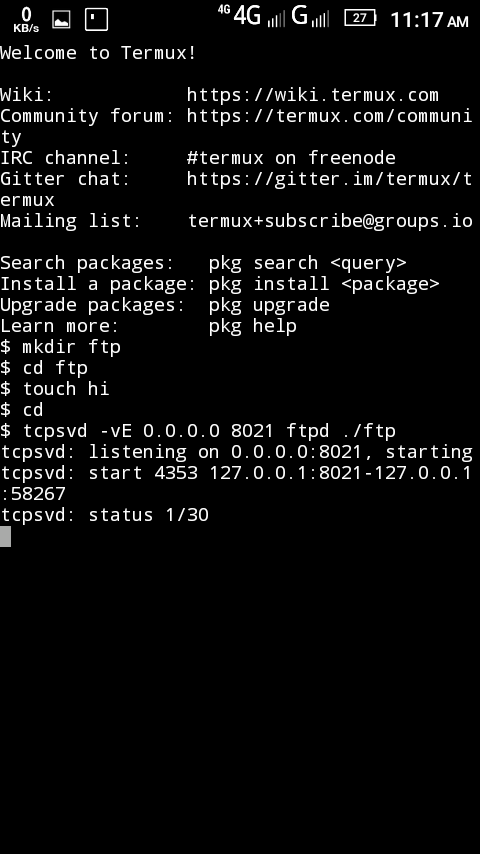
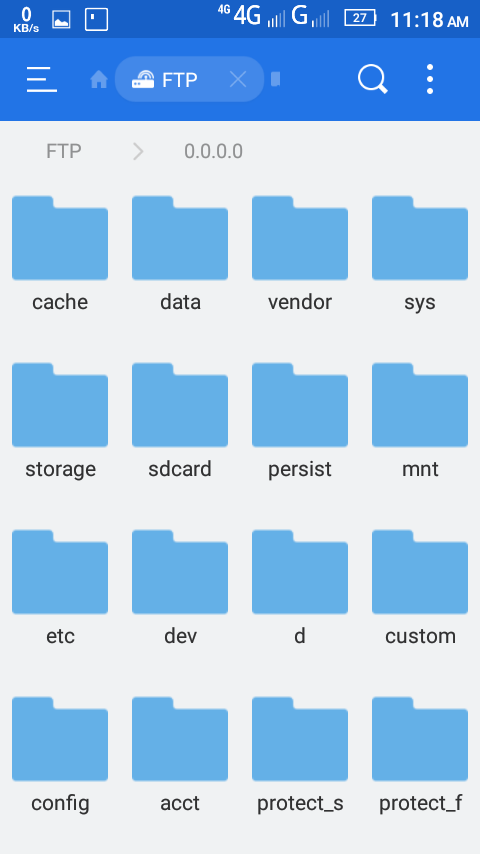
But the ftp home directory is still root(/)
oscl
on 31 May 2018
@AJ-Creations set the home path in your ftp client to the path to your TestLab folder. Worked for me when I tested with some android ftp app.
Grimler91
on 31 May 2018
@Deathlive If you want an additional keys, check this PR: https://github.com/termux/termux-app/pull/605
xeffyr
on 31 May 2018
@Grimler91
It works perfectly. Thanks.
oscl
on 3 Jun 2018
Hey please I still can't make my FTP server work correctly. I've searched online and followed the Instructions on the official site but it still doesn't work . I don't know what to do
My config in client app :
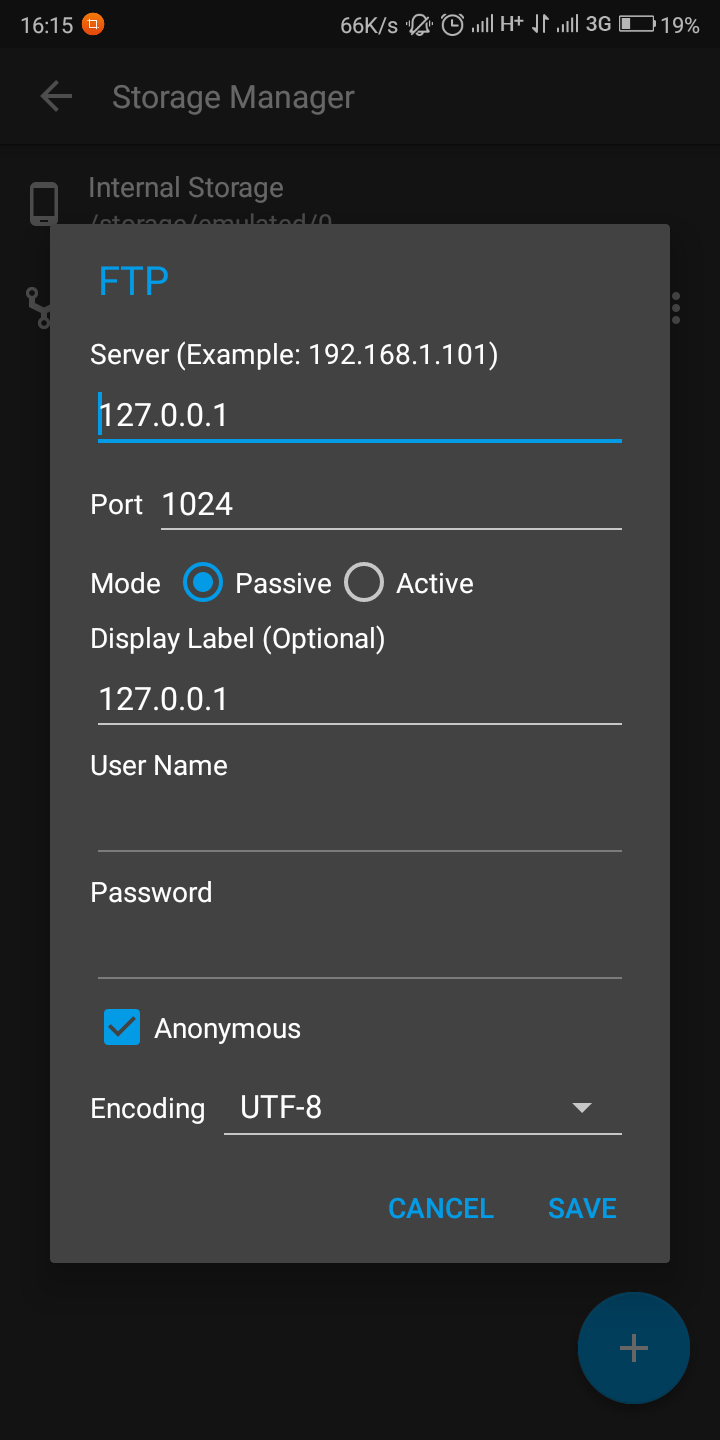
Error =>
tcpsvd -vE 0.0.0.0 1024 ftpd haboard
tcpsvd: listening on 0.0.0.0:1024, starting
tcpsvd: start 29375 127.0.0.1:1024-127.0.0.1:37137
tcpsvd: can't execute 'ftpd': No such file or directory
tcpsvd: status 1/30
tcpsvd: end 29375 exit 127
tcpsvd: status 0/30
 JosiasAurel
on 3 Aug 2020
JosiasAurel
on 3 Aug 2020
Instructions on the official site
Instructions are now different:
pkg install busybox termux-services
source $PREFIX/etc/profile.d/start-services.sh
sv-enable ftpd
sv up ftpd
If you still need tcpsvd use, then do:
busybox tcpsvd -vE 0.0.0.0 1024 busybox ftpd -w /
However, it's to use SFTP...
xeffyr
on 3 Aug 2020
Hi everyone,
I have run ftp through busybox tcpsvd -vE 0.0.0.0 1024 busybox ftpd -w /storage/emulated/0/ command, but I can't see anything. Since my android is 10 and not rooted, so I can access $HOME termux directory but cannot access my files in /storage. What should I do to access that. I want this ftp service for sharing my files from phone to another device. Just like an FTP server for cPanel. You could access everything there.
In this service I'm only able to download SOME files.
What would you suggest for this problem ?
@xeffyr
 ImAli7
on 9 Dec 2020
ImAli7
on 9 Dec 2020
If can't read /storage/emulated/0/, then enable storage access permission.
xeffyr
on 9 Dec 2020
If can't read
/storage/emulated/0/, then enable storage access permission.
Bro, it works! But I only can access ./0 directory, not emulated. It's good enough but why is this happening that I can't access the emulated directory ?
Thanks a lot for helping me
ImAli7
on 9 Dec 2020
You can't view the contents under /storage/emulated/ without root. /storage/emulated/0 is a right path to shared storage.
xeffyr
on 9 Dec 2020
Related issues
 jakubix30
·
4Comments
jakubix30
·
4Comments
 uyu717
·
4Comments
uyu717
·
4Comments
 baconicsynergy
·
5Comments
baconicsynergy
·
5Comments
 AlainKnaff
·
4Comments
AlainKnaff
·
4Comments
 coreyreichle
·
3Comments
coreyreichle
·
3Comments
Most helpful comment
My crystal ball is foggy today so what did you run and which error are you getting?