Termux-app: How can I re-view my files from the sd card?
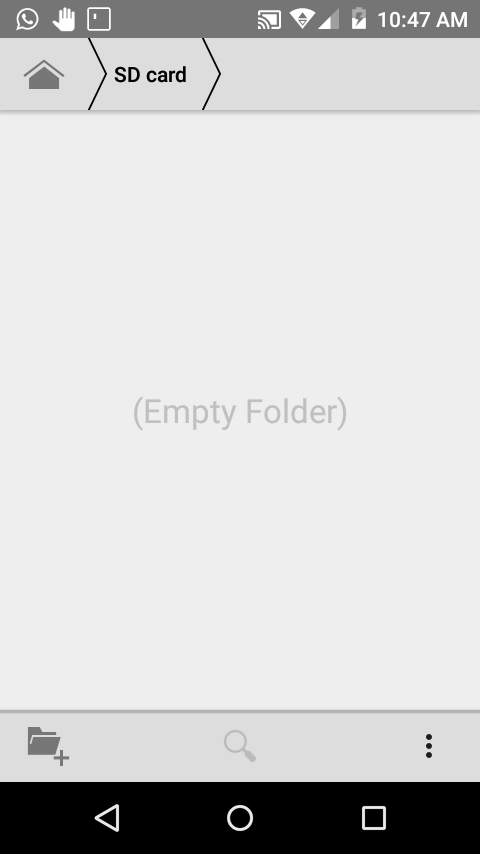
Hello guys, is that I wrote in termux' termux-setup-storge' and this generated as a kind of direct access from the home folder to the sd called' storage', and now that I want to enter through the file manager in the sd nothing appears
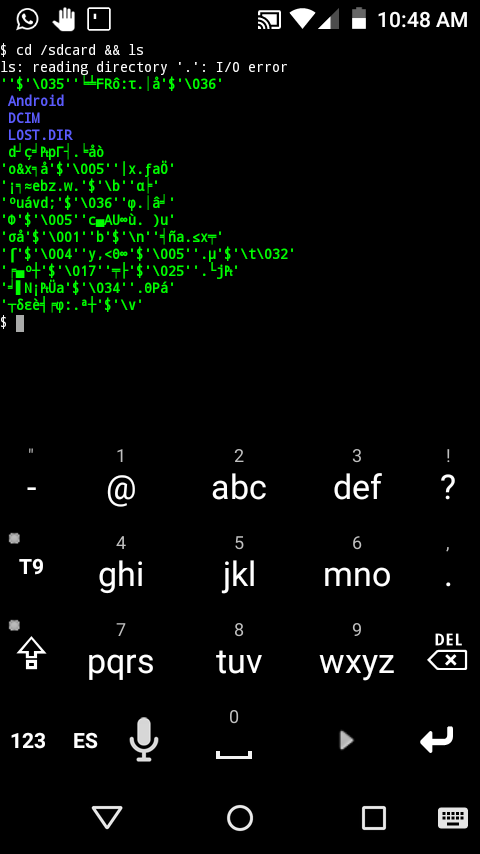
and if I search for it by termux they appear as some types of symbols as if they were folders.
What solution can there be?
thx for your help!

@fornwall
@Auxilus
 Alexjh16
All 10 comments
Isn't the folder generated by termux-setup-storage ~/storage? Can you see any data in the storage folder?
Are you using Android unified storage?
Did you upgrade Android/file manager app? Do this file manager have the storage/sd card permisions?
Your SD card is almost empty; Did you try list the contents on another device?
 empjustine
on 20 Feb 2018
empjustine
on 20 Feb 2018
Are the file names written in English?
Do you know what character set you use, if not?
empjustine
on 20 Feb 2018
If that's the folder that generates termux for me.
I don't think my android is 5.1 and so I read a little bit, and that option is like for higher android.
That file manager is the one that brings the phone by default, that manager does not have permissions, besides that use root files as an alternate app.
If in fact I entered it to a pc and the content as such but I couldn't change the attributes to the folders, that is to say they left the folders and when I opened them I didn't allow it.
Alexjh16
on 21 Feb 2018
No, the folders are created in Spanish, but the language of the cell phone is in English.
I suppose it should be the UTF-8, but because it's or is in the Colombian region, do you think it's the ISO-8859-1?
Or do you think that matters at all?
Alexjh16
on 21 Feb 2018
/sdcard points to the standard internal storage (same as /storage/emulated/0), it doesn't point to the actual sdcard that you can insert/remove, so the two screenshots doesn't show the same folder.
The I/O error is still weird though.
 Grimler91
on 21 Feb 2018
Grimler91
on 21 Feb 2018
No! on my cell phone when I type cd /sdcard directly it will show me everything I have in the external sdcard, that is, the one that has 15GB.
Very different when typing cd--> /storage/sdcard1 && ls
It's gonna list the internal memory as such, which you refer to.
or typing $cd --->/storage/emulted/1.... In my case, of course.
Yes!... in both captures I wanted to show the external storage that I chose in termux
Alexjh16
on 21 Feb 2018
Hello I couldnt write to my work dir
Also i cant access from my filemanager to
/data/data/com.termux/files/home
 dixonnixon
on 24 Sep 2018
dixonnixon
on 24 Sep 2018
dixonnixon
on 24 Sep 2018
dixonnixon
on 24 Sep 2018
Also i cant access from my filemanager to
/data/data/com.termux/files/home
@dixonnixon You can't access your $HOME with file manager. Even if all your files will have rwxrwxrwx permissions, SELinux will still block read or write access from other applications (on most ROMs), however there is an exception for applications that have shared user id between each other.
If you still want to do this - your device should be rooted.
Forget about doing chmod +x on shared storage (/sdcard). This will not work, just limitation of file system.
 xeffyr
on 24 Sep 2018
xeffyr
on 24 Sep 2018
Closing since it is possible to access Termux home only from file managers properly using Storage Access Framework or if device is rooted.
xeffyr
on 6 Sep 2019
Related issues
 Areahints
·
4Comments
Areahints
·
4Comments
 AnkurJagani
·
3Comments
AnkurJagani
·
3Comments
 gerroon
·
5Comments
gerroon
·
5Comments
 ngroup
·
5Comments
ngroup
·
5Comments
 coreyreichle
·
3Comments
coreyreichle
·
3Comments
Most helpful comment
/sdcard points to the standard internal storage (same as /storage/emulated/0), it doesn't point to the actual sdcard that you can insert/remove, so the two screenshots doesn't show the same folder.
The I/O error is still weird though.