Terminus: [Feature Request] Reconnect closed SSH session
When a SSH session is closed for some reason, I would like it could be re-connected. For example, right click the tab and select "Reconnect". Currently, I can only close the existing tab of closed SSH session and create a new one for reconnecting.
The most important reason for this feature:
- I often need to check previous screen log of closed SSH session. If I have to close the existing tab and create a new one for reconnection, then I would lose the previous screen log.
 wangxin
All 14 comments
I would love this too. I thought that was the whole point of using Mosh, so that when I’m in another app for a while and come back to terminus my session is still open...
 okwme
on 30 Jun 2019
okwme
on 30 Jun 2019
on Windows 10 I don`t see reconnect command in right-clicked menu on a tab.
Moreover if a connection is lost in a tab, the tab will be closed automatically with an red marked error.
 spanyukov
on 26 Mar 2020
spanyukov
on 26 Mar 2020
@Eugeny Why was this closed with no fix?
 gtsteffaniak
on 11 Jun 2020
gtsteffaniak
on 11 Jun 2020
This was closed with a fix. The reconnect button is available in the terminal bar if a session was disconnected.

 Eugeny
on 11 Jun 2020
Eugeny
on 11 Jun 2020
This was closed with a fix. The reconnect button is available in the terminal bar if a session was disconnected.
I just tested this on my terminus and I do not get any reconnect button. it will give a toast ERR message and close the tab.
gtsteffaniak
on 11 Jun 2020
Can you please capture DevTools console logs at the time of the disconnection? https://github.com/Eugeny/terminus/wiki/Debug-logs
GitHub
A terminal for a more modern age. Contribute to Eugeny/terminus development by creating an account on GitHub.
Eugeny
on 11 Jun 2020
[ssh] [47m [49m Host key fingerprint:
log.service.ts:56 [ssh] Trying saved password
log.service.ts:56 [ssh-pig-22] Shell session ended
xtermFrontend.ts:117 Could not resize xterm Error: This API only accepts integers
at eval (xterm.js:1)
at Array.forEach (<anonymous>)
at e._verifyIntegers (xterm.js:1)
at e.resize (xterm.js:1)
at XTermFrontend.resizeHandler (xtermFrontend.ts:113)
at ResizeObserver.eval (xtermFrontend.ts:158)
XTermFrontend.resizeHandler @ xtermFrontend.ts:117
eval @ xtermFrontend.ts:158
This time the tab closed before I could test trying to reconnect.
gtsteffaniak
on 11 Jun 2020
@Eugeny Could you add 'reconnect' menu item on a tab?
Sometimes I just want to have a force reconnect option
spanyukov
on 12 Jun 2020
This was closed with a fix. The reconnect button is available in the terminal bar if a session was disconnected.
I just tested this on my terminus and I do not get any reconnect button. it will give a toast ERR message and close the tab.
I have the same behaviour.
spanyukov
on 13 Jun 2020
Do we have a solution for this yet? I an using terminus and need "reconnect" option badly.
 diptimanbasak
on 1 Jul 2020
diptimanbasak
on 1 Jul 2020
EDIT: With the latest release, reconnect button is added. Thanks very much!!!
This one could be really useful, as if your connection drops you will still keep your "screen" and with simple "restart" you continue where you left of. ExtraPutty got this feature, but you have to sacrifice everything else :D
 martinzca
on 29 Jul 2020
martinzca
on 29 Jul 2020
@martinzca
I installed the latest release, but I don't find reconnect button!

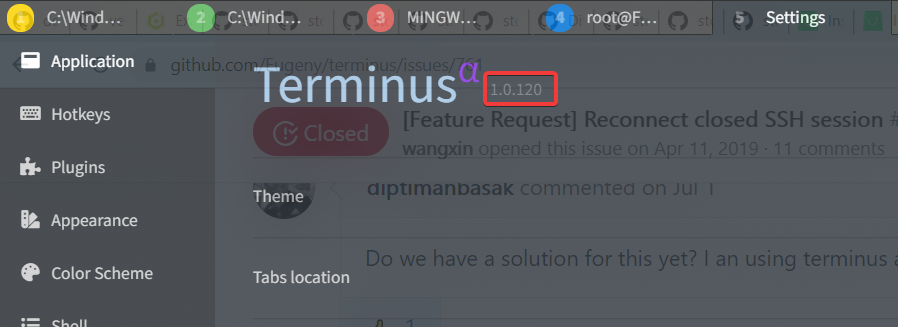
 mirismaili
on 5 Nov 2020
mirismaili
on 5 Nov 2020
@mirismaili
Try the right corner of established SSH session.
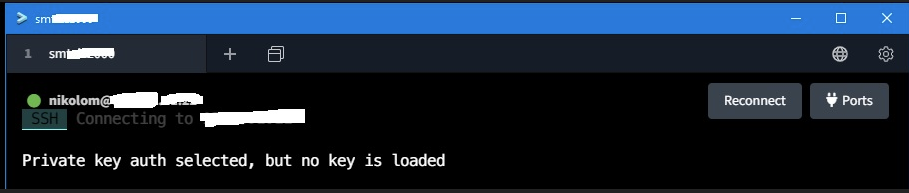
martinzca
on 10 Nov 2020
@martinzca
Oh! Thanks. I didn't hover on that "three dots" icon, at all!
mirismaili
on 10 Nov 2020
Related issues
 tabarra
·
16Comments
tabarra
·
16Comments
 tavisdxh
·
14Comments
tavisdxh
·
14Comments
 smithomaster
·
19Comments
smithomaster
·
19Comments
 marcinbojko
·
51Comments
marcinbojko
·
12Comments
marcinbojko
·
51Comments
marcinbojko
·
12Comments