Hi, thanks for the project it's really nice and feel super fast.
Whatever theme I use (_tomorrow_, _base16_) I got a padding all around my content. You can see it top and left of my prompt ❯:
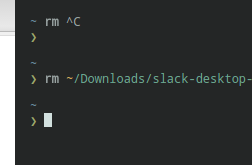
Is there a way to remove it?
Question
 edouard-lopez
All 3 comments
It's coming from the app theme. But you can override the padding with the following CSS:
terminaltab > div { margin: 0 !important; }
Just paste that under Custom CSS in the settings.
 Eugeny
on 1 Sep 2017
Eugeny
on 1 Sep 2017
👍2
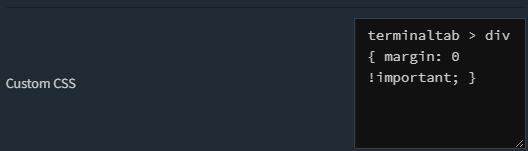
It's coming from the app theme. But you can override the padding with the following CSS:
terminaltab > div { margin: 0 !important; }Just paste that under
Custom CSSin the settings.
By doing like this? It looks like doesn't work.
 Chr1s-T
on 3 Jul 2019
Chr1s-T
on 3 Jul 2019
Hello,
In case it's still useful, I've removed these margins as follows in the last version:
tab-body div.content {
    margin: 0 !important;
}
 Nyxtorm
on 19 Aug 2020
Nyxtorm
on 19 Aug 2020
Was this page helpful?
0 / 5 - 0 ratings
Related issues
 rsolomonjr
·
3Comments
rsolomonjr
·
3Comments
 Flueworks
·
4Comments
Flueworks
·
4Comments
 mjklemm
·
3Comments
mjklemm
·
3Comments
 JeroMiya
·
4Comments
JeroMiya
·
4Comments
 danfloyd111
·
4Comments
danfloyd111
·
4Comments
Most helpful comment
It's coming from the app theme. But you can override the padding with the following CSS:
Just paste that under
Custom CSSin the settings.