Terminal: Powerline glyph's render incorrectly (sometimes)
Environment
Windows build number: [Microsoft Windows [Version 10.0.18362.175]
Windows Terminal version (if applicable): First Preview version;

Font's used
Fira Code - (Ligature)
FuraCode NF - (Ligature)
Hack
Hack NF
Steps to reproduce
~Happened after PC restart tested out other fonts to see if it would fix and restarted PC again.~
After more testing, this seems to be 2 bugs, the first is setting "alwaysShowTabs" to true will cause Glyphs to break setting it to false fixes the issue. this bug only seems to happen if set to true on system restarts. It is about a 25% chance of reproducing it this number may change for some.
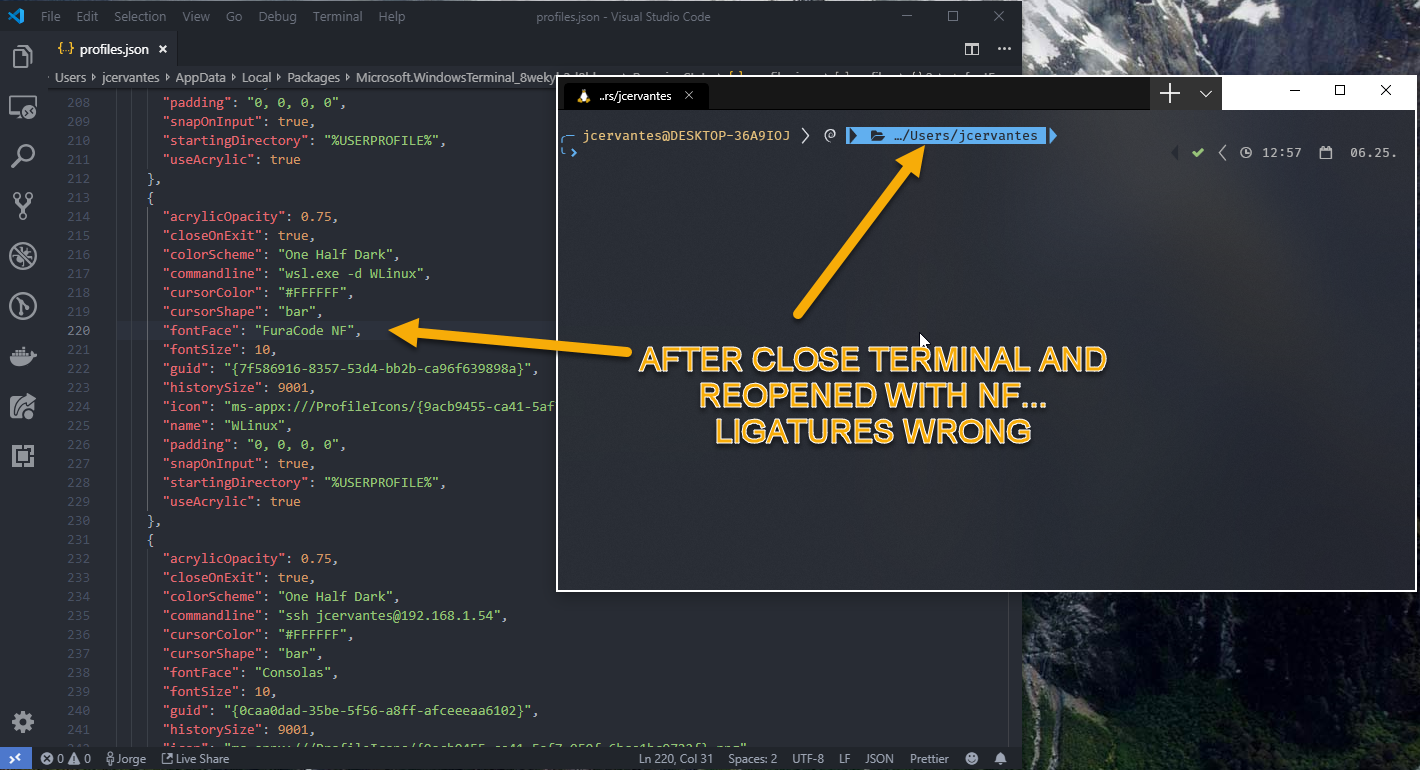
The Ligatures not rendering properly is only with the Nerd Font variant of the ligature fonts, standard versions work fine. This ended up being a separate issue from the one above after more testing.
Expected behavior
~ligatures and glyph's rendering correctly~
Glyphs should render the same regardless of if "alwaysShowTabs" is set to true or false.
Actual behavior
~Glyphs are not connecting and ligatures are not working the first character typed will also be hidden by the triangle glyph.~
Glyphs not rendering correctly and overlapping characters that come right after.

 A-Lamia
All 5 comments
The Ligatures not rendering properly is only with the Nerd Font variant of the ligature fonts,
I'm going to go out on a limb and say, "I'm going to go out on a limb and say it's the font."
 DHowett-MSFT
on 24 Jun 2019
DHowett-MSFT
on 24 Jun 2019
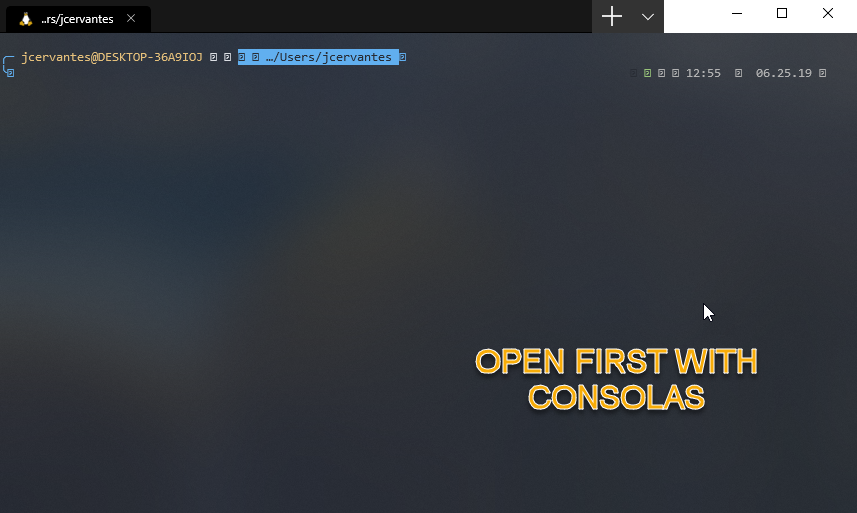
Is'nt the font, you can reproduce with this steps
- Open the terminal with Consolas font
- Switch the profile font with any on Nerdfont (I try with, meslo, hack and Hasklug)
(In this moment the terminal and fonts looks awesome) - Restart the terminal and see how loss the ligatures

 neo-clon
on 25 Jun 2019
neo-clon
on 25 Jun 2019
Yes this is a bug IMO. Every other terminal I try on windows works with these fonts, wsl and zsh. Hyperjs, cmdr, Terminus...etc.
 MikeBairdRocks
on 26 Jun 2019
MikeBairdRocks
on 26 Jun 2019
Oh yea those aren't ligatures. Those are _powerline_ characters.
It's curious to me that if you start with consolas, then switch to FuraCode NF it breaks. That's probably a bug.
 zadjii-msft
on 2 Jul 2019
zadjii-msft
on 2 Jul 2019
Wait no this is already #633
zadjii-msft
on 2 Jul 2019
Related issues
 wkbrd
·
3Comments
wkbrd
·
3Comments
 alabuzhev
·
3Comments
alabuzhev
·
3Comments
 mdtauk
·
3Comments
mdtauk
·
3Comments
 ghvanderweg
·
3Comments
ghvanderweg
·
3Comments
 mrmlnc
·
3Comments
mrmlnc
·
3Comments
Most helpful comment
Yes this is a bug IMO. Every other terminal I try on windows works with these fonts, wsl and zsh. Hyperjs, cmdr, Terminus...etc.