Tensorrt: [REFERENCE] KeyError: 'mrcnn_mask_bn4/batchnorm/mul_1' in running sampleUffMaskRCNN demo
while I try to run the maskrcnn demo following this page,
Ubuntu 16.04.6
CUDA 10.1.168
tensorrt 5.1.5.0
uff 0.6.3
Traceback (most recent call last):
  File "mrcnn_to_trt_single.py", line 165, in <module>
    main()
  File "mrcnn_to_trt_single.py", line 123, in main
    text=True, list_nodes=list_nodes)
  File "mrcnn_to_trt_single.py", line 158, in convert_model
    debug_mode = False
  File "/usr/lib/python3.5/dist-packages/uff/converters/tensorflow/conversion_helpers.py", line 233, in from_tensorflow_frozen_model
    return from_tensorflow(graphdef, output_nodes, preprocessor, **kwargs)
  File "/usr/lib/python3.5/dist-packages/uff/converters/tensorflow/conversion_helpers.py", line 108, in from_tensorflow
    pre.preprocess(dynamic_graph)
  File "./config.py", line 123, in preprocess
    connect(dynamic_graph, timedistributed_connect_pairs)
  File "./config.py", line 113, in connect
    if node_a_name not in dynamic_graph.node_map[node_b_name].input:
KeyError: 'mrcnn_mask_bn4/batchnorm/mul_1'
 seanyuner
All 36 comments
I converted successfully. But when runing:
./sample_uff_maskRCNN -d ~/TensorRT-6.0.1.5/data/faster-rcnn/
Got error:
08/19/2019-12:07:31] [I] Building and running a GPU inference engine for Mask RCNN
[08/19/2019-12:07:32] [E] [TRT] UffParser: Validator error: mrcnn_mask_deconv/add_1: Unsupported operation _AddV2
The uff I converted can be downloaded from here
 jinfagang
on 19 Sep 2019
jinfagang
on 19 Sep 2019
@jinfagang Many thanks for your converted files. I'll try again later.
seanyuner
on 19 Sep 2019
@jinfagang I have encountered the same problem as seanyuner with tensorRT 5.15. What platform have you done your model conversion?(x86+gpu or nvidia jetson? which version of your tensorflow?)
Thanks a lot!
 Jacob-Jacob-Go
on 19 Sep 2019
Jacob-Jacob-Go
on 19 Sep 2019
Just follow the tutorial, it can be exported. But can not actually run
jinfagang
on 19 Sep 2019
Maybe the keras version is not 2.1.3. I download the latest keras 2.3.x and have the same error as you. Now I change the keras version to 2.1.3, everything is ok
 dssdyx
on 7 Oct 2019
dssdyx
on 7 Oct 2019
@jinfagang I can not download the uff you converted, could you send it by email? My email is [email protected].
 guods
on 9 Oct 2019
guods
on 9 Oct 2019
I met the problem whenI converted the uff, do you know the reason?
Traceback (most recent call last):
File "/home/gds/ruanjian/pycharm-community-2018.3.3/helpers/pydev/pydevd.py", line 1741, in <module>
main()
File "/home/gds/ruanjian/pycharm-community-2018.3.3/helpers/pydev/pydevd.py", line 1735, in main
globals = debugger.run(setup['file'], None, None, is_module)
File "/home/gds/ruanjian/pycharm-community-2018.3.3/helpers/pydev/pydevd.py", line 1135, in run
pydev_imports.execfile(file, globals, locals) # execute the script
File "/home/gds/ruanjian/pycharm-community-2018.3.3/helpers/pydev/_pydev_imps/_pydev_execfile.py", line 18, in execfile
exec(compile(contents+"\n", file, 'exec'), glob, loc)
File "/home/gds/gds/Mask_RCNN-master/mrcnn_to_trt_single.py", line 163, in <module>
main()
File "/home/gds/gds/Mask_RCNN-master/mrcnn_to_trt_single.py", line 112, in main
model = modellib.MaskRCNN(mode="inference", model_dir=LOG_DIR, config=config).keras_model
File "/home/gds/gds/Mask_RCNN-master/mrcnn/model.py", line 1837, in __init__
self.keras_model = self.build(mode=mode, config=config)
File "/home/gds/gds/Mask_RCNN-master/mrcnn/model.py", line 1901, in build
stage5=True, train_bn=config.TRAIN_BN)
File "/home/gds/gds/Mask_RCNN-master/mrcnn/model.py", line 180, in resnet_graph
x = KL.Conv2D(64, (7, 7), strides=(2, 2), name='conv1', use_bias=True)(x)
File "/home/gds/.local/lib/python3.5/site-packages/keras/engine/topology.py", line 590, in __call__
self.build(input_shapes[0])
File "/home/gds/.local/lib/python3.5/site-packages/keras/layers/convolutional.py", line 129, in build
raise ValueError('The channel dimension of the inputs '
ValueError: The channel dimension of the inputs should be defined. Found `None`.
I think @dssdyx is correct here. The requirements.txt that comes with the sample specifically pins the Keras version to 2.1.3
Using a later version might be pulling in some TF2.0 ops or something that aren't yet supported.
However, I do notice that the requirements.txt file specifies tensorflow-gpu >= 1.9.0. At the time of releasing the samples, TF 2.0 wasn't released yet, so this was fine. But now, I think that will resolve to install tensorflow-gpu==2.0.0 unless specified otherwise.
So something like pip install tensorflow-gpu>=1.9.0,<=1.14 might resolve some of these issues. This probably applies to all samples that require a pip install tensorflow.
 rmccorm4
on 30 Oct 2019
rmccorm4
on 30 Oct 2019
@seanyuner @Jacob-Jacob-Go Both of you experienced the same issue with TensorRT 5.x - but this sample was updated with the 6.0 release (you can see that in the commit name and history). So the sample will likely not work unless you're using the expected version of (TensorRT 6.0)
rmccorm4
on 31 Oct 2019
Thank you for sharing @rmccorm4. I am sure the version of my software is appropriate, but when I run the MaskRCNN demo fallow here, a similar error still occurs.
Software version:
Ubuntu16.04
Anaconda3.7
TensorRT6.0+Cuda10.0+cuDNN7.63
Tensorflow-gpu1.15.0
Keras2.1.3
The command I used:
python mrcnn_to_trt_single.py -w /XXX/TensorRT-6
.0.1.5/data/mask_rcnn/mask_rcnn_coco.h5 -o /XXX/TensorRT-6.0.1.5/data/mask_rcnn/mrcnn_nchw.uff -p ./config.py
And the program error:
Traceback (most recent call last):
File "mrcnn_to_trt_single.py", line 182, in
main()
File "mrcnn_to_trt_single.py", line 131, in main
model = modellib.MaskRCNN(mode="inference", model_dir=LOG_DIR, config=config).keras_model
File "/XXX/TensorRT-6.0.1.5/samples/sampleUffMaskRCNN/converted/mrcnn/model.py", line 1837, in __init__
self.keras_model = self.build(mode=mode, config=config)
File "/XXX/TensorRT-6.0.1.5/samples/sampleUffMaskRCNN/converted/mrcnn/model.py", line 1901, in build
stage5=True, train_bn=config.TRAIN_BN)
File "/XXX/TensorRT-6.0.1.5/samples/sampleUffMaskRCNN/converted/mrcnn/model.py", line 180, in resnet_graph
x = KL.Conv2D(64, (7, 7), strides=(2, 2), name='conv1', use_bias=True)(x)
File "/home/martin/anaconda3/lib/python3.7/site-packages/keras/engine/topology.py", line 590, in __call__
self.build(input_shapes[0])
File "/home/martin/anaconda3/lib/python3.7/site-packages/keras/layers/convolutional.py", line 129, in build
raise ValueError('The channel dimension of the inputs'
ValueError: The channel dimension of the inputs should be defined. Found None.
How do you think I can improve? @rmccorm4
 doomb007
on 7 Nov 2019
doomb007
on 7 Nov 2019
Hi @doomb007,
I should be able to look into this tomorrow.
rmccorm4
on 7 Nov 2019
Ok, thank you in advance @rmccorm4.
doomb007
on 7 Nov 2019
Hi @doomb007, @guods
I was able to reproduce your error with the following:
pip install -r $TRT_SOURCE/samples/opensource/sampleUffMaskRCNN/converted/requirements.txt
pip install tensorflow-gpu == 1.14
dpkg -i /opt/tensorrt/python/graphsurgeon-tf_6.0.1-1+cuda10.1_amd64.deb
dpkg -i /opt/tensorrt/python/uff-converter-tf_6.0.1-1+cuda10.1_amd64.deb
git clone https://github.com/matterport/Mask_RCNN.git
export PYTHONPATH=$PYTHONPATH:$PWD/Mask_RCNN
cd Mask_RCNN/
wget https://github.com/matterport/Mask_RCNN/releases/download/v2.0/mask_rcnn_coco.h5
cd $TRT_SOURCE/samples/opensource/sampleUffMaskRCNN/converted/
python mrcnn_to_trt_single.py -w $TRT_SOURCE/Mask_RCNN/mask_rcnn_coco.h5 -o mrcnn_nchw.uff -p config.py
Same error:
Traceback (most recent call last):
File "mrcnn_to_trt_single.py", line 164, in <module>
main()
File "mrcnn_to_trt_single.py", line 113, in main
model = modellib.MaskRCNN(mode="inference", model_dir=LOG_DIR, config=config).keras_model
File "/mnt/TensorRT/Mask_RCNN/mrcnn/model.py", line 1837, in __init__
self.keras_model = self.build(mode=mode, config=config)
File "/mnt/TensorRT/Mask_RCNN/mrcnn/model.py", line 1901, in build
stage5=True, train_bn=config.TRAIN_BN)
File "/mnt/TensorRT/Mask_RCNN/mrcnn/model.py", line 180, in resnet_graph
x = KL.Conv2D(64, (7, 7), strides=(2, 2), name='conv1', use_bias=True)(x)
File "/usr/local/lib/python3.6/dist-packages/keras/engine/topology.py", line 590, in __call__
self.build(input_shapes[0])
File "/usr/local/lib/python3.6/dist-packages/keras/layers/convolutional.py", line 129, in build
raise ValueError('The channel dimension of the inputs '
ValueError: The channel dimension of the inputs should be defined. Found `None`.
However, this happens when you don't apply the patch to MRCNN as mentioned in the instructions:
git clone https://github.com/matterport/Mask_RCNN.git
export PYTHONPATH=$PYTHONPATH:$PWD/Mask_RCNN
# Make sure you do this
cd Mask_RCNN
git checkout 3deaec5
git am $TRT_SOURCE/samples/opensource/sampleUffMaskRCNN/converted/0001-Update-the-Mask_RCNN-model-from-NHWC-to-NCHW.patch
In case the above fails and gives you an error from git about your config like so:
root@e50cb87c5094:/mnt/TensorRT/Mask_RCNN# git checkout 3deaec5
Note: checking out '3deaec5'.
You are in 'detached HEAD' state. You can look around, make experimental
changes and commit them, and you can discard any commits you make in this
state without impacting any branches by performing another checkout.
If you want to create a new branch to retain commits you create, you may
do so (now or later) by using -b with the checkout command again. Example:
git checkout -b <new-branch-name>
HEAD is now at 3deaec5 import logging for line 382
root@e50cb87c5094:/mnt/TensorRT/Mask_RCNN# git am $TRT_SOURCE/samples/opensource/sampleUffMaskRCNN/converted/0001-Update-the-Mask_RCNN-model-from-NHWC-to-NCHW.patch
*** Please tell me who you are.
Run
git config --global user.email "[email protected]"
git config --global user.name "Your Name"
to set your account's default identity.
Omit --global to set the identity only in this repository.
You can set your actual config or some dummy config, it doesn't matter:
git config --global user.email "foo"
git config --global user.name "bar"
git checkout 3deaec5
git am $TRT_SOURCE/samples/opensource/sampleUffMaskRCNN/converted/0001-Update-the-Mask_RCNN-model-from-NHWC-to-NCHW.patch
# Applying: Update the Mask_RCNN model from NHWC to NCHW
However, now I'm hitting the same error as mentioned here: https://github.com/NVIDIA/TensorRT/issues/132#issuecomment-549188744
I think it's because I have CUDA 10.1 on my host and there is still some incompatibility with TensorFlow at the moment. Looking into it now.
rmccorm4
on 7 Nov 2019
Okay @doomb007 I was able to run the sample.
Possible solutions when using CUDA 10.1:
Solution 1
Use nvcr.io/nvidia/tensorflow:19.10-py3 - this has TensorFlow 1.14 built for CUDA 10.1, unlike the current pip packages that aren't working as mentioned in #132.
nvidia-docker run -it -v ${PWD}:/mnt --workdir=/mnt nvcr.io/nvidia/tensorflow:19.10-py3
Then inside the container:
# Download OSS Components
git clone -b master https://github.com/nvidia/TensorRT TensorRT
cd TensorRT
git submodule update --init --recursive
export TRT_SOURCE=`pwd`

# Install required libraries
apt-get update && apt-get install -y --no-install-recommends libcurl4-openssl-dev wget zlib1g-dev git pkg-config

# Install CMake >= 3.13
pushd /tmp
wget https://github.com/Kitware/CMake/releases/download/v3.14.4/cmake-3.14.4-Linux-x86_64.sh
chmod +x cmake-3.14.4-Linux-x86_64.sh
./cmake-3.14.4-Linux-x86_64.sh --prefix=/usr/local --exclude-subdir --skip-license
rm ./cmake-3.14.4-Linux-x86_64.sh
popd

# Necessary in the Tensorflow container due to some PATH/cmake issues
export CMAKE_ROOT=/usr/share/cmake-3.14
source ~/.bashrc

# Check that installation worked
cmake --version

# Set relevant env variables relative to NGC container paths
export TRT_RELEASE=/usr/src/tensorrt
export TRT_LIB_DIR=$TRT_RELEASE/lib
export TRT_SOURCE=/mnt/TensorRT
export LD_LIBRARY_PATH=$LD_LIBRARY_PATH:$TRT_LIB_DIR

# Generate Makefiles and build
cd $TRT_SOURCE
mkdir -p build && cd build
cmake .. -DTRT_LIB_DIR=$TRT_RELEASE/lib -DTRT_BIN_DIR=`pwd`/out
make -j$(nproc)

# Installs OSS Components and Builds All Samples
make install
sampleUffMaskRCNN specific
# This container comes with tensorflow-gpu==1.14.0+nv built for CUDA 10.1, note the version has "+nv" at the end of it
# This currently won't work with Google's `pip install tensorflow-gpu==1.14` + CUDA 10.1
pip install -r $TRT_SOURCE/samples/opensource/sampleUffMaskRCNN/converted/requirements.txt

# Verify location of uff package to edit
find / -name uff
# Edit the conv_transpose function as mentioned in README
vim /usr/lib/python3.6/dist-packages/uff/converters/tensorflow/converter_functions.py

# Set config if not already set so we don't get an error from "git am ..." below
git config --global user.name "foo"
git config --global user.email "bar"

# Clone Mask_RCNN repo, and add it to python path for imports
cd $TRT_SOURCE
git clone https://github.com/matterport/Mask_RCNN.git
export PYTHONPATH=$PYTHONPATH:$PWD/Mask_RCNN

# Checkout specific Mask_RCNN version, and apply patch
cd Mask_RCNN
git checkout 3deaec5
git am $TRT_SOURCE/samples/opensource/sampleUffMaskRCNN/converted/0001-Update-the-Mask_RCNN-model-from-NHWC-to-NCHW.patch

# Setup data dir
DATA_DIR=$TRT_SOURCE/samples/opensource/sampleUffMaskRCNN/data
mkdir -p $DATA_DIR
wget -P $DATA_DIR https://github.com/matterport/Mask_RCNN/releases/download/v2.0/mask_rcnn_coco.h5

# In TensorRT container, you can copy the data from $TRT_RELEASE/data/faster-rcnn instead
# In TensorFlow container, you'll need to mount data from the host like so.
# See workaround expandable section below for how to get data on host
cp /mnt/001763.ppm $DATA_DIR/
cp /mnt/004545.ppm $DATA_DIR/

# Convert the downloaded model to UFF
cd $TRT_SOURCE/samples/opensource/sampleUffMaskRCNN/converted/
python mrcnn_to_trt_single.py -w $DATA_DIR/mask_rcnn_coco.h5 -o $DATA_DIR/mrcnn_nchw.uff -p config.py

# Run the sample
# NOTE: All samples were already built above when doing cmake + make install
cd $TRT_RELEASE/bin
./sample_uff_maskRCNN -d $DATA_DIR
Click to expand Copying the *.ppm data to host
# Launch TensorRT container to copy data over to host
nvidia-docker run -it -v ${PWD}:/mnt --workdir=/mnt nvcr.io/nvidia/tensorrt:19.10-py3
cp /usr/src/tensorrt/data/faster-rcnn/001763.ppm /mnt
cp /usr/src/tensorrt/data/faster-rcnn/004545.ppm /mnt
# Exit container, data should now be in your current directory that was mounted
exit

# Launch TensorFlow container mounting the same directory
nvidia-docker run -it -v ${PWD}:/mnt --workdir=/mnt nvcr.io/nvidia/tensorflow:19.10-py3

# Data should now be in /mnt in TensorFlow container
Click to expand successful UFF Parsing output
UFF Version 0.6.5
=== Automatically deduced input nodes ===
[name: "input_image"
op: "Placeholder"
attr {
  key: "dtype"
  value {
    type: DT_FLOAT
  }
}
attr {
  key: "shape"
  value {
    shape {
      dim {
        size: -1
      }
      dim {
        size: 3
      }
      dim {
        size: 1024
      }
      dim {
        size: 1024
      }
    }
  }
}
]
=========================================

Using output node mrcnn_detection
Using output node mrcnn_mask/Sigmoid
Converting to UFF graph
Warning: No conversion function registered for layer: PyramidROIAlign_TRT yet.
Converting roi_align_mask_trt as custom op: PyramidROIAlign_TRT
Warning: No conversion function registered for layer: ResizeNearest_TRT yet.
Converting fpn_p5upsampled as custom op: ResizeNearest_TRT
Warning: No conversion function registered for layer: ResizeNearest_TRT yet.
Converting fpn_p4upsampled as custom op: ResizeNearest_TRT
Warning: No conversion function registered for layer: ResizeNearest_TRT yet.
Converting fpn_p3upsampled as custom op: ResizeNearest_TRT
Warning: No conversion function registered for layer: SpecialSlice_TRT yet.
Converting mrcnn_detection_bboxes as custom op: SpecialSlice_TRT
Warning: No conversion function registered for layer: DetectionLayer_TRT yet.
Converting mrcnn_detection as custom op: DetectionLayer_TRT
Warning: No conversion function registered for layer: ProposalLayer_TRT yet.
Converting ROI as custom op: ProposalLayer_TRT
Warning: keepdims is ignored by the UFF Parser and defaults to True
Warning: keepdims is ignored by the UFF Parser and defaults to True
Warning: keepdims is ignored by the UFF Parser and defaults to True
Warning: keepdims is ignored by the UFF Parser and defaults to True
Warning: keepdims is ignored by the UFF Parser and defaults to True
Warning: keepdims is ignored by the UFF Parser and defaults to True
Warning: keepdims is ignored by the UFF Parser and defaults to True
Warning: keepdims is ignored by the UFF Parser and defaults to True
Warning: keepdims is ignored by the UFF Parser and defaults to True
Warning: keepdims is ignored by the UFF Parser and defaults to True
Warning: No conversion function registered for layer: PyramidROIAlign_TRT yet.
Converting roi_align_classifier as custom op: PyramidROIAlign_TRT
DEBUG [/usr/lib/python3.6/dist-packages/uff/converters/tensorflow/converter.py:96] Marking ['mrcnn_detection', 'mrcnn_mask/Sigmoid'] as outputs
No. nodes: 3044
UFF Output written to mrcnn_nchw.uff
UFF Text Output written to mrcnn_nchw.pbtxt
Click to expand successful sample run output
Running the sample
root@eb12143e7d72:/mnt/TensorRT/samples/opensource/sampleUffMaskRCNN/converted# sample_uff_maskRCNN -d $DATA_DIR
&&&& RUNNING TensorRT.sample_maskrcnn # sample_uff_maskRCNN -d /mnt/TensorRT/samples/opensource/sampleUffMaskRCNN/data/
[10/08/2019-18:59:48] [I] Building and running a GPU inference engine for Mask RCNN
[10/08/2019-18:59:58] [I] [TRT] Some tactics do not have sufficient workspace memory to run. Increasing workspace size may increase performance, please check verbose output.
[10/08/2019-19:02:35] [I] [TRT] Detected 1 inputs and 2 output network tensors.
[10/08/2019-19:02:40] [I] Run for 10 times with Batch Size 1
[10/08/2019-19:02:40] [I] Average inference time is 441.708 ms/frame
[10/08/2019-19:02:40] [I] Detected dog in/mnt/TensorRT/samples/opensource/sampleUffMaskRCNN/data/001763.ppm with confidence 99.9171 and coordinates (259.165, 13.8516, 488.325, 370.222)
[10/08/2019-19:02:40] [I] Detected dog in/mnt/TensorRT/samples/opensource/sampleUffMaskRCNN/data/001763.ppm with confidence 99.8545 and coordinates (27.6855, 45.785, 317.039, 365.296)
[10/08/2019-19:02:40] [I] The results are stored in current directory: 0.ppm
&&&& PASSED TensorRT.sample_maskrcnn # sample_uff_maskRCNN -d /mnt/TensorRT/samples/opensource/sampleUffMaskRCNN/data/
Solution 2
Build tensorflow from source for CUDA 10.1: https://github.com/tensorflow/tensorflow/issues/26150#issuecomment-506807444
(I didn't test this)
Solution 3
If using CUDA 10.1, I think downgrading to CUDA 10.0 first and then using the pip package: pip install tensorflow-gpu==1.14 should work, until Google releases pip package binaries for CUDA 10.1
See note in README: https://github.com/NVIDIA/TensorRT/tree/master/samples/opensource/sampleUffMaskRCNN#known-issues
(I didn't test this)
rmccorm4
on 7 Nov 2019
@rmccorm4 Got it! I am trying to solve the program error with the method you provided.
doomb007
on 8 Nov 2019
@rmccorm4 yes, It works, The format of the MaskRCNN model was converted to uff.
A tip: After installing the TensorRT resource following the tutorial, don't arbitrarily move the internal folders and files out of the main folder, it may also cause the error as this:
Traceback (most recent call last):
File "mrcnn_to_trt_single.py", line 182, in <module>
main()
File "mrcnn_to_trt_single.py", line 131, in main
model = modellib.MaskRCNN(mode="inference", model_dir=LOG_DIR, config=config).keras_model
File "/home/martin/Downloads/TensorRT-6.0.1.5/samples/sampleUffMaskRCNN/converted/mrcnn/model.py", line 1837, in __init__
self.keras_model = self.build(mode=mode, config=config)
File "/home/martin/Downloads/TensorRT-6.0.1.5/samples/sampleUffMaskRCNN/converted/mrcnn/model.py", line 1901, in build
stage5=True, train_bn=config.TRAIN_BN)
File "/home/martin/Downloads/TensorRT-6.0.1.5/samples/sampleUffMaskRCNN/converted/mrcnn/model.py", line 180, in resnet_graph
x = KL.Conv2D(64, (7, 7), strides=(2, 2), name='conv1', use_bias=True)(x)
File "/home/martin/anaconda3/lib/python3.7/site-packages/keras/engine/topology.py", line 590, in __call__
self.build(input_shapes[0])
File "/home/martin/anaconda3/lib/python3.7/site-packages/keras/layers/convolutional.py", line 129, in build
raise ValueError('The channel dimension of the inputs'
ValueError: The channel dimension of the inputsshould be defined. Found `None`.
So you were able to run the sample now @doomb007 ?
rmccorm4
on 8 Nov 2019
@rmccorm4 Not yet, I have another problem.......
As this sample tutorial says:
- Compile this sample by running make in the TensorRT root directory TensorRT root directory _TensorRT root directory_/samples/sample_uff_maskRCNN directory. The binary named sample_uff_maskRCNN will be created in the _TensorRT root directory_/bin directory.
cd _TensorRT root directory_/samples/sample_uff_maskRCNN
make
Where _TensorRT root directory_ is where you installed TensorRT. - Run the sample to perform object detection and object mask prediction.
./sample_uff_maskRCNN -d path/to/data - Verify that the sample ran successfully.
When I tried the command 'make' in the directory of sampleUffMaskRCNN, the terminal display:
make: * No targets specified and no makefile found. Stop.
And when I tried the command 'cmake' to get the makefile, the terminal display:
-- The C compiler identification is GNU 5.4.0
-- The CXX compiler identification is GNU 5.4.0
-- Check for working C compiler: /usr/bin/cc
-- Check for working C compiler: /usr/bin/cc -- works
-- Detecting C compiler ABI info
-- Detecting C compiler ABI info - done
-- Detecting C compile features
-- Detecting C compile features - done
-- Check for working CXX compiler: /usr/bin/c++
-- Check for working CXX compiler: /usr/bin/c++ -- works
-- Detecting CXX compiler ABI info
-- Detecting CXX compiler ABI info - done
-- Detecting CXX compile features
-- Detecting CXX compile features - done
CMake Error at /home/martin/Downloads/TensorRT/samples/CMakeSamplesTemplate.txt:22 (set_ifndef):
Unknown CMake command "set_ifndef".
Call Stack (most recent call first):
CMakeLists.txt:25 (include)
-- Configuring incomplete, errors occurred!
See also "/home/martin/Downloads/TensorRT/samples/opensource/sampleUffMaskRCNN/build/CMakeFiles/CMakeOutput.log".
What the command "set_ifndef"?
doomb007
on 8 Nov 2019
Hi @doomb007,
All of the samples are built and placed into $TRT_RELEASE/bin from the start when you do:
# Generate Makefiles and build
cd $TRT_SOURCE
mkdir -p build && cd build
cmake .. -DTRT_LIB_DIR=$TRT_RELEASE/lib -DTRT_BIN_DIR=`pwd`/out
make -j$(nproc)
# Installs OSS Components and Builds All Samples
make install
I'll see if I can fix the README on that sample, because that part that you referenced seems misleading.
I've updated my comment above (https://github.com/NVIDIA/TensorRT/issues/123#issuecomment-551269792) to do the entire pipeline:
- Clone repo
- Build OSS components
- Convert model to UFF successfully
- Run sample successfully
Note, that we're using that Tensorflow container only because of the CUDA 10.1 restriction. Using CUDA 10.0 shouldn't be as cumbersome. And once there is a pip package for Tensorflow 1.14 compatible with CUDA 10.1, it should also be easier.
But since we're using the Tensorflow container above, it doesn't come with $TRT_RELEASE/data/faster-rcnn that's mentioned in the sample. So I also added an expandable section on how to grab that data from the TensorRT container and copy it over.
Click to expand Copying the *.ppm data to host
# Launch TensorRT container to copy data over to host
nvidia-docker run -it -v ${PWD}:/mnt --workdir=/mnt nvcr.io/nvidia/tensorrt:19.10-py3
cp /usr/src/tensorrt/data/faster-rcnn/001763.ppm /mnt
cp /usr/src/tensorrt/data/faster-rcnn/004545.ppm /mnt
# Exit container, data should now be in your current directory that was mounted
exit

# Launch TensorFlow container mounting the same directory
nvidia-docker run -it -v ${PWD}:/mnt --workdir=/mnt nvcr.io/nvidia/tensorflow:19.10-py3

# Data should now be in /mnt in TensorFlow container
@rmccorm4 Sorry for my late reply, just finished my weekend, I'm testing the MaskRCNN sample now, will tell you if there is any progress.
doomb007
on 11 Nov 2019
@doomb007 Can u share some speed test ? Such inference video fps?
jinfagang
on 11 Nov 2019
@doomb007 Can u share some speed test ? Such inference video fps?
Hi@jinfagang, I have not successfully run the program yet, will let you know if I complete the test of MaskRCNN sample.
doomb007
on 11 Nov 2019
Hi @rmccorm4,
After follow the Tutorial, I found the file 'sample_of_maskRCNN' in the directory: XXX/TensorRT/build/out, and then I copy the file to the directory: XXX/TensorRT-6.0.1.5/bin. when I try the command like this(no docker run, with cuda10.0):
sudo ./sample_uff_maskRCNN -d /home/martin/Downloads/TensorRT-6.0.1.5/data/mask_rcnn
The terminal display:
./sample_uff_maskRCNN: error while loading shared libraries: libnvparsers.so.6: cannot open shared object file: No such file or directory
I notice that the file libnvparsers.so.6 is in the directory of ' XXX/TensorRT-6.0.1.5/lib ', and this directory has been exported to LD_LIBRARY_PATH, but it just doesn't work.
What do you think is the cause?
doomb007
on 11 Nov 2019
I think the top level README mentions doing this if it still fails to link:
ln -s $TRT_BIN_DIR/libnvinfer_plugin.so $TRT_BIN_DIR/libnvinfer_plugin.so.6
Let me know if something like that works for you.
rmccorm4
on 11 Nov 2019
I think the top level README mentions doing this if it still fails to link:
ln -s $TRT_BIN_DIR/libnvinfer_plugin.so $TRT_BIN_DIR/libnvinfer_plugin.so.6Let me know if something like that works for you.
OK, will let you know @rmccorm4
I have tried the command:
ln -s $TRT_BIN_DIR/libnvinfer_plugin.so $TRT_BIN_DIR/libnvinfer_plugin.so.6
but it doesn't work. it looks like the library needed is 'libnvparsers.so.6', not 'libnvinfer_plugin.so.6'
I am trying other ways.
doomb007
on 11 Nov 2019
@rmccorm4 I can successfully run the sampleUffMaskRCNN example according to your instruction. But the speed seems too slow:
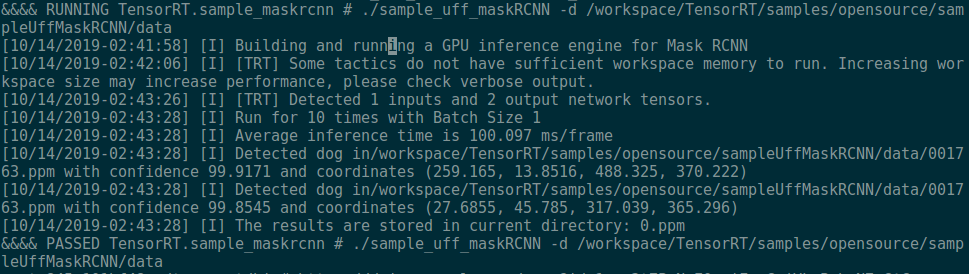
It's basically 100 ms/frame or so, I am using a device of GTX 1080 Ti. Just wondering how fast can you guys run the sample code?
What's the peak performance of trt engine to inference maskrcnn?
 ShawnNew
on 14 Nov 2019
ShawnNew
on 14 Nov 2019
Hi @ShawnNew,
I don't really have any performance numbers gathered for various GPUs. Hopefully this info can be crowdsourced from other users here that were able to successfully run the sample.
Seems like from this thread, several users with 1080ti achieved ~5 FPS on original model. So it looks you're seeing ~10 FPS (100ms/frame) with TensorRT on this sample (2x speedup).
You could also try adding --fp16 flag to the sample to see if you can get better performance than that.
rmccorm4
on 14 Nov 2019
Thanks @rmccorm4,
Basically we can derive around 10 FPS on pytorch framework when we do inference, I thought TRT model should have the ability to boost this process.
When I use --fp16, the result is 96 (ms/frame) or so, I think there must be some operation block the speed.
I am just curious about the performance of this TRT engine, appreciate if anyone can report of achieving a better result.
ShawnNew
on 15 Nov 2019
@ShawnNew I noticed the warning about workspace size impacting performance in your screenshot. You could try to increase the workspace size to see if that helps performance: https://github.com/NVIDIA/TensorRT/blob/77af534c21b7e1bfa322ccbab028477be4c56eb3/samples/opensource/sampleUffMaskRCNN/sampleUffMaskRCNN.cpp#L401
rmccorm4
on 15 Nov 2019
@rmccorm4 I changed bulder->setMaxWorkspaceSize(11_GiB) which is the maximum of GTX1080Ti, but I still get the same performance.
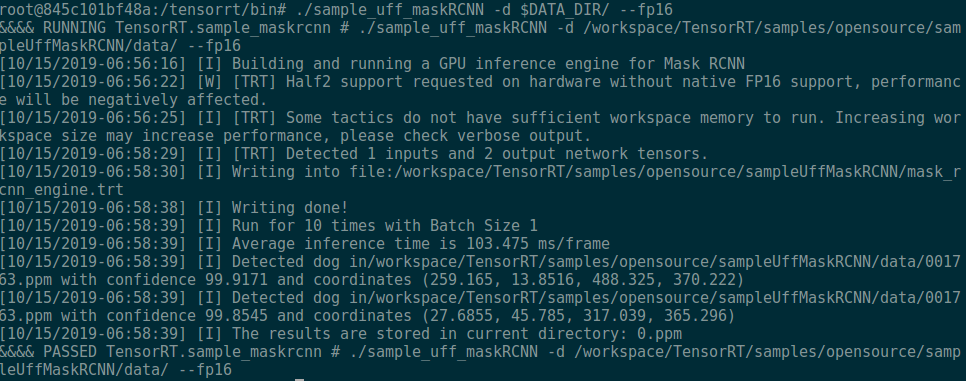
What is your environment setting and performance record?
ShawnNew
on 15 Nov 2019
Sorry, I don't really have performance numbers. I ran through it once on my workstation's P4 and looks like it only got 2-3 FPS here (expand the output section): https://github.com/NVIDIA/TensorRT/issues/123#issuecomment-551269792
rmccorm4
on 15 Nov 2019
Hi all
how to run the sample on jetson nano device?
any advice
Thanks
 MoAbd
on 25 Nov 2019
MoAbd
on 25 Nov 2019
Closing as I believe the original issue is solved: https://github.com/NVIDIA/TensorRT/issues/123#issuecomment-551269792
rmccorm4
on 26 Jan 2020
@rmccorm4 Not yet, I have another problem.......
As this sample tutorial says:
- Compile this sample by running make in the TensorRT root directory TensorRT root directory _TensorRT root directory_/samples/sample_uff_maskRCNN directory. The binary named sample_uff_maskRCNN will be created in the _TensorRT root directory_/bin directory.
cd _TensorRT root directory_/samples/sample_uff_maskRCNN
make
Where _TensorRT root directory_ is where you installed TensorRT.- Run the sample to perform object detection and object mask prediction.
./sample_uff_maskRCNN -d path/to/data- Verify that the sample ran successfully.
When I tried the command 'make' in the directory of sampleUffMaskRCNN, the terminal display:
make: * No targets specified and no makefile found. Stop.And when I tried the command 'cmake' to get the makefile, the terminal display:
-- The C compiler identification is GNU 5.4.0
-- The CXX compiler identification is GNU 5.4.0
-- Check for working C compiler: /usr/bin/cc
-- Check for working C compiler: /usr/bin/cc -- works
-- Detecting C compiler ABI info
-- Detecting C compiler ABI info - done
-- Detecting C compile features
-- Detecting C compile features - done
-- Check for working CXX compiler: /usr/bin/c++
-- Check for working CXX compiler: /usr/bin/c++ -- works
-- Detecting CXX compiler ABI info
-- Detecting CXX compiler ABI info - done
-- Detecting CXX compile features
-- Detecting CXX compile features - done
CMake Error at /home/martin/Downloads/TensorRT/samples/CMakeSamplesTemplate.txt:22 (set_ifndef):
  Unknown CMake command "set_ifndef".
Call Stack (most recent call first):
  CMakeLists.txt:25 (include)
-- Configuring incomplete, errors occurred!
See also "/home/martin/Downloads/TensorRT/samples/opensource/sampleUffMaskRCNN/build/CMakeFiles/CMakeOutput.log".
What the command "set_ifndef"?
CMake Error at /home/zjkj/Downloads/wu/TensorRT/samples/CMakeSamplesTemplate.txt:22 (set_ifndef):
  Unknown CMake command "set_ifndef".
Call Stack (most recent call `first):`
  CMakeLists.txt:22 (include)


CMake Warning (dev) in CMakeLists.txt:
  No cmake_minimum_required command is present.  A line of code such as

    cmake_minimum_required(VERSION 3.10)

  should be added at the top of the file.  The version specified may be lower
  if you wish to support older CMake versions for this project.  For more
  information run "cmake --help-policy CMP0000".
This warning is for project developers.  Use -Wno-dev to suppress it.

-- Configuring incomplete, errors occurred!
Hi,I got the same problem when I ran cmake command
 hiteyoshi
on 1 Feb 2020
hiteyoshi
on 1 Feb 2020
@rmccorm4 Not yet, I have another problem.......
As this sample tutorial says:
- Compile this sample by running make in the TensorRT root directory TensorRT root directory _TensorRT root directory_/samples/sample_uff_maskRCNN directory. The binary named sample_uff_maskRCNN will be created in the _TensorRT root directory_/bin directory.
cd _TensorRT root directory_/samples/sample_uff_maskRCNN
make
Where _TensorRT root directory_ is where you installed TensorRT.- Run the sample to perform object detection and object mask prediction.
./sample_uff_maskRCNN -d path/to/data- Verify that the sample ran successfully.
When I tried the command 'make' in the directory of sampleUffMaskRCNN, the terminal display:
make: * No targets specified and no makefile found. Stop.
And when I tried the command 'cmake' to get the makefile, the terminal display:-- The C compiler identification is GNU 5.4.0 -- The CXX compiler identification is GNU 5.4.0 -- Check for working C compiler: /usr/bin/cc -- Check for working C compiler: /usr/bin/cc -- works -- Detecting C compiler ABI info -- Detecting C compiler ABI info - done -- Detecting C compile features -- Detecting C compile features - done -- Check for working CXX compiler: /usr/bin/c++ -- Check for working CXX compiler: /usr/bin/c++ -- works -- Detecting CXX compiler ABI info -- Detecting CXX compiler ABI info - done -- Detecting CXX compile features -- Detecting CXX compile features - done CMake Error at /home/martin/Downloads/TensorRT/samples/CMakeSamplesTemplate.txt:22 (set_ifndef): Unknown CMake command "set_ifndef". Call Stack (most recent call first): CMakeLists.txt:25 (include) -- Configuring incomplete, errors occurred! See also "/home/martin/Downloads/TensorRT/samples/opensource/sampleUffMaskRCNN/build/CMakeFiles/CMakeOutput.log".What the command "set_ifndef"?
CMake Error at /home/zjkj/Downloads/wu/TensorRT/samples/CMakeSamplesTemplate.txt:22 (set_ifndef):
  Unknown CMake command "set_ifndef".
Call Stack (most recent call `first):`
  CMakeLists.txt:22 (include)


CMake Warning (dev) in CMakeLists.txt:
  No cmake_minimum_required command is present.  A line of code such as

    cmake_minimum_required(VERSION 3.10)

  should be added at the top of the file.  The version specified may be lower
  if you wish to support older CMake versions for this project.  For more
  information run "cmake --help-policy CMP0000".
This warning is for project developers.  Use -Wno-dev to suppress it.

-- Configuring incomplete, errors occurred!
Hi,I got the same problem when I ran cmake command
Same here. Have you guys found out how to solve this?
 czs1886
on 9 Mar 2020
czs1886
on 9 Mar 2020
Hello all,
I successfully converted my model to UFF.
When I run the sample, I have this error:
&&&& RUNNING TensorRT.sample_maskrcnn # ./sample_maskRCNN -d /mnt/DTAA_data/DTAA/code/z662728/optimization/data/
[05/04/2020-09:24:19] [I] Building and running a GPU inference engine for Mask RCNN
[05/04/2020-09:24:21] [E] [TRT] UffParser: Validator error: mrcnn_detection_bboxes: Unsupported operation _SpecialSlice_TRT
&&&& FAILED TensorRT.sample_maskrcnn # ./sample_maskRCNN -d /mnt/DTAA_data/DTAA/code/z662728/optimization/data/
How did you solve it? @rmccorm4 @ShawnNew I would be very grateful if you could please help me :)
Config:
TF-gpu 1.14.0
CUDA 10.0
TensorRT: 6.0.1.5
Keras 2.1.3
Thanks!
 ApoorvaSuresh
on 4 Jun 2020
ApoorvaSuresh
on 4 Jun 2020
Related issues
 float123
·
6Comments
float123
·
6Comments
 peijason
·
3Comments
peijason
·
3Comments
 Xianqi-Zhang
·
5Comments
Xianqi-Zhang
·
5Comments
 ycchanau
·
3Comments
ycchanau
·
3Comments
 sbbug
·
5Comments
sbbug
·
5Comments
Most helpful comment
Okay @doomb007 I was able to run the sample.
Possible solutions when using CUDA 10.1:
Solution 1
Use
nvcr.io/nvidia/tensorflow:19.10-py3- this has TensorFlow 1.14 built for CUDA 10.1, unlike the currentpippackages that aren't working as mentioned in #132.Then inside the container:
sampleUffMaskRCNN specific
Click to expand Copying the *.ppm data to host
Click to expand successful UFF Parsing output
Click to expand successful sample run output
Running the sample
Solution 2
Build tensorflow from source for CUDA 10.1: https://github.com/tensorflow/tensorflow/issues/26150#issuecomment-506807444
(I didn't test this)
Solution 3
If using CUDA 10.1, I think downgrading to CUDA 10.0 first and then using the pip package:
pip install tensorflow-gpu==1.14should work, until Google releases pip package binaries for CUDA 10.1See note in README: https://github.com/NVIDIA/TensorRT/tree/master/samples/opensource/sampleUffMaskRCNN#known-issues
(I didn't test this)