Tensorflowtts: FS2 + MBMelgan Speech sounds much worse when exported to TFLite in Android
Hi,
I have trained a FS2 model and fine-tuned my MBMelgan model. Here is a sample of the speech produced in Python before exporting to TFLite: Normal FS2 and MBMelgan.
Once converted to TFLite and used in Android (based on TensorFlowTTS/examples/android/) the models sound much worse...
Using my FS2 model + repo's pretrained
multiband_melgan.v1_24k, both exported as TFLite. SpeechUsing my FS2 model + my MB MelGAN, both exported as TFLite. Speech
In 1 and 2 the speech sounds lower quality, _the voice is less life-like_ and sounds less like my speaker. It's also much lower pitch, even though
f0_ratio1.0 is passed into both models.When using my vocoder in (2) you can hear low-frequency crackling you do not hear before converting to TFLite.
Is it normal to expect the model to sound worse once exported to TFLite?
Why do you think my vocoder adds crackling noise but the repo's pre-trained one does not?
Thanks.
 OscarVanL
All 30 comments
Hi @OscarVanL you should use tf.float32 for tflite, the đefault code will use 8bit then the performance worse
 dathudeptrai
on 21 Nov 2020
dathudeptrai
on 21 Nov 2020
converter.optimizations = [tf.lite.Optimize.DEFAULT]
converter.target_spec.supported_types = [tf.float32]
dathudeptrai
on 21 Nov 2020
Thanks, I did not have that set so I will try re-converting the models and trying again :D
OscarVanL
on 21 Nov 2020
Should keep everything
dathudeptrai
on 21 Nov 2020
This made an improvement and it sounds more like my speaker, but now there is a new type of audio issue.
https://drive.google.com/file/d/1INdXMROfKLnoxq_MzyzjN4JSkLQyJtqa/view?usp=sharing
OscarVanL
on 21 Nov 2020
This made an improvement and it sounds more like my speaker, but now there is a new type of audio issue.
https://drive.google.com/file/d/1INdXMROfKLnoxq_MzyzjN4JSkLQyJtqa/view?usp=sharing
Is the output match 100% with python code ? And what is an issue now :3
dathudeptrai
on 21 Nov 2020
Is the output match 100% with python code ? And what is an issue now :3
No it doesn't match, the quality is degraded still, it sounds like it is speaking through a pillow, it is muffled and there is a little rattle/crackle in words.
I converted the repo's pretrained multiband_melgan.v1_24k vocoder again, and the muffled voice and rattle/crackle is not present. It must be a problem with my MB-Melgan model, but I don't understand why because it sounds fine in Python before TFLite conversion.
OscarVanL
on 21 Nov 2020
Is the output match 100% with python code ? And what is an issue now :3
No it doesn't match, the quality is degraded still, it sounds like it is speaking through a pillow, it is muffled and there is a little rattle/crackle in words.
I converted the repo's pretrained
multiband_melgan.v1_24kvocoder again, and the muffled voice and rattle/crackle is not present. It must be a problem with my MB-Melgan model, but I don't understand why because it sounds fine in Python before TFLite conversion.
If you use float32 the output of tflite should match with the python code, i am not at home now to figure out what is the problem but you can debug by ur self :)). Let check mb melgan tflite and python first, then check encoder/decoder of fastspeech if they generate a same output when the input is the same 😀
dathudeptrai
on 21 Nov 2020
Yes, thank you for the help :) Sounds good. I am going to bed now so will have a look tomorrow.
OscarVanL
on 21 Nov 2020
I was mistaken, the muffled / rattle sound happens with the pretrained multiband_melgan.v1_24k when converted to float32 too, not just my model.
OscarVanL
on 21 Nov 2020
Is TF>= 2.4.1 still necessary for TFLite conversion? I have been using TF 2.3.1, maybe this could be related to the problem.
OscarVanL
on 21 Nov 2020
Is TF>= 2.4.1 still necessary for TFLite conversion? I have been using TF 2.3.1, maybe this could be related to the problem.
let try tf-nightly. I will debug tmr. Not sure what is the reason, but the ouput of python and tflite should match 100% in float32.
dathudeptrai
on 21 Nov 2020
I converted the model with !pip install tf-nightly (2.5.0-dev20201125), and it fixes the muffled/rattle sound, but the quality is still not as good as on desktop.
If you use float32 the output of tflite should match with the python code. Let check mb melgan tflite and python first, then check encoder/decoder of fastspeech if they generate a same output when the input is the same 😀
I did an experiment as you described. I pass the same FS2 Mel into both versions of the same vocoder.
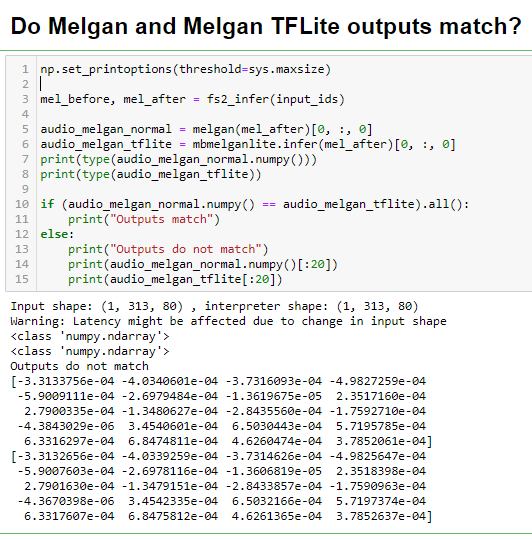
There are some differences between the normal model and TFLite model, I suppose this difference should not exist?
Unfortunately, I can't work out how to do FS2 TFLite inference. When I try, my Jupyter kernel dies...
The function that causes the crash is fs2tflite_infer, maybe you could have a look at what I've done wrong?
(It is based on the FS1 TFLite inference, I don't see any examples for FS2 😞)
# Load the TFLite model and allocate tensors.
interpreter = tf.lite.Interpreter(model_path=fs2_tflite_name)

# Get input and output tensors.
input_details = interpreter.get_input_details()
output_details = interpreter.get_output_details()

# Prepare input data.
def prepare_input(input_ids):
    input_ids = tf.expand_dims(tf.convert_to_tensor(input_ids, dtype=tf.int32), 0)
    return (input_ids,
          tf.convert_to_tensor([0], tf.int32),
          tf.convert_to_tensor([1.0], dtype=tf.float32),
          tf.convert_to_tensor([1.0], dtype=tf.float32),
          tf.convert_to_tensor([1.0], dtype=tf.float32))

# Test the model on random input data.
def fs2tflite_infer(input_ids):
    for x in input_details:
        print(x)
    for x in output_details:
        print(x)
    interpreter.resize_tensor_input(input_details[0]['index'],
                                  [1, len(input_ids)])
    interpreter.resize_tensor_input(input_details[1]['index'],
                                  [1])
    interpreter.resize_tensor_input(input_details[2]['index'],
                                  [1])
    interpreter.resize_tensor_input(input_details[3]['index'],
                                  [1])
    interpreter.resize_tensor_input(input_details[4]['index'],
                                  [1])
    interpreter.allocate_tensors()
    input_data = prepare_input(input_ids)
    for i, detail in enumerate(input_details):
        input_shape = detail['shape']
        interpreter.set_tensor(detail['index'], input_data[i])

    interpreter.invoke()

  # The function `get_tensor()` returns a copy of the tensor data.
  # Use `tensor()` in order to get a pointer to the tensor.
    return (interpreter.get_tensor(output_details[0]['index']),
          interpreter.get_tensor(output_details[1]['index']))
@OscarVanL Hi
There are some differences between the normal model and TFLite model, I suppose this difference should not exist?
That's ok :)) the differences are very small. It can't affect the result.
It is based on the FS1 TFLite inference, I don't see any examples for FS2
Here (https://colab.research.google.com/drive/1HudLLpT9CQdh2k04c06bHUwLubhGTWxA?usp=sharing) :D. You can see the link at What's new Section. :D
2020/07/05 Support Convert Tacotron-2, FastSpeech to Tflite. Pls see the colab. Thank @jaeyoo from the TFlite team for his support
Thank you, I can't believe I forgot about this Collab 😵 I will check this tomorrow. Thanks 👍
OscarVanL
on 26 Nov 2020
Hi @OscarVanL, this is what I also observed in German model I trained. Basically, I obtained good results after removing optimizations with:
converter.optimizations = []
Default optimizations do not disturb the performance of Tacotron 2 seriously, but the performance of Multi-band MelGAN quickly degrades with optimizations. So I applied them to the former but not to the latter.
 monatis
on 7 Dec 2020
monatis
on 7 Dec 2020
@monatis Wow, thank you for this reply! I will try this soon!
OscarVanL
on 7 Dec 2020
Unfortunately, that didn't fix the issue, but thanks for the suggestion.
OscarVanL
on 7 Dec 2020
In Windows, my model sounds the same for TFLite and normal models, so I am confident these model is good now.
I think I have found one potential cause of the degradation in quality, it is on the Android side.
In the Android example, you can see that outputMap is passed to runForMultipleInputsOutputs():
https://github.com/TensorSpeech/TensorFlowTTS/blob/d3b1bc5a52f095dac9855d789d27b8cfc0ee4856/examples/android/app/src/main/java/com/tensorspeech/tensorflowtts/module/FastSpeech2.java#L67-L69
This outputMap determines which tensor index to get as output:
https://github.com/TensorSpeech/TensorFlowTTS/blob/d3b1bc5a52f095dac9855d789d27b8cfc0ee4856/examples/android/app/src/main/java/com/tensorspeech/tensorflowtts/module/FastSpeech2.java#L61
This reminded me of this from the TFLite Python examples:

The first returned value is mel_before and the second is mel_after. My understanding is that mel_after has better quality because it has had some extra processing steps.
In the Android example, it gets mel_before, not mel_after.
However... Changing 0 to 1 in outputMap still did not improve my audio quality to the same level as in Windows...
I thought this might have been the cause, but I'm not sure it is.
Do you have any idea why the TFLite inference quality would be worse on Android compared to Windows? @mapledxf
OscarVanL
on 8 Dec 2020
@OscarVanL Android's TfLite should has same result as Windows' TfLite model.
Here are some suggestions that you should try to find out where the problem is:
- Check the TfLite version in Android project's gradle file.
- The text converter's logic might be different between Windows and Android. In order to test the FS2 model, you should use the exactly the same inputs (the converted ids, not the original text) to check if the Windows and Android outputs from FS2 model are the same.
- To test the vocoder, you should save the output of Windows' FS2 model as a npy file, and load it back to Android. Then run the vocoder model with the data generated by Windows FS2 model.
 mapledxf
on 8 Dec 2020
mapledxf
on 8 Dec 2020
Hi, thanks for the reply.
- My build gradle has these TFLite imports:
    implementation 'org.tensorflow:tensorflow-lite:0.0.0-nightly'
    implementation 'org.tensorflow:tensorflow-lite-select-tf-ops:0.0.0-nightly'
    implementation 'org.tensorflow:tensorflow-lite-support:0.0.0-nightly'
I have gone gradle build --refresh-dependencies to ensure they're the latest nightly builds and not using an old cached build.
This is what I have been doing :) I generate the phoneme IDs on a desktop PC using the same
g2p-enlibrary and have used the same phoneme IDs on Android as in Windows.I will try this suggestion, thank you.
OscarVanL
on 8 Dec 2020
@OscarVanL does the android fs2 has the same output as the windows fs2 with same phoneme ids input?
there is a java lib that can load npy file. i will post the link here later. I will also write some sample code about how to convert the float[] to tensorbuffer.
you can use float[] instead of buyebuffer but it cost more memory.
mapledxf
on 9 Dec 2020
@OscarVanL You can use this to load npy file on Android.
https://github.com/dreamolight/JavaNpy
mapledxf
on 9 Dec 2020
And you can create a TensorBuffer like this:
    float[] npyData = null; //data loaded from npy file
    int[] inputShape = new int[]{1234, 5678};   //the data shape
    TensorBuffer tensorBuffer = TensorBuffer.createFixedSize(inputShape, DataType.FLOAT32);
    tensorBuffer.loadArray(npyData);
Thank you for the link and code sample!
I passed the same phoneme IDs into FS2 TFLite on Android and on Windows...
[10, 48, 46, 27, 58, 71, 67, 70, 30, 45, 5, 48, 10, 59, 39, 56, 74, 39, 60, 58, 10, 48, 46, 20, 45, 46, 41, 25, 8, 60, 71, 67, 71, 67, 72, 25, 10, 70, 30, 24, 22, 51, 60, 58, 70, 32, 48, 38, 48, 27, 69, 57, 41, 24, 33, 45, 6, 48, 69, 29, 58, 33, 59, 10, 48, 74, 58, 51, 39, 60, 58, 12, 48, 24, 29, 58, 60, 8, 48, 24, 10, 22, 46, 41, 10, 60, 57, 39, 45, 41, 70, 11, 48, 74, 75]
The shapes are the same, in Python a np.ndarray of shape (1, 525, 80). In Android a TensorBufferFloat with shape (1, 525, 80).
In Python mel_after[0][0] gives:
[-1.5059787 -1.7320795 -1.9079964 -1.8676406 -1.8736442 -1.9466034
 -1.9908158 -1.9366952 -1.9205105 -1.9246047 -1.8518398 -1.7648181
 -1.7376462 -1.7114125 -1.6920923 -1.679082  -1.6686003 -1.6380396
 -1.5950183 -1.5745487 -1.5916386 -1.6052428 -1.5401446 -1.5224077
 -1.5815228 -1.6259059 -1.6105357 -1.5805362 -1.5854305 -1.6103137
 -1.5739157 -1.5689071 -1.5245659 -1.449347  -1.4158634 -1.4374285
 -1.4389478 -1.376891  -1.404099  -1.4732645 -1.5156264 -1.5607682
 -1.6380042 -1.6807852 -1.6964935 -1.737543  -1.753344  -1.7582725
 -1.7680699 -1.673243  -1.6363925 -1.5629841 -1.5935234 -1.7063985
 -1.7933303 -1.845872  -1.8102326 -1.7541003 -1.7198529 -1.7016747
 -1.721418  -1.7550254 -1.7593185 -1.7223005 -1.6816446 -1.6692342
 -1.6514735 -1.6182883 -1.5730317 -1.565013  -1.5225544 -1.473021
 -1.4668757 -1.4731013 -1.468734  -1.4902879 -1.5259354 -1.48712
 -1.3690064 -1.3613288]
In Android the first 80 values are:
[-1.5406566, -1.7635659, -1.9335406, -1.9046866, -1.9128604, -1.9940763,
-2.0509481, -1.9947923, -1.9888217, -1.9972297, -1.9131414, -1.827804,
-1.809323, -1.7751042, -1.740706, -1.7270424, -1.7138882, -1.6719505,
-1.6292266, -1.6068707, -1.6171829, -1.6316558, -1.5762691, -1.5577911,
-1.6130322, -1.6632794, -1.6623122, -1.6377256, -1.635051, -1.6553742,
-1.6225927, -1.6194375, -1.5778279, -1.5026191, -1.4700427, -1.4969835,
-1.5018724, -1.4393021, -1.4652624, -1.5243146, -1.5634011, -1.61023,
-1.6841962, -1.732171, -1.7471226, -1.7837256, -1.7995887, -1.7931243,
-1.8090982, -1.7141669, -1.6745806, -1.6105051, -1.6480676, -1.7638202,
-1.8488395, -1.8911444, -1.8515401, -1.7912201, -1.7525909, -1.7278352,
-1.7485312, -1.787319, -1.793692, -1.7596052, -1.7210315, -1.7046155,
-1.682918, -1.6510527, -1.5998232, -1.583777, -1.538456, -1.4880353,
-1.4741269, -1.4724184, -1.4669679, -1.4873681, -1.5225383, -1.4839075,
-1.3693116, -1.3680356]
As you can see there are some differences.
Just to reiterate, the voice in Android is intelligible, but it is lower in quality. It sounds less like the target voice, and is much deeper. The voice sounds flatter.
I will try the vocoder next using the approach you linked :)
OscarVanL
on 9 Dec 2020
@OscarVanL
You should also check the sample rate.
https://github.com/TensorSpeech/TensorFlowTTS/blob/e7a6a3de2a5e1670078a37d88a4211d10ff9fe67/examples/android/app/src/main/java/com/tensorspeech/tensorflowtts/tts/TtsPlayer.java#L23
https://github.com/TensorSpeech/TensorFlowTTS/blob/e7a6a3de2a5e1670078a37d88a4211d10ff9fe67/examples/android/app/src/main/java/com/tensorspeech/tensorflowtts/tts/TtsPlayer.java#L36
should match your training sample rate.
mapledxf
on 9 Dec 2020
And you can create a TensorBuffer like this:
    float[] npyData = null; //data loaded from npy file
    int[] inputShape = new int[]{1234, 5678};   //the data shape
    TensorBuffer tensorBuffer = TensorBuffer.createFixedSize(inputShape, DataType.FLOAT32);
    tensorBuffer.loadArray(npyData);
OK, I got this to work. I made my Android app play the .npy Spectrogram generated in Python, followed by the spectrogram generated in the Android. The audio sounded exactly the same.
@OscarVanL
You should also check the sample rate.
https://github.com/TensorSpeech/TensorFlowTTS/blob/e7a6a3de2a5e1670078a37d88a4211d10ff9fe67/examples/android/app/src/main/java/com/tensorspeech/tensorflowtts/tts/TtsPlayer.java#L23should match your training sample rate.
OMG I just changed this to 24000 and it sounds perfect now. I can't believe I missed this... 🤦♂️
Thank you for the help!!!
OscarVanL
on 9 Dec 2020
Sometimes it's so easy to narrow your vision on something you miss the obvious...
Thanks for your excellent Android example model, it works really well.
OscarVanL
on 9 Dec 2020
OMG I just changed this to 24000 and it sounds perfect now. I can't believe I missed this... man_facepalming
@OscarVanL it took a long time to debug :)))
dathudeptrai
on 9 Dec 2020
Hah I was not debugging it this whole time, I was working on other things, but yes it did 😵
OscarVanL
on 9 Dec 2020
Related issues
OscarVanL
·
4Comments
 jun-danieloh
·
6Comments
jun-danieloh
·
6Comments
 linhld0811
·
3Comments
linhld0811
·
3Comments
 sujeendran
·
8Comments
sujeendran
·
8Comments
 seicaratteri
·
8Comments
seicaratteri
·
8Comments
Most helpful comment
Hi @OscarVanL, this is what I also observed in German model I trained. Basically, I obtained good results after removing optimizations with:
Default optimizations do not disturb the performance of
Tacotron 2seriously, but the performance ofMulti-band MelGANquickly degrades with optimizations. So I applied them to the former but not to the latter.