Tensorboard: [Feature Request] Night Mode Toggle Option
It would be super helpful for people working at night like me.
Thanks,
 datlife
All 4 comments
As a crude approximation of this, you can just invert the colors in the page by running document.documentElement.style = "filter: invert(100%)" in the JS console.
Doing this in a more sophisticated way seems tricky, because the various visualizations do different things in terms of color, background, etc. For example, would you expect that a night mode would change how images on the Image dashboard get displayed (e.g. by tinting them orange) or would you expect it to preserve the original pixel values? It could also be a bit tricky to define color palettes for the runs that show up well against a dark background (I'm not sure if the current ones would all work).
 nfelt
on 11 Jul 2018
nfelt
on 11 Jul 2018
Hi @nfelt,
Thank you for asking.
- Inspired from recent night mode updates of Youtube / Reddit, I think it is okay to keep the images as-is.
- I am currently using "Dark Mode" Extension on Google Chrome to switch to night mode. However, for Tensorboard, the scalar tab is blacked out whenever I enable the extension.
- Yeah, true that the color palettes might be messed up. I do not have experience in web development so I am not sure how to comment on this.
Thanks.
Dat
datlife
on 11 Jul 2018
Hmm, if you get a chance could you post a screenshot of what Tensorboard looks like with the extension? Even if it doesn't look quite right.
nfelt
on 11 Jul 2018
Sure!
Here is the example of before and after I toggle the Dark Mode extension
Before

After
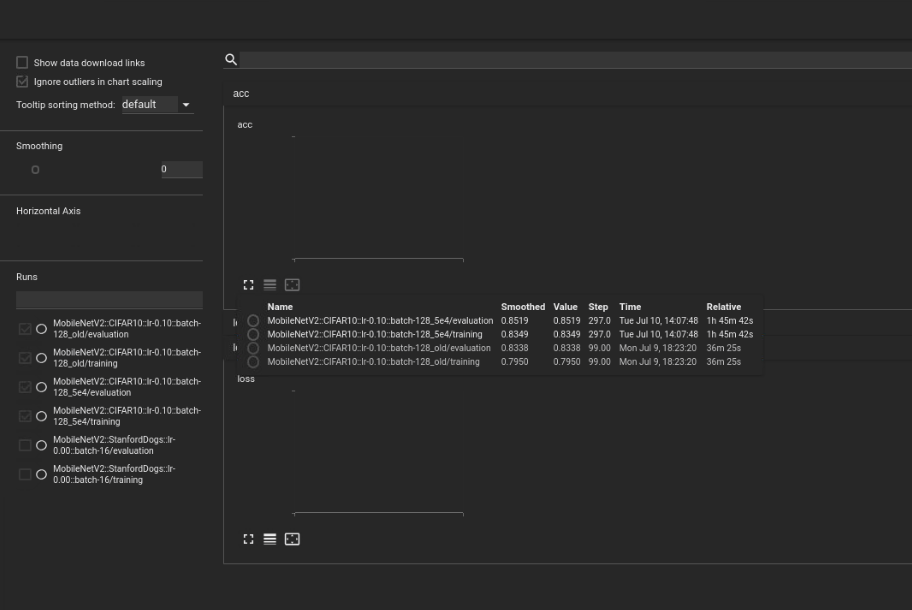
This is the extension I am currently using (might be properly not related) :
https://chrome.google.com/webstore/detail/dark-mode/dmghijelimhndkbmpgbldicpogfkceaj
datlife
on 11 Jul 2018
Related issues
 wchargin
·
3Comments
wchargin
·
3Comments
 wengqi123
·
3Comments
wchargin
·
4Comments
wengqi123
·
3Comments
wchargin
·
4Comments
 yegortokmakov
·
3Comments
yegortokmakov
·
3Comments
 vipulroxx
·
3Comments
vipulroxx
·
3Comments
Most helpful comment
As a crude approximation of this, you can just invert the colors in the page by running
document.documentElement.style = "filter: invert(100%)"in the JS console.Doing this in a more sophisticated way seems tricky, because the various visualizations do different things in terms of color, background, etc. For example, would you expect that a night mode would change how images on the Image dashboard get displayed (e.g. by tinting them orange) or would you expect it to preserve the original pixel values? It could also be a bit tricky to define color palettes for the runs that show up well against a dark background (I'm not sure if the current ones would all work).