Tempus-dominus: Datetimepicker coming behind div with position fixed
I have a static header and when i scroll to end, datetimepicker opens to the top but behind the header. Is there any way we can set the z-index of the datetimepicker widget?
Thanks.

 nosheen-javed
All 14 comments
I have a similar problem in a complex page. Trying the classic datepicker of jquery instead the problem is not there.
All the parent divs have relative position but the widget seems close into the first parent.
Following the discussion and thanks in advance
 agentili
on 3 Nov 2016
agentili
on 3 Nov 2016
I actually want the time picker as well. So i do not see any better time picker. Do you know any better time picker i can use instead of this?
Thanks
nosheen-javed
on 7 Nov 2016
"top": "auto", "bottom": "auto", "left": "auto", "right": "auto", "position": "fixed"
 leekay0032
on 16 Jan 2018
leekay0032
on 16 Jan 2018
I had the same issue. I solved it by creating a custom css file and gave datepicker a new z-index.
.datepicker.dropdown-menu {
    z-index: 9999 !important;
}
 lyndonjohn
on 12 Jul 2018
lyndonjohn
on 12 Jul 2018
Hi,
I'm also facing the same issue. Can someone help me with the same.
 deeksha92
on 10 Aug 2018
deeksha92
on 10 Aug 2018
I had the same issue. I solved it by creating a custom css file and gave datepicker a new z-index.
.datepicker.dropdown-menu {
    z-index: 9999 !important;
}
Great workaround.
 uldisv
on 3 Feb 2019
uldisv
on 3 Feb 2019
same with datetime picker
.bootstrap-datetimepicker-widget.dropdown-menu {
    z-index: 9999 !important;
}
 sfandrew
on 19 Apr 2019
sfandrew
on 19 Apr 2019
.bootstrap-datetimepicker-widget.dropdown-menu {
z-index: 9999 !important;
}
is not working in accordion. See:
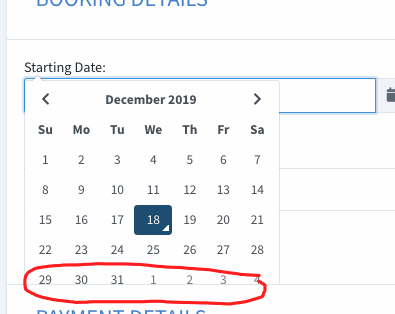
i used datetimepicker
 rochiey
on 18 Dec 2019
rochiey
on 18 Dec 2019
I had to use javascript to add and remove style overflow="visible" when I clicked to expand and contract the accordion menu I was using.
document.getElementById("name-of-div").style.overflow = "visible";
 cwills
on 25 Jan 2020
cwills
on 25 Jan 2020
.bootstrap-datetimepicker-widget.dropdown-menu {
z-index: 9999 !important;
}is not working in accordion. See:
i used datetimepicker
Am also facing a similar issue! Did you happen to find a resolution to this accordion issue? Can you please help?
 kprajaguru
on 29 Apr 2020
kprajaguru
on 29 Apr 2020
Same issue here. Version 4.17. 47
 chupetoide
on 24 Jun 2020
chupetoide
on 24 Jun 2020
worked for me
.bootstrap-datetimepicker {
        z-index: 9999 !important;
    }
 CHOUKI-Mouhssine
on 15 Sep 2020
CHOUKI-Mouhssine
on 15 Sep 2020
.bootstrap-datetimepicker-widget.dropdown-menu {
z-index: 9999 !important;
}is not working in accordion. See:
i used datetimepickerAm also facing a similar issue! Did you happen to find a resolution to this accordion issue? Can you please help?
No, I scrapped my project and make a hiding div with jquery hide and show than using accordion.
rochiey
on 18 Sep 2020
Hello. Thanks for using my project. We’re closing all tickets/prs for v4 as it is no longer supported. We’re making way for a new version. Please read this blog post
 eonasdan-bot
on 12 Nov 2020
eonasdan-bot
on 12 Nov 2020
Related issues
 dungphanxuan
·
3Comments
dungphanxuan
·
3Comments
 y2kim
·
5Comments
y2kim
·
5Comments
 brunoDegaspare
·
3Comments
brunoDegaspare
·
3Comments
 justqyx
·
3Comments
justqyx
·
3Comments
 illudens
·
4Comments
illudens
·
4Comments
Most helpful comment
I had the same issue. I solved it by creating a custom css file and gave datepicker a new z-index.