Templating: Build a UI in Visual Studio for Dotnet New Templates
VS is where all the users are at for consuming templates. I'm having huge problems getting my current VSIX template working with VS 2017. Every VS upgrade breaks something which is hugely frustrating. I'd like to be in the template authoring business, not the VSIX authoring business.
Visual Studio Template VSIX
It would be great if there was an easier way to build a project template VSIX (or some other mechanism) around my template NuGet package with a feature selection UI built around template.json. That way template authors could easily release their templates to their biggest market. Whatever the mechanism for getting my template into VS, I'd like it to appear in the Visual Studio Gallery.
Icons, Logos & Banner Images
It would be great to include icons for the template and any symbols in the template. I propose extending the template.json file to add these. I've shown the values as URL's but they could equally be file paths relative to the .template.config folder:
{
  "name": "ASP.NET Core 1.1.1 MVC 6 Boilerplate API",
  ...
  "logo": "http://example.com/logo.png",
  "banner": "http://example.com/banner.png",
  "symbols": {
    "Swagger": {
      ...
      "icon": "http://example.com/swagger/icon.png"
    },
    "PrimaryWebServer": {
      ...
      "icon": "http://example.com/primarywebserver/icon.png"
      "choices": [
        {
          "choice": "Kestrel",
          "icon": "http://example.com/primarywebserver/kestrel/icon.png"
        },
        {
          "choice": "WebListener",
          "icon": "http://example.com/primarywebserver/weblistener/icon.png"
        }
      ]
    }
  }
}
Cross Platform Feature Selection UI
Another idea is to make the feature selection UI cross-platform so a potential extension could also be created for Visual Studio Code. A simple ASP.NET Core UI could be fired up as that's already cross platform. Once features have been selected and you hit ok, you shutdown the ASP.NET Core site and work the templating engine magic.
 RehanSaeed
All 66 comments
Hi @RehanSaeed thanks for the issue. This is something that we are very much interested in. We've already started working on it actually.
For the cli we are planning to implement --install, --uninstall, and --update for the cli in dotnet new.
For Visual Studio we are planning to create a new entry in the New Project Dialog which will launch a WPF dialog that allows you to:
- View installed templates, and create a project from one
- Install/Uninstall templates
- Update templates
This WPF dialog would also handle prompting for the parameters that the template makes available.
With this model when you ship your template for dotnet new, it will be available also to Visual Studio. You wouldn't need to worry about any Visual Studio specific work (_unless you wanted to customize that experience_).
If you're specifically looking to create a new entry in the New Project Dialog, I think the best thing to do there is to create a new VSIX containing your .vstemplate which has a custom wizard to invoke the Template Engine. The code for our WPF dialog will be open source so you should be able to create such a wizard for your own specific scenarios. I can help you with this as well when the time is right.
With respect to the cross platform UI idea. I think its an interesting idea but, if we implemented that I think we will have one UI used across various different scenarios. This isn't the desired result. In Visual Studio when creating a project I want to go through the familiar UIs that I'm used to. It would be strange for VS to launch a UI that looked different. Also the same can be said about VS4Mac and other IDEs/Editors that are integrated with the Template Engine. The specific UI/UX needs to be implemented in a first class way for that specific scenario. So having a shared UI is not that useful.
 sayedihashimi
on 26 Mar 2017
sayedihashimi
on 26 Mar 2017
That sounds great. It would be great if the installed templates showed up as items in the VS New Project dialogue instead of having to click through to a separate templates screen. To do that, I suppose, you would need to add some kind of category property to template.json.
Regarding cross-platform, agreed it might look strange but I think VS Code should also have a UI that makes sense for creating projects.
RehanSaeed
on 27 Mar 2017
It would be great if the installed templates showed up as items in the VS New Project dialogue instead of having to click through to a separate templates screen.
This would require changes to the core New Project Dialog in Visual Studio. I'm going to have some discussions with that team soon, but that's not something that's likely to happen any time soon. It is one of my long term goals though.
but I think VS Code should also have a UI that makes sense for creating projects.
No disagreement. On the VS Code side I think it would be quicker if we (the community) create an extension.
sayedihashimi
on 27 Mar 2017
No disagreement. On the VS Code side I think it would be quicker if we (the community) create an extension.
I'd like to help with that.
 PallasMedia
on 27 Mar 2017
PallasMedia
on 27 Mar 2017
I'm also interested in this feature. What is the status for this? VS 15.3 is released on August 14 and there is no mention of this feature (neither in the following four patches)
We built custom dotnet new template for our client, and they are complaining because they have to use CLI instead of VS.
Any progress on this or some change in milestone, since it's now in backlog?
 neman
on 18 Sep 2017
neman
on 18 Sep 2017
I posted an announcement a few weeks back, see https://github.com/dotnet/templating/issues/1209.
sayedihashimi
on 18 Sep 2017
@sayedihashimi Isn't it possible that VS makes this UI himself? I mean they have the metadata for the parameters and knows what templates are installed. Rider goes a similar way.
That other way seems way too complicated and time expensive.
 panmau
on 24 May 2018
panmau
on 24 May 2018
@maracuja-juice I've moved to a different team, so I can't really speak to this any longer. Hopefully someone else here can.
sayedihashimi
on 24 May 2018
Any update with adding a dotnet new template UI option in Visual Studio 2019? While Visual Studio 2019 preview 1 demos the updated startup and template creation process, it does not seem to offer anything in the way of additional dotnet new template support yet.
 Plac3hold3r
on 29 Dec 2018
Plac3hold3r
on 29 Dec 2018
We are really missing some guidance on how to create, install and use templates that work both in Visual Studio as well with the new dotnet cli or if that is not possible how to port one to the other.
What is the current state of the consolidation or interoperability of the two templating systems?
 bitbonk
on 2 Jan 2019
bitbonk
on 2 Jan 2019
I considered working on a solution to this myself at one point but ultimately decided against it since the readme would suggest this will be officially supported at some point in the future. With some guidance I'd be willing to commit some time to assist with the official development of this feature.
 Frogman7
on 17 Jan 2019
Frogman7
on 17 Jan 2019
@seancpeters is there an update on this issue? This is something I'm also very interested in. It would make documenting .NET Core with Visual Studio and the CLI so much easier.
But I really think you guys should sync with the Visual Studio team and get this built into Visual Studio directly. It should just consume .NET Core templates directly without any other special dialog steps.
 Thraka
on 14 Jun 2019
Thraka
on 14 Jun 2019
@Thraka - We've been discussing some plans to make the use of templates more uniform between VS & the Cli, but nothing definite at this point.
 seancpeters
on 14 Jun 2019
seancpeters
on 14 Jun 2019
@seancpeters This issue has been going for a couple years now, and .NET Core 3.0 is shipping in a months time, and I can imagine with WPF and WinForms coming in, this really starts to be needed, as VS would be the main way to build those projects, rather than the CLI.
I'm trying to figure out how to ship my .NET Core WPF templates in a VSIX so they both work in VS and .NET Core CLI, but lack guidance on this.
 dotMorten
on 28 Aug 2019
dotMorten
on 28 Aug 2019
The VS tooling team just finished a redesign of the new project dialogue, lets hope they can now work on a UI for dotnet new.
I've started to think that it would be great to make a dotnet new ui command as a kind of global tool, not requiring Visual Studio at all. If you've seen the Vue CLI which does this, it's a pretty amazing experience?
RehanSaeed
on 28 Aug 2019
@DamianEdwards talks a little about their plans with templating on this ASP.NET Core community standup (somewhere around minute 50). The bad news is that it will probably still take quite a long time (far beyond .NET Core 3.1 timeframe would be my guess). The good news is that they are going for a solution that works across VS, VSMac and the CLI. I heard him say the word DSL.
bitbonk
on 29 Aug 2019
Need to discuss next steps with team owning VS integration.
 donJoseLuis
on 19 Mar 2020
donJoseLuis
on 19 Mar 2020
Need to discuss with VS integration team.
donJoseLuis
on 19 Mar 2020
Is this issue the best one to follow for updates on the situation? Currently I'm at the stage where I've successfully created "dotnet new" templates, and would love to create a VSIX, but the Sidewaffle extension mentioned over the last few years has disappeared, and I can't see any sign that VS is going to consume the templates automatically just yet. Current best hope is that VSNext that will presumably ship with .NET 5 might support it, but it would be good to know where to follow that.
 jskeet
on 9 Apr 2020
jskeet
on 9 Apr 2020
This repo has come alive again after some time, so I think work is starting anew.
I wrote a blog post What dotnet new Could Be a few weeks ago and people like Kathleen Dollard are listening and taking feedback onboard (see her comments on my post). It's unclear to me what is going to happen but gears have started turning.
RehanSaeed
on 9 Apr 2020
@jskeet @RehanSaeed
While there isn't have anything definitive to announce at the moment, this thread will be definitely one place where there would be a status update.
One this is for sure, existing template authors would need to do some work in order to better enable their template's usage within Visual Studio.
 phenning
on 9 Apr 2020
phenning
on 9 Apr 2020
@phenning: Thanks - not expecting anything to "just work out of the box with no effort"; good to hear I'm in the right place and that at least it's not a "definitely not happening" situation.
jskeet
on 9 Apr 2020
Any new information on whether this might be part of .NET 5? Template authors are really not in a great place at the moment...
cc @KathleenDollard
jskeet
on 27 Jul 2020
Hi everyone, I wanted to let you know that my team is working to automatically display templates in Visual Studio that were installed with dotnet new —install. We are still ironing out the details, but it is in progress.
sayedihashimi
on 28 Jul 2020
Hey all, to work around this issue I've created a .NET Core tool that creates a vsix given a template nupkg and some additional metadata for the vsix.
Repo: https://github.com/Jjagg/dotnet-vstemplate
The readme covers options to set vsix metadata. Docs aren't great, but should be doable. If not let me know. I'll improve them later this week.
For example usage check out what we're doing in MonoGame as part of our CI:
 Jjagg
on 30 Jul 2020
Jjagg
on 30 Jul 2020
I wanted to let you know that my team is working to automatically display templates in Visual Studio that were installed with dotnet new —install
I'd actually be more interested in the opposite: Making sure that .NET Core templates installed with the vsix is also available to "dotnet new"
dotMorten
on 30 Jul 2020
@dotMorten thanks for the suggestion. The tech used by vsix is specific to Visual Studio so I don't believe that it would be suitable for the command line. In many cases vsix templates contain custom wizards that require VS + WPF to be on the box, so it wouldn't be cross platform.
I don't speak for the templating team (I'm no longer formally involved, because I am working in a different area now), but I would not think this would be a priority for them.
sayedihashimi
on 30 Jul 2020
The tech used by vsix is specific to Visual Studio
This issue is about Visual Studio
so it wouldn't be cross platform.
I don't get this argument. I'd expect the templates I have available in VS to also be available at command line and vice-versa. We're currently installing templates with out vsix, which also includes some .NET Core templates packaged as a nuget. It's IMHO rather odd I can't reuse the same templates from commandline that I also made available in Visual Studio - The above comment is sort of the same thing but other way around "it's odd commandline templates aren't available in VS".
We're forced to redistribute and install the same .NET Core templates yet again via the commandline if the user wants those templates available from commandline as well.
dotMorten
on 31 Jul 2020
@dotMorten I agree that in an ideal world vstemplate templates would be surfaced on the cli via dotnet new. vstemplate has a lot of dependencies on Windows and Visual Studio. We would need to port vstemplate to .net core, and also figure out some way to get all the custom wizards to work from a cli experience.
sayedihashimi
on 31 Jul 2020
We would need to port vstemplate to .net core
Why? If my vsix contains .NET Core project templates packaged as nuget packages the exact same way that the CLI needs them (which they are - see here), why can't the VSIX installer not just run the .NET Core install (and uninstall) against the embedded nuget packages commands?
I can literally download that VSIX I linked to, unzip it, grab the nuget package inside it that's used for the WPF .NET Core project template by the VSIX and install it with the CLI. So why can't the VSIX installer just do that for me?
dotMorten
on 31 Jul 2020
@dotMorten it wasn’t clear that you were referring to template engine templates packaged into a vsix. That could be done. Seems like a good thing to consider. Today they are isolated, but it should be doable. It may even be possible to directly do that in the vsix. Or to create a custom wizard to do that.
sayedihashimi
on 31 Jul 2020
Yeah since we can package .NET Core templates for VS the same way the cli needs them, it makes sense to just make the recommendation to always do it that way for .NET Core project templates embedded in a VSIX, and then the vsix can install those in both places (probably should be an opt in in the vsix manifest)
dotMorten
on 31 Jul 2020
@sayedihashimi I was wondering if this will include item templates as well? For example, I've been working on MSBuild.Sdk.SqlProj and a piece of feedback I've gotten is that having the ability to quickly create a stored procedure is something that's missing, while the original SSDT projects support this. Having the ability to ship item templates as a (probably separate) NuGet package and then having them show up in Visual Studio when using Add New Item would be very nice to have.
 jmezach
on 6 Aug 2020
jmezach
on 6 Aug 2020
@jmezach We are planning on adding .NET Core item template support to be installable in the same manner as .NET Core project templates. The capacities around this feature will continue to evolve over the next few releases.
phenning
on 6 Aug 2020
Hi
Can anyone please help me with following question :
What is the installation path for both VSIX Project templates and dotnet CLI Project templates?
Is there a way to PACK VSIX installer for NUGET sharing?
And can you please give a rough timeline, when that UI will be ready in Visual Studio? So that we can answer our clients as they are facing difficulties by using command line and visual studio both.
Thank you
 Malayp
on 7 Aug 2020
Malayp
on 7 Aug 2020
It seems a preview of the UI experience was release with Visual Studio 16.8 Preview 2
https://devblogs.microsoft.com/dotnet/net-cli-templates-in-visual-studio/
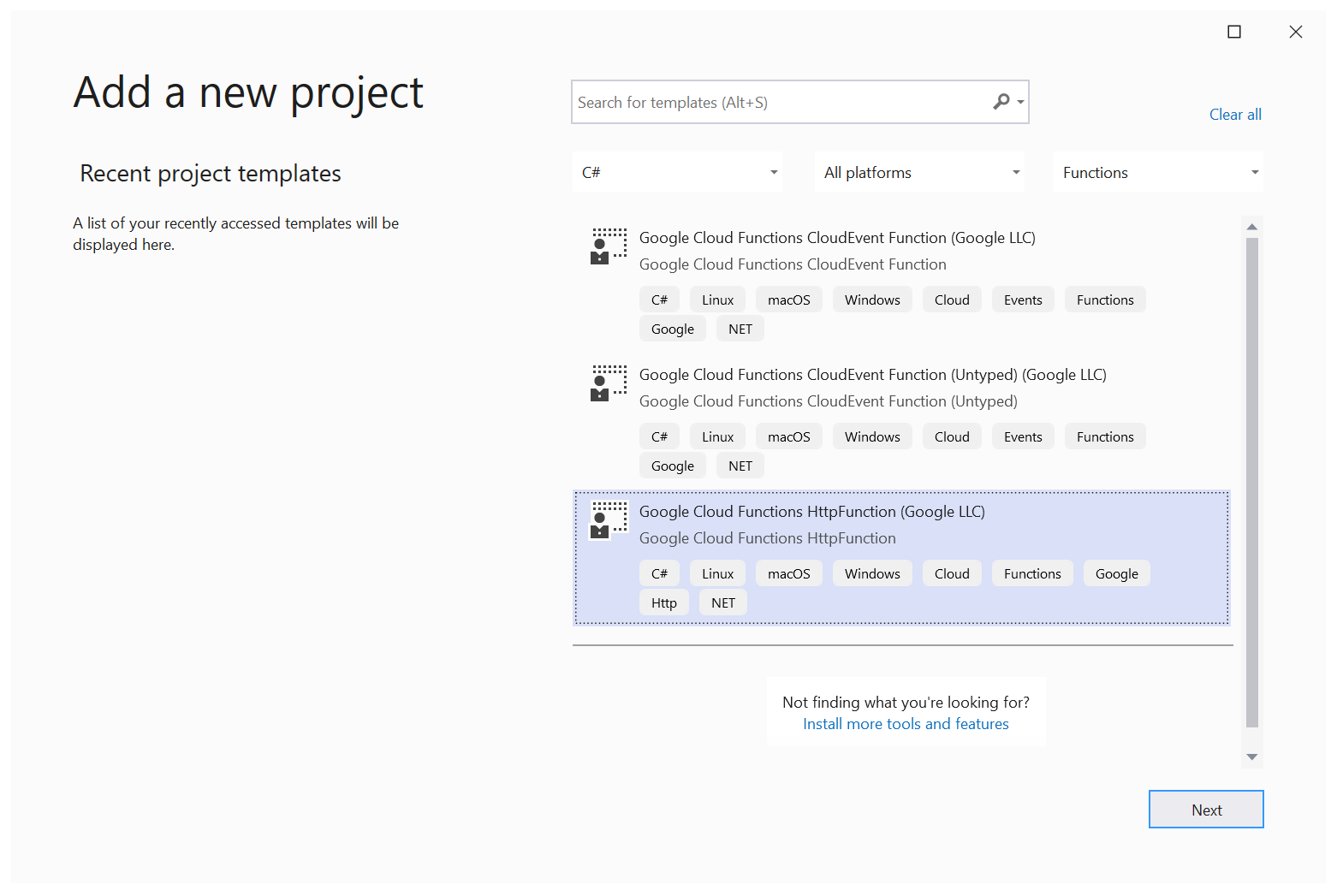
Starting in Visual Studio 16.8 Preview 2 we’ve enabled a preview feature that you can turn on that enables all templates that are installed via CLI to now show as options in Visual Studio as well. To enable this option visit the Preview Features options in the Tools…Options menu and look for the “Show all .NET Core templates in the New Project dialog” (we’re awesome at naming) checkbox and check it:
Looks promising.
Plac3hold3r
on 3 Sep 2020
@Plac3hold3r thanks for that. Yes, that is the experience that we are working on. If you are a template author, please try it out and report any issues that you run into.
sayedihashimi
on 3 Sep 2020
Works for me! This is awesome 👍
jskeet
on 4 Sep 2020
I can't seem to be able to install my template with .NET 5 Preview:
❯ dotnet new --install Boxed.Templates
  Determining projects to restore...
C:\Program Files\dotnet\sdk\5.0.100-preview.8.20417.9\NuGet.targets(128,5): error : Unable to load the service index for source https://api.nuget.org/v3/index.json. [C:\Users\musa\.templateengine\dotnetcli\v5.0.100-preview.8.20417.9\scratch\restore.csproj]
C:\Program Files\dotnet\sdk\5.0.100-preview.8.20417.9\NuGet.targets(128,5): error :   The SSL connection could not be established, see inner exception. [C:\Users\musa\.templateengine\dotnetcli\v5.0.100-preview.8.20417.9\scratch\restore.csproj]
C:\Program Files\dotnet\sdk\5.0.100-preview.8.20417.9\NuGet.targets(128,5): error :    Received an unexpected EOF or 0 bytes from the transport stream. [C:\Users\musa\.templateengine\dotnetcli\v5.0.100-preview.8.20417.9\scratch\restore.csproj]
When I install my template from a local folder (which does work), I can't see them appear in the dialogue.
RehanSaeed
on 4 Sep 2020
@RehanSaeed: That mostly sounds like a network issue. What happens if you visit https://api.nuget.org/v3/index.json in the browser?
When I install my template from a local folder (which does work), I can't see them appear in the dialogue.
Did you enable the option to do so? Tools / Options / Preview Features / Show all .NET Core templates in the New project dialog
(Then you'll need to restart VS)
jskeet
on 4 Sep 2020
I've played around with the latest preview and managed to get it to work (note that it does not work if you run dotnet new --install "C:\MyTemplate" on a directory path where your template is located, you must install a .nupkg file).
I have a PR for my .NET Boxed templates here if anyone is interested in seeing a non-trivial example of how you can add support: https://github.com/Dotnet-Boxed/Templates/pull/836.
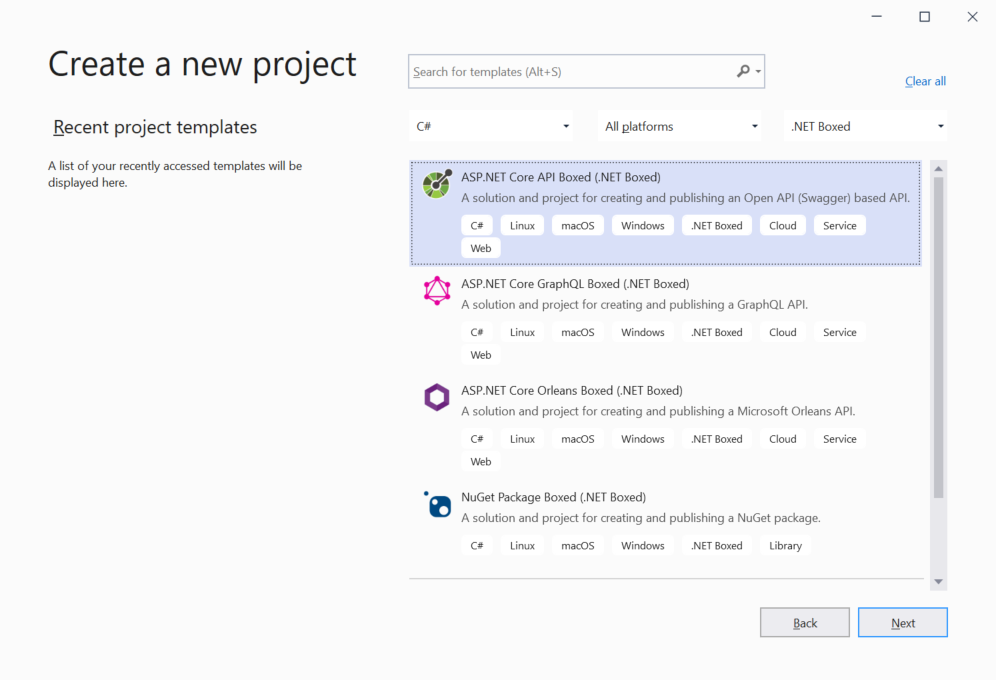
@sayedihashimi has a repo where he has documented how you can add support for VS to your template https://github.com/sayedihashimi/template-sample. I discovered a few possible bugs, usability problems and blockers, so I raised a few issues in his repo. He's going to move them to this repo if they are templating related.
RehanSaeed
on 3 Nov 2020
Using Visual Studio Version 16.8.0 with Show all .NET core templates in the New project dialog enabled I can't see any of the templates I have uploaded to an Azure DevOps package feed. The feed is configured as a package source in Visual Studio.
I can run the templates from the command line with dotnet new.
 DavidJFowler
on 12 Nov 2020
DavidJFowler
on 12 Nov 2020
Using Visual Studio Version 16.8.0 with Show all .NET core templates in the New project dialog enabled I can't see any of the templates I have uploaded to an Azure DevOps package feed. The feed is configured as a package source in Visual Studio.
I can run the templates from the command line with dotnet new.
There is currently no mechanism for discovering the templates from feeds automatically.
What is supported today is the display and creation of a template installed via dotnet new --install from the command line to the CLI hive. The Visual Studio host will sync any templates found in this hive for use in Visual Studio. This assumes the template is compliant with guidance as described. The advantage of this feature is that templates can now be used within Visual Studio without the need for a stub vstemplate file.
phenning
on 12 Nov 2020
There is currently no mechanism for discovering the templates from feeds automatically.
Hi @phenning, I don't think the template needs to be discovered from the feed, If I run
dotnet new -lI can see my templates.
DavidJFowler
on 12 Nov 2020
@DavidJFowler: When you run dotnet new -l are you in a directory with a global.json somewhere? I believe templates are stored on a per-SDK basis, and it looks to me like VS takes them from .NET Core 5. I found that when I installed a template in a directory with no global.json anywhere in the hierarchy, it was then visible in VS.
jskeet
on 12 Nov 2020
@DavidJFowler: When you run
dotnet new -lare you in a directory with aglobal.jsonsomewhere? I believe templates are stored on a per-SDK basis, and it looks to me like VS takes them from .NET Core 5. I found that when I installed a template in a directory with noglobal.jsonanywhere in the hierarchy, it was then visible in VS.
This is the most likely cause, assuming that the preview feature is enabled and the template is accessible via dotnet new.
If this still doesn’t work for you, let me know which template you are trying to use and I’ll install it locally and debug.
phenning
on 12 Nov 2020
My templates are solution templates, rather than project templates. Could that be the reason?
I don't have a global.json in my directory hierarchy and I've tried with Use previews of the .NET Core SDK turned on and off.
DavidJFowler
on 12 Nov 2020
My templates are solution templates, rather than project templates. Could that be the reason?
I don't have a global.json in my directory hierarchy and I've tried with Use previews of the .NET Core SDK turned on and off.
That would be the cause then.
The type does needs to be "project" for use in the new project dialog. For multi-project templates, for example the Blazor template, if you don't specify any of the project files as primary outputs, Visual Studio will add all the discovered project files to the loaded solution. You can also specify the primary outputs explictly. The Blazor template uses the explicit method.
phenning
on 12 Nov 2020
@davidfowl We are planning to look at what if any differing behavior we need to have to support type: "solution". See https://github.com/sayedihashimi/template-sample/issues/7
phenning
on 12 Nov 2020
@davidfowl try out my template analyzer, more info at https://twitter.com/sayedihashimi/status/1326622265144905731?s=20
sayedihashimi
on 12 Nov 2020
Template team, I removed the "triaged" tag so that in the next session, this issue is assigned to Phil's team.
donJoseLuis
on 22 Nov 2020
I think we can close out this ticket, we've already implemented the support in the previews of Visual Studio.
sayedihashimi
on 1 Dec 2020
@sayedihashimi: It's better than that - it's in the released (GA) version of Visual Studio - still behind a "preview features" flag, but you don't need a preview version of VS itself.
jskeet
on 1 Dec 2020
@sayedihashimi Any ideas when the 'solution' template type will get released? Also interested in the timeline for the other issues raised in https://github.com/sayedihashimi/template-sample/issues.
RehanSaeed
on 1 Dec 2020
@jskeet yes, that is more accurate than what I posted.
@RehanSaeed we are hoping to get solution support into 16.9, but there is a chance it can slip to 16.10.
sayedihashimi
on 1 Dec 2020
@jskeet
It's better than that - it's in the released (GA) version of Visual Studio - still behind a "preview features" flag, but you don't need a preview version of VS itself.
When is it expected to not be behind the "preview features" flag? Is it expected to become non-preview for 16.9? Or sometime after that? If so, is 16.9 still planned for release in December? I'm trying to get a feel for when this will be available out of the box without messing with settings.
 rbwhitaker
on 10 Dec 2020
rbwhitaker
on 10 Dec 2020
@rbwhitaker: I have no idea about any of those things, I'm afraid. I'm just a VS consumer like others.
jskeet
on 10 Dec 2020
Maybe I should be at-mentioning @vlada-shubina instead? Do you have any insight into the timing of the "Show all .NET Core templates in the New project dialog" feature becoming mainstream, and not behind a preview toggle? If this issue got closed, does that mean the next 16.9 preview will have it as a formal part of the program?
rbwhitaker
on 10 Dec 2020
Do you have any insight into the timing of the "Show all .NET Core templates in the New project dialog" feature becoming mainstream, and not behind a preview toggle? If this issue got closed, does that mean the next 16.9 preview will have it as a formal part of the program?
@sayedihashimi do you have any insight on this? Thank you.
 vlada-shubina
on 10 Dec 2020
vlada-shubina
on 10 Dec 2020
@rbwhitaker in 16.9 the preview flag will default to On. If users have any issues they can turn that flag off, but we are hoping that we will run into only a few issues. Let me know if you need any more info.
sayedihashimi
on 10 Dec 2020
@sayedihashimi, thank you for the answer. That was what I needed to know. Do we have a rough timetable for 16.9's final release? I believe I heard December (this month). Is that still the best guess?
@vlada-shubina thanks for helping get my question to the right people!
(And sorry for spamming like 5 messages. My cat jumped on the keyboard and somehow got my message posted like five times within a fraction of a second before I grabbed him.)
rbwhitaker
on 10 Dec 2020
@rbwhitaker sorry, I am no at liberty to give any specific dates, but I do not believe that it will be released this year. I looked to see if there was any public message about the release date but I did not find any.
(And sorry for spamming like 5 messages. My cat jumped on the keyboard and somehow got my message posted like five times within a fraction of a second before I grabbed him.)
Haha, it's normally the dogs fault, but now it's the cats turn :)
sayedihashimi
on 10 Dec 2020
@sayedihashimi
I am no at liberty to give any specific dates, but I do not believe that it will be released this year.
I swear I heard December, but the place I thought I heard it was in the .NET Conf videos, and after reviewing it, I don't see anything. It seems like I jumped to a conclusion somewhere. Thanks for helping me get straightened out! 😃
rbwhitaker
on 11 Dec 2020
@rbwhitaker no problem, glad I could help.
sayedihashimi
on 11 Dec 2020
@rbwhitaker in 16.9 the preview flag will default to On. If users have any issues they can turn that flag off, but we are hoping that we will run into only a few issues. Let me know if you need any more info.
Any updates on this, @sayedihashimi? I've been watching the 16.9 Preview release notes carefully, and this change has yet to be called out. Is it still coming? Did it happen without being called out? Has it been delayed?
I know I can go enable this feature myself, but I've got a group of new devs that I work with, and getting easy access to the new template system will make the first steps of their C# journey much easier.
rbwhitaker
on 27 Feb 2021
@rbwhitaker it will be on by default when 16.9 is released.
sayedihashimi
on 2 Mar 2021
Related issues
 DamianEdwards
·
5Comments
DamianEdwards
·
5Comments
 jamiewest
·
3Comments
jamiewest
·
3Comments
 crhairr
·
5Comments
crhairr
·
5Comments
 mhutch
·
5Comments
mhutch
·
5Comments
 brucewilkins
·
3Comments
brucewilkins
·
3Comments
Most helpful comment
Hi everyone, I wanted to let you know that my team is working to automatically display templates in Visual Studio that were installed with
dotnet new —install. We are still ironing out the details, but it is in progress.