Template10: The name "Interaction" does not exist in the namespace "using:Microsoft.Xaml.Interactivity".
After installing the Template10 upgrade, in a File->New project I named T10Minimal1.1 I get this error. I have this same error in a previous Template10 project with just the Interaction namespace error.
I've updated all my tools extensions and NuGets. Closed the solution, opened cleaned and rebuilt. The app appears to work correctly.
When I 'Design in blend' the project opens with no errors and the xaml designer renders.
In VS I open the DetailsPage.xaml that appears to have the same namespaces. Designer renders and no errors are shown.

 jhalbrecht
All 17 comments
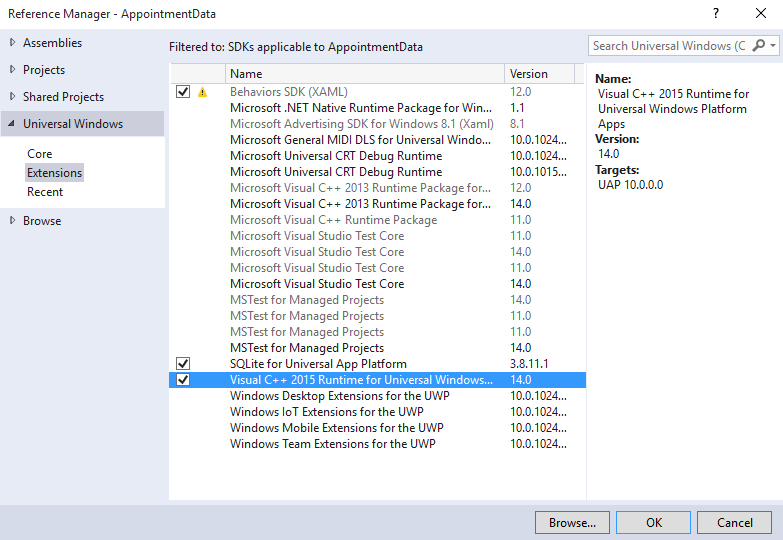
I am going to guess that this is a copy/paste inheritance error. Ha! You need to do two things. The first is to make sure you have referenced the Behaviors SDK in your project (right-click References, select Windows/Extensions/Behaviors SDK) and then add this to your xmlns at the top of your page:
      xmlns:Behaviors="using:Template10.Behaviors"
      xmlns:Core="using:Microsoft.Xaml.Interactions.Core"
      xmlns:Interactivity="using:Microsoft.Xaml.Interactivity"
 JerryNixon
on 16 Oct 2015
JerryNixon
on 16 Oct 2015
"After installing the Template10 upgrade, in a File->New project I named T10Minimal1.1 I get this error"
It wasn't a copy paste situation. It was file new Template10 Minimal project.
    x:Class="Sample.Views.MainPage"
      xmlns="http://schemas.microsoft.com/winfx/2006/xaml/presentation"
      xmlns:x="http://schemas.microsoft.com/winfx/2006/xaml"
      xmlns:Behaviors="using:Template10.Behaviors"
      xmlns:Core="using:Microsoft.Xaml.Interactions.Core"
      xmlns:Interactivity="using:Microsoft.Xaml.Interactivity"
      xmlns:controls="using:Template10.Controls"
      xmlns:d="http://schemas.microsoft.com/expression/blend/2008"
      xmlns:local="using:Sample.Views"
      xmlns:mc="http://schemas.openxmlformats.org/markup-compatibility/2006"
      xmlns:vm="using:Sample.ViewModels" mc:Ignorable="d">
What's with this yellow caution indicator? Is there a uwp windows 10 version of BehaviorsXamlSDKManaged? This one targets windows 8.1 Seems I'd get a warning or error from VS on this.

jhalbrecht
on 16 Oct 2015
Also curious about the uppercase for the Behaviors, Core and Interactivity. Although I might prefer upper case isn't it a generally accepted .XAML convention to use lower case?
 xmlns:Behaviors="using:Template10.Behaviors"
      xmlns:Core="using:Microsoft.Xaml.Interactions.Core"
      xmlns:Interactivity="using:Microsoft.Xaml.Interactivity"
I am having the same issue, but in main page. Designer crashes, but the project compiles despite errors.
This is a screen by @darenm so the issue must be wide.
The screen is from "Microsoft: DEV209.1x Developing Windows 10 Universal Apps - Part 1" and we are at least two people there with the same problem.
 Muhomorik
on 16 Oct 2015
Muhomorik
on 16 Oct 2015
Acknowledged. Chasing it today.
JerryNixon
on 16 Oct 2015
Now I understand what your issue is.
Good news. The Behaviors SDK has a warning icon next to it because Visual Studio detects incompatibilities with UWP that in practice do not impact anything for us (developers). For what we use it for - behaviors - it is perfect. My screen also shows the warning, too.
To be clear this is a WARNING and not an ERROR.
The reason your designer is failing is something else. The reason might be simply because the designer is a little unstable at this point and requires a restart every day. Then again, it might be because your XAML has an error. It's impossible to diag that at this point. But the Behavior SDK warning is okay.
JerryNixon
on 16 Oct 2015
Clean installed Windows 10, Visual Studio 2015 Enterprise - clean, not modified minimal template and the same thing happens to me so I guess it can't be an error in XAML - Maybe it is "a little unstable designer" - nevertheless it compiles and works so it's okay for now..
 mflotynski
on 18 Oct 2015
mflotynski
on 18 Oct 2015
I'm facing the same issue here.
 saguiitay
on 20 Oct 2015
saguiitay
on 20 Oct 2015
It seems that you target ARM.
Try to set to Any CPU when designing, rebuild and it should be OK
 MichaelPetrinolis
on 20 Oct 2015
MichaelPetrinolis
on 20 Oct 2015
Solution: uninstall Template10 NuGet package, Clean solution and install it back.
Error reproduced here: http://1drv.ms/1Gpfd60
P.S.: namespaces should be a lower case anyway,
xmlns:Behaviors, Core, Interactivity
Muhomorik
on 21 Oct 2015
Having the same issue.
What worked for me was MichaelPetronlis's solution. Thanks!
A quick note: I had to switch to Debug x64 to get the designer loading in VS2015.
For Blend however, I would still get the same error. Debug x86 got the Blend designer to
load there :)
So try out various configurations in both(!) VS and Blend if one or both of your designers are unhappy for some reason.
 djb12
on 12 Nov 2015
djb12
on 12 Nov 2015
I get this error, i.e.
"The name 'Interaction' does not exist in the namespace "using:Microsoft.Xaml.Interactivity"
in many files in the XAMLBehaviorsSample project. I had set the target to x86 (from Arm, which was what it started as), but otherwise did not change anything. It compiles and runs though.
 TCPhelps
on 11 Feb 2016
TCPhelps
on 11 Feb 2016
Make sure you do not use _Behaviors SDK (XAML) version 12.0_, which is for Windows 8.1.
What you need is the new open-sourced XamlBehaviors. You can include it by adding Microsoft.Xaml.Behaviors.Uwp.Managed to your _project.json_.
{
  "dependencies": {
    "Microsoft.NETCore.UniversalWindowsPlatform": "5.0.0",
    "Microsoft.Xaml.Behaviors.Uwp.Managed": "1.0.3",
    "Template10": "1.1.3",
    "Newtonsoft.Json": "8.0.2"
  },
 JustinXinLiu
on 11 Feb 2016
JustinXinLiu
on 11 Feb 2016
Thanks Justin, the project did have the right version of XamlBehaviors -- 1.0.3 was listed in the .json file (the XAMLBehaviorsSample actually came from the UWP XamlBehaviors project on Github). I did fix the problem though, in Solution Explorer there were references to Microsoft.Xaml.Interactivity and Microsoft.Xaml.Interactions.Core; they both had the exclamation mark beside them so I removed them, then added the references back from Object Browser (v1.0.3.0 req'd for Win 10 UWP as opposed to the identically named v12.0.0.0 which supports Win 8.1). They do not show up in the project's References list now, but I don't get those error messages in the XAML file.
Haven't managed to remove the error from my own UWP project yet though; there are no references to .Interactivity or .Interactions in my project References to remove. Adding v1.0.3.0 of both of them from Object Browser does let it compile and run though (and it behaves as expected), but in the XAML file it shows them as errors.
Thanks!
TCPhelps
on 11 Feb 2016
So, turns out I just needed to restart Visual Studio to get it to stop giving me "The name 'Interaction' does not exist in the namespace" errors for the XAML file. When in doubt, reboot! :)
TCPhelps
on 11 Feb 2016
@TCPhelps This worked for me as well! Thanks!!
 dpaulino
on 29 May 2016
dpaulino
on 29 May 2016
@TCPhelps Thanks!!! This worked for me too. Additionally I have to manually delete the bin & obj folder and rebuild it. 😄
 l2obin
on 13 Oct 2016
l2obin
on 13 Oct 2016
Related issues
JerryNixon
·
6Comments
JerryNixon
·
9Comments
 marcinmarkiewicz
·
9Comments
marcinmarkiewicz
·
9Comments
 syaifulnizamyahya
·
6Comments
syaifulnizamyahya
·
6Comments
 Weasy666
·
8Comments
Weasy666
·
8Comments
Most helpful comment
So, turns out I just needed to restart Visual Studio to get it to stop giving me "The name 'Interaction' does not exist in the namespace" errors for the XAML file. When in doubt, reboot! :)