Telethon: Unable to recieve api access code while running on AWS EC2 instance
Checklist
- [ maybe] The error is in the library's code, and not in my own.
- [yes ] I have searched for this issue before posting it and there isn't a duplicate.
- [yes ] I ran
pip install -U https://github.com/LonamiWebs/Telethon/archive/master.zipand triggered the bug in the latest version.
I am facing this only in amazon EC2 instance. I am prompted to input my phonenumber, followed by code that I recieve. However I never got the code on my phone. Even after several tries. But the exact same process and a fresh local instance of Ubuntu is running fine. As in I am able to recieve the code.
NAME="Amazon Linux AMI"
VERSION="2018.03"
ID="amzn"
ID_LIKE="rhel fedora"
VERSION_ID="2018.03"
PRETTY_NAME="Amazon Linux AMI 2018.03"
ANSI_COLOR="0;33"
CPE_NAME="cpe:/o:amazon:linux:2018.03:ga"
HOME_URL="http://aws.amazon.com/amazon-linux-ami/"
Code that causes the issue
from telethon.sync import TelegramClient

client = TelegramClient('anon', API_ID,  API_HASH)

with client as client:
    client.loop.run_until_complete(client.send_message('me', 'Hello, myself!'))

...
Output
Please enter your phone (or bot token): 91xxxxxxxxxx
Please enter the code you received:
The exact same code runs well in my local machine with Ubuntu OS.
 selfishhari
All 24 comments
This is being reported a lot lately and unfortunately I don't think there is anything we can do. Quoting a message on the official chat:
apparently it mostly fails for indian users, but works if they try at 3:00 am local time
 Lonami
on 29 Apr 2020
Lonami
on 29 Apr 2020
I found a workaround:
Since it runs on local machine. I copied the generated session file from local machine to my cloud working directory. All seems to be working fine after that. :)
selfishhari
on 30 Apr 2020
Yeah I guess I'll close this since it's not really actionable. At least people searching for the issue will come across this workaround.
Lonami
on 30 Apr 2020
Quoting https://t.me/TelethonChat/230667
Where is the session file located on a windows machine and where should it be in a linux machine?
...
in the same directory where your py file is
the file you execute
 phanirithvij
on 6 Jul 2020
phanirithvij
on 6 Jul 2020
Reopening because there might be a way to solve this, but I have no idea how.
Lonami
on 28 Jul 2020
I have the same issue - code runs fine on my local machine (in Greece) but when I installed the code in AWS I do not receive a login code. However, if using a telegram account with a US phone number it works perfectly OK.
So the issue is caused by the telegram account country != country where the code runs
 spencescu
on 30 Jul 2020
spencescu
on 30 Jul 2020
@spencescu @selfishhari, can you give logs about this issue? For debugging, append this at file begging:
import logging
logging.basicConfig(level=logging.DEBUG)
 intereal
on 10 Aug 2020
intereal
on 10 Aug 2020
There are some extra logs in the linked #1504.
Lonami
on 10 Aug 2020
Hello @selfishhari
I am facing a similar problem I copied the session file from my local pc to aws ec2 but after few hours session terminates due to security reasons by telegram of usage of the session on 2 different IPs.
I have spent hours on finding the fix do you have any fix for this problem?
Osama
 osamajameelahmad
on 10 Sep 2020
osamajameelahmad
on 10 Sep 2020
Happening with me too. I don't know if it's worth mention but I used python-telegram library a couple times and I had no problem with that. I was having a problem to receive updates from all channels over that API, and telethon solved that for me. But at that time I never had a problem with receveing telegram access code. Do you guys think it's worth to see how it's maded there?
 LeonardoRick
on 26 Sep 2020
LeonardoRick
on 26 Sep 2020
I have added some logs inside the telethon library and checked printed the response of the send_otp API call it turns out on AWS-EC2 the response says my mobile number not even registered on telegram but it works perfectly on my local my this issue is still not resolved.
osamajameelahmad
on 26 Sep 2020
I don't think it's a country problem. I'm from Brazil and my EC2 instance is on my region. What else could cause your phone to appear as not registered?
LeonardoRick
on 26 Sep 2020
Same problem for AWS lambda functions. In my case it does not matter whether I send the code to a European number or to an American one. It is never received. The session file also does not seem to be the issue, since I store the session information inside DynamoDB which will get accessed as well when I execute the code locally (when executing the code locally everything works as expected).
Edit:
As a workaround you can use pyrogram. It works for me with Lambda functions.
 LorenzHW
on 27 Sep 2020
LorenzHW
on 27 Sep 2020
@selfishhari, I tried your temporary workaround and I'm receveing this error now:
Error: telethon.errors.rpcerrorlist.AuthKeyDuplicatedError: The authorization key (session file) was used under two different IP addresses simultaneously, and can no longer be used. Use the same session exclusively, or use different sessions (caused by InvokeWithLayerRequest)
Did you ever get this error?
LeonardoRick
on 30 Sep 2020
EDIT: It didn't solve the problem. I did manage to get a verification code once, but I don't know why, and I couldn't reproduce it
I think I found the bug source!
Apparently, there is a bug when using IPv6 which prevents the verification code from being sent. the issue was addressed on v1.16.1 but seems like it doesn't help
https://docs.telethon.dev/en/latest/misc/changelog.html#bug-fixes-v1-16-1
My solution to the problem is to add False to the ipv6 flag like this:
client = TelegramClient(session_file_path, API_ID, API_HASH, use_ipv6=False)
EDIT: It didn't solve the problem. I did manage to get a verification code once, but I don't know why, and I couldn't reproduce it
 giltal1
on 4 Oct 2020
giltal1
on 4 Oct 2020
No IPv6 is the default, though:
This also shouldn't be related at all, because if Telegram is answering to the SendCodeRequest it's because it has supposedly sent the code…
Lonami
on 4 Oct 2020
@LorenzHW pyrogram uses GNU Lesser General Public License which I think do not allow comercialization. Telethon is the most complete MIT Telegram API written in python and would be awsome to go on on this issue. Is there a way to see what pyrogram or python-telegram does so we could do the same here?
LeonardoRick
on 17 Oct 2020
@LorenzHW pyrogram uses GNU Lesser General Public License which I think do not allow comercialization. Telethon is the most complete MIT Telegram API written in python and would be awsome to go on on this issue. Is there a way to see what pyrogram or python-telegram does so we could do the same here?
Hi, @Lonami pinged me about this. It's true that pyrogram is currently licensed under LGPL, but this doesn't mean you can't use it commercially. In fact, you can use and integrate Pyrogram into your own code — either open source, under the same or a different license, or even proprietary with any purpose whatsoever — without being required to release the source code of your own applications. However, any derivative work or modification to the library itself is required to be published for free under the same LGPLv3+ license.
 delivrance
on 17 Oct 2020
delivrance
on 17 Oct 2020
@selfishhari in the past a few days I was dealing with the same issue. Interestingly enough my code worked on day one on AWS and on the second day stoped working!!!
I believe I have found the root cause. The issue is with not having the NTP (Network Time Protocol) and TimeZone properly set up on the server-side which I'm going to describe it based on my scenario.
The only thing that we always miss to compare between dev and test or prod environment is the local time of our machines especially when we move our app to the cloud.
When I tested my code for the very first time, I tested on my AWS machine which worked just fine but on the second day of my testing, I decided to do it on my local machine and of course, I received the verification code but when I moved back to my AWS server things started acting strange!!!
The catch was my local zone was based on US Central (America/Chicago) and when I moved my code to my AWS the time zone of my server was UTC. Based on my past experience I have seen REST APIs get confused when they see the authentication requests coming from a different time. (one request is coming from the current time and one request coming from the future).
The best way to avoid this type of situation is to use one standard time zone (e.g. UTC or Local Time Zone ) in both Dev and Test/Prod environments and that was exactly what I did.
On my AWS machine, I synced my server with NTP and changed the time zone from UTC to America/Central and everything started working again.
Here is the link for AWS NTP:
https://docs.aws.amazon.com/AWSEC2/latest/UserGuide/set-time.html
And here is the Linux command for setting up the right time zone:
$ timedatectl list-timezones
$ timedatectl list-timezones | grep Chicago
$ sudo timedatectl set-timezone America/Chicago
 yekrangian
on 17 Oct 2020
yekrangian
on 17 Oct 2020
@yekrangian awesome debug and you went one step further setting NTP, but it's still not working for me.
I had already settled my timezone because I'm from Brazil so it's intuitive for me to update that. I taught that this NTP configuration was the gap, but I think it's something else in my situation.
Please let us know if anyone had fixed the problem with those two steps. Would be nice to compare another locations.
LeonardoRick
on 18 Oct 2020
@LeonardoRick also please make sure your time zone on your AWS machine is the same as your local (where you are developing the code).
once you ensured that all your environments have the same time zone, run your code where you always run and get the verification code, and next run the same code in your other environment.
yekrangian
on 18 Oct 2020
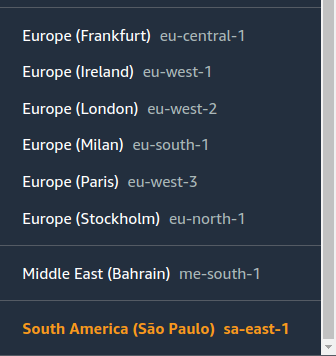
AWS selected Server
timedatectl
leonardo@ip-xxx-xx-xx-xxx:~$ timedatectl
                      Local time: Tue 2020-10-20 10:57:55 -03
                  Universal time: Tue 2020-10-20 13:57:55 UTC
                        RTC time: Tue 2020-10-20 13:57:56
                       Time zone: America/Sao_Paulo (-03, -0300)
       System clock synchronized: yes
systemd-timesyncd.service active: yes
                 RTC in local TZ: no
``
chronyc sources -v
leonardo@ip-xxx-xx-xx-xxx:~$ chronyc sources -v
  .-- Source mode  '^' = server, '=' = peer, '#' = local clock.
 / .- Source state '*' = current synced, '+' = combined , '-' = not combined,
| /   '?' = unreachable, 'x' = time may be in error, '~' = time too variable.
||                                                 .- xxxx [ yyyy ] +/- zzzz
||      Reachability register (octal) -.           |  xxxx = adjusted offset,
||      Log2(Polling interval) --.      |          |  yyyy = measured offset,
||                                \     |          |  zzzz = estimated error.
||                                 |    |           \
MS Name/IP address         Stratum Poll Reach LastRx Last sample
===============================================================================
^* 169.254.169.123               3   4   377    15    -29us[  -33us] +/-  483us
^- pugot.canonical.com           2  10   377   912  -2273us[-2297us] +/-  127ms
^- chilipepper.canonical.com     2  10   377   513    -85us[  -89us] +/-  131ms
^- golem.canonical.com           2  10   377   723   +562us[ +581us] +/-  133ms
^- alphyn.canonical.com          2  10   377   201   -246us[ -249us] +/-  137ms
^- a.ntp.br                      2  10   377   403   -107us[ -108us] +/- 5019us
^- time.cloudflare.com           3  10   377   958   -145us[ -139us] +/-   67ms
^- ntp1.ifsc.usp.br              2  10   377   616   +269us[ +280us] +/- 7578us
^- 45.11.105.223                 2  10   377   278    +36us[  +37us] +/- 3899us
chronyc tracking
leonardo@ip-xxx-xx-xx-xxx:~$ chronyc tracking
Reference ID    : A9FEA97B (169.254.169.123)
Stratum         : 4
Ref time (UTC)  : Tue Oct 20 13:53:08 2020
System time     : 0.000000886 seconds slow of NTP time
Last offset     : -0.000001058 seconds
RMS offset      : 0.000003360 seconds
Frequency       : 23.756 ppm slow
Residual freq   : -0.001 ppm
Skew            : 0.046 ppm
Root delay      : 0.000407746 seconds
Root dispersion : 0.000270084 seconds
Update interval : 16.3 seconds
Leap status     : Normal
@yekrangian I really don't know what I'm missing. The only weird thing for me is this chronyc tracking output that is showing a different UTC as ref time. Should this be different? I found NO where saying how to change this so I taught that maybe it's just the NTP server location or something that doesn't need to be changed.
Besides that, I really don't know what else to do. I even tried multiple times to send the code running on my machine and try it on server before that but it's not working too.
Thanks a lot for helping.
LeonardoRick
on 20 Oct 2020
@LeonardoRick NTP service is separate from the time zone.
NTP will synchronize your machine's time based on whatever time zone you set. From what I see your NTP service on your AWS is up and synced.
Now you need to make sure your AWS machine time zone is set with the same time zone as your development machine where you can run the code successfully.
My local development machine where I was able to run my code successfully:
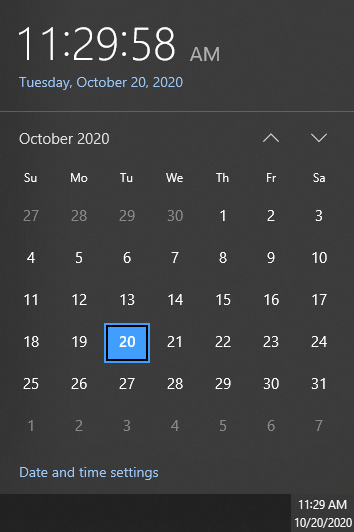
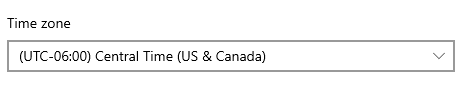
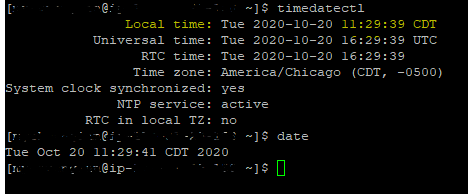
My AWS Server
yekrangian
on 20 Oct 2020
My local machine
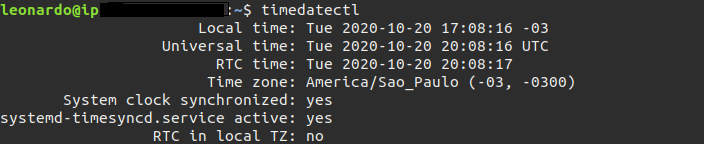
timedatecrl on server
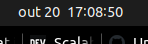
date on server (i took 2 min to take the other screenshot)

@yekrangian can you see something missing?
LeonardoRick
on 20 Oct 2020
Related issues
 adv-zl
·
3Comments
adv-zl
·
3Comments
 rbabaee2014
·
3Comments
rbabaee2014
·
3Comments
 ghost
·
4Comments
ghost
·
4Comments
 justxor
·
4Comments
justxor
·
4Comments
 aminhyper
·
3Comments
aminhyper
·
3Comments
Most helpful comment
I have the same issue - code runs fine on my local machine (in Greece) but when I installed the code in AWS I do not receive a login code. However, if using a telegram account with a US phone number it works perfectly OK.
So the issue is caused by the telegram account country != country where the code runs