Telegram-foss: [Feature Request]Allow "sync contacts" check/uncheck option at startup for first/initial account as well.
Hi Team,
It would be good to have the "sync contacts" checkbox available when we are adding the first/initial account, just like it does in the second or third account addition. Many like me, do not like to have their accounts synced due to privacy reasons, and by the time we reach to settings to disable it, it is synced already (taking into consideration, the internet connectivity is still ON, for whatever valid reason, when the TG setup is being done, or taking that few are not aware of the option, as new users).
This will be a good option to have. Kindly take this into consideration.
 vdbhb59
All 14 comments
No use raising any issues. At least give a holding response..
vdbhb59
on 25 Aug 2020
I don't see the issue. Don't grant the contacts permission?
Telegram doesn't force you to grant any permission. Quit making up issues that don't exist
 anupritaisno1
on 25 Aug 2020
anupritaisno1
on 25 Aug 2020
@anupritaisno1 Are you serious? Did you even read what I wrote?
Irrespective of whether one grants sync permission or not, the client auto syncs the moment one logs in (initial a/c). This is NOT an issue, this is a feature request of allowing sync contacts checkbox like it is allowed when adding a second account.
I clearly explained and you are being rude for no apparent reason. Please read and then communicate. Courtesy..
vdbhb59
on 26 Aug 2020
Just so that you understand, I added Feature Request tag.
vdbhb59
on 26 Aug 2020
hello everyone → a friend of mine just pointed me at this specific problem: first setup on smartphone of Telegram FOSS it opens a request to give access to contacts and synch them to the (hopefully) encrypted server. Whenever the App opens, this pops up each time again. So one could accidentally hit "OK" although the decision not to synch has been made a long time ago :)
→ if someone does not want this it would be nice to have a simple checkbox while setup to check/uncheck this option (well also later check/uncheck) would be good in case one decides otherwise :)
thx for raising this privacy topic @vdbhb59
 timmwille
on 4 Feb 2021
timmwille
on 4 Feb 2021
hello everyone → a friend of mine just pointed me at this specific problem: first setup on smartphone of Telegram FOSS it opens a request to give access to contacts and synch them to the (hopefully) encrypted server. Whenever the App opens, this pops up each time again. So one could accidentally hit "OK" although the decision not to synch has been made a long time ago :)
→ if someone does not want this it would be nice to have a simple checkbox while setup to check/uncheck this option (well also later check/uncheck) would be good in case one decides otherwise :)
thx for raising this privacy topic @vdbhb59
It is open for long, and no one cares I believe. I was replied in a rude manner earlier, and TG-FOSS team is behaving exactly how TG does, do not reply, and do not care. Only illogical and stupid stuff get IN, not PRIVACY friendly in reality.
vdbhb59
on 4 Feb 2021
But why do you give contacts sync permission in the first place?
I can't reproduce, I install the app, don't give the permission when asked, all good
:/
 thermatk
on 4 Feb 2021
thermatk
on 4 Feb 2021
hello everyone → a friend of mine just pointed me at this specific problem: first setup on smartphone of Telegram FOSS it opens a request to give access to contacts and synch them to the (hopefully) encrypted server. Whenever the App opens, this pops up each time again. So one could accidentally hit "OK" although the decision not to synch has been made a long time ago :)
→ if someone does not want this it would be nice to have a simple checkbox while setup to check/uncheck this option (well also later check/uncheck) would be good in case one decides otherwise :)
thx for raising this privacy topic @vdbhb59It is open for long, and no one cares I believe. I was replied in a rude manner earlier, and TG-FOSS team is behaving exactly how TG does, do not reply, and do not care. Only illogical and stupid stuff get IN, not PRIVACY friendly in reality.
I think sometimes People just need to understand the Problem in detail, I hope for the best
timmwille
on 4 Feb 2021
But why do you give contacts sync permission in the first place?
I can't reproduce, I install the app, don't give the permission when asked, all good
:/
Ah so this might be causing the pop-up? so a clean new install would solve it?
So far I understood, when ever you try to enter contacts or you fully close the app (also in the background) and start it again you're presented with the Pop-Up
But sure I'll further investigate, from what I could find it is not possible to stop, when it starts asking (might be caused by an earlier "OK" so the question is how to stop it)
timmwille
on 4 Feb 2021
ok tested: so after the install you HAVE to allow Telegram to access your call list to automatically input the login code send (also strange, that it does only provide "OK" and does not allow me to manually do this via SMS, but that's another question for another time). So you can only press "OK" and after that it also asks you to activate the synch and access contacts with the option reject/later → and always asks again when the program was closed and opened again
timmwille
on 4 Feb 2021
But why do you give contacts sync permission in the first place?
I can't reproduce, I install the app, don't give the permission when asked, all good
:/
did you test also with closing the program and/or starting a chat or go to "contacts" and then it also does not pop-up? this would mean different behaviour on different devices/OS → I'm currently on LineageOS
timmwille
on 4 Feb 2021
@vdbhb59 @timmwille tldr: telegram can't access your contacts regardless of what the app says, as long as the system permission to access contacts is denied.
There seems to be confusion about what a permission means in this thread.
Contacts permission ≠ option named Sync contacts
- Permissions are android settings, they are not controlled by any app. When you talk about permissions, people understand that you are referring to android settings.
Permissions look like this :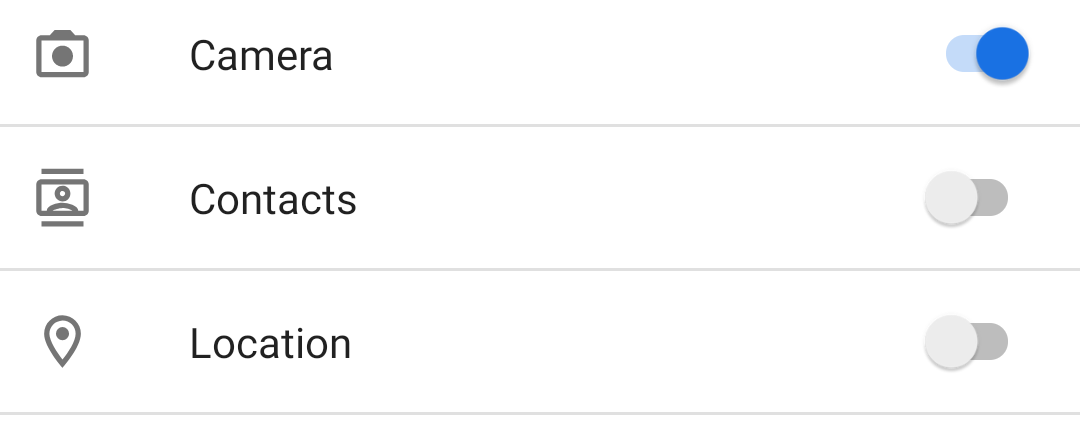
Meanwhile you refer to the telegram setting named
sync contacts.This is not a permission, just a setting inside the app.
This telegram option looks like this :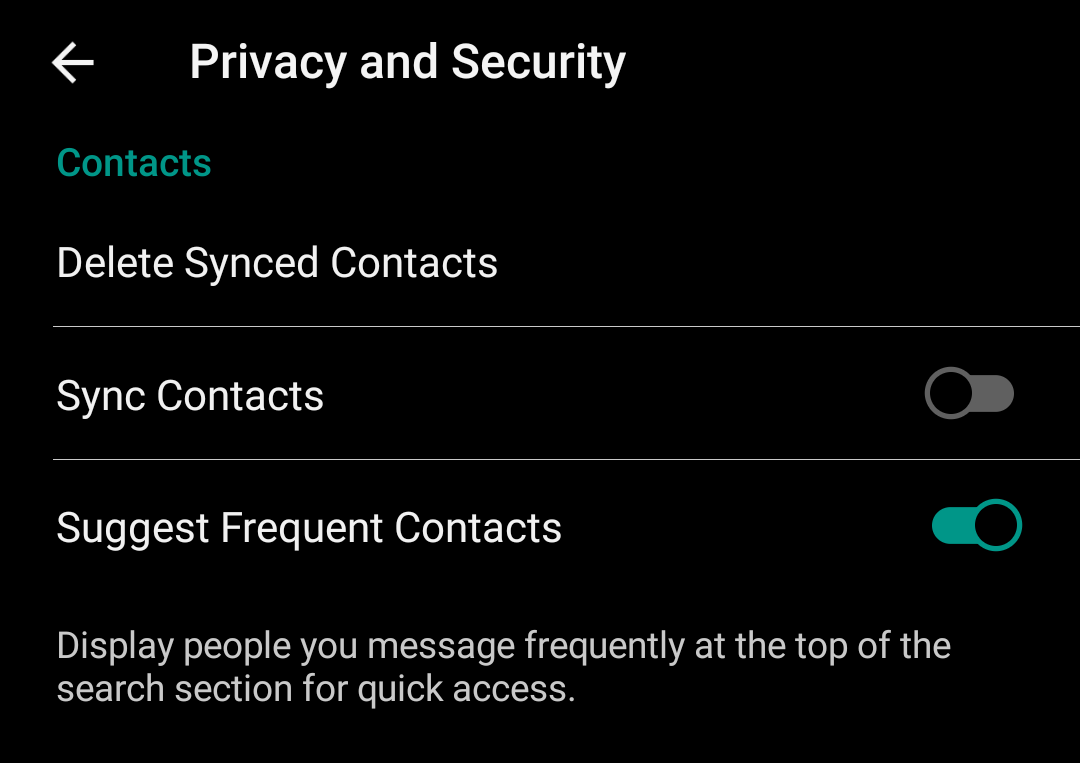
This particular telegram setting (sync contacts) does nothing, whether it's ON or OFF, unless you also grant the system permission to access contacts.
By default, on a fresh install, the permission to access contacts is OFF, just like all other permissions.
By default, on a first login, the telegram option to sync contacts is ON, but this doesn't matter, because the permission to access contacts is OFF. The app can't sync contacts anyway because it can't see them.
Now to fix your problem @vdbhb59 : no need to do anything, as there's no issue. You can safely keep the ☑️ "sync contacts" checkbox checked, during first login, or when adding accounts, it does not matter. What matters is whether or not you grant the permission to access contacts in Android system settings.
To fix your problem @timmwille : this is a real problem but thankfully it's completely caused by user error.
Telegram will only ask you to give it access to contacts if you turn on the "sync contacts" option in telegram settings.
Turn OFF "sync contacts" in settings, and telegram will stop asking you every time.
Telegram only asks you because as far as the app is concerned, you (the user) want to sync contacts. Otherwise you wouldn't keep the "sync contacts" option enabled, right ?
You'll see a similar behaviour if you deny permission to access microphone, for example, then you try to record a voice note. Telegram will then ask you to give it access to microphone, of course because you pressed the microphone button.
Doing things like uninstall , reinstall , wipe data , reset , etc will not help. @timmwille the popup is a result of telegram options inside telegram settings, they are not affected by uninstall/reinstall.
 Younes-L
on 6 Feb 2021
Younes-L
on 6 Feb 2021
thx @Younes-L I'll pass it over and let you know if it solved it (thx for your patient and detailed answer!)
timmwille
on 19 Feb 2021
solved → it was the not turned of security option in the settings of Telegram. thank you, from my side this can be closed now
timmwille
on 19 Feb 2021
Related issues
 dupuy
·
4Comments
dupuy
·
4Comments
 moriel5
·
6Comments
moriel5
·
6Comments
 joeftiger
·
4Comments
joeftiger
·
4Comments
 p4t0g3n0
·
3Comments
p4t0g3n0
·
3Comments
 danialbehzadi
·
3Comments
danialbehzadi
·
3Comments