Telegraf: [Feature Request] MTR plugin for peer-to-peer network reliability
MTR investigates the network connection between the host mtr runs on and a user-specified destination host. After it determines the address of each network hop between the machines, it sends a sequence ICMP ECHO requests to each one to determine the quality of the link to each machine. As it does this, it prints running statistics about each machine.
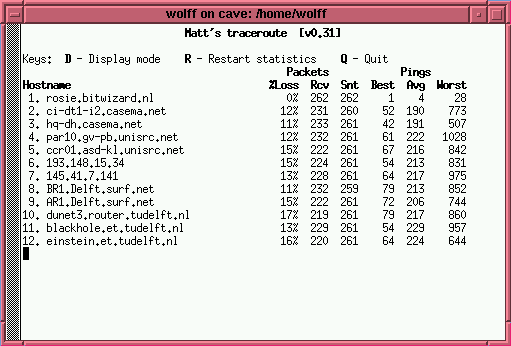
Current behavior:
I don't find the similar plugin which reports the reliability of each route in network
Use case: [Why is this important (helps with prioritizing requests)]
It makes easy to stat packets and help diagnose issues. https://github.com/traviscross/mtr/issues/170 provides go API(?)
 jacktang
All 15 comments
sorry but this is not feasible to port to telegraf. you will have to make do with the ping plugin.
 sparrc
on 8 Mar 2017
sparrc
on 8 Mar 2017
Just for posterity, we use the follow script to accomplish a similar goal of tracerouting hosts, and recording the latency of each hop:
now=$(date +%s%N)
for target in gdns:8.8.4.4 sea32:54.182.214.11 sfo5:205.251.214.110 lax1:216.137.44.127 lax3:205.251.202.216; do
    IFS=: read target_loc target_ip <<< "$target"
    traceroute -n -I -q 1 $target_ip | awk '$1 != "traceroute" && $2 != "*" { print "traceroute,target_loc='$target_loc',target_ip='$target_ip',hop_num="$1",hop_host="$2" resp_time="$3" '$now'" }' &
done
wait
This results in output such as:
traceroute,target_loc=sea32,target_ip=54.182.214.11,hop_num=2,hop_host=192.88.178.1 resp_time=0.503 1489035309935444225
traceroute,target_loc=sea32,target_ip=54.182.214.11,hop_num=3,hop_host=4.15.233.1 resp_time=1.891 1489035309935444225
traceroute,target_loc=sea32,target_ip=54.182.214.11,hop_num=4,hop_host=4.69.210.218 resp_time=8.124 1489035309935444225
traceroute,target_loc=sea32,target_ip=54.182.214.11,hop_num=6,hop_host=4.16.168.34 resp_time=82.223 1489035309935444225
traceroute,target_loc=sea32,target_ip=54.182.214.11,hop_num=9,hop_host=205.251.225.72 resp_time=82.262 1489035309935444225
traceroute,target_loc=sea32,target_ip=54.182.214.11,hop_num=10,hop_host=205.251.226.69 resp_time=82.972 1489035309935444225
traceroute,target_loc=sea32,target_ip=54.182.214.11,hop_num=14,hop_host=54.182.214.11 resp_time=82.984 1489035309935444225
Just plug it into telegraf via an [[inputs.exec]]
 phemmer
on 9 Mar 2017
phemmer
on 9 Mar 2017
Hello All,
Great Job on the script @phemmer
I got a similar output and trying to calculate number of hops (in your case it is hop_num = 14). When I try to query influxDB I am not getting any data when I run the query.
I used the following query
show max(“hop_num”) FROM “traceroute” WHERE (“host” = ‘ip-xx.xx.xx.xx’) AND $timeFilter GROUP BY time($__interval) fill(null)
 srikanthvamaraju
on 24 Apr 2018
srikanthvamaraju
on 24 Apr 2018
This is because hop_num is a tag, if you make it a field you will able to do this.
traceroute -n -I -q 1 $target_ip | awk '$1 != "traceroute" && $2 != "*" { print "traceroute,target_loc='$target_loc',target_ip='$target_ip',hop_host="$2" hop_num=$1i,resp_time="$3" '$now'" }' &
Edit: fixed the type of the field
 danielnelson
on 24 Apr 2018
danielnelson
on 24 Apr 2018
@phemmer I am looking into this too, may use mtr instead. also planning to record AS per ips too, my question is: are there any influxdb queries to detect route changes overtime? is that feasible to do with with influxdb queries or should I do a small python script to scan the time series manually to report changes to another time series?
 jarossi
on 9 May 2018
jarossi
on 9 May 2018
I know it is a Feature closed a long time ago, but since it is the first result to come up in google, and I had the same need, I would like to suggest this solution: mtr can export its result in various protocol, including CSV.
Thus, you can have your mtr plugin without additional script:
[[inputs.exec]]
# MTR as csv
commands=["mtr -C -n host1", "mtr -C -n host2" ]
timeout = "40s"
data_format = "csv"
csv_skip_rows = 1
csv_column_names=[ "", "", "status","dest","hop","ip","loss","snt","", "","avg","best","worst","stdev"]
name_override = "mtr"
csv_tag_columns = ["dest", "hop", "ip"]
Hope it will help :)
It give something like this:
> mtr,dest=example.org,host=probe avg=0.8,best=0.29,hop=1i,ip="X.X.X.X",loss=0,snt=10i,status="OK",stdev=1.1,worst=4.6 1556201959000000000
> mtr,dest=example.org,host=probe avg=0.89,best=0.66,hop=2i,ip="X.X.X.X",loss=0,snt=10i,status="OK",stdev=0,worst=1.12 1556201959000000000
> mtr,dest=example.org,host=probe avg=0,best=0,hop=3i,ip="???",loss=100,snt=10i,status="OK",stdev=0,worst=0 1556201959000000000
> mtr,dest=example.org,host=probe avg=1.03,best=0.73,hop=4i,ip="X.X.X.X",loss=0,snt=10i,status="OK",stdev=0,worst=1.53 1556201959000000000
> mtr,dest=example.org,host=probe avg=1.1,best=0.72,hop=5i,ip="X.X.X.X",loss=0,snt=10i,status="OK",stdev=0,worst=1.6 1556201959000000000
> mtr,dest=example.org,host=probe avg=0.96,best=0.73,hop=6i,ip="X.X.X.X",loss=0,snt=10i,status="OK",stdev=0,worst=1.54 1556201959000000000
> mtr,dest=example.org,host=probe avg=1.78,best=1.78,hop=7i,ip="212.3.235.197",loss=90,snt=10i,status="OK",stdev=0,worst=1.78 1556201959000000000
> mtr,dest=example.org,host=probe avg=0,best=0,hop=8i,ip="???",loss=100,snt=10i,status="OK",stdev=0,worst=0 1556201959000000000
> mtr,dest=example.org,host=probe avg=93.31,best=90.16,hop=9i,ip="4.68.73.106",loss=0,snt=10i,status="OK",stdev=5.03,worst=106.32 1556201959000000000
> mtr,dest=example.org,host=probe avg=85.17,best=84.51,hop=10i,ip="152.195.65.129",loss=0,snt=10i,status="OK",stdev=0.82,worst=87.67 1556201959000000000
> mtr,dest=example.org,host=probe avg=83.71,best=83.64,hop=11i,ip="93.184.216.34",loss=0,snt=10i,status="OK",stdev=0,worst=83.82 1556201959000000000
 jnguiot
on 25 Apr 2019
jnguiot
on 25 Apr 2019
And so we have a completely working solution to something the authors of telegraf feel is not feasible.
I suggest this is reopened, as I too had been looking for a solution to this, and here it is
 thetravellor
on 17 Jul 2019
thetravellor
on 17 Jul 2019
Either of @phemmer and @jnguiot's solutions should work well, and don't require any changes to Telegraf. Maybe we should make a list of how to monitor things that don't have a specific plugin, so that it is easier to discover these sorts of things.
danielnelson
on 19 Jul 2019
I added @jnguiot's tip to the Telegraf wiki, perhaps we could build this into a useful resource?
danielnelson
on 19 Jul 2019
Just for posterity, we use the follow script to accomplish a similar goal of tracerouting hosts, and recording the latency of each hop:
now=$(date +%s%N)
for target in gdns:8.8.4.4 sea32:54.182.214.11 sfo5:205.251.214.110 lax1:216.137.44.127 lax3:205.251.202.216; do
    IFS=: read target_loc target_ip <<< "$target"
    traceroute -n -I -q 1 $target_ip | awk '$1 != "traceroute" && $2 != "*" { print "traceroute,target_loc='$target_loc',target_ip='$target_ip',hop_num="$1",hop_host="$2" resp_time="$3" '$now'" }' &
done
wait
This results in output such as:
traceroute,target_loc=sea32,target_ip=54.182.214.11,hop_num=2,hop_host=192.88.178.1 resp_time=0.503 1489035309935444225
traceroute,target_loc=sea32,target_ip=54.182.214.11,hop_num=3,hop_host=4.15.233.1 resp_time=1.891 1489035309935444225
traceroute,target_loc=sea32,target_ip=54.182.214.11,hop_num=4,hop_host=4.69.210.218 resp_time=8.124 1489035309935444225
traceroute,target_loc=sea32,target_ip=54.182.214.11,hop_num=6,hop_host=4.16.168.34 resp_time=82.223 1489035309935444225
traceroute,target_loc=sea32,target_ip=54.182.214.11,hop_num=9,hop_host=205.251.225.72 resp_time=82.262 1489035309935444225
traceroute,target_loc=sea32,target_ip=54.182.214.11,hop_num=10,hop_host=205.251.226.69 resp_time=82.972 1489035309935444225
traceroute,target_loc=sea32,target_ip=54.182.214.11,hop_num=14,hop_host=54.182.214.11 resp_time=82.984 1489035309935444225
Just plug it into telegraf via an
[[inputs.exec]]
Just for posterity, we use the follow script to accomplish a similar goal of tracerouting hosts, and recording the latency of each hop:
now=$(date +%s%N)
for target in gdns:8.8.4.4 sea32:54.182.214.11 sfo5:205.251.214.110 lax1:216.137.44.127 lax3:205.251.202.216; do
  IFS=: read target_loc target_ip <<< "$target"
  traceroute -n -I -q 1 $target_ip | awk '$1 != "traceroute" && $2 != "*" { print "traceroute,target_loc='$target_loc',target_ip='$target_ip',hop_num="$1",hop_host="$2" resp_time="$3" '$now'" }' &
done
wait
This results in output such as:
traceroute,target_loc=sea32,target_ip=54.182.214.11,hop_num=2,hop_host=192.88.178.1 resp_time=0.503 1489035309935444225
traceroute,target_loc=sea32,target_ip=54.182.214.11,hop_num=3,hop_host=4.15.233.1 resp_time=1.891 1489035309935444225
traceroute,target_loc=sea32,target_ip=54.182.214.11,hop_num=4,hop_host=4.69.210.218 resp_time=8.124 1489035309935444225
traceroute,target_loc=sea32,target_ip=54.182.214.11,hop_num=6,hop_host=4.16.168.34 resp_time=82.223 1489035309935444225
traceroute,target_loc=sea32,target_ip=54.182.214.11,hop_num=9,hop_host=205.251.225.72 resp_time=82.262 1489035309935444225
traceroute,target_loc=sea32,target_ip=54.182.214.11,hop_num=10,hop_host=205.251.226.69 resp_time=82.972 1489035309935444225
traceroute,target_loc=sea32,target_ip=54.182.214.11,hop_num=14,hop_host=54.182.214.11 resp_time=82.984 1489035309935444225
Just plug it into telegraf via an
[[inputs.exec]]
Hi,phemmer
I followe you script add my telegraf exec,but no input any data to my influxdb. I tried run script is work.
 wiljay
on 19 Aug 2019
wiljay
on 19 Aug 2019
I know it is a Feature closed a long time ago, but since it is the first result to come up in google, and I had the same need, I would like to suggest this solution: mtr can export its result in various protocol, including CSV.
Thus, you can have your mtr plugin without additional script:[[inputs.exec]] # MTR as csv commands=["mtr -C -n host1", "mtr -C -n host2" ] timeout = "40s" data_format = "csv" csv_skip_rows = 1 csv_column_names=[ "", "", "status","dest","hop","ip","loss","snt","", "","avg","best","worst","stdev"] name_override = "mtr" csv_tag_columns = ["dest", "hop", "ip"]Hope it will help :)
It give something like this:> mtr,dest=example.org,host=probe avg=0.8,best=0.29,hop=1i,ip="X.X.X.X",loss=0,snt=10i,status="OK",stdev=1.1,worst=4.6 1556201959000000000 > mtr,dest=example.org,host=probe avg=0.89,best=0.66,hop=2i,ip="X.X.X.X",loss=0,snt=10i,status="OK",stdev=0,worst=1.12 1556201959000000000 > mtr,dest=example.org,host=probe avg=0,best=0,hop=3i,ip="???",loss=100,snt=10i,status="OK",stdev=0,worst=0 1556201959000000000 > mtr,dest=example.org,host=probe avg=1.03,best=0.73,hop=4i,ip="X.X.X.X",loss=0,snt=10i,status="OK",stdev=0,worst=1.53 1556201959000000000 > mtr,dest=example.org,host=probe avg=1.1,best=0.72,hop=5i,ip="X.X.X.X",loss=0,snt=10i,status="OK",stdev=0,worst=1.6 1556201959000000000 > mtr,dest=example.org,host=probe avg=0.96,best=0.73,hop=6i,ip="X.X.X.X",loss=0,snt=10i,status="OK",stdev=0,worst=1.54 1556201959000000000 > mtr,dest=example.org,host=probe avg=1.78,best=1.78,hop=7i,ip="212.3.235.197",loss=90,snt=10i,status="OK",stdev=0,worst=1.78 1556201959000000000 > mtr,dest=example.org,host=probe avg=0,best=0,hop=8i,ip="???",loss=100,snt=10i,status="OK",stdev=0,worst=0 1556201959000000000 > mtr,dest=example.org,host=probe avg=93.31,best=90.16,hop=9i,ip="4.68.73.106",loss=0,snt=10i,status="OK",stdev=5.03,worst=106.32 1556201959000000000 > mtr,dest=example.org,host=probe avg=85.17,best=84.51,hop=10i,ip="152.195.65.129",loss=0,snt=10i,status="OK",stdev=0.82,worst=87.67 1556201959000000000 > mtr,dest=example.org,host=probe avg=83.71,best=83.64,hop=11i,ip="93.184.216.34",loss=0,snt=10i,status="OK",stdev=0,worst=83.82 1556201959000000000
I copy you script in my telegraf, but no data input to influxdb.And then check telegraf --test -config /etc/telegraf/telegraf.d/traceroute.conf no anything respond.
wiljay
on 19 Aug 2019
I know it is a Feature closed a long time ago, but since it is the first result to come up in google, and I had the same need, I would like to suggest this solution: mtr can export its result in various protocol, including CSV.
Thus, you can have your mtr plugin without additional script:[[inputs.exec]] # MTR as csv commands=["mtr -C -n host1", "mtr -C -n host2" ] timeout = "40s" data_format = "csv" csv_skip_rows = 1 csv_column_names=[ "", "", "status","dest","hop","ip","loss","snt","", "","avg","best","worst","stdev"] name_override = "mtr" csv_tag_columns = ["dest", "hop", "ip"]Hope it will help :)
It give something like this:> mtr,dest=example.org,host=probe avg=0.8,best=0.29,hop=1i,ip="X.X.X.X",loss=0,snt=10i,status="OK",stdev=1.1,worst=4.6 1556201959000000000 > mtr,dest=example.org,host=probe avg=0.89,best=0.66,hop=2i,ip="X.X.X.X",loss=0,snt=10i,status="OK",stdev=0,worst=1.12 1556201959000000000 > mtr,dest=example.org,host=probe avg=0,best=0,hop=3i,ip="???",loss=100,snt=10i,status="OK",stdev=0,worst=0 1556201959000000000 > mtr,dest=example.org,host=probe avg=1.03,best=0.73,hop=4i,ip="X.X.X.X",loss=0,snt=10i,status="OK",stdev=0,worst=1.53 1556201959000000000 > mtr,dest=example.org,host=probe avg=1.1,best=0.72,hop=5i,ip="X.X.X.X",loss=0,snt=10i,status="OK",stdev=0,worst=1.6 1556201959000000000 > mtr,dest=example.org,host=probe avg=0.96,best=0.73,hop=6i,ip="X.X.X.X",loss=0,snt=10i,status="OK",stdev=0,worst=1.54 1556201959000000000 > mtr,dest=example.org,host=probe avg=1.78,best=1.78,hop=7i,ip="212.3.235.197",loss=90,snt=10i,status="OK",stdev=0,worst=1.78 1556201959000000000 > mtr,dest=example.org,host=probe avg=0,best=0,hop=8i,ip="???",loss=100,snt=10i,status="OK",stdev=0,worst=0 1556201959000000000 > mtr,dest=example.org,host=probe avg=93.31,best=90.16,hop=9i,ip="4.68.73.106",loss=0,snt=10i,status="OK",stdev=5.03,worst=106.32 1556201959000000000 > mtr,dest=example.org,host=probe avg=85.17,best=84.51,hop=10i,ip="152.195.65.129",loss=0,snt=10i,status="OK",stdev=0.82,worst=87.67 1556201959000000000 > mtr,dest=example.org,host=probe avg=83.71,best=83.64,hop=11i,ip="93.184.216.34",loss=0,snt=10i,status="OK",stdev=0,worst=83.82 1556201959000000000I copy you script in my telegraf, but no data input to influxdb.And then check telegraf --test -config /etc/telegraf/telegraf.d/traceroute.conf no anything respond.
Is MTR installed on your system?
 danfoxley
on 26 Sep 2019
danfoxley
on 26 Sep 2019
Just FYI, this data format won't work:
> mtr,dest=example.org,host=probe avg=0.8,best=0.29,hop=1i,ip="X.X.X.X",loss=0,snt=10i,status="OK",stdev=1.1,worst=4.6 1556201959000000000
> mtr,dest=example.org,host=probe avg=0.89,best=0.66,hop=2i,ip="X.X.X.X",loss=0,snt=10i,status="OK",stdev=0,worst=1.12 1556201959000000000
> mtr,dest=example.org,host=probe avg=0,best=0,hop=3i,ip="???",loss=100,snt=10i,status="OK",stdev=0,worst=0 1556201959000000000
> mtr,dest=example.org,host=probe avg=1.03,best=0.73,hop=4i,ip="X.X.X.X",loss=0,snt=10i,status="OK",stdev=0,worst=1.53 1556201959000000000
> mtr,dest=example.org,host=probe avg=1.1,best=0.72,hop=5i,ip="X.X.X.X",loss=0,snt=10i,status="OK",stdev=0,worst=1.6 1556201959000000000
> mtr,dest=example.org,host=probe avg=0.96,best=0.73,hop=6i,ip="X.X.X.X",loss=0,snt=10i,status="OK",stdev=0,worst=1.54 1556201959000000000
> mtr,dest=example.org,host=probe avg=1.78,best=1.78,hop=7i,ip="212.3.235.197",loss=90,snt=10i,status="OK",stdev=0,worst=1.78 1556201959000000000
The problem is that all these entries are all in the same series, and and have the same timestamp. Meaning they're going to overwrite each other. They need different tags to not overwrite.
phemmer
on 26 Sep 2019
It looks like the config example above is correct, but the example output doesn't match the config. Here is some updated output:
[[inputs.exec]]
  commands=["mtr -C -n example.org"]
  timeout = "40s"
  data_format = "csv"
  csv_skip_rows = 1
  csv_column_names=[ "", "", "status","dest","hop","ip","loss","snt","", "","avg","best","worst","stdev"]
  name_override = "mtr"
  csv_tag_columns = ["dest", "hop", "ip"]
> mtr,dest=example.org,hop=1,host=loaner,ip=10.13.49.1 avg=0.66,best=0.36,loss=0,snt=10i,status="OK",stdev=0,worst=1.08 1569527324000000000
> mtr,dest=example.org,hop=2,host=loaner,ip=76.218.212.1 avg=23.41,best=19.38,loss=0,snt=10i,status="OK",stdev=3.73,worst=29.6 1569527324000000000
> mtr,dest=example.org,hop=3,host=loaner,ip=71.148.135.76 avg=19.21,best=18.74,loss=0,snt=10i,status="OK",stdev=0,worst=19.89 1569527324000000000
> mtr,dest=example.org,hop=4,host=loaner,ip=12.122.149.186 avg=25.51,best=18.77,loss=0,snt=10i,status="OK",stdev=5.77,worst=34.13 1569527324000000000
> mtr,dest=example.org,hop=5,host=loaner,ip=12.122.114.5 avg=20.96,best=19.24,loss=0,snt=10i,status="OK",stdev=1.29,worst=23.45 1569527324000000000
> mtr,dest=example.org,hop=6,host=loaner,ip=192.205.32.238 avg=24.21,best=22.03,loss=0,snt=10i,status="OK",stdev=3.02,worst=31.12 1569527324000000000
> mtr,dest=example.org,hop=7,host=loaner,ip=152.195.85.133 avg=23.11,best=20.26,loss=0,snt=10i,status="OK",stdev=4.83,worst=33.45 1569527324000000000
> mtr,dest=example.org,hop=8,host=loaner,ip=93.184.216.34 avg=21.09,best=20.43,loss=0,snt=10i,status="OK",stdev=0.67,worst=23.14 1569527324000000000
2020-07-23T01:25:59Z E! [inputs.exec] Error in plugin: EOF
2020-07-23T01:25:59Z E! [telegraf] Error running agent: input plugins recorded 1 errors
 prhr
on 23 Jul 2020
prhr
on 23 Jul 2020
Related issues
 m4ce
·
3Comments
m4ce
·
3Comments
 aihysp
·
3Comments
aihysp
·
3Comments
 Bregor
·
3Comments
Bregor
·
3Comments
 Isonami
·
3Comments
Isonami
·
3Comments
 yn1v
·
3Comments
yn1v
·
3Comments
Most helpful comment
Just for posterity, we use the follow script to accomplish a similar goal of tracerouting hosts, and recording the latency of each hop:
This results in output such as:
Just plug it into telegraf via an
[[inputs.exec]]