teams-for-linux can't open meeting link from command line
Describe the bug
Since yesterday (or the day before yesterday) after opening links with teams-for-linux --url {URL} (see the URL below) the content inside teams-for-linux window flashes for a few times and then teams-for-linux ends with:
The resource you are looking for has been removed, had its name changed, or is temporarily unavailable.
To Reproduce
$ teams-for-linux --url https://teams.microsoft.com/l/meetup-join/19%3ameeting_YzcyNTYxM2EtYzI0OS00OTA0LWIxZjEtMGI4Mjk0NmU5YjMy%40thread.v2/0?context=%7b%22Tid%22%3a%2205f73a75-999a-4b6f-83c1-8a9511c3f90d%22%2c%22Oid%22%3a%221503686b-c143-4d30-ab15-a4acaea621c7%22%7d
configPath = ~/.config/teams-for-linux
Failed to get the config file, using default values
configFile = {}
Fontconfig warning: "/etc/fonts/fonts.conf", line 100: unknown element "blank"
processArgs [ '/opt/teams-for-linux/teams-for-linux',
  '--url',
  'https://teams.microsoft.com/l/meetup-join/19%3ameeting_YzcyNTYxM2EtYzI0OS00OTA0LWIxZjEtMGI4Mjk0NmU5YjMy%40thread.v2/0?context=%7b%22Tid%22%3a%2205f73a75-999a-4b6f-83c1-8a9511c3f90d%22%2c%22Oid%22%3a%221503686b-c143-4d30-ab15-a4acaea621c7%22%7d' ]
meetup-join argument received with https protocol
second-instance started
processArgs [ '/opt/teams-for-linux/teams-for-linux',
  'msteams:/l/meetup-join/19:meeting_YzcyNTYxM2EtYzI0OS00OTA0LWIxZjEtMGI4Mjk0NmU5YjMy@thread.v2/0?context=%7b%22Tid%22%3a%2205f73a75-999a-4b6f-83c1-8a9511c3f90d%22%2c%22Oid%22%3a%221503686b-c143-4d30-ab15-a4acaea621c7%22%7d&anon=true&deeplinkId=698d521e-ad93-42e1-2233-e9a0e6ef91b2&launchAgent=join_launcher&type=meetup-join&directDl=true&msLaunch=true&enableMobilePage=true&fqdn=teams.microsoft.com' ]
meetup-join argument received with msteams protocol
second-instance started
processArgs [ '/opt/teams-for-linux/teams-for-linux',
  'msteams:/l/meetup-join/19:meeting_YzcyNTYxM2EtYzI0OS00OTA0LWIxZjEtMGI4Mjk0NmU5YjMy@thread.v2/0?context=%7b%22Tid%22%3a%2205f73a75-999a-4b6f-83c1-8a9511c3f90d%22%2c%22Oid%22%3a%221503686b-c143-4d30-ab15-a4acaea621c7%22%7d/l/meetup-join/19:meeting_YzcyNTYxM2EtYzI0OS00OTA0LWIxZjEtMGI4Mjk0NmU5YjMy@thread.v2/0?context=%7b%22Tid%22%3a%2205f73a75-999a-4b6f-83c1-8a9511c3f90d%22%2c%22Oid%22%3a%221503686b-c143-4d30-ab15-a4acaea621c7%22%7d&anon=true&deeplinkId=698d521e-ad93-42e1-2233-e9a0e6ef91b2&launchAgent=join_launcher&type=meetup-join&directDl=true&msLaunch=true&enableMobilePage=true&fqdn=teams.microsoft.com&deeplinkId=7324dd94-754d-49ab-9e94-23faaa51fbc0&launchAgent=join_launcher&type=meetup-join&directDl=true&msLaunch=true&enableMobilePage=true&fqdn=teams.microsoft.com' ]
meetup-join argument received with msteams protocol
second-instance started
processArgs [ '/opt/teams-for-linux/teams-for-linux',
  'msteams:/l/meetup-join/19:meeting_YzcyNTYxM2EtYzI0OS00OTA0LWIxZjEtMGI4Mjk0NmU5YjMy@thread.v2/0?context=%7b%22Tid%22%3a%2205f73a75-999a-4b6f-83c1-8a9511c3f90d%22%2c%22Oid%22%3a%221503686b-c143-4d30-ab15-a4acaea621c7%22%7d/l/meetup-join/19:meeting_YzcyNTYxM2EtYzI0OS00OTA0LWIxZjEtMGI4Mjk0NmU5YjMy@thread.v2/0?context=%7b%22Tid%22%3a%2205f73a75-999a-4b6f-83c1-8a9511c3f90d%22%2c%22Oid%22%3a%221503686b-c143-4d30-ab15-a4acaea621c7%22%7d/l/meetup-join/19:meeting_YzcyNTYxM2EtYzI0OS00OTA0LWIxZjEtMGI4Mjk0NmU5YjMy@thread.v2/0?context=%7b%22Tid%22%3a%2205f73a75-999a-4b6f-83c1-8a9511c3f90d%22%2c%22Oid%22%3a%221503686b-c143-4d30-ab15-a4acaea621c7%22%7d&anon=true&deeplinkId=698d521e-ad93-42e1-2233-e9a0e6ef91b2&launchAgent=join_launcher&type=meetup-join&directDl=true&msLaunch=true&enableMobilePage=true&fqdn=teams.microsoft.com&deeplinkId=7324dd94-754d-49ab-9e94-23faaa51fbc0&launchAgent=join_launcher&type=meetup-join&directDl=true&msLaunch=true&enableMobilePage=true&fqdn=teams.microsoft.com&deeplinkId=483346ad-a62e-4ac4-b480-5605e929cc0f&launchAgent=join_launcher&type=meetup-join&directDl=true&msLaunch=true&enableMobilePage=true&fqdn=teams.microsoft.com' ]
meetup-join argument received with msteams protocol
second-instance started
processArgs [ '/opt/teams-for-linux/teams-for-linux',
  'msteams:/l/meetup-join/19:meeting_YzcyNTYxM2EtYzI0OS00OTA0LWIxZjEtMGI4Mjk0NmU5YjMy@thread.v2/0?context=%7b%22Tid%22%3a%2205f73a75-999a-4b6f-83c1-8a9511c3f90d%22%2c%22Oid%22%3a%221503686b-c143-4d30-ab15-a4acaea621c7%22%7d/l/meetup-join/19:meeting_YzcyNTYxM2EtYzI0OS00OTA0LWIxZjEtMGI4Mjk0NmU5YjMy@thread.v2/0?context=%7b%22Tid%22%3a%2205f73a75-999a-4b6f-83c1-8a9511c3f90d%22%2c%22Oid%22%3a%221503686b-c143-4d30-ab15-a4acaea621c7%22%7d/l/meetup-join/19:meeting_YzcyNTYxM2EtYzI0OS00OTA0LWIxZjEtMGI4Mjk0NmU5YjMy@thread.v2/0?context=%7b%22Tid%22%3a%2205f73a75-999a-4b6f-83c1-8a9511c3f90d%22%2c%22Oid%22%3a%221503686b-c143-4d30-ab15-a4acaea621c7%22%7d/l/meetup-join/19:meeting_YzcyNTYxM2EtYzI0OS00OTA0LWIxZjEtMGI4Mjk0NmU5YjMy@thread.v2/0?context=%7b%22Tid%22%3a%2205f73a75-999a-4b6f-83c1-8a9511c3f90d%22%2c%22Oid%22%3a%221503686b-c143-4d30-ab15-a4acaea621c7%22%7d&anon=true&deeplinkId=698d521e-ad93-42e1-2233-e9a0e6ef91b2&launchAgent=join_launcher&type=meetup-join&directDl=true&msLaunch=true&enableMobilePage=true&fqdn=teams.microsoft.com&deeplinkId=7324dd94-754d-49ab-9e94-23faaa51fbc0&launchAgent=join_launcher&type=meetup-join&directDl=true&msLaunch=true&enableMobilePage=true&fqdn=teams.microsoft.com&deeplinkId=483346ad-a62e-4ac4-b480-5605e929cc0f&launchAgent=join_launcher&type=meetup-join&directDl=true&msLaunch=true&enableMobilePage=true&fqdn=teams.microsoft.com&deeplinkId=5964824e-f264-4cfa-79ea-23e101b96536&launchAgent=join_launcher&type=meetup-join&directDl=true&msLaunch=true&enableMobilePage=true&fqdn=teams.microsoft.com' ]
meetup-join argument received with msteams protocol
window close
^Cbefore-quit
window close
^C
$
Basically, what happens is that the content inside teams-for-linux window flashes for a few times and then teams-for-linux ends with:
The resource you are looking for has been removed, had its name changed, or is temporarily unavailable.
Expected behavior
A screen saying something like "Waiting for someone to allow you to get in"
Screenshots
See attached screencast
Desktop (please complete the following information):
teams-for-linux_1.0.0_amd64.deb
Additional context
The same happens with vanilla live cd Debian Buster distribution (and with teams-for-linux_1.0.0_amd64.deb as well of course) while on Windows clients the link works fine :(
No issues doing calls and all the other things teams-for-linux allows you to do when not opening a link
 bigiulio
All 26 comments
Can you Try one of the MSTeams links?
msteams:/l/meetup-join/19:meeting_YzcyNTYxM2EtYzI0OS00OTA0LWIxZjEtMGI4Mjk0NmU5YjMy@thread.v2
/0?context=%7b%22Tid%22%3a%2205f73a75-999a-4b6f-83c1-8a9511c3f90d%22%2c%22Oid%22%3a%221503686b-c143-4d30-ab15-a4acaea621c7%22%7d&anon=true&deeplinkId=698d521e-ad93-42e1-2233-e9a0e6ef91b2&launchAgent=join_launcher&type=meetup-join&directDl=true&msLaunch=true&enableMobilePage=true&fqdn=
teams.microsoft.com
On Fri, 7 Feb 2020 at 22:25, bigiulio notifications@github.com wrote:
Describe the bug
Since yesterday (or the day before yesterday) after opening links with teams-for-linux
--url {URL} (see the URL below) the content inside teams-for-linux window
flashes for a few times and then teams-for-linux ends with:The resource you are looking for has been removed, had its name changed,
or is temporarily unavailable.To Reproduce
$ teams-for-linux --url https://teams.microsoft.com/l/meetup-join/19%3ameeting_YzcyNTYxM2EtYzI0OS00OTA0LWIxZjEtMGI4Mjk0NmU5YjMy%40thread.v2/0?context=%7b%22Tid%22%3a%2205f73a75-999a-4b6f-83c1-8a9511c3f90d%22%2c%22Oid%22%3a%221503686b-c143-4d30-ab15-a4acaea621c7%22%7d
configPath = ~/.config/teams-for-linux
Failed to get the config file, using default values
configFile = {}
Fontconfig warning: "/etc/fonts/fonts.conf", line 100: unknown element "blank"
processArgs [ '/opt/teams-for-linux/teams-for-linux',
'--url',
'https://teams.microsoft.com/l/meetup-join/19%3ameeting_YzcyNTYxM2EtYzI0OS00OTA0LWIxZjEtMGI4Mjk0NmU5YjMy%40thread.v2/0?context=%7b%22Tid%22%3a%2205f73a75-999a-4b6f-83c1-8a9511c3f90d%22%2c%22Oid%22%3a%221503686b-c143-4d30-ab15-a4acaea621c7%22%7d' ]
meetup-join argument received with https protocol
second-instance started
processArgs [ '/opt/teams-for-linux/teams-for-linux',
'msteams:/l/meetup-join/19:meeting_YzcyNTYxM2EtYzI0OS00OTA0LWIxZjEtMGI4Mjk0NmU5YjMy@thread.v2/0?context=%7b%22Tid%22%3a%2205f73a75-999a-4b6f-83c1-8a9511c3f90d%22%2c%22Oid%22%3a%221503686b-c143-4d30-ab15-a4acaea621c7%22%7d&anon=true&deeplinkId=698d521e-ad93-42e1-2233-e9a0e6ef91b2&launchAgent=join_launcher&type=meetup-join&directDl=true&msLaunch=true&enableMobilePage=true&fqdn=teams.microsoft.com' ]
meetup-join argument received with msteams protocol
second-instance started
processArgs [ '/opt/teams-for-linux/teams-for-linux',
'msteams:/l/meetup-join/19:meeting_YzcyNTYxM2EtYzI0OS00OTA0LWIxZjEtMGI4Mjk0NmU5YjMy@thread.v2/0?context=%7b%22Tid%22%3a%2205f73a75-999a-4b6f-83c1-8a9511c3f90d%22%2c%22Oid%22%3a%221503686b-c143-4d30-ab15-a4acaea621c7%22%7d/l/meetup-join/19:meeting_YzcyNTYxM2EtYzI0OS00OTA0LWIxZjEtMGI4Mjk0NmU5YjMy@thread.v2/0?context=%7b%22Tid%22%3a%2205f73a75-999a-4b6f-83c1-8a9511c3f90d%22%2c%22Oid%22%3a%221503686b-c143-4d30-ab15-a4acaea621c7%22%7d&anon=true&deeplinkId=698d521e-ad93-42e1-2233-e9a0e6ef91b2&launchAgent=join_launcher&type=meetup-join&directDl=true&msLaunch=true&enableMobilePage=true&fqdn=teams.microsoft.com&deeplinkId=7324dd94-754d-49ab-9e94-23faaa51fbc0&launchAgent=join_launcher&type=meetup-join&directDl=true&msLaunch=true&enableMobilePage=true&fqdn=teams.microsoft.com' ]
meetup-join argument received with msteams protocol
second-instance started
processArgs [ '/opt/teams-for-linux/teams-for-linux',
'msteams:/l/meetup-join/19:meeting_YzcyNTYxM2EtYzI0OS00OTA0LWIxZjEtMGI4Mjk0NmU5YjMy@thread.v2/0?context=%7b%22Tid%22%3a%2205f73a75-999a-4b6f-83c1-8a9511c3f90d%22%2c%22Oid%22%3a%221503686b-c143-4d30-ab15-a4acaea621c7%22%7d/l/meetup-join/19:meeting_YzcyNTYxM2EtYzI0OS00OTA0LWIxZjEtMGI4Mjk0NmU5YjMy@thread.v2/0?context=%7b%22Tid%22%3a%2205f73a75-999a-4b6f-83c1-8a9511c3f90d%22%2c%22Oid%22%3a%221503686b-c143-4d30-ab15-a4acaea621c7%22%7d/l/meetup-join/19:meeting_YzcyNTYxM2EtYzI0OS00OTA0LWIxZjEtMGI4Mjk0NmU5YjMy@thread.v2/0?context=%7b%22Tid%22%3a%2205f73a75-999a-4b6f-83c1-8a9511c3f90d%22%2c%22Oid%22%3a%221503686b-c143-4d30-ab15-a4acaea621c7%22%7d&anon=true&deeplinkId=698d521e-ad93-42e1-2233-e9a0e6ef91b2&launchAgent=join_launcher&type=meetup-join&directDl=true&msLaunch=true&enableMobilePage=true&fqdn=teams.microsoft.com&deeplinkId=7324dd94-754d-49ab-9e94-23faaa51fbc0&launchAgent=join_launcher&type=meetup-join&directDl=true&msLaunch=true&enableMobilePage=true&fqdn=teams.microsoft.com&deeplinkId=483346ad-a62e-4ac4-b480-5605e929cc0f&launchAgent=join_launcher&type=meetup-join&directDl=true&msLaunch=true&enableMobilePage=true&fqdn=teams.microsoft.com' ]
meetup-join argument received with msteams protocol
second-instance started
processArgs [ '/opt/teams-for-linux/teams-for-linux',
'msteams:/l/meetup-join/19:meeting_YzcyNTYxM2EtYzI0OS00OTA0LWIxZjEtMGI4Mjk0NmU5YjMy@thread.v2/0?context=%7b%22Tid%22%3a%2205f73a75-999a-4b6f-83c1-8a9511c3f90d%22%2c%22Oid%22%3a%221503686b-c143-4d30-ab15-a4acaea621c7%22%7d/l/meetup-join/19:meeting_YzcyNTYxM2EtYzI0OS00OTA0LWIxZjEtMGI4Mjk0NmU5YjMy@thread.v2/0?context=%7b%22Tid%22%3a%2205f73a75-999a-4b6f-83c1-8a9511c3f90d%22%2c%22Oid%22%3a%221503686b-c143-4d30-ab15-a4acaea621c7%22%7d/l/meetup-join/19:meeting_YzcyNTYxM2EtYzI0OS00OTA0LWIxZjEtMGI4Mjk0NmU5YjMy@thread.v2/0?context=%7b%22Tid%22%3a%2205f73a75-999a-4b6f-83c1-8a9511c3f90d%22%2c%22Oid%22%3a%221503686b-c143-4d30-ab15-a4acaea621c7%22%7d/l/meetup-join/19:meeting_YzcyNTYxM2EtYzI0OS00OTA0LWIxZjEtMGI4Mjk0NmU5YjMy@thread.v2/0?context=%7b%22Tid%22%3a%2205f73a75-999a-4b6f-83c1-8a9511c3f90d%22%2c%22Oid%22%3a%221503686b-c143-4d30-ab15-a4acaea621c7%22%7d&anon=true&deeplinkId=698d521e-ad93-42e1-2233-e9a0e6ef91b2&launchAgent=join_launcher&type=meetup-join&directDl=true&msLaunch=true&enableMobilePage=true&fqdn=teams.microsoft.com&deeplinkId=7324dd94-754d-49ab-9e94-23faaa51fbc0&launchAgent=join_launcher&type=meetup-join&directDl=true&msLaunch=true&enableMobilePage=true&fqdn=teams.microsoft.com&deeplinkId=483346ad-a62e-4ac4-b480-5605e929cc0f&launchAgent=join_launcher&type=meetup-join&directDl=true&msLaunch=true&enableMobilePage=true&fqdn=teams.microsoft.com&deeplinkId=5964824e-f264-4cfa-79ea-23e101b96536&launchAgent=join_launcher&type=meetup-join&directDl=true&msLaunch=true&enableMobilePage=true&fqdn=teams.microsoft.com' ]
meetup-join argument received with msteams protocol
window close
^Cbefore-quit
window close
^C
$Basically, what happens is that the content inside teams-for-linux window
flashes for a few times and then teams-for-linux ends with:The resource you are looking for has been removed, had its name changed,
or is temporarily unavailable.
Expected behavior
A screen saying something like "Waiting for someone to allow you to get in"Screenshots
See attached screencastDesktop (please complete the following information):
teams-for-linux_1.0.0_amd64.debAdditional context
The same happens with vanilla live cd Debian Buster distribution (and with
teams-for-linux_1.0.0_amd64.deb as well of course) while on Windows
clients the link works fine :(
No issues doing calls and all the other things teams-for-linux allows you
to do when not opening a linkScreencast from 02-07-2020 11:16:41 PM.zip
https://github.com/IsmaelMartinez/teams-for-linux/files/4173137/Screencast.from.02-07-2020.11.16.41.PM.zip—
You are receiving this because you are subscribed to this thread.
Reply to this email directly, view it on GitHub
https://github.com/IsmaelMartinez/teams-for-linux/issues/318?email_source=notifications&email_token=AADJHEB427QTJ2JZQSSFIT3RBXNULA5CNFSM4KRV2OSKYY3PNVWWK3TUL52HS4DFUVEXG43VMWVGG33NNVSW45C7NFSM4IL56YFQ,
or unsubscribe
https://github.com/notifications/unsubscribe-auth/AADJHEE7FSZKWYWB5UQJA7DRBXNULANCNFSM4KRV2OSA
.
 IsmaelMartinez
on 8 Feb 2020
IsmaelMartinez
on 8 Feb 2020
Not sure what link I should try.
This is what I tried:
$ teams-for-linux --url msteams://teams.microsoft.com/l/meetup-join/19%3ameeting_YzcyNTYxM2EtYzI0OS00OTA0LWIxZjEtMGI4Mjk0NmU5YjMy%40thread.v2/0?context=%7b%22Tid%22%3a%2205f73a75-999a-4b6f-83c1-8a9511c3f90d%22%2c%22Oid%22%3a%221503686b-c143-4d30-ab15-a4acaea621c7%22%7d
configPath = ~/.config/teams-for-linux
Failed to get the config file, using default values
configFile = {}
Fontconfig warning: "/etc/fonts/fonts.conf", line 100: unknown element "blank"
processArgs [ '/opt/teams-for-linux/teams-for-linux',
  '--url',
  'msteams://teams.microsoft.com/l/meetup-join/19%3ameeting_YzcyNTYxM2EtYzI0OS00OTA0LWIxZjEtMGI4Mjk0NmU5YjMy%40thread.v2/0?context=%7b%22Tid%22%3a%2205f73a75-999a-4b6f-83c1-8a9511c3f90d%22%2c%22Oid%22%3a%221503686b-c143-4d30-ab15-a4acaea621c7%22%7d' ]
second-instance started
processArgs [ '/opt/teams-for-linux/teams-for-linux',
  'msteams://teams.microsoft.com/l/meetup-join/19%3ameeting_YzcyNTYxM2EtYzI0OS00OTA0LWIxZjEtMGI4Mjk0NmU5YjMy%40thread.v2/0?context=%7b%22Tid%22%3a%2205f73a75-999a-4b6f-83c1-8a9511c3f90d%22%2c%22Oid%22%3a%221503686b-c143-4d30-ab15-a4acaea621c7%22%7d' ]


window close
^Cbefore-quit
window close
^C
$
Result is a completely blank page of teams-for-linux
Otherwise, can you please rewrite the URL I should use?
bigiulio
on 8 Feb 2020
Sorry, not much of an internet connection during this weekend and next
week. Try pasting the msteams: link that I pasted before in your browser.
If you had installed the Debian version it will try to open the link in
teams-for-linux.
Otherwise, try a version before 1.0.0 but it's probably something that ms
have changed and that now has broken.
Try with another meeting created by yourself just in case the link you
got doesn't work anymore (they cancelled the meeting).
Hope helps
On Sat, 8 Feb 2020, 10:47 bigiulio, notifications@github.com wrote:
Not sure what link I should try.
This is what I tried:
$ teams-for-linux --url msteams://teams.microsoft.com/l/meetup-join/19%3ameeting_YzcyNTYxM2EtYzI0OS00OTA0LWIxZjEtMGI4Mjk0NmU5YjMy%40thread.v2/0?context=%7b%22Tid%22%3a%2205f73a75-999a-4b6f-83c1-8a9511c3f90d%22%2c%22Oid%22%3a%221503686b-c143-4d30-ab15-a4acaea621c7%22%7d
configPath = ~/.config/teams-for-linux
Failed to get the config file, using default values
configFile = {}
Fontconfig warning: "/etc/fonts/fonts.conf", line 100: unknown element "blank"
processArgs [ '/opt/teams-for-linux/teams-for-linux',
'--url',
'msteams://teams.microsoft.com/l/meetup-join/19%3ameeting_YzcyNTYxM2EtYzI0OS00OTA0LWIxZjEtMGI4Mjk0NmU5YjMy%40thread.v2/0?context=%7b%22Tid%22%3a%2205f73a75-999a-4b6f-83c1-8a9511c3f90d%22%2c%22Oid%22%3a%221503686b-c143-4d30-ab15-a4acaea621c7%22%7d' ]
second-instance started
processArgs [ '/opt/teams-for-linux/teams-for-linux',
'msteams://teams.microsoft.com/l/meetup-join/19%3ameeting_YzcyNTYxM2EtYzI0OS00OTA0LWIxZjEtMGI4Mjk0NmU5YjMy%40thread.v2/0?context=%7b%22Tid%22%3a%2205f73a75-999a-4b6f-83c1-8a9511c3f90d%22%2c%22Oid%22%3a%221503686b-c143-4d30-ab15-a4acaea621c7%22%7d' ]window close
^Cbefore-quit
window close
^C
$Otherwise, can you please rewrite the URL I should use?
—
You are receiving this because you commented.
Reply to this email directly, view it on GitHub
https://github.com/IsmaelMartinez/teams-for-linux/issues/318?email_source=notifications&email_token=AADJHEHFZQJIQPZTVBE6ZODRB2ET5A5CNFSM4KRV2OSKYY3PNVWWK3TUL52HS4DFVREXG43VMVBW63LNMVXHJKTDN5WW2ZLOORPWSZGOELFPCGA#issuecomment-583725336,
or unsubscribe
https://github.com/notifications/unsubscribe-auth/AADJHEFSPHFOUF2W6UO5CVTRB2ET5ANCNFSM4KRV2OSA
.
IsmaelMartinez
on 8 Feb 2020
I just tried the following (which is basically the link you suggested but URL encoded) getting again a completely blank page:
teams-for-linux --url msteams://teams.microsoft.com/l/meetup-join/19%3ameeting_YzcyNTYxM2EtYzI0OS00OTA0LWIxZjEtMGI4Mjk0NmU5YjMy%40thread.v2/0?context=%7b%22Tid%22%3a%2205f73a75-999a-4b6f-83c1-8a9511c3f90d%22%2c%22Oid%22%3a%221503686b-c143-4d30-ab15-a4acaea621c7%22%7d%26anon=true%26deeplinkId=698d521e-ad93-42e1-2233-e9a0e6ef91b2%26launchAgent=join_launcher%26type=meetup-join%26directDl=true%26msLaunch=true%26enableMobilePage=true%26fqdn=teams.microsoft.com
To sum up, please note that, if you use the URL I've provided in my very first comment with teams-for-linux (either triggerd by Chrome or command line) then you'll be getting the the same (wrong) behaviour __but__ if you use the same link and join with Chrome, then you'll be asked to wait for someone to let you join in (expected behaviour).
bigiulio
on 9 Feb 2020
Hi, just to confirm, you say this use to work in teams-for-linux a few
days ago?
On Sun, 9 Feb 2020, 12:21 bigiulio, notifications@github.com wrote:
I just tried the following (which is basically the link you suggested but
URL encoded) getting again a completely blank page:To sum up, please note that, if you use the URL I've provided in my very
first comment with teams-for-linux (either triggerd by Chrome or command
line) then you'll be getting the the same (wrong) behaviour but if you
use the same link and join with Chrome, then you'll be asked to wait for
someone to let you join in (expected behaviour).—
You are receiving this because you commented.
Reply to this email directly, view it on GitHub
https://github.com/IsmaelMartinez/teams-for-linux/issues/318?email_source=notifications&email_token=AADJHEBZQOK4I7Y2ZJYYCTDRB7YN3A5CNFSM4KRV2OSKYY3PNVWWK3TUL52HS4DFVREXG43VMVBW63LNMVXHJKTDN5WW2ZLOORPWSZGOELGKZIA#issuecomment-583838880,
or unsubscribe
https://github.com/notifications/unsubscribe-auth/AADJHECP5PGSINNS3EOHFI3RB7YN3ANCNFSM4KRV2OSA
.
IsmaelMartinez
on 9 Feb 2020
Yes, I can't be more accurate, but even if being a little bit conservative, I can say that for sure it was fully functional till Fri, Jan 24th (i.e. the last time I used it I'm sure of)
bigiulio
on 9 Feb 2020
Ok, is a bit of a pain but the only way I can see it working is by copying the meeting link into a teams channel and then click on the link. Then it works... looks like MS have changed something on their end. The link like:
https://teams.microsoft.com/l/meetup-join/19%3ameeting_stuf.....
IsmaelMartinez
on 10 Feb 2020
I'm unsure of what you mean.
I've created a private Channel and copy pasted my Teams URL in the Channel posts. But I'm not getting a clickable URL. What I'm doing wrong?
Thanks
bigiulio
on 10 Feb 2020
What I did was:
Create a new channel (well, I just used one that I got for test and only me is in it)
Copy paste the following link to the channel (and "send")
https://teams.microsoft.com/l/meetup-join/19%3ameeting_YzcyNTYxM2EtYzI0OS00OTA0LWIxZjEtMGI4Mjk0NmU5YjMy%40thread.v2/0?context=%7b%22Tid%22%3a%2205f73a75-999a-4b6f-83c1-8a9511c3f90d%22%2c%22Oid%22%3a%221503686b-c143-4d30-ab15-a4acaea621c7%22%7dYou should get something like this.

Just click on the link with your mouse. It works like this:
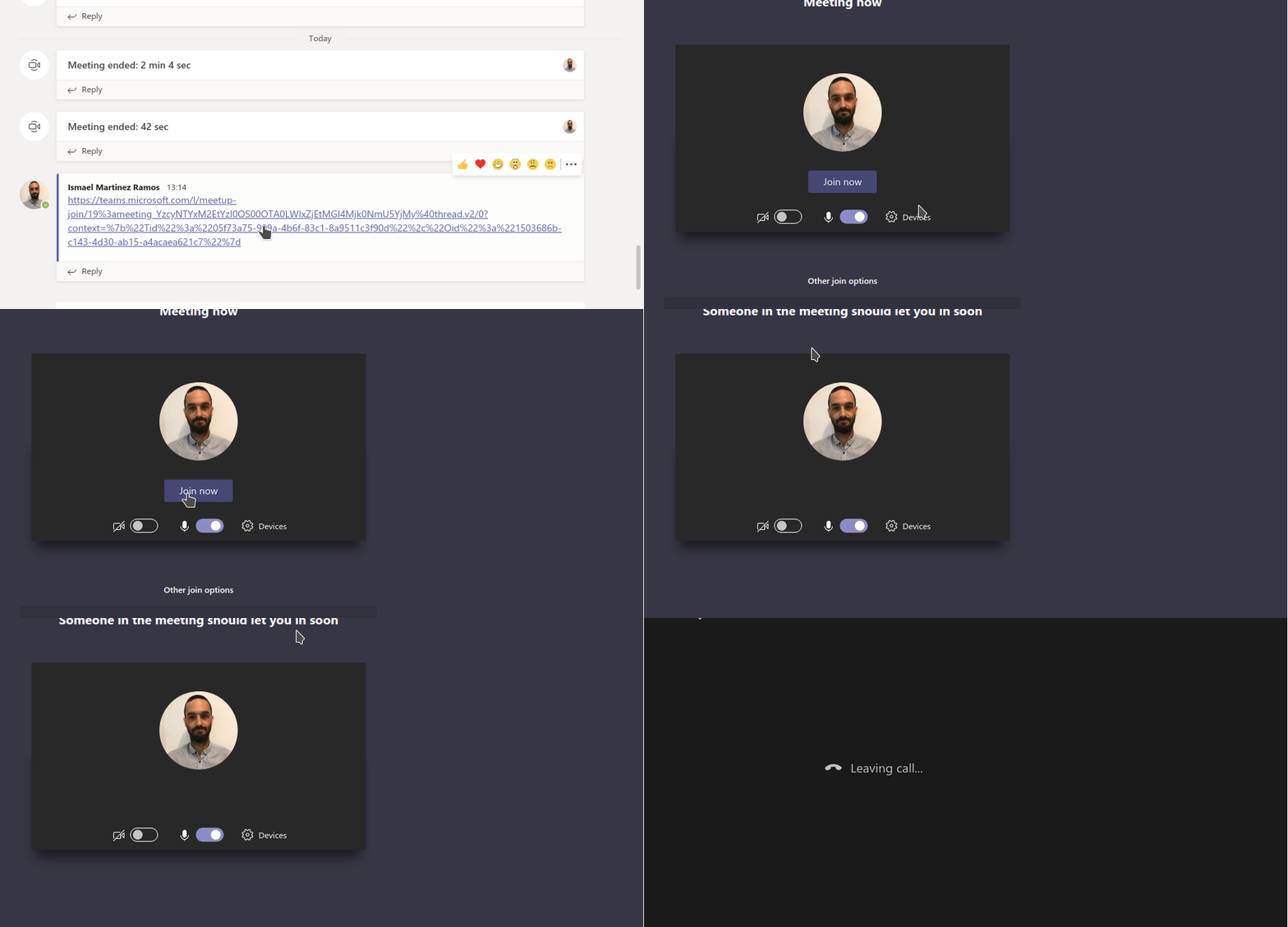
by the way, make sure you don't use that link again as this is public...
IsmaelMartinez
on 10 Feb 2020
I think this one and #322 are more or less the same. MS have changed something in the way they open the links and now they fail when launch from the outside. Having a look but slowly as I got not much time.
IsmaelMartinez
on 15 Mar 2020
I am looking at this and have identified where the issue is but it's a bit of a precision work... Meaning, adding the fix is breaking other functionality... But I am working on it.
IsmaelMartinez
on 15 Apr 2020
I'm running the application from git source.
As soon as you're done, let me know and I'll do a pull and a try on it.
bigiulio
on 15 Apr 2020
Hi, There is a PR open for this. Codebuild is compliaining about me adding some console statements but the fix should be there.
When running from yarn you will get a "can't find handler for msteams" error message pop up but will still work. That works fine once packaged.
IsmaelMartinez
on 24 Apr 2020
I would say all fine and good. For a couple of days I tried starting Teams up like this:
$ yarn start --url {URL}
with no issues at all (neither "can't find handler for msteams").
Thanks
bigiulio
on 28 Apr 2020
Nice to hear that. Snap edge is using that. I will see when I can get that released as soon as I can. I am taking the advantage of moving to GitHub actions from Travis as they Travis is slowing me down. I will ping you once is done and close the issue. Apologies but busy life!!
IsmaelMartinez
on 29 Apr 2020
Also, I am fairly sure you don't need the --url. You can just do teams-for-linux {URL}
IsmaelMartinez
on 29 Apr 2020
As mentioned in #341 I moved to snapd and installed version 1.0.4.
Now this happens:
- I click a meeting link
- if teams-for-linux has an open window it is moved to foreground, if there is no window (e.g. minimized to tray) nothing happens
Output when I try to run it from the command line:
$ teams-for-linux {URL}
configPath = /home/{USER}/snap/teams-for-linux/98/.config/teams-for-linux
Failed to get the config file, using default values
configFile = {}
Error org.freedesktop.DBus.Error.Failed: cannot use setting "default-url-scheme-handler": not allowed
App already running
EDIT: Seems I just hit an old snap restriction...
 josefschabasser
on 4 May 2020
josefschabasser
on 4 May 2020
I don’t think snap allows for this (issue in it). This is duplicated with https://github.com/IsmaelMartinez/teams-for-linux/issues/175#issue-468380730
Use another package type (deb or rpm and/or wait for snaps to fix the issue (https://github.com/snapcore/snapd/pull/7129)
IsmaelMartinez
on 5 May 2020
Sorry, closed by confusion with @josefschabasser comment. Hope to have a release at some point... just don’t have time to pack stuff up
IsmaelMartinez
on 5 May 2020
Pre release ready in here https://github.com/IsmaelMartinez/teams-for-linux/releases/tag/v1.0.4
Can someone test it? I have been running it for 11 days with no issues but there are quite a few changes... internally
IsmaelMartinez
on 5 May 2020
Started using v1.0.4 tag.
Will update in 7 days....
bigiulio
on 5 May 2020
Should I assume no news good news @bigiulio ?
IsmaelMartinez
on 14 May 2020
You should assume, no time ;)
The only nasty bug is, when you're in a meeting, and you click Email icon from Contacts, meeting is dropped. This happened at all times in my conf.
Beside that, it's all stable enough
bigiulio
on 15 May 2020
Is that something that was happening before? I will probably then try to release properly on this week. Thanks!
IsmaelMartinez
on 17 May 2020
Mmmmh, can't say for sure, sorry
bigiulio
on 21 May 2020
released as 1.0.5. Closing
IsmaelMartinez
on 4 Jun 2020
Related issues
 elhennig
·
7Comments
elhennig
·
7Comments
 theangryangel
·
4Comments
theangryangel
·
4Comments
 Kalyan-M
·
8Comments
IsmaelMartinez
·
7Comments
Kalyan-M
·
8Comments
IsmaelMartinez
·
7Comments
 galgalesh
·
9Comments
galgalesh
·
9Comments