Teams-for-linux: Can't open Microsoft Teams - blank screen
Describe the bug
Trying to open Microsoft Teams leaves a blank page.
To Reproduce
Steps to reproduce the behavior:
- Open Microsoft Teams
- That's it, a blank page should be shown (the error)
Expected behavior
Load normally
Screenshots

Desktop (please complete the following information):
- OS: Ubuntu 18.04.2
- Installation package deb
- Version teams-for-linux_0.4.0_amd64.deb
Additional context
Clicking on debug option I get this:

Any idea of what's going on? Thanks.
 sant123
All 152 comments
Also when cleaning config "~/.config/Teams for Linux" it solves the issue for a while, then you will encounter this again.
sant123
on 11 Jul 2019
I have seen this before but if you click ctrl+R it should just do the job.
Feel free to investigate the root cause, if you can/wish. We really appreciate contributions.
 IsmaelMartinez
on 11 Jul 2019
IsmaelMartinez
on 11 Jul 2019
Also, 0.4.0 is not out yet as deb package. Only out to snap edge at the moment. Can you confirm deb package version or if it is from snap edge/source? Thanks
IsmaelMartinez
on 11 Jul 2019
Thanks for your answer @IsmaelMartinez. I tried Ctrl+R too but didn't work. What I did was sign out and sign in again but that only works once.
I built the deb installer with yarn dist:linux deb command and got these:

sant123
on 12 Jul 2019
Can you explain more about Ctrl+R not working? Have you tried clicking on the “refresh” option in the tab menu?
Another option is to try —disable-gpu?
teams-for-linux --disable-gpu
The windows client seems to have the same issue. For reference:
https://techcommunity.microsoft.com/t5/Microsoft-Teams/Blank-screen-when-opening-Teams-app-on-windows-10/m-p/32356?advanced=false&collapse_discussion=true&q=Teams%20app%20white&search_type=thread
Also, are you company or personal profiles? Proxy’s can be also creating this issue.
Last but not least, can you check snap edge, revert to 0.3.0 or drop me and email and I send you a deb package. It might be an environment issue.
IsmaelMartinez
on 12 Jul 2019
I experienced the same bug in 0.1.17, upgraded to 0.3.0, and still have that bug.
Same javascript errors. Sometimes refresh helps, sometimes not.
As I sometimes move between office and home environment, I am going to take notes when it happens exactly.
Wow, the microsoft report is from 2016
 g4borg
on 12 Jul 2019
g4borg
on 12 Jul 2019
I think is more MS issue, I sometimes need to click a couple of times Ctrl+R but it's pretty sporadic.
As a workaround, it could be possible look for for that log in the console and trigger a refresh, but that might create a infinite loop/kaos.
IsmaelMartinez
on 12 Jul 2019
+1
 wellingtoncosta
on 12 Jul 2019
wellingtoncosta
on 12 Jul 2019
Can you explain more about Ctrl+R not working? Have you tried clicking on the “refresh” option in the tab menu?
Another option is to try —disable-gpu?
teams-for-linux --disable-gpu
The windows client seems to have the same issue. For reference:
https://techcommunity.microsoft.com/t5/Microsoft-Teams/Blank-screen-when-opening-Teams-app-on-windows-10/m-p/32356?advanced=false&collapse_discussion=true&q=Teams%20app%20white&search_type=threadAlso, are you company or personal profiles? Proxy’s can be also creating this issue.
Last but not least, can you check snap edge, revert to 0.3.0 or drop me and email and I send you a deb package. It might be an environment issue.
What I mean is hitting Ctrl + R refresh the page but the blank page still persists. Also tried with the "refresh" option in the tab menu and still the same.
This is what I get with the --disable-gpu option:

My profile is from a company and was working fine 2 days ago with 0.3.0 version, when issue appeared I upgraded to 0.4.0 to see what happens and see me here :sweat_smile:
sant123
on 12 Jul 2019
have you tried removing the cache?
https://github.com/IsmaelMartinez/teams-for-linux/blob/develop/KNOWN_ISSUES.md#no-history
Sometimes it does the trick.
IsmaelMartinez
on 12 Jul 2019
Yes, but that's my workaround to make it work once. If you do a refresh, you will see the blank page again.
sant123
on 12 Jul 2019
do you have the same issue with the workaround in 0.3.0? I know this process might be a bit painful, but will help nail down if the issue is now worse for you or is just something introduced since 0.3.0.
Funnily enough, I use to have to click Ctrl+R every morning but I don't need to do it anymore. MS might have changed something underneath, or your company network. Apologies for not been that helpful at the moment.
IsmaelMartinez
on 12 Jul 2019
Yes I have the same issue with the same workaround. Don't worry, I saw the code last night but understood nothing :rofl: I tried to figure out the issue but seems MS Teams issue, in fact is done in Angular.js If I get an idea of what's going on I'll post it here.
sant123
on 12 Jul 2019
tried all 0.1.16, 0.1.17, 0.3.0 and deleting the .config folder each time, but at second time it always happens, even in different internet scenarios.
Relogging works as workaround, either by waiting for the timeout site of teams, or deleting the config folder. Albeit, our SSO logout does not bring you back to the login screen unfortunately, so usually I delete the config.
The main difference is now, that it always happens now for me, and it will not recover with refresh at all, on all versions.
Error: Action with name notificationsService_startup already exists
i think this angular error basicly happens only on reload, not on first login. And it does not even work after a refresh once you logged in successfully.
The Content-Security-Policy directive 'prefetch-src' is implemented behind a flag which is currently disabled
Not sure if this might be related. at least i can try out all fixes because it is always reliably does not work.
g4borg
on 16 Jul 2019
Hi !
First, thanks for your work. It's very convenient to have a Linux client for Teams.
I don't know if it can help, but deleting the folder :
.config/Teams for Linux/Partitions/teams-4-linux/Service Worker
resolves the problem (@sant123 said deleting .config/Teams for Linux solves the problem, but you have to do a full login, not when you delete only Service Worker)
 lgringo
on 16 Jul 2019
lgringo
on 16 Jul 2019
confirmed, that does the trick for me as well.
g4borg
on 16 Jul 2019
does any of you all can run the app from source? My suspect now is the cache so it might be as easy as changing this line https://github.com/IsmaelMartinez/teams-for-linux/blob/develop/app/index.js#L74 to:
window.loadURL(config.url, { extraHeaders: 'pragma: no-cache\n' });
from https://electronjs.org/docs/api/web-contents#contentsloadurlurl-options
I do really need to do some refactoring to that index.js file...
IsmaelMartinez
on 16 Jul 2019
I executed the app from source with that change but occurs the same thing:

sant123
on 16 Jul 2019
Well, worth a try. I hope I start facing the issue should I can then fix it!
IsmaelMartinez
on 16 Jul 2019
Hi !
First, thanks for your work. It's very convenient to have a Linux client for Teams.I don't know if it can help, but deleting the folder :
.config/Teams for Linux/Partitions/teams-4-linux/Service Workerresolves the problem (@sant123 said deleting .config/Teams for Linux solves the problem, but you have to do a full login, not when you delete only Service Worker)
Can confirm, need to do this before every start of the application though. I configured a rm -rf ~/.config/Teams\ for\ Linux/Partitions/teams-4-linux/Service\ Worker/* as user login script for the time being.
 EdRoxter
on 17 Jul 2019
EdRoxter
on 17 Jul 2019
I deleted ~/.config/Teams for Linux/ folder and it didn't recreated after installing Teams for Linux again. Any idea?
wellingtoncosta
on 17 Jul 2019
you did try to start teams as well, after installing it? the binary creates that folder.
(might be a stupid answer, and nothing to do with your problem)
g4borg
on 17 Jul 2019
I uninstalled and installed multiple times and this folder was not created again.
wellingtoncosta
on 17 Jul 2019
@WellingtonCosta you need to open Microsoft Teams in order to re-create that folder, and yes @EdRoxter you need to delete "Service Worker" folder before opening the application.
sant123
on 17 Jul 2019
@sant123 I did it, but the folder wasn't recreated...
wellingtoncosta
on 17 Jul 2019
I'll try to reconfigure the package.
wellingtoncosta
on 17 Jul 2019
check if is not been created under /home/$HOME/snap/teams-4-linux
IsmaelMartinez
on 17 Jul 2019
@IsmaelMartinez you're goddamn right!
wellingtoncosta
on 17 Jul 2019
@EdRoxter it worked like a charm! Thank you!
wellingtoncosta
on 17 Jul 2019
It will be absolutely amazing if one of you can add it to the known issues section. As other people might encounter the problem. Thanks!!
IsmaelMartinez
on 17 Jul 2019
Also had this issue. It is also resolved by deleting the Service Worker folder from my config directory before start up.
 gstorer
on 18 Jul 2019
gstorer
on 18 Jul 2019
Can confirm, deleting service worker folder resolved this issue for me too.
 vhakulinen
on 18 Jul 2019
vhakulinen
on 18 Jul 2019
It will be absolutely amazing if one of you can add it to the known issues section. As other people might encounter the problem. Thanks!!
Any volunteers? It should not take you long to put a sentence in it... and I will really appreciate it.
IsmaelMartinez
on 18 Jul 2019
Hi @IsmaelMartinez, take a look at https://github.com/IsmaelMartinez/teams-for-linux/pull/178
sant123
on 18 Jul 2019
Thanks @sant123 ! Closing this as there is a documented workaround. (I might amend it a bit before the full release but it does save me a lot of time!)
IsmaelMartinez
on 19 Jul 2019
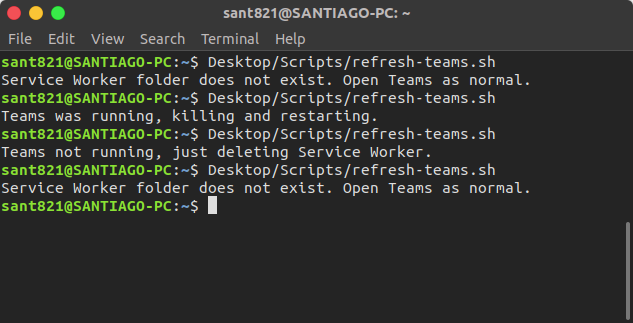
Just want to share a bash script to automate the process of closing, opening, removing Service Worker folder:
teamsInstances=$(pgrep teams-for-linux)
serviceWorkerFolder="$HOME/.config/Teams for Linux/Partitions/teams-4-linux/Service Worker"

teamsNotRunning="Teams not running, just deleting Service Worker."
serviceWorkerNotFound="Service Worker folder does not exist. Open Teams as normal."
teamsWasRunning="Teams was running, killing and restarting."

if [ -z "$teamsInstances" ]; then
    if [ -d "$serviceWorkerFolder" ]; then
        echo "$teamsNotRunning"
        rm -r "$serviceWorkerFolder"
    else
        echo "$serviceWorkerNotFound"
    fi
else
    echo "$teamsWasRunning"
    kill -9 $teamsInstances
    rm -r "$serviceWorkerFolder"
    teams-for-linux&
fi
sant123
on 23 Jul 2019
But why not removing this on start automatically when it is a known issue? I really have to delete it every time.
 Mairu
on 26 Jul 2019
Mairu
on 26 Jul 2019
I am sorry to hear about that. Feel free to create a PR. It will need to work in all packaged versions.
IsmaelMartinez
on 26 Jul 2019
I seem to be having this worse than most others here. Mine will not load properly unless I delete everything under ".config/teams-for-linux/Partitions/teams-4-linux/". This means I have to reauthenticate about 10 times a workday.
Using the normal web interface works fine, of course, but it would be lovely to have a proper fix for this issue.
 fosspill
on 6 Aug 2019
fosspill
on 6 Aug 2019
Have you tried other package types? I use to have to do "Ctrl+R" every morning (after the 1st login) but changed to deb package and now it works fine.
IsmaelMartinez
on 6 Aug 2019
For me, clearing everything under 'Application Cache' works. 'Service Worker' cleaning seemed to work a while ago, but no longer does. (DEB package, v. 0.5.0)
 Phitherek
on 7 Aug 2019
Phitherek
on 7 Aug 2019
thanks @Phitherek: confirmed that removing "Service Worker" didn't work but removing everything under "Application Cache" and entire "Service Worker" folder worked (DEB package v.0.6.0)
As a workaround I just created this script:
#!/bin/bash

killall -9 teams-for-linux
rm -Rf "$HOME/.config/teams-for-linux/Partitions/teams-4-linux/Service Worker"
rm -Rf "$HOME/.config/teams-for-linux/Partitions/teams-4-linux/Application Cache"
teams-for-linux &
 leoperria
on 7 Aug 2019
leoperria
on 7 Aug 2019
maybe then we can just clear the cache of the application on start...
https://github.com/electron/electron/blob/master/docs/api/session.md#sesclearcache
Again, I don't have the issue (or pretty randomly and it resolves itself) but I am going to reopen this as there might be a way around. Anyone interested on picking it up, great! I got little time and spend most of it administering this (and trying to move to electron 6)
IsmaelMartinez
on 7 Aug 2019
Why not leave the issue open then? The issue is clearly not fixed. Maybe add a help wanted label?
 rojaro
on 7 Aug 2019
rojaro
on 7 Aug 2019
seems like I didn't click the reopen and comment button... appologies but yeah, the implementation shoudl be fairly easy so adding the help wanted and good first issue
IsmaelMartinez
on 7 Aug 2019
I think chrome is playing with me... had to add the tags twice. time to go home and relax.
IsmaelMartinez
on 7 Aug 2019
Same issue @ me :disappointed:
 petr-nehez
on 7 Aug 2019
petr-nehez
on 7 Aug 2019
I started experiencing this issue 2 days ago after a couple of months with no issues, and the only thing that fixes it is deleting Service Worker and Application Cache.
EDIT: Manjaro Gnome. Installed from AUR
 abelsromero
on 7 Aug 2019
abelsromero
on 7 Aug 2019
Same issue on my Machine (Ubuntu 18.0.4 hwe Kernel 5.0) with teams for linux 0.6.0.
For me it's enough to execute rm -Rf "$HOME/.config/teams-for-linux/Partitions/teams-4-linux/Application Cache" before launching to workaround the blank screen.
BR,
Alfred
 alfsch
on 8 Aug 2019
alfsch
on 8 Aug 2019
t4l 0.6.0, Fedora 30: can confirm, removing "Application Cache" does the trick. Better then deleting "Service Worker".
 mweirauch
on 8 Aug 2019
mweirauch
on 8 Aug 2019
Hello,
I've installed it this week on my fresh Manjaro KDE installation on work computer (from AUR : https://aur.archlinux.org/packages/teams-for-linux, still in 0.4.0). I've experienced this blank page frustration after a computer reboot, I confirm that 'Application Cache' folder removal is effective while 'Service worker' was not. You may update the wiki with this fresh information :)
 seboss666
on 8 Aug 2019
seboss666
on 8 Aug 2019
For me on MX-Linux removing of Application Cache is not enough, I have to remove Service Worker as well.
petr-nehez
on 8 Aug 2019
Never mind my previous comment, I made a stupid error in my launch wrapper script :D. Removing 'Service Worker' and 'Application Cache' contents works as a workaround.
Phitherek
on 8 Aug 2019
It started to happen after update of Ubuntu 18.04. Before no issues. After blank page and deletion of '~/.config/teams-for-linux/Partitions/teams-4-linux/Application\ Cache/' is required.
I have upgraded:
azure-cli base-files dkms dotnet-sdk-2.1 firefox firefox-locale-cs firefox-locale-en gir1.2-gst-plugins-base-1.0 gir1.2-gstreamer-1.0 gir1.2-gtk-3.0 google-chrome-stable gstreamer1.0-alsa gstreamer1.0-gl gstreamer1.0-gtk3 gstreamer1.0-libav gstreamer1.0-plugins-bad gstreamer1.0-plugins-base gstreamer1.0-plugins-base:i386 gstreamer1.0-plugins-base-apps gstreamer1.0-plugins-good gstreamer1.0-plugins-ugly gstreamer1.0-pulseaudio gstreamer1.0-tools gstreamer1.0-x gtk-update-icon-cache language-pack-en language-pack-gnome-en ldap-utils libcephfs2 libegl-mesa0 libegl1-mesa libfreerdp-client2-2 libfreerdp2-2
libgail-3-0 libgbm1 libgl1-mesa-dri libgl1-mesa-dri:i386 libgl1-mesa-glx libgl1-mesa-glx:i386 libglapi-mesa libglapi-mesa:i386 libglx-mesa0 libglx-mesa0:i386 libgstreamer-gl1.0-0 libgstreamer-plugins-bad1.0-0 libgstreamer-plugins-base1.0-0 libgstreamer-plugins-base1.0-0:i386 libgstreamer-plugins-good1.0-0 libgstreamer1.0-0 libgstreamer1.0-0:i386 libgtk-3-0 libgtk-3-bin libgtk-3-common libinput-bin libinput10 libldap-2.4-2 libldap-2.4-2:i386 libldap-common libmysqlclient20 libnginx-mod-http-geoip libnginx-mod-http-image-filter libnginx-mod-http-xslt-filter libnginx-mod-mail libnginx-mod-rtmp libnginx-mod-stream libnss-myhostname libnss-systemd libosmesa6 libosmesa6:i386 libpam-systemd librados2 libsox-fmt-alsa libsox-fmt-base libsox3 libsystemd-dev libsystemd0 libsystemd0:i386 libudev1 libudev1:i386 libwayland-egl1-mesa libwinpr2-2 libxatracker2 linux-generic-hwe-18.04 gnome-software-plugin-flatpak openjdk-11-jre openjdk-11-jre-headless openjdk-8-jre openjdk-8-jre-headless patch systemd-sysv ubuntu-desktop ubuntu-minimal ubuntu-standard usb-creator-common usb-creator-gtk linux-libc-dev mesa-va-drivers mesa-vdpau-drivers
and installed: pulseeffects pulseaudio-equalizer
Probably one of the following can be responsible for the behavior.
 tomas-lipensky
on 8 Aug 2019
tomas-lipensky
on 8 Aug 2019
Experiencing this on every app start on Ubuntu 18.04 LTS.
Running "rm -rf ~/.config/teams-for-linux/Partitions/teams-4-linux/Application\ Cache" before the app start solves it.
UPD: even a refresh of an already running app breaks it. Looks like it cannot re-register the one of the services:
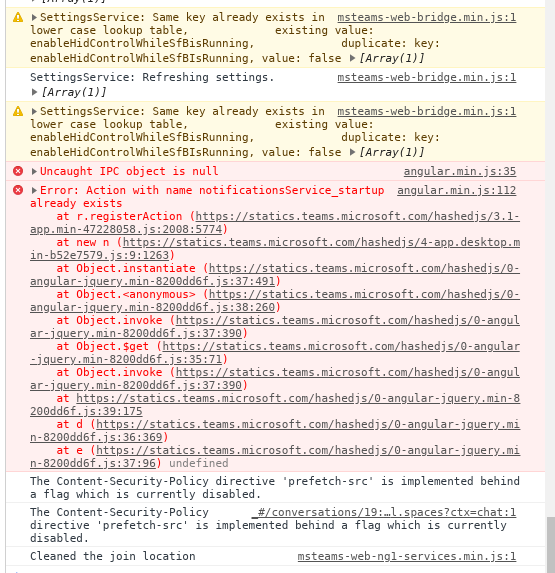
angular.min.js:112 Error: Action with name notificationsService_startup already exists
    at r.registerAction (https://statics.teams.microsoft.com/hashedjs/3.1-app.min-47228058.js:2008:5774)
    at new n (https://statics.teams.microsoft.com/hashedjs/4-app.desktop.min-b52e7579.js:9:1263)
    at Object.instantiate (https://statics.teams.microsoft.com/hashedjs/0-angular-jquery.min-8200dd6f.js:37:491)
    at Object.<anonymous> (https://statics.teams.microsoft.com/hashedjs/0-angular-jquery.min-8200dd6f.js:38:260)
    at Object.invoke (https://statics.teams.microsoft.com/hashedjs/0-angular-jquery.min-8200dd6f.js:37:390)
    at Object.$get (https://statics.teams.microsoft.com/hashedjs/0-angular-jquery.min-8200dd6f.js:35:71)
    at Object.invoke (https://statics.teams.microsoft.com/hashedjs/0-angular-jquery.min-8200dd6f.js:37:390)
    at https://statics.teams.microsoft.com/hashedjs/0-angular-jquery.min-8200dd6f.js:39:175
    at d (https://statics.teams.microsoft.com/hashedjs/0-angular-jquery.min-8200dd6f.js:36:369)
    at e (https://statics.teams.microsoft.com/hashedjs/0-angular-jquery.min-8200dd6f.js:37:96) undefined
 kamax7C0
on 8 Aug 2019
kamax7C0
on 8 Aug 2019
@tomas-lipensky @kamax7C0 It has nothing to do with Ubuntu.
I am on MX-Linux (which is based on Debian) and have not updated any packages recently and still I get the same issue.
It must be something MS has changed...
petr-nehez
on 8 Aug 2019
Added some stuff to clear the cache. Merging now in develop so it should land in snap edge channel as 0.6.2. Can you snap people test it? I haven't find any issues but I didn't had any issues before (so difficult to test)
IsmaelMartinez
on 8 Aug 2019
Hello, looks likes folder Service Worker does not exist anymore. At least, it's not re-created. I have to delete Application Cache (and only this one now).
Running 0.6.0
lgringo
on 8 Aug 2019
Added some stuff to clear the cache. Merging now in develop so it should land in snap edge channel as 0.6.2. Can you snap people test it? I haven't find any issues but I didn't had any issues before (so difficult to test)
installed the --edge version via Snap, same blank screen appears on refresh or new start.
Console shows:
`SettingsService: Refreshing settings. Array(1)
msteams-web-bridge.min.js:1 SettingsService: Same key already exists in lower case lookup table, existing value: enableHidControlWhileSfBisRunning, duplicate: key: enableHidControlWhileSfBIsRunning, value: false Array(1)
warn @ msteams-web-bridge.min.js:1
msteams-web-bridge.min.js:1 SettingsService: Refreshing settings. Array(1)
msteams-web-bridge.min.js:1 SettingsService: Same key already exists in lower case lookup table, existing value: enableHidControlWhileSfBisRunning, duplicate: key: enableHidControlWhileSfBIsRunning, value: false Array(1)
warn @ msteams-web-bridge.min.js:1
angular.min.js:35 Uncaught IPC object is null
angular.min.js:112 Error: Action with name notificationsService_startup already exists
at r.registerAction (https://statics.teams.microsoft.com/hashedjs/3.1-app.min-47228058.js:2008:5774)
at new n (https://statics.teams.microsoft.com/hashedjs/4-app.desktop.min-b52e7579.js:9:1263)
at Object.instantiate (https://statics.teams.microsoft.com/hashedjs/0-angular-jquery.min-8200dd6f.js:37:491)
at Object.
at Object.invoke (https://statics.teams.microsoft.com/hashedjs/0-angular-jquery.min-8200dd6f.js:37:390)
at Object.$get (https://statics.teams.microsoft.com/hashedjs/0-angular-jquery.min-8200dd6f.js:35:71)
at Object.invoke (https://statics.teams.microsoft.com/hashedjs/0-angular-jquery.min-8200dd6f.js:37:390)
at https://statics.teams.microsoft.com/hashedjs/0-angular-jquery.min-8200dd6f.js:39:175
at d (https://statics.teams.microsoft.com/hashedjs/0-angular-jquery.min-8200dd6f.js:36:369)
at e (https://statics.teams.microsoft.com/hashedjs/0-angular-jquery.min-8200dd6f.js:37:96) undefined
(anonymous) @ angular.min.js:112
The Content-Security-Policy directive 'prefetch-src' is implemented behind a flag which is currently disabled.
_#/conversations/General?threadId=19:[email protected]&ctx=channel:1 The Content-Security-Policy directive 'prefetch-src' is implemented behind a flag which is currently disabled.
_:356 index.html: remove startup cache listeners
msteams-web-ng1-services.min.js:1 Cleaned the join location
serviceworker.js:362 Error: service-worker unable to find response in cache for : https://statics.teams.microsoft.com/hashedcss/stylesheets.theme-default.min-d45ed988.css
at serviceworker.js:358`
kamax7C0
on 8 Aug 2019
Looks like "blank screen" appears only on second start. But if you wait for a very long time, you get connected after all ... and next restart works flawlessly (normal speed).
Step to reproduce :
- Delete ~/.config/teams-for-linux (rm -rf ~/.config/teams-for-linux/)
- Start teams-for-linux
- Login
- You may have to choose "Use Wep Application"
- Quit teams-for-linux (right click on systray)
- Restart teams-for-linux
- Blank page on step "Initialisation ..."
8a. Wait
8b. Wait
8c. Wait
8d. Wait - After about 2 minutes, it gets connected
- Quit teams-for-linux (right click on systray)
- Restart teams-for-linux
- Only 5 seconds to get connected ... no more blank screen
Can someone confirm ?
(Same thing running 0.6.0, or using 0.6.2 from sources)
lgringo
on 8 Aug 2019
Looks like "blank screen" appears only on second start. But if you wait for a very long time, you get connected after all ... and next restart works flawlessly (normal speed).
Step to reproduce :
...
Can someone confirm ?(Same thing running 0.6.0, or using 0.6.2 from sources)
Mmm... I tried with 0.6.0 version and no, it stucks into "Initialisation..." so I cannot go after step 8d (or 8z...).
Anyway deleting Service Worker does not help, I have to delete the whole teams-for-linux directory.
 apetrelli
on 8 Aug 2019
apetrelli
on 8 Aug 2019
This MS Teams product sucks :disappointed: (unfortunately I have to use it and thus I really appreciate teams-for-linux)
After few hours I got a screen with MS' issue and after pressing their refresh button it got stuck on the same blank screen...
petr-nehez
on 8 Aug 2019
@tomas-lipensky @kamax7C0 It has nothing to do with Ubuntu.
I am on MX-Linux (which is based on Debian) and have not updated any packages recently and still I get the same issue.It must be something MS has changed...
FWIW yesterday I logged in inside the "normal" Teams webapp and a message said "The app has been updated". It appeared only once, so I have no screenshot, sorry.
apetrelli
on 8 Aug 2019
Looks like I have same problem, but to make sure I would have to open debug window - how to do it?
 jmayday
on 8 Aug 2019
jmayday
on 8 Aug 2019
You can click Ctrl+D , or click In the task bar icon and "debug"
IsmaelMartinez
on 8 Aug 2019
OK, so it's same issue here:
Error: Action with name notificationsService_startup already exists
Hello,
I've installed it this week on my fresh Manjaro KDE installation on work computer (from AUR : https://aur.archlinux.org/packages/teams-for-linux, still in 0.4.0). I've experienced this blank page frustration after a computer reboot, I confirm that 'Application Cache' folder removal is effective while 'Service worker' was not. You may update the wiki with this fresh information :)
Please do update the know_issues. I got plenty of my plate currently so got no time for much than reply to this stuff, prepare releases and do normal life! I do appreciate contributions when they are possible.
This issue seems to be fairly random affecting quite a few people but at different levels. It also affects MS official electron app for windows, so I suspect is something more related to how electron stores those files than anything. Maybe they get corrupted on close or something like that.
Can you guys that are having the worse of it try doing a full clean? Meaning, remove the config folder and the app (uninstall) and reinstall again. Maybe that can help.
Apologies again but the number of users is starting to be unmanageable for me alone. Any help is more than welcomed. I will start bringing more bots!!
IsmaelMartinez
on 8 Aug 2019
+1
Had no issues a while ago. This started just recently (past 2 weeks maybe).
Anyone else having this problem use Single Sign On? I bounce around from white screen to white screen before I make it teams. Wondering if maybe that is a commonality.
 brutog
on 8 Aug 2019
brutog
on 8 Aug 2019
I removed the config folder and installed 0.6.2 -> opened the app -> showed debug -> restarted -> and voila the blank screen is here...
The console log shows still the same error: Action with name notificationsService_startup already exists.
This indicates to me a generic problem within the Teams' code.
petr-nehez
on 9 Aug 2019
+1
Had no issues a while ago. This started just recently (past 2 weeks maybe).
Anyone else having this problem use Single Sign On? I bounce around from white screen to white screen before I make it teams. Wondering if maybe that is a commonality.
I'm experiencing this in a SSO environment too. I don't have a non-SSO Teams account handy but when I have spare time (ha!), will see if I can figure out a way of testing that for comparison. Unless someone else here gets to it first :)
 lkrms
on 9 Aug 2019
lkrms
on 9 Aug 2019
I removed the config folder and installed 0.6.2 -> opened the app -> showed debug -> restarted -> and voila the blank screen is here...
The console log shows still the same error:Action with name notificationsService_startup already exists.This indicates to me a generic problem within the Teams' code.
For clarity, Did you uninstall all previous versions of teams for linux? Also, Did you close the app "quickly" or let it run for a bit? I am starting to suspect corruption in some of the downloaded files from the web.
IsmaelMartinez
on 9 Aug 2019
I did not uninstall all previous versions - for sure I will do it now.
And when I am checking now my previous comment I have to correct it:
_...-> opened the app -> showed debug -> refreshed -> blank screen_
I did not restart the app, I only executed "Refresh" command from the tray menu.
petr-nehez
on 9 Aug 2019
FWIW, I have an old installation on my other PC, version 0.1.9 and it seems to work well, aside from the fact that desktop sharing is not active. Sorry I cannot test more in these days, I will be out starting tomorrow.
apetrelli
on 9 Aug 2019
So full uninstall did not help - this is an error after "Refresh" command:
petr-nehez
on 9 Aug 2019
Maybe we need to do a flush on closing the app
https://electronjs.org/docs/api/session#sesflushstoragedata
And maybe even adding a https://electronjs.org/docs/api/app#appquit to that same area.
Probably good to also add extra logs for the application events.
IsmaelMartinez
on 9 Aug 2019
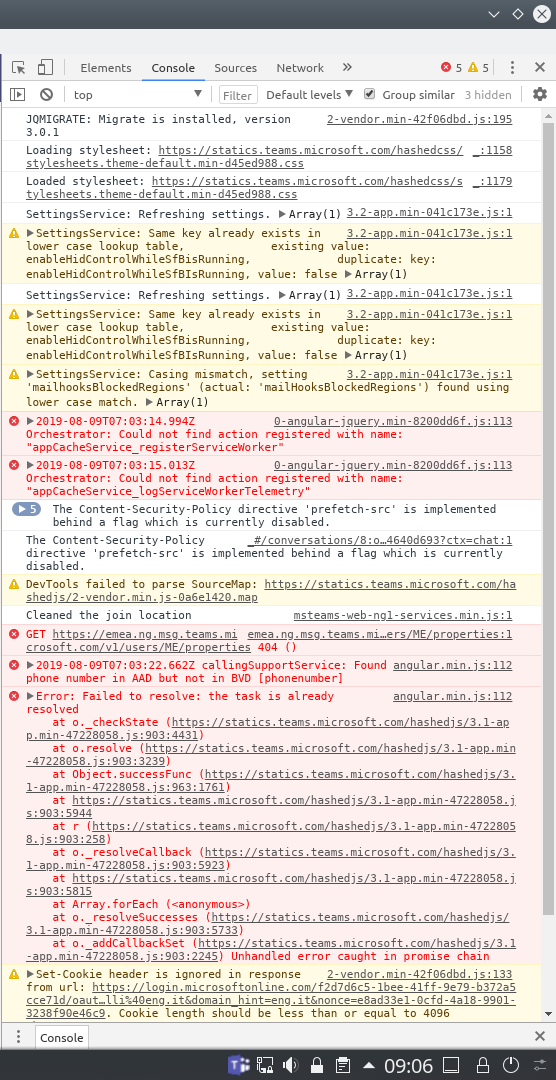
Again, FWIW in version 0.1.9 I see totally different logs.
apetrelli
on 9 Aug 2019
FWIW: I had this problem with the snap stable version... had to remove it via sudo snap remove teams-for-linux and then manually delete the ./snap/teams-for-linux folder. After that installed the stable channel version again, started the application, logged in, and got past the blank screen.
I exited the application and opened it again and got the same Uncaught IPC object is null and Action with name notificationsService_startup already exists errors as shown in https://github.com/IsmaelMartinez/teams-for-linux/issues/171#issuecomment-519800293.
 plafue
on 9 Aug 2019
plafue
on 9 Aug 2019
Had the same issue from yesterday, and following the instructions above I tried to delete the cache and try again. First of all I did not have the folder "/home/
When I checked the cache folder again, I dont see any teams related cache folder created at all. (Means no cache??) And If I refresh, again it gets stuck in "Initializing" phase"
 prazooo
on 9 Aug 2019
prazooo
on 9 Aug 2019
@prazooo the folder is in .config not in .cache.
You should delete .config/teams-for-linux/Partitions/teams-4-linux/Application Cache.
 skyghis
on 9 Aug 2019
skyghis
on 9 Aug 2019
Im sorry. I mistyped. It should be .config NOT .cache.
I still dont see a folder called "~/.config/teams-for-linux". So I have nothing to delete now. :D
prazooo
on 9 Aug 2019
For snap installations the Application Cache folder can be found under ~/snap/teams-for-linux/current/.config/teams-for-linux/Partitions/teams-4-linux/
plafue
on 9 Aug 2019
For snap installations the
Application Cachefolder can be found under~/snap/teams-for-linux/current/.config/teams-for-linux/Partitions/teams-4-linux/
Great Thanks. Its there.
prazooo
on 9 Aug 2019
t4l: 0.6.2; Fedora30
Started out with a fresh RPM install and .config/teams-for-linux cleaned.
- Started up, logged in, worked.
- Quit the app. No
Application Cachefolder. - Startup, all fine.
- Subsequent starts failed. CTRL+Rs didn't help.
My observation/testing:
- always deleted the
Application Cachefolder before the app was started - most of the times, the
Application Cachefolder is not created on shutdown - on every succesful start (aka no blank screen) of the application, no
Application Cachefolder is present during runtime - on failed starts (aka blank screen), the
Application Cachefolder is created during start of the application
So it seems to me, despite the fix of removing the Aplication Cache folder before application start, sometimes that folder is created during start and these times it leads to the "blank screen" issue.
HTH.
mweirauch
on 9 Aug 2019
@mweirauch , I do have an application cache in my deb app and it works fine.
I added a few more things to the snap --edge (0.6.3) that should provide more logs about the application closing, etc.
I also added the following to clear the appcache on startup
window.webContents.session.clearStorageData({ storages: ['appcache']} ,()=> console.log("appcache cleared"));
It doesn't remove the application cache folder but might be the right direction without been too aggressive.
I manage to get a couple of times stuck in the white screen (manage to get snap running!!) but after adding that clearStorageData I "only" need to Ctrl+Q (quit the app) and start it again.
If this proves to be the case across the board we can implement something around that (like restart the app if we find that IPC message and/or wait for the application cache to be clean before loading anything)
IsmaelMartinez
on 9 Aug 2019
@mweirauch , I do have an application cache in my deb app and it works fine.
I added a few more things to the snap --edge (0.6.3) that should provide more logs about the application closing, etc.
I also added the following to clear the appcache on startup
window.webContents.session.clearStorageData({ storages: ['appcache']} ,()=> console.log("appcache cleared"));It doesn't remove the application cache folder but might be the right direction without been too aggressive.
I manage to get a couple of times stuck in the white screen (manage to get snap running!!) but after adding that clearStorageData I "only" need to Ctrl+Q (quit the app) and start it again.
If this proves to be the case across the board we can implement something around that (like restart the app if we find that IPC message and/or wait for the application cache to be clean before loading anything)
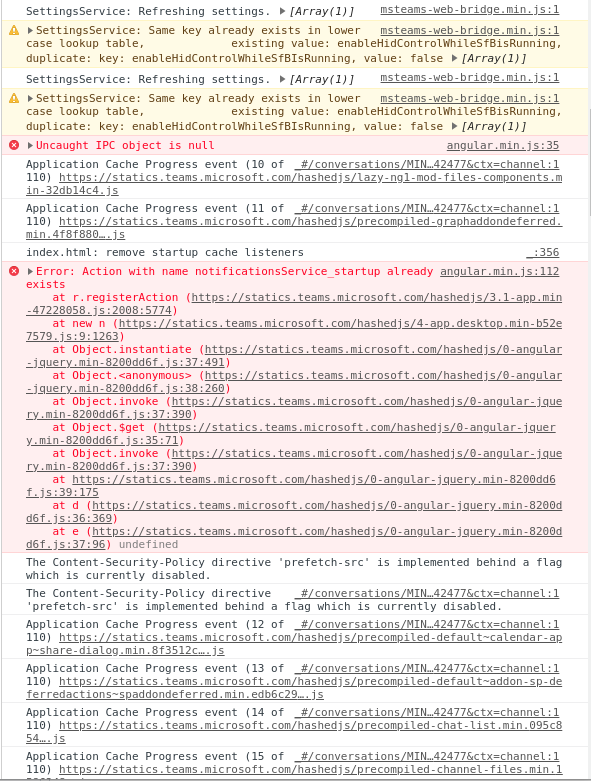
Refreshed to 0.6.3 :
now the behavior has changed a bit in a way that:
- Say I start the app ok
- Quit. Start again - stuck on a white screen with the same JS error [1]
- Quit. Start again - it works.
- Quit. Start again - stuck.
- Quit, start - works
- etc ... it loops. So it's probably cleaning up the cache every second start.
[1]
kamax7C0
on 9 Aug 2019
got no time now, maybe tomorrow, but there is a way there... maybe we need to wait for the clean before loading it. Apologies but I need to park it for just now.
IsmaelMartinez
on 9 Aug 2019
Does adding window.webContents.session.clearStorageData({ storages: ['appcache']} ,()=> console.log("appcache cleared")); fix the issue for you? Seems it does for me.
 mivanovaxway
on 9 Aug 2019
mivanovaxway
on 9 Aug 2019
Clearing storage did the job, for now (Ctrl+D --> Application --> Clear storage --> clear site data)
Then, you have to log in again
 davidcolacilli
on 9 Aug 2019
davidcolacilli
on 9 Aug 2019
got no time now, maybe tomorrow,
Take your time 👍 Current scenario is a nuisance but I think deleting the cache works for most people and is not such a big thing.
abelsromero
on 9 Aug 2019
https://github.com/IsmaelMartinez/teams-for-linux/issues/171#issuecomment-519933176
You can keep the "Cookies" checkbox unchecked so you don't have to log in every time.
 Lomanic
on 9 Aug 2019
Lomanic
on 9 Aug 2019
@mweirauch , I do have an application cache in my deb app and it works fine.
I added a few more things to the snap --edge (0.6.3) that should provide more logs about the application closing, etc.
I also added the following to clear the appcache on startupwindow.webContents.session.clearStorageData({ storages: ['appcache']} ,()=> console.log("appcache cleared"));It doesn't remove the application cache folder but might be the right direction without been too aggressive.
I manage to get a couple of times stuck in the white screen (manage to get snap running!!) but after adding that clearStorageData I "only" need to Ctrl+Q (quit the app) and start it again.
If this proves to be the case across the board we can implement something around that (like restart the app if we find that IPC message and/or wait for the application cache to be clean before loading anything)Refreshed to 0.6.3 :
now the behavior has changed a bit in a way that:
- Say I start the app ok
- Quit. Start again - stuck on a white screen with the same JS error [1]
- Quit. Start again - it works.
- Quit. Start again - stuck.
- Quit, start - works
- etc ... it loops. So it's probably cleaning up the cache every second start.
[1]
Hi, can you check with the latest (0.6.4)? I am using that async/await magic now to wait for the cache to be clean.
IsmaelMartinez
on 9 Aug 2019
Hi guys, I too started getting this problem a few days ago on v0.3.0 on Solus OS. I've tried all the releases with the same issue. the only way i can get it to load is to blow away the .config directory and i'll work just fine (we have login via a corp redirect thing too but that all works)
first fresh load always works, then it'll just hang at the js error. i did notice that of all the MS sites, teams is VERY time dependant on the login after having it wrong and ended up in a redirect loop. was hoping that was the issue but no :(
thanks for all your good work on this.
just saw 6.2.0, can see the cache clear - same result unfortunately
 seasurfpete
on 10 Aug 2019
seasurfpete
on 10 Aug 2019
We ran into this issue with MS Teams on our Electron app (Mac & Windows) too.
What worked for us was overwriting the serviceworker.register method via Webview preload script
    Object.defineProperty(navigator.serviceWorker, 'register', {
        value: () => {
            return Promise.reject()
        }
    });
Hope this helps.
 basaas
on 10 Aug 2019
basaas
on 10 Aug 2019
Thanks @basaas , I will give it a try once I got some time. If noone else beats me to it!!
IsmaelMartinez
on 10 Aug 2019
Can confirm @basaas tip fixes the blank page issue (also on Rambox, PR opened), tested with the following diff
diff --git a/app/browser/index.js b/app/browser/index.js
index 59a8986..98eea85 100644
--- a/app/browser/index.js
+++ b/app/browser/index.js
@@ -88,5 +88,9 @@
                injector.get('settingsService').appConfig.hideGetAppButton = true;
                injector.get('settingsService').appConfig.enableMobileDownloadMailDialog = false;
        }
+       Object.defineProperty(navigator.serviceWorker, 'register', {
+        value: () => {
+            return Promise.reject()
+        }
+    });
 }());
-
Thanks a lot @basaas for the catch!
Lomanic
on 10 Aug 2019
Great! Can someone create a PR? (@Lomanic ?) I am happy to merge and send it for test around. Like that then we can probably formally release early next week. Probably reverting the cacheClean, etc that I added as a PoC.
Basically removing the stuff in the PR https://github.com/IsmaelMartinez/teams-for-linux/pull/215/files. including the 2 webview.webcontent.cache... stuff.
Thanks a lot @basaas !
IsmaelMartinez
on 10 Aug 2019
@inglor have implemented the solution suggested by @basaas and tested by @Lomanic .
Thanks a lot!
IsmaelMartinez
on 12 Aug 2019
@skyghis , seems like where also closed to do a PR on this! Thanks to you also.
IsmaelMartinez
on 12 Aug 2019
Yes, I just see it while preparing the PR, I'm too slow :snail:
Good to see the issue fixed !
skyghis
on 12 Aug 2019
So what version is the fix available?
prazooo
on 12 Aug 2019
just pre-released 0.6.6 so people that don't use snap can test it also.
https://github.com/IsmaelMartinez/teams-for-linux/releases/tag/v0.6.6
The actual release will be either 0.7.0 or 1.0.0... if I get the time to fix the screenshare with electron 6
IsmaelMartinez
on 12 Aug 2019
To note that you will need to clean the config folder the 1st time as the user agent changed in 0.6.5 to fix another issue.
IsmaelMartinez
on 12 Aug 2019
Thank you! Works fine now with 0.6.6
 ghostface
on 12 Aug 2019
ghostface
on 12 Aug 2019
guys. i'm really sorry, but can't understand. ok. i have the same issue. i see this release:
https://github.com/IsmaelMartinez/teams-for-linux/releases/tag/v0.6.6
i downloaded teams-for-linux-0.6.6.tar.gz
i unpacked it. but.. how can i implement this changes,, this release to my team-for-linux ...???
@IsmaelMartinez
 Maks-Chornyi
on 12 Aug 2019
Maks-Chornyi
on 12 Aug 2019
What did you install previously? snap, deb, rpm? if so, download a packaged version, it will safe time.
If using deb (or rpm), you will need to remove the following folder ~/.config/teams-for-linux
IsmaelMartinez
on 12 Aug 2019
What did you install previously? snap, deb, rpm? if so, download a packaged version, it will safe time.
If using deb (or rpm), you will need to remove the following folder
~/.config/teams-for-linux
i used this guide:
https://websiteforstudents.com/install-microsoft-teams-desktop-app-on-ubuntu-16-04-17-10-18-04/
so as i understand i installed snap, i guess
i tried to log in to 'Teams', but had white screen initializing
i checked and found that haven't inside my 'config' folder 'temas-for-linux' folder.
i really understand that these questions are stupid. but just wanna setup this program in my ubuntu 18.04
Maks-Chornyi
on 12 Aug 2019
I did make a comment to it as we are not using --beta channel.
If you want to change channel in snap, I think you can use the following command
sudo snap refresh teams-for-linux --channel=edge
IsmaelMartinez
on 12 Aug 2019
I did make a comment to it as we are not using --beta channel.
If you want to change channel in snap, I think you can use the following command
sudo snap refresh teams-for-linux --channel=edge
Thank You!!! it works properly now.
Maks-Chornyi
on 12 Aug 2019
Confirmed fixed on 0.6.6 AppImage version as well!
Thank you everyone, you make my work-life a little bit easier.
 mattdconnell
on 12 Aug 2019
mattdconnell
on 12 Aug 2019
working for me too. thanks
seasurfpete
on 13 Aug 2019
Thanks everybody involved and @IsmaelMartinez for freeing up some time to ship all the test versions allthough your schedule is tight!
mweirauch
on 13 Aug 2019
AppImage 0.6.6 works perfect. Big thanx to all :1st_place_medal:
alfsch
on 13 Aug 2019
While waiting for the fix to be included in a stable release, I open "Application -> Debug" and then go to "Clear storage" under "Application" tab where I use the "Clear site data" button followed by "Application -> Refresh" to reliably work around the issue. That way, I don't have to remove any files manually and more importantly don't have to log in again.
 joelnibejpi
on 13 Aug 2019
joelnibejpi
on 13 Aug 2019
0.6.6 seems to be pretty stable. Hopefully I release it by the end of the week.
IsmaelMartinez
on 13 Aug 2019
still have the issue on 0.6.6-496 (installed from the last .deb)
 drozel
on 13 Aug 2019
drozel
on 13 Aug 2019
Did you do a full config folder clean?
On Tue, 13 Aug 2019, 12:16 Vitaly Kolmakov, notifications@github.com
wrote:
still have the issue on 0.6.6-496 (installed from the last .deb)
—
You are receiving this because you were mentioned.
Reply to this email directly, view it on GitHub
https://github.com/IsmaelMartinez/teams-for-linux/issues/171?email_source=notifications&email_token=AADJHECMEWPIZQWUUINT7XLQEKJXLA5CNFSM4IBPUND2YY3PNVWWK3TUL52HS4DFVREXG43VMVBW63LNMVXHJKTDN5WW2ZLOORPWSZGOD4FK23Y#issuecomment-520793455,
or mute the thread
https://github.com/notifications/unsubscribe-auth/AADJHECEHLGZ6NUJS2F46M3QEKJXLANCNFSM4IBPUNDQ
.
IsmaelMartinez
on 13 Aug 2019
@IsmaelMartinez sorry for the stupid question: where is it?
drozel
on 13 Aug 2019
Check in the known issues (blank screen) . Sorry but I am not fully online
at the moment
On Tue, 13 Aug 2019, 14:22 Vitaly Kolmakov, notifications@github.com
wrote:
@IsmaelMartinez https://github.com/IsmaelMartinez sorry for the stupid
question: where is it?—
You are receiving this because you were mentioned.
Reply to this email directly, view it on GitHub
https://github.com/IsmaelMartinez/teams-for-linux/issues/171?email_source=notifications&email_token=AADJHECMZKMXPPDB4O5QKTTQEKYQHA5CNFSM4IBPUND2YY3PNVWWK3TUL52HS4DFVREXG43VMVBW63LNMVXHJKTDN5WW2ZLOORPWSZGOD4FUIRY#issuecomment-520832071,
or mute the thread
https://github.com/notifications/unsubscribe-auth/AADJHEBJLRTFFJODQX2HHGDQEKYQHANCNFSM4IBPUNDQ
.
IsmaelMartinez
on 13 Aug 2019
@IsmaelMartinez yep, after cleaning the settings it works on 0.6.6. Thanks
drozel
on 13 Aug 2019
Vote to re-open. Asking people to delete config or cache is not a valid solution.
 jamesdwilson
on 13 Aug 2019
jamesdwilson
on 13 Aug 2019
@jamesdwilson this is closed as that delete config should only be necessary once. Just after, or before, installing 0.6.6. maybe it wasn't clear.
IsmaelMartinez
on 13 Aug 2019
thank you for that clarification, @IsmaelMartinez and thank you for your work on this project.
jamesdwilson
on 13 Aug 2019
I have a similar issue and the behavior of the app is altogether quite strange. This is what happened:
- Saw a blank page after hitting the 'refresh' option, quitting and restarting the app didn't work.
- Quit the app and removed the cache folder as suggested, restarted the app again.
- It functioned normally at first, but upon refreshing it broke again. No 'Application Cache' folder was created this time.
- I quit the app again and upgraded (from 0.3.0) to 0.6.0.
- I was able to login, but then immediately got a blank screen again.
- I removed the application from Ubuntu Software Center
- Installed 0.6.0 again, still broken
- Now the Application Cache folder gets created again and removing it seems to temporarily resolve the issue again, although I don't dare to refresh anymore :p. Strange thing is that in Ubuntu Software Center, the application does not show up anymore (installed it with the .deb file), also in the installations history list.
 paddotk
on 14 Aug 2019
paddotk
on 14 Aug 2019
Hi @paddotk , 0.6.6 has the fix. 0.6.0 does not have a fix.
0.6.6 is available either in snap edge channel or in the release folder (marked as "test only" but is actually release ready).
You will need to remove the ~/.config/teams-for-linux folder after installing 0.6.6 due changes in the user agent (from #204). That should only be needed to be done once.
IsmaelMartinez
on 14 Aug 2019
You will need to remove the
~/.config/teams-for-linuxfolder after installing 0.6.6 due changes in the user agent (from #204). That should only be needed to be done once.
I can verify that this works
 Jalle19
on 14 Aug 2019
Jalle19
on 14 Aug 2019
@IsmaelMartinez Awesome! Thanks for your quick response. I didn't try 0.6.6 because of the _test only_ note but if that fixes it I'll just get that one :)
Edit: This resolved the issue for me, refreshing works :dancer:
paddotk
on 14 Aug 2019
Also when cleaning config "~/.config/Teams for Linux" it solves the issue for a while, then you will encounter this again.
For me was:
'rm -rf ~/.config/teams-for-linux/Partitions/teams-4-linux/{Application\ Cache,Service\ Worker}/'
 phouverneyuff
on 15 Aug 2019
phouverneyuff
on 15 Aug 2019
@phouverneyuff , check version 0.6.6/0.6.7
IsmaelMartinez
on 15 Aug 2019
Also when cleaning config "~/.config/Teams for Linux" it solves the issue for a while, then you will encounter this again.
This is a dumb question, but by 'clean' what do you mean? Can you give an example please?
 andrewdurkiewicz
on 15 Aug 2019
andrewdurkiewicz
on 15 Aug 2019
Also when cleaning config "~/.config/Teams for Linux" it solves the issue for a while, then you will encounter this again.
This is a dumb question, but by 'clean' what do you mean? Can you give an example please?
Not dumb at all. He just means deleting the directory .config/Teams for Linux or .config/teams-4-linux (depending on distro package) located in your HOME directory. This holds several caches, note that after that you will need to log again.
abelsromero
on 15 Aug 2019
No dump questions ;) The config folder location depends on your packaging system:
https://github.com/IsmaelMartinez/teams-for-linux/blob/develop/KNOWN_ISSUES.md#config-folder-locations.
@agates documented that the other day. For snap, you should use snap edge channel. I think is something like this:
sudo snap refresh teams-for-linux --channel=edge
IsmaelMartinez
on 16 Aug 2019
Getting the blank screen on Linux Mint 18.3 Cinnamon but can't find .config/teams-for-linux/Partitions/teams-4-linux/Application Cache. Anyone any idea where to find the application cache on Mint? Was installed from the LM Software Manager which uses FlatHub.
Thanks.
 craigs100
on 18 Aug 2019
craigs100
on 18 Aug 2019
@craigs100 as mentioned in the URL in the comment before yours, the configuration directory for a flatpak is:
~/.var/app/com.github.IsmaelMartinez.teams_for_linux/config/teams-for-linux/
 agates
on 18 Aug 2019
agates
on 18 Aug 2019
@agates you beat me to this! Thanks for the quick reply.
0.7.0 is just been build and hopefully I finish the release notes soon, that has this fix.
Flathub seems to be a bit out of sink, maybe someone can create a PR on it to update to version 0.7.0? The maintainer seems to be offline (probably on holidays)
IsmaelMartinez
on 18 Aug 2019
Thanks @agates. Got it. Sorry to trouble you. FlatHub didn't register with me when I read it for some reason.
craigs100
on 18 Aug 2019
Hi, installing on Ubuntu 18.04:
sudo snap install teams-for-linux
teams-for-linux 0.7.0 from Julian Alarcon (alarconj) installed
A JavaScript error occurred in the main process
Uncaught Exception:
/snap/teams-for-linux/56/resources/app.asar/app/config/index.js:91
<<<<<<< HEAD
^^
SyntaxError: Unexpected token <<
at new Script (vm.js:79:7)
at createScript (vm.js:251:10)
at Object.runInThisContext (vm.js:303:10)
at Module._compile (internal/modules/cjs/loader.js:660:28)
at Object.Module._extensions..js (internal/modules/cjs/loader.js:704:10)
at Module.load (internal/modules/cjs/loader.js:602:32)
at tryModuleLoad (internal/modules/cjs/loader.js:541:12)
at Function.Module._load (internal/modules/cjs/loader.js:533:3)
at Module.require (internal/modules/cjs/loader.js:640:17)
at require (internal/modules/cjs/helpers.js:20:18)
 paragenic
on 19 Aug 2019
paragenic
on 19 Aug 2019
Additional: Version 0.7.0 this issue will still exist, but brought on by clicking x to close the window at the end of the previous session. Then this issue will present itself on the following session. Workaround by clearing cache as previously noted works.
This issue can be avoided by logging off cleanly in the previous session before closing the window.
System Setup:
Centos 7
Company Setup: SSO
 assembledStarDust
on 22 Oct 2019
assembledStarDust
on 22 Oct 2019
I still have this in the flatpak package.
 ghost
on 25 Nov 2019
ghost
on 25 Nov 2019
Hi @trialism , have you tried with deb or snap packages?
IsmaelMartinez
on 25 Nov 2019
I'm on arch, those won't work for me.
ghost
on 26 Nov 2019
try the arch package then https://aur.archlinux.org/packages/teams-for-linux
IsmaelMartinez
on 26 Nov 2019
I've now downloaded the "Microsoft Teams for Linux" Preview package and it seems to be working very well.
craigs100
on 20 Jan 2020
It works well, and having native call and calendar notifications is really a must that Ismael's work can't work around (it's the way web version works, inside the window). But CPU usage is still a mess, like it was under Windows and Microsoft did not answer a single word on it for years.
Hence, the preview version may embed more telemetry stuff to monitor key points of this specific build.
seboss666
on 21 Jan 2020
hi @seboss666, I did look at the asar file and it doesn't look like they have added extra telemetry. Its just the normal telemetry that they have. Is the same code as for Windows and Mac.
You can try to limit the CPU allocation, but then it goes pretty slow if you don't give it 90%, but that could depend on the processor, etc. Hope helps.
IsmaelMartinez
on 21 Jan 2020
Hi. I'm currently suffering from this problem too in my corporate network. Correct me if I'm wrong, but does the app uses chromium in some way?
I have an issue with chromium that all sites are available except the local authentication server. I just get a error page that the server can't be found. When I try to log into other Microsoft web apps, after the first authentication, the page becomes white. I don't see this issue in Firefox.
I don't know if this is just an issue with Chromium on Ubuntu or not, but my co-worker runs Fedora and he does not see any issues.
--Update: I added our corporate certificate to chromium and now it works.
--Update 2: I found a work around that at least made it work. By appending "teams-for-linux --ignore-certificate-errors". Happy days!
 magnusolsson80
on 13 Feb 2020
magnusolsson80
on 13 Feb 2020
Hi. I'm currently suffering from this problem too in my corporate network. Correct me if I'm wrong, but does the app uses chromium in some way?
I have an issue with chromium that all sites are available except the local authentication server. I just get a error page that the server can't be found. When I try to log into other Microsoft web apps, after the first authentication, the page becomes white. I don't see this issue in Firefox.
I don't know if this is just an issue with Chromium on Ubuntu or not, but my co-worker runs Fedora and he does not see any issues.
--Update: I added our corporate certificate to chromium and now it works.
--Update 2: I found a work around that at least made it work. By appending "teams-for-linux --ignore-certificate-errors". Happy days!
Electron apps, just like this one, are, in a nutshell, webapps running with a chromium frontend and a nodejs/v8 backend. So yes, it uses Chromium, but a packaged version not dependent on you system dependencies like I think the version shipped on Ubuntu.
seboss666
on 14 Feb 2020
Hi @magnusolsson80 , your company probably uses self sign certificates.
You will see a message in the console saying something like
The unknown certificate fingerprint is:
if that is the case, you can add that certificate fingerprint to you config.json file.
You can find more info in here https://github.com/IsmaelMartinez/teams-for-linux/tree/develop/app/certificate
Thanks for putting your solution. This helps others to tackle issues and it is really appreciated.
IsmaelMartinez
on 14 Feb 2020
I met this bug in 1.0 under Ubuntu 19.10, and I tried installing it through flatpak, snap and .deb, but no matter what I did I was still met with no window upon starting the program. I tried the --disable-gpu command line switch, ctrl+r or refresh from context menu, and nothing would work.
I then tried installing it on my laptop which has an Intel GPU, and it worked out of the box. Then I tried removing one of my GPUs in my desktop, since I was running a GPU passthrough system I thought that might help, but no dice. As a last ditch attempt I tried installing Plasma and when running plasma, the application starts as normal. So my problem exists only under Gnome and only using an AMD GPU.
 jonjahren
on 14 Mar 2020
jonjahren
on 14 Mar 2020
@jonjahren, have you tried something like this? https://github.com/IsmaelMartinez/teams-for-linux/issues/35#issuecomment-474760816
IsmaelMartinez
on 24 Mar 2020
I just had a similar issue (blank on startup) with the .deb version on Ubuntu (teams 1.3.00.5153 from https://packages.microsoft.com/repos/ms-teams/), which was solved differently than any of the answers above.
My issue was that my laptop was docked and had multiple monitors running. The solution was to un-dock and use the laptop monitor, where I can finally see a log-in screen. After logging-in (and chose option to say logged in), there are no issues when re-docking with multiple monitors, including when restarting.
 mwtoews
on 31 Mar 2020
mwtoews
on 31 Mar 2020
Hi @mwtoews,
Thanks for reporting that, but you are reporting a MS official app issue. This is NOT the official app.
I think many people are starting to confuse both... hopefully they solve their main issues soon.
IsmaelMartinez
on 31 Mar 2020
I quit the app and restarted, it worked for me.
 manoj-zwayam
on 1 Jun 2020
manoj-zwayam
on 1 Jun 2020
Related issues
 homebrew79
·
8Comments
homebrew79
·
8Comments
 galgalesh
·
9Comments
galgalesh
·
9Comments
 wagnst
·
5Comments
wagnst
·
5Comments
 Kalyan-M
·
8Comments
IsmaelMartinez
·
7Comments
Kalyan-M
·
8Comments
IsmaelMartinez
·
7Comments
Most helpful comment
0.6.6 seems to be pretty stable. Hopefully I release it by the end of the week.