Teams-for-linux: Camera not detected (while supported in Chromium)
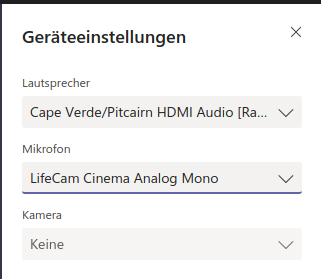
While the microphone (Lifecam Cinema Analog Mono) is detected fine in the device settings, the camera device of aforementioned USB webcam isn't (and thus the camera toggle is disabled).
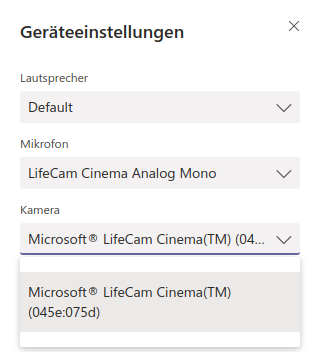
In contrast, the USB webcam works just fine in the Teams webapp with Chromium:
Desktop (please complete the following information):
OS: Ubuntu 18.04
Installation package: snap
Version: 0.3.0
 BOFH2k
All 4 comments
Hi, can you fill the issue template? I will avoid going back and forward with simple questions about OS, version, etc. Thanks
 IsmaelMartinez
on 1 Jul 2019
IsmaelMartinez
on 1 Jul 2019
Also, if using snap, read the docs. You need to activate the camera
IsmaelMartinez
on 2 Jul 2019
Check the documentation to enable the camera feature here @BOFH2k https://github.com/IsmaelMartinez/teams-for-linux/blob/develop/KNOWN_ISSUES.md#use-camera-using-the-snap-build
 julian-alarcon
on 3 Jul 2019
julian-alarcon
on 3 Jul 2019
Thanks a lot,
that worked.
BOFH2k
on 6 Jul 2019
Related issues
 tulanian
·
6Comments
tulanian
·
6Comments
 danielscarvalho
·
3Comments
danielscarvalho
·
3Comments
 theangryangel
·
4Comments
theangryangel
·
4Comments
 jpiautinity
·
8Comments
jpiautinity
·
8Comments
 adithyank
·
6Comments
adithyank
·
6Comments
Most helpful comment
Check the documentation to enable the camera feature here @BOFH2k https://github.com/IsmaelMartinez/teams-for-linux/blob/develop/KNOWN_ISSUES.md#use-camera-using-the-snap-build