Teams-for-linux: Desktop sharing isn't supported in your browser...
Describe the bug
When trying to share the screen, I see the "Desktop sharing isn't supported in your browser..."
To Reproduce
Steps to reproduce the behavior:
- Join a meeting
- Try to share the screen
- See the error
Expected behavior
A choice of screens and windows should be presented
Screenshots
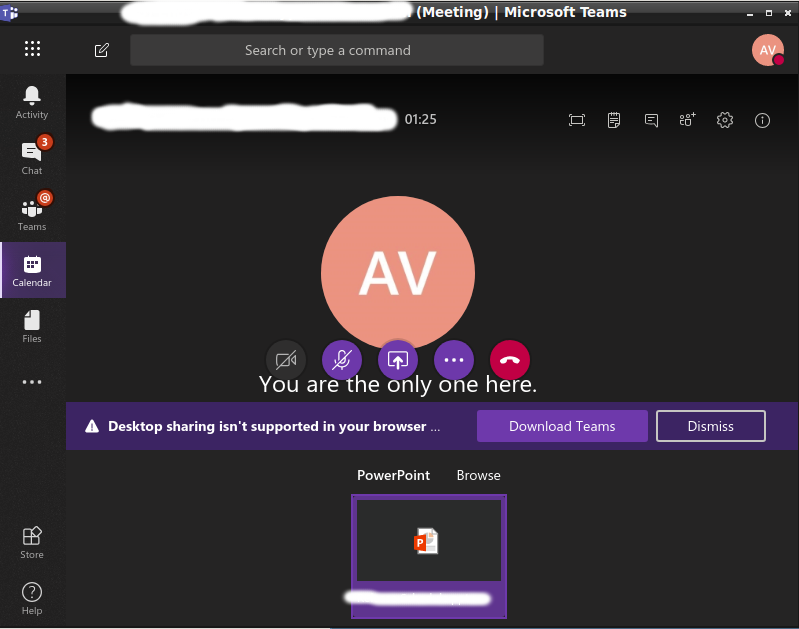
Desktop (please complete the following information):
- OS:
$ uname -a
Linux xxxxxxxxxx 4.2.0-38-generic #45~14.04.1-Ubuntu SMP Thu Jun 9 09:27:51 UTC 2016 x86_64 x86_64 x86_64 GNU/Linux - Installation package deb
- Version 0.2.0
Additional context
I have successfully used the same version of teams-for-linux on another machine. I thought the teams-for-linux configures the embedded Chrome so that UserAgent and other settings are recognized by Teams code as supported. For some reason that doesn't work in that case.
 avodonosov
All 15 comments
Hi,
The user Agent changes to another version of chrome and it does, indeed, add some flags after around 3 seconds. It might be that 3 seconds is not enough in all the cases and needs to be increased.
Did that user had a previous version installed?
Can you clear the ~/.config/teams-for-linux folder and try again?
I have rarely seen similar case, but tend to work again by stopping the call, moving to another group and back to the group/or person that you are trying to call, and starting it again.
Not really looking into changing/improving much that area as MS itself is planning to add support to it, so not worth the extra effort. Let me know how you get on.
 IsmaelMartinez
on 12 Apr 2019
IsmaelMartinez
on 12 Apr 2019
Closing, reopen if you still have the issue.
IsmaelMartinez
on 15 Apr 2019
Thanks for the response.
Removed ~/.config/teams-for-linux, unfortunately, doesn't help, the issue remains.
as MS itself is planning to add support to it
Do you have a link? On the forums I saw MS just closed the ticket. People were complaining so MS reopened the ticket, but without any promise to work on it.
avodonosov
on 15 Apr 2019
reopen if you still have the issue.
There is no button to reopen.
avodonosov
on 15 Apr 2019
I think this is the same as #64 .
Can you try with the argument explain in there? (using another "desktop" in the starting arguments)
IsmaelMartinez
on 18 Apr 2019
Also, I think is the same as #100
IsmaelMartinez
on 19 Apr 2019
Closing as it does smell like duplicate.
IsmaelMartinez
on 19 Apr 2019
The ticket was reported from LXDE. Now I also tried XFCE and Unity - still doesn't work.
At the same time, on another machine screen sharing works OK under LXDE.
avodonosov
on 19 Apr 2019
Can you try running from code? I can only suspect on the delay. Can you try to find differences between the env? Like, does both have cameras?
IsmaelMartinez
on 19 Apr 2019
I'm getting this issue now as well in Ubuntu 18.04 with Gnome. It was working fine, I stopped sharing, then when I tried to start again this error started coming up. I can't seem to get around it with any of the recommended fixes (using teams-for-linux_0.4.0_amd64.deb from here in GitHub).
 Fmstrat
on 1 Aug 2019
Fmstrat
on 1 Aug 2019
Screensharing worked for me yesterday, but today i also get this message ... running Archlinux and Gnome.
 rojaro
on 2 Aug 2019
rojaro
on 2 Aug 2019
@rojaro and @Fmstrat , can you check in #100 as is where the more things we tried. It does smell like system configuration. Also, open another bug issue if you seek more help and reference this old issues.
IsmaelMartinez
on 2 Aug 2019
Tried removing ~/.config/teams-for-linux
Tried building 0.4.0 from code using AUR
Removed package and ran AppImage from release page
Still no success with screensharing :(
rojaro
on 2 Aug 2019
FYI ... my configuration has not changed at all. No updated packages, nor reboot. Yesterday it worked, today it doesn't.
rojaro
on 2 Aug 2019
see #194 . MS has changed something on their side and f###d us
IsmaelMartinez
on 2 Aug 2019
Related issues
 smonat
·
8Comments
smonat
·
8Comments
 Kalyan-M
·
8Comments
Kalyan-M
·
8Comments
 homebrew79
·
8Comments
homebrew79
·
8Comments
 mpruefer
·
8Comments
mpruefer
·
8Comments
 theangryangel
·
4Comments
theangryangel
·
4Comments
Most helpful comment
see #194 . MS has changed something on their side and f###d us