Teammates: "cannot find module api-"...
- Commit SHA: 4cce50f625ceb0e411d34168424bab7c546cca3a
- Operating System: Linux Mint
- JDK Version: 1.8.0_251
- Node.js Version: 12.18.4
- Google Cloud SDK Version: 311.0.0
- IntelliJ Version (if applicable):
- Firefox / Chrome Version (if applicable): 68.0.1
What I was trying to do / What I need help with
When running front-end component tests a large number of the test suites failed to run. Here is a small sample of the error messages received:
FAIL teammates/src/web/app/pages-admin/admin-search-page/admin-search-page.component.spec.ts
● Test suite failed to run
teammates/src/web/services/account.service.ts:3:35 - error TS2307: Cannot find module '../types/api-endpoints'.

3 import { ResourceEndpoints } from '../types/api-endpoints';
                                    ~~~~~~~~~~~~~~~~~~~~~~~~
teammates/src/web/services/account.service.ts:4:50 - error TS2307: Cannot find module '../types/api-output'.

4 import { Account, JoinLink, MessageOutput } from '../types/api-output';
                                                   ~~~~~~~~~~~~~~~~~~~~~
teammates/src/web/services/account.service.ts:5:38 - error TS2307: Cannot find module '../types/api-request'.

5 import { AccountCreateRequest } from '../types/api-request';
Attempts to resolve the problem
Steps Taken:
1.) I found a closed issue (##9681) which described this problem. Someone reminded him to run the command "./gradlew generateTypes" which worked for him, but it has not worked for me.
2.) I read through a thread on stackflow that suggested removing the entire node_modules folder, do a npm cache clean, removing the package-lock.json, re-installing npm.
Note: the node modules are stored in the root directory of my local repository
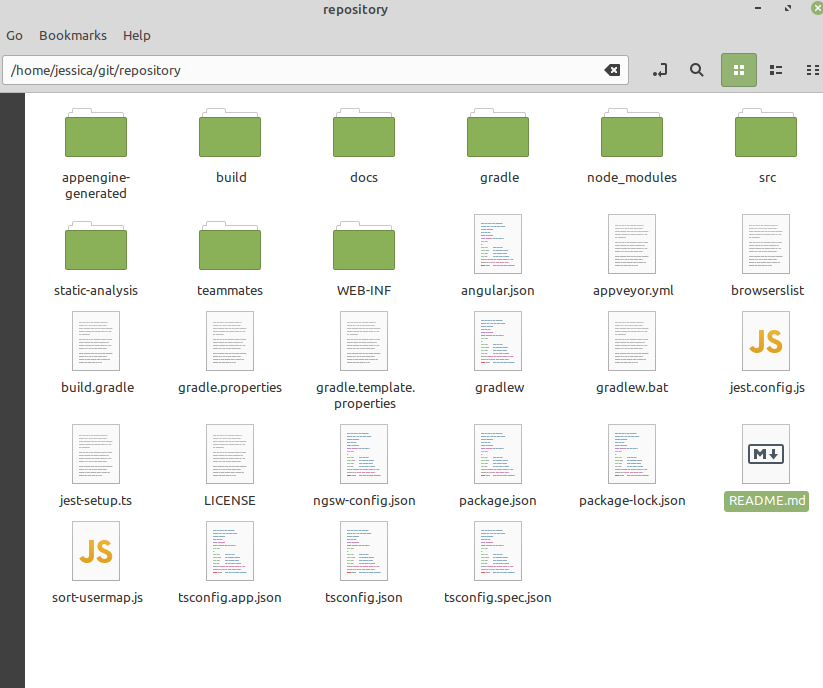
 jfrairigh
All 12 comments
1.) I found a closed issue ### (#9681) which described this problem. Someone reminded him to run the command "./gradlew generateTypes" which worked for him, but it has not worked for me.
How exactly does it not work for you?
 wkurniawan07
on 2 Oct 2020
wkurniawan07
on 2 Oct 2020
@wkurniawan07 Even after running "./gradlew generateTypes" . The test still fail to run
and produce the same error messages. It does not work in that it does not
change the outcome of the tests. The "/gradlew generateTypes" command itself runs successfully.
jfrairigh
on 2 Oct 2020
Unfortunately that doesn't tell anything new.
The "/gradlew generateTypes" command itself runs successfully.
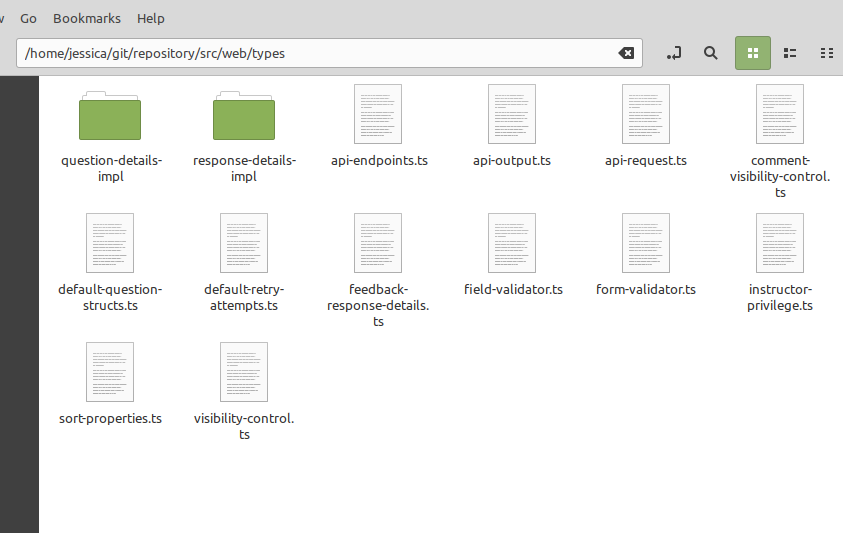
Do you have the file src/web/types/api-output.ts?
wkurniawan07
on 3 Oct 2020
yes
jfrairigh
on 4 Oct 2020
Here is a screenshot of the contents of the src/web/types folder:
jfrairigh
on 4 Oct 2020
The folder looks perfectly fine. Maybe we shouldn't worry about testing first. Does npm run start and npm run build work for you?
wkurniawan07
on 5 Oct 2020
yes
jfrairigh
on 5 Oct 2020
@wkurniawan07 I think it may be a path issue. It seems like the tests that are failing do not know how to find these module files. Is there a configuration file I could use to verify the path that has been given to these tests that are failing?
jfrairigh
on 5 Oct 2020
I'm out of ideas myself so that's probably what happened, and this is the first time I heard it happened. It's also weird given that your npm run start and npm run build can run but not this where there should not be any difference (i.e. it should be all fail or all success).
The only places whereby paths are set are here and here but I doubt any of them will cause whatever you observed.
wkurniawan07
on 5 Oct 2020
All of test ran and passed!
Here is what I did:
-I discovered that the test that were failing to run were all in the git/teammates/teammates/src/web/services directory. The .ts files were trying to import files (api-endpoints.ts, api-output.ts, and api-request.ts) from the git/teammates/teammates/src/web/types directory were not present. These files were present in git/teammates/src/web/types directory.
- Ran ./gradlew generateTypes while in git/teammates/teammates. This fixed the "Cannot find module '../types/api" error message, but created a new error message of "Cannot find module './config' from 'teammates/src/web/environments/environment.ts'"
-Ran ./gradlew createConfigs while still in git/teammates/teammates. This fixed the problem!
Conclusion:
I'm not sure if it was necessary to duplicate the types and config file in the git/teammates/teammates directory since they were already in the git/teammates directory. I thought about pointing all of the import statements that were failing in each file to point to the original type folder and config files. However, that sounded like a long, tedious, error prone solution.
This was a good learning experience. If anyone reads this and thinks "wow you made that way too complicated", then please let me know the better solution. I'm sure this will not be the last time for me to set up an environment, and I would like for future attempts to go smoother.
jfrairigh
on 6 Oct 2020
I'm not sure if it was necessary to duplicate the types and config file in the git/teammates/teammates directory since they were already in the git/teammates directory.
Good job for resolving it, but it's a curious case here. Why do you have git/teammates/teammates directory in the first place?
wkurniawan07
on 6 Oct 2020
You are correct there was no reason for me to have git/teammates/teammates as a directory. A couple hours after I closed this issue that occurred to me as well. I deleted it and the test are all passing still.
jfrairigh
on 8 Oct 2020
Related issues
 joanneong
·
4Comments
joanneong
·
4Comments
 amarlearning
·
4Comments
amarlearning
·
4Comments
 keoren3
·
3Comments
keoren3
·
3Comments
 whipermr5
·
4Comments
whipermr5
·
4Comments
 damithc
·
4Comments
damithc
·
4Comments
Most helpful comment
All of test ran and passed!
Here is what I did:
-I discovered that the test that were failing to run were all in the git/teammates/teammates/src/web/services directory. The .ts files were trying to import files (api-endpoints.ts, api-output.ts, and api-request.ts) from the git/teammates/teammates/src/web/types directory were not present. These files were present in git/teammates/src/web/types directory.
-Ran ./gradlew createConfigs while still in git/teammates/teammates. This fixed the problem!
Conclusion:
I'm not sure if it was necessary to duplicate the types and config file in the git/teammates/teammates directory since they were already in the git/teammates directory. I thought about pointing all of the import statements that were failing in each file to point to the original type folder and config files. However, that sounded like a long, tedious, error prone solution.
This was a good learning experience. If anyone reads this and thinks "wow you made that way too complicated", then please let me know the better solution. I'm sure this will not be the last time for me to set up an environment, and I would like for future attempts to go smoother.