Teammates: Fix error when doing fresh setup on IntelliJ IDEA 2018.1
I can't run the server in Intellij Idea.
- Commit SHA: 8ad5768d4007a1fd5e8eca729975d779840b1126
- Operating System: Windows 10
- JDK Version: 1.8
- Node.js Version: v8.10.0
- Google Cloud SDK Version: 196.0.0
- Eclipse / IntelliJ Version (if applicable): Intellij Ultimate 2018.1
What I was trying to do / What I need help with
I am trying to set up the environment for Intellij Idea and get the NoSuchFileException error, saying that appengine-web.xml doesn't exist.
Attempts to resolve the problem
I've tried to setup the environment again several times now, following the tutorials listed here and here but to no success.
 nashmia-riaz
All 11 comments
appengine-web.xmldoesn't exist.
If it doesn't exist, that's a step in the setting up guide missed. Is it a problem where it actually exists but IntelliJ fails to recognize it?
 wkurniawan07
on 10 Apr 2018
wkurniawan07
on 10 Apr 2018
@wkurniawan07 I don't think I missed a step as I managed to fix the problem by downgrading my Intellij Idea to 2017.3.5.
nashmia-riaz
on 11 Apr 2018
@nashmia-riaz I'm using IntelliJ Ultimate 2018.1 too and it's working fine, though I set up the project on an earlier version. Did you confirm that appengine-web.xml existed when you were on 2018.1?
 whipermr5
on 13 Apr 2018
whipermr5
on 13 Apr 2018
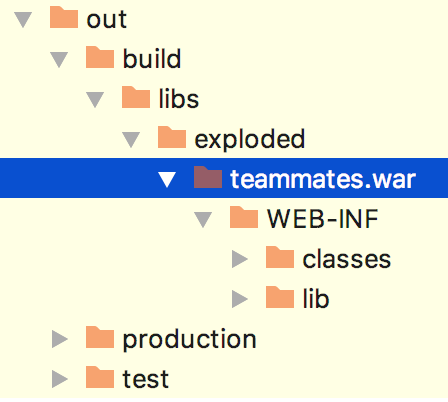
@whipermr5 Apologies for not stating earlier. As far as I can tell, it wasn't being created on 2018.1. Only two folders (WEB-INF and META-INF) would get created in teammates.war.
nashmia-riaz
on 13 Apr 2018
So src/main/webapp/WEB-INF/appengine-web.xml existed but was not copied over? Also, now that you've gotten it working in 2017.3.5, does it work if you upgrade to 2018.1? That would help verify the problem.
whipermr5
on 13 Apr 2018
@whipermr5 yes, that is true. It does exist in src/main/webapp/WEB-INF/appengine-web.xml but is not copied over into the out folder.
The problem persists. Here's what I know:
- I can't set up a new environment on 2018.1. It tells me that appengine-web.xml doesn't exist in the out folder. However, I can set up that same environment in 2017.3.5 without any errors.
- (This is trivial but) I can run an environment I have already set up in 2017.3.5 using 2018.1.
Let me know what else I can do to help figure this out.
nashmia-riaz
on 14 Apr 2018
@nashmia-riaz Thanks for the report! I was able to reproduce the issue upon performing a fresh setup on IntelliJ IDEA 2018.1:

whipermr5
on 16 Apr 2018
Somehow the exploded war folder only contains these:
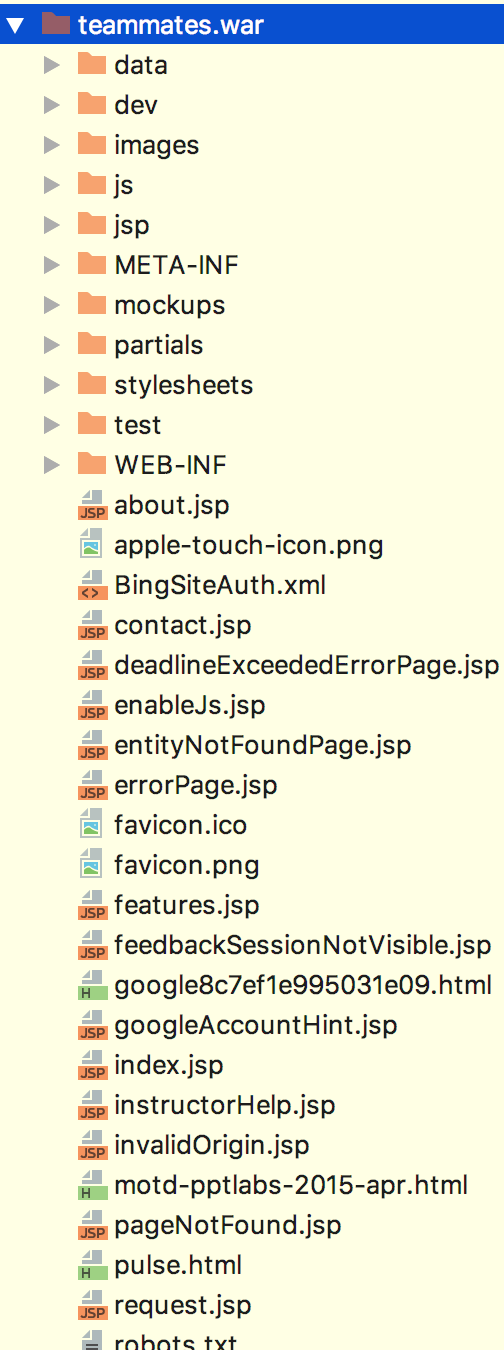
The expected behaviour is that it should contain all these:
whipermr5
on 16 Apr 2018
@whipermr5 this is exactly the problem I faced. 👍
nashmia-riaz
on 16 Apr 2018
The problem seems to be fixed in 2018.1.1 (it was probably this issue). @nashmia-riaz can verify?
whipermr5
on 19 Apr 2018
Yes, I can confirm. Local server is up and running now.
nashmia-riaz
on 19 Apr 2018
Related issues
whipermr5
·
4Comments
whipermr5
·
4Comments
 YongJieYongJie
·
3Comments
YongJieYongJie
·
3Comments
 LiHaoTan
·
4Comments
LiHaoTan
·
4Comments
 sujeet14108
·
4Comments
sujeet14108
·
4Comments
Most helpful comment
Yes, I can confirm. Local server is up and running now.