Tdesktop: [Question] Compilation error
Hi,
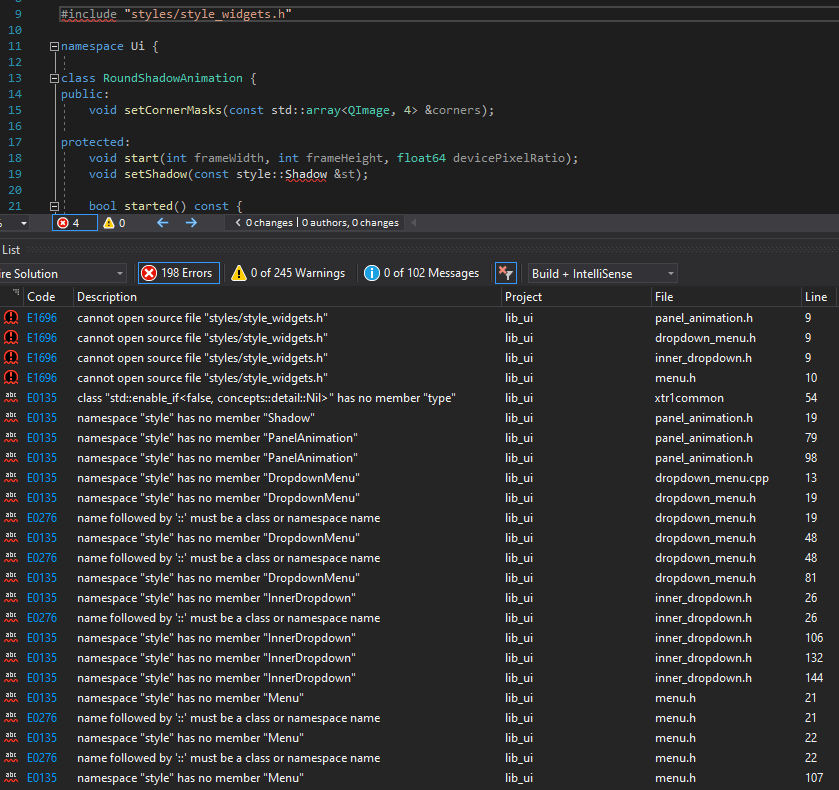
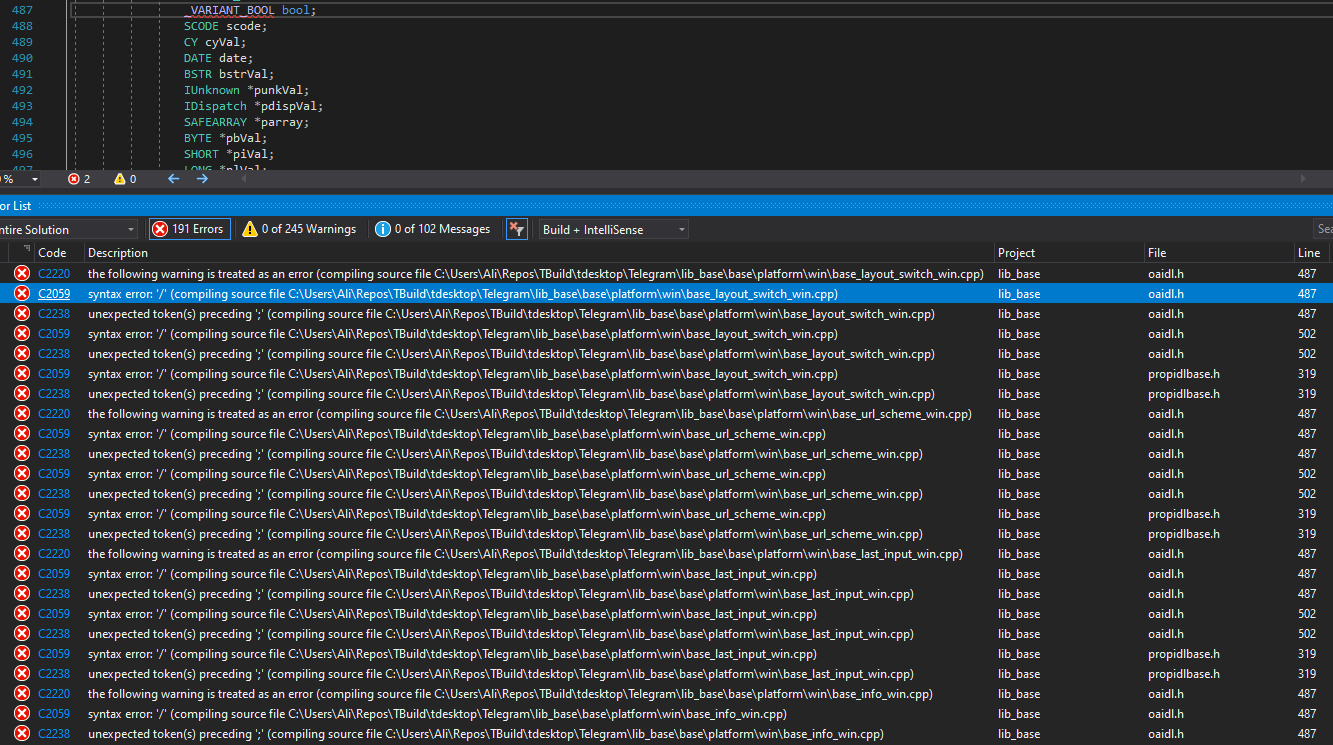
I've done all of the instructions which was written, but after opening Telegram.sln and building it, these errors occurred.
What else I need to do in order to solve these errors and run telegram.exe?
Specifications
Visual Studio Enterprise 16.7.0
Windows 10 SDK 10.0.18362.0
tdesktop git branch: dev
 dehqan
All 19 comments
Stop closing and creating new issues, use only one issue until you compile :see_no_evil:
I guess you didn't fix https://github.com/telegramdesktop/tdesktop/issues/8413 in the fact, force argument can't fix what you described on that issue. And that error can appear only if -D DESKTOP_APP_USE_PACKAGED=OFF is not set.
 ilya-fedin
on 11 Aug 2020
ilya-fedin
on 11 Aug 2020
@ilya-fedin
Stop closing and creating new issues, use only one issue until you compile 🙈
I guess you didn't fix #8413 in the fact,
forceargument can't fix what you described on that issue. And that error can appear only if-D DESKTOP_APP_USE_PACKAGED=OFFis not set.
sorry 😥, I thought they are different issues and have to separate them.
after all, I did a clean install and everything has been resolved.
except this error from vs build output console:
.
.
.
TBuild\tdesktop\Telegram\SourceFiles\calls\calls_call.cpp(43): fatal error C1001: Internal compiler error.
(compiler file 'D:\agent\_work\9\s\src\vctools\Compiler\Utc\src\p2\main.c', line 195)
To work around this problem, try simplifying or changing the program near the locations listed above.
If possible please provide a repro here: https://developercommunity.visualstudio.com
Please choose the Technical Support command on the Visual C++
Help menu, or open the Technical Support help file for more information
spellchecker_common.cpp
stickers_emoji_image_loader.cpp
stickers_emoji_pack.cpp
stickers_dice_pack.cpp
stickers_list_widget.cpp
stickers_lottie.cpp
cl : command line error D8040: error creating or communicating with child process
Done building project "Telegram.vcxproj" -- FAILED.
========== Build: 32 succeeded, 1 failed, 0 up-to-date, 0 skipped ==========
beside that building is failed, I wonder what's D:\agent\_work\9\s\src\vctools\Compiler\Utc\src\p2\main.c
cause I have only one drive and that is C 😕
so how can I fix this problem?
dehqan
on 11 Aug 2020
so how can I fix this problem?
This is a MSVC bug, you need Visual Studio 16.5 (16.6 and 16.7 both are buggy and won't compile tdesktop) :(
ilya-fedin
on 11 Aug 2020
I wonder what's
D:\agent\_work\9\s\src\vctools\Compiler\Utc\src\p2\main.c
MSVC source file where the bug is placed :D
ilya-fedin
on 11 Aug 2020
@dehqan Replace
auto endpoint = blabla{
With
blabla endpoint = {
 john-preston
on 11 Aug 2020
john-preston
on 11 Aug 2020
I have the same issue as described by dehqan in the first message: I can't compile on Windows because of _VARIANT_BOOL. It is defined in the system header like this:
/* 0 == FALSE, -1 == TRUE */
typedef short VARIANT_BOOL;

#if !__STDC__ && (_MSC_VER <= 1000)
/* For backward compatibility */
typedef VARIANT_BOOL _VARIANT_BOOL;

#else
/* ANSI C/C++ reserve bool as keyword */
#define _VARIANT_BOOL    /##/
#endif
When I compile Telegram I got these errors:
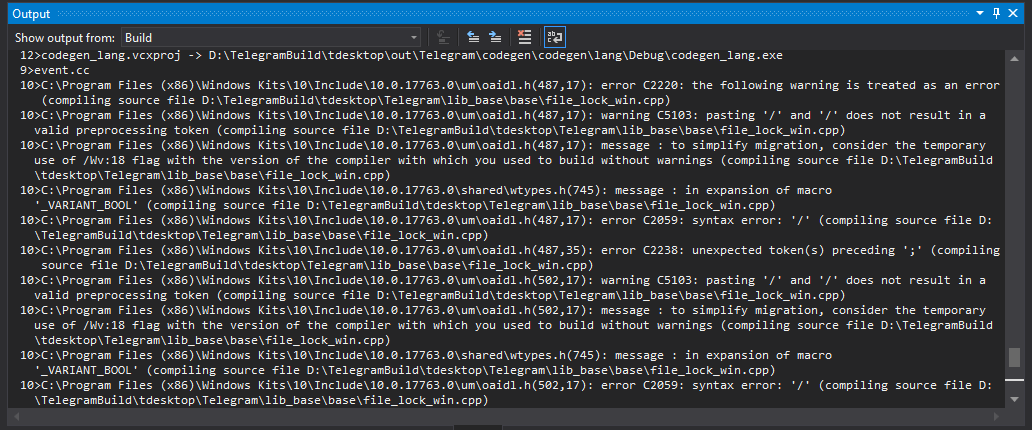
What can I do to solve this issue?
Specifications
Visual Studio Community 16.5.0
Windows 10 SDK 10.0.17763.0
git branch: dev
 GeorgeGribkov
on 13 Aug 2020
GeorgeGribkov
on 13 Aug 2020
What can I do to solve this issue?
Just like he - with clean install
ilya-fedin
on 13 Aug 2020
I don't quite understand. What do you mean by "clean install"?
GeorgeGribkov
on 13 Aug 2020
What do you mean by "clean install"?
Well, this was said by @dehqan originally, but I guess he meant removing all the files created when building tdesktop and following the instruction from the beggining.
ilya-fedin
on 13 Aug 2020
Thanks!
GeorgeGribkov
on 13 Aug 2020
@dehqan Replace
auto endpoint = blabla{
With
blabla endpoint = {
Hi, Thanks for your reply,
cause i'm new to this project, could you please say where should i apply these changes?
dehqan
on 13 Aug 2020
so how can I fix this problem?
This is a MSVC bug, you need Visual Studio 16.5 (16.6 and 16.7 both are buggy and won't compile tdesktop) :(
Thanks for your reply!
I'll try that
dehqan
on 13 Aug 2020
cause i'm new to this project, could you please say where should i apply these changes?
Where you got the error:
TBuildtdesktop\Telegram\SourceFiles\calls\calls_call.cpp(43)
ilya-fedin
on 13 Aug 2020
What do you mean by "clean install"?
Well, this was said by @dehqan originally, but I guess he meant removing all the files created when building tdesktop and following the instruction from the beggining.
Well, clean install hasn't help me: I still got that error. How can I fix this?
GeorgeGribkov
on 14 Aug 2020
@GeorgeGribkov Please update Visual Studio to 16.7.1
john-preston
on 14 Aug 2020
@GeorgeGribkov Please update Visual Studio to 16.7.1
Have just updated, and this doesn't work :(
GeorgeGribkov
on 14 Aug 2020
@GeorgeGribkov I'm working on tdesktop using 16.7.1, so generally it should be fine on the current dev branch code.
john-preston
on 14 Aug 2020
I've updated to 16.7.1 and moved to master branch. everything works fine!
dehqan
on 15 Aug 2020
What do you mean by "clean install"?
Well, this was said by @dehqan originally, but I guess he meant removing all the files created when building tdesktop and following the instruction from the beggining.
Well, clean install hasn't help me: I still got that error. How can I fix this?
I had those issues as well, but the key is to do all of the steps carefully, specially the last and configuration step. keep an eye on your output and be sure to have no errors.
dehqan
on 15 Aug 2020
Related issues
 Yanrishatum
·
3Comments
Yanrishatum
·
3Comments
 slowaways
·
3Comments
slowaways
·
3Comments
 qwitriy
·
3Comments
qwitriy
·
3Comments
 ArmeF97
·
3Comments
ArmeF97
·
3Comments
 hosseinab
·
3Comments
hosseinab
·
3Comments