Tdesktop: [Windows 7] [VS2019] [ release] Telegram Menu Icons Doesn't Display Correctly
Steps to reproduce
- download and install third party tools.The versions are :
Perl: ActivePerl-5.26.3.2603-MSWin32-x64-a95bce075
cmake: cmake-3.14.3-win64-x64
NASM: nasm-2.14.02-installer-x64
jom_1_1_3
msys2-x86_64-20180531
python-2.7.16.amd64
yasm-1.3.0-win64
vs 2019 version : 16.0.2.
- Clone source code and prepare libraries according to the official commands list:
https://github.com/telegramdesktop/tdesktop/blob/dev/docs/building-msvc.md#clone-source-code-and-prepare-libraries
And git chechout 1.6.7 version of Telegram before running gyp\refresh.bat.
(In fact ,I have tried the current master version ,and it behaves the same bug)
- Build the project to get the result debug version and release version bin files.
4.Execute Telegram.exe.
Expected behaviour
Both debug version and release version icons should display correctly just as official version 1.6.7.
Actual behaviour
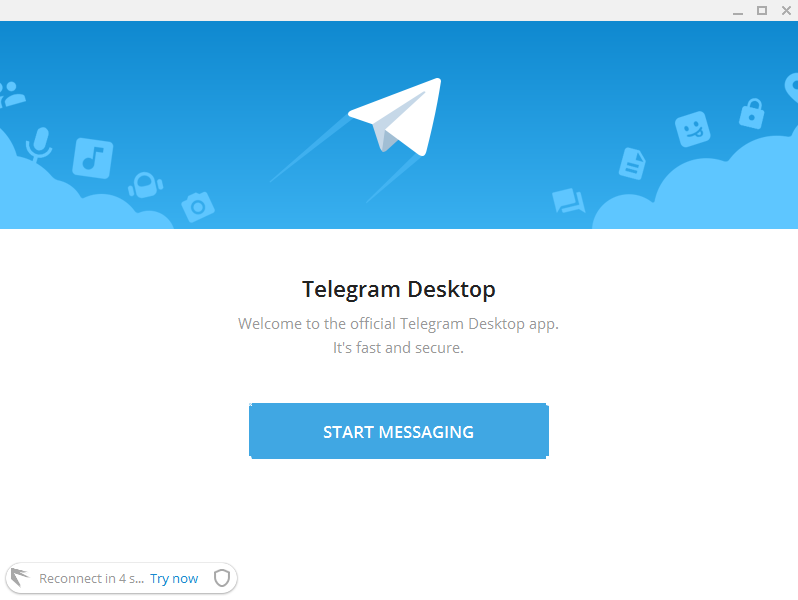
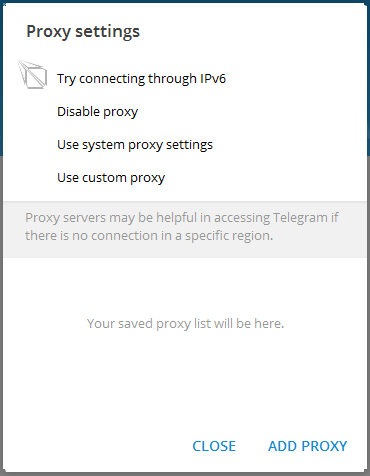
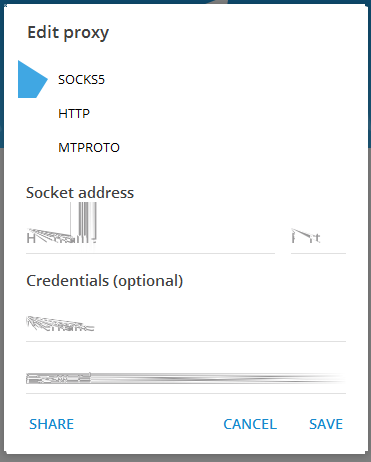
The debug version displays correctly,but release version doesn't.
The release version icons shows as:
Configuration
Windows 7
Version of Telegram Desktop:
1.6.7
Used theme:
Logs:
[2019.04.28 04:20:32] Launched version: 1006007, install beta: [FALSE], alpha: 0, debug mode: [FALSE], test dc: [FALSE]
[2019.04.28 04:20:32] Executable dir: C:/TBuild/tdesktop/out/Release/, name: Telegram.exe
[2019.04.28 04:20:32] Initial working dir: C:/TBuild/tdesktop/out/Release/
[2019.04.28 04:20:32] Working dir: C:/TBuild/tdesktop/out/Release/
[2019.04.28 04:20:32] Command line: C:\TBuildtdesktopout\Release\Telegram.exe
[2019.04.28 04:20:32] Executable path before check: C:/TBuild/tdesktop/out/Release/Telegram.exe
[2019.04.28 04:20:32] Logs started
[2019.04.28 04:20:32] Connecting local socket to Global\e76f751266637b9ebbba17120d5f5689-{87A94AB0-E370-4cde-98D3-ACC110C5967D}...
[2019.04.28 04:20:32] This is the only instance of Telegram, starting server and app...
[2019.04.28 04:20:32] Moved logging from 'C:/TBuild/tdesktop/out/Release/log_start0.txt' to 'C:/TBuild/tdesktop/out/Release/log.txt'!
[2019.04.28 04:20:32] Primary screen DPI: 96
[2019.04.28 04:20:33] App Info: reading settings...
[2019.04.28 04:20:33] App Info: reading encrypted settings...
[2019.04.28 04:20:33] OpenAL Logging Level: (not set)
[2019.04.28 04:20:33] Audio Playback Devices: OpenAL Soft
[2019.04.28 04:20:33] Audio Playback Default Device: OpenAL Soft
[2019.04.28 04:20:33] Audio Capture Devices: OpenAL Soft on Microphone (High Definition Audio Device)
[2019.04.28 04:20:33] Audio Capture Default Device: OpenAL Soft on Microphone (High Definition Audio Device)
[2019.04.28 04:20:35] App Info: reading map...
[2019.04.28 04:20:35] App Info: reading encrypted map...
[2019.04.28 04:20:35] App Info: could not read encrypted user settings...
[2019.04.28 04:20:35] App Info: writing encrypted user settings...
[2019.04.28 04:20:35] Map read time: 29
[2019.04.28 04:20:35] Window Shadow: 1, 1, 3, 4, 6, 9, 13, 18, 24, 31, 38, 46
[2019.04.28 04:20:35] Update Info: MTP is unavailable.
[2019.04.28 04:20:36] Update Error: could not get current version 99
[2019.04.28 04:20:42] HTTP Error: remote host closed - Connection closed
[2019.04.28 04:20:44] HTTP Error: remote host closed - Connection closed
[2019.04.28 04:20:45] Config Error: Failed to get response, error: Error transferring https://software-download.microsoft.com/prodv2/config.txt - server replied: Forbidden (202)
[2019.04.28 04:20:45] Config Error: Bad data size 245 required 344
[2019.04.28 04:20:47] HTTP Error: remote host closed - Connection closed
[2019.04.28 04:20:49] HTTP Error: connection refused - Connection refused
[2019.04.28 04:20:49] HTTP Error: remote host closed - Connection closed
[2019.04.28 04:20:51] HTTP Error: remote host closed - Connection closed
[2019.04.28 04:20:54] Config Error: Failed to get response, error: Error transferring https://software-download.microsoft.com/prodv2/config.txt - server replied: Forbidden (202)
[2019.04.28 04:20:54] Config Error: Bad data size 245 required 344
 YuanWujin
All 10 comments
it must be something on your side:
https://i.imgur.com/eu1ZulD.png
 Aokromes
on 12 May 2019
Aokromes
on 12 May 2019
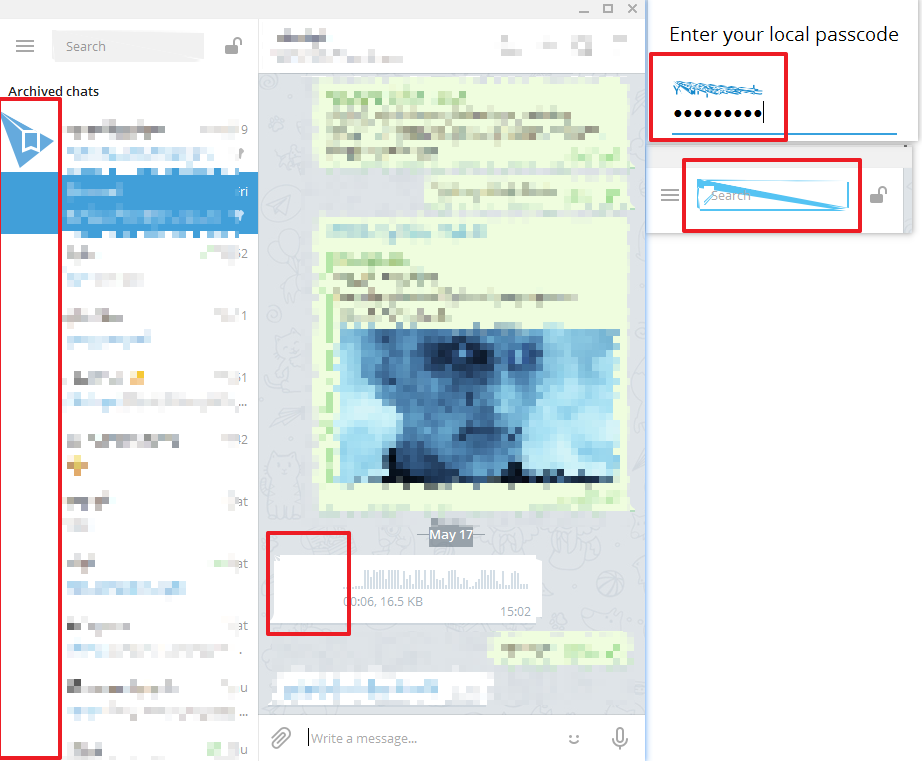
Same problem here. After switching to vs2019 release build have many visual glitches :( Debug is ok.
Windows 7 pro x64, vs2019 16.0.4, win SDK 10.0.17763.0, tdesktop 1.7.
Any clue?
 kirsan31
on 19 May 2019
kirsan31
on 19 May 2019
@john-preston can you comment about this please?
kirsan31
on 20 May 2019
@kirsan31 I have no idea how this can happen :( Perhaps some optimizations trigger this, maybe it is a compiler bug and maybe there is some undefined behaviour in my code. Anyway, I can't reproduce that (production builds are using Release configuration and work fine), so maybe you'll have to debug that yourself, sorry.
Strange thing, it's not icons (graphics), but QPainter painting operations. For example Saved Messages logo is painted without raster graphics, only vector shapes.
 john-preston
on 20 May 2019
john-preston
on 20 May 2019
@kirsan31 I have no idea how this can happen :( Perhaps some optimizations trigger this, maybe it is a compiler bug and maybe there is some undefined behaviour in my code. Anyway, I can't reproduce that (production builds are using Release configuration and work fine), so maybe you'll have to debug that yourself, sorry.
Strange thing, it's not icons (graphics), but QPainter painting operations. For example Saved Messages logo is painted without raster graphics, only vector shapes.
Thanks, I hope we will figure this out some day :)
@OmidMahmoudi on what OS you build it?
kirsan31
on 20 May 2019
@kirsan31 I build it on
windows 10 pro version 1709
visual studio pro 2019
windows SDK 10.0.17763.132
 OmidMahmoudi
on 21 May 2019
OmidMahmoudi
on 21 May 2019
I tried to disable optimizations (settings_win.gypi) in release - it's doesn't help.
Also I tried to enable optimizations (settings_win.gypi) in debug - still working good.
So, I think problem in building qt libraries...
Yes, I found that the problem is Qt5Gui.lib. After replacing this one with vs2017 compiled, the release build working fine.
So, we must investigate further...
kirsan31
on 21 May 2019
Update on situation:
QT:
https://bugreports.qt.io/browse/QTBUG-75280?jql=text%20~%20%22vs2019%22
VS2019:
https://developercommunity.visualstudio.com/content/problem/591454/qt-5122-compile-with-vs2019-display-error.html (closed)
https://developercommunity.visualstudio.com/content/problem/591474/qt-598-sharedstatic-build-with-msvc-2019-issue.html (closed)
https://developercommunity.visualstudio.com/content/problem/547684/visual-studio-20191602-generator-incorrect-code-wi.html
kirsan31
on 19 Jun 2019
Finally, it's MS compiler bug. Waiting for fix...
kirsan31
on 26 Jun 2019
Can be closed as it confirmed VS issue...
kirsan31
on 9 Aug 2019
Related issues
 ArmeF97
·
3Comments
ArmeF97
·
3Comments
 DRSDavidSoft
·
3Comments
DRSDavidSoft
·
3Comments
 Mindstormer619
·
3Comments
Mindstormer619
·
3Comments
 ghost
·
3Comments
ghost
·
3Comments
 matteotumiati
·
3Comments
matteotumiati
·
3Comments