Tdesktop: Support MTProto clusters in Telegram Client
Steps to reproduce
- Click MTProto cluster url (cl2 - two nodes) - Cluster Ok
https://t.me/proxy?server=cl2.drproxy.pro&port=1010&secret=03bd6926a81f6d2f1359f65f57eed4bb
; - Click MTProto cluster url (cl3 - three nodes, two the same and one brouken) - Cluster Totaly brouken.
https://t.me/proxy?server=cl3.drproxy.pro&port=1010&secret=03bd6926a81f6d2f1359f65f57eed4bb ;
Expected behaviour
cl2 and cl3 shoud work untill one node in cluster ready to serve requests.
Actual behaviour
cl3 do not connected (ifinite loop while connectiong)
Configuration
iOS, Windows 7, Windows 10
Version of Telegram Desktop:
All versions - latest and appha.
Used theme:
Details
Colleagues, I assume that the authors of the MTProto server work closely with the authors of the Telegram Client.
The problem at the junction. I will describe my case.
I own a large MTProto server farm, which I provide customers with the SaaS model.
Individual nodes are organized into clusters under a common DNS name.
It perfectly solves the problem of load balancing and address changes when locked.
But error handling by the client is terrible. If any (sic!, any) node in the cluster falls out, the client may stumble on it and go to infinite loop.
Instead of just like all modern network-based programs, it's easy to go through all the addresses under the same dns name and find the available one.
So we will not defeat the blockages!
I think the normalization of the search of available IP inside the cluster should become one of the priority tasks within the framework of the Digital Resistance movement.
I saw the change logs of the latest beta versions - it says about prioritizing the proxies for availability, but again there is nothing about sorting out IP addresses inside a single DNS name.
Ready for the most dense collaboration - to portray the test cases and the server for modeling, but the case seems to be extremely simple.
DNS Zone:
; BUG Support MTProto clusters in Telegram Client #146
; #146
; Testcase from https://t.me/iqdoctor
; AM1 - Second IP's
cl2.drproxy.pro. 60 IN A 217.69.0.102 ; Ok
cl2.drproxy.pro. 60 IN A 95.179.130.49 ; Ok
; AM1 - Second IP's
cl3.drproxy.pro. 60 IN A 217.69.0.102 ; Ok
cl3.drproxy.pro. 60 IN A 95.179.130.49 ; Ok
cl3.drproxy.pro. 60 IN A 194.67.222.24 ; broken node
; https://t.me/proxy?server=cl2.drproxy.pro&port=1010&secret=03bd6926a81f6d2f1359f65f57eed4bb ; Cluster Ok
; https://t.me/proxy?server=cl3.drproxy.pro&port=1010&secret=03bd6926a81f6d2f1359f65f57eed4bb ; Cluster Broken some times (it depends from dns round robin)
; cl-2 nodes ckeck list
; https://t.me/proxy?server=217.69.0.102&port=1010&secret=03bd6926a81f6d2f1359f65f57eed4bb
; https://t.me/proxy?server=95.179.130.49&port=1010&secret=03bd6926a81f6d2f1359f65f57eed4bb
; cl-3 nodes ckeck list
; https://t.me/proxy?server=217.69.0.102&port=1010&secret=03bd6926a81f6d2f1359f65f57eed4bb
; https://t.me/proxy?server=95.179.130.49&port=1010&secret=03bd6926a81f6d2f1359f65f57eed4bb
; https://t.me/proxy?server=194.67.222.24&port=1010&secret=03bd6926a81f6d2f1359f65f57eed4bb
 iqdoctor
All 15 comments
iqdoctor
on 17 Jun 2018
@iqdoctor I'll be able to look into it on the Telegram Desktop side in about a week only :(
Telegram Desktop should try different addresses under a common dns name.
 john-preston
on 18 Jun 2018
john-preston
on 18 Jun 2018
Thank you. We are waiting with great impatience, it is very time-consuming to reconfigure clusters manually when the node is dropped out.
iqdoctor
on 18 Jun 2018
@iqdoctor Did you try Telegram Desktop and Telegram for iOS? What about Android app?
Also, which version of Telegram Desktop? Your link:
https://t.me/proxy?server=cl3.drproxy.pro&port=1010&secret=03bd6926a81f6d2f1359f65f57eed4bb ;
Works for me, at least for now. If you make a test-link with, say, one out of five or six working I could test it as well.
john-preston
on 18 Jun 2018
One moment.
iqdoctor
on 18 Jun 2018
host cl3.drproxy.pro
cl3.drproxy.pro has address 95.179.130.49
cl3.drproxy.pro has address 217.69.0.102
cl3.drproxy.pro has address 194.67.222.24
iqdoctor
on 18 Jun 2018
Ha-ha РКН unlock node #3. Now I will change node #3 on broken ip. One moment
iqdoctor
on 18 Jun 2018
iqdoctor
on 18 Jun 2018
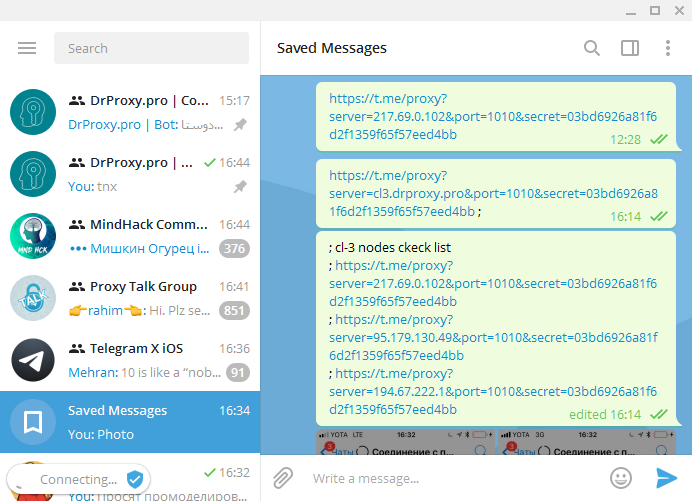
- I corrected the test case. My blocked address is just unlocked. I changed it to not existing at all.
- The situation on Windows began to look better - about 10 seconds of waiting if the broken node is the first in the list of round robin, and instantly if the root node. Earlier there was a hang. I took a screenshot of the pause for you.
- Perhaps there is a need for more complex modeling - as you know, the РКН (Рос Ком Надзор) passed the SYN packet, and did not miss the reverse ones. Perhaps there is a hang in this case. If the host responds that is unavailable - the client exits the loop more quickly. check this point by code if you can, and I'll try to reproduce for you the situation is not a complete connection setup (a kind of SYN FLOOD attack).
host cl3.drproxy.pro
cl3.drproxy.pro has address 95.179.130.49
cl3.drproxy.pro has address 194.67.222.1 ;# broiken
cl3.drproxy.pro has address 217.69.0.102
iqdoctor
on 18 Jun 2018
@iqdoctor The delay if the first address is unavailable is by design unfortunately, it tries them one by one with some timeout.
john-preston
on 18 Jun 2018
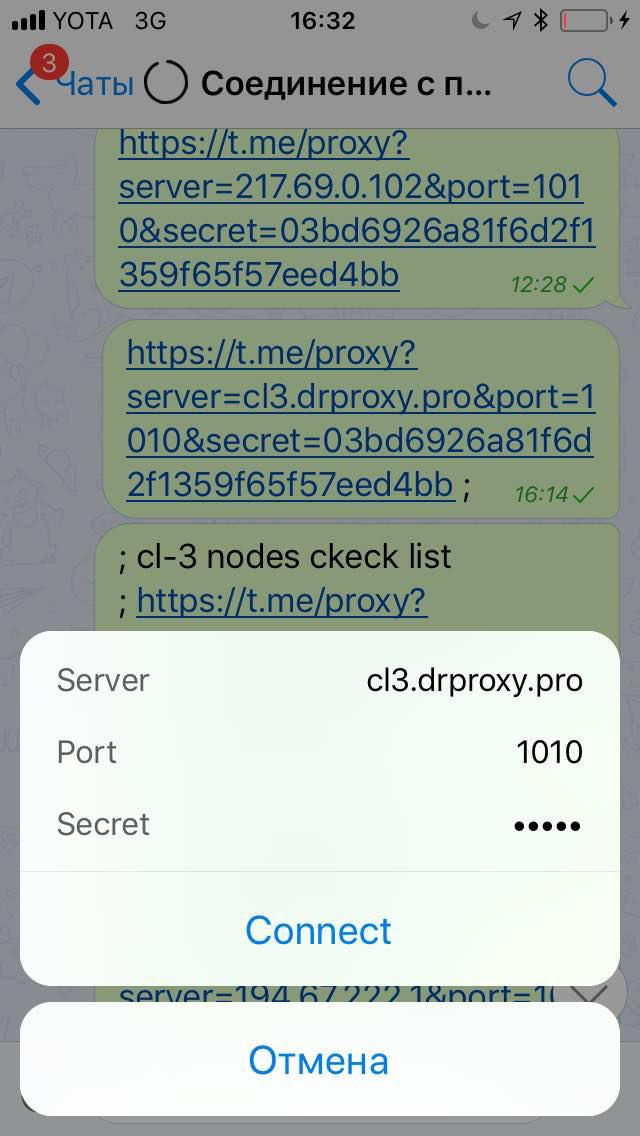
iOS stell go to the infine loop on cl3.

iqdoctor
on 18 Jun 2018
@john-preston test case fixed.
iqdoctor
on 18 Jun 2018
@john-preston I open iOS client ticket
https://github.com/peter-iakovlev/Telegram/issues/291
Desctop client work excelent in this case now.
But iOS fail to connect in this case.
iqdoctor
on 12 Aug 2018
@iqdoctor report iOS issues to telegram support (and check telegram X too -- if it's broken there, report in tgiostests group).
 stek29
on 14 Aug 2018
stek29
on 14 Aug 2018
Telegram X too: https://t.me/tgiostests/46460
iqdoctor
on 14 Aug 2018
Related issues
 ArmeF97
·
3Comments
ArmeF97
·
3Comments
 FunctionalHacker
·
3Comments
FunctionalHacker
·
3Comments
 Justinzobel
·
3Comments
Justinzobel
·
3Comments
 ghost
·
3Comments
ghost
·
3Comments
 Liudvikas
·
3Comments
Liudvikas
·
3Comments
Most helpful comment
@iqdoctor I'll be able to look into it on the Telegram Desktop side in about a week only :(
Telegram Desktop should try different addresses under a common dns name.