Tdesktop: Security warning for dangerous file types
Security warning for dangerous file types
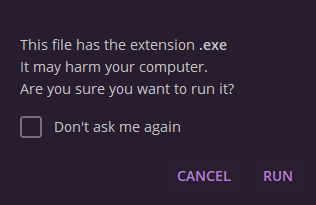
There should be a security warning when the user clicks on a dangerous or executable file in chat.
It is too easy to click on dangerous files accidentally. Surprisingly, a dangerous file will execute without warning.
There are some file extensions found in the documentIsExecutableName function:
https://github.com/telegramdesktop/tdesktop/blob/master/Telegram/SourceFiles/layout.cpp#L249
It would be a good idea to add more file extensions, such as script files sh, js, py, rb, etc...
 XP1
XP1
All 15 comments
In Windows the system should give you warning before you launch executables anyway, no?
 john-preston
on 3 Apr 2017
john-preston
on 3 Apr 2017
@john-preston I just tried a py Python file. It ran with no warning after I clicked and saved the file.
For the common Windows file types, there is a "Open File - Security Warning" prompt, but it only works on NTFS. Downloaded files have an attached Zone.Identifier stream on NTFS. Other file systems, like FAT, do not have alternate data streams, so if I click on a file and save it to a non-NTFS file system, the file will be executed with no security warning.
XP1
on 4 Apr 2017
When this first happened, I was surprised because when I clicked on the file and the save dialog appeared, I expected Telegram to only save the file. Any browser, for example, treats downloads with a save dialog that only saves but does not execute the file (in the same step). I think that is the expected behavior.
Instead of a security warning, an idea would be to adopt the common behavior of save-only by default for unknown and unsafe file types but only allow opening by default for safe file types.
Another idea is using a Run/Save/Cancel dialog for unknown and unsafe file types. An example dialog from IE and Opera 12:

XP1
on 4 Apr 2017
Most people do not have a Python, Shell, Ruby, JavaScript etc. interpreter, so I don't think there's a need to have warnings on those files.
And who uses FAT file system these days anyway?
 ralesk
on 10 Apr 2017
ralesk
on 10 Apr 2017
@ralesk Opening files just because system may protect user from this seems a weird behavior for me.
Also, opening any file seems a bad idea for me. Maybe it should be done like on most browsers: click on download(ed|ing) file to open it (when downloaded)
 stek29
on 10 Apr 2017
stek29
on 10 Apr 2017
Nothing in Telegram opens a file automatically, there's an explicit user interaction on the whatever file that they downloaded. The saved file is checked by antivirus on Windows. I don't feel Telegram can do much more than that, and again, the files listed above do not run on most people's computers at all.
The Run-Save-Cancel dialog is irrelevant to Telegram: Telegram doesn't ever do "download temporarily, run, and then forget" (which is what Run is), it only ever does Save (which is either automatic or manual — in fact, with "files" it's always manual, I couldn't find a setting in the Automatic Media Download settings menu), and opening the received file with the associated application is done with the user clicking on the received file. Which, in the case of 99% of Windows users, Python, Ruby, Bash and JavaScript will all pop up the Associate Application window.
I could only try it on Linux currently, but I had to click once to receive a py file at all, and then click on it again to open it (which in my case was a text editor). I expect the two click behaviour to be the case in Windows and macOS as well.
ralesk
on 10 Apr 2017
The saved file is checked by antivirus
Bullshit. Don't ever trust antivirus, it can't protect you if you're dumb enough to open untrusted executables.
Run-Save-Cancel dialog is irrelevant to Telegram
I'm not suggesting Run-Save-Cancel. Have you tried to download a file in Chrome? It starts just downloading file, and when you click on not yet downloaded one in marks it "open when finished". One more click -- reset. Right click -- menu with cancel option.
opening the received file with the associated application is done with the user clicking on the received file
Yeah. But just downloading file is done by clicking too, and one click sometimes causes download+open, and that's not what you expect. I don't know why and how, but it does happen, and that's what this issue is about
stek29
on 10 Apr 2017
@ralesk: Most people do not have a Python, Shell, Ruby, JavaScript etc. interpreter, so I don't think there's a need to have warnings on those files.
How about a whitelist for open-by-default file types? Unknown file types are save-only by default and do not need to be added or maintained in code. That's a reasonable idea I proposed earlier.
@ralesk: And who uses FAT file system these days anyway?
Millions of people who use flash media or removable media? Anyway, the notion that everyone uses NTFS is flawed and not a safe assumption in terms of security.
@ralesk: I had to click once to receive a py file at all, and then click on it again to open it (which in my case was a text editor). I expect the two click behaviour to be the case in Windows and macOS as well.
I think that is a reasonable idea. 1 click save + 1 click open, which is similar to how Chrome works.
XP1
on 10 Apr 2017
Unknown file types are save-only by default and do not need to be added or maintained in code.
That's the point though, they are maintained by the OS's file association service and most of those files (okay, except maybe JS, because of Windows Scripting Host) are not associated with anything at all by default.
How about a whitelist for open-by-default file types?
This wouldn't be a bad idea if it didn't mean that those outside of the average user group (who never receive files anyway, just media :P) will suffer because they really did want to open their zips and whatever obscure files that they received legitimately. It's a hard choice, but really I hope that the OS's services protect us sufficiently.
ralesk
on 11 Apr 2017
@ralesk Please stop assuming that Windows is the only OS, it really bothers me.
stek29
on 11 Apr 2017
I use Telegram on Linux and Windows. I even mentioned I had done a test on Linux, with perfectly acceptable results: the oh my god dangerous py script I received from a friend opened in the default text editor, when I wanted to do so and not automatically.
The entire bug was opened with the Windows and executing dangerous files thing in mind, this is the only reason I'm focusing on that aspect (also because most viruses target that platform; but if anything, that platform at least has some hooks to get any new file scanned). You've probably seen a whole lot of my other issue contributions, and it always, otherwise, focuses on multiple platforms. (keyboard shortcuts come to my mind...)
... and on Linux there's no way to immediately make a file executable, the simple download won't add the +x bit. (okay, let's admit I have no clue how macOS behaves beyond its unixish core)
So maybe I'm overlooking something. Without explicitly going into my desktop environment's file association manager (or editing .desktop files, or just whatever, really), the way this naturally evolved since the installation of my system is that my desktop opens script files in the desktop's default text editor.
ralesk
on 11 Apr 2017
Hey there!
We're automatically closing this issue since there was no activity in this issue since 416 days ago. We therefore assume that the user has lost interest or resolved the problem on their own. Closed issues that remain inactive for a long period may get automatically locked.
Don't worry though; if this is in error, let us know with a comment and we'll be happy to reopen the issue.
Thanks!
(Please note that this is an automated comment.)
 tdesktop-closer
on 1 Jun 2018
tdesktop-closer
on 1 Jun 2018
Is it still valid for latest 2.1.1 version?
 RadRussianRus
on 4 May 2020
RadRussianRus
on 4 May 2020
@XP1
 Aokromes
on 15 May 2020
Aokromes
on 15 May 2020
no answer after more than 1 month, closing.
Aokromes
on 16 Jun 2020
Related issues
 ghost
·
3Comments
ghost
·
3Comments
 ArmeF97
·
3Comments
ArmeF97
·
3Comments
 Mindstormer619
·
3Comments
Mindstormer619
·
3Comments
 Justinzobel
·
3Comments
Justinzobel
·
3Comments
 hosseinab
·
3Comments
hosseinab
·
3Comments
Most helpful comment
When this first happened, I was surprised because when I clicked on the file and the save dialog appeared, I expected Telegram to only save the file. Any browser, for example, treats downloads with a save dialog that only saves but does not execute the file (in the same step). I think that is the expected behavior.
Instead of a security warning, an idea would be to adopt the common behavior of save-only by default for unknown and unsafe file types but only allow opening by default for safe file types.
Another idea is using a Run/Save/Cancel dialog for unknown and unsafe file types. An example dialog from IE and Opera 12:
