Tcomb-form-native: Cannot create border of Picker Container in Android
Version
- tcomb-form-native v0.6.11
- react-native v0.50.4
Expected behaviour
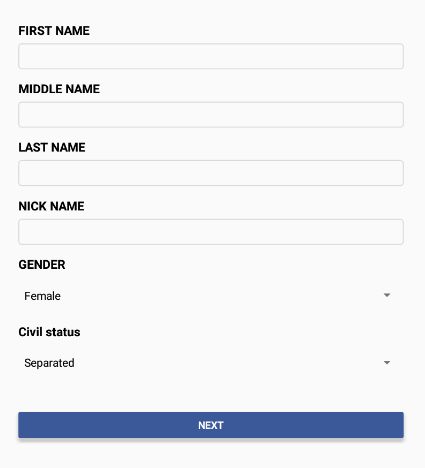
I want to put a border around the Picker Container.
Actual behaviour
By default, it has no Border. I tried to customize the style and add border width on Picker related styles but still not working. I can customize borders of the textinputs, text, and datepickerandroid. But no luck on Picker Android.
I think Picker component should be wrapped by another view instead of directly under formGroupStyle.
 jovanxua
All 2 comments
Nevermind my issue above. I created a custom template just to allow borders on Picker in Android as below:
<View style={formGroupStyle}>
        {label}
            <View style={specialPickerWrapperStyle}>
                <Picker
                    accessibilityLabel={locals.label}
                    ref="input"
                    style={selectStyle}
                    selectedValue={locals.value}
                    onValueChange={locals.onChange}
                    help={locals.help}
                    enabled={locals.enabled}
                    mode={locals.mode}
                    prompt={locals.prompt}
                    itemStyle={locals.itemStyle}
                >
                    {options}
                </Picker>
            </View>
        {help}
        {error}
        </View>
jovanxua
on 25 Jan 2018
use touchable opacity
 mkmukulkumar
on 6 Apr 2020
mkmukulkumar
on 6 Apr 2020
Related issues
 muthuraman007
·
4Comments
muthuraman007
·
4Comments
 flyingace
·
5Comments
flyingace
·
5Comments
 abdelghafourzguindou
·
4Comments
abdelghafourzguindou
·
4Comments
 albertogugliotta
·
3Comments
albertogugliotta
·
3Comments
 sibelius
·
4Comments
sibelius
·
4Comments
Most helpful comment
Nevermind my issue above. I created a custom template just to allow borders on Picker in Android as below:
<View style={formGroupStyle}>
        {label}
            <View style={specialPickerWrapperStyle}>
                <Picker
                    accessibilityLabel={locals.label}
                    ref="input"
                    style={selectStyle}
                    selectedValue={locals.value}
                    onValueChange={locals.onChange}
                    help={locals.help}
                    enabled={locals.enabled}
                    mode={locals.mode}
                    prompt={locals.prompt}
                    itemStyle={locals.itemStyle}
                >
                    {options}
                </Picker>
            </View>
        {help}
        {error}
        </View>