Tcomb-form-native: No style applied to Date
I am using tcomb in react native app
Expected behaviour
Date supposed to have style applied to it
Actual behaviour
There is no style shown.. I also tried to override stylesheet , but it seems that styles do not apply
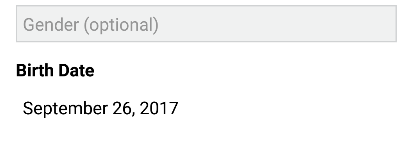
Code snippet
const Form = t.form.Form;

Form.stylesheet.datepicker.normal.marginBottom = 20; // Not working , no changes applied
Form.stylesheet.datepicker.normal.borderColor = '#000';  // Not working as well

const formRegistration = t.struct({
    // other fields
    birthDate: t.maybe(t.Date)
});
const options = {
    fields: {
        birthDate : {
              label: 'Birth Date',
              mode: 'date',
              config: {
                   format: (date) => myDateFormat('LL', date)
             }
         }
     }
 };
 YasirSherzad
All 2 comments
I have the same issue, any help?
Thanks in advance.
 jlsuarezs
on 27 Sep 2017
jlsuarezs
on 27 Sep 2017
@jlsuarezs Yes I found the solution... Looking at this: https://github.com/gcanti/tcomb-form-native/blob/master/lib/stylesheets/bootstrap.js
The style for the date is in dateValue at line 196
so this is what I did to style it according to what I need
const Form = t.form.Form;

Form.stylesheet.dateValue.normal.borderColor = '#d0d2d3';
Form.stylesheet.dateValue.normal.backgroundColor = '#f0f1f1';
Form.stylesheet.dateValue.normal.borderWidth = 1;
you follow the same way to style other components in tcomb (e.g: labels: Form.stylesheet.controlLabel.normal.fontSize = 14;)
YasirSherzad
on 27 Sep 2017
👍6
Was this page helpful?
0 / 5 - 0 ratings
Related issues
 scarlac
·
4Comments
scarlac
·
4Comments
 muthuraman007
·
4Comments
muthuraman007
·
4Comments
 sibelius
·
4Comments
sibelius
·
4Comments
 dvlprmartins
·
4Comments
dvlprmartins
·
4Comments
 ilyadoroshin
·
4Comments
ilyadoroshin
·
4Comments
Most helpful comment
@jlsuarezs Yes I found the solution... Looking at this: https://github.com/gcanti/tcomb-form-native/blob/master/lib/stylesheets/bootstrap.js
The style for the date is in
dateValueat line 196so this is what I did to style it according to what I need
you follow the same way to style other components in tcomb (e.g: labels:
Form.stylesheet.controlLabel.normal.fontSize = 14;)