Tau: [BUG]: flutterSoundHelper.convertFile crash on release app
Flutter Sound Version :
FULL flavor ?
Important: Result of the command :
flutter pub deps | grep flutter_sound
Severity
- Crash on release app
Platforms you faced the error
Android
Real device
Describe the bug
On debug mode, i used flutterSoundHelper.convertFile to convert the temp file created by the recorder to permanent file; i record on aac as temp and convert to premanent mp3; this work well on debug, but when i build a release app, record work well, but when on convert , the app crash,
i said that is the convert the problem cause i put a specifi button to convert aac to mp3, and when the button clicked, the app crash,
Logs!!!!
i put some try catch on my code to see the output, this is the log on debug
I/flutter (14966): ----------------------------------------
I/flutter (14966): convert start
I/flutter (14966): ----------------------------------------
D/flutter-ffmpeg(14966): Running FFmpeg with arguments: [-loglevel, error, -y, -i, /data/user/0/com.example.topos/cache/300621-19#58-Bornage-Immatriculation.aac, /storage/emulated/0/Topos/300621-19#58-Bornage-Immatriculation.mp3].
I/mobile-ffmpeg(14966): Loading mobile-ffmpeg.
I/mobile-ffmpeg(14966): Loaded mobile-ffmpeg-full-arm64-v8a-4.4-lts-20200724.
D/mobile-ffmpeg(14966): Callback thread started.
D/flutter-ffmpeg(14966): FFmpeg exited with rc: 0
I/flutter (14966): ----------------------------------------
I/flutter (14966): convert end
I/flutter (14966): ----------------------------------------
the aac file is the temp file, and the mp3 is the result of convert, the file is successfuly converted and it appear in the path where it would be. i don't know if this line "D/flutter-ffmpeg(14966): Running FFmpeg with arguments: [-loglevel, error, -y, -i, " mean something important or not cause this error text.
But on release this convert make the app crash.
Below screenshot of my full code to save the record

 Necrometal
All 52 comments
I have no idea :(
Have you any possibility to check if your AAC file is correct before trying to convert it on your release version ?
 Larpoux
on 30 Jun 2021
Larpoux
on 30 Jun 2021
I have no idea :(
Have you any possibility to check if your AAC file is correct before trying to convert it on your release version ?
my device is not rooted, so i think i can't check manualy, but ill try with File.exist()
Necrometal
on 30 Jun 2021
I am not an expert, but maybe you can try "adb pull ..."
Larpoux
on 30 Jun 2021
I am not an expert, but maybe you can try "adb pull ..."
adb pull with device connected or no need?
i've tried to play the recorded (tmp file)on release and it work, make a dialog to show if file exit or not and it exist
Necrometal
on 30 Jun 2021
ok. If you can play your AAC temporary file, it is certainly correct.
Actually I have no idea.
Does someone else can help ?
Larpoux
on 30 Jun 2021
Try to do a convert to an "xxx.opus" file.
Just to see if the crash is because .mp3. (Mobile FFmpeg use lame to encode mp3. But lame is not supposed to be in a released app).
I guess that you will get the same crash, but just try ...
Larpoux
on 30 Jun 2021
Try to do a
convertto an "xxx.opus" file.
Just to see if the crash is because .mp3. (Mobile FFmpeg uselameto encode mp3. But lame is not supposed to be in a released app).
I guess that you will get the same crash, but just try ...
you mean opus extension?
Necrometal
on 30 Jun 2021
yes
Larpoux
on 30 Jun 2021
😄
Larpoux
on 30 Jun 2021
The extension really must be ".opus" instead of ".mp3" for your test. FFmpeg uses the extension to select the correct output
codec.
Larpoux
on 30 Jun 2021
so tried to convert to obus using Codec.obusCAF and Codec.obusOGG, tried with aac to aac, all crash :(
Necrometal
on 30 Jun 2021
:(
Did you try to connect your device to your computer and do a "flutter run --release" ?
We really need logs ...
Larpoux
on 30 Jun 2021
at the last line, it crash
i record, stop record, play the file recorded, pause it,
and when try to convert, it end like that

Necrometal
on 30 Jun 2021
Interesting.
Can you try to replace the special char "#" in your filename to something else ?
Larpoux
on 30 Jun 2021
same thing
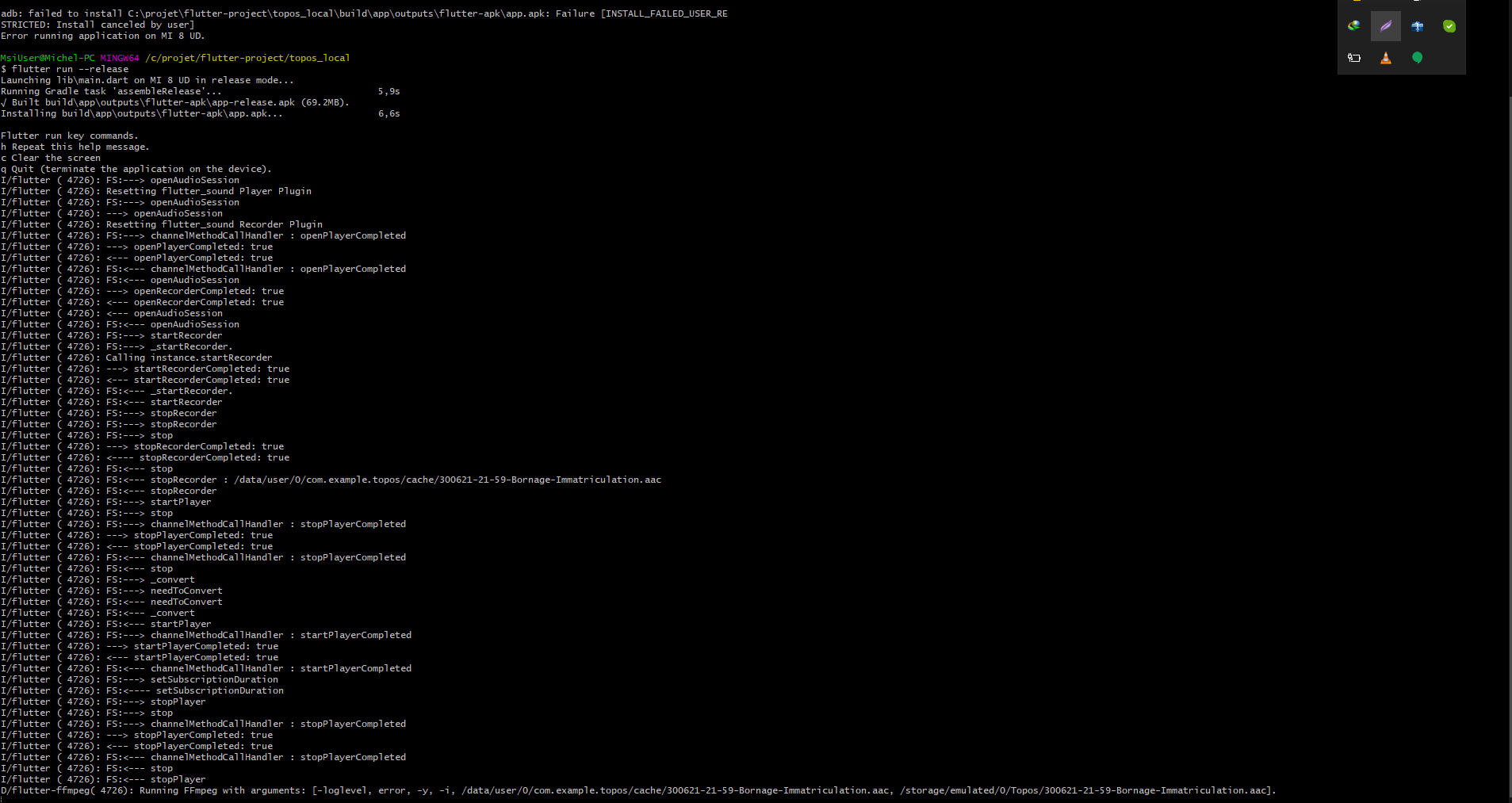
Necrometal
on 30 Jun 2021
I must study your log now.
I I do not understand why there is a "pausePlayer()" before your convert.
You should have a "stopPlayer()" and not a "pausePlayer()"
Larpoux
on 30 Jun 2021
The sequence seems incorrect : The player is paused and not stopped during the convert.
Larpoux
on 30 Jun 2021
But this does not explain why a crash
Larpoux
on 30 Jun 2021
The sequence is correct in your last logs.
I am stuck. No idea.
Larpoux
on 30 Jun 2021
I must study your log now.
I I do not understand why there is a "pausePlayer()" before your convert.
You should have a "stopPlayer()" and not a "pausePlayer()"
in this line i'm playing the record :/
Necrometal
on 30 Jun 2021
Of course you use the full flavor of flutter sound, and not the lite ? don't you ?
Larpoux
on 30 Jun 2021
Of course you use the full flavor of flutter sound, and not the lite ? don't you ?
honestly i don't know .
i just use this this
Necrometal
on 30 Jun 2021
What is the result of :
flutter pub deps | grep flutter_sound
?
Larpoux
on 30 Jun 2021
What is the result of :
flutter pub deps | grep flutter_sound
?
i'm using vscode, so i just copy the dependence on pubspec and it pub automaticly ^^"
Necrometal
on 30 Jun 2021
Just check the command
flutter pub deps | grep flutter_sound
We will know which version flutter had selected
Larpoux
on 30 Jun 2021
Or just :
flutter pub deps
if you do not have a regular shell
Larpoux
on 30 Jun 2021
i removed the dependence from pubspec and added it manually with flutter pub add flutter_sound
Necrometal
on 30 Jun 2021
I insist you do a "flutter pub deps" to be sure which flutter_sound version is selected
Larpoux
on 30 Jun 2021
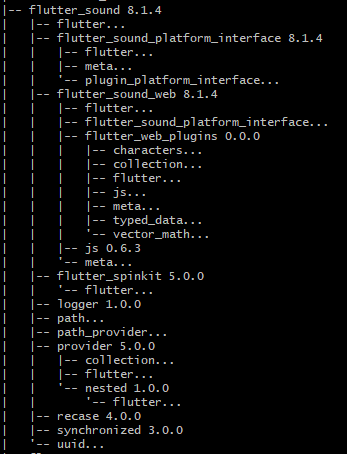
Necrometal
on 30 Jun 2021
This is correct.
I am sorry, Necro, I am stuck. Someone else can help ?
Larpoux
on 30 Jun 2021
This is correct.
I am sorry, Necro, I am stuck. Someone else can help ?
just a question , have you already use the converter on a little project? :)
i think if you tried to make it yourself in little project can maybe help if its not a package bug :)
Necrometal
on 1 Jul 2021
Might be better off using flutter sound lite and including ffmpeg as a separate dependency and running the commands directly.
Flutter_ffmpeg likes to crash or output weird things when multiple jobs are run concurrently. I had to create a queue system for ffmpeg calls to work around this. I'm sure there are other quirks and something like that could be causing this issue.
Best way forward is probably to run ffmpeg directly so you have full control over the process
 mhstoller
on 1 Jul 2021
mhstoller
on 1 Jul 2021
I agree with @mhstoller.
Actually Flutter Sound Full is linked with Flutter FFmpeg FULL. Flutter FFmpeg FULL is huge and probably you do not need all the video stuff. The current link of Flutter Sound FULL is a kind of hack to be able to play directly Opus files on iOS.
If you use Flutter Sound Lite and put a dependency on "Flutter FFmpeg Audio" (or maybe even a lighter library),
you will have something more clean and more lite.
Larpoux
on 1 Jul 2021
@mhstoller :
I am not surprised that you got some concurrency issues using Flutter Ffmpeg.
All the Flutter Sound verbs are protected with an interlock semaphore.
But I did not realized that Convert() must be also protected with this interlock semaphore.
Someone (me?) should add a few lines of code to achieve that.
Larpoux
on 1 Jul 2021
just a question , have you already use the converter on a little project? :)
i think if you tried to make it yourself in little project can maybe help if its not a package bug :)
Yes. Definitely. I began to write several few very simple test app. The purpose of those little tests are to show and test only one or two Flutter Sound feature at a time.
We must code a new very little test for the Convert routine.
@necrometal :
I will do some tests and fix concurrency issues if any, tomorrow.
Please wait a few days.
I am sorry that you get problems with Flutter Sound.
Larpoux
on 1 Jul 2021
just a question , have you already use the converter on a little project? :)
i think if you tried to make it yourself in little project can maybe help if its not a package bug :)Yes. Definitely. I began to write several few very simple test app. The purpose of those little tests are to show and test only one or two Flutter Sound feature at a time.
We must code a new very little test for the Convert routine.@Necrometal :
I will do some tests and fix concurrency issues if any, tomorrow.
Please wait a few days.
I am sorry that you get problems with Flutter Sound.
Not problem dude :) for moment i used to record the sound directly on perment file xD
But record an mp3 is not allowed right? i tried on record to mp3 but no sound when playing the file.
Necrometal
on 2 Jul 2021
Might be better off using flutter sound lite and including ffmpeg as a separate dependency and running the commands directly.
Flutter_ffmpeg likes to crash or output weird things when multiple jobs are run concurrently. I had to create a queue system for ffmpeg calls to work around this. I'm sure there are other quirks and something like that could be causing this issue.
Best way forward is probably to run ffmpeg directly so you have full control over the process
Have you please any tutorial for doing the FFmpeg separately?
Necrometal
on 2 Jul 2021
Yes. Android and iOS does not allow us to record mp3.
What you are trying to do is correct : record AAC (for example) and then do a convert to mp3 with ffmpeg.
I am writing a little test for Convert. I will tell you when done.
Larpoux
on 2 Jul 2021
Have you please any tutorial for doing the FFmpeg separately?
The documentation is on the _Flutter FFmpeg_ site.
You must add a dependency to Flutter_FFmpeg and you must link your android App with Mobile FFmpeg.
I think that this link is not obvious. It is the reason for which I linked Flutter Sound to Fluttter FFmpeg, so that Flutter Sound users does not bother with that.
Larpoux
on 2 Jul 2021
Wait until tomorrow. I will have a new Flutter Sound with an example of Convert AAC to MP3.
Larpoux
on 2 Jul 2021
Wait until tomorrow. I will have a new Flutter Sound with an example of Convert AAC to MP3.
ok thanks :)
Necrometal
on 2 Jul 2021
Is there any reason you try to convert during a PausePlayer() ?
Larpoux
on 2 Jul 2021
Is there any reason you try to convert during a PausePlayer() ?
Not at all, i just use my app like guest user xD, i just paused the audio for no reason and save (convert) like nothing happen
Necrometal
on 2 Jul 2021
OK. I will keep my example very simple :
- Convert an AAC file to MP3
- Play the MP3
Larpoux
on 2 Jul 2021
so the sound must be stopped to be converted?
Necrometal
on 2 Jul 2021
No.
I just asked to be similar in my test with your App
Larpoux
on 2 Jul 2021
No.
I just asked to be similar in my test with your App
okay, i'll wait for your up tomorrow
Necrometal
on 2 Jul 2021
Necro,
I am able to reproduce your issue on my development environment.
The problem is a problem in Mobile FFmpeg : Here
@tanersener published a work-around. I am going to try this work-around this afternoon.
Then I will post more informations in this thread.
Larpoux
on 3 Jul 2021
Hi Necro,
Flutter Sound 8.1.9 is released.
This version has a fix for your issue.
You must also check your build.gradle :
- Remove any reference to repository
jcenter() - Add a reference to
mavenCentral()if not already done
I wrote a very simple example here that record an AAC audio, convert it to MP3 and playback it.
You probably do not need any more this example : your code was correct and the problem was on Flutter FFmpeg.
Thank you for your patience
Larpoux
on 3 Jul 2021
Hi Necro,
Flutter Sound 8.1.9 is released.
This version has a fix for your issue.You must also check your build.gradle :
- Remove any reference to repository
jcenter()- Add a reference to
mavenCentral()if not already doneI wrote a very simple example here that record an AAC audio, convert it to MP3 and playback it.
You probably do not need any more this example : your code was correct and the problem was on Flutter FFmpeg.Thank you for your patience
Thanks :) i'll test it and give you a feedback
Necrometal
on 3 Jul 2021
it work on flutter run --release, i think it'll work on build release too :) thanks.
i have another thing to ask if you can check this one please ^^
Necrometal
on 6 Jul 2021
Hi Necro,
Flutter Sound 8.1.9 is released.
This version has a fix for your issue.
You must also check your build.gradle :
- Remove any reference to repository
jcenter()- Add a reference to
mavenCentral()if not already doneI wrote a very simple example here that record an AAC audio, convert it to MP3 and playback it.
You probably do not need any more this example : your code was correct and the problem was on Flutter FFmpeg.
Thank you for your patienceThanks :) i'll test it and give you a feedback
good job.
 ThinkerJack
on 16 Jul 2021
ThinkerJack
on 16 Jul 2021
Related issues
 palfrey
·
3Comments
palfrey
·
3Comments
 Denmal1982
·
4Comments
Denmal1982
·
4Comments
 gtilson
·
5Comments
gtilson
·
5Comments
 java-james
·
3Comments
Larpoux
·
4Comments
java-james
·
3Comments
Larpoux
·
4Comments