Version of flutter_sound
4.0.1+1
flutter doctor
Platforms you faced the error (IOS or Android or both?)
IOS only
Expected behavior
Actual behavior
When i have tried to call resume recording it was calling stopRecorder(). But this was not in case of android.
Tested environment (Emulator? Real Device?)
IOS 13.4 - XS 10 Real Device
Steps to reproduce the behavior
- Call start recorder
- Call Pause Recorder
- these two steps are working on both the platforms
- Call Resume recorder
- this resumes recording in android but not in IOS.
 chpraneeth1539
All 50 comments
We need your logs
 Larpoux
on 28 Apr 2020
Larpoux
on 28 Apr 2020
We need your logs
Do you mean the logs that i get when i use flutter build ios ??
actually I'm new to coding/development.
chpraneeth1539
on 28 Apr 2020
The logs that you get when running on iOS and resume recording does not work.
Larpoux
on 28 Apr 2020
Future
bool b = await invokeMethod('resumeRecorder',
if (!b) {
await stopRecorder();
return false;
}
recorderState = t_RECORDER_STATE.IS_RECORDING;
return true;
}
I tried to Debug the issue. Can you please tell me in what cases does this function returns false.
chpraneeth1539
on 29 Apr 2020
This function returns false when the resume() cannot be done.
For example if your playback is not in a pause state.
Larpoux
on 29 Apr 2020
(flutterSoundRecorder.isRecording)
? FloatingActionButton(
heroTag: 'Record',
child: Icon(Icons.pause, color: Colors.red),
backgroundColor: Colors.white,
elevation: 1,
onPressed: () {
pauseRecorder();
})
: FloatingActionButton(
heroTag: 'Record',
child: Icon(Icons.mic_none),
backgroundColor: Colors.red,
elevation: 1,
onPressed: () {
if (flutterSoundPlayer.isPlaying || flutterSoundPlayer.isPaused) stopPlayer();

if (flutterSoundRecorder.isPaused) resumeRecorder();
else startRecorder();
}
)
This is my button that does the recording, pausing, and resuming the recording process.
When i debug using breakpoints, i see the stopPlayer() is called, then resumeRecorder() method is called and the function that i have shared above returns false.
You mean to say - it returns false when FlutterSoundRecorder is not in isPaused state?
chpraneeth1539
on 29 Apr 2020
my other related functions goes as below-
Future
await flutterSoundRecorder.pauseRecorder();
setState(() {
animationControllerWave.reverse();
_stopWatchTimer.onExecute.add(StopWatchExecute.stop);
});
}
Future
await flutterSoundRecorder.resumeRecorder();
setState(() {
animationControllerWave.forward();
_stopWatchTimer.onExecute.add(StopWatchExecute.start);
});
}
chpraneeth1539
on 29 Apr 2020
if (flutterSoundPlayer.isPlaying || flutterSoundPlayer.isPaused) stopPlayer();
if (flutterSoundRecorder.isPaused) resumeRecorder();
If flutterSoundPlayer is Paused then you stop it.
Of course, the following test does nothing, because flutterSoundPlayer is stopped. It cannot be paused anymore.
Larpoux
on 29 Apr 2020
But the issue i had was with resumeRecorder().
This is the scenario i had noticed with the same code-
On Android-
- started recording
- paused recording
- played the recorded track
- paused the playing track
- resumed the recording - this returned true
These were working as expected in android
The same steps when executed on IOS
5th step returned false.
Note: In brief, when the track is ni paused or playing or stopped state the resume recording is returning false only on ios.
chpraneeth1539
on 29 Apr 2020
`class Record extends StatefulWidget {
Record({Key key, this.title}) : super(key: key);
final String title;
@override
RecordTrack createState() => RecordTrack();
}
class RecordTrack extends State
FlutterSound flutterSound = new FlutterSound();
String _trackPath;
double _recorderPosition, _playerPosition;
StreamSubscription _playerSubscription, _recorderSubscription;
FlutterSoundRecorder flutterSoundRecorder = new FlutterSoundRecorder();
FlutterSoundPlayer flutterSoundPlayer = new FlutterSoundPlayer();
@override
void dispose() {
super.dispose();
flutterSoundRecorder.release();
flutterSoundPlayer.release();
}
void startRecorder() async {
try {
if (flutterSoundPlayer.isPlaying) flutterSoundPlayer.stopPlayer();
  _trackPath = await flutterSoundRecorder.startRecorder(iosQuality: IosQuality.HIGH, bitRate: 32000, requestPermission: true);

  setState(() {
    _playerPosition = null;
  });
} on Exception catch (e) {
  print('start recorder exception ---> $e');
}
}
void stopRecorder() async {
if (flutterSoundRecorder.isRecording || flutterSoundPlayer.isPlaying)
setState(() {
stopPlayer();
});
await flutterSoundRecorder.stopRecorder().then((onValue) {
if (_recorderSubscription != null) {
_recorderSubscription.cancel();
_recorderSubscription = null;
}
});
}
void startPlayer() async {
if (flutterSoundPlayer.isPlaying || flutterSoundPlayer.isPaused) stopPlayer();
await flutterSoundPlayer.startPlayer(
  _trackPath,
);

_playerSubscription = flutterSoundPlayer.onPlayerStateChanged.listen((e) {
  if (e != null) {
    setState(() {
      _playerPosition = e.currentPosition;
    });
  }
});
}
void stopPlayer() async {
await flutterSoundPlayer.stopPlayer().then((value) {
if (_playerSubscription != null) {
setState(() {
_playerSubscription.cancel();
_playerSubscription = null;
});
}
});
}
void pausePlayer() async {
await flutterSoundPlayer.pausePlayer().then((result) {
setState(() {});
return result;
});
}
void resumePlayer() async {
await flutterSoundPlayer.resumePlayer().then((result) {
setState(() {});
return result;
});
}
void seekToPlayer(int milliSecs) async {
await flutterSoundPlayer.seekToPlayer(milliSecs);
}
String formatDuration(double duration) {
if (duration == null || duration == 0) {
return '00:00';
}
int hundreds = (duration / 10).truncate();
int seconds = (hundreds / 100).truncate();
int minutes = (seconds / 60).truncate();
String minutesStr = (minutes % 60).toString().padLeft(2, '0');
String secondsStr = (seconds % 60).toString().padLeft(2, '0');

return "$minutesStr:$secondsStr";
}
Future
await flutterSoundRecorder.pauseRecorder();
}
Future
await flutterSoundRecorder.resumeRecorder();
}
void cancelRecording() {
stopPlayer();
stopRecorder();
_trackPath = null;
_playerPosition = null;
_recorderPosition = null;
setState(() {});
}
@override
Widget build(BuildContext context) {
return Scaffold(
body: Column(
mainAxisAlignment: MainAxisAlignment.spaceEvenly,
children:
Container(
margin: EdgeInsets.only(left: 15, right: 15),
child: Row(
mainAxisAlignment: MainAxisAlignment.center,
crossAxisAlignment: CrossAxisAlignment.center,
mainAxisSize: MainAxisSize.max,
children:
                                /// play or pause button
                                (_trackPath == null)
                                    ? Expanded(child: Container())
                                    : Expanded(
                                  child: (flutterSoundRecorder.isRecording)
                                      ? IconButton(
                                    icon: Icon(Icons.stop, color: Colors.white),
                                    iconSize: 30,
                                    onPressed: () {
                                      setState(() {
                                        stopRecorder();
                                      });
                                    },
                                  )
                                      : IconButton(
                                      icon: AnimatedIcon(
                                          icon: AnimatedIcons.play_pause, color: Colors.grey[100]),
                                      iconSize: 30,
                                      onPressed: () {
                                        if (flutterSoundPlayer.isPlaying) {
                                          pausePlayer();
                                        } else if (flutterSoundPlayer.isPaused) {
                                          this.resumePlayer();
                                        } else {
                                          this.startPlayer();
                                        }
                                      }),
                                ),

                                ///record or pause button
                                Expanded(
                                  child: Stack(
                                    alignment: Alignment.center,
                                    children: <Widget>[
                                      (flutterSoundRecorder.isRecording)
                                          ? FloatingActionButton(
                                          heroTag: 'Record',
                                          child: Icon(Icons.pause, color: Colors.red),
                                          onPressed: () {
                                            pauseRecorder();
                                          })
                                          : FloatingActionButton(
                                          heroTag: 'Record',
                                          child: Icon(Icons.mic_none),
                                          onPressed: () {
                                            if (flutterSoundPlayer.isPlaying || flutterSoundPlayer.isPaused) stopPlayer();

                                            if (flutterSoundRecorder.isPaused) {
                                              resumeRecorder();
                                            }

                                            else
                                              startRecorder();
                                          })
                                    ],
                                  ),
                                ),

                                ///close button
                                (_trackPath == null)
                                    ? Expanded(child: Container())
                                    : Expanded(
                                  child: IconButton(
                                    icon: Icon(Icons.close, color: Colors.white),
                                    iconSize: 30,
                                    onPressed: () {
                                      setState(() {
                                        cancelRecording();
                                      });
                                    },
                                  ),
                                ),
                              ],
                            ),
                          ),
                          (_trackPath != null)
                              ? (!flutterSoundRecorder.isRecording)
                              ? Container(
                            height: 50,
                            child: (!flutterSoundPlayer.isPlaying)
                                ? IconButton(
                                icon: Icon(Icons.cloud_upload, color: Colors.grey[100]),
                                iconSize: 30,
                                onPressed: () {
                                })
                                : SliderTheme(
                              data: SliderThemeData(
                                activeTrackColor: Colors.green,
                                inactiveTrackColor: Colors.green,
                                thumbColor: Colors.green,
                                thumbShape: RoundSliderThumbShape(enabledThumbRadius: 4.0, disabledThumbRadius: 2.0),
                              ),
                              child: Slider(
                                min: 0,
                                max: (_maxDuration != null) ? _maxDuration : 0,
                                value: (_playerPosition != null) ? _playerPosition : 0,
                                activeColor: Colors.grey[200],
                                inactiveColor: Colors.grey[200],
                                onChanged: (double value) {
                                  this.setState(() {
                                    seekToPlayer(value.toInt());
                                  });
                                },
                              ),
                            ),
                          )
                              : Container(height: 50)
                              : Container(
                            height: 50,
                            child: Text(
                              'Please the red button to \nstart your recording',
                              textAlign: TextAlign.center,
                              style: TextStyle(color: Colors.white),
                            ),
                          ),
                        ]
                    )
);
}
}
`
chpraneeth1539
on 29 Apr 2020
Please, fix your code which is bad,
and send us your logs if you still have problems.
Larpoux
on 29 Apr 2020
Please, fix your code which is incorrect.
Please re-open this issue and send us your logs if you still have problems.
Larpoux
on 30 Apr 2020
Where can i find my logs?
chpraneeth1539
on 30 Apr 2020
when i run my app, the console shows only the things that i have printed using PRINT
I have set my flutter console to show verbose logs
I don't see any error in those logs
actually I'm not getting any error, just that the resume recording is returning false. even when my player is in a stopped state and also I have checked before resuming if the recorder state is in a paused state.
chpraneeth1539
on 30 Apr 2020
Linked to #292
Larpoux
on 2 May 2020
Can you please let me know how can i help you to get this bug resolved. What additional details required let me know ill provide them as much as possible.
To my knowledge and exp this is one of the best plugins i have ever used. Please help in resolving this bug
chpraneeth1539
on 2 May 2020
I tried to Debug the issue. Can you please tell me in what cases does this function returns false.
I found a little bug with the resumeRecorder() procedure.
This function should return a String (like pauseRecorder() ) and not a boolean.
I am going to fix that in next release.
To my knowledge and exp this is one of the best plugins i have ever used. Please help in resolving this bug
To understand what is your problem, we need your logs.
This is very important.
Larpoux
on 3 May 2020
In all cases that I have tested, this function is returning false in the following case
- StartRecorder()
- PauseRecorder()
- ResumeRecorder() - in this step, the resumeRecorder() retuns true and resumes the recording
- StartPlayer()
- StopPlayer() or PausePlayer()
- ResumeRecorder() - in this step, the resumeRecorder() retuns false and state goed to ISSTOPPED
chpraneeth1539
on 3 May 2020
We cannot do anything without your logs.
Larpoux
on 3 May 2020
you can refer to the logs in #292, this is the only output we are getting in XCODE console. Anyways ill share once again if you need them
chpraneeth1539
on 3 May 2020
Anyways ill share once again if you need them
Yes, please.
Larpoux
on 3 May 2020
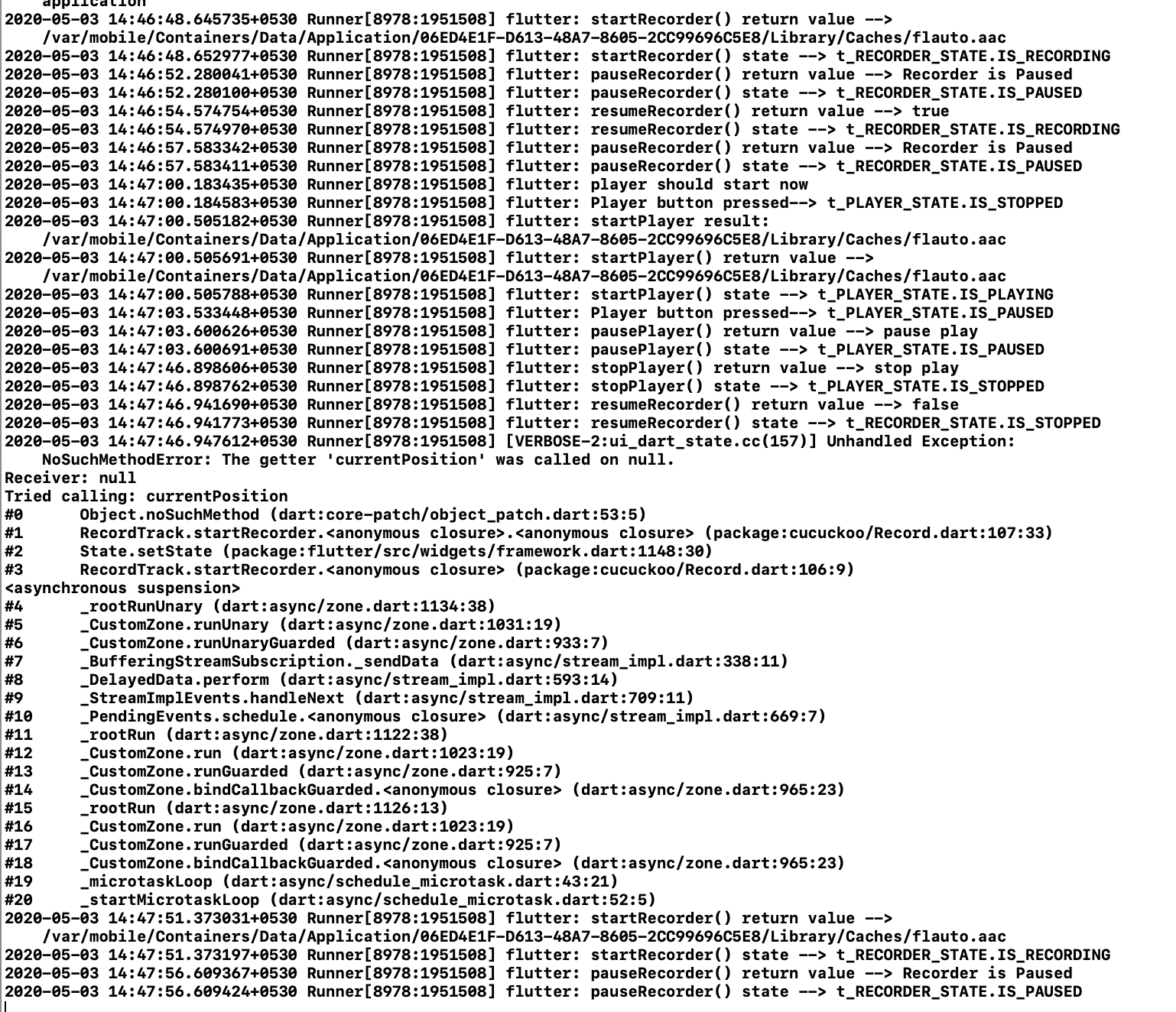
chpraneeth1539
on 3 May 2020
For every method call, I have added print statements - return value and also printing the current state of recorder/player
chpraneeth1539
on 3 May 2020
Thank you very much @chpraneeth1539 .
I am going to look to this.
Larpoux
on 3 May 2020
Linked to #292 and #282 :
I realize that there is actually a serious problem with 'resumeRecorder()`.
I am going to look to that, guys and girls.
But I am currently overbooked and I will work on that in a few days(less than one week).
Sorry for the inconvenient.
Larpoux
on 3 May 2020
@chpraneeth1539 :
Looking to your logs, it seems that you have a serious bug in cucuckoo/Record.dart at line 107 : you call method currentPosision on a null object.
This is probably the reason of your problems.
Please, fix your code and reopen this issue if you still have problems.
Larpoux
on 4 May 2020
Ideally this should no return null, because when i called resumeRecorder -> this is making the return value of onRecorderStateChanged null. Which is not right.
in parallel lets take the same scenario for flutterSoundPlayer
When i pause the player and then resume player the position was not returning null at this point.
chpraneeth1539
on 4 May 2020
I agree that the recorder and the player should be homogeneous.
What is your line 107 ?
Larpoux
on 4 May 2020
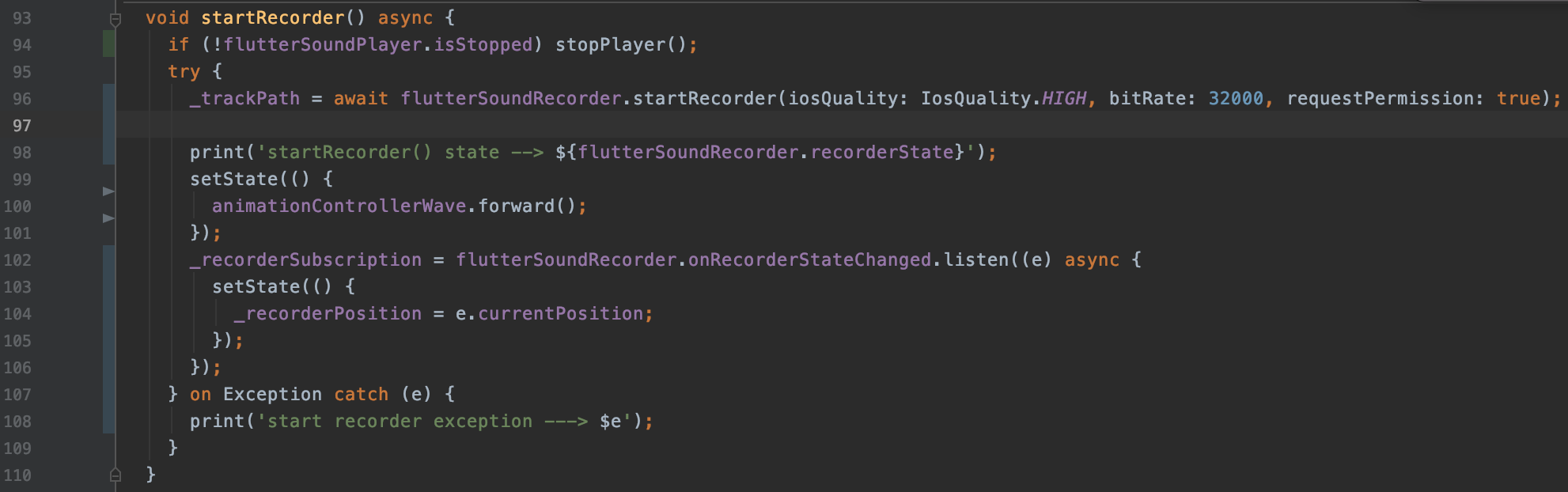
chpraneeth1539
on 4 May 2020
the line 107 you are refferring to is 104 now
chpraneeth1539
on 4 May 2020
Oh, Thank you very much.
I see the problem, now.
I am going to fix that.
Thank you for your help (others developers have the same problem than you).
Larpoux
on 4 May 2020
is this the reason why the resume recorder is returning false? (as it cannot find the current recorder position?)
chpraneeth1539
on 4 May 2020
There was a little problem with resumeRecorder() : it should return a String (as pauseRecorder()) but not a boolean. I have just fixed that.
But the problem with your 'e' variable which is null is more serious.
I am looking to the problem, and see if it can be fixed in 4.x.x, or if we must wait the version 5.x.x .
I will give you some news in some hours.
Thank you again for your patience
Larpoux
on 4 May 2020
It is not just that resumeRecorder() is returning true/false. The recording is not getting resumed, instead it is getting stopped as this was returning false.
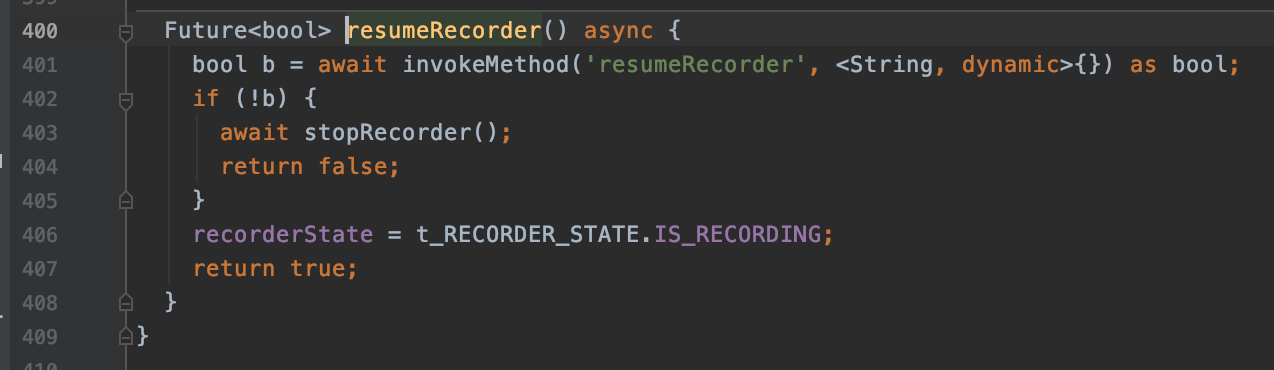
chpraneeth1539
on 4 May 2020
Yes, I understand.
Can you confirm that your problems are on iOS ?
Larpoux
on 4 May 2020
Yes only on IOS i have faced this issue.
chpraneeth1539
on 4 May 2020
In flutterSoundRecorder :
  void _removeRecorderCallback() {
    if (_recorderController != null) {
      _recorderController
        ..add(null) // We keep that strange line for backward compatibility
        ..close();
      _recorderController = null;
    }
  }
This is the reason of your (e) which is null.
I wanted to remove that line, but I had problems with backward compatibility.
I will remove this line in 5.x.x.
But this is not the reason of your recorder being closed.
Larpoux
on 4 May 2020
Please, could you try 4.0.4+1 after protecting your code :
(e != null) ? e.currentPosition : 0
Now my resumeRecorder() does not give any error exceptions but nothing is getting recorder at all post resumeRecorder() call.
chpraneeth1539
on 4 May 2020
Again, is this possible to have your new logs, please ?
Larpoux
on 4 May 2020
and i notice that stop recorder returns the path starting with "file://" but not for any other player or recorder methods that returns the path.
And i see the recorders currentPosition is moving very fast than normal seconds duration.
chpraneeth1539
on 4 May 2020
yes i can share the similiar logs from the Xcode, as i dont get any exceptions or errors that wont be helpful to you at all
chpraneeth1539
on 4 May 2020
Following are the methods called on recorder and player button clicks -->
void startRecorder() async {
    if (!flutterSoundPlayer.isStopped) stopPlayer();
    try {
      _trackPath = await flutterSoundRecorder.startRecorder(iosQuality: IosQuality.HIGH, bitRate: 32000, requestPermission: true);

      print('startRecorder() returnvalue --> $_trackPath');
      print('startRecorder() state --> ${flutterSoundRecorder.recorderState}');
      print(' ');

      setState(() {
        animationControllerWave.forward();
      });
      _recorderSubscription = flutterSoundRecorder.onRecorderStateChanged.listen((e) async {
        setState(() {
          if (e != null) _recorderPosition = e.currentPosition;
        });
      });
    } on Exception catch (e) {
      print('start recorder exception ---> $e');
    }
  }

  void stopRecorder() async {
    if (!flutterSoundPlayer.isStopped) stopPlayer();

    await flutterSoundRecorder.stopRecorder().then((onValue) {
      if (_recorderSubscription != null) {
        _recorderSubscription.cancel();
        _recorderSubscription = null;
      }
      print('stopRecorder() state --> ${flutterSoundRecorder.recorderState}');
      print(' ');
      setState(() {
        _recorderPosition = null;
        animationControllerWave.reverse();
      });
    });
  }

Future<void> pauseRecorder() async {
    var temp = await flutterSoundRecorder.pauseRecorder();

    print('recorder current position --> $_recorderPosition');
    print('pauseRecorder() state --> ${flutterSoundRecorder.recorderState}');
    print(' ');

    setState(() {
      animationControllerWave.reverse();
    });
  }

  Future<void> resumeRecorder() async {
    var temp = await flutterSoundRecorder.resumeRecorder();

    print('recorder current position --> $_recorderPosition');
    print('resumeRecorder() state --> ${flutterSoundRecorder.recorderState}');
    print(' ');

    setState(() {
      animationControllerWave.forward();
    });
  }

  void startPlayer() async {
    try {
      var temp = await flutterSoundPlayer.startPlayer(
        _trackPath,
        whenFinished: () {
          _animationController.reverse();
          print("player current position $_maxDuration");
        },
      );

      print('startPlayer() state --> ${flutterSoundPlayer.playerState}');
      print(' ');

      _playerSubscription = flutterSoundPlayer.onPlayerStateChanged.listen((e) {
        if (e != null) {
          setState(() {
            _maxDuration = e.duration;
            _playerPosition = e.currentPosition;
          });
        }
      });
    } catch (e) {
     print('exception------------>>>>>>> $e');
    }
  }

  void stopPlayer() async {
    await flutterSoundPlayer.stopPlayer().then((result) async {
      print('stopPlayer() state --> ${flutterSoundPlayer.playerState}');
      print(' ');

      if (_playerSubscription != null) {
        _playerSubscription.cancel();
        _playerSubscription = null;
      }
      setState(() {
        _playerPosition = null;
        _animationController.reverse();
      });
    });
  }

  void pausePlayer() async {
    await flutterSoundPlayer.pausePlayer().then((result) {
      print('pausePlayer() state --> ${flutterSoundPlayer.playerState}');
      print(' ');

      setState(() {});
      return result;
    });
  }

  void resumePlayer() async {
    await flutterSoundPlayer.resumePlayer().then((result) {
      print('resumePlayer() state --> ${flutterSoundPlayer.playerState}');
      print(' ');

      setState(() {});
      return result;
    });
  }
Here are the logs --> with button clicks the respective method calls will print the following logs
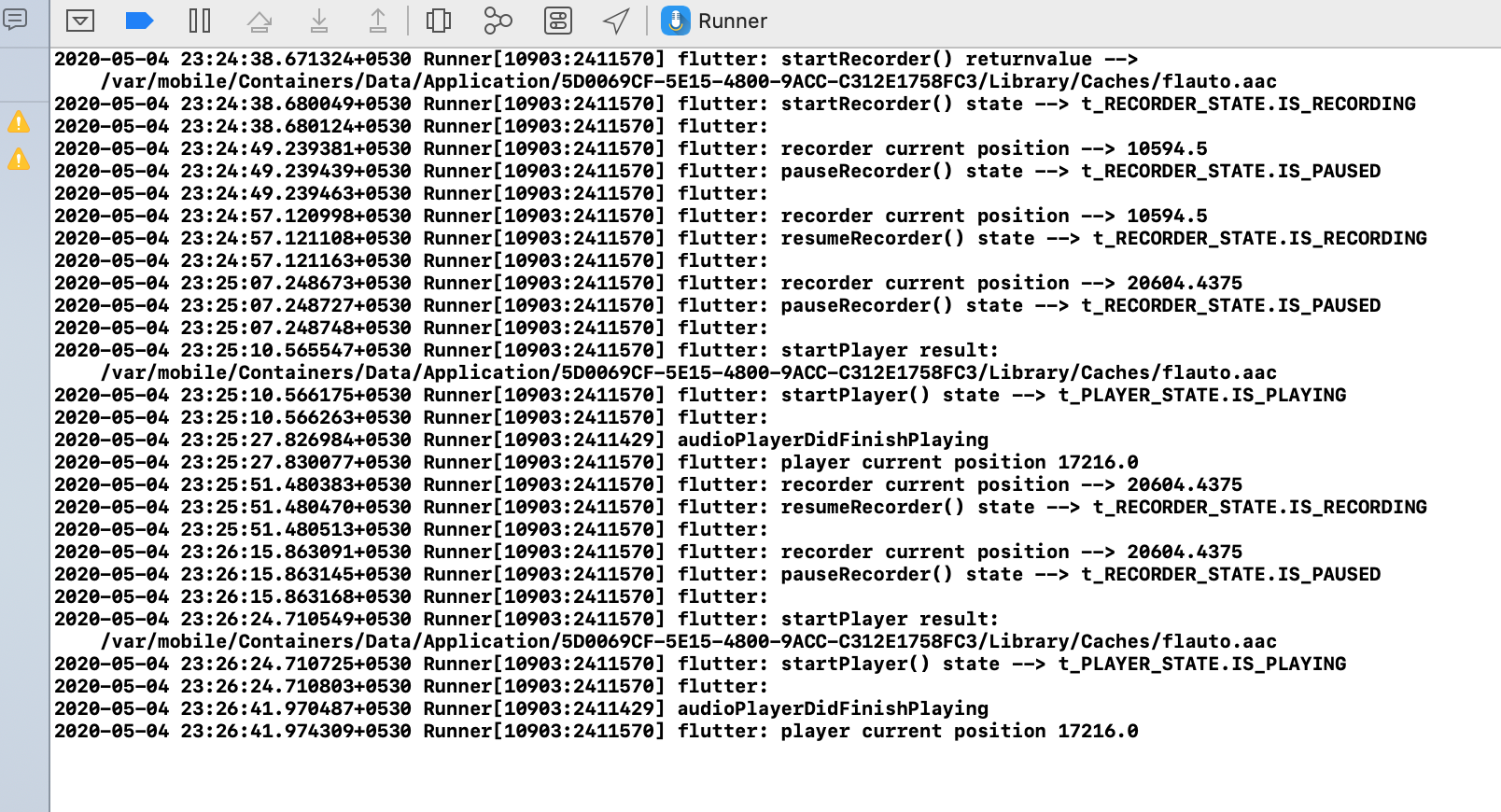
NOTE:
You must notice the following -
- Resume recorder, Pause recorder works fine until i start playing the recorded track, post playing till the end of track you can see that the duration "17216" is not equal to the recorded currentPosition which is "20604"
After playing and player audioPlayerDidFinishPlaying, i have resumed recording from "20604" for 15seconds (you can see the log time), then i have paused the recording - and the current position of recording is the same as "20604" which is expected to be "20604"+15 seonds(in millis)
When i have played after pauseRecording at the end the player audioPlayerDidFinishPlaying at "17216" which is the previous recording duration it self.
Please go through each point as i have seen you have missed my comments. This is a blocker issue in my view.
chpraneeth1539
on 4 May 2020
As I already told you, your problems is because you are trying to record and play the same file.
This is not supposed to work.
An Audio file is data inside an envelope. With most audio format (for example .wav, opus, MP3,) the envelope cannot be built until the end of the record.
AAC/ADTS is more Stream friendly and you are able to open and play the record during the recording. But when you pause the recorder, the last buffer is not yet flushed into the file. So the playback does not play the end of the record. This is normal.
When you stop the recorder, the complete envelope can be built and I guess that if you start a fresh player, you will have the complete record.
I am currently investigating how to manage audio streams from microphone to Flutter, or Flutter to speakers. But this will be new developments. Not Audio files, as now.
Larpoux
on 4 May 2020
Thanks for the details, can you please suggest how to use the streams in this case
I am building an app with recording and playing functionalities but when a part of recording is done the user should be able to play and listen if that if good or no and then upload that to firebase and also add to the same recording if needed.
in this case, do you recommend to duplicate the file flauto.aac that is getting created by default. And then use that file to play and pause.
chpraneeth1539
on 4 May 2020
No, this will not solve your issue.
Let me think about a good solution for you.
Please keep this issue open.
Larpoux
on 4 May 2020
in this case, do you recommend to duplicate the file flauto.aac that is getting created by default. And then use that file to play and pause.
@chpraneeth1539 I tried doing this and it does not work. I think because as @Larpoux said But when you pause the recorder, the last buffer is not yet flushed into the file. so even if you duplicate the file, pat of the audio is missing.
 claptimes5
on 4 May 2020
claptimes5
on 4 May 2020
Thanks @Larpoux and @claptimes5 for your comments 👍
I think this issue is only in IOS and in android this works perfectly
chpraneeth1539
on 4 May 2020
@Larpoux so now im clear about the first point why the recorder current position and player position cannot be the same.
Can you please go through the 2nd and third points as well
chpraneeth1539
on 4 May 2020
Yes, I am aware that you also have another problem. 👎
Looking on internet, many others people have problems because there files are corrupt if not closed properly. I am currently looking if my actual development with stream can help you.
Larpoux
on 4 May 2020
Related issues
Larpoux
·
4Comments
 farrelanelca
·
5Comments
farrelanelca
·
5Comments
 java-james
·
3Comments
java-james
·
3Comments
 luckmlc
·
4Comments
luckmlc
·
4Comments
 BeshoyMelika
·
3Comments
BeshoyMelika
·
3Comments
Most helpful comment
No, this will not solve your issue.
Let me think about a good solution for you.
Please keep this issue open.