 kimwijfje
All 53 comments
Looks promising. Thanks for the issue! Currently, it's not supported.
 hyochan
on 22 Jun 2019
hyochan
on 22 Jun 2019
This issue is stale because it has been open 90 days with no activity. Leave a comment or this will be closed in 7 days.
![github-actions[bot] picture](https://avatars.githubusercontent.com/in/15368?v=4&s=40) github-actions[bot]
on 31 Dec 2019
github-actions[bot]
on 31 Dec 2019
I wanted to achieve thus functionality in my app, is this able to done?
 patelnirav48
on 2 Oct 2020
patelnirav48
on 2 Oct 2020
Yes, you can do that with Flutter Sound V6.
Of course, do not playback to the loudspeaker, you will have a very unpleasant Larsen effect.
Just
- Call
startPlayerFromStream() - declare a Stream controller, and pass the sink side as a parameter to
StartRecorder() - You will listen to the Stream side and pass the data received to your playback session.
This will be very easy.
 Larpoux
on 2 Oct 2020
Larpoux
on 2 Oct 2020
If you do not want to fight with the back-pressure mechanism,
you can use the Stream option (and not the feed verb) for your playback.
It means that you will have two streams cascading. Your Stream, and the internal Flutter Sound Stream. This is not very elegant, nor efficient, but it will work fine.
Larpoux
on 2 Oct 2020
Thanks for your reply. What i want to achieve is when i press mic icon in my app it will record surrounding voice from mic and play instant to headset. I will try as you suggested.
patelnirav48
on 2 Oct 2020
I recommend you to look to the two very simple examples :
- Record to Stream
- Playback from stream without back pressure
You just want to plug the former to the later. Not difficult for having quickly something working.
Of course you will have after to manage all the details :
- What to do with the headset when nothing is recording, stopping all your loop, etc...
Larpoux
on 2 Oct 2020
Perhaps you could try to give foodStreamController.sink (from flutter_sound_player.dart) to StartRecorder().
I am not sure that it will work, but if it does, you will not need to manage your own StreamController and it would be :
- more elegant
- more efficient
- simpler
Just try ... and tell me if it works (I am curious)
EDIT: No, you can't, because the Sink declared in startRecorder() has not the same declaration than foodStreamController. Too bad ... I will think later on your App.
Good luck.
Larpoux
on 2 Oct 2020
Hi KIM
I released Flutter Sound 6.1.4
I did some fixes so that we can plug the Recorder sink directly to the Player Stream.
I added a small example to show the kind of loop you are wanting to do :
streamLoop
There is a small delay between what is recorded and what is played.
I guess that it is because all the audio data are moved from ios/android to Dart, and then back from Dart to ios/android.
If this delay is not acceptable, we will need to plug a direct connection in the OS, without any transfert to Flutter.
Please tell me what you think ...
Larpoux
on 3 Oct 2020
StreamSink is now StreamSink<food> and not any more StreamSink<Uint8List>.
Probably you do not link your example with 6.1.4 but an older version.
What is the result of
$ flutter pub deps | grep flutter_sound
Try also to do a
$ flutter pub get
If you do not want to work/develop/debug Flutter Sound, you can also replace the following lines in pubspec.yaml :
flutter_sound:
    path: ../
 ```
by :
flutter_sound: ^6.1.4
```
Larpoux
on 3 Oct 2020
I guess that it is because all the audio data are moved from ios/android to Dart, and then back from Dart to ios/android.
@Larpoux Thank a lot for this. It working but delay is about 10-15 seconds. Any way we can play instant?
patelnirav48
on 3 Oct 2020
oH! 10/15 seconds is very bad.
I have a delay of 100 milliseconds or so.
There is a problem with your test.
Is this a real device ? Android or ios ?
Larpoux
on 3 Oct 2020
@Larpoux I'm testing in iOS real device, but what happening is when i click button Record at start its playing instant. but after sometime its getting delayed.
patelnirav48
on 3 Oct 2020
Oh, I see.
Let me think about what we can do ...
Larpoux
on 3 Oct 2020
@Larpoux Thanks a lot, spent lot of time on this & thank god you supported me. This is really what i wanted.
I will wait for your reply for delayed issue. Thanks again.
patelnirav48
on 3 Oct 2020
You can try the following :
- Keep the constant 'SAMPLE_RATE` to 44100
- Increase the
sampleRateparameter to 45500 in functioninit()
const int SAMPLE_RATE = 44100;
...
Future<void> init() async
{
...
         await _mPlayer.startPlayerFromStream
          (
                codec:  Codec.pcm16,
                numChannels: 1,
                sampleRate: 45500,
          );
 }
For me it is better on an ios emulator.
But this is a dirty hack. The correct solution would be to do a direct loop in iOS, without involving Flutter.
Unfortunately I have actually no spare time for such a development.
Larpoux
on 3 Oct 2020
@Larpoux Thank you very much for all you did for me. I will try & use this for now. But if you find correct solution in your spare time please keep update here. That would be great help. Again thank you very much.
patelnirav48
on 3 Oct 2020
Added a new thread , because your issue (#90) is really very, very old 😆 .
I congratulate you for your perseverance 🥇
Larpoux
on 3 Oct 2020
@Larpoux I tried doing this way as you suggested, its working fine till 1 minute but after that there is delay as previously.
Also can we stop taking sound from headset mic, it will take only from device mic?
patelnirav48
on 5 Oct 2020
@Larpoux Can we only take voice from device mic instead headset mic? currently its taking audio from device as well as headset mic, i wanted to stop from headset should allow only device mic.
patelnirav48
on 5 Oct 2020
@Larpoux I tried doing this way as you suggested, its working fine till 1 minute but after that there is delay as previously.
OK, i put your problem somewhere on top of the stack. I really want to be able to plug the mic to speaker inside the OS, and not inside flutter.
But I actually have several tasks that I want to finish before. I am currently redoing the architecture to isolate what is OS dependent from what is flutter dependent. When it will be done, many doors will be open to be supported by others frameworks like React native, Solar2d, Cordova, ...
It will need some weeks, because I must be very careful not to introduce any regression.
Larpoux
on 5 Oct 2020
@Larpoux Can we only take voice from device mic instead headset mic? currently its taking audio from device as well as headset mic, i wanted to stop from headset should allow only device mic.
Also, can we do anything for this in current code?
patelnirav48
on 5 Oct 2020
@Larpoux Can we only take voice from device mic instead headset mic? currently its taking audio from device as well as headset mic, i wanted to stop from headset should allow only device mic.
I do not like the way how Flutter Sound manage the audio devices and the audio sessions.
- There is no way to query what devices are available
- It is painful to specify that we want to play to the earphone and not the headset
- The various parameters during openSession are not compatible between Android and iOS
- When we open a Recorder Session, the parameters given supersede the parameters of the Player Session (or the oposite)
Many little problems that should be handled in a cleaner way.
In StartRecorder() there is a parameter :
AudioSource audioSource = AudioSource.defaultSource,
You can try to adjust this parameter for your own needs.
Larpoux
on 5 Oct 2020
I tried setting defaultSource to microphone, headsetMic, voice_call but i still hear the audio from headset mic. could you tell me what i doing wrong?
patelnirav48
on 5 Oct 2020
Instead of feeding the Flutter Player Stream with the Flutter Recorder Sink you can try :
- Listen to the Recorder Stream
- For each packet received: ,
- Test if already a
feed in progress, and if YES, ignore the packet - Set the flag "Feed in progress"
- call the verb "feed" for the player, without await, but use
.then()to release the flagfeed in progress.
The result will be a correct synchronization between the player and the recorder.
The bad effect will be that some packets will be dropped to keep in sync. We cannot do anything for that.
If the result is not perfect, we can adjust, after, the size of the packets and the number of packets buffered in the Player.
Larpoux
on 6 Oct 2020
@patelnirav48 : I found a bug in iOS code which can explain the problems you have to select your input Audio Device.
I will release a new version with this bug fixed in a few days.
Also, I will rewrite the example which shows how to loop the mic to the speaker so that there will not be anymore a delay between what is recorded and what is played back.
I really hope that you will be glad with those point fixed.
Larpoux
on 9 Oct 2020
@Larpoux Thats really a great news. Thank you very much for all your support.
patelnirav48
on 9 Oct 2020
@Larpoux Hello, i also have the same issue. I want to stream directly from the microphone/headsetmic to some speakers. But i also get always a delay with about 1-2 seconds. What i realy need would be to play the sound directly from the mic to the headset, without delay. I tried it with the demo: StreamLoop.
Did you make some progress in fixing the problem with the delay? I tried it with an Android Phone.
 davidmarogy
on 10 Dec 2020
davidmarogy
on 10 Dec 2020
@davidmarogy : I would like very much to do something like this :
The App will define an audio string composed of several audio nodes.
For example
Read-From-Stream -> mixer |
Read-From-microphone -> mixer -> echo -> play-to-loudspeaker
The nodes String would be handled by the OS, without any delay.
I know that it is possible to do things like that on iOS, but I am not sure for Android.
And probably not possible on Flutter Web
This is a major development, but I really want to work on that soon.
The problem is that I do not have much time. I am actually loosing an incredible amout of time on stupid things (the documentation 👎 )
Your Post will be useful to help putting this task near the top of the stack.
Note: I was thinking to work on 6.5 with React Native support, before improving flutter Sound features.
But perhaps it would be better to delay React Native later, because nobody asked for that, and it was only a development for my own pleasure.
Please keep this issue open : open issues help me to manage the dev priorities
Larpoux
on 10 Dec 2020
@Larpoux No problem, i am currently developing an prototype for a product, thats why i am asking. I dont realy have a preference in using react native or flutter. Main decission for using flutter was to develop on one plattform to get an android and ios app. Otherwhise i will have to develop it by myself in android and ios :D. Hmmm if it doesnt work in android, this will be a huge drawback for me :D, else only ios for the beginning XD.
Yeah i understand, that you have a lot of work :D, therefore respect for replying instantly.
I just saw that you had an workaround defined, perhaps i will try this and give you some feedback. I only have to increase the sample rate for it?
davidmarogy
on 11 Dec 2020
Yes, supporting iOS AND Android is really important (and when possible Flutter Web or React-JS). This is the main reason we use Flutter or React Native.
Larpoux
on 11 Dec 2020
@Larpoux So i tried the dirty hack :D, the delay is much smaller. I will build the prototype with that for the beginning. But it would be nice to have a better solution :).
davidmarogy
on 14 Dec 2020
@davidmarogy ,
I am glad that you have not renounced to use Flutter Sound.
I promise to work on that soon. But actually I do not have any delay to give you.
It will be done sometime in the future ...
(Flutter Sound really needs more developers 👎 )
Larpoux
on 14 Dec 2020
Hey, facing the same issue! I need an ultra minimal delay on sound from mic to headset.
Happy to work on Android OS code if I could get some pointers on how to start...
 RevanthRameshkumar
on 25 Dec 2020
RevanthRameshkumar
on 25 Dec 2020
I really want to work on that. This feature will be very interesting to implement for me.
(I always have to do compromises between what I like to do, and what Flutter Sound users needs. But for this point, I am glad that there is no compromise to do).
Actually I am finishing some work on the fucking documentation. I hope being able to release something tomorrow.
Then I will build something like a Roadmap because actually nobody have any visibility of what will be the next things in Flutter Sound.
Actually I think that the major points that will be worked are :
- Cleaning the API
- Support of React native
- Implement something like a Graph that the App wants to run. This graph will have input nodes (microphone, Streams, Webstreams, files, ...), some intermediate nodes (mixers, splitters, reverb, encoders, decoders, ..) and output nodes (speakers, headphone, Dart streams, files, ...). The graph will be handled entirely in the OS side.
Of course there will be also some minor points, like
- removing the debugging traces
- verify that we can play several song at the same time (with an example)
- ...
A Road map is really something missing.
Larpoux
on 25 Dec 2020
Sounds good! I'm really looking forward to this feature...so I hope it is included early in the roadmap XD
In the meantime, I think I should be able to work with my app features that are OK w/ delay until it is improved.
Great library!!! 🥇
RevanthRameshkumar
on 25 Dec 2020
I love the graph idea. I'm guessing it will be an acyclical graph so it should be quite easy to implement directly in Dart (I'm thinking similar to pytorch).
IDK how typing works in Dart yet, but I hope there is something like multiple generic typing.
Graph(){
input_nodes
graph functions
}
Node
input_pointers
outputs
}
RevanthRameshkumar
on 25 Dec 2020
This duplicate [#479]
Larpoux
on 28 Dec 2020
hey guys is there any way to take the stream before it reaches to the headset and edit it in real time
i saw the stream loop example so all i want is taking that stream that comes from the mic adding it to equalizer and then after editing it in the equalizer streaming it again to the headset is there any way that i can achieve that ?
and thank so much for reading this
 Mood-al
on 2 Jan 2021
Mood-al
on 2 Jan 2021
Hi @Mood-al ,
Yes, you can do this. You must
- start a recorder to stream and a player from stream
- process the data received from the recorder stream
- and then send the processed data to the player stream
The "loop example" does something like that, but it does not really process. it just resends the data received to the player.
There is a small delay between what is recorded by the microphone and what is played on the speaker.
I am actually working to improve that
Larpoux
on 3 Jan 2021
l
Hi @Mood-al ,
Yes, you can do this. You must
- start a recorder to stream and a player from stream
- process the data received from the recorder stream
- and then send the processed data to the player stream
The "loop example" does something like that, but it does not really process. it just resends the data received to the player.
There is a small delay between what is recorded by the microphone and what is played on the speaker.
I am actually working to improve that
oh thank you so much for your reply i will look about it i hope i can do it cause im so new to flutter world
btw is there any plans to implement an audio equalizing library to flutter_sound package ??
Mood-al
on 3 Jan 2021
My plan is to allow building an audio graph composed by Audio Nodes linked together.
Those nodes can be many things like microphone, speaker, mixer, Stream to or from the App, input or output files,
encoders and decoders, ...
I do not know very well equalizer, but if I understand correctly some functional specifications, equalizers can be one kind of node.
The major problem is that we 🤣 are 🤣 not many developers 😆 . (actually I am alone 👎 ).
So I need to make some priorities.
This concept of nodes is really something I am interested about. So there is a good possibility that I will start this task soon. And fortunately, this is something than several Flutter Sound users are waiting for.
You are new on Flutter (every body was new at once time), but if I can help you I will do it.
Larpoux
on 3 Jan 2021
My plan is to allow building an audio graph composed by Audio Nodes linked together.
Those nodes can be many things like microphone, speaker, mixer, Stream to or from the App, input or output files,
encoders and decoders, ...I do not know very well equalizer, but if I understand correctly some functional specifications, equalizers can be one kind of node.
The major problem is that we 🤣 are 🤣 not many developers 😆 . (actually I am alone 👎 ).
So I need to make some priorities.
This concept of nodes is really something I am interested about. So there is a good possibility that I will start this task soon. And fortunately, this is something than several Flutter Sound users are waiting for.You are new on Flutter (every body was new at once time), but if I can help you I will do it.
i see now the reason i asked you for equalizer is that there is just an only flutter package for that and its problem that you cant change much in it everything is fixed so i faced a lot of issues with it .
waw all this project you made in your own it's really amazing to see all this work is made by one person i really hope i can help you in this nice project i see a bright future about it especially that it's made for several platforms and that is perfect
keep going and i really appriciate your great work thank you so much for everything ❤
Mood-al
on 8 Jan 2021
Today I am releasing 7.5.0.
This is related to your needs.
But this is a disappointment : #580
Larpoux
on 8 Jan 2021
@Mood-al ,
I tried to tune FlutterSoundPlayer.startPlayerFromMic() on Android,
but impossible to have a delay < 500ms between what is recorded and what is played.
If we add add interface to Dart and process the audio data by an equalizer it will worst.
Perhaps near 1 second.
Is it acceptable for an equalizer ?
Larpoux
on 8 Jan 2021
hey
well it turned out that we can't change the fixed value of flutter_equalizer so we couldnt countiue in the app that we were working on
our idea is about helping hearing impaired patients so the app we were working on is about editing the audio that we are getting from the mic due to the equalizer then after editing its frequency we want to send it back to a headset so the patient can hear the surrounding voices around him or her due to the mic
this is a sample of flutter_equalizer example app as you see, so above the red lines i want to change these values but i could'nt in that package because they are fixed and the entire idea of app is about changing these values
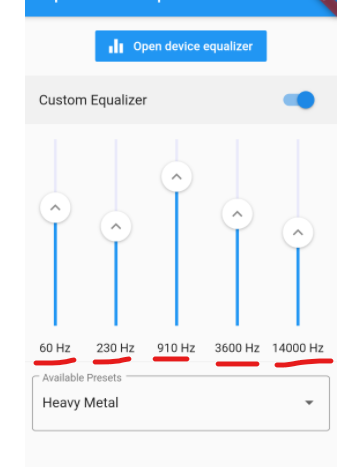
about 1 s delay i dont think it's that much important in that app
Mood-al
on 10 Jan 2021
Good 👍
Actually I am working on this latency problem. I hope to be able to improve it.
I plan to work very soon on implementing the concept of audio-graph.
Audio-graph will be several audio-nodes linked together.
For example, you will be able to connect the Microphone node to the Equalizer node, and the Equalizer node to the Headset node.
I really want to do that. This project is really interesting to be developed, and I am fed up to work on uninteresting things.
My dream is also to create a graphic-editor to be be able to draw the audio-graph with the mouse.
The graphic will generate both a Dart (or Javascript) module and a visual SVG image that the user will be able to insert in its own documentation.
Probably not very useful for τ users, but funny for me to develop
Larpoux
on 10 Jan 2021
I added an item in this post
Larpoux
on 10 Jan 2021
waw sounds so interesting and i saw what you add im going to add startPlayerFromMic to my app but still there is a big problem which is equalizing or changing the audio frequency to certain levels i dont know if you can add something like that in tau project it would be so nice especially that so far there is nothing like that in flutter except flutter_equalizer but its problem that you cant change the fixed frequency values that are provided by it so you cant edit anything in it
Mood-al
on 11 Jan 2021
Yes, the Equalizer will be one of the possible Filter Nodes.
If you look to this post, you will see that one of the graph examples have an Equalizer among their Filter Nodes.
I would prefer not to implement that feature in the current "StartPlayerFromMic()" :
StartPlayerFromMic() was just something like a draft to have a better view of the "Ins and outs" that I will have to fight with, during audio-graphs development. If I spend too much time on this procedure, then the Audio-Graphs support will be delayed.
I put the audio-graph developments on the top of the tasks todo.
If I do not encounter too many problems and if I do not have to spend too much time on the maintenance, then the first very simple graphs with a limited set of kinds of nodes will be able to be run very soon.
Note: we will have to fight with two problems :
- Audio latency
- The saturation
Audio latency could be something like a second with an equalizer.
Saturation is also a big problem. If the input nodes feed data faster that can be processed by the downstream nodes, then we will have several possibilities
Backpressure. This can be possible only with a few input nodes. There is no possibility, of course to slow down a Microphone, for example.
Keep the data in buffers. This is possible but only in a few specific cases. If the input nodes permanently feed data faster than processed, then the audio-latency will be more and more important, and the superfluous data buffered could be saturate the RAM.
Drop audio packets. This always can be done. But this can be very unpleasant for the ears
Larpoux
on 11 Jan 2021
@Larpoux hey i just saw that the issue was closed :D. So is the StartPlayerFromMic() where the latency is improved? Just saw in the changelog that the latency for iphone is much better but for android it is not. Will you also try to fix this or is it just not possible for android?
And i want to thank you for the huge support on this project :D. this project is realy awesome.
davidmarogy
on 12 Jan 2021
Larpoux
on 12 Jan 2021
Related issues
 ggirotto
·
3Comments
ggirotto
·
3Comments
 satyajitghana
·
3Comments
satyajitghana
·
3Comments
 jordygarcias
·
5Comments
jordygarcias
·
5Comments
 palfrey
·
3Comments
palfrey
·
3Comments
 felixjunghans
·
4Comments
felixjunghans
·
4Comments
Most helpful comment
Good 👍
Actually I am working on this latency problem. I hope to be able to improve it.
I plan to work very soon on implementing the concept of audio-graph.
Audio-graph will be several audio-nodes linked together.
For example, you will be able to connect the Microphone node to the Equalizer node, and the Equalizer node to the Headset node.
I really want to do that. This project is really interesting to be developed, and I am fed up to work on uninteresting things.
My dream is also to create a graphic-editor to be be able to draw the audio-graph with the mouse.
The graphic will generate both a Dart (or Javascript) module and a visual SVG image that the user will be able to insert in its own documentation.
Probably not very useful for τ users, but funny for me to develop