Tasmota: ZBBridge: IKEA bulb losing connectivity after Tasmota restart
PROBLEM DESCRIPTION
_A clear and concise description of what the problem is._
Sonoff ZBBridge: IKEA bulb loses connectivity after a Tasmota restart.
REQUESTED INFORMATION
_Make sure your have performed every step and checked the applicable boxes before submitting your issue. Thank you!_
- [x] Read the Contributing Guide and Policy and the Code of Conduct
- [x] Searched the problem in issues
- [x] Searched the problem in the docs
- [x] Searched the problem in the forum
- [x] Searched the problem in the chat
- [x] Device used (e.g., Sonoff Basic): Sonoff ZBBridge
- [x] Tasmota binary firmware version number used: 8.4.0
- [x] Pre-compiled
- [ ] Self-compiled
- [ ] IDE / Compiler used: _____
- [x] Flashing tools used: esptool.py
- [x] Provide the output of command:
Backlog Template; Module; GPIO 255:
16:56:54 MQT: stat/tasmota/ZBBridge/RESULT = {"NAME":"Sonoff ZBBridge","GPIO":[56,208,0,209,21,22,0,0,6,158,5,0,17],"FLAG":0,"BASE":18}
16:56:54 MQT: stat/tasmota/ZBBridge/RESULT = {"Module":{"75":"Sonoff ZbBridge"}}
16:56:55 MQT: stat/tasmota/ZBBridge/RESULT = {"GPIO0":{"56":"Led1i"},"GPIO1":{"165":"Zigbee Tx"},"GPIO2":{"0":"None"},"GPIO3":{"166":"Zigbee Rx"},"GPIO4":{"215":"Zigbee Rst"},"GPIO5":{"0":"None"},"GPIO9":{"0":"None"},"GPIO10":{"0":"None"},"GPIO12":{"6":"I2C SDA"},"GPIO13":{"158":"LedLinki"},"GPIO14":{"5":"I2C SCL"},"GPIO15":{"0":"None"},"GPIO16":{"17":"Button1"}}
- [ ] If using rules, provide the output of this command:
Backlog Rule1; Rule2; Rule3:
16:57:27 MQT: stat/tasmota/ZBBridge/RESULT = {"Rule1":"ON","Once":"OFF","StopOnError":"OFF","Length":78,"Free":433,"Rules":"on zbstate#status==0 do backlog zblisten1 0; zblisten2 99; zblisten3 100 endon"}
16:57:27 MQT: stat/tasmota/ZBBridge/RESULT = {"Rule2":"OFF","Once":"OFF","StopOnError":"OFF","Length":0,"Free":511,"Rules":""}
16:57:28 MQT: stat/tasmota/ZBBridge/RESULT = {"Rule3":"OFF","Once":"OFF","StopOnError":"OFF","Length":0,"Free":511,"Rules":""}
- [ ] Provide the output of this command:
Status 0:
16:58:22 MQT: stat/tasmota/ZBBridge/STATUS1 = {"StatusPRM":{"Baudrate":115200,"SerialConfig":"8N1","GroupTopic":"tasmotas","OtaUrl":"http://thehackbox.org/tasmota/release/tasmota.bin","RestartReason":"Power On","Uptime":"0T00:04:44","StartupUTC":"2020-08-01T15:53:38","Sleep":50,"CfgHolder":4617,"BootCount":578,"BCResetTime":"2020-06-11T18:29:13","SaveCount":1327,"SaveAddress":"F7000"}}
16:58:22 MQT: stat/tasmota/ZBBridge/STATUS2 = {"StatusFWR":{"Version":"8.4.0.1(tasmota)","BuildDateTime":"2020-08-01T09:47:37","Boot":31,"Core":"2_7_3_2","SDK":"2.2.2-dev(38a443e)","CpuFrequency":160,"Hardware":"ESP8266EX","CR":"424/699"}}
16:58:50 MQT: stat/tasmota/ZBBridge/STATUS3 = {"StatusLOG":{"SerialLog":0,"WebLog":2,"MqttLog":0,"SysLog":0,"LogHost":"","LogPort":514,"SSId":["Tasmota",""],"TelePeriod":300,"Resolution":"55C180C0","SetOption":["00C08009","2805C8000100060000005A00000000000000","00000000","00046002"]}}
16:58:50 MQT: stat/tasmota/ZBBridge/STATUS4 = {"StatusMEM":{"ProgramSize":567,"Free":436,"Heap":21,"ProgramFlashSize":1024,"FlashSize":2048,"FlashChipId":"1540A1","FlashFrequency":40,"FlashMode":3,"Features":["00000809","0F0007C6","04500001","00000002","00000000","00000000","00020000"],"Drivers":"1,2,4,9,10,20,21,23,41","Sensors":""}}
16:58:50 MQT: stat/tasmota/ZBBridge/STATUS5 = {"StatusNET":{"Hostname":"tasmota/ZBBridge-0879","IPAddress":"192.168.1.92","Gateway":"192.168.1.1","Subnetmask":"255.255.255.0","DNSServer":"192.168.1.1","Mac":"B4:E6:2D:7F:C3:6F","Webserver":2,"WifiConfig":4,"WifiPower":17.0}}
16:58:50 MQT: stat/tasmota/ZBBridge/STATUS6 = {"StatusMQT":{"MqttHost":"a3pa4ktnq87yfu-ats.iot.eu-central-1.amazonaws.com","MqttPort":8883,"MqttClientMask":"DVES_%06X","MqttClient":"DVES_7FC36F","MqttUser":"DVES_USER","MqttCount":1,"MAX_PACKET_SIZE":1200,"KEEPALIVE":30}}
16:58:50 MQT: stat/tasmota/ZBBridge/STATUS7 = {"StatusTIM":{"UTC":"2020-08-01T15:58:50","Local":"2020-08-01T16:58:50","StartDST":"2020-03-29T02:00:00","EndDST":"2020-10-25T03:00:00","Timezone":"+01:00","Sunrise":"05:25","Sunset":"20:28"}}
16:58:50 MQT: stat/tasmota/ZBBridge/STATUS10 = {"StatusSNS":{"Time":"2020-08-01T16:58:50"}}
16:58:50 MQT: stat/tasmota/ZBBridge/STATUS11 = {"StatusSTS":{"Time":"2020-08-01T16:58:50","Uptime":"0T00:05:12","UptimeSec":312,"Vcc":3.504,"Heap":21,"SleepMode":"Dynamic","Sleep":50,"LoadAvg":19,"MqttCount":1,"Wifi":{"AP":1,"SSId":"Tasmota","BSSId":"76:83:C2:90:D6:15","Channel":1,"RSSI":88,"Signal":-56,"LinkCount":1,"Downtime":"0T00:00:03"}}}
- [ ] Provide the output of the Console log output when you experience your issue; if applicable:
_(Please use_weblog 4_for more debug information)_
TO REPRODUCE
_Steps to reproduce the behavior:
I paired an IKEA white/CT bulb to Z2T. The bulb acts as a Zigbee router.
When I reboot Tasmota/coordinator, the IKEA bulb does not respond to commands anymore. I checked with a Zigbee sniffer, the commands are correctly sent in the air, but for an unknown reason the IKEA buld ignores the packets. The bulb still send 'Link status' packets as required by a router.
When I power off/on the IKEA bulb, it reconnects to the coordinator (Device announcement...) and everything works fine again.
EXPECTED BEHAVIOUR
_A clear and concise description of what you expected to happen._
Using CC2530 the issue does not happen. There is something wrong with routing on ZBBridge maybe linked to Zigbee V3.
SCREENSHOTS
_If applicable, add screenshots to help explain your problem._
ADDITIONAL CONTEXT
_Add any other context about the problem here._
This is a follow up from #8583 to have an issue dedicated to this problem.
(Please, remember to close the issue when the problem has been addressed)
 s-hadinger
All 56 comments
@MattWestb let's continue the discussion about the issue here.
I tried downgrading EZSP to StackProfile 1 and 0 (instead of 2), hoping to switch back to Zigbee 1.2. But changing StackProfile prevents the IKEA bulb to pair at all. Xiaomi sensors would still pair though.
s-hadinger
on 1 Aug 2020
Good that you was closing the original thread and taking case for case.
Then you downgrading the profile it can being the EZSP have saved parameters in the emulated eeprom (it is in the internal flash after the EZSP app) that can doing very strange things. I was having that in ZHA and was not possible pairing ZB3 devices more than one time. J-tag the EFR and erase the internal and flash bootloader and the EZSP so you have eliminating one case of error and don't spending days banging your head for perhaps nothing.
And I think it's good going down to ZB1.2 then you can comparing with the CC-2531 and eliminating much ZB3 problems and then stepping up then you have it under more control.
Edit: Your Osram problems looks little like my in ZHA. Device was pared and then trying reparing its joining and leaving all the time until timeout. Tyre device erase and reload BL and EZSP it's worth trying.
 MattWestb
on 1 Aug 2020
MattWestb
on 1 Aug 2020
How do you getting the stack using one other profile then the default one ?
Is it one setting / variable parameter or must it being compiled in in the tasmota ?
If it easy to do i like testing it after cleaning the internal flash and see how its working or not.
MattWestb
on 1 Aug 2020
From the UG129: zigbee® Gateway Reference Design User's Guide (RD-0001-0201, RD-0002-0201)
2.4.1 Flashing from Simplicity Studio. The last written is one warning:
" IMPORTANT: The device should be erased before programming."
Olds tokens and data is saved in the simulated EEPROM storage need being erased then installing the EZSP.
MattWestb
on 1 Aug 2020
9011 is working great with both old and new motion sensors and showing the right off time :-)))))
One bad thing it's now its not possible steering the lights.
Repowering on light = its on.
Sending power command 0, 1 or 2 = light turned off (also "on" making it going off).
After that it's not reacting of any command from groupe and device.
From Motion sensor or On/Off remote its working OK.
MattWestb
on 2 Aug 2020
Was reading little about the ZB security and key handling. Have not so much experience of the low level software things but both the handling and rolling networks and link keys its good explained in the link below.
https://research.kudelskisecurity.com/2017/11/08/zigbee-security-basics-part-2/
I think both current problem its is around the trustcenter key handling and can being one or more problems there that making all more or less crazy.
One example The Ikea on/off switch its "talking" OK with the bulbs and coordinator with there application link keys. But the coordinator can only "Talking" with the on/of remote (application link key its OK) but not with the bulbs (application link key its not OK). The same its with the old and new motions sensors (LL/ZB3),
You have more experience in of the zigbee problematik so taking one look and see if you finding some more pattern that can making problems with the EZSP.
And don't forget that ZB(3) devices can't joining one networks if the security its settings it's wrong or too low (exceptions Xiaomi).
Edit:
Replay Protection: Frame Counter looks also as something that can doing the mess in the mech.
Runtime key updates: not likely but possible.
MattWestb
on 2 Aug 2020
Little strange behaviour.
Then sending "ZbProbe 2"
After some lines i getting "ZIG: NAK, resending packet 3"
And then the expected result from device 2.
It's not every time then sending ZbProbe command but have trying menny time and around 4 of 5 getting NAK. Have testing with all router in the test mesh and it's the same (except the 0x0000 the Coordinator that not getting it). Frame counter light out of sync ?
ZbPing don't getting any NAK problem then trying around 20 times.
MattWestb
on 3 Aug 2020
@MattWestb NAK just means that the EFR32 missed a serial frame, because they were sent too fast. You can safely ignore.
About ZB security, I was also suspecting the Frame Counter preventing frame replays. But I couldn't see any proof of it. I don't have my IKEA bulb for the next 2 weeks, so we'll need to wait.
On EZSP I didn't find any way to clear flash settings, and I'm not even sure that re-flashing the firmware does the trick.
I tried changing EZSP_CONFIG_STACK_PROFILE settings from 2 to 1 and 0, hoping to switch back to Zigbee 1.2, but I didn't find any documentation about the meaning of this parameter.
For reference, it's in xdrv_23_zigbee_7_statemachine.ino, line 637. Change the 0x02 to 0x01 or 0x00.
ZBM(ZBS_SET_STK_PROF, EZSP_setConfigurationValue, 0x00 /*high*/, EZSP_CONFIG_STACK_PROFILE, 0x02, 0x00) // 53000C0200
OK the gecko its some time too fast for the mesh and the ACK/NAK its working well.
In simplicity commander i was using "flash map" on a new erased and flashed module and it was filled from bottom and nothing at the top of the flash. Restarting the module and letting it settle and then reading it with "flash map" and it have getting some more written after the app and the end (random places) its the flash (Simulated EEPROM). Some time the "flash_erase" in GDB was not working (have reading back and was not "FF" in the dump) so i have making one elf file with "FF" that i can flashing and getting it empty and the flashing BL and EZSP. Yesterday i was dumping the flash after have rewriting it for making it easier later (slowly but 100% erased and very abused flash).
If i get time i trying compiling one with the modded stack profile or if its raining too much i going to Ikea (need little more köttbullar).
The impression it's that Xiaomi sensors its reporting stabile and also the Ikea motion and on/off switch its working well in the mesh only coordinator commands that failing and i think it's more stable than the CC-2531 in ZHA.
MattWestb
on 3 Aug 2020
@s-hadinger Your pairing problem with the EZSP_CONFIG_STACK_PROFILE as 01 or 00 is confirmed also with clean install on erased internal flash.
HOMA LED drive its possible pairing but no Ikea bulbs.
Have not trying the motion sensors and the Xiaomi sensors.
MattWestb
on 4 Aug 2020
Thanks for testing. Looking quickly with a sniffer, it looks like an encryption key problem. Buts I'm not sure we should go into this direction. It would have been a nice fix
s-hadinger
on 4 Aug 2020
Was sending ZbSend {"group":11784,"Send":{"Power":2}} after repower the NCP to the groupe 11784 and getting no "reaction". The same with groupe "0".
Repower "HOMA_LRDD" (it's in the groupe 11784) and all routers in both groups its responding on power commands.
Was then looking little in the log and is finding this line interesting:
14:06:09 ZIG: {"ZbZCLReceived":{"groupid":0,"clusterid":6,"srcaddr":"0xFB93","srcendpoint":1,"dstendpoint":1,"wasbroadcast":0,"LinkQuality":224,"securityuse":0,"seqnumber":38,"fc":"0x18","manuf":"0x0000","transact":9,"cmdid":"0x01","payload":"0000001001"}}
What is interesting is the ""seqnumber":38," for the "HOMA_LEDD" (this is not the first sent package only as an example of the numbers) its restarted at zero but the other (not repowerd) its continuing counting as before the NCP restart (one router was having 249 before restart of NCP and HOMA_LEDD it was ticking to 250 at the first command sended to it after the NCP and HOMA_LEDD restart).
I think that is interesting to see then sniffing what happens with the seqnumber to from the NCP and all the routers after it being repowerd. If I not having wrong is the seqnumber a part of the Replay Protection and the application link key in ZB3.
Edit:
One thing we should not forgetting that both our EZSP its from the same maker and have not being tested fully as Coordinator and proven that its working 100% in that role. The 6.6.4.0 its not getting Zigbee certified but the next and the one before is.
MattWestb
on 4 Aug 2020
Getting back to Stack Profile, it's actually the Zigbee stack profile (not EZSP specific). I checked back with CC2530, they also use Stack Profile 0x02 (Zibgee Pro). So changing Stack Profile is not a good idea.
The seqnumber above is the ZCL seq number, which is informative only. It allows to match the response to the right request but has no importance with regards to encryption. Also, the seqnumber scheme is the same on CC2530.
The encryption frame counter is not visible from EZSP, you need a sniffer to see them.
s-hadinger
on 4 Aug 2020
@MattWestb I looked more closely at frame counter and it seems that the value is reset to zero after a coordinator reboot. This would explain why the IKEA bulb would discard any new packet as part of the replay protection. Normally the coordinator should remeber the last outgoing frame counter for each device, but it doesn't.
I will dig into this theory and see how to make sure the coordinator does not "forget" the frame counter.
s-hadinger
on 4 Aug 2020
Aha, I may need to enable EMBER_NO_FRAME_COUNTER_RESET
From the doc:
This denotes whether the device should NOT reset its outgoing frame counters (both NWK and APS) when ::emberSetInitialSecurityState() is called. Normally it is advised to reset the frame counter before joining a new network. However in cases where a device is joining to the same network again (but not using ::emberRejoinNetwork()) it should keep the NWK and APS frame counters stored in its tokens.
And I do call setInitialSecurityState at each reboot - maybe I shouldn't.
s-hadinger
on 4 Aug 2020
Great finding !!
Normally the frame counter at both ends (device - device) only being reseted then the trustcenter its rolling (updating) the network key.
Its sounds very logical and if you can pin pointing it then it a very large step forward and perhaps its helping or fixing the Osram problem 2.
Keeeep coding :-)))
MattWestb
on 4 Aug 2020
@MattWestb Confirmed. Can you please try since I don't currently have an IKEA bulb.
In file xdrv_23_zigbee_7_statemachine.ino line 683.
Change from:
#define EZ_SECURITY_MODE EMBER_TRUST_CENTER_GLOBAL_LINK_KEY | EMBER_PRECONFIGURED_NETWORK_KEY_MODE | EMBER_HAVE_NETWORK_KEY | EMBER_HAVE_PRECONFIGURED_KEY
to
#define EZ_SECURITY_MODE EMBER_TRUST_CENTER_GLOBAL_LINK_KEY | EMBER_PRECONFIGURED_NETWORK_KEY_MODE | EMBER_HAVE_NETWORK_KEY | EMBER_HAVE_PRECONFIGURED_KEY | EMBER_NO_FRAME_COUNTER_RESET
This is a quick fix, I will instead recode the state machine not to call setInitialSecurityState at all to avoid other surprises.
s-hadinger
on 5 Aug 2020
@s-hadinger I have compiled the firmware but must running and coming back in some hours for testing.
MattWestb
on 5 Aug 2020
Some good and bad news.
Have compiling from you repro and the changes was in (Key def commit).
Paring 2xGU10 1XE27 1xE1743 and 1xHOMA and looks working. Adding the GU10 to groupe 0.
Restarting EZSP and getting LIQ from from both GU10 and E1743 then using the E1743(on/off switch.) and the lights its reacting (before was not getting any LIQ then restarted NCP and using the E1743 = NCP / device have right frame counter and encryption).
Trying with groupe0 and only reacting on off command.
Restarting EZSP and trying groupe0 command and getting LIQ from the both GU10 but only off command its working.
Puting the GU10 off with E1743. Sending ZbSend {"device":0x666A,"Send":{"Power":1}}
Getting 14:30:58 MQT: tele/tasmota_B3C82A/RESULT = {"ZbResponse":{"Device":"0x666A","Name":"IKEA_GU10_WS1","Command":"0006!40","Status":0,"StatusMessage":"SUCCESS","Endpoint":1,"LinkQuality":137}} = false, Not turning the devices on and status "SUCCESS" its fals.
Sending ZbSend {"device":0x666A,"Send":{"Power":2}}
Getting 14:33:31 MQT: tele/tasmota_B3C82A/RESULT = {"ZbResponse":{"Device":"0x666A","Name":"IKEA_GU10_WS1","Command":"0006!40","Status":135,"StatusMessage":"INVALID_VALE","Endpoint":1,"LinkQuality":137}} = Not toggling and status "INVALID_VALE".
Puting the light on with the E1743.
Sending: 14:37:09 MQT: tele/tasmota_B3C82A/RESULT = {"ZbResponse":{"Device":"0x666A","Name":"IKEA_GU10_WS1","Command":"0006!40","Status":0,"StatusMessage":"SUCCESS","Endpoint":1,"LinkQuality":137}} = light off and status "SUCCSESS". Very good !!
Was trying with groupe commands and the same behaviour 0 = off, 1 = not working 2, = not working. For all groupe commands i don't getting anything interesting in the log (what i knowing).
You have finding and eliminating the restart problem with ZB3 devices that its GREAT !!!!
The on / of / toggle problem was not there before it was coming in tasmota commit "Add Zigbee better support for IKEA Motion Sensor" but it can being something else that making working / not working before.
I trying compiling one new with your next 2 commits and trying little more.
And very good coded and using your head for good things !!
Edit: Thanks for the groupe 0 subscription !!!!!!
MattWestb
on 5 Aug 2020
The on/off/toggle command problems is also the same with the "HOMA" = no real ZB3.
On = not working
Off = working if the light is on
Toggle = Only working if the light is on = only turning off.
MattWestb
on 5 Aug 2020
With the last 2 commitments i don't getting any LQI from the bulbs but from sensors after restart of the NCP and the "power 0" command its not working. Then repower one bulb in groupe 0 i getting LIQ and the "power 0" its working for both bulbs in the groupe 0.
Restarting the NCP No LIQ from bulbs but from sensors then activating them.
Sending "power off" the groupe 17318 (Ikea old motion sensor with HOMA and Ikea E27 bulb) = not working and also groupe 0. Repowering one GU10 (in groupe 0) and I getting LIQ from the bulb in the grupe 17318 and "power 0" its working falso for grupe 0.
Commands from end devices to all bulbs is working after restart of the NCP (LL bindings).
I was giving the commands " ZbListen1 0" and "ZbListen2 17318" after restart of the NCP.
Looks little like two step forwards and one backwards :-(((
I flashing the "Key def" commit and trying it one more time and comparing the behaviour.
MattWestb
on 5 Aug 2020
Confirmed "Key def" its working also after NCP hard and soft restart with all bulbs and end devices.
LIQ from all devices then they have talking the the NCP except the bulbs in groupe 0 (2xGU10 1xE1743 and 1x Motion Sensor New) until i have sending one power of command from NCP to the groupe then the GU10 getting LIQ. reported.
Have ading the Aqara Door / window contact and Aqara Weather sensor and looks working OK.
MattWestb
on 5 Aug 2020
Test sending power 0, 1 and 2 to one GU10 bulb:
Power 0
19:32:38 CMD: ZbSend {"device":IKEA_GU10_WS1,"Send":{"Power":0}}
19:32:38 SRC: WebConsole from 192.168.2.10
19:32:38 CMD: Group 0, Index 1, Command "ZBSEND", Data "{"device":IKEA_GU10_WS1,"Send":{"Power":0}}"
19:32:38 ZIG: guessing endpoint 1
19:32:38 SendZCLCommand_P: zcl_cmd = 0000
19:32:38 ZigbeeZCLSend device: 0xBE0F, group: 0x0000, endpoint:1, cluster:0x0006, cmd:0x40, send:"0000"
19:32:38 ZbSend: shortaddr 0xBE0F, groupaddr 0x0000, cluster 0x0006, endpoint 0x01, cmd 0x40, data
19:32:38 ZIG: ZbEZSPSend 3400000FBE040106000101400100000701050107400000
19:32:38 MQT: stat/tasmota_B3C82A/RESULT = {"ZbSend":"Done"}
19:32:38 ZIG: {"ZbEZSPReceived":"340000F7"}
19:32:38 ZIG: {"ZbEZSPReceived":"4500000401060001014001000013E8D60FBEFFFF0508070B400006"}
19:32:38 ZIG: {"ZbZCLReceived":{"groupid":0,"clusterid":6,"srcaddr":"0xBE0F","srcendpoint":1,"dstendpoint":1,"wasbroadcast":0,"LinkQuality":118,"securityuse":0,"seqnumber":19,"fc":"0x08","manuf":"0x0000","transact":7,"cmdid":"0x0B","payload":"4000"}}
19:32:38 MQT: tele/tasmota_B3C82A/RESULT = {"ZbResponse":{"Device":"0xBE0F","Name":"IKEA_GU10_WS1","Command":"0006!40","Status":0,"StatusMessage":"SUCCESS","Endpoint":1,"LinkQuality":118}}
19:32:38 ZIG: {"ZbEZSPReceived":"3F00000FBE04010600010140010000F7010000"}
19:32:38 ZIG: ZbEZSPSend 3400000FBE040106000101400100000801050008000000
19:32:38 ZIG: {"ZbEZSPReceived":"340000F8"}
19:32:38 ZIG: {"ZbEZSPReceived":"4500000401060001014001000014E4D50FBEFFFF08180801000000100006"}
19:32:38 ZIG: {"ZbZCLReceived":{"groupid":0,"clusterid":6,"srcaddr":"0xBE0F","srcendpoint":1,"dstendpoint":1,"wasbroadcast":0,"LinkQuality":116,"securityuse":0,"seqnumber":20,"fc":"0x18","manuf":"0x0000","transact":8,"cmdid":"0x01","payload":"0000001000"}}
19:32:38 ZIG: ZbZCLRawReceived: {"0xBE0F":{"0006/0000":0}}
19:32:38 ZIG: {"ZbEZSPReceived":"3F00000FBE04010600010140010000F8010000"}
19:32:38 MQT: tele/tasmota_B3C82A/SENSOR = {"ZbReceived":{"0xBE0F":{"Device":"0xBE0F","Name":"IKEA_GU10_WS1","Power":0,"Endpoint":1,"LinkQuality":116}}}
Power 1
19:33:45 CMD: ZbSend {"device":IKEA_GU10_WS1,"Send":{"Power":1}}
19:33:45 SRC: WebConsole from 192.168.2.10
19:33:45 CMD: Group 0, Index 1, Command "ZBSEND", Data "{"device":IKEA_GU10_WS1,"Send":{"Power":1}}"
19:33:45 ZIG: guessing endpoint 1
19:33:45 SendZCLCommand_P: zcl_cmd = 0100
19:33:45 ZigbeeZCLSend device: 0xBE0F, group: 0x0000, endpoint:1, cluster:0x0006, cmd:0x40, send:"0100"
19:33:45 ZbSend: shortaddr 0xBE0F, groupaddr 0x0000, cluster 0x0006, endpoint 0x01, cmd 0x40, data
19:33:45 ZIG: ZbEZSPSend 3400000FBE040106000101400100000901050109400100
19:33:45 MQT: stat/tasmota_B3C82A/RESULT = {"ZbSend":"Done"}
19:33:45 ZIG: {"ZbEZSPReceived":"340000F9"}
19:33:45 ZIG: {"ZbEZSPReceived":"4500000401060001014001000015E8D60FBEFFFF0508090B400006"}
19:33:45 ZIG: {"ZbZCLReceived":{"groupid":0,"clusterid":6,"srcaddr":"0xBE0F","srcendpoint":1,"dstendpoint":1,"wasbroadcast":0,"LinkQuality":118,"securityuse":0,"seqnumber":21,"fc":"0x08","manuf":"0x0000","transact":9,"cmdid":"0x0B","payload":"4000"}}
19:33:45 MQT: tele/tasmota_B3C82A/RESULT = {"ZbResponse":{"Device":"0xBE0F","Name":"IKEA_GU10_WS1","Command":"0006!40","Status":0,"StatusMessage":"SUCCESS","Endpoint":1,"LinkQuality":118}}
19:33:45 ZIG: ZbEZSPSend 3400000FBE040106000101400100000A0105000A000000
19:33:45 ZIG: {"ZbEZSPReceived":"3F00000FBE04010600010140010000F9010000"}
19:33:45 ZIG: {"ZbEZSPReceived":"340000FA"}
19:33:45 ZIG: {"ZbEZSPReceived":"4500000401060001014001000016E8D60FBEFFFF08180A01000000100006"}
19:33:45 ZIG: {"ZbZCLReceived":{"groupid":0,"clusterid":6,"srcaddr":"0xBE0F","srcendpoint":1,"dstendpoint":1,"wasbroadcast":0,"LinkQuality":118,"securityuse":0,"seqnumber":22,"fc":"0x18","manuf":"0x0000","transact":10,"cmdid":"0x01","payload":"0000001000"}}
19:33:45 ZIG: ZbZCLRawReceived: {"0xBE0F":{"0006/0000":0}}
19:33:45 ZIG: {"ZbEZSPReceived":"3F00000FBE04010600010140010000FA010000"}
19:33:46 MQT: tele/tasmota_B3C82A/SENSOR = {"ZbReceived":{"0xBE0F":{"Device":"0xBE0F","Name":"IKEA_GU10_WS1","Power":0,"Endpoint":1,"LinkQuality":118}}}
Power 2
19:34:37 CMD: ZbSend {"device":IKEA_GU10_WS1,"Send":{"Power":2}}
19:34:37 SRC: WebConsole from 192.168.2.10
19:34:37 CMD: Group 0, Index 1, Command "ZBSEND", Data "{"device":IKEA_GU10_WS1,"Send":{"Power":2}}"
19:34:37 ZIG: guessing endpoint 1
19:34:37 SendZCLCommand_P: zcl_cmd = 0200
19:34:37 ZigbeeZCLSend device: 0xBE0F, group: 0x0000, endpoint:1, cluster:0x0006, cmd:0x40, send:"0200"
19:34:37 ZbSend: shortaddr 0xBE0F, groupaddr 0x0000, cluster 0x0006, endpoint 0x01, cmd 0x40, data
19:34:37 ZIG: ZbEZSPSend 3400000FBE040106000101400100000B0105010B400200
19:34:37 MQT: stat/tasmota_B3C82A/RESULT = {"ZbSend":"Done"}
19:34:37 ZIG: {"ZbEZSPReceived":"340000FB"}
19:34:37 ZIG: {"ZbEZSPReceived":"4500000401060001014001000017E8D60FBEFFFF05080B0B408706"}
19:34:37 ZIG: {"ZbZCLReceived":{"groupid":0,"clusterid":6,"srcaddr":"0xBE0F","srcendpoint":1,"dstendpoint":1,"wasbroadcast":0,"LinkQuality":118,"securityuse":0,"seqnumber":23,"fc":"0x08","manuf":"0x0000","transact":11,"cmdid":"0x0B","payload":"4087"}}
19:34:37 MQT: tele/tasmota_B3C82A/RESULT = {"ZbResponse":{"Device":"0xBE0F","Name":"IKEA_GU10_WS1","Command":"0006!40","Status":135,"StatusMessage":"INVALID_VALE","Endpoint":1,"LinkQuality":118}}
19:34:37 ZIG: {"ZbEZSPReceived":"3F00000FBE04010600010140010000FB010000"}
19:34:37 ZIG: ZbEZSPSend 3400000FBE040106000101400100000C0105000C000000
19:34:37 ZIG: {"ZbEZSPReceived":"340000FC"}
19:34:37 ZIG: {"ZbEZSPReceived":"4500000401060001014001000018E8D60FBEFFFF08180C01000000100006"}
19:34:37 ZIG: {"ZbZCLReceived":{"groupid":0,"clusterid":6,"srcaddr":"0xBE0F","srcendpoint":1,"dstendpoint":1,"wasbroadcast":0,"LinkQuality":118,"securityuse":0,"seqnumber":24,"fc":"0x18","manuf":"0x0000","transact":12,"cmdid":"0x01","payload":"0000001000"}}
19:34:37 ZIG: ZbZCLRawReceived: {"0xBE0F":{"0006/0000":0}}
19:34:37 ZIG: {"ZbEZSPReceived":"3F00000FBE04010600010140010000FC010000"}
19:34:38 MQT: tele/tasmota_B3C82A/SENSOR = {"ZbReceived":{"0xBE0F":{"Device":"0xBE0F","Name":"IKEA_GU10_WS1","Power":0,"Endpoint":1,"LinkQuality":118}}}
The interesting its the status replay "Power":0.
I cant saying if the EZSP its sending the right command to the device or not but i think you can calculating it.
The patten its the same then sending power commands to groups but no status from the devices in the log.
MattWestb
on 5 Aug 2020
@MattWestb Thanks for the logs, I broke the Power in the last commit... I understand the problem, and will have to revert for now.
I just pushed the PR to solve the IKEA router issue.
s-hadinger
on 5 Aug 2020
Good that you doing findings and can fixing the problems.
The groupe 0 its working great then not need configure it after NCP restart.
I building one new with your last "Power fix" commit with gitpod and testing little more.
I think later it being good binding new devices to groupe 0 if the device not having one after pairing, the new motion sensor make little strange things then its not "being real" bonded to one group and the old making one group and working great with the other devices.
First priority its the large global / key things and after that all the small ditalies its coming by time.
Thanks for all your efforts and time you spending.
MattWestb
on 5 Aug 2020
One fast testing without resetting all of the devices but erasing the ESP:
All looks working more than well also after soft restart of the NCP.
Doing one complete clean install tomorrow but so far its looks GREAT !!!!
MattWestb
on 5 Aug 2020
@s-hadinger Have done new installation of the tasmota with all devices resetted before start joining them (not reflashing the EZSP).
All is looking OK also after soft restart of the NCP so what i can see is the issue solved.
Very well work done !!
How do you like have other small issues in new cases and it wath pace.
I have only more or less cosmetic things and also wath is your plan for the project ?
Support for all devices that you have for CC-2531, more light steering or more HA sensors and other HA things ?
One thing you can do is one "to do list" that you updating and making priority on and users can applying for futures and and "how to do" then the wiki is not yet up to date for the EZSP version and user needs little support.
Test setup:
1 IKEA ICC-A-1 module with EZSP 6.7.6.0 firmware.
1 WeMos D1 Mini
1 IKEA LED1836G9 E27 WW
2 IKEA LED1837R5 GU10 WS
1 IKEA E1743 On/Off Dimmer Switch
1 IKEA E1525 Motion sensor
1 IKEA E1745 Motion sensor
1 HOMA HLD812-Z-SC LED drive
1 Aqara WSDCGQ11LM Weather
1 Aqara MCCGQ11LM Door / window contact
(un odred)
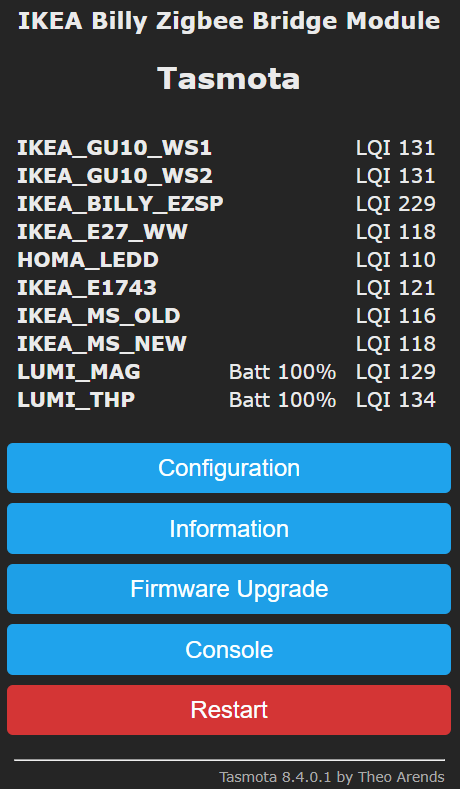
And one more time great thanks for making the silabs EZSP working as coordinator and opened it for the community !!
MattWestb
on 6 Aug 2020
Thanks for your support, it was instrumental in solving this issue.
The next feature planned is support for Attribute Reporting Configuration which is more and more asked for. It allows to control how often sensors and devices report their states.
I will open a Feature Request for the short term todo list so we can share about it.
s-hadinger
on 6 Aug 2020
Excellent work @s-hadinger and "assistant" @MattWestb with trusty BillyEZSP !
Attribute Reporting Configuration - very important. I'm testing 30 IKEA lights in a single group with a dimmer/color interface and the attribute reporting from each light with every level change is causing some problems...
 grobasoz
on 8 Aug 2020
grobasoz
on 8 Aug 2020
Thanks @grobasoz for supplying and supporting the EZSP firmwares to our devices that was making it possible !!
I was yesterday reading little interesting thing of more or less broadcast storming that zsmartsystems was having problem with. What i have understanding is that its gets limits in the underlying 802.15.4 layer of the network, that trying avoiding that the zigbee mesh its being blocked.
I think attribute reporting (= not knowing) is unicast but in the end all traffic must going thru the mesh and its not unlimited gigabit we having here so all packages must going thru or they in the end being lost after timeouts and resending.
Perhaps pulling the device status its one better way like Philips HUE is doing then configuring device reporting ?
Different ways give different benefits and problematics, and the best compromise it's not always easy to find.
MattWestb
on 8 Aug 2020
@MattWestb - You are welcome! I will continue to test here as new releases are made available...
grobasoz
on 8 Aug 2020
@grobasoz It must indeed create a network storm.
By default Z2T will query the devices via a group command to report back their states - that's 30 messages. It's also possible that IKEA lights spontaneously report their states, that's another 30 messages.
I need to add an option to not query the device state.
Also, aren't you facing routing issues with 30 paired devices?
s-hadinger
on 8 Aug 2020
First @s-hadinger NOT storm, STORMS !!!! :-))
Secund: Feedback from attribute reporting.
Working great on some off my routers !!
Was first trying only configure attribute reporting and letting the binding to the groups that was assigned before (1 and 14639) but it was not reporting after NCP restart.
Was doing the "ZbBind {"Device":"OSRAM","Cluster":"Power"}" on my 4 bulbs and restarting the NCP.
ZbBindState 3
15:13:35 MQT: tele/tasmota_B3C82A/RESULT = {"ZbBindState":{"Device":"0x3BE9","Name":"IKEA_E27_WW","Status":0,"StatusMessage":"SUCCESS","BindingsTotal":2,"BindingsStart":1,"Bindings":[{"Cluster":"0x0000","Endpoint":1,"ToGroup":14639},{"Cluster":"0x0006","Endpoint":1,"ToDevice":"0xCCCCCCFFFEB9B319","ToEndpoint":1}]}}
The first bounding is to the IKEA_MS_OLD group and the second is to NCP address.
In 10 minuten later I have getting LIQ and status of the Ikea bulbs but not from "HOMA_LEDD" so all is working as expected (The nice chinese ZB3 device with not founded Zigbee certificate "HOMA" is not working as expected and your code dos).
14:46:38 MQT: tele/tasmota_B3C82A/SENSOR = {"ZbReceived":{"0x3BE9":{"Device":"0x3BE9","Name":"IKEA_E27_WW","Power":0,"Endpoint":1,"LinkQuality":126}}}
14:51:37 MQT: tele/tasmota_B3C82A/SENSOR = {"ZbReceived":{"0xB54B":{"Device":"0xB54B","Name":"IKEA_GU10_WS1","Power":0,"Endpoint":1,"LinkQuality":142}}}
14:51:37 MQT: tele/tasmota_B3C82A/SENSOR = {"ZbReceived":{"0xA4EE":{"Device":"0xA4EE","Name":"IKEA_GU10_WS2","Power":0,"Endpoint":1,"LinkQuality":145}}}
14:56:38 MQT: tele/tasmota_B3C82A/SENSOR = {"ZbReceived":{"0x3BE9":{"Device":"0x3BE9","Name":"IKEA_E27_WW","Power":0,"Endpoint":1,"LinkQuality":121}}}
Have not testing the other attributes (Brightness & Color) that the Ikea bulbs supporting but it's not urgent for my to do.
Is it good configuring reporting for end devices or should i letting it ?
For getting status after restart of the NCP is it bad sending "ZbProbe " (its the easiest way i knowing to getting all status from the routers) to all routers after restart so the NCP updating the LIQ status ?
Do you like have feedback here or in the arendst/tasmota commitment ?
MattWestb
on 8 Aug 2020
You can use ZbPing to get LQI with lesser traffic
s-hadinger
on 8 Aug 2020
Not working as expected:
15:50:58 CMD: ZbPing 1
15:50:58 SRC: WebConsole from 192.168.2.10
15:50:58 CMD: Group 0, Index 1, Command "ZBPING", Data "1"
15:50:58 ZIG: ZbEZSPSend 3400004BB500000100000040010000010105014BB50000
15:50:58 MQT: stat/tasmota_B3C82A/RESULT = {"ZbPing":"Done"}
15:50:58 ZIG: {"ZbEZSPReceived":"3400004A"}
15:50:58 ZIG: {"ZbEZSPReceived":"59004BB5239853FEFF57B414FFDD00"}
15:50:58 ZIG: {"ZbEZSPReceived":"59004BB5239853FEFF57B414FFDD00"}
15:50:58 ZIG: {"ZbEZSPReceived":"4500000000018000004001000062FFDD4BB5FFFF0C0100239853FEFF57B4144BB502"}
15:50:58 MQT: tele/tasmota_B3C82A/RESULT = {"ZbPing":{"Device":"0xB54B","IEEEAddr":"0x14B457FFFE539823","Name":"IKEA_GU10_WS1""}}
15:50:58 ZIG: {"ZbEZSPReceived":"3F00004BB5000001000000400100004A010000"}
I don't getting LIQ in the replay and therefore the main menu device list is not updated with LIQ..
15:57:45 CMD: ZbProbe 4
15:57:45 SRC: WebConsole from 192.168.2.10
15:57:45 CMD: Group 0, Index 1, Command "ZBPROBE", Data "4"
15:57:45 ZIG: ZbEZSPSend 340000D2AD0000010000004001000004010504D2AD0000
15:57:45 ZIG: ZbEZSPSend 340000D2AD0000050000004001000005010305D2AD
15:57:45 MQT: stat/tasmota_B3C82A/RESULT = {"ZbProbe":"Done"}
15:57:45 ZIG: {"ZbEZSPReceived":"3400004D"}
15:57:45 ZIG: NAK, resending packet 3
15:57:45 ZIG: {"ZbEZSPReceived":"3400004E"}
15:57:45 ZIG: {"ZbEZSPReceived":"3F0000D2AD000001000000400100004D010000"}
15:57:45 ZIG: {"ZbEZSPReceived":"450000000001800000400100000ED0D0D2ADFFFF0C04007663341A004B1200D2AD"}
15:57:45 MQT: tele/tasmota_B3C82A/RESULT = {"ZbPing":{"Device":"0xADD2","IEEEAddr":"0x00124B001A346376","Name":"HOMA_LEDD""}}
15:57:45 ZIG: {"ZbEZSPReceived":"3F0000D2AD000005000000400100004E010000"}
15:57:45 ZIG: {"ZbEZSPReceived":"450000000005800000000100000FD0D0D2ADFFFF070500D2AD020B0D"}
15:57:45 MQT: tele/tasmota_B3C82A/RESULT = {"ZbState":{"Status":32,"ActiveEndpoints":["0x0B","0x0D"]}}
15:57:45 ZIG: ZbEZSPSend 340000D2AD04010000010B4001000001010700010004000500
15:57:45 ZIG: {"ZbEZSPReceived":"3400004F"}
15:57:45 ZIG: {"ZbEZSPReceived":"3F0000D2AD04010000010B400100004F010000"}
15:57:45 ZIG: {"ZbEZSPReceived":"450000040100000B010001000010D0D0D2ADFFFF22180101040000420D5368656E5A68656E5F486F6D610500004208484F4D4131303038"}
15:57:45 ZIG: {"ZbZCLReceived":{"groupid":0,"clusterid":0,"srcaddr":"0xADD2","srcendpoint":11,"dstendpoint":1,"wasbroadcast":0,"LinkQuality":103,"securityuse":0,"seqnumber":16,"fc":"0x18","manuf":"0x0000","transact":1,"cmdid":"0x01","payload":"040000420D5368656E5A68656E5F486F6D610500004208484F4D4131303038"}}
15:57:45 ZIG: ZbZCLRawReceived: {"0xADD2":{"0000/0004":"ShenZhen_Homa","0000/0005":"HOMA1008"}}
15:57:45 MQT: tele/tasmota_B3C82A/SENSOR = {"ZbReceived":{"0xADD2":{"Device":"0xADD2","Name":"HOMA_LEDD","Manufacturer":"ShenZhen_Homa","ModelId":"HOMA1008","Endpoint":11,"LinkQuality":103}}}
ZbProbe working good :-))
MattWestb
on 8 Aug 2020
Ah. I need to add LQI in this message. I'll work on it later
s-hadinger
on 8 Aug 2020
Ruhetag bitte !!!! ;-)
MattWestb
on 9 Aug 2020
That's actually a very simple change. Cc2530 did not report LQI for ZDO messages but EZSP does.
s-hadinger
on 9 Aug 2020
@MattWestb I pushed the change and would like you to test it. Unfortunately I bricked my only working ZBBridge and will not be able to serial flash it until next week.
s-hadinger
on 9 Aug 2020
Seems OK?
10:54:20 CMD: ZbPing 1
10:54:20 RSL: stat/tasmota_A5CC54/RESULT = {"ZbPing":"Done"}
10:54:20 ZIG: {"ZbEZSPReceived":"590076CFF46FC0FEFFD76B08D4D100"}
10:54:20 ZIG: {"ZbEZSPReceived":"590076CFF46FC0FEFFD76B08D4D100"}
10:54:21 ZIG: {"ZbEZSPReceived":"45000000000180000040010000C4D4D176CFFFFF0C0F00F46FC0FEFFD76B0876CF02"}
10:54:21 RSL: tele/tasmota_A5CC54/RESULT = {"ZbPing":{"Device":"0xCF76","IEEEAddr":"0x086BD7FFFEC06FF4","Name":"GFR_RGB_1""}}
10:54:25 ZIG: {"ZbEZSPReceived":"590076CFF46FC0FEFFD76B08D8D200"}
10:54:25 ZIG: {"ZbEZSPReceived":"6200F46FC0FEFFD76B08"}
10:54:25 ZIG: {"ZbEZSPReceived":"45000092C00A00010140050000C5D8D276CFFFFF204445563D434637362C5254522D4746525F52474253322D30315B44382C44325D02"}
10:54:25 RSL: tele/tasmota_A5CC54/SENSOR = {"ZbReceived":{"0xCF76":{"Device":"0xCF76","Name":"GFR_RGB_1","Endpoint":1,"LinkQuality":108}}}
grobasoz
on 9 Aug 2020
Well hard to say. You will not see the LQI in the logs but they will show in the web gui.
s-hadinger
on 9 Aug 2020
Sorry - thought you just wanted the logs...

grobasoz
on 9 Aug 2020
It looks good. Did you use https://github.com/arendst/Tasmota/pull/9057
It's not merged yet.
s-hadinger
on 9 Aug 2020
I did a standard git clone of Tasmota development repo... How can I check here?
grobasoz
on 9 Aug 2020
Will rebuild now and test...
grobasoz
on 9 Aug 2020
Same result as above.
grobasoz
on 9 Aug 2020
DAM I was hoping having one "Ruhetag" (silent day) and writing little for the wish list [#9051] for this project but its useless then one is bricking the EFR module (and cant resoldering the other one that have bicked flash (I have bricking 2 EFR with J-Link)) and then the Aussie that dot understanding to sleeping in the night start testing !!!
Great work both of You !
Do i need testing it ? I using gitpod on your repro so it's going fast to compiling if its committed there.
MattWestb
on 9 Aug 2020
Compiled #9057 with gitpod (https://gitpod.io/#https://github.com/arendst/Tasmota/pull/9057) and loaded with erasing flash and without repairing devices.
Open network for pairing and repower my routers so the tasmota is knowing them (erased then flashing).
Restarting NCP and do ZbPing 5 and my HOMA (no attribute reporting device) is getting LIQ on the main menu = working great !!!!
MattWestb
on 9 Aug 2020
Its looks that the Ikea bulbs ar working in reaal ZB3 mode.
After repower they do announcement to the mesh and 10 - 20 seconds later they sending Parent info if they have some children to the coordinator (by the bock).
09:14:23 RSL: RESULT = {"ZbParent":{"Device":"0x413B","Name":"IKEA_GU10_WS1","Children":2,"ChildInfo":["0x00158D00045CDCE2","0x00158D00053FD050"]}}
The IKEA_GU10_WS1 is reporting its having the 2 Xiaomi end devices, LUMI_MAG and LUMI_THP as children.
09:16:39 RSL: RESULT = {"ZbParent":{"Device":"0x8BAE","Name":"IKEA_E27_WW","Children":3,"ChildInfo":["0x14B457FFFE70C4BB","0x14B457FFFED4D031","0x90FD9FFFFE59BB73"]}}
The IKEA_GU10_WS1 is reportingi its having 3 Ikea end devices, IKEA_MS New and Old plus the E1743 as children.
The IKEA_GU10_WS2 have no active children so not sending any parent report.
And the HOMA is . . . . it looks like its not doing announcement after repower and is likely Zigbee PRO 2015 (R21) or older in the ground and "half ZB3" and not Zigbee PRO 2017 (R22) that is the current under laying ZB3 standard.
Is it possible requesting / pulling one router for a "parent report" ?
MattWestb
on 11 Aug 2020
I looked at the Zigbee spec but I didn't find a way to trigger a new parent announce. There may alternative ways to request children though.
s-hadinger
on 11 Aug 2020
Not importing was only curious if it was easy way to getting the information but its also working the "mechanical" way (Main power for the apartment off and on) and having the laptop running on battery ;-)))
MattWestb
on 11 Aug 2020
And I do call setInitialSecurityState at each reboot - maybe I shouldn't.
@s-hadinger I don't think there's real need to "form" network each time you reboot, i.e. setInitialSecurityState. EmberZNet does a decent job storing those in NVRAM.
You could call networkInit and then check StackStatus and nodeType and form if the network is not there or the node type is not coordinator.
 Adminiuga
on 11 Aug 2020
Adminiuga
on 11 Aug 2020
@Adminiuga I some time having problems that the NCP have stored bad things in the NVRAM (SimEEv2 I think its on the 1 gen geckos for storing tokens) in HA and then i moving between host applications.
Normally the Ikeas new motion sensor (ZB3) can paring one time and after that its not possible its only leaving the mesh (for the moment its working in tasmota reparinga and rejoining). Then erasing the flash and flashing bootloaders and NCP its working normal. Do you knowing if its some easy way "resetting / erasing" the NVR / SimEEv2 (master reset / token cleaning) ?
Silab is recommending first erasing the internal flash before flashing the NCP with EZSP then using it with there demo GW (then the EZSP is making one new clean SimEEv2 in the upper free flash).
I have not testing going from HA to current tasmota then I have the problem and resetting the devices and repairing them in tasmota (for see if Tasmota can fixing the problem in the NVR then rewriting the tokens).
For my its no big problem in alpha / beta test phase but later for users that don't have SWD programming available (loading one flash size(minus BL size) GBL file with "FF" and then the EZSP with Xmodem can being one workaround for user).
What i have reading is that TI having similar problems and need reflashing the NCP from time 2 time (from Z2M forum).
MattWestb
on 12 Aug 2020
This may be related to the keys NCP stores for ZB3 devices. If you reset the device, you should remove the key from the NCP
Adminiuga
on 12 Aug 2020
Sounds more than likely.
I keep watching if its coming back.
I think tasmota is making it right now but was problem before the maior ZB3 fix.
Bellows with 6.6.4.0 looks ok but have not testing so much.
For the moment is being one mess with 6.7.4.0 if mowing from tasmota and not erasing the flash and flashing bl and EZSP.
MattWestb
on 12 Aug 2020
@Adminiuga
I'm now doing what you mention. I call initNetwork then check parameters and call formNetwork only if I need to change parameters (ex PanID)
s-hadinger
on 12 Aug 2020
Related issues
 kckepz
·
3Comments
kckepz
·
3Comments
 luisfpinto
·
3Comments
luisfpinto
·
3Comments
 JoergZ2
·
3Comments
JoergZ2
·
3Comments
 ximonline
·
3Comments
ximonline
·
3Comments
 renne
·
3Comments
renne
·
3Comments
Most helpful comment
Aha, I may need to enable
EMBER_NO_FRAME_COUNTER_RESETFrom the doc:
And I do call
setInitialSecurityStateat each reboot - maybe I shouldn't.