Tasmota: MG90s Servo Control with Dimmer command
PROBLEM DESCRIPTION
_A clear and concise description of what the problem is._
I'm using the precompiled ESP32WEBCAM Image. I connected two MG90s servos to GPIO14 and 15. I can control the servos with the commands channel1 xx and channel2 xx.
Example:
channel1 19 moves the servo to 0°, channel 42 to 180° (which is the maximum of this servo)
The problem is, when I enter a value lower than 19 or higher than 42 than the servo moves very fast from 0 to 180°.
I read in a few other issues, that they managed to move the servos with dimmer command. (and than I could use dimmerrange paramter)
This doesn't work for me at all. The servos doesn't move.
As I'm using two servos, I do need two "dimmer comands" (dimmer1 / dimmer2)
I tried setoption37 128, but this doesn't help either.
Here are my current settings:
setoption15 ON
setoption37 0
setoption68 ON
setoption69 ON
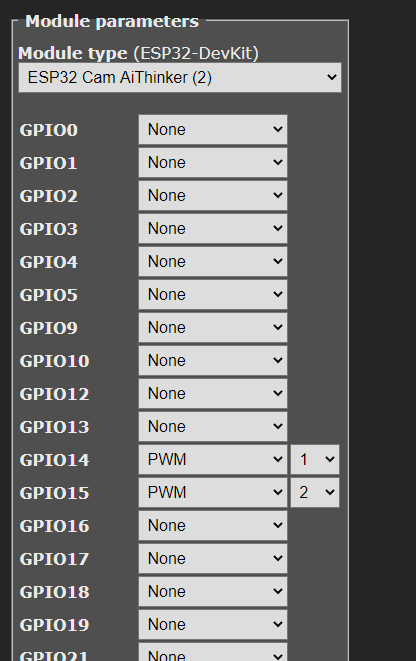
GPIO14 is set to PWM1
GPIO15 is set to PWM2
Has anyone an idea, what I could try further?
Regards
Helmar
REQUESTED INFORMATION
_Make sure your have performed every step and checked the applicable boxes before submitting your issue. Thank you!_
- [X] Read the Contributing Guide and Policy and the Code of Conduct
- [X] Searched the problem in issues
- [X] Searched the problem in the docs
- [X] Searched the problem in the forum
- [X] Searched the problem in the chat
- [X] Device used (e.g., Sonoff Basic): ESP32CAM
- [X] Tasmota binary firmware version number used: 8.4.0
- [X] Pre-compiled
- [ ] Self-compiled
- [ ] IDE / Compiler used: _____
- [X] Flashing tools used: esptool
- [ ] Provide the output of command:
Backlog Template; Module; GPIO 255:
18:54:02 CMD: Backlog Template; Module; GPIO 255
18:54:03 RSL: stat/tasmota_144E80/RESULT = {"NAME":"ESP32-DevKit","GPIO":[1,1,1,1,1,1,1,1,1,1,1,1,1,1,1,1,0,1,1,1,0,1,1,1,0,0,0,0,1,1,1,1,1,0,0,1],"FLAG":0,"BASE":1}
18:54:03 RSL: stat/tasmota_144E80/RESULT = {"Module":{"2":"ESP32 Cam AiThinker"}}
18:54:03 RSL: stat/tasmota_144E80/RESULT = {"GPIO0":{"0":"None"},"GPIO1":{"0":"None"},"GPIO2":{"0":"None"},"GPIO3":{"0":"None"},"GPIO4":{"0":"None"},"GPIO5":{"0":"None"},"GPIO9":{"0":"None"},"GPIO10":{"0":"None"},"GPIO12":{"0":"None"},"GPIO13":{"0":"None"},"GPIO14":{"416":"PWM1"},"GPIO15":{"417":"PWM2"},"GPIO16":{"0":"None"},"GPIO17":{"0":"None"},"GPIO18":{"0":"None"},"GPIO19":{"0":"None"},"GPIO21":{"0":"None"},"GPIO22":{"0":"None"},"GPIO23":{"0":"None"},"GPIO25":{"0":"None"},"GPIO26":{"0":"None"},"GPIO27":{"0":"None"},"GPIO32":{"0":"None"},"GPIO33":{"0":"None"},"GPIO34":{"0":"None"},"GPIO35":{"0":"None"},"GPIO36":{"0":"None"},"GPIO39":{"0":"None"}}
- [ ] If using rules, provide the output of this command:
Backlog Rule1; Rule2; Rule3:
Rules output here:
- [ ] Provide the output of this command:
Status 0:
  STATUS 0 output here:
18:54:45 RSL: stat/tasmota_144E80/STATUS = {"Status":{"Module":2,"DeviceName":"Tasmota","FriendlyName":["Tasmota","Tasmota2"],"Topic":"tasmota_144E80","ButtonTopic":"0","Power":3,"PowerOnState":3,"LedState":1,"LedMask":"FFFF","SaveData":1,"SaveState":1,"SwitchTopic":"0","SwitchMode":[0,0,0,0,0,0,0,0],"ButtonRetain":0,"SwitchRetain":0,"SensorRetain":0,"PowerRetain":0}}
18:54:45 RSL: stat/tasmota_144E80/STATUS1 = {"StatusPRM":{"Baudrate":115200,"SerialConfig":"8N1","GroupTopic":"tasmotas","OtaUrl":"http://thehackbox.org/tasmota/release/tasmota.bin","RestartReason":"Software reset CPU","Uptime":"0T00:15:19","StartupUTC":"2020-07-12T10:39:26","Sleep":50,"CfgHolder":4617,"BootCount":55,"BCResetTime":"2020-07-12T06:19:58","SaveCount":608}}
18:54:45 RSL: stat/tasmota_144E80/STATUS2 = {"StatusFWR":{"Version":"8.4.0(webcam)","BuildDateTime":"2020-07-12T16:57:04","Core":"1_0_4","SDK":"v3.2.3-14-gd3e562907","CpuFrequency":240,"Hardware":"ESP32","CR":"352/699"}}
18:54:45 RSL: stat/tasmota_144E80/STATUS3 = {"StatusLOG":{"SerialLog":2,"WebLog":2,"MqttLog":0,"SysLog":0,"LogHost":"","LogPort":514,"SSId":["MYSSID",""],"TelePeriod":300,"Resolution":"558180C0","SetOption":["00008009","2805C8000100060000005A00000000000000","000C0000","00006000"]}}
18:54:45 RSL: stat/tasmota_144E80/STATUS4 = {"StatusMEM":{"ProgramSize":1180,"Free":1984,"Heap":98,"PsrMax":4095,"PsrFree":3345,ProgramFlashSize":4096,"FlashSize":4096,"FlashFrequency":40,"FlashMode":3,"Features":["00000809","8FDAC787","00140001","000000CD","010013C0","40000181","80004000"],"Drivers":"1,2,3,4,5,7,8,9,10,12,20,21,24,26,27,81","Sensors":"1,2,3,5,6"}}
18:54:45 RSL: stat/tasmota_144E80/STATUS5 = {"StatusNET":{"Hostname":"tasmota_144E80-3712","IPAddress":"192.168.1.204","Gateway":"192.168.1.1","Subnetmask":"255.255.255.0","DNSServer":"192.168.1.2","Mac":"24:6F:28:14:4E:80","Webserver":2,"WifiConfig":4,"WifiPower":17.0}}
18:54:45 RSL: stat/tasmota_144E80/STATUS6 = {"StatusMQT":{"MqttHost":"","MqttPort":1883,"MqttClientMask":"DVES_%06X","MqttClient":"DVES_144E80","MqttUser":"DVES_USER","MqttCount":0,"MAX_PACKET_SIZE":1200,"KEEPALIVE":30}}
18:54:45 RSL: stat/tasmota_144E80/STATUS7 = {"StatusTIM":{"UTC":"2020-07-14T10:54:45","Local":"2020-07-14T18:54:45","StartDST":"2020-03-29T02:00:00","EndDST":"2020-10-25T03:00:00","Timezone":"+01:00","Sunrise":"05:02","Sunset":"20:49"}}
18:54:45 RSL: stat/tasmota_144E80/STATUS10 = {"StatusSNS":{"Time":"2020-07-14T18:54:45"}}
18:54:45 RSL: stat/tasmota_144E80/STATUS11 = {"StatusSTS":{"Time":"2020-07-14T18:54:45","Uptime":"0T00:15:19","UptimeSec":919,"Heap":98,"SleepMode":"Dynamic","Sleep":10,"LoadAvg":2993,"MqttCount":0,"POWER1":"ON","Channel1":43,"POWER2":"ON","Channel2":27,"Color":"6E45","Wifi":{"AP":1,"SSId":"MYSSID","BSSId":"9C:C7:A6:F7:72:A2","Channel":6,"RSSI":64,"Signal":-68,"LinkCount":1,"Downtime":"0T00:00:03"}}}
- [ ] Provide the output of the Console log output when you experience your issue; if applicable:
_(Please use_weblog 4_for more debug information)_
Console output here:
TO REPRODUCE
_Steps to reproduce the behavior:_
EXPECTED BEHAVIOUR
_A clear and concise description of what you expected to happen._
SCREENSHOTS
_If applicable, add screenshots to help explain your problem._
ADDITIONAL CONTEXT
_Add any other context about the problem here._
(Please, remember to close the issue when the problem has been addressed)
 helmar74
All 47 comments
@helmar74 Servo is a very old question. https://github.com/arendst/Tasmota/issues/3997
I tried to solve it using the undocumented features of Tasmota. BUT it works very badly.
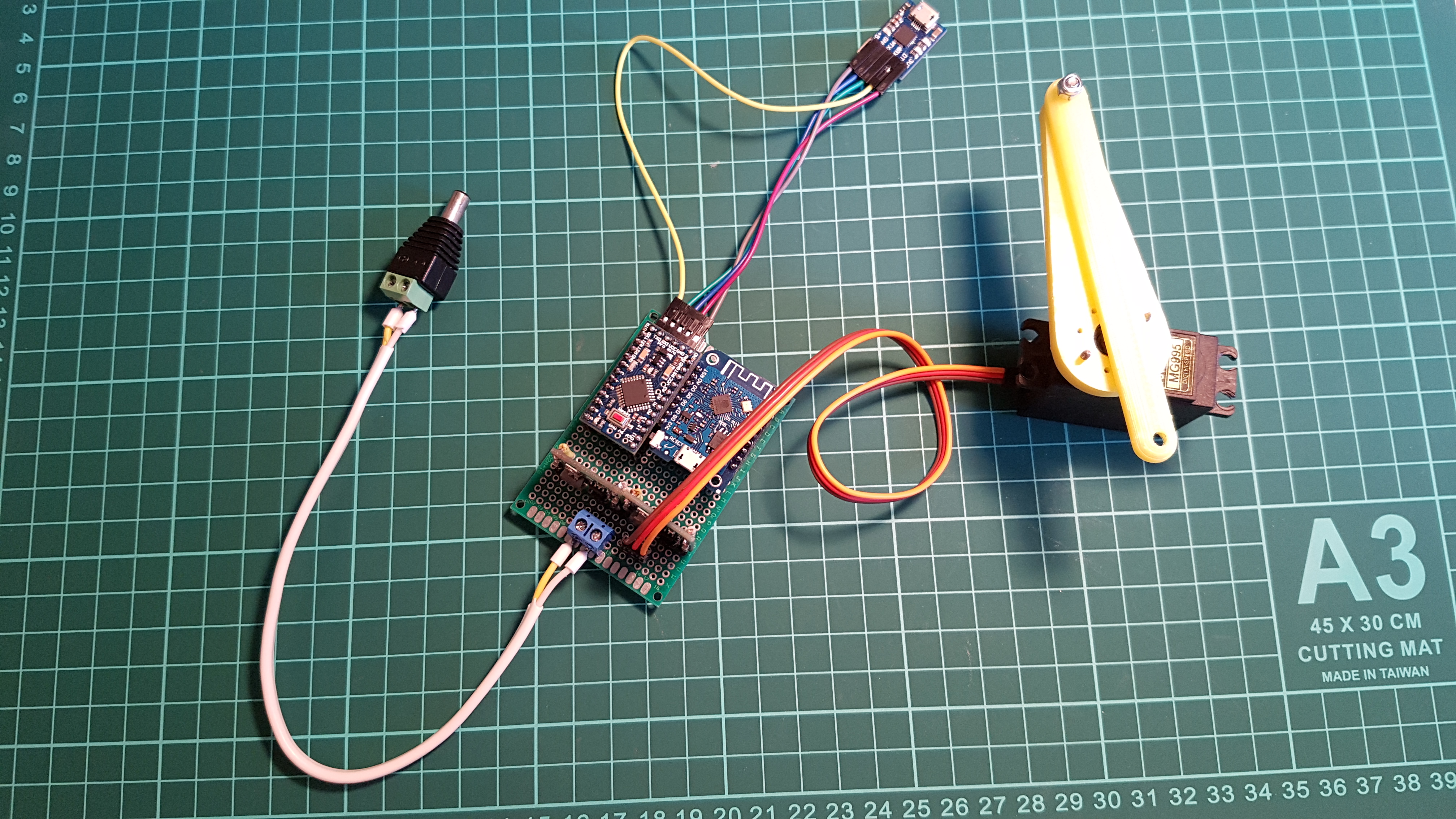
I am currently using a third party library to control servo + Aduino (Tasmota slave) https://github.com/arendst/Tasmota/issues/8316 + Wemos.



 TrDA-hab
on 25 Jul 2020
TrDA-hab
on 25 Jul 2020
@stefanbode
If it doesn't bother you, could you please see this question?
Can the gate driver be configured to work with a servo drive?
I think this is an opportunity to provide a working solution using both your driver and the servo driver.
Perhaps you will have comments.
Thank!
TrDA-hab
on 25 Jul 2020
I have already made some investigation on the servo. In General it can be integrated. It behave more or less like a normal motor with different approach to start and stop. I did not further worked on it because there where some side effects with the stepper motors I was not able to easily fix. Anyhow if more interested I can add the servo as an additional option to drive the shutter. The Pwm can also be used to accelerate and decelerate the serve at start/stop. This is would skip in the first approach.
 stefanbode
on 26 Jul 2020
stefanbode
on 26 Jul 2020
Anyhow if more interested I can add the servo as an additional option to drive the shutter.
Yes. It's very, very interesting.
I have been trying to do this for four months now, but have not achieved a good result. I need a minimum size control board + two servo drives.
The Pwm can also be used to accelerate and decelerate the serve at start/stop. This is would skip in the first approach.
Even if the PWM works in the second stage it will be a big step for the servo drive.
I have all the necessary components and am now ready to start testing the servo drive.
Thank!
TrDA-hab
on 26 Jul 2020
I have added the required function now, but not able to test it. Therefore no commit to the main project right now. Please replace the xdrv_27_shutter.ini with the one linked below and compile.
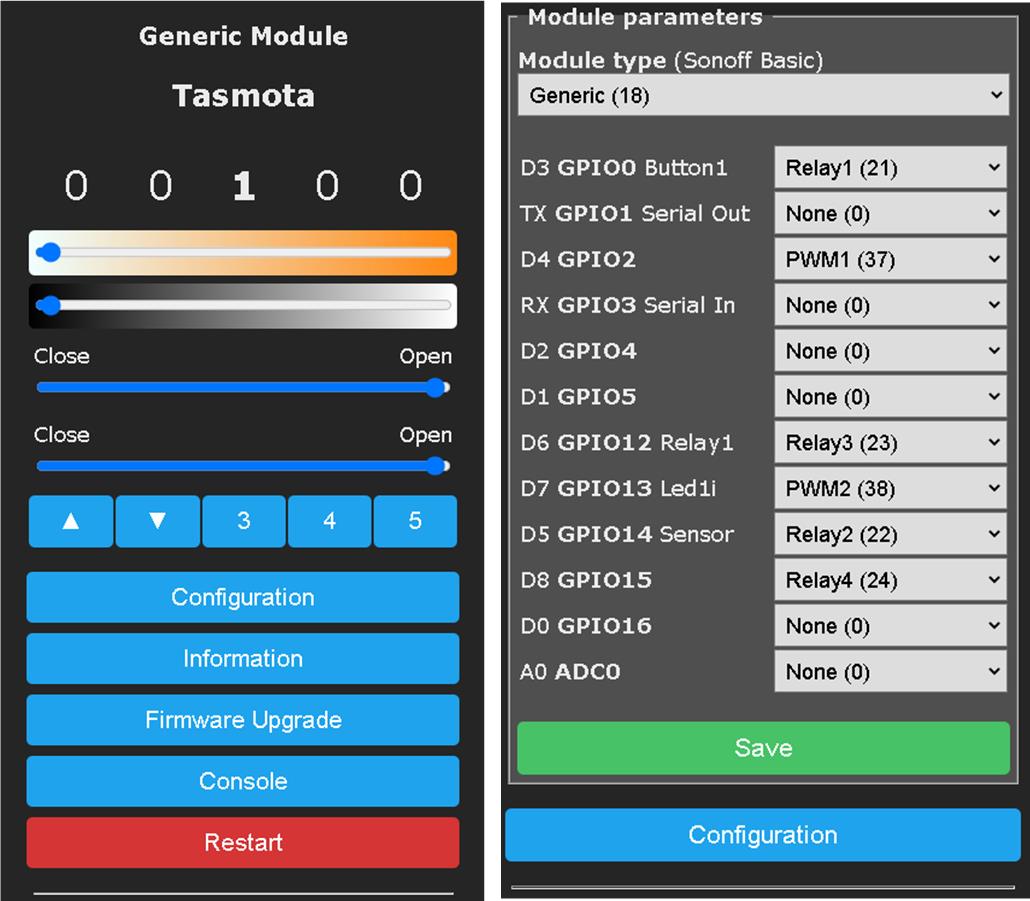
For the SERVO mode, there must be RELAY1 (on/off) RELAY2 (up/down) and PWM1 defined. COUNTER1 must be UNDEFINED. Otherwise, the driver think it is a StepperMotor. With LOGlevel 4 you will get additional feedback when changing the servo. You can connect RELAY1 to the power of the servo or connect the power directly. Both should work. In the last case there is always power consumption also when the shutter stops. After boot the SHUTTERMODE ==4 is a good sign, that the driver operates in servo mode. You should also see some log messages: SHT: Servo %d Direction: %d
https://github.com/stefanbode/Sonoff-Tasmota/blob/master/tasmota/xdrv_27_shutter.ino
stefanbode
on 29 Jul 2020
How it works: to CLOSE the PWM=0, to OPEN the PWM=1023. Stop is 512. Most SERVO stop or go into the middle position with 50% duty time in the PWM. The current approach expects a continuous revolving servo and stops the servo after SHUTTEROPENTIME or SHUTTERCLOSETIME. There is no direct relationship between the PWM and the SERVO position. This is more or less a dimmer and does not need the shutter driver. The shutter driver takes care HOW LONG the servo get the PWM=0 or PWM=1023 before it gets back to PWM=512
stefanbode
on 29 Jul 2020
When I read the intro into the problem I think you will get easier to success with just lowering the PWMFREQUENCY = 100. In this case the servo should be able to follow better the PWM duty time.
stefanbode
on 29 Jul 2020
I'm going to start testing...
TrDA-hab
on 29 Jul 2020
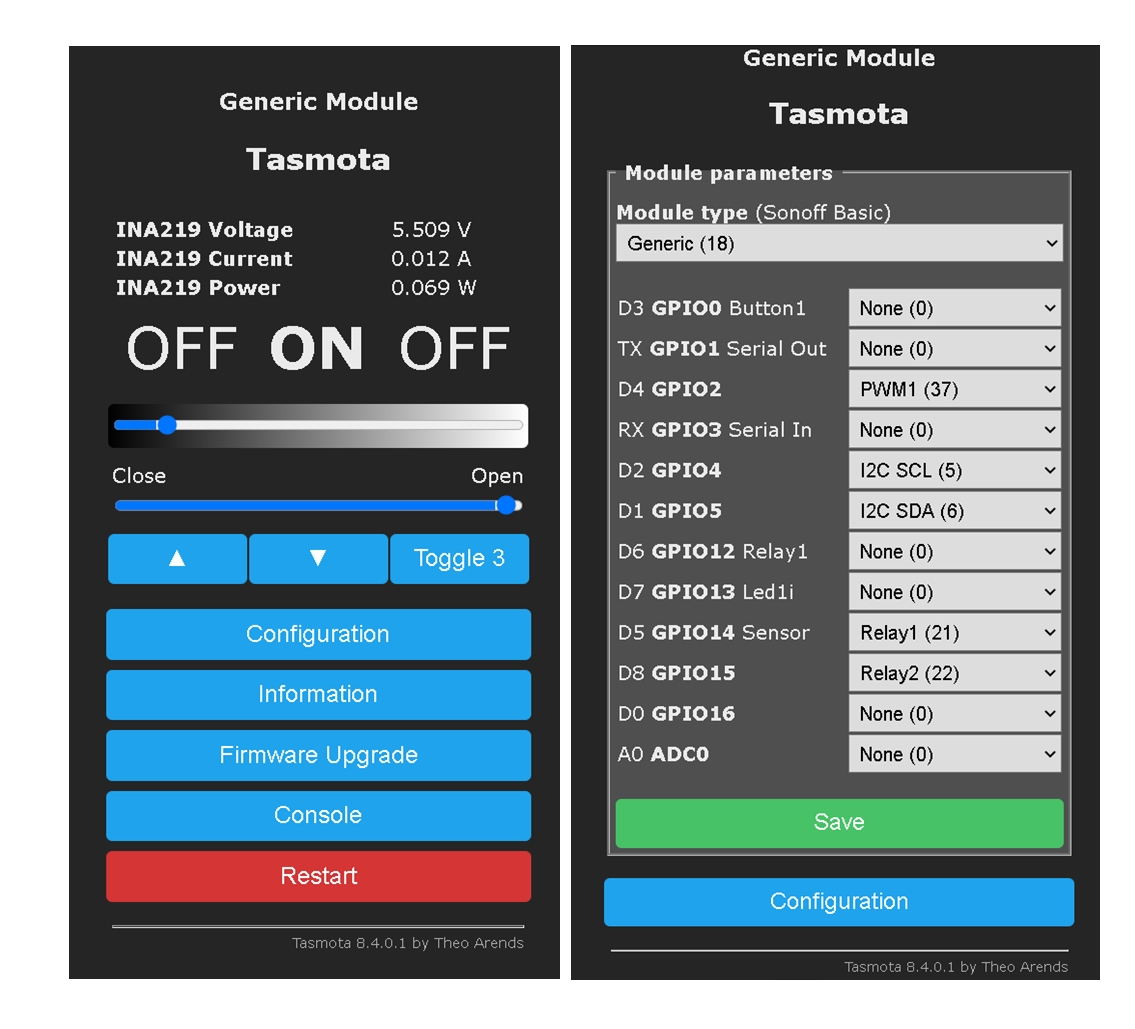
These are the results of my tests.
++++++++++++++++
My settings:
D1: SDA (INA219)
D2: SCL (INA219)
Shutter1:
D4: PWM1 = PLS (Servo)
D5: Relay1 = EN
D6: Relay2 = DIR
Backlog PulseTime1 0; PulseTime2 0; Interlock OFF
ShutterRelay1 1
Restart 1
ShutterCloseDuration 0.3
ShutterOpenDuration 0.3
Restart 1
++++++++++++++++
After restart:
00:00:00 SHT: Servo 0 Direction: 0
00:00:00 SHT: Shutter 0 Closefreq: 1000
00:00:00 SHT: Shutter 1 (Relay:1): Init. Pos: 600 [100 %], Open Vel.: 100, Close Vel.: 100 , Max Way: 600, Opentime 0.3 [s], Closetime 0.3 [s], CoeffCalc: c0: 300, c1 500, c2: 700, c3: 900, c4: 1000, binmask 3, is inverted 0, is locked 0, end stop time enabled 0, webButtons inverted 0, shuttermode 4, motordelay 0
++++++++++++++++
I can only execute the "ShutterClose" command once and the servo moves:
17:23:55 CMD: ShutterClose
17:23:55 SRC: WebConsole from 192.168.1.102
17:23:55 CMD: Group 0, Index 1, Command "SHUTTERCLOSE", Data ""
17:23:55 SHT: Pos. in: payload (0), payload 0, idx 1, src 7
17:23:55 SHT: lastsource 7:, real 600, target 0, payload 0
17:23:55 SHT: Start in dir 0
17:23:55 SHT: Servo 0 Direction: 0
17:23:55 SRC: Shutter
17:23:55 SHT: Switched relay: 2 by Shutter
17:23:55 RSL: stat/tasmota_051132/RESULT = {"POWER2":"ON"}
17:23:55 RSL: stat/tasmota_051132/POWER2 = ON
17:23:55 RSL: stat/tasmota_051132/RESULT = {"ShutterClose1":0}
17:23:55 SHT: Shutter1 Real 600, Start 600, Stop 0, Dir -1, Delay 0, Rtc 0.10 [s], Freq 100
17:23:55 RSL: stat/tasmota_051132/RESULT = {"Shutter1":{"Position":100,"Direction":-1,"Target":0}}
17:23:55 CFG: Saved to flash at F4, Count 216, Bytes 4096
17:23:55 SHT: Servo 0 Direction: 0
17:23:55 SHT: Shutter1 Real 0, Start 600, Stop 0, Dir -1, Delay 0, Rtc 0.30 [s], Freq 100
17:23:55 RSL: stat/tasmota_051132/SHUTTER1 = 0
17:23:55 RSL: stat/tasmota_051132/RESULT = {"Shutter1":{"Position":0,"Direction":0,"Target":0}}
+++++++++++++++++
Further, the servo does not respond, but everything works in the console. Relay2 does not turn off after the first operation (always on).
17:39:12 CMD: ShutterOpen
17:39:12 SRC: WebConsole from 192.168.1.102
17:39:12 CMD: Group 0, Index 1, Command "SHUTTEROPEN", Data ""
17:39:12 SHT: Pos. in: payload (0), payload 100, idx 1, src 7
17:39:12 SHT: lastsource 7:, real 0, target 600, payload 100
17:39:12 SHT: Start in dir 0
17:39:12 SHT: Servo 0 Direction: 0
17:39:12 SRC: Shutter
17:39:12 SHT: Switched relay: 1 by Shutter
17:39:12 RSL: stat/tasmota_051132/RESULT = {"POWER1":"ON"}
17:39:12 RSL: stat/tasmota_051132/POWER1 = ON
17:39:12 RSL: stat/tasmota_051132/RESULT = {"ShutterOpen1":100}
17:39:12 SHT: Shutter1 Real 0, Start 0, Stop 600, Dir 1, Delay 0, Rtc 0.05 [s], Freq 100
17:39:12 RSL: stat/tasmota_051132/RESULT = {"Shutter1":{"Position":0,"Direction":1,"Target":100}}
17:39:12 CFG: Saved to flash at F4, Count 224, Bytes 4096
17:39:12 SHT: Servo 0 Direction: 0
17:39:12 SRC: Shutter
17:39:12 SHT: Switched relay: 1 by Shutter
17:39:12 RSL: stat/tasmota_051132/RESULT = {"POWER1":"OFF"}
17:39:12 RSL: stat/tasmota_051132/POWER1 = OFF
17:39:12 SHT: Shutter1 Real 600, Start 0, Stop 600, Dir 1, Delay 0, Rtc 0.30 [s], Freq 100
17:39:12 RSL: stat/tasmota_051132/SHUTTER1 = 100
17:39:12 RSL: stat/tasmota_051132/RESULT = {"Shutter1":{"Position":100,"Direction":0,"Target":100}}
TrDA-hab
on 31 Jul 2020
Hmm, the direction is always 0. This means stop the servo. Quite strange. Definitely not as it should be
17:23:55 SHT: Servo 0 Direction: 0
stefanbode
on 31 Jul 2020
I found the issue for the direction 0 problem and commit the new code. Anyhow I still do not believe that this is the solution for your problem. You do not have a continuous spinning servo. As mentioned a normal dimmer and the pwmfrequency 100 might be a much better approach. The you can control exactly the position of the servo with the Pwm duty cycle. Ledtable 0 might be an additional option you have to set
stefanbode
on 31 Jul 2020
I have uploaded new code.
++++++++++++++++++++++
18:55:41 CMD: ShutterClose
18:55:41 SRC: WebConsole from 192.168.1.102
18:55:41 CMD: Group 0, Index 1, Command "SHUTTERCLOSE", Data ""
18:55:41 SHT: Pos. in: payload (0), payload 0, idx 1, src 7
18:55:41 SHT: lastsource 7:, real 600, target 0, payload 0
18:55:41 SHT: Wait for Motorstop..
18:55:41 SRC: Shutter
18:55:41 SHT: Switched relay: 0 by Shutter
18:55:41 RSL: stat/tasmota_051132/RESULT = {"POWER1":"OFF"}
18:55:41 RSL: stat/tasmota_051132/POWER1 = OFF
18:55:41 SHT: Servo 0 Direction: 0
18:55:42 SRC: Shutter
18:55:42 SHT: Switched relay: 0 by Shutter
18:55:42 RSL: stat/tasmota_051132/RESULT = {"POWER1":"OFF"}
18:55:42 RSL: stat/tasmota_051132/POWER1 = OFF
18:55:42 SHT: Servo 0 Direction: 0
18:55:42 SHT: Servo 0 Direction: -1
18:55:42 SRC: Shutter
18:55:42 SHT: Switched relay: 2 by Shutter
18:55:42 RSL: stat/tasmota_051132/RESULT = {"POWER2":"ON"}
18:55:42 RSL: stat/tasmota_051132/POWER2 = ON
18:55:42 SRC: Shutter
18:55:42 SHT: Switched relay: 1 by Shutter
18:55:42 RSL: stat/tasmota_051132/RESULT = {"POWER1":"ON"}
18:55:42 RSL: stat/tasmota_051132/POWER1 = ON
18:55:42 RSL: stat/tasmota_051132/RESULT = {"ShutterClose1":0}
18:55:42 SHT: Shutter1 Real 600, Start 600, Stop 0, Dir -1, Delay 0, Rtc 0.10 [s], Freq 100
18:55:42 RSL: stat/tasmota_051132/RESULT = {"Shutter1":{"Position":100,"Direction":-1,"Target":0}}
18:55:42 SHT: Shutter1 Real 400, Start 600, Stop 0, Dir -1, Delay 0, Rtc 0.10 [s], Freq 100
18:55:42 RSL: stat/tasmota_051132/RESULT = {"Shutter1":{"Position":67,"Direction":-1,"Target":0}}
18:55:42 SHT: Servo 0 Direction: 0
18:55:42 SRC: Shutter
18:55:42 SHT: Switched relay: 1 by Shutter
18:55:42 RSL: stat/tasmota_051132/RESULT = {"POWER1":"OFF"}
18:55:42 RSL: stat/tasmota_051132/POWER1 = OFF
18:55:42 SHT: Shutter1 Real 0, Start 600, Stop 0, Dir -1, Delay 0, Rtc 0.35 [s], Freq 100
18:55:42 RSL: stat/tasmota_051132/SHUTTER1 = 0
18:55:42 RSL: stat/tasmota_051132/RESULT = {"Shutter1":{"Position":0,"Direction":0,"Target":0}}
The servo turned!
18:58:22 CMD: ShutterOpen
18:58:22 SRC: WebConsole from 192.168.1.102
18:58:22 CMD: Group 0, Index 1, Command "SHUTTEROPEN", Data ""
18:58:22 SHT: Pos. in: payload (0), payload 100, idx 1, src 7
18:58:22 SHT: lastsource 7:, real 0, target 600, payload 100
18:58:22 SHT: Wait for Motorstop..
18:58:22 SRC: Shutter
18:58:22 SHT: Switched relay: 0 by Shutter
18:58:22 RSL: stat/tasmota_051132/RESULT = {"POWER1":"OFF"}
18:58:22 RSL: stat/tasmota_051132/POWER1 = OFF
18:58:22 SHT: Servo 0 Direction: 0
18:58:23 SRC: Shutter
18:58:23 SHT: Switched relay: 0 by Shutter
18:58:23 RSL: stat/tasmota_051132/RESULT = {"POWER1":"OFF"}
18:58:23 RSL: stat/tasmota_051132/POWER1 = OFF
18:58:23 SHT: Servo 0 Direction: 0
18:58:23 SHT: Servo 0 Direction: 1
18:58:23 SRC: Shutter
18:58:23 SHT: Switched relay: 2 by Shutter
18:58:23 RSL: stat/tasmota_051132/RESULT = {"POWER2":"OFF"}
18:58:23 RSL: stat/tasmota_051132/POWER2 = OFF
18:58:23 SRC: Shutter
18:58:23 SHT: Switched relay: 1 by Shutter
18:58:23 RSL: stat/tasmota_051132/RESULT = {"POWER1":"ON"}
18:58:23 RSL: stat/tasmota_051132/POWER1 = ON
18:58:23 RSL: stat/tasmota_051132/RESULT = {"ShutterOpen1":100}
18:58:23 SHT: Shutter1 Real 0, Start 0, Stop 600, Dir 1, Delay 0, Rtc 0.15 [s], Freq 100
18:58:23 RSL: stat/tasmota_051132/RESULT = {"Shutter1":{"Position":0,"Direction":1,"Target":100}}
18:58:23 SHT: Shutter1 Real 300, Start 0, Stop 600, Dir 1, Delay 0, Rtc 0.15 [s], Freq 100
18:58:23 RSL: stat/tasmota_051132/RESULT = {"Shutter1":{"Position":50,"Direction":1,"Target":100}}
18:58:23 SHT: Servo 0 Direction: 0
18:58:23 SRC: Shutter
18:58:23 SHT: Switched relay: 1 by Shutter
18:58:23 RSL: stat/tasmota_051132/RESULT = {"POWER1":"OFF"}
18:58:23 RSL: stat/tasmota_051132/POWER1 = OFF
18:58:23 SHT: Shutter1 Real 600, Start 0, Stop 600, Dir 1, Delay 0, Rtc 0.30 [s], Freq 100
18:58:23 RSL: stat/tasmota_051132/SHUTTER1 = 100
18:58:23 RSL: stat/tasmota_051132/RESULT = {"Shutter1":{"Position":100,"Direction":0,"Target":100}}
Servo does not move.
As mentioned a normal dimmer and the pwmfrequency 100 might be a much better approach. The you can control exactly the position of the servo with the Pwm duty cycle. Ledtable 0 might be an additional option you have to set
I need the ability to accelerate and decelerate the feed at start / stop. If this is not done, Servo dies quickly.
TrDA-hab
on 31 Jul 2020
From the log now everything looks fine. I assume power is connected to Relay1.
Accelerate and decelerate on Servos is very tricky. The continuous moving ones can be controlled through changing the PWM value from 512 to 0 in time defined steps. If your servo directly uses the PWM for positioning control you also need control the PWM value but this time the speed of change is very important. Need to think further how to get this solved with more or less no code.
Regarding the current issue. Does it operates when you double the open time/close time?
As mentioned, from the log I looks ok
stefanbode
on 31 Jul 2020
Accelerate and decelerate on Servos is very tricky
Yes I know. Now I use this library to work the servo (TastotaSlave = Arduino + Wemos):
https://github.com/AlexGyver/GyverLibs/tree/master/ServoSmooth
My Servo (180, 35kg):
https://aliexpress.ru/item/4000538643378.html
Regarding the current issue. Does it operates when you double the open time/close time?
Changing the open / close time has no effect, nothing changes, the servo works once.
If you don't have time now, for this question. Let's come back a second time in the Autumn (in three months).
Now I can replace the x2 servo with a x1 angular gear stepper motor. This is a temporary solution to the issue.
https://aliexpress.ru/item/32860395449.html
TrDA-hab
on 31 Jul 2020
I checked the ServoSmooth library and in the end they control the change of the PWM duty cycle to do a smooth start/stop. PWM frequency is fixed at 60Hz. Now back from holiday so I can test in the evening why it only works in one direction.
stefanbode
on 3 Aug 2020
It's fantastic! I'll wait. I'm ready to test the Servo again.
TrDA-hab
on 3 Aug 2020
@stefanbode Is the servo driving smooth? Maybe using the modified servo driver from Arduino ESP PR# https://github.com/esp8266/Arduino/pull/7022
 Jason2866
on 9 Aug 2020
Jason2866
on 9 Aug 2020
Servo driving is not smooth right now. We also have to decide if it works for continuous spinning servos or position servos. Both are completely different. I have a continuous one here. Very cheap but ok for Develoment
stefanbode
on 11 Aug 2020
Continuous spinning servos (from my practice they are rarely used ~ 10%), position servos are used very often (this is what they are made for).
TrDA-hab
on 11 Aug 2020
Ok, but this take some time. I have to order one to ensure the whole stuff is running as it should be. Coding without testing is a bad advise
stefanbode
on 16 Aug 2020
I'll wait... I'm ready to test.
Testing is very important.
TrDA-hab
on 16 Aug 2020
I have now reorganize the code and prepared also the servo mode with acceleration. The servo was delivered yesterday. Anyhow I'm not able to get it worked. Any idea why?
Red: 5V, brown: gnd, yellow PWM1
Then Pwmfrequency 50.
My expectation was that changing the slider of the dimmer operates the servo. There is some movement. But not as it should be. Any idea what is wrong?
stefanbode
on 3 Sep 2020
You really have 5V, not 3.3? Also for PWM? Else it is hit and miss for me... If yes, I'd hook up a logic analyzer.
 joba-1
on 4 Sep 2020
joba-1
on 4 Sep 2020
Vcc servo has to be => 5V
Jason2866
on 4 Sep 2020
Ok. I checked with 5V and moved a bit forward. PWMFREQUENCY 50. Now the min ist at PWM 437 and the max at PWM 547. So there are "only 110" steps on 180° turn. I have the same servo you have in your pictures. I use SETOPTION15 0 to control the servo first only with PWM values. Can you confirm, that I have no chance to use the complete 1024 steps of PWM control? Currently it looks for me like a duty cycle only between 40% and 50% is used to operate the relay.
stefanbode
on 5 Sep 2020
And one additional step forward. The servo also likes PWMFREQUENCY 200. Now I can control from PWM 90..500. This should work. I have seen an article that the signal must be between 1ms and 2ms. to operate from 0° to180°. At PWMFREQUENCY 200 the period is 5ms. So the expectation is PWM 209..409 (https://www.wikiwand.com/de/Servo#/Positionsregelung). So I need the min and max value also as permanent parameters. the pwmrange seems not to work with setopin15. additionally I miss the min.
stefanbode
on 5 Sep 2020
Ok, done. You need the following files from my branch and copy them in the current source code and compile yourself. If everything works I will merge it into the master:
https://github.com/stefanbode/Sonoff-Tasmota/blob/master/tasmota/xdrv_27_shutter.ino
https://github.com/stefanbode/Sonoff-Tasmota/blob/master/tasmota/settings.h
https://github.com/stefanbode/Sonoff-Tasmota/blob/master/tasmota/i18n.h
In the xdrv27 you will find hardcoded the min and max pwm for the relay. Please use pwmfrequency 200 for the relay.
you have to set shuttermode 5 to enable the new mode for servos. Additionally, you can define shuttermotordelay e.g. 1.0 for 1 second to have a smooth ram of the velocity. open/close is always full operation 180°. openduration and closeduration can be set to limit the speed in general. Please have fun and let me know if it also works for you.
stefanbode
on 5 Sep 2020
I start testing immediately.
TrDA-hab
on 6 Sep 2020
@stefanbode
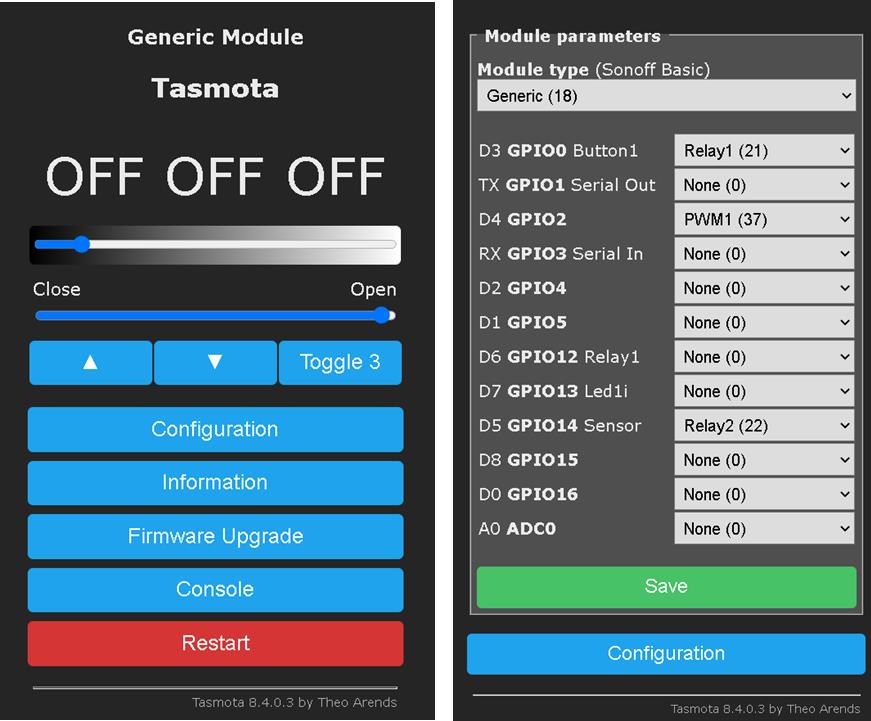
you have to set shuttermode 5 to enable the new mode for servos.
- How should I set the "shuttermode 5"? What commands should I use?
+++++
14:40:49 CMD: shuttermode 5
14:40:49 CMD: Group 0, Index 1, Command "SHUTTERMODE", Data "5"
14:40:49 RSL: stat/tasmota_051132/RESULT = {"Command":"Unknown"}
+++++ - How to control the servo, what commands?
TrDA-hab
on 6 Sep 2020
Added new "shuttermode" command to specify an operation mode.
I did everything as you indicated and compiled the code.
I have been trying to get this to work for 4 hours.
But ... where did I go wrong?
+++++
15:06:25 CMD: shuttermode 5
15:06:25 SRC: WebConsole from 192.168.1.21
15:06:25 CMD: Group 0, Index 1, Command "SHUTTERMODE", Data "5"
15:06:25 RSL: stat/tasmota_051132/RESULT = {"Command":"Unknown"}
TrDA-hab
on 6 Sep 2020
Can you do a status 13 to see what is configured
stefanbode
on 6 Sep 2020
I assume SETOPTION80 1 as normal for shutters is set and also the relays do some stuff, if you move up and down. Please add some log files. You still have to use my files from my branch. Arendst will not use the current state for the 8.5 release today
stefanbode
on 6 Sep 2020
Can you do a status 13 to see what is configured
17:37:04 CMD: status 13
17:37:04 SRC: WebConsole from 192.168.1.103
17:37:04 CMD: Group 0, Index 1, Command "STATUS", Data "13"
17:37:04 RSL: stat/tasmota_051132/STATUS13 = {"StatusSHT":{"SHT0":{"Relay1":1,"Relay2":2,"Open":0,"Close":0,"50perc":50,"Delay":0,"Opt":"0000","Calib":"300:500:700:900:1000"}}
TrDA-hab
on 6 Sep 2020
I assume SETOPTION80 1 as normal for shutters is set and also the relays do some stuff, if you move up and down.
17:38:14 CMD: SETOPTION80
17:38:14 SRC: WebConsole from 192.168.1.103
17:38:14 CMD: Group 0, Index 80, Command "SETOPTION", Data ""
17:38:14 RSL: stat/tasmota_051132/RESULT = {"SetOption80":"ON"}
TrDA-hab
on 6 Sep 2020
Please add some log files.
17:39:59 HTP: Console
17:40:02 HTP: Main Menu
17:40:04 SRC: WebGui from 192.168.1.103
17:40:04 CMD: Group 0, Index 1, Command "SHUTTERPOSITION", Data "0"
17:40:04 SHT: Pos. in: payload 0 (1), payload 0, idx 1, src 7
17:40:04 SHT: lastsource 7:, real 20000, target 0, payload 0
17:40:04 SHT: Wait for Motorstop..
17:40:04 SRC: Shutter
17:40:04 SHT: Switched relay: 0 by Shutter
17:40:04 RSL: stat/tasmota_051132/RESULT = {"POWER1":"OFF"}
17:40:04 RSL: stat/tasmota_051132/POWER1 = OFF
17:40:05 SRC: Shutter
17:40:05 SHT: Switched relay: 0 by Shutter
17:40:05 RSL: stat/tasmota_051132/RESULT = {"POWER1":"OFF"}
17:40:05 RSL: stat/tasmota_051132/POWER1 = OFF
17:40:05 SRC: Shutter
17:40:05 SHT: Switched relay: 2 by Shutter
17:40:05 RSL: stat/tasmota_051132/RESULT = {"POWER2":"ON"}
17:40:05 RSL: stat/tasmota_051132/POWER2 = ON
17:40:05 SRC: Shutter
17:40:05 SHT: Switched relay: 1 by Shutter
17:40:05 RSL: stat/tasmota_051132/RESULT = {"POWER1":"ON"}
17:40:05 RSL: stat/tasmota_051132/POWER1 = ON
17:40:05 RSL: stat/tasmota_051132/RESULT = {"ShutterPosition1":0}
17:40:05 SHT: Shutter1 Real 20000, Start 20000, Stop 0, Dir -1, Delay 0, Rtc 0.10 [s], Freq 0
17:40:05 RSL: stat/tasmota_051132/RESULT = {"Shutter1":{"Position":100,"Direction":-1,"Target":0}}
17:40:05 SHT: Shutter1 Real 19800, Start 20000, Stop 0, Dir -1, Delay 0, Rtc 0.10 [s], Freq 0
17:40:05 RSL: stat/tasmota_051132/RESULT = {"Shutter1":{"Position":99,"Direction":-1,"Target":0}}
17:40:06 CFG: Saved to flash at FA, Count 18, Bytes 4096
17:40:06 SHT: Shutter1 Real 18000, Start 20000, Stop 0, Dir -1, Delay 0, Rtc 1.00 [s], Freq 0
17:40:06 RSL: stat/tasmota_051132/RESULT = {"Shutter1":{"Position":90,"Direction":-1,"Target":0}}
17:40:07 SHT: Shutter1 Real 15900, Start 20000, Stop 0, Dir -1, Delay 0, Rtc 2.05 [s], Freq 0
17:40:07 RSL: stat/tasmota_051132/RESULT = {"Shutter1":{"Position":80,"Direction":-1,"Target":0}}
17:40:07 WIF: Checking connection...
17:40:08 SHT: Shutter1 Real 14000, Start 20000, Stop 0, Dir -1, Delay 0, Rtc 3.00 [s], Freq 0
17:40:08 RSL: stat/tasmota_051132/RESULT = {"Shutter1":{"Position":70,"Direction":-1,"Target":0}}
17:40:09 SHT: Shutter1 Real 11900, Start 20000, Stop 0, Dir -1, Delay 0, Rtc 4.05 [s], Freq 0
17:40:09 RSL: stat/tasmota_051132/RESULT = {"Shutter1":{"Position":60,"Direction":-1,"Target":0}}
17:40:10 SHT: Shutter1 Real 10000, Start 20000, Stop 0, Dir -1, Delay 0, Rtc 5.00 [s], Freq 0
17:40:10 RSL: stat/tasmota_051132/RESULT = {"Shutter1":{"Position":50,"Direction":-1,"Target":0}}
17:40:11 SHT: Shutter1 Real 8000, Start 20000, Stop 0, Dir -1, Delay 0, Rtc 6.00 [s], Freq 0
17:40:11 RSL: stat/tasmota_051132/RESULT = {"Shutter1":{"Position":40,"Direction":-1,"Target":0}}
17:40:12 SHT: Shutter1 Real 5900, Start 20000, Stop 0, Dir -1, Delay 0, Rtc 7.05 [s], Freq 0
17:40:12 RSL: stat/tasmota_051132/RESULT = {"Shutter1":{"Position":30,"Direction":-1,"Target":0}}
17:40:13 SHT: Shutter1 Real 3900, Start 20000, Stop 0, Dir -1, Delay 0, Rtc 8.05 [s], Freq 0
17:40:13 RSL: stat/tasmota_051132/RESULT = {"Shutter1":{"Position":20,"Direction":-1,"Target":0}}
17:40:14 SHT: Shutter1 Real 2000, Start 20000, Stop 0, Dir -1, Delay 0, Rtc 9.00 [s], Freq 0
17:40:14 RSL: stat/tasmota_051132/RESULT = {"Shutter1":{"Position":10,"Direction":-1,"Target":0}}
17:40:15 SRC: Shutter
17:40:15 SHT: Switched relay: 1 by Shutter
17:40:15 RSL: stat/tasmota_051132/RESULT = {"POWER1":"OFF"}
17:40:15 RSL: stat/tasmota_051132/POWER1 = OFF
17:40:15 SRC: Shutter
17:40:15 SHT: Switched relay: 2 by Shutter
17:40:15 RSL: stat/tasmota_051132/RESULT = {"POWER2":"OFF"}
17:40:15 RSL: stat/tasmota_051132/POWER2 = OFF
17:40:15 SHT: Shutter1 Real 0, Start 20000, Stop 0, Dir -1, Delay 0, Rtc 10.00 [s], Freq 0
17:40:15 RSL: stat/tasmota_051132/SHUTTER1 = 0
17:40:15 RSL: stat/tasmota_051132/RESULT = {"Shutter1":{"Position":0,"Direction":0,"Target":0}}
TrDA-hab
on 6 Sep 2020
17:43:08 CMD: Group 0, Index 1, Command "SHUTTERPOSITION", Data "100"
17:43:08 SHT: Pos. in: payload 100 (3), payload 100, idx 1, src 7
17:43:08 SHT: lastsource 7:, real 0, target 20000, payload 100
17:43:08 SHT: Wait for Motorstop..
17:43:08 SRC: Shutter
17:43:08 SHT: Switched relay: 0 by Shutter
17:43:08 RSL: stat/tasmota_051132/RESULT = {"POWER1":"OFF"}
17:43:08 RSL: stat/tasmota_051132/POWER1 = OFF
17:43:08 SRC: Shutter
17:43:08 SHT: Switched relay: 0 by Shutter
17:43:08 RSL: stat/tasmota_051132/RESULT = {"POWER1":"OFF"}
17:43:08 RSL: stat/tasmota_051132/POWER1 = OFF
17:43:08 SRC: Shutter
17:43:08 SHT: Switched relay: 0 by Shutter
17:43:08 RSL: stat/tasmota_051132/RESULT = {"POWER2":"OFF"}
17:43:08 RSL: stat/tasmota_051132/POWER2 = OFF
17:43:08 SRC: Shutter
17:43:08 SHT: Switched relay: 1 by Shutter
17:43:08 RSL: stat/tasmota_051132/RESULT = {"POWER1":"ON"}
17:43:08 RSL: stat/tasmota_051132/POWER1 = ON
17:43:08 RSL: stat/tasmota_051132/RESULT = {"ShutterPosition1":100}
17:43:08 SHT: Shutter1 Real 0, Start 0, Stop 20000, Dir 1, Delay 0, Rtc 0.05 [s], Freq 0
17:43:08 RSL: stat/tasmota_051132/RESULT = {"Shutter1":{"Position":0,"Direction":1,"Target":100}}
17:43:08 SHT: Shutter1 Real 100, Start 0, Stop 20000, Dir 1, Delay 0, Rtc 0.05 [s], Freq 0
17:43:08 RSL: stat/tasmota_051132/RESULT = {"Shutter1":{"Position":1,"Direction":1,"Target":100}}
17:43:09 SHT: Shutter1 Real 1000, Start 0, Stop 20000, Dir 1, Delay 0, Rtc 0.50 [s], Freq 0
17:43:09 RSL: stat/tasmota_051132/RESULT = {"Shutter1":{"Position":5,"Direction":1,"Target":100}}
17:43:09 CFG: Saved to flash at F8, Count 20, Bytes 4096
17:43:10 SHT: Shutter1 Real 3000, Start 0, Stop 20000, Dir 1, Delay 0, Rtc 1.50 [s], Freq 0
17:43:10 RSL: stat/tasmota_051132/RESULT = {"Shutter1":{"Position":15,"Direction":1,"Target":100}}
17:43:11 SHT: Shutter1 Real 5000, Start 0, Stop 20000, Dir 1, Delay 0, Rtc 2.50 [s], Freq 0
17:43:11 RSL: stat/tasmota_051132/RESULT = {"Shutter1":{"Position":25,"Direction":1,"Target":100}}
17:43:12 SHT: Shutter1 Real 7000, Start 0, Stop 20000, Dir 1, Delay 0, Rtc 3.50 [s], Freq 0
17:43:12 RSL: stat/tasmota_051132/RESULT = {"Shutter1":{"Position":35,"Direction":1,"Target":100}}
17:43:13 SHT: Shutter1 Real 9100, Start 0, Stop 20000, Dir 1, Delay 0, Rtc 4.55 [s], Freq 0
17:43:13 RSL: stat/tasmota_051132/RESULT = {"Shutter1":{"Position":46,"Direction":1,"Target":100}}
17:43:14 SHT: Shutter1 Real 11000, Start 0, Stop 20000, Dir 1, Delay 0, Rtc 5.50 [s], Freq 0
17:43:14 RSL: stat/tasmota_051132/RESULT = {"Shutter1":{"Position":55,"Direction":1,"Target":100}}
17:43:15 SHT: Shutter1 Real 13000, Start 0, Stop 20000, Dir 1, Delay 0, Rtc 6.50 [s], Freq 0
17:43:15 RSL: stat/tasmota_051132/RESULT = {"Shutter1":{"Position":65,"Direction":1,"Target":100}}
17:43:16 SHT: Shutter1 Real 15000, Start 0, Stop 20000, Dir 1, Delay 0, Rtc 7.50 [s], Freq 0
17:43:16 RSL: stat/tasmota_051132/RESULT = {"Shutter1":{"Position":75,"Direction":1,"Target":100}}
17:43:17 SHT: Shutter1 Real 17100, Start 0, Stop 20000, Dir 1, Delay 0, Rtc 8.55 [s], Freq 0
17:43:17 RSL: stat/tasmota_051132/RESULT = {"Shutter1":{"Position":86,"Direction":1,"Target":100}}
17:43:18 SHT: Shutter1 Real 19100, Start 0, Stop 20000, Dir 1, Delay 0, Rtc 9.55 [s], Freq 0
17:43:18 RSL: stat/tasmota_051132/RESULT = {"Shutter1":{"Position":96,"Direction":1,"Target":100}}
17:43:18 SRC: Shutter
17:43:18 SHT: Switched relay: 1 by Shutter
17:43:18 RSL: stat/tasmota_051132/RESULT = {"POWER1":"OFF"}
17:43:18 RSL: stat/tasmota_051132/POWER1 = OFF
17:43:18 SRC: Shutter
17:43:18 SHT: Switched relay: 0 by Shutter
17:43:18 RSL: stat/tasmota_051132/RESULT = {"POWER2":"OFF"}
17:43:18 RSL: stat/tasmota_051132/POWER2 = OFF
17:43:18 SHT: Shutter1 Real 20000, Start 0, Stop 20000, Dir 1, Delay 0, Rtc 10.05 [s], Freq 0
17:43:18 RSL: stat/tasmota_051132/SHUTTER1 = 100
17:43:18 RSL: stat/tasmota_051132/RESULT = {"Shutter1":{"Position":100,"Direction":0,"Target":100}}
TrDA-hab
on 6 Sep 2020
You still have to use my files from my branch.
I don't mind at all.
TrDA-hab
on 6 Sep 2020
You will find the final version to compile here: https://github.com/stefanbode/Sonoff-Tasmota/tree/patch-1
I requested integration into 8.5. I can see in the logs that you have the wrong version. Not the one that has all the changes. Maybe you just wait before it gets pushed into main. Alternative download the project from the link above. Take care that this is NOT master but patch-1.
stefanbode
on 8 Sep 2020
I understand you, I will download from your link, I will not wait. Tomorrow morning I will continue testing.
TrDA-hab
on 8 Sep 2020
I have now tested with one servo drive. I tested this for 5 hours non-stop and didn't get any errors.
It works great, very soft. I was really looking forward to this feature. And now I am delighted.
Thank you very much!
... now I will put together a circuit for two servos, and will test a lot.
TrDA-hab
on 9 Sep 2020
I tested it with two servos. It works great.
Many thanks!
TrDA-hab
on 9 Sep 2020
@helmar74 : Please can you close the issue. Your request is implemented with the latest shutter driver.
stefanbode
on 9 Sep 2020
@TrDA-hab : You're welcome to enhance the documentation for this topic. I already started some changes and really like the community to support.
stefanbode
on 9 Sep 2020
@stefanbode I will definitely support you and I have already seen your work. Now I am making changes to the wiring diagrams. And I will deal with the text. I'm already working. I just need more time.
TrDA-hab
on 9 Sep 2020
Closing this issue as this feature has been added by @stefanbode
Thanks 👍
 ascillato2
on 9 Sep 2020
ascillato2
on 9 Sep 2020
I'm following the development of this feature as I'm looking for a way to control my servo controlled blinds with tasmota. What I don't understand is what the relays are used for? Is it to cut of the power to the servo? And is that absolutely necessary?
I have almost the same servo as used here, only 35kg and 270 degrees, it has the following specs
Signal Cycle: 50HZ
High Time: 0.5ms-2.5ms
I'm planning to controll the servo with a nodemcu
 Try2Fly
on 14 Sep 2020
Try2Fly
on 14 Sep 2020
@Try2Fly
Relay1 - used to power the servo drive (on/off), the use of a physical relay is optional.
Relay2 - only shows the direction of rotation "DIR" (direction), but does not control it.
Relay1 and Relay2 must be configured in Tasmota, or your servo will not work.
You must also use the command ShutterPwmRange 100, 500 for your servo to work properly.
p.s.
If you have questions about how Tasmota software works, visit the Tasmota Discord chat room for a discussion:
https://discordapp.com/invite/Ks2Kzd4
This is not a place for discussions and various questions.
Good luck!
TrDA-hab
on 23 Sep 2020
Related issues
 esp32x
·
3Comments
esp32x
·
3Comments
 he-so
·
3Comments
he-so
·
3Comments
 belidzs
·
3Comments
belidzs
·
3Comments
 JoergZ2
·
3Comments
JoergZ2
·
3Comments
 abzman
·
3Comments
abzman
·
3Comments