Have you looked for this feature in other issues and in the docs?
Yes!
Is your feature request related to a problem? Please describe.
_A clear and concise description of what the problem is._
No
Describe the solution you'd like
_A clear and concise description of what you want to happen._
I managed to flash an old CC2531 Zigbee module and install it on a Wemos D1 Mini. Everything as described in your documentation. Unfortunately it was not possible to flash the CC2531 stick via OSX. This had to be done via Parallels>Win7. There it worked right away.
First of all, I have to say a big praise. It is truly incredible what was made possible with the zigbee driver for Tasmota. Hats off!
Now to my feature request:
Would it be possible to extend the driver so that the CC2530/CC2531 no longer runs as a coordinator but as a kind of router?
For example, you could switch off Wifi on the ESP8266 completely and Tasmota would receive its commands via Zigbee from another coordinator/router.
This would make it possible:
- Operation of relays and circuits in areas where there is no or very poor WIFI coverage, but a good Zigbee coverage. (BTW My garden would be such a case)
- Maybe this could be combined with the DeepSleep mode to optimize Tasmota+Sensors for battery operation (Endpoint Mode).
- As switch or monitoring of certain states (Endpoint Mode)
- As a router with various sensors Tasmota already supports.
Maybe this is possible by a small adjustment of the router firmware from Z2M, just similar as for the coordinator FW.
Describe alternatives you've considered
_A clear and concise description of any alternative solutions or features you've considered._
-
Additional context
_Add any other context or screenshots about the feature request here._
Some Photos from the Pins that are used for RX/TX on my CC2531 USB Stick. For people that wants to rebuild it. RED ->TX // BLACK ->RX

(Please, remember to close the issue when the problem has been addressed)
 kugelkopf123
All 46 comments
Imho it would make more sense to flash a router firmware to the stick and enhance
the z2t coordinator to work with the router. Maybe it works already. I did not test this setup.
Afaik s-hadinger didnt test this setup too
 Jason2866
on 9 May 2020
Jason2866
on 9 May 2020
Routers cannot act independently, the purpose of a zigbee router isn't the same as a wifi router.
You still need a coordinator so I don't see any purpose of attaching it to a working wifi device.
Also routers need to work 24/7 they cannot run on batteries or have any sleep time.
What you're proposing can be done as a standalone zigbee switch/sensor point that acts as a router when powered by mains which still needs a coordinator to send and receive commands.
see https://github.com/formtapez/ZigUP/
Z2T works with routers, tested on a few DIY ptvo routers
 blakadder
on 10 May 2020
blakadder
on 10 May 2020
@blakadder
Thanks for the link! That looks pretty interesting.
And: Yes, I understand your point.
However, I have not only mentioned the possibility as a router but also as an endpoint with sensors. Similar to the projects like you suggested.
If most of the code is already there, why not ask if there is a possibility to implement something similarly with Tasmota?
I'm aware of how Zigbee works. By the way I have a Zigbee network with over 30 devices myself. The coordinator for me is a Raspbee from deconz.
Tasmota simply offers an incredible variety of possibilities. Why shouldn't you be able to use them with zigbee?
Apart from that, a device defined as a router offers besides its own functionality also the extension of the mesh network.
So what I mean is:
Of course I am aware that a router has to be powered by electricity all the time and may not sleep.
This idea was also much more for the principle as an endpoint, which wakes up every X minutes and sends its sensor data via zigbee without connection to the WifiNetwork.
And just because the ESP8266 offers the possibility of a Wifi connection, it doesn't mean you have to use it. It's just like saying: ESP32 offers Bluetooth, so every project now has to work with BT.
No offence, but I see real potential in my proposal.
So if it's "relatively" easy to implement, why not take advantage of this new possibility?
I am curious about @s-hadinger s opinion.
kugelkopf123
on 10 May 2020
Sorry, that wasn't clear to me from your description since you've used the term router interchangeably with endpoint.
What you're actually implying is use a zigbee module to communicate over the zigbee network and transmit Tasmota collected data and receive commands.
That is a very interesting proposition but would likely require some very special firmware. Waiting for the man to give his 0.2 cents!
blakadder
on 10 May 2020
I didn't think of using Z2T as a router or even an end-device.
It all depends whether the Z-Stack 1.2 software also supports it or not. I can do a quick test. If it supports router mode, then indeed you should be able to send and receive Zigbee commands and data.
For device not connected to Wifi, you could set up Rules to react on Zigbee commands and convert to Tasmota commands (power on, dimmer...). But don't expect to send MQTT over Zigbee. Also keep in mind that Zigbee messages are quite short, around 200 bytes if I remember well.
Also keep in mind that Wifi-disconnected Tasmota require a local RTC (real-time clock) to work properly.
 s-hadinger
on 10 May 2020
s-hadinger
on 10 May 2020
Nope. The CC2530 refuses to start as a router or an end-device. It look like the firmware was compiled with Coordinator only code, maybe to save some space. It will require more deep dive.
Edit: oh wait, the status is indeed 'Discovering PAN's to join', so there's still hope.
Edit2: it works as an end-device. I will try router too. It will require some changes in the state machine because the initialization scheme is different, but nothing major.
s-hadinger
on 10 May 2020
@blakadder No, Problem! Sorry for the confusion!
@s-hadinger
I think you already knew this, there is a router firmware from z2m. Maybe there's something to be gained from that. And in the link from @blakadder the author shows also the possibility to configure between router and enddevice. Perhaps this helps.
I think you already know this, there is a router firmware from z2m Maybe there's something to be gained from that. And in the link from @Blakadder the author seems to have also the possibility to configure between router and enddevice.
Concerning the RTC: Yes right. For the DeepSleep function of Tasmota this is probably necessary. But maybe it could be extended with its original function. So that it is no longer time-dependent and therefore not so accurate.
Whether a temperature sensor reports its current temperature exactly every 15 minutes or sometimes after 14 or sometimes after 16 minutes doesn't really matter.
And if the device acts as a router, the Esp8266 stays on and doesn't lose the current time. Even though the RTC of the ESP is not really accurate. However, the time would not be important for all functions.
kugelkopf123
on 10 May 2020
There is no easy way to make Tasmota working without correct time.
Needed changes are (too) hughe. Dont expect that will be done.
Adding a (cheap) RTC module is the way to go.
Jason2866
on 10 May 2020
@s-hadinger If there's anything I can help you with, testing or anything else, just let me know.
kugelkopf123
on 11 May 2020
I just pushed a PR to run router or end-device mode.
Good news: I think there is a way to set time via Zigbee for devices without RTC.
s-hadinger
on 11 May 2020
I just pushed a PR to run router or end-device mode.
Good news: I think there is a way to set time via Zigbee for devices without RTC.
Sounds greate! But how can i set tasmota into paring mode? Is it with zbpermitjoin 1? So that i can add it to my coordinator.
kugelkopf123
on 11 May 2020
This is a nice addition, thanks @s-hadinger !
@kugelkopf123 - it's also worth checking out these firmwares - they allow a zigbee end-device or router/end-device with GPIO for sensors/buttons/switches from a standalone CC2530.
https://ptvo.info/zigbee-switch-configurable-firmware-v2-210/
 rando-calrissian
on 12 May 2020
rando-calrissian
on 12 May 2020
First of all, many thanks @s-hadinger for your work! That was super fast!
Ok, I have now managed to add Tasmota as router. However I managed to do this. It also works as an endpoint. But I can't send a zbsend command as endpoint.
In general I have to ask myself how I can use rules to retrieve the incoming messages. It would also be interesting if it would be possible to emulate tasmota as a specific Zigbee device. Similar to how it already works with Alexa. For example as a simple light. Or a light with multiple color settings. Or just a relay with 1-4 relays. In router mode no IEEE addresses are displayed.
In endpoint mode I get the message "zigbee not started" for every command that has to do with Zigbee. But it was started as endpoint and I see Tasmota as endpoint in my coordinator.
Oh, and btw, i tried to bind my Coordinator time cluster to the tasmota time cluster. It says success but it hasnt updated the time from tasmota.
02:08:57 ZIG: Zigbee Devices Data store in Flash (0x402FF800 - 65 bytes)
02:09:07 CMD: zbstatus3
02:09:07 SRC: Serial
02:09:07 CMD: Gruppe 0, Index 3, Befehl "ZBSTATUS", Daten ""
02:09:07 RSL: stat/tasmota_E3CB1D/RESULT = {"ZbStatus3":[{"Device":"0xB32C","IEEEAddr":"0x0000000000000000","Endpoints":[]},{"Device":"0x2EBA","IEEEAddr":"0x0000000000000000","Endpoints":[]},{"Device":"0xBFF7","IEEEAddr":"0x0000000000000000","Endpoints":[]},{"Device":"0x1AA2","IEEEAddr":"0x0000000000000000","Endpoints":[]}]}
@rando-calrissian Thanks for the link. I will have a look at it!
Edit1:
If Zigbee is declared as a router, the web console hangs up in between. But the web server continues to run. The main menu still works but the web console cannot be loaded. I'll keep watching this and see if I can determine when exactly the error occurs. Via Serial Console the error does not exist. This also continues to run normally. Independent from the Webconsole.
kugelkopf123
on 12 May 2020
Please try the latest PR from this evening. It has better support for logging. The IEEEAddress should not be blank.
On the routeur side, you can try ZbReset 1 to completely reset the configuration, then ZbConfig {"PanID":"0xFFFF"} to enable router mode.
The device should start and loop indefinitely with the following message:
RSL: tele/tasmota_ED74B2/RESULT = {"ZbState":{"Status":40,"NewState":2,"Message":"Scanning Zigbee network"}}
Then on the coordinator side, do ZbPermitJoin 1. After a few seconds you should see the following on router side:
RSL: tele/tasmota_ED74B2/RESULT = {"ZbState":{"Status":40,"NewState":3,"Message":"Joining a PAN"}}
RSL: tele/tasmota_ED74B2/RESULT = {"ZbState":{"Status":40,"NewState":5,"Message":"Joined, not yet authenticated"}}
RSL: tele/tasmota_ED74B2/RESULT = {"ZbState":{"Status":40,"NewState":7,"Message":"Started as router"}}
RSL: tele/tasmota_ED74B2/RESULT = {"ZbState":{"Status":51,"IEEEAddr":"0x00124B00199DCB4B","ShortAddr":"0xCE83","DeviceType":7,"DeviceState":7,"NumAssocDevices":0}}
RSL: tele/tasmota_ED74B2/RESULT = {"ZbState":{"Status":0,"Message":"Started"}}
ZIG: Zigbee started
At the same time on the coordinator side, you should see:
MQT: stat/tasmota/Zigbee_home/RESULT = {"ZbPermitJoin":"Done"}
MQT: tele/tasmota/Zigbee_home/RESULT = {"ZbState":{"Status":21,"Message":"Enable Pairing mode for 60 seconds"}}
MQT: tele/tasmota/Zigbee_home/RESULT = {"ZbState":{"Status":34,"IEEEAddr":"0x00124B00199DCB4B","ShortAddr":"0xCE83","ParentNetwork":"0x0000"}}
MQT: tele/tasmota/Zigbee_home/RESULT = {"ZbState":{"Status":30,"IEEEAddr":"0x00124B00199DCB4B","ShortAddr":"0xCE83","PowerSource":true,"ReceiveWhenIdle":true,"Security":false}}
MQT: tele/tasmota/Zigbee_home/RESULT = {"ZbState":{"Status":32,"ActiveEndpoints":["0x01"]}}
Setting time remotely is not coded yet. But you can send commands, for example sending ZbSend { "device":"0xCE83", "send":{"Power":1}} from the coordinator, you'll see the following on the router, if you set loglevel to 3:
ZIG: {"ZbZNPReceived":"44810000060000000101006F009F580E00000301060100001D"}
ZIG: {"ZbZCLReceived":{"groupid":0,"clusterid":6,"srcaddr":"0x0000","srcendpoint":1,"dstendpoint":1,"wasbroadcast":0,"LinkQuality":111,"securityuse":0,"seqnumber":0,"timestamp":940191,"fc":"0x01","manuf":"0x0000","transact":6,"cmdid":"0x01","payload":""}}
ZIG: ZbZCLRawReceived: {"0x0000":{"0006!01":"","Power":1}}
So it's not finished, I need to surface this as a proper MQTT message, but the Zigbee logic already works.
s-hadinger
on 12 May 2020
@s-hadinger Great! I can confirm this.
Had to flash a second CC2531 stick with CC2530 FW first. Unfortunately it did not work at all this time. Also not with Windows. Then I did it over my Raspberrypi. I will add this way to the Wiki.
Because of the initial problems I tried the whole thing on my deconz stick first. Thats my system here with all home devices. When i add the router there, it also starts connecting directly to all other devices nearby. Great! These devices are also stored in flash. But without their long address. It remains 000000... as in the post before. Here I can also confirm that it works. The router or even the enddevice is not shown as a device in Phoscon (the GUI), but in the driver itself I can see it and send commands to it.
For it to be recognized as a device, the router would have to pretend to be a light or sensor.
Its a bit like the alexa emulation.
I'm excited. Thanks for your work!
kugelkopf123
on 13 May 2020
Thanks for your feedback. Can you please share the Weblog 3 logs when the router joins the zigbee network, as well as logs from the coordinator once you set ZbPermitJoin 1. This will help me understand why your IEEEaddress is 0.
s-hadinger
on 13 May 2020
tasmota & tasmota > Coordinator <> Router Setup:
Coordinator:
21:09:12 CMD: Gruppe 0, Index 1, Befehl "ZBPERMITJOIN", Daten "1"
21:09:12 ZIG: ZbZNPSent 25360FFCFF3C00
21:09:12 RSL: stat/tasmota_E399B3/RESULT = {"ZbPermitJoin":"Done"}
21:09:12 ZIG: Bytes follow_read_metric = 276
21:09:12 ZIG: {"ZbZNPReceived":"653600"}
21:09:12 ZIG: Bytes follow_read_metric = 283
21:09:12 ZIG: {"ZbZNPReceived":"45CB3C"}
21:09:12 RSL: tele/tasmota_E399B3/RESULT = {"ZbState":{"Status":21,"Message":"Enable Pairing mode for 60 seconds"}}
21:09:12 ZIG: Bytes follow_read_metric = 283
21:09:12 ZIG: {"ZbZNPReceived":"45B6000000"}
21:09:12 WIF: Prüfe Verbindung...
21:09:26 ZIG: Bytes follow_read_metric = 299
21:09:26 ZIG: {"ZbZNPReceived":"45CA73BB45AFE118004B12000000"}
21:09:26 RSL: tele/tasmota_E399B3/RESULT = {"ZbState":{"Status":34,"IEEEAddr":"0x00124B0018E1AF45","ShortAddr":"0xBB73","ParentNetwork":"0x0000"}}
21:09:27 ZIG: Bytes follow_read_metric = 316
21:09:27 ZIG: {"ZbZNPReceived":"45C173BB73BB45AFE118004B12008E"}
21:09:27 RSL: tele/tasmota_E399B3/RESULT = {"ZbState":{"Status":30,"IEEEAddr":"0x00124B0018E1AF45","ShortAddr":"0xBB73","PowerSource":true,"ReceiveWhenIdle":true,"Security":false}}
21:09:27 ZIG: ZbZNPSent 250573BB73BB
21:09:27 ZIG: Bytes follow_read_metric = 321
21:09:27 ZIG: {"ZbZNPReceived":"650500"}
21:09:27 ZIG: Bytes follow_read_metric = 347
21:09:27 ZIG: {"ZbZNPReceived":"458573BB0073BB0101"}
21:09:27 RSL: tele/tasmota_E399B3/RESULT = {"ZbState":{"Status":32,"ActiveEndpoints":["0x01"]}}
21:09:27 ZIG: ZbZNPSent 240173BB0101000001301E0700010004000500
21:09:27 ZIG: Bytes follow_read_metric = 352
21:09:27 ZIG: {"ZbZNPReceived":"45C873BB45AFE118004B120001"}
21:09:27 ZIG: Bytes follow_read_metric = 359
21:09:27 ZIG: {"ZbZNPReceived":"640100"}
21:09:27 ZIG: Bytes follow_read_metric = 359
21:09:27 ZIG: {"ZbZNPReceived":"4480000101"}
21:09:29 ZIG: ZbFlashStore 011573BB45AFE118004B120001010000FFFF000000FF
21:09:29 ZIG: Zigbee Devices Data store in Flash (0x402FF800 - 22 bytes)
21:09:32 WIF: Prüfe Verbindung...
21:09:52 WIF: Prüfe Verbindung...
21:10:12 ZIG: Bytes follow_read_metric = 364
21:10:12 ZIG: {"ZbZNPReceived":"45CB00"}
21:10:12 RSL: tele/tasmota_E399B3/RESULT = {"ZbState":{"Status":20,"Message":"Disable Pairing mode"}}
21:10:12 WIF: Prüfe Verbindung...
21:10:16 CMD: zbStatus 3
21:10:16 SRC: WebConsole from 192.168.1.33
21:10:16 CMD: Gruppe 0, Index 1, Befehl "ZBSTATUS", Daten "3"
21:10:16 RSL: stat/tasmota_E399B3/RESULT = {"ZbStatus":"Unknown device"}
21:10:26 ZIG: Bytes follow_read_metric = 379
21:10:26 ZIG: {"ZbZNPReceived":"45C873BB45AFE118004B120001"}
21:10:30 CMD: zbstatus3
21:10:30 SRC: WebConsole from 192.168.1.33
21:10:30 CMD: Gruppe 0, Index 3, Befehl "ZBSTATUS", Daten ""
21:10:30 RSL: stat/tasmota_E399B3/RESULT = {"ZbStatus3":[{"Device":"0xBB73","IEEEAddr":"0x00124B0018E1AF45","Endpoints":["0x01"]}]}
21:10:32 WIF: Prüfe Verbindung...
Router:
21:09:09 RSL: tele/espzigbee/RESULT = {"ZbState":{"Status":40,"NewState":2,"Message":"Scanning Zigbee network"}}
21:09:17 ZIG: {"ZbZNPReceived":"45C002"}
21:09:17 RSL: tele/espzigbee/RESULT = {"ZbState":{"Status":40,"NewState":2,"Message":"Scanning Zigbee network"}}
21:09:26 ZIG: {"ZbZNPReceived":"45C003"}
21:09:26 RSL: tele/espzigbee/RESULT = {"ZbState":{"Status":40,"NewState":3,"Message":"Joining a PAN"}}
21:09:26 ZIG: {"ZbZNPReceived":"45C005"}
21:09:26 RSL: tele/espzigbee/RESULT = {"ZbState":{"Status":40,"NewState":5,"Message":"Joined, not yet authenticated"}}
21:09:26 ZIG: {"ZbZNPReceived":"45C007"}
21:09:26 RSL: tele/espzigbee/RESULT = {"ZbState":{"Status":40,"NewState":7,"Message":"Started as router"}}
21:09:26 ZIG: ZbZNPSent 2700
21:09:26 ZIG: {"ZbZNPReceived":"67000045AFE118004B120073BB070700"}
21:09:26 RSL: tele/espzigbee/RESULT = {"ZbState":{"Status":51,"IEEEAddr":"0x00124B0018E1AF45","ShortAddr":"0xBB73","DeviceType":7,"DeviceState":7,"NumAssocDevices":0}}
21:09:26 RSL: tele/espzigbee/RESULT = {"ZbState":{"Status":0,"Message":"Started"}}
21:09:26 ZIG: Zigbee started
21:09:26 ZIG: Zigbee signature in Flash: FFFFFFFF - 65535
21:09:26 ZIG: No zigbee devices data in Flash
21:09:27 ZIG: {"ZbZNPReceived":"45C4000000"}
21:09:27 ZIG: {"ZbZNPReceived":"44810000000000000101004C0026F7020000070001000400050000001D"}
21:09:27 ZIG: {"ZbZCLReceived":{"groupid":0,"clusterid":0,"srcaddr":"0x0000","srcendpoint":1,"dstendpoint":1,"wasbroadcast":0,"LinkQuality":76,"securityuse":0,"seqnumber":0,"timestamp":194342,"fc":"0x00","manuf":"0x0000","transact":1,"cmdid":"0x00","payload":"04000500"}}
21:09:27 ZIG: ZbZCLRawReceived: {"0x0000":{}}
21:09:29 ZIG: {"ZbZNPReceived":"45C80000C4CB3819004B120001"}
21:10:29 ZIG: {"ZbZNPReceived":"45C80000C4CB3819004B120001"}
21:11:29 ZIG: {"ZbZNPReceived":"45C80000C4CB3819004B120001"}
21:12:29 ZIG: {"ZbZNPReceived":"45C80000C4CB3819004B120001"}
21:12:40 CMD: zbstatus3
21:12:40 SRC: WebConsole from 192.168.1.33
21:12:40 CMD: Gruppe 0, Index 3, Befehl "ZBSTATUS", Daten ""
21:12:40 RSL: stat/espzigbee/RESULT = {"ZbStatus3":[]}
The web console at the router does not react/hangs / does not update itself in the meantime.
Tasmota & Deconz -> Tasmota Router > Deconz Coordinator
TasmotaRouter:
21:23:45 RSL: tele/espzigbee/RESULT = {"ZbState":{"Status":3,"Message":"Configured, starting router"}}
21:23:45 ZIG: ZbZNPSent 2400010401050000000E0000040005000600070008000A00020100030004020403040504060400
21:23:45 ZIG: Bytes follow_read_metric = 88
21:23:45 ZIG: {"ZbZNPReceived":"640000"}
21:23:45 ZIG: ZbZNPSent 25406400
21:23:46 ZIG: Bytes follow_read_metric = 98
21:23:46 ZIG: {"ZbZNPReceived":"654001"}
21:23:46 ZIG: Bytes follow_read_metric = 98
21:23:46 ZIG: {"ZbZNPReceived":"45C002"}
21:23:46 RSL: tele/espzigbee/RESULT = {"ZbState":{"Status":40,"NewState":2,"Message":"Scanning Zigbee network"}}
21:23:53 WIF: Prüfe Verbindung...
21:23:54 ZIG: Bytes follow_read_metric = 103
21:23:54 ZIG: {"ZbZNPReceived":"45C002"}
21:23:54 RSL: tele/espzigbee/RESULT = {"ZbState":{"Status":40,"NewState":2,"Message":"Scanning Zigbee network"}}
21:24:02 ZIG: Bytes follow_read_metric = 108
21:24:02 ZIG: {"ZbZNPReceived":"45C002"}
21:24:03 RSL: tele/espzigbee/RESULT = {"ZbState":{"Status":40,"NewState":2,"Message":"Scanning Zigbee network"}}
21:24:11 ZIG: Bytes follow_read_metric = 113
21:24:11 ZIG: {"ZbZNPReceived":"45C003"}
21:24:11 RSL: tele/espzigbee/RESULT = {"ZbState":{"Status":40,"NewState":3,"Message":"Joining a PAN"}}
21:24:11 ZIG: Bytes follow_read_metric = 118
21:24:11 ZIG: {"ZbZNPReceived":"45C002"}
21:24:11 RSL: tele/espzigbee/RESULT = {"ZbState":{"Status":40,"NewState":2,"Message":"Scanning Zigbee network"}}
21:24:13 WIF: Prüfe Verbindung...
21:24:20 ZIG: Bytes follow_read_metric = 123
21:24:20 ZIG: {"ZbZNPReceived":"45C002"}
21:24:20 RSL: tele/espzigbee/RESULT = {"ZbState":{"Status":40,"NewState":2,"Message":"Scanning Zigbee network"}}
21:24:28 ZIG: Bytes follow_read_metric = 128
21:24:28 ZIG: {"ZbZNPReceived":"45C002"}
21:24:28 RSL: tele/espzigbee/RESULT = {"ZbState":{"Status":40,"NewState":2,"Message":"Scanning Zigbee network"}}
21:24:33 WIF: Prüfe Verbindung...
21:24:37 ZIG: Bytes follow_read_metric = 133
21:24:37 ZIG: {"ZbZNPReceived":"45C002"}
21:24:37 RSL: tele/espzigbee/RESULT = {"ZbState":{"Status":40,"NewState":2,"Message":"Scanning Zigbee network"}}
21:24:45 ZIG: Bytes follow_read_metric = 138
21:24:45 ZIG: {"ZbZNPReceived":"45C002"}
21:24:45 RSL: tele/espzigbee/RESULT = {"ZbState":{"Status":40,"NewState":2,"Message":"Scanning Zigbee network"}}
21:24:53 WIF: Prüfe Verbindung...
21:24:54 ZIG: Bytes follow_read_metric = 143
21:24:54 ZIG: {"ZbZNPReceived":"45C002"}
21:24:54 RSL: tele/espzigbee/RESULT = {"ZbState":{"Status":40,"NewState":2,"Message":"Scanning Zigbee network"}}
21:25:02 ZIG: Bytes follow_read_metric = 148
21:25:02 ZIG: {"ZbZNPReceived":"45C002"}
21:25:02 RSL: tele/espzigbee/RESULT = {"ZbState":{"Status":40,"NewState":2,"Message":"Scanning Zigbee network"}}
21:25:10 ZIG: Bytes follow_read_metric = 153
21:25:10 ZIG: {"ZbZNPReceived":"45C002"}
21:25:10 RSL: tele/espzigbee/RESULT = {"ZbState":{"Status":40,"NewState":2,"Message":"Scanning Zigbee network"}}
21:25:13 WIF: Prüfe Verbindung...
21:25:19 ZIG: Bytes follow_read_metric = 158
21:25:19 ZIG: {"ZbZNPReceived":"45C002"}
21:25:19 RSL: tele/espzigbee/RESULT = {"ZbState":{"Status":40,"NewState":2,"Message":"Scanning Zigbee network"}}
21:25:27 ZIG: Bytes follow_read_metric = 163
21:25:27 ZIG: {"ZbZNPReceived":"45C002"}
21:25:27 RSL: tele/espzigbee/RESULT = {"ZbState":{"Status":40,"NewState":2,"Message":"Scanning Zigbee network"}}
21:25:33 WIF: Prüfe Verbindung...
21:25:36 ZIG: Bytes follow_read_metric = 168
21:25:36 ZIG: {"ZbZNPReceived":"45C002"}
21:25:36 RSL: tele/espzigbee/RESULT = {"ZbState":{"Status":40,"NewState":2,"Message":"Scanning Zigbee network"}}
21:25:44 ZIG: Bytes follow_read_metric = 173
21:25:44 ZIG: {"ZbZNPReceived":"45C003"}
21:25:44 RSL: tele/espzigbee/RESULT = {"ZbState":{"Status":40,"NewState":3,"Message":"Joining a PAN"}}
21:25:44 ZIG: Bytes follow_read_metric = 178
21:25:44 ZIG: {"ZbZNPReceived":"45C005"}
21:25:44 RSL: tele/espzigbee/RESULT = {"ZbState":{"Status":40,"NewState":5,"Message":"Joined, not yet authenticated"}}
21:25:45 ZIG: Bytes follow_read_metric = 183
21:25:45 ZIG: {"ZbZNPReceived":"45C007"}
21:25:45 RSL: tele/espzigbee/RESULT = {"ZbState":{"Status":40,"NewState":7,"Message":"Started as router"}}
21:25:45 ZIG: ZbZNPSent 2700
21:25:45 ZIG: Bytes follow_read_metric = 201
21:25:45 ZIG: {"ZbZNPReceived":"67000045AFE118004B12005F4F070700"}
21:25:45 RSL: tele/espzigbee/RESULT = {"ZbState":{"Status":51,"IEEEAddr":"0x00124B0018E1AF45","ShortAddr":"0x4F5F","DeviceType":7,"DeviceState":7,"NumAssocDevices":0}}
21:25:45 RSL: tele/espzigbee/RESULT = {"ZbState":{"Status":0,"Message":"Started"}}
21:25:45 ZIG: Zigbee started
21:25:45 ZIG: Zigbee signature in Flash: FFFFFFFF - 65535
21:25:45 ZIG: No zigbee devices data in Flash
21:25:52 ZIG: Bytes follow_read_metric = 216
21:25:52 ZIG: {"ZbZNPReceived":"45C80000513E01FFFF2E210003"}
21:25:53 WIF: Prüfe Verbindung...
21:25:55 ZIG: Bytes follow_read_metric = 245
21:25:55 ZIG: {"ZbZNPReceived":"448197120600BA2E0101005600AE440600000501884000002CB31C"}
21:25:55 ZIG: {"ZbZCLReceived":{"groupid":4759,"clusterid":6,"srcaddr":"0x2EBA","srcendpoint":1,"dstendpoint":1,"wasbroadcast":0,"LinkQuality":86,"securityuse":0,"seqnumber":0,"timestamp":410798,"fc":"0x01","manuf":"0x0000","transact":136,"cmdid":"0x40","payload":"0000"}}
21:25:55 ZIG: ZbZCLRawReceived: {"0x2EBA":{"0006!40":"0000","Power":64}}
21:25:55 RSL: tele/espzigbee/SENSOR = {"ZbReceived":{"0x2EBA":{"0006!40":"0000","Power":64,"Endpoint":1,"Group":4759,"LinkQuality":86}}}
21:25:57 ZIG: ZbFlashStore 0110BA2E000000000000000000000000FF
21:25:57 ZIG: Zigbee Devices Data store in Flash (0x402FF800 - 17 bytes)
21:25:59 ZIG: Bytes follow_read_metric = 272
21:25:59 ZIG: {"ZbZNPReceived":"448197120600BA2E0101005400637B06000003018B012CB31C"}
21:25:59 ZIG: {"ZbZCLReceived":{"groupid":4759,"clusterid":6,"srcaddr":"0x2EBA","srcendpoint":1,"dstendpoint":1,"wasbroadcast":0,"LinkQuality":84,"securityuse":0,"seqnumber":0,"timestamp":424803,"fc":"0x01","manuf":"0x0000","transact":139,"cmdid":"0x01","payload":""}}
21:25:59 ZIG: ZbZCLRawReceived: {"0x2EBA":{"0006!01":"","Power":1}}
21:25:59 RSL: tele/espzigbee/SENSOR = {"ZbReceived":{"0x2EBA":{"0006!01":"","Power":1,"Endpoint":1,"Group":4759,"LinkQuality":84}}}
21:26:13 WIF: Prüfe Verbindung...
21:26:18 ZIG: Bytes follow_read_metric = 277
21:26:18 ZIG: {"ZbZNPReceived":"45CB00"}
21:26:18 RSL: tele/espzigbee/RESULT = {"ZbState":{"Status":20,"Message":"Disable Pairing mode"}}
21:26:24 ZIG: Bytes follow_read_metric = 284
21:26:24 ZIG: {"ZbZNPReceived":"45C4000000"}
21:26:33 WIF: Prüfe Verbindung...
21:26:53 WIF: Prüfe Verbindung...
21:27:00 ZIG: Bytes follow_read_metric = 311
21:27:00 ZIG: {"ZbZNPReceived":"448197120600BA2E0101005600E76309000003018E012CB31C"}
21:27:00 ZIG: {"ZbZCLReceived":{"groupid":4759,"clusterid":6,"srcaddr":"0x2EBA","srcendpoint":1,"dstendpoint":1,"wasbroadcast":0,"LinkQuality":86,"securityuse":0,"seqnumber":0,"timestamp":615399,"fc":"0x01","manuf":"0x0000","transact":142,"cmdid":"0x01","payload":""}}
21:27:00 ZIG: ZbZCLRawReceived: {"0x2EBA":{"0006!01":"","Power":1}}
21:27:00 RSL: tele/espzigbee/SENSOR = {"ZbReceived":{"0x2EBA":{"0006!01":"","Power":1,"Endpoint":1,"Group":4759,"LinkQuality":86}}}
21:27:13 WIF: Prüfe Verbindung...
21:27:19 CMD: zbstatus3
21:27:19 SRC: Serial
21:27:19 CMD: Gruppe 0, Index 3, Befehl "ZBSTATUS", Daten ""
21:27:19 RSL: stat/espzigbee/RESULT = {"ZbStatus3":[{"Device":"0x2EBA","IEEEAddr":"0x0000000000000000","Endpoints":[]}]}
21:27:33 WIF: Prüfe Verbindung...
I had to use the serial to log. Because the webconsole or the webserver keeps on crashing/hanging. As you can see, my PhilipsDimmerschalter connects to to the router device. I'd started to switch the light (a tradfri e14 blulb) on and of and you can see the message there in the log. This Dimmerswitch is the one that you can see in the list from zbstatus3.
Hope that helps.
kugelkopf123
on 13 May 2020
Ok, I get it now. The IEEEaddress is correctly received by the coordinator. The reason you don't see the IEEEaddress for device 0x2EBA is because it is collected when the device pairs to the coordinator. If you want you can force a probing using ZbProbe 0x2EBA to gather IEEEaddress as well as manufacturer name and model id.
I only used my router through serial, I need to see why the web console hangs.
s-hadinger
on 13 May 2020
Ok!
I've tried it. and there is no IEEEaddr. I've tried to probe it while I was pressing a knob on the switch but still no message with the right IEEE.
But thats not that important.
If there is something else I should check. Let me know!
00:09:02 CMD: zbstatus3
00:09:02 SRC: Serial
00:09:02 CMD: Gruppe 0, Index 3, Befehl "ZBSTATUS", Daten ""
00:09:02 RSL: stat/espzigbee/RESULT = {"ZbStatus3":[{"Device":"0x2EBA","IEEEAddr":"0x0000000000000000","Endpoints":[]},{"Device":"0xBFF7","IEEEAddr":"0x0000000000000000","Endpoints":[]},{"Device":"0x1AA2","IEEEAddr":"0x0000000000000000","Endpoints":[]}]}
00:09:10 CMD: ZbProbe 0x2EBA
00:09:10 SRC: Serial
00:09:10 CMD: Gruppe 0, Index 1, Befehl "ZBPROBE", Daten "0x2EBA"
00:09:10 ZIG: ZbZNPSent 2501BA2E0000
00:09:10 ZIG: ZbZNPSent 2505BA2EBA2E
00:09:10 RSL: stat/espzigbee/RESULT = {"ZbProbe":"Done"}
00:09:10 ZIG: Bytes follow_read_metric = 524
00:09:10 ZIG: {"ZbZNPReceived":"650100"}
00:09:10 ZIG: Bytes follow_read_metric = 524
00:09:10 ZIG: {"ZbZNPReceived":"650500"}
00:09:10 ZIG: Bytes follow_read_metric = 524
00:09:10 ZIG: {"ZbZNPReceived":"45C4BA2E012CB3"}
00:09:14 CMD: zbstatus3
00:09:14 SRC: Serial
00:09:14 CMD: Gruppe 0, Index 3, Befehl "ZBSTATUS", Daten ""
00:09:14 RSL: stat/espzigbee/RESULT = {"ZbStatus3":[{"Device":"0x2EBA","IEEEAddr":"0x0000000000000000","Endpoints":[]},{"Device":"0xBFF7","IEEEAddr":"0x0000000000000000","Endpoints":[]},{"Device":"0x1AA2","IEEEAddr":"0x0000000000000000","Endpoints":[]}]}
00:09:19 WIF: Prüfe Verbindung...
Hi! I was just checking in to see if there was any news on this or there's anything else I can help with.
kugelkopf123
on 17 May 2020
I just pushed a new PR to allow sending and receiving messages from the coordinator. This was necessary to go further. Stay tuned.
s-hadinger
on 17 May 2020
I just pushed a new PR to allow sending and receiving messages from the coordinator. This was necessary to go further. Stay tuned.
@s-hadinger The PR looks like it's more about things "under the hood". Or is there something specific I should test with it? I know you are very busy with the compressor right now, so I ask. Just let me know.
kugelkopf123
on 21 May 2020
Good news is I finished the compressor part, it's now reliable and enabled by default for rules.
My plan for Zigbee router/device is to surface high level messages for Zigbee commands received, and be able to publish attribute values like sensors would do. The last one needs more work because sending attributes values requires to select the right attribute type from the ZCL specification. The attributes for each type is already in the code, but not the encoding. yet.
Just to say I need to work a little more on "under the hood" stuff to make it fully usable. Thanks for your patience.
s-hadinger
on 22 May 2020
That sounds good!
Thank you for the short overview!
kugelkopf123
on 22 May 2020
@s-hadinger
Sorry, was on a short vacation. I will look at it as soon as possible and give you feedback. Many greetings and many thanks!
kugelkopf123
on 1 Jun 2020
Just wait for a few more days, a new PR is coming and will allows to easily set the RTC time via Zigbee, if you lost wifi connectivity.
s-hadinger
on 1 Jun 2020
Hi there, with the latest PR, you can now set the time on a router/end-device. You need to upgrade both coordinator and router/device.
You can now send this command:
ZbSend {"Device":"0x0000","Read":{"Time":true}}
And the coordinator reponds with the current time:
RSL: tele/tasmota_ED74B2/SENSOR = {"ZbReceived":{"0x0000":{"Device":"0x0000","Time":1591217632,"Endpoint":1,"LinkQuality":111}}}
You can then create a simple rule like this one:
Rule1 on ZbReceived#?#Time do Time %value% endon
You can simply send the first command after Zigbee is initialized. I don't think that you need retries, because if the coordinator is off-line, Zigbee will not start.
I also added support for reporting light state, so you can simulate a bulb.
Happy hacking.
s-hadinger
on 3 Jun 2020
Hi!
Tried a few things.
The time and time zone thing works great.
Added a relay to the router and tried to have the coordinator switch it.
I added the following rule to the router device:
"on ZbReceived#?#Power do Power %value% endon on ZbReceived#?#Time do Time %value% endon"
This works if I use the following syntax for the coordinator:
ZbSend {"Device": "0x31C9", "Report":{"Power":1}}
If I use Write instead of Report, it does not work. Log from the Router:
ZbSend {"Device": "0x31C9", "Write":{"Power":1}}
Report:
02:19:24 CIG: Bytes follow_read_metric = 1955
02:19:24 ZIG: {"ZbZNPReceived": "45C4000000"}
02:19:24 ZIG: Bytes follow_read_metric = 1986
02:19:24 ZIG: {"ZbZNPReceived": "44810000060000000101000500B5B445000007103C0A0000100100001D"}
02:19:24 ZIG: {"ZbZCLReceived":{"groupid":0, "clusterid":6, "srcaddr": "0x0000", "srcendpoint":1, "dstendpoint":1, "wasbroadcast":0, "LinkQuality 5, "securityuse":0, "seqnumber":0, "timestamp":4568245, "fc": "0x10", "manuf": "0x0000", "transact":60, "cmdid": "0x0A", "payload": "00001001"}}}
02:19:24 ZIG: ZbZCLRawReceived: {"0x0000":{"0006/0000":1}}
02:19:25 RSL: tele/tasmota_E3CB1D/SENSOR = {"ZbReceived":{"0x0000":{"Device": "0x0000", "Power":1, "Endpoint":1, "LinkQuality":5}}}
02:19:25 RUL: ZBRECEIVED#?#POWER performs "Power 1"
02:19:25 SRC: Rule
02:19:25 CMD: Group 0, Index 1, Command "POWER", Data "1
02:19:25 RSL: stat/tasmota_E3CB1D/RESULT = {"POWER": "ON"}
02:19:25 RSL: stat/tasmota_E3CB1D/POWER = ON
02:19:34 WIF: Checking connection...
Write:
02:20:00 RSL: tele/tasmota_E3CB1D/STATE = {"Time": "2020-06-04T02:20:00", "Uptime": "0T00:25:07", "UptimeSec":1507, "Heap":27, "SleepMode": "Dynamic", "Sleep":50, "LoadAvg": 19, "MqttCount":0, "POWER": "ON", "Wifi":{"AP":1, "SSId": "Eiswerstchen", "BSSId": "E0:28:6D:22:3F:BC", "Channel":1, "RSSI":94, "Signal":-53, "LinkCount":1, "Downtime": "0T00:00:03"}}}
02:20:11 ZIG: Bytes follow_read_metric = 2024
02:20:11 ZIG: {"ZbZNPReceived": "45C4000000"}
02:20:12 ZIG: Bytes follow_read_metric = 2024
02:20:12 ZIG: {"ZbZNPReceived": "4481000006000000010100050075F347000007103D020000100100001D"}
02:20:12 ZIG: {"ZbZCLReceived":{"groupid":0, "clusterid":6, "srcaddr": "0x0000", "srcendpoint":1, "dstendpoint":1, "wasbroadcast":0, "LinkQuality": 5, "securityuse":0, "seqnumber":0, "timestamp":4715381, "fc": "0x10", "manuf": "0x0000", "transact":61, "cmdid": "0x02", "payload": "00001001"}}}
02:20:12 ZIG: ZbZCLRawReceived: {"0x0000":{}}
02:20:12 RSL: tele/tasmota_E3CB1D/SENSOR = {"ZbReceived":{"0x0000":{"Device": "0x0000", "Endpoint":1, "LinkQuality":5}}}
02:20:14 WIF: Check connection...
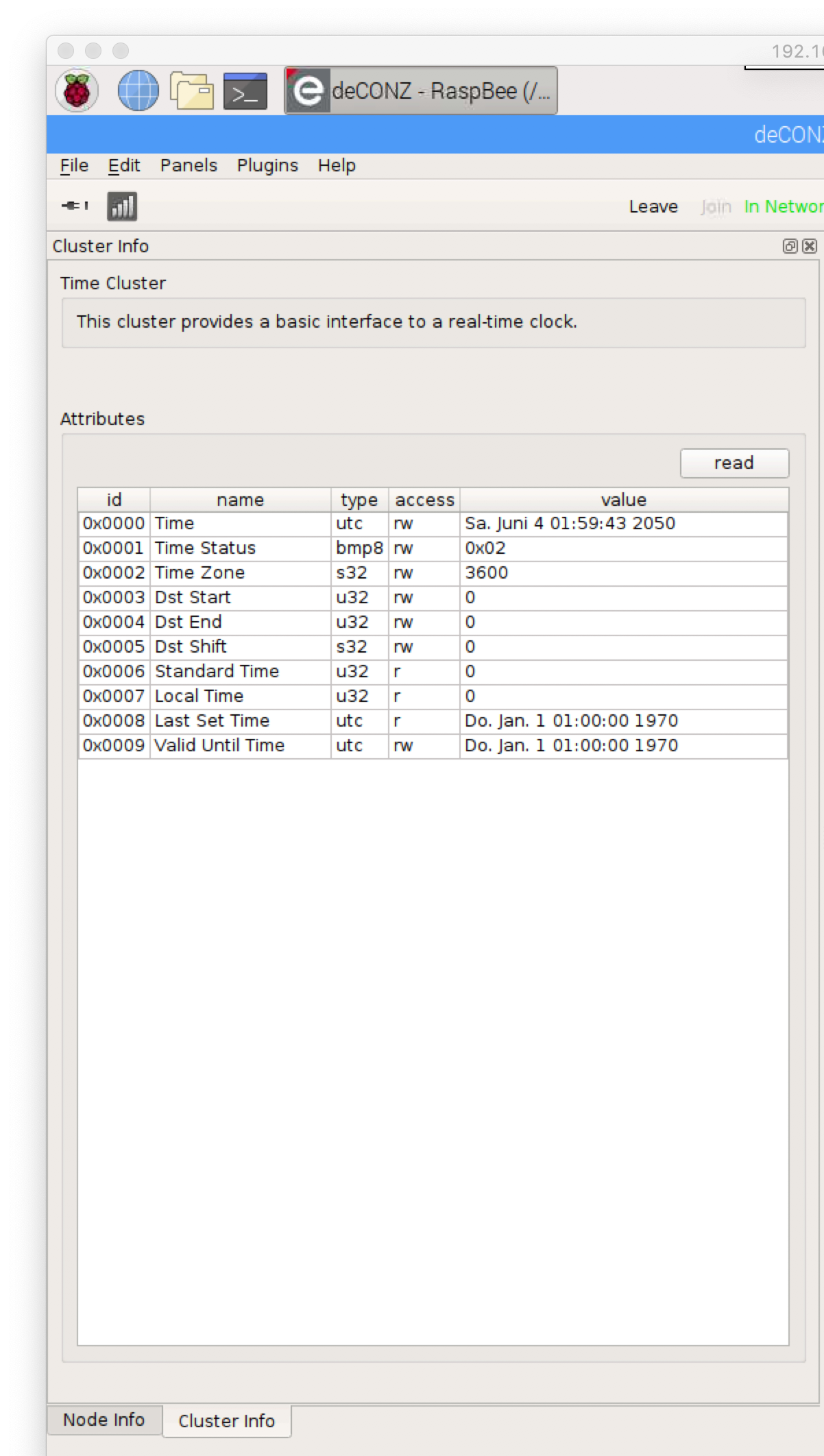
And, will it be possible to change the ModelID and Manufacturer to emulate another device? I don't know if this is the reason why my DeconzGateway does not add the Zigbee Router as "LIGHT".
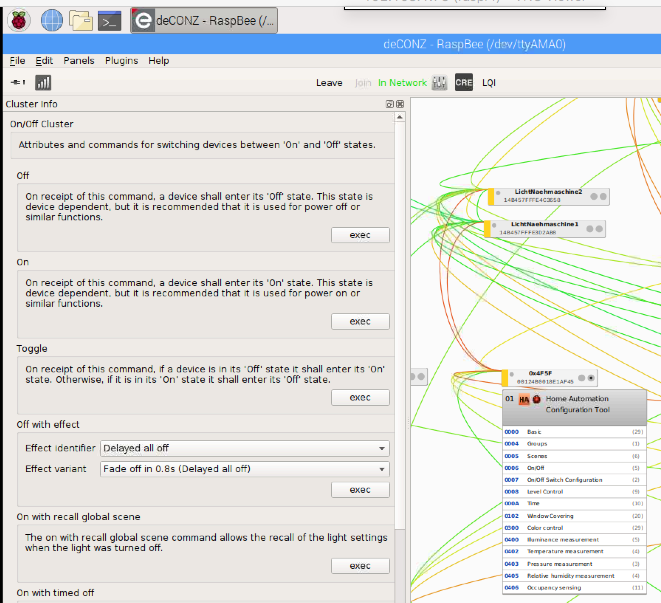
I have added some screenshots from the DeconzGateway. One is an Osram Smart+ Plug and 0x13e7 is the Tasmota Zigbee Router.
If you need more information, just let me know. Greetings!
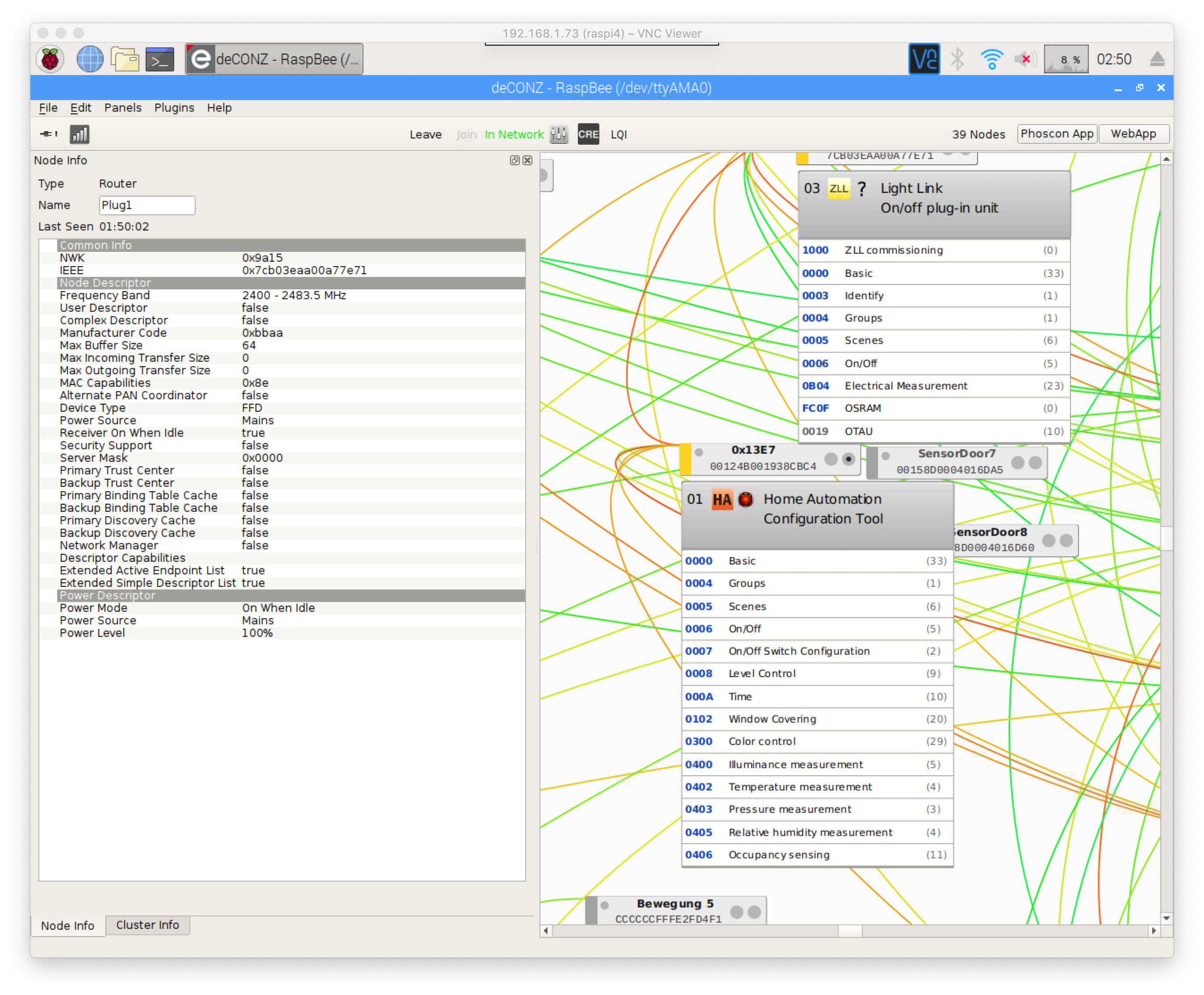
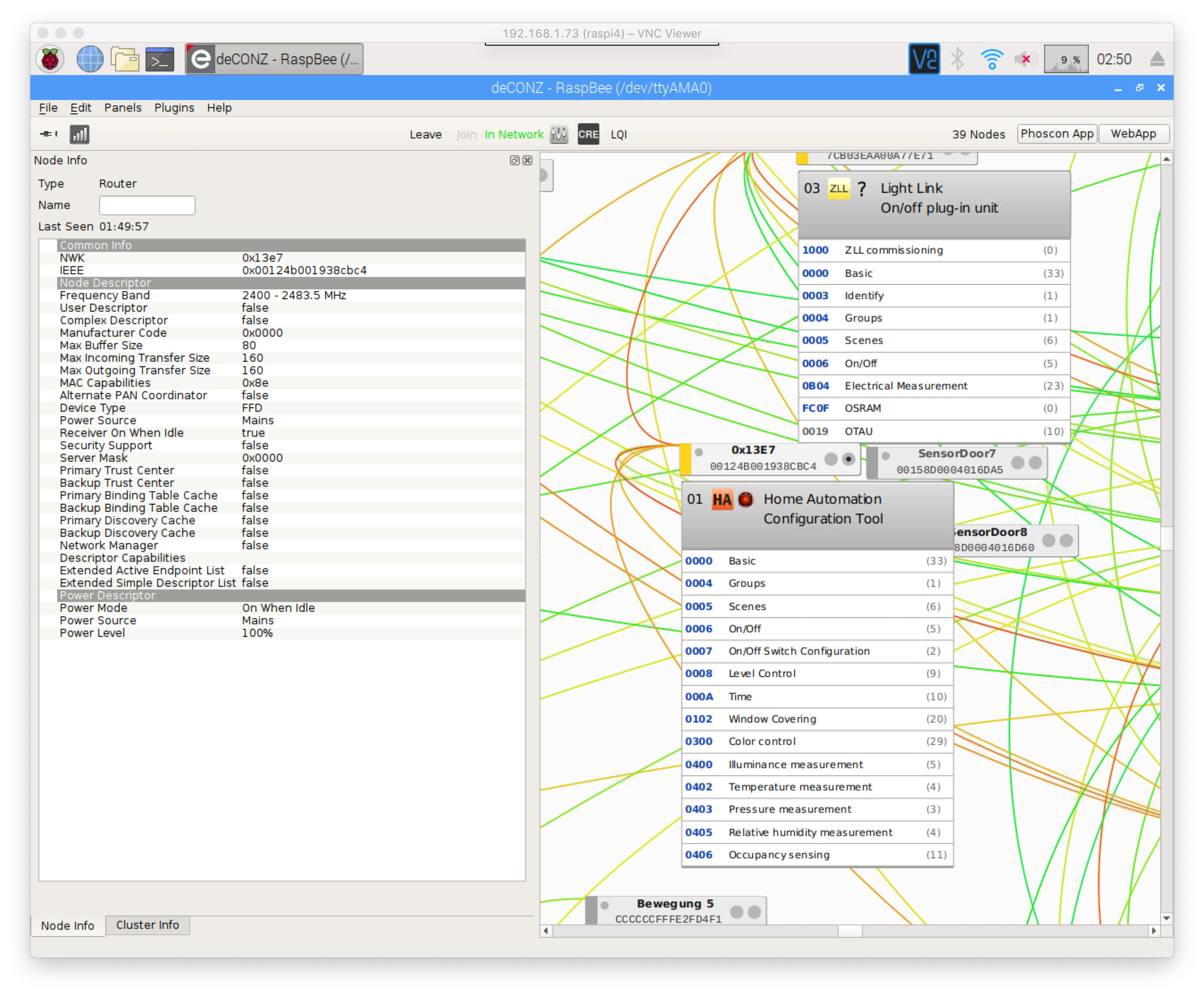
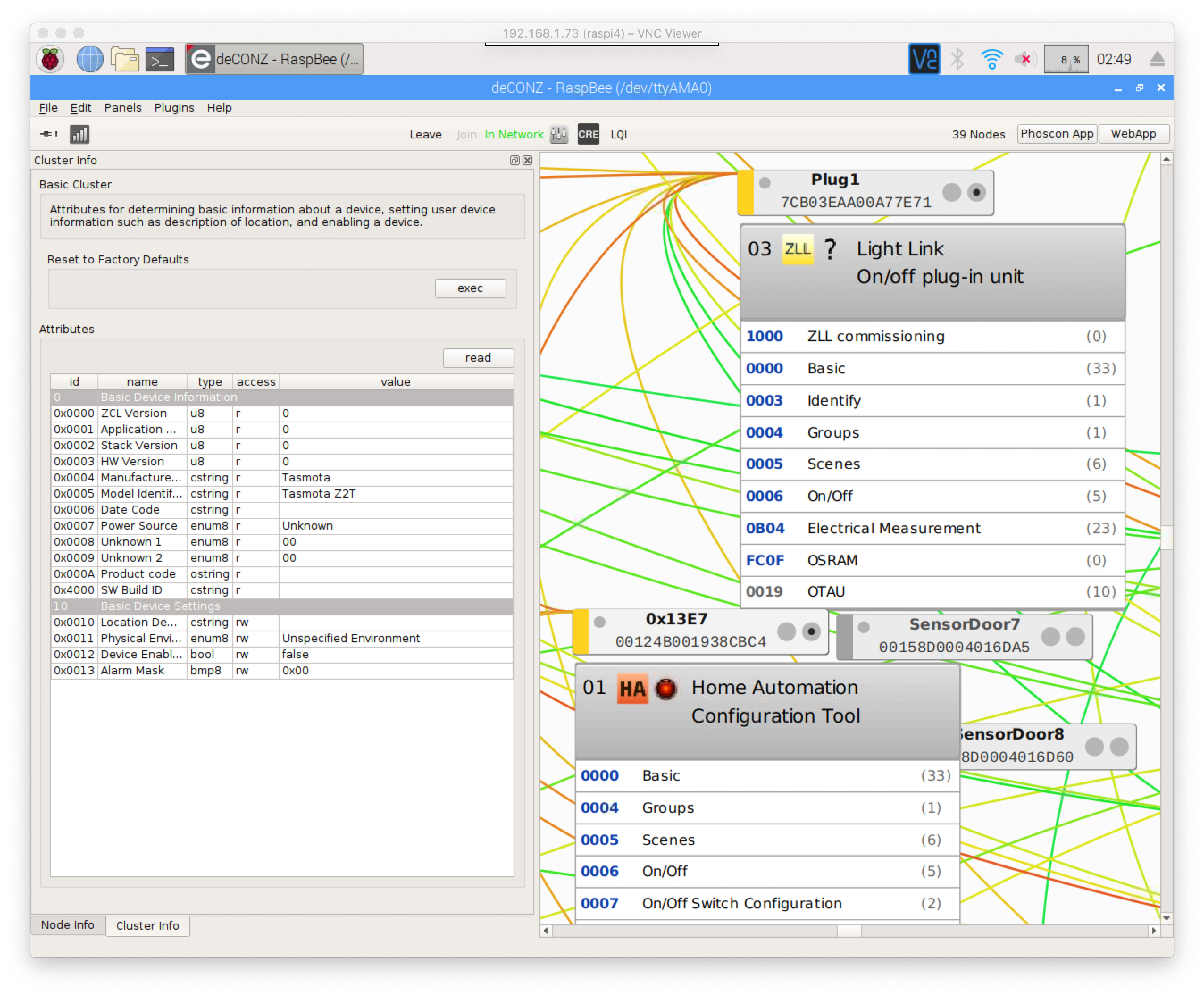
BTW. Ive tried the Time thing on my deconzGW, too. But it sends the wrong time.
02:57:33 CMD: ZbSend {"Device":"0x0000","Read":{"Time":1}}
02:57:33 SRC: WebConsole from 192.168.1.33
02:57:33 CMD: Gruppe 0, Index 1, Befehl "ZBSEND", Daten "{"Device":"0x0000","Read":{"Time":1}}"
02:57:33 ZIG: guessing endpoint 1
02:57:33 ZIG: ZbZNPSent 2402020000000000000000010000010A0019301E05000019000000
02:57:33 RSL: stat/tasmota_E3CB1D/RESULT = {"ZbSend":"Done"}
02:57:33 ZIG: Bytes follow_read_metric = 4884
02:57:33 ZIG: {"ZbZNPReceived":"640200"}
02:57:33 ZIG: Bytes follow_read_metric = 4891
02:57:33 ZIG: {"ZbZNPReceived":"45C4000000"}
02:57:33 ZIG: Bytes follow_read_metric = 4898
02:57:33 ZIG: {"ZbZNPReceived":"4480000119"}
02:57:33 ZIG: Bytes follow_read_metric = 4905
02:57:33 ZIG: {"ZbZNPReceived":"45C4000000"}
02:57:33 ZIG: Bytes follow_read_metric = 4940
02:57:33 ZIG: {"ZbZNPReceived":"448100000A000000010100170047E26500000B181901000000E27E036B26000009"}
02:57:33 ZIG: {"ZbZCLReceived":{"groupid":0,"clusterid":10,"srcaddr":"0x0000","srcendpoint":1,"dstendpoint":1,"wasbroadcast":0,"LinkQuality":23,"securityuse":0,"seqnumber":0,"timestamp":6677063,"fc":"0x18","manuf":"0x0000","transact":25,"cmdid":"0x01","payload":"000000E27E036B26"}}
02:57:33 ZIG: ZbZCLRawReceived: {"0x0000":{"000A/0000":644547454}}
02:57:34 RSL: tele/tasmota_E3CB1D/SENSOR = {"ZbReceived":{"0x0000":{"Device":"0x0000","Time":644547454,"Endpoint":1,"LinkQuality":23}}}
02:57:34 RUL: ZBRECEIVED#?#TIME performs "Time 644547454"
02:57:34 SRC: Rule
02:57:34 CMD: Gruppe 0, Index 1, Befehl "TIME", Daten "644547454"
02:57:34 RSL: stat/tasmota_E3CB1D/RESULT = {"Time":"2020-06-04T02:57:34","Epoch":1591232254}
02:57:35 NTP: UTC 2020-06-04T00:57:34, DST 2020-03-29T02:00:00, STD 2020-10-25T03:00:00
Added 2 Screenshots from the DeconzGateway Cluster Time and from Tasmota Cluster Time

kugelkopf123
on 4 Jun 2020
Thanks for the report.
I will make ModelID and Manufacturer configurable.
Write cannot be used to change the Power. The On/off attribute is not writable. Actually Write is rarely used, but since it was the same code as Report, I added it anyways.
I will double check time, I may have got it completely wrong...
s-hadinger
on 5 Jun 2020
Confirmed, the UTCTime is different from Epoch, so I got it wrong... Epoch is from Jan 1st 1970, Zigbee if from Jan 1st 2000.
I need to substract 946684800 and you need to add 946684800 in the rule (which means activating expressions).
I will add "TimeTasmota" specific attribute to avoid the conversion.
s-hadinger
on 5 Jun 2020
Thanks for the report.
No Problem! If you need more or have more to check... let me know.
I will make ModelID and Manufacturer configurable.
Hope that this makes it possible to "emulate" a specific Module so that i can add it via deconz GUI. ex. as Plug or Light or Sensor. We will see.
Write cannot be used to change the Power. The On/off attribute is not writable. Actually Write is rarely used, but since it was the same code as Report, I added it anyways.
I think I know what you mean.. Its not writeable but setable. Write is for something like a String that you want to change.
I will double check time, I may have got it completely wrong...
I will wait until you have changed the model/manufactorid as well and then do the next test. Then I can test several things at once. Thanks a lot for your efforts!
kugelkopf123
on 6 Jun 2020
Hey @s-hadinger
Is there already anything new to test on here? If you need more infos, let me know!
Greetings
kugelkopf123
on 12 Jun 2020
Hi, sorry the PR for #define of ModelID and Manufacturer was stuck. I forgot about it.
I don't have any specific feature to add right now, what are you trying to achieve?
s-hadinger
on 15 Jun 2020
Hey! Thanks for that!
In my garden there is no WIFI but a pretty good Zigbee coverage. I would like to take advantage of tasmota, do without wifi and use zigbee instead.
In the end, a sonoff 4ch r2 will be controlled via zigbee, which is responsible for the irrigation.
For this I have to make the deconz Gateway (Raspbee) from dresden-elektronik believe that the Tasmota-Wemos is a Zigbee device with 4 lamps. (From their Database)
I hope to achieve this with the manuf/modelid.
kugelkopf123
on 15 Jun 2020
Ok, I did some digging in the code of deconz and found a PullReq. where just a device was added.
Obviously several properties are needed to detect a device.
What I was able to figure out so far:
- Apparently, different vendors have IEEE addresses that always start with the same numbers.
However, some manufacturers share these IEEE numbers. (de_web_plugin.cpp) - the vendor code also seems to play a role.
- the ModelID which you can already change now. (bindings.cpp)
To 1. I think currently it is not possible to change the IEEE. I guess that this is not possible because it is unique for the cc2531, isn't it?
Greetings!
kugelkopf123
on 16 Jun 2020
Have you tried to use a known Vendor and ModellD for T2Z?
And yes, IEEE addresses are fixed (like MAC addresses)
Jason2866
on 16 Jun 2020
Have you tried to use a known Vendor and ModellD for T2Z?
And yes, IEEE addresses are fixed (like MAC addresses)
Yes tried: "Osram" with "Plug 01"
and "Ikea of Sweden" with "TRADFRI bulb E27 WW clear 250lm"
But as this "Ikea of Sweden" seams to come from: here
and the ManuCode comes from here.
witch means it depends on the IEEE addresses as far as i can tell.
kugelkopf123
on 16 Jun 2020
So it seems it needs a change in deCONZ.
Jason2866
on 16 Jun 2020
@Jason2866
There is an option with the secondary IEEE Address. If that was set, the device publish this secondary one. As far as i get it right: here and here
and here
and here on page 11.
Dont know if there is an option to set this address while the cc2530/1 is already flashed. The second link look like this.
And i have no jtag flasher so i have to do it via a Wemos. Thats not supported by this software.
kugelkopf123
on 16 Jun 2020
So far there has been no response from the deconz crew.
Maybe @s-hadinger or someone else with more code knowhow than me, can find some time to look at the linked code from the previous post.
Maybe you have an idea on how to do it.
Greetings and thanks!
kugelkopf123
on 3 Jul 2020
Something seems to be different in the latest version.
I only get Status40 messages and can't join a network. No matter if configured as router or as end device.
I checked the cable connections, that's not it. I would have been surprised, because it hasn't been changed for a month.
@s-hadinger Does it have anything to do with the Sonoff Zigbee?
:36:59 ZIG: Bytes follow_read_metric = 163
17:36:59 ZIG: {"ZbZNPReceived":"45C002"}
17:36:59 RSL: tele/tasmota_E399B3/RESULT = {"ZbState":{"Status":40,"NewState":2,"Message":"Scanning Zigbee network"}}
17:37:02 CMD: zbstatus
17:37:02 SRC: Serial
17:37:02 CMD: Gruppe 0, Index 1, Befehl "ZBSTATUS", Daten ""
17:37:02 RSL: stat/tasmota_E399B3/RESULT = {"ZbStatus":"Zigbee not started"}
I will take a look. There was no voluntary changes to ZNP code, but the introduction of EZSP compatibility may have let a bug slip through.
s-hadinger
on 5 Jul 2020
I will take a look. There was no voluntary changes to ZNP code, but the introduction of EZSP compatibility may have let a bug slip through.
I've just tired the setup with two Wemos. One as Coordinator the other as Router. Its the same Result. I changed the cc2531 boards with each other. The Problem stays by the Wemos that is setuped as router. The Router just doesnt join the network.
BTW: I found something on the Deconz page: requirements for pairing
As far as i understand it, Tasmota should be added without any additional programming effort on the part of Deconz, as long as Tasmota sends the following attributes when pairing:
_The REST API plugin creates a /lights resource per endpoint based on:
Receiver On When Idle is set in the _Node Descriptor;
The Device Type from the Simple Descriptor;
The presence of a server OnOff cluster and, optionally server Level Control and Color Control clusters. Effectively, the REST API plugin will create the appropriate /lights resources for standard ZHA, ZLL, and ZigBee 3.0 lights, plug-in units, and wired in-wall switches and dimmers. Other devices (windows covering, vents, door locks, ...), and devices with non-standard device types or descriptors will have to be whitelisted explicitly, requiring a code change to the REST API plugin to support new devices._
kugelkopf123
on 5 Jul 2020
Hello @s-hadinger ! I see you are currently very busy with the sonoff Zigbee module. Is there something new around here, by any chance?
kugelkopf123
on 21 Jul 2020
I just tried with the latest version. I can successfully configure Z2T as Router or End-device, and pair it with the coordinator. I don't see any problem.
Can you paste here full logs with weblog 3 level?
s-hadinger
on 21 Jul 2020
I just tried with the latest version. I can successfully configure Z2T as Router or End-device, and pair it with the coordinator. I don't see any problem.
Can you paste here full logs with
weblog 3level?
Sorry took so long to answer.
Found the Problem. Had to disconnect RST and DC of the Zigbee device. That was the problem.
But i still have the problem with deconz as mentioned before.
kugelkopf123
on 28 Jul 2020
Related issues
 Ndrinta
·
3Comments
Ndrinta
·
3Comments
 JoergZ2
·
3Comments
JoergZ2
·
3Comments
 j4k3
·
3Comments
j4k3
·
3Comments
 ximonline
·
3Comments
ximonline
·
3Comments
 Vujagig
·
3Comments
Vujagig
·
3Comments
Most helpful comment
I just pushed a new PR to allow sending and receiving messages from the coordinator. This was necessary to go further. Stay tuned.