Tasmota: Add ability to mark a pin as bad / do not use
Have you looked for this feature in other issues and in the docs?
Yes? It's hard to search for this issue, so it's hard to say.
Is your feature request related to a problem? Please describe.
No
Describe the solution you'd like
I have an ESP8266 with a bad pin. It doesn't affect functionality of anything else, but I'd like to note that it's bad. I'm going to install this unit in my garage. If I decide to come back to it in a year or two and want to add a new sensor I want to make sure I don't use that bad pin.
It would be nice if there were a way to flag a pin as bad or do not use. This would persist in the config so when a user comes back in the future they'll know not to use that pin.
Describe alternatives you've considered
Currently I'm just flagging that pin as a "BUZZER" which hopefully I'll remember is something I never use and it really means "bad".
Additional context
This is just a "nicety" not a requirement.
I work in the telco field and we have various cards with 100s of interfaces and it's not uncommon to see an interface marked as bad for whatever reason. Saves a lot of headaches in the future trying to figure out where to put the next circuit / sensor.
(Please, remember to close the issue when the problem has been addressed)
 scottchiefbaker
All 4 comments
How about use a simple template?
In a template you can block gpio usage, one by one.
 effelle
on 7 May 2020
effelle
on 7 May 2020
Prepare your template from GUI or quickly from console:
21:17:56 template 255

21:17:56 MQT: stat/tasmota_2350B0/RESULT = {"NAME":"Merged","GPIO":[255,255,255,255,25,22,255,255,255,9,255,255,255],"FLAG":15,"BASE":18}
Let's say GPIO12 is not working, now that you have your base template simply edit it from console or better from the GUI:
Configuration--> Configure Template:
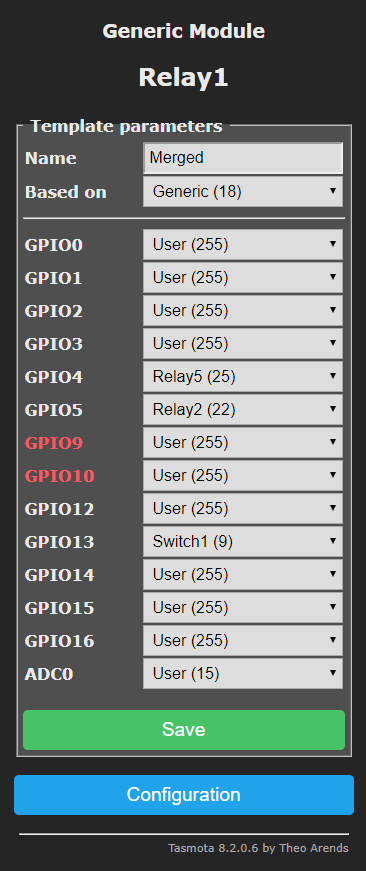
Then update it removing the offending GPIO (12 in our case) and give it a meaningful name:
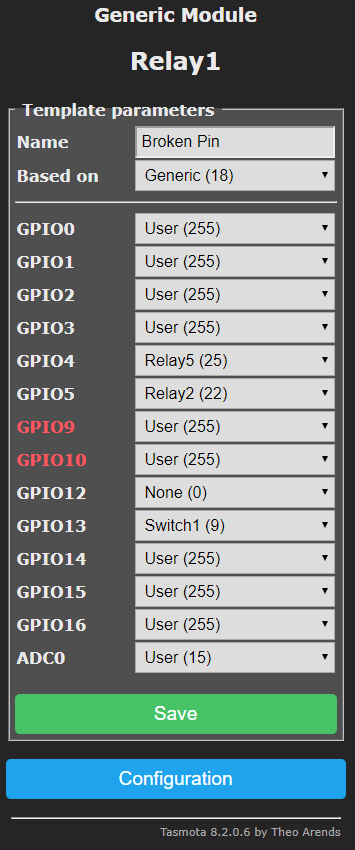
Now simply apply it from console with the command Module 0 or from the GUI under
Configuration --> Configure Other --> Template and hit activate.
As a result your broken pin will be gone:
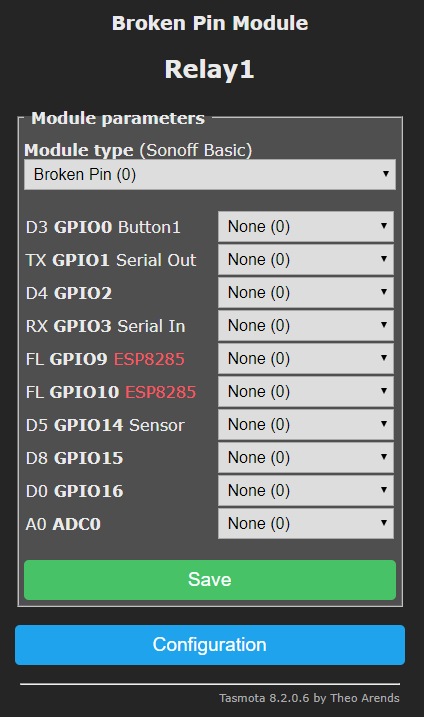
Now your template is ready to be deployed in every device you need.
effelle
on 7 May 2020
Closing this issue as it has been answered.
Please address this to the Tasmota Support Discord Chat. The chat is a better and more dynamic channel for helping you. Github issues are best used for Tasmota software feature requests and bug reporting. Troubleshooting and setup assistance is more effective using an interactive forum.
Please check the Contributing Guideline and Policy and the Support Guide.
Thanks.
Support Information
See Docs for more information.
See Chat for more user experience.
See Community for forum.
See Code of Conduct
effelle
on 7 May 2020
This seems like a decent solution. Thanks for the feedback.
scottchiefbaker
on 7 May 2020
Related issues
 Joeyhza
·
3Comments
Joeyhza
·
3Comments
 esp32x
·
3Comments
esp32x
·
3Comments
 renne
·
3Comments
renne
·
3Comments
 belidzs
·
3Comments
belidzs
·
3Comments
 he-so
·
3Comments
he-so
·
3Comments