Have you looked for this feature in other issues and in the docs?
Is your feature request related to a problem? Please describe.
It seems to me that Shelly EM isn't currently supported, even tho it should be using the same ADE7953 chip as the Shelly 2.5
Describe the solution you'd like
Add support for shelly EM?
Many thanks!
 ilgrank
All 58 comments
Hi,
As you are the one that owns that device, please, open it and post photos of the board. Thanks
 ascillato
on 3 Apr 2020
ascillato
on 3 Apr 2020
Then, if it has an ESP8266 chip and an ADE7953, you should backup the stock firmware (as explained in the docs) and then flash Tasmota. After that, you should test the GPIO outputs in order to make a new template (as explained in the docs). These steps are explained very well on the docs, but if you need further help you can ask here or in the Tasmota Support Chat.
ascillato
on 3 Apr 2020
@digiblur has/had one.
He tested it with the stock firmware but I don't know if he changed the firmware.
On his review you can see the internals too.
 effelle
on 3 Apr 2020
effelle
on 3 Apr 2020
I did flash it later as well with Tasmota. I had some issues with the little relay if I remember right but I don't use it anyways. Let me see if I can find the template.
 digiblur
on 3 Apr 2020
digiblur
on 3 Apr 2020
I have one indeed, but it is currently hooked up in a remote location, and so I cannot open it. I have read several times in the shelly support forum it should be using the same chip as the 2.5.
ilgrank
on 3 Apr 2020
@ilgrank
Hi, any news on this? Were you able to open it and takes some photos of the board?
 ascillato2
on 10 Apr 2020
ascillato2
on 10 Apr 2020
@ascillato2 : we're in lockdown for Covid-19 here, and so I can't move from home.
But as @effelle had pointed out there's photos of it it here:
https://www.youtube.com/watch?v=pdo0IzpEEMI
I was thinking it was enough..
ilgrank
on 10 Apr 2020
Photos attacched.


 djbx83
on 12 Apr 2020
djbx83
on 12 Apr 2020
Thanks @djbx83
ilgrank
on 12 Apr 2020
Great! Thanks.
So, seems that the only missing is just someone that has this device to flash it and test the GPIOs and make a template for it.
ascillato
on 12 Apr 2020
Try this one. Pinned it out a while back and got it working for the most part except the relay as it was acting weird from what I remember.
{"NAME":"Shelly EM","GPIO":[0,0,0,0,0,0,0,0,6,156,5,21,0],"FLAG":2,"BASE":18}
digiblur
on 12 Apr 2020
ShellyEM doesn't use standard pins but they are much smaller... I can't understand what cable I've to use to connect my usb-ftdi... help me!
djbx83
on 13 Apr 2020
Breadboard jumpers work fine.
digiblur
on 13 Apr 2020
Sorry digiblur, but breadbord jumpers are slightly wider, and I can't insert wire in socket
djbx83
on 13 Apr 2020
That's what I used to flash mine, mine were smaller than dupont male jumpers.
digiblur
on 13 Apr 2020
I have seen photos of people using stripped ethernet wires in that holes (the ones with solid cores)
ilgrank
on 14 Apr 2020
Hi, Any news on this? Could you try the template from @digiblur ?
ascillato2
on 18 Apr 2020
@ascillato2 : we're in lockdown for Covid-19 here, and so I can't move from home and as I wrote before, the EM is in a remote location.
As far as I know, there's no way of remotely flashing Tasmota to a Shelly,but please correct me if I'm wrong.
Will test it as soon as lockdown is lifted
Thanks!
ilgrank
on 18 Apr 2020
@ilgrank
Hi, sorry, I forgot to tag. That message was intended to @djbx83
@djbx83
Hi, Any news on this? Could you try the template from @digiblur ?
ascillato
on 18 Apr 2020
I've used a small piece of ethernet cable @ascillato2 @ascillato as suggested by @ilgrank
But..... unfortunatly I've bricked shelly and ftdi programmer... ooops!
djbx83
on 18 Apr 2020
@djbx83 : you tried to flash it while it was mains powered? (I'm really sorry for your loss)
ilgrank
on 19 Apr 2020
Yes @ilgrank, I did.... LOL
djbx83
on 19 Apr 2020
@djbx83 whoops :(
You're lucky you didn't fry your USB ports then..
ilgrank
on 20 Apr 2020
@djbx83
unfortunatly I've bricked shelly and ftdi programmer
Hi,
Your device is burnt? you couldn't reflash it? The only way to brick an ESP8266 is by applying more than 3.3V to VCC and GND pins.
Hope you weren't flashing with AC connected.
ascillato2
on 6 May 2020
@ascillato2 : yes, he was flashing with mains connected, that's what he replied me on his last message
ilgrank
on 7 May 2020
Try this one. Pinned it out a while back and got it working for the most part except the relay as it was acting weird from what I remember.
{"NAME":"Shelly EM","GPIO":[0,0,0,0,0,0,0,0,6,156,5,21,0],"FLAG":2,"BASE":18}
Mmmm no, It doesn't look good to me...
Even temperature is not real. I checked now with my fingers and it should be 50° or so on.
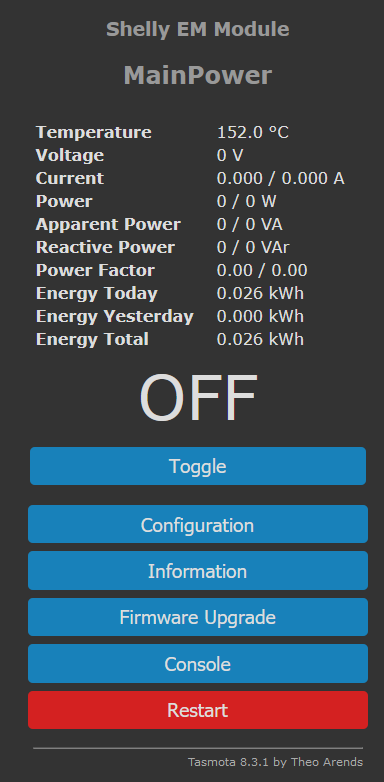
 Frigorio
on 23 May 2020
Frigorio
on 23 May 2020
Ok, changed analog to user (15) and now if the relay is on the meter is working...
The template now is {"NAME":"Shelly EM","GPIO":[0,0,0,0,0,0,0,0,6,156,5,21,0],"FLAG":15,"BASE":18}
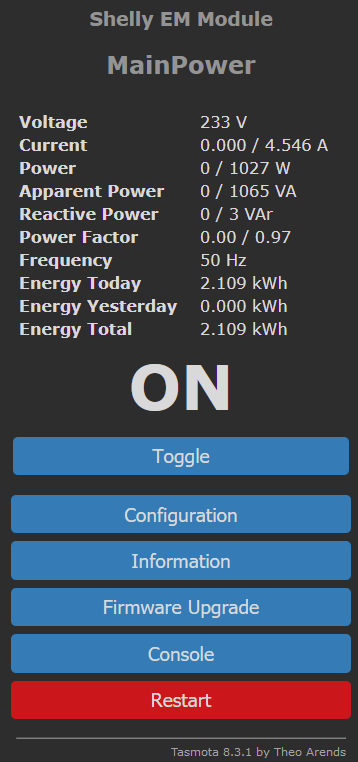
Frigorio
on 23 May 2020
@Frigorio
Great!!! Thank you very much for testing and sharing the template. Very appreciated. :+1:
Can I ask you one little favour? Can you please add this template to the Template repository? https://templates.blakadder.com/new.html
Thanks.
ascillato
on 24 May 2020
Ok, changed analog to user (15) and now if the relay is on the meter is working...
Stupid me... SetOption21 was OFF 🤣
Can I ask you one little favour? Can you please add this template to the Template repository?
Sure!
Frigorio
on 24 May 2020
Please be sure to review the code of conduct and be respectful of other users.
Keep in mind, this repository uses the Contributor Covenant.
![sentiment-bot[bot] picture](https://avatars3.githubusercontent.com/in/4544?v=4&s=40) sentiment-bot[bot]
on 24 May 2020
sentiment-bot[bot]
on 24 May 2020
@Frigorio
Ok, changed analog to user (15) and now if the relay is on the meter is working...
Stupid me... SetOption21 was OFF 🤣
So now the meter is working anyways (even if relay off), right?
Also, to fix the temperature misreading you used a temperature offset?
Thanks!
ilgrank
on 27 May 2020
Please be sure to review the code of conduct and be respectful of other users.
Keep in mind, this repository uses the Contributor Covenant.
sentiment-bot[bot]
on 27 May 2020
So now the meter is working anyways (even if relay off), right?
Yes, meter is working.
Also, to fix the temperature misreading you used a temperature offset?
Nope, to enable the template to work I had to set
Frigorio
on 27 May 2020
@ascillato so while the basic functionality is there, there's still some data missing
ilgrank
on 27 May 2020
ascillato2
on 18 Jun 2020
@ascillato2 : so the issue @Frigorio was having (no temperature read) has been fixed?
ilgrank
on 19 Jun 2020
Nope. I had to change ADC0 to User (15) otherwise the relay "was acting
weird" as @digiblur said.
Frigorio
on 19 Jun 2020
Do you have 2 channel ? I flashed mine and has got only 1 measure. Is it normal ?
Does that mean only channel 1 or both channel ?
Could someone change comment on template to indicate ADC0 to User(15) and SetOption21 ?
 mugnier102
on 20 Jun 2020
mugnier102
on 20 Jun 2020
Do you have 2 channel ? I flashed mine and has got only 1 measure. Is it normal ?
I only have 1 channel connected, but as you can see in my screenshot the measure displayed is dual...
Frigorio
on 20 Jun 2020
@Frigorio : and so you're lacking temperature monitoring, right?
ilgrank
on 21 Jun 2020
Hello
I also got a ShellyEM and flashed with Tasmota.
so far so good and everything went according to plan
I connected the Shelly but I just don't get any values. does anyone know why?
I took the template as described here


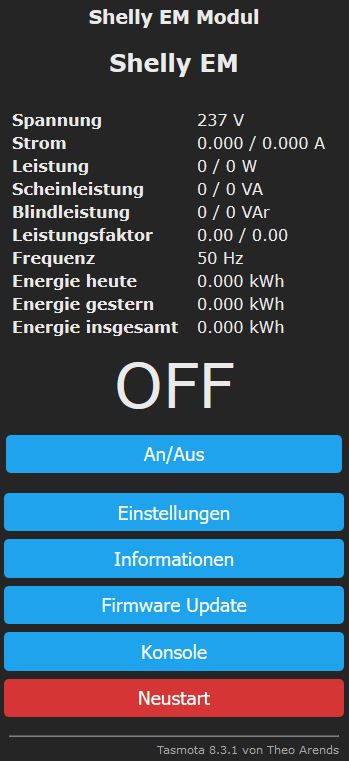


 Sonnenberg
on 17 Jul 2020
Sonnenberg
on 17 Jul 2020
@Sonnenberg this issue is closed, you better ask @ascillato to re-open it, since the current template seem to
a) not be working correctly (alas, I can't test it until I get to my EM location)
b) missing temperature data anyways.
ilgrank
on 17 Jul 2020
@Sonnenberg You have to set command "SetOption21 1" to enable energy
monitoring when power is off.
Frigorio
on 17 Jul 2020
hi i'm not sure i had tried it with setoption21 on. I will test it again later and then report
Sonnenberg
on 17 Jul 2020
@Frigorio: but still lacking temperature, right?
ilgrank
on 17 Jul 2020
no, according to my memory, the temperature shows 152 degrees. however, this is switched off with ADC0 user (15). it makes no difference whether the relay is switched on or off
Sonnenberg
on 17 Jul 2020
@Sonnenberg it's a safety measure, you should know if your equipment is overheating :)
ilgrank
on 17 Jul 2020
I switched SetOption21 to 1.
with this template:
{"NAME": "Shelly EM", "GPIO": [0,0,0,0,0,0,0,0,6,156,5,21,0], "FLAG": 15, "BASE": 18}

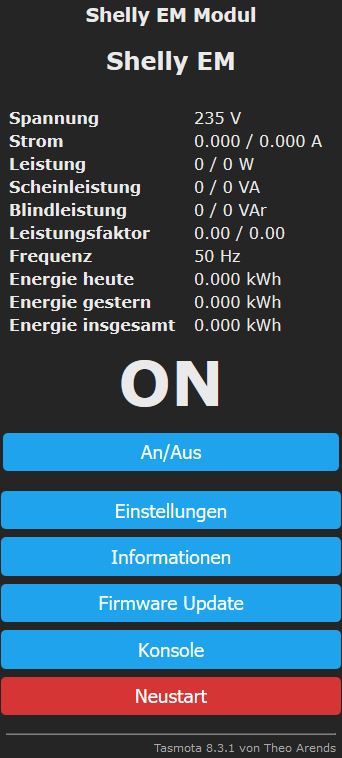
with this template: {"NAME": "Shelly EM", "GPIO": [0,0,0,0,0,0,0,0,6,156,5,21,0], "FLAG": 2, "BASE": 18}
I have the following result.

I tried both templates with SetOption21 1, but I still don't get any values in watts & volts.
I do not understand this because a post with the same Tasmota version gets at least the values displayed
Sonnenberg
on 17 Jul 2020
Are you getting no reading because you are clamped over the whole cable and not just one tail?
The live and neutral will cancel each other out if you put the clamp iver both.
 seamus65
on 19 Jul 2020
seamus65
on 19 Jul 2020
Yes of course
you are absolutely right, I could have thought of that on my own;)

sometimes you can't see the forest for the trees ^^
okay that works
now we only have the "problem" with the temperature
best regards and thanks so far for your help =)
@ilgrank , do you have the right template at work?
Sonnenberg
on 19 Jul 2020
I have now turned "SetOption21" off
the relay is working properly
but the temperature is still missing,
if this is switched on, the relay switches off again immediately
the temperature problem has already been mentioned above.
Sonnenberg
on 19 Jul 2020
Guys, if the temperature switches the relay off it means it either detects and overtemp or the tmeperature calculation is wrong.
In this case it's obvious the calculation is wrong. You'll have to change ADCPARAMs according to the installed NTC resistor bridge.
 arendst
on 19 Jul 2020
arendst
on 19 Jul 2020
exactly, the temperature is so high
that the Shelly or Tasmota turns off the device
a security function that is super but I'm a little afraid to destroy the Shelly by testing it.
I have installed Tasmota on all my devices and I am very satisfied with it, but I was probably a bit hasty with the ShellyEM, because I probably can't use Tasmota as I would have liked
Sonnenberg
on 19 Jul 2020
I've flashed with Tasmota 8.3.1, loaded the template and SetOption21 to On.
But I can only see the relay. No power information. Any clue of what may I'm doing wrong?
 zbuh
on 26 Jul 2020
zbuh
on 26 Jul 2020
a new erase and flash fixed!
zbuh
on 26 Jul 2020
zbuh: meaning you also see temperature?
ilgrank
on 27 Jul 2020
no. no temperature
zbuh
on 27 Jul 2020
@Sonneberg:
You have missed the most important physical part.
YOu must have only 1 wire in the shelf. You're picture show that you put red and blue wire in the shelf.
Move your shelf to have only the red wire (or the blue if you prefer...).
Putting both make the blue one to cancel the red one..... and so the measure is 0.
mugnier102
on 29 Jul 2020
Related issues
 renne
·
3Comments
renne
·
3Comments
 ximonline
·
3Comments
ximonline
·
3Comments
 j4k3
·
3Comments
j4k3
·
3Comments
 Vujagig
·
3Comments
Vujagig
·
3Comments
 TylerDurden23
·
3Comments
TylerDurden23
·
3Comments
Most helpful comment
Try this one. Pinned it out a while back and got it working for the most part except the relay as it was acting weird from what I remember.
{"NAME":"Shelly EM","GPIO":[0,0,0,0,0,0,0,0,6,156,5,21,0],"FLAG":2,"BASE":18}